HLZB1720Tablet Computer
Acer Incorporated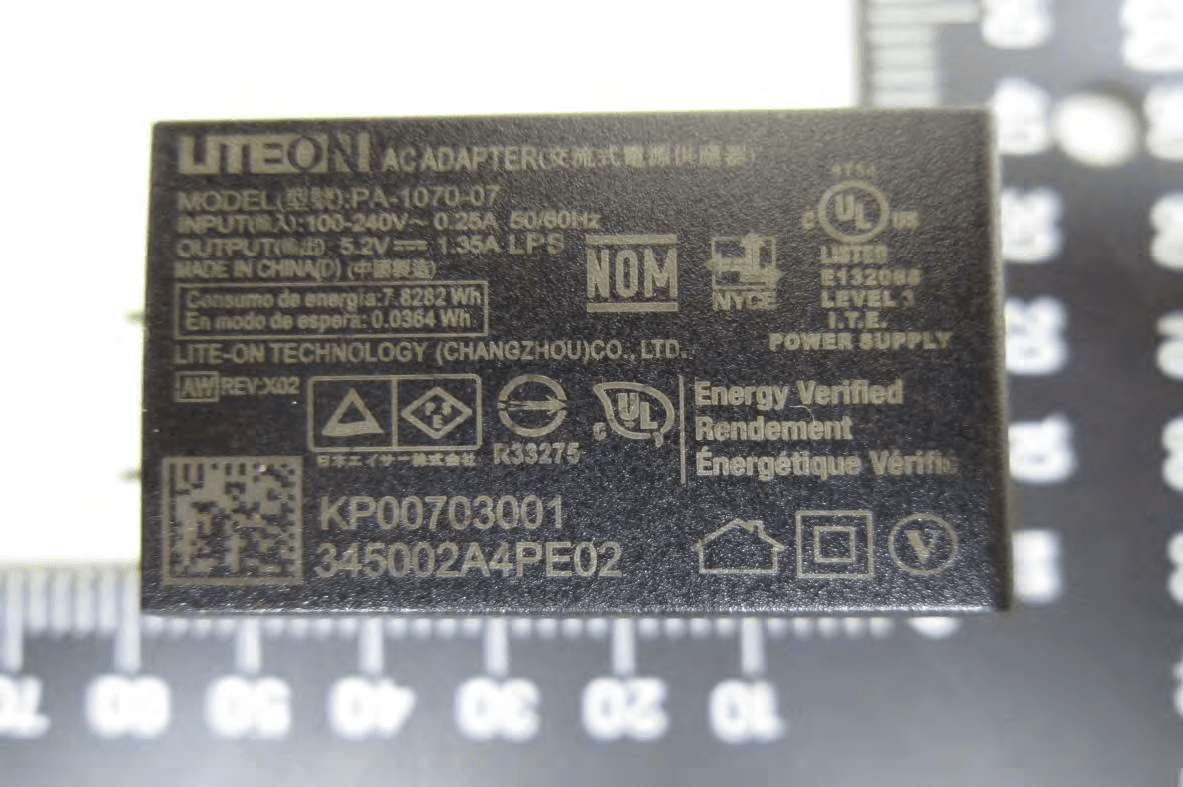
Click to zoom
Application Details
- Equipment Class
- DSS - Part 15 Spread Spectrum Transmitter
- Date of Grant
- Jan 08, 2014
- Application Purpose
- Original Equipment
- Date of Application
- Jan 06, 2014
- Equipment Note
- Tablet Computer
- Frequency Range
- 2402.00000000 - 2480.00000000
- Company
- Acer Incorporated
- Country
- Taiwan
Documents & Files
Document Text
Text extracted from the exhibit documents filed with the FCC. Open a document above to read the original.
Users Manual
2 - © 2013 All Rights Reserved Acer Iconia User’s Manual Model: B1-720 This revision: December 2013 Acer Iconia B1-720 Model number: ______________________________________________ Serial number: ______________________________________________ Date of purchase: ___________________________________________ Place of purchase: ___________________________________________ Important This manual contains proprietary information that is protected by copyright laws. The information contained in this manual is subject to change without notice. Images provided herein are for reference only and may contain information or features that do not apply to your computer. Acer Group shall not be liable for technical or editorial errors or omissions contained in this manual. Sign up for an Acer ID and enable Acer Remote Files Open the Acer Portal from the Home screen to sign up for an Acer ID or sign in if you already have an Acer ID. There are three great reasons for you to get an Acer ID: • Remotely access your PC from your other devices with our free Acer Remote Files app • Get the latest offers and product information • Register your device for warranty service For more information, please visit the AcerCloud website: www.acer.com/acercloud Table of contents - 3 TABLE OF CONTENTS Getting started with your tablet 4 Features and functions ............................ 4 Unp acking your tablet.............................. 4 Getting to know your tablet...................... 5 Using your tablet 7 Charging your tablet ................................ 7 T urning on for the first time...................... 8 Using the touchscreen........................... 10 The Home screen .................................. 10 The onscreen keyboard......................... 16 Editing text............................................. 17 Shutting down your tablet ...................... 19 Connecting devices to your tablet 20 Connecting to AC power........................ 20 Inserting a microSD card ....................... 20 Transferring files between your tablet and a PC................................................ 20 Connecting a Bluetooth device.............. 21 Accessories ........................................... 21 Going online 22 Managing Wi-Fi connections ................. 22 Bro wsing the Internet............................. 22 Setting up the Email application ............ 23 Google services ..................................... 24 Playing music and video 28 Multimedia playback .............................. 28 Managing people and contacts 30 Using the camera and camcorder 33 Camera/camcorder icons and indicators 33 Ta king a photo ....................................... 35 Shooting a video .................................... 36 Advanced settings 37 Wireless & Networks.............................. 37 Device .................................................... 39 Personal................................................. 40 System ................................................... 41 Updating your tablet’s operating system 42 Resetting your tablet .............................. 42 FAQ and troubleshooting 43 Other sources of help ............................ 45 Specifications 46 End user license agreement 49 4 - Getting started with your tablet GETTING STARTED WITH YOUR TABLET Features and functions Your new tablet offers leading, easy-to-access multimedia and entertainment features. You can: • Connect to the Internet via Wi-Fi. • Access your email while on the move. • Keep in touch with your friends via your People and social networking applications. Unpacking your tablet Your new tablet comes packed in a protective box. Carefully unpack the box and remove the contents. If any of the following items is missing or damaged, contact your dealer immediately: • Acer Iconia B1-720 tablet • Setup poster • USB cable • AC adapter • Warranty card Getting started with your tablet - 5 Getting to know your tablet 1 23 9 4 5 87 6 Views No.ItemDescription 1Power button Long press to turn the tablet on, press br iefly to turn the screen on/off or enter sleep mode; press and hold to turn the tablet off. 2 Micro USB port (Slave) Connects to a computer via a USB cable. Also serves as the charging port for the AC adapter. For more information, see Charging your tablet on page 7. 3 3.5 mm headphone jack Con nects to stereo headphones. 4Front-facing camera A 0.3-megapixel camera for video chats and se lf-portrait images. 5microSD card slotInsert a microSD card into the slot. 6Touchscreen 7-inch, 1024 x 600 pixel capacitive to uchscre en. 7SpeakerEmits audio. 6 - Getting started with your tablet 8Microphone Receives audio for video chats and Intern et calls. 9Volume control key Incr eases and decreases the tablet volume. No.ItemDescription Using your tablet - 7 USING YOUR TABLET Charging your tablet For first-time use, you need to charge your tablet for four hours. After that you can recharge the battery as needed. Assembling the power adapter Slide the plug fitting into the power adapter body until it clicks into place. Note Charger illustration is for reference only. Actual configuration may vary. 8 - Using your tablet Connecting power Connect the power connector to your tablet and plug the AC adapter side into any AC outlet. Turning on for the first time To turn on your tablet, press and hold the power button until you see the Acer logo. Wait a moment for your tablet to boot up. You will then be asked some questions before you can use your tablet. Warning Only use the bundled power adapter to charge your device. Note It is normal for the tablet surface to become warm during charging or long periods of use. Using your tablet - 9 To start, tap to select your language then tap Start. Follow the rest of the instructions as they are displayed. If the tablet’s screen turns off, it has entered sleep mode. Briefly press the power button to wake it up. For more information see Waking your tablet on page 18. Sign in to or create a Google accoun…
Text truncated - open the document above for the full version.
Cover Letter(s)
Acer Incorporated 8F., No. 88, Sec. 1, Xintai 5th Rd., Xizhi, New Taipei City 22181, Taiwan (R.O.C) Tel : 886-2-2696-1234 Fax : 886-2-2696-3535 www.acer.com Dec. 30, 2013 Federal Communications Commission Authorization and Evaluation Division Dear Regulatory Authority, We, the undersigned, hereby declare that Declaration of Conformity procedures will be applied to the digital device portion of the following product: Type: Tablet Computer Model: B1-720 Test report: F-A170-1312-018 SGS Taiwan Ltd.: TW1016 ------------------------------------------------------------------------------------------------- ( Product Identification ) It is herewith confirmed and found to comply with the requirements set up by ANSI C63.4 & FCC PART 15 regulations for the evaluation of electromagnetic compatibility. This Device complies with Part 15 of the FCC rules, operation is subject to the following two conditions. This device may not cause harmful interference and, This device must accept any interference received, including interference that may cause undesired operation. TEST LABORATORY SGS Taiwan Ltd. Electronics & Communication Laboratory No. 134, Wu Kung Rd., Wuku Industrial Zone, New Taipei City, Taiwan. FCC Registration Number: 94644. TAF Accreditation No.: L0513-090505, BSMI MRA Test Lab. Sincerely, RU Jan / Sr. Manager Acer Incorporated
Cover Letter(s)
Acer Incorporated 8F., No. 88, Sec. 1, Xintai 5th Rd., Xizhi, New Taipei City 22181, Taiwan (R.O.C) Tel : 886-2-2696-1234 Fax : 886-2-2696-3535 www.acer.com Date: Dec. 30, 2013 Federal Communications Commission Authorization and Evaluation Division Subject: Request for Confidentiality FCC ID: HLZB1720 To Whom It May Concern: Pursuant to the provisions of Sections 0.457 and 0.459 of the Commission’s Rules ( 47 CFR §§ 0.457,0.459),we are requesting the Commission to withhold the following attachments as confidential document from public disclosure indefinitely. Schematic Block Diagram Operational Description Above mentioned document contains detailed system and equipment description are considered as proprietary information in operation of the equipment. The public disclosure of above documents might be harmful to our company and would give competitor an unfair advantage in the market. In additional to above mentioned documents, pursuant to Public Notice DA 04-1705 of the Commission’s policy, in oder to comply with the marketing regulations in 47CFR §2.803 and the importation rules in 47 CFR §2.1204, while ensuring that business sensitive information remains confidential until the actual marketing of newly authorized devices. We are requesting the commission to grant short-term confidentiality request on the following attachments 180 days. External Photos Internal Photos Test Setup Photos User Manual It is our understanding that all measurement test reports, FCC ID label format and correspondent during certification review process cannot be granted as confidential documents and those information will be available for public review once the grant of equipment authorization is issued. Sincerely, _____________________________________ RU Jan / Sr. Manager Acer Incorporated
Cover Letter(s)
RF_160, Issue 03 Declaration of Authorization We Name: Acer Incorporated Address: 8F., No. 88, Sec. 1, Xintai 5th Rd., Xizhi, New Taipei City 22181, City: New Taipei City 22181 Country: Taiwan (R.O.C) Declare that: Name Representative of agent: Willis Chen (1) Agent Company name: SGS Taiwan Ltd. Address: 134, Wu Kung Rd., Wuku Industrial Zone City: New Taipei City Country Taiwan is authorized to apply for Certification of the following product(s): Product description: Tablet Computer Type designation: B1-720 Trademark: on our behalf. Date: Dec. 30, 2013 City: Xizhi, New Taipei City Name: RU Jan Function: Sr. Manager Signature: Notes: (1): Required for FCC application (2): For FCC it must be the Grantee Code “owner” or the authorized agent.
External Photos
All View of EUT Front View of EUT Back View of EUT Side View of EUT – 1 Side View of EUT – 2 Side View of EUT – 3 Side View of EUT – 4 Data Cable (Model No.: CB 0H5 USB-MICRO USB W/WEEE-T, Supplier: MEC (ICT)) Adapter-1 (Model No.: PA-1070-07, Supplier: LITEON) Adapter-2 (Model No.: ADP-10HW A, Supplier: DELTA) Battery-1 (Model No.: AP13PFJ, Supplier: Darfon) Battery-2 (Model No.: AP13P8J, Supplier: LG)
Internal Photos
Open View of EUT – 1 Open View of EUT – 2 Open View of EUT – 3 Open View of EUT – 4 Internal View of EUT – 1 Internal View of EUT – 2 Internal View of EUT – 3 Internal View of EUT – 4 Module Antenna Location Antenna Location BT/WLAN Antenna GPS Antenna
Test Report
Report No.: E2/2013/C0007 FCC ID: HLZB1720 Issue Date: Jan. 02, 2014 IC: 1754F-B1720 Page: 1 of 82 Unless otherwise stated the results shown in this test report refer only to the sample(s) tested and such sample(s) are retained for 90 days only. 除非另有說明,此報告結果僅對測試之樣品負責,同時此樣品僅保留90天。本報告未經本公司書面許可,不可部份複製。 This document is issued by the Company subject to its General Conditions of Service printed overleaf, available on request or accessible at www.sgs.com/terms_and_conditions.htm and, for elec- tronic format documents, subject to Terms and Conditions for Electronic Documents at www.sgs.com/terms_e-document.htm . Attention is drawn to the limitation of liability, indemnification and jurisdiction issues defined therein. Any holder of this document is advised that information contained hereon reflects the Company’s findings at the time of its intervention only and within the limits of Client’s instructions, if any. The Company’s sole responsibility is to its Client and this document does not exonerate parties to a transaction from exercising all their rights and obligations under the transaction documents. This document cannot be reproduced except in full, without prior written approval of the Company. Any unauthorized alteration, forgery or falsification of the content or ap- pearance of this document is unlawful and offenders may be prosecuted to the fullest extent of the law. SGS Taiwan Ltd. No.134,WuKungRoad,NewTaipeiIndustrialPark,WukuDistrict,NewTaipeiCity,Taiwan24803/新北市五股區新北產業園區五工路 134 號 台灣檢驗科技股份有限公司 t (886-2) 2299-3279 f (886-2) 2298-0488 www.tw.sgs.com Member of SGS Group ELECTROMAGNETIC EMISSIONS COMPLIANCE REPORT INTENTIONAL RADIATOR CERTIFICATION TO FCC PART 15 SUBPART C REQUIREMENT AND INDUSTRY CANADA RSS-210 OF Product Name: Tablet Computer Brand Name: Marketing Name: Iconia B1-720 Model No.: B1-720 Model Difference: N/A FCC ID: HLZB1720 IC: 1754F-B1720 Report No.: E2/2013/C0007 Issue Date: Jan. 02, 2014 FCC Rule Part: §15.247, Cat: DSS IC Rule Part: RSS-210 issue 8:2010, Annex 8 Prepared for: Acer Incorporated 8F., No. 88, Sec. 1, Xintai 5th Rd., Xizhi, New Taipei City 22181, Taiwan (R.O.C) Prepared by: SGS Taiwan Ltd. Electronics & Communication Laboratory No.2, Keji 1st Rd., Guishan Township, Taoyuan County, Taiwan 333 Note: This report shall not be reproduced except in full, with- out the written approval of SGS Taiwan Ltd. This document may be altered or revised by SGS Taiwan Ltd. personnel only, and shall be noted in the revision section of the document. Report No.: E2/2013/C0007 FCC ID: HLZB1720 Issue Date: Jan. 02, 2014 IC: 1754F-B1720 Page: 2 of 82 Unless otherwise stated the results shown in this test report refer only to the sample(s) tested and such sample(s) are retained for 90 days only. 除非另有說明,此報告結果僅對測試之樣品負責,同時此樣品僅保留90天。本報告未經本公司書面許可,不可部份複製。 This document is issued by the Company subject to its General Conditions of Service printed overleaf, available on request or accessible at www.sgs.com/terms_and_conditions.htm and, for elec- tronic format documents, subject to Terms and Conditions for Electronic Documents at www.sgs.com/terms_e-document.htm . Attention is drawn to the limitation of liability, indemnification and jurisdiction issues defined therein. Any holder of this document is advised that information contained hereon reflects the Company’s findings at the time of its intervention only and within the limits of Client’s instructions, if any. The Company’s sole responsibility is to its Client and this document does not exonerate parties to a transaction from exercising all their rights and obligations under the transaction documents. This document cannot be reproduced except in full, without prior written approval of the Company. Any unauthorized alteration, forgery or falsification of the content or ap- pearance of this document is unlawful and offenders may be prosecuted to the fullest extent of the law. SGS Taiwan Ltd. No.134,WuKungRoad,NewTaipeiIndustrialPark,WukuDistrict,NewTaipeiCity,Taiwan24803/新北市五股區新北產業園區五工路 134 號 台灣檢驗科技股份有限公司 t (886-2) 2299-3279 f (886-2) 2298-0488 www.tw.sgs.com Member of SGS Group CERTIFICATION OF COMPLIANCE Applicant: Acer Incorporated 8F., No. 88, Sec. 1, Xintai 5th Rd., Xizhi, New Taipei City 22181, Taiwan (R.O.C) Product Name: Tablet Computer Brand Name: Marketing Name: Iconia B1-720 Model No.: B1-720 Model Difference: N/A FCC ID: HLZB1720 IC: 1754F-B1720 File Number: E2/2013/C0007 Date of test: Dec. 09, 2013 ~ Jan. 02, 2014 Date of EUT Received: Dec. 09, 2013 We hereby certify that: The above equipment was tested by SGS Taiwan Ltd. Electronics & Communication Laboratory The test data, data evaluation, test procedures, and equipment configurations shown in this report were made in accordance with the procedures given in ANSI C63.4:2009 and RSS-Gen. issue 3 the energy emitted by the sample EUT tested as described in this report is in compliance with conducted and radi- ated emission limits of FCC Rules Part 15.247 and IC RSS 210 issue 8: 2010 Annex 8. The test results of this report relate only to the tested sample identified in this report. Test By: Date: Jan. 02, 2014 Jazz Huang / Sr. Engineer Prepared By: Date: Jan. 02, 2014 Julia Chang / Clerk Approved By: Date: Jan. 02, 2014 Jim Chang / Supervisor Report No.: E2/2013/C0007 FCC ID: HLZB1720 Issue Date: Jan. 02, 2014 IC: 1754F-B1720 Page: 3 of 82 Unless otherwise stated the results shown in this test report refer only to the sample(s) tested and such sample(s) are retained for 90 days only. 除非另有說明,此報告結果僅對測試之樣品負責,同時此樣品僅保留90天。本報告未經本公司書面許可,不可部份複製。 This document is issued by the Company subject to its General Conditions of Service printed overleaf, available on request or accessible at www.sgs.com/terms_and_conditions.htm and, for elec- tronic format documents, subject to Terms and Conditions for Electronic Documents at www.sgs.com/terms_e-document.htm . Attention is drawn to the limitation of liability, indemnification and jurisdiction issues defined therein. Any holder of this docu…
Text truncated - open the document above for the full version.
Test Setup Photos
Radiated Emission Set up Photos (E2 PLAN) Conducted Emission Set up Photo (LITEON) Conducted Emission Set up Photo (DELTA) Conducted Setup Photo (Measurement at Antenna Port)
Contact Information
Applicant
RU Jan(Sr. Manager)
Technical Contact
SGS Taiwan Ltd.Willis Chen
[email protected]886222993279
134, Wu Kung Rd., Wuku Industrial Zon · Taiwan
Non-Technical Contact
SGS Taiwan Ltd.Willis Chen
[email protected]886222993279
Test Firm
SGS Taiwan Ltd.Ryan Wang
Technical Specifications
| # | Rule Parts | Frequency Range | Power Output |
|---|---|---|---|
| 1 | 15C | 2.40 GHz - 2.48 GHz | 2.10 mW |
Other Applications from Acer Incorporated
HLZA26007
Aug 07, 2026Tablet PC
Equipment Class
DTS - Digital Transmission SystemHLZA26003
Jul 28, 2026Tablet PC
Equipment Class
6XD - 15E 6 GHz Low Power Indoor ClientHLZAMR570
Apr 21, 2026Acer Wireless Mouse
Equipment Class
DTS - Digital Transmission SystemHLZ-NSK510
Apr 09, 2026Gaming sound bar
Equipment Class
DSS - Part 15 Spread Spectrum TransmitterHLZA26002
Apr 01, 2026Tablet PC
Equipment Class
NII - Unlicensed National Information Infrastructure TX