HLZMS2154RM8Notebook Computer with WLAN and Bluetooth
Acer Incorporated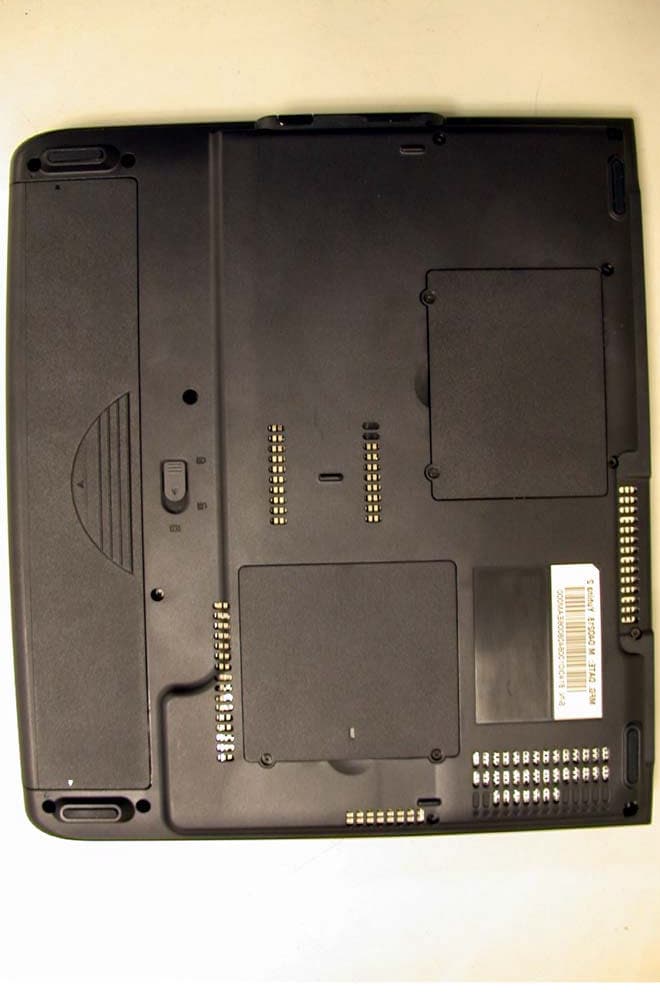
Click to zoom
Application Details
- Equipment Class
- DTS - Digital Transmission System
- Date of Grant
- Mar 17, 2004
- Application Purpose
- Original Equipment
- Date of Application
- Mar 17, 2004
- Equipment Note
- Notebook Computer with WLAN and Bluetooth
- Frequency Range
- 2402.00000000 - 2480.00000000
- Company
- Acer Incorporated
- Country
- Taiwan
Documents & Files
Document Text
Text extracted from the exhibit documents filed with the FCC. Open a document above to read the original.
Users Manual
Acer Aspire 1620 Series User’s Guide Changes may be made periodically to the information in this publication without obligation to notify any person of such revision or changes. Such changes will be incorporated in new editions of this manual or supplementary documents and publications. This company makes no representations or warranties, either expressed or implied, with respect to the contents hereof and specifically disclaims the implied warranties of merchantability or fitness for a particular purpose. Record the model number, serial number, purchase date, and place of purchase information in the space provided below. The serial number and model number are recorded on the label affixed to your computer. All correspondense concerning your unit should include the serial number, model number, and purchase information. No part of this publication may be reproduced, stored in a retrieval system, or transmitted, in any form or by any means, electronic, mechanical, photocopy, recording, or otherwise, without the prior written permission of Acer Incorporated. Model Number : _________________________________ Serial Number: ___________________________________ Purchase Date: ___________________________________ Place of Purchase: ________________________________ Copyright © 2004 All Rights Reserved Acer Aspire 1620 Series Notebook Computer User's Guide Original Issue: March 2004 Acer Aspire 1620 Series Notebook Computer All trademarks and registered trademarks are the properties of their respective companies. iii English English First things first Yo u r g u i d e s A set of guides is provided to help you set up and use your Aspire computer: For more information on Acer’s products, services, and support, please visit the web site: http:// www.acer.com. Basic care and tips for using your computer Turning your computer on and off To turn on your computer, open the lid and press the power button above the keyboard. To turn the power off, you can do any of the following: •Click on the Start button in Windows, and then select Shut Down on the popup menu. •Push the power button. To use this method, you must first click on the Power Management icon in Windows Control Panel, and then check that the power button is set to shut down the computer when pressed. See Windows Help and Support for more information. The Just for starters... poster shows you how to set up your computer. This User's Guide provides clear and concise information on using your computer productively. You are advised to read it thoroughly and keep it handy for future reference. iv English Note: If you are unable to shut down the computer in the usual way, press and hold the power button for more than four seconds. You should then wait at least two seconds before turning the computer on again. Taking care of your computer Your computer will serve you well if you take care of it. •Do not expose the computer to direct sunlight. Do not place it near sources of heat, such as a radiator. •Do not expose the computer to temperatures below 0°C (32°F), or above 50°C (122°F). •Do not expose the computer to magnetic fields. •Do not expose the computer to rain or moisture. •Do not spill water or any liquid on the computer. •Do not subject the computer to heavy shock or vibration. •Do not expose the computer to dust or dirt. •Do not place objects on top of the computer. •Do not slam the lid shut. Close the computer gently. •Do not place the computer on unstable or uneven surfaces. Taking care of your AC adapter It is important that you look after your AC adapter. •Do not connect the adapter to any other device. •Do not step on the power cord or place heavy objects on it. Route the power cord away from areas where people might walk on it or trip over it. •Do not pull on the power cord when disconnecting from the mains power socket. Grasp and pull the plug instead. •The total ampere ratings of equipment plugged into a power strip should not exceed the ampere rating for that power strip. v English English Taking care of your battery pack It is also important that you look after your computer's battery pack. •Use the correct battery model for your computer. Do not use other kinds of batteries. •Turn the power off before removing or replacing the battery. •Do not tamper with the battery. Keep the battery away from children. •Dispose of batteries according to local regulations. Recycle if possible. Cleaning and servicing When cleaning your computer, it is important that you follow these steps: •Turn off the computer and remove the battery. •Disconnect the AC adapter. •Clean with a soft cloth moistened with a little water. Do not use liquid or aerosol cleaners. Refer to the chapter entitled “Frequently asked questions” on page 61 if any of the following occurs: •You drop the computer or damage the case. •You spill liquid on the computer. •The computer does not operate normally. vi English English First things firstiii Your guidesiii Basic care and tips for using your computeriii Getting familiar with your computer1 A tour of your computer3 Front view3 Left view 5 Right view 6 Rear view7 Bottom view8 Features9 Indicators11 Indicators on cover12 Keyboard13 Special keys13 Touchpad19 Touchpad basics19 Launch keys21 Storage22 Ejecting the optical drive tray23 Emergency ejection of the optical drive tray23 Connectivity options24 Ethernet and LAN24 Fax/Data modem25 Audio26 Securing your computer27 Security slot27 Operating on battery power29 Battery pack31 Battery pack characteristics31 Installing and removing the battery pack32 Charging the battery33 Checking the battery level33 Optimizing battery life33 Battery-low warning34 Power management35 Peripherals and options37 External display devices39 External input devices39 Contents English External keyboard39 External keypad39 External pointing device39 USB devices40 IEEE 1394 Port41 Printer42 Audio devices42 Expansion devices43 PC Card43 44 Miscellaneous options44 Battery pack44 AC adapter44 Key component upgrade…
Text truncated - open the document above for the full version.
Users Manual
Ambit Microsystems Corporation() 5F-1, 5 Hsin-An Rd., Hsinchu Science-Based Industrial Park, Hsinchu, Taiwan, R.O.C. TEL: 886-3-5784975, FAX: 886-3-5782924, Internet: http:\\www.ambit.com.tw\ 551 886-3-5784975886-3-5782924 INSTALLATION MANUAL T60M665 Bluetooth Modem Combo Module Ambit Microsystems Corporation() 5F-1, 5 Hsin-An Rd., Hsinchu Science-Based Industrial Park, Hsinchu, Taiwan, R.O.C. TEL: 886-3-5784975, FAX: 886-3-5782924, Internet: http:\\www.ambit.com.tw\ 551 886-3-5784975886-3-5782924 Contents SECTION ONE: INTRODUCTION...........................................................................................................1 1.1 FEATURES.............................................................................................................................................1 1.1.1 BLUETOOTH FUNCTION............................................................................................................................1 1.1.2 MODEM FUNCTION....................................................................................................................................1 1.2 HARDWARE REQUIREMENTS.......................................................................................................................2 SECTION TWO: BLUETOOTH INSTALLATION............................................................................................3 2.1 BLUETOOTH INSTALLATION............................................................................................................3 SECTION THREE: MODEM INSTALLATION..................................................................................................8 3.1 DRIVER INSTALLATION......................................................................................................................8 3.2 AT COMMANDS..................................................................................................................................11 SECTION FOUR: FCC NOTICE................................................................................................................19 4.1 FCC COMPLIANCE.............................................................................................................................19 4.2 FCC CLASS B STATEMENT..............................................................................................................19 The information contained in this manual has been verified at the time of this manual printing. The manufacturer reserves the right to make any changes and improvements in the product described in this manual at any time and without notice. All registered trademarks are the property of their respective owners. Ambit Microsystems Corporation() 5F-1, 5 Hsin-An Rd., Hsinchu Science-Based Industrial Park, Hsinchu, Taiwan, R.O.C. TEL: 886-3-5784975, FAX: 886-3-5782924, Internet: http:\\www.ambit.com.tw\ 551 886-3-5784975886-3-5782924 Section One: Introduction The Bluetooth Modem Combo Module is a cost-effective wireless access. The Bluetooth circuit of this module is compliant to Bluetooth 1.1 standard. With V.92 technology, the modem part can achieve internet connection rates up to 56 kbits/s with backward compatibility. The V.92 Feature include PCM Upstream, Modem On Hold, Quick Connection and V.44 Data compression. The Audio CODEC will be placed on the notebook and contact with Modem Codec by AC-Link Interface. The combo card complies with MDC Domestic form factor. 1.1 Features 1.1.1 Bluetooth Function o Bluetooth radio firmware is upgradeable for bug fixes, initial version compatible with Bluetooth specification version 1.1. o Fully compliant to Bluetooth SIG (BQB) compatibility testing. o USB Pin assignment is to use MDC reserve pin to communicate with Host.interface o Bluetooth Profile Support - General Access Profile - Service Discovery Application Profile - Serial Port Profile - Dial-up Networking Profile - LAN Access Profile - Generic Object Exchange Profile - File Transfer Profile - Object Push Profile - Synchronization Profile o Drivers support Windows 98, 98SE, ME, 2000, XP. o Supports Power Management ACPI 1.94 (or later) o 1.1.2 Modem Function o AC’97/MC’97 2.2 compliant o Support Modem Digital Line Guard: The product shall incorporate circuitry to sense whenever the Ambit Microsystems Corporation() 5F-1, 5 Hsin-An Rd., Hsinchu Science-Based Industrial Park, Hsinchu, Taiwan, R.O.C. TEL: 886-3-5784975, FAX: 886-3-5782924, Internet: http:\\www.ambit.com.tw\ 551 886-3-5784975886-3-5782924 current on the line exceeds approximately 130mA, and should immediately go back on hook. o The call progress signal shall be scaled digitally according to the speaker level setting (ATL1, L2, L3) o ITU-T V.92 PCM Upstream and V.90 data rates with auto-fallback to V.34, V.32terbo, V.32bis and fallbacks o TIA/EIA 602 standard for AT Command set o Supports V.42 error correction and V.44, V.42bis/MNP5 data compression o FAX capabilities: ITU-T V.17, V.29, V.27ter, V.21 Ch2 and TIA/EIA 578 Class1 FAX o Support Wake up on Ring and meet WHQL test requirement.. 1.2 Hardware Requirements Supply Voltage 3.3V & 1.8V Frequency Range 2.400-2.4835 GHz Antenna Load 50 Ohm Receive Sensitivity –80 [email protected]% BER Maximum Receiver Signal -20 dBm TX Power 4 dBm maximum (class 2) RF Power Control Step Size 2 dB Range 10 meters at 0 dBm TX power (class 2) Radio Compliant with Bluetooth standard version 1.1 Pico Net 1 master to 7 slaves Operating Channels 79 channels of 1 MHz BW Security Full support of Bluetooth security provisions including hardware support for full length 128 bit encryption keys. Host Interface (USB) USB specification 1.1 compliant and using MDC reserve pin to communicate with Host Software Requirements Windows 98SE, ME, 2000, XP. Mechanical Requirements 27mm x 45mm x 4.7mm(1.2/0.8/2.7mm) Ambit Microsystems Corporation() 5F-1, 5 Hsin-An Rd., Hsinchu Science-Based Industrial Park, Hsinchu, Taiwan, R.O.C. TEL: 886-3-5784975, FAX: 886-3-5782924, Internet: http:\\www.ambit.com.tw\ 551 886-…
Text truncated - open the document above for the full version.
Users Manual
WLAN 802.11g mini-PCI Module User Manual Version: 1.0 Sep. 2003 1 Copyright Statement No part of this publication may be reproduced, stored in a retrieval system, or transmitted in any form or by any means, whether electronic, mechanical, photocopying, recording or otherwise without the prior writing of the publisher. Windows ™ 98SE/2000/ME/XP are trademarks of Microsoft ® Corp. Pentium is trademark of Intel. All copyright reserved. 2 Federal Communication Commission Interference Statement This equipment has been tested and found to comply with the limits for a Class B digital device, pursuant to Part 15 of the FCC Rules. These limits are designed to provide reasonable protection against harmful interference in a residential installation. This equipment generates, uses and can radiate radio frequency energy and, if not installed and used in accordance with the instructions, may cause harmful interference to radio communications. However, there is no guarantee that interference will not occur in a particular installation. If this equipment does cause harmful interference to radio or television reception, which can be determined by turning the equipment off and on, the user is encouraged to try to correct the interference by one of the following measures: - Reorient or relocate the receiving antenna. - Increase the separation between the equipment and receiver. - Connect the equipment into an outlet on a circuit different from that to which the receiver is connected. - Consult the dealer or an experienced radio/TV technician for help. FCC Caution: To assure continued compliance, (example - use only shielded interface cables when connecting to computer or peripheral devices) any changes or modifications not expressly approved by the party responsible for compliance could void the user's authority to operate this equipment. This device complies with Part 15 of the FCC Rules. Operation is subject to the following two conditions: (1) This device may not cause harmful interference, and (2) This device must accept any interference received, including interference that may cause undesired operation. IMPORTANT NOTE: This transmitter must not be co-located or operating in conjunction with any other antenna or transmitter. 3 Table of Contents 1. INTRODUCTION 4 1.1 THE WLAN 802.11G MINI-PCI MODULE..............................................................4 1.2 FEATURES................................................................................................................4 2. PLANNING YOUR WIRELESS NETWORK 5 2.1 NETWORK TOPOLOGY.............................................................................................5 2.2 AD-HOC VERSUS INFRASTRUCTURE MODE............................................................5 3. SOFTWARE INSTALLATION AND UNINSTALLATION 7 3.1 SETUP WIZARD INSTALLATION.......................................................................7 3.2 ADDITIONAL SETUP PROCESSES.............................................................................9 3.3 DISABLE WINDOWS XP ZERO-CONFIGURATION.................................................11 3.4 UNINSTALLATION...................................................................................................12 4. USING THE CONFIGURATION UTILITY 14 4.1 OVERVIEW.............................................................................................................14 4.2 ACCESSING THE CONFIGURATION UTILITY.........................................................14 4.3 LINK STATUS..........................................................................................................18 4.4 SITE MONITOR.......................................................................................................19 4.5 STATISTICS.............................................................................................................20 4.6 DIAGNOSTICS.........................................................................................................21 4.7 INFORMATION........................................................................................................22 APPENDIX A: TROUBLESHOOTING23 APPENDIX B: GLOSSARY 26 APPENDIX C: SPECIFICATION 31 4 1. Introduction 1.1 The WLAN 802.11g mini-PCI Module 802.11g is the 54Mbps wireless networking standard that's almost five times faster than the widely deployed 802.11b products found in homes, businesses, and public wireless hotspots around the country — but since they share the same 2.4GHz radio band, 802.11g devices can also work with existing 11Mbps 802.11b equipment. The new 802.11g mini-PCI Module has both standards built in, so you can connect your notebook to existing 802.11b infrastructure, and also the new screaming fast 802.11g networks. The included Setup Wizard will walk you through configuring the module to your network's settings, step by step. Once you're connected, you can keep in touch with your e-mail, access the Internet, and share files and other resources such as printers and network storage with other computers on the network, wherever you wander. At home, you can surf the web or use instant messaging to chat with friends while sitting out on the patio. You'll also be able to connect with any of the growing number of public wireless hotspots springing up in coffee shops, airport lounges, hotels and convention centers. And as those hotspots upgrade to the new high-speed 802.11g standard, you'll be ready to take advantage of the increased speeds. Get connected to current-standard 802.11b networks today, and be prepared for the future with the WLAN 802.11g mini-PCI Module. 1.2 Features l High-speed 802.11g networking for your notebook computer l Data rates up to 54Mbps -- 5 times faster than 802.11b l Also interoperates with 802.11b networks (at 11Mbps) l Wireless security -- up to 128-bit WEP encryption 5 2. Planning Your Wireless Network 2.1 Network Topology A wireless local area network (WLAN) is exactly like a regular local area network (LAN), exce…
Text truncated - open the document above for the full version.
Cover Letter(s)
No. 65, Ku Dai Keng St., Hsichih, Taipei 221, R.O. C. Tel: 886-2-2646-2550 FAX: 886-2-26464641 No. 120, Lane 180, San Ho Tsuen, Hsin Ho Rd. Lung-Tan Hsiang, Tao Yuan County 325, Taiwan, R.O.C. Tel: 886-3-407-1718 FAX:886-3-407-1738 Rev 2 C:\tmp\04lr015 yuhina +RM8\fcc\AP FORM.doc 02/08/02 Request for Confidentiality Date: Mar. 8, 2004 American Telecommunications Certification Body, Inc. 6731 Whittier Avenue Suite C110 McLean, VA 22101 RE: Certification Application FCC ID: HLZMS2154RM8 Please be advised that the following information is to be held confidential on behalf of Acer Inc. : q Block Diagram q Schematics q Technical Spec The application contains technical information which Acer Inc. deems to be trade secrets and proprietary. If made public, the information might be used to the disadvantage of the applicant in the market place. Thank you for your attention to this matter. Sincerely, ___________________________ Eddy Hsiung / Director International Standards Laoboratory
Cover Letter(s)
Acer Incorporated 8F, 88, Sec. 1, Hsin Tai Wu Rd., Hsichih Taipei Hsien 221, Taiwan, R.O.C. Tel : 886-2-2696-1234 Fax : 886-2-2696-3535 www.acer.com Letter Of Agency Date:Mar. 08, 2004 American Telecommunications Certification Body, Inc. 6731 Whittier Avenue Suite C110 McLean, VA 22101 To Whom It May Concern: Please be advised that Acer Incorporated authorizes International Standards Laboratory (ISL) to act on our behalf, until otherwise notified, for applications submitted to American Telecommunications Certification Body, Inc. (ATCB). We certify that we are not subject to denial of federal benefits that includes FCC benefits, pursuant to Section 5301 of the Anti-Drug Abuse ACT of 1988, U.S.C. 862. Further, no party as defined in 47 CFR 1.2002(b), for this application is subject to denial of federal benefits that includes FCC benefits. Thank you for your attention to this matter. ________________ Easy Lai / Director Acer Incorporated
Cover Letter(s)
No. 65, Ku Dai Keng St., Hsichih, Taipei 221, R.O. C. Tel: 886-2-2646-2550 FAX: 886-2-26464641 No. 120, Lane 180, San Ho Tsuen, Hsin Ho Rd. Lung-Tan Hsiang, Tao Yuan County 325, Taiwan, R.O.C. Tel: 886-3-407-1718 FAX:886-3-407-1738 Rev 2 C:\tmp\04lr015 yuhina +RM8\fcc\AP FORM.doc 02/08/02 FCC Labeling Requirements and Information Date: Mar. 08, 2004 American Telecommunications Certification Body, Inc. 6731 Whittier Avenue Suite C110 McLean, VA 22101 RE: FCC Labeling Requirements FCC ID: HLZMS2154RM8 The following label information is required by the FCC Rules and Regulations for certified devices. Please find marketing information required by the FCC Rules and Regulations as following: Label Requirements An intentional radiator device subject to certification by the FCC shall carry a warning label which includes the following statement: (Due to space limitation, this statement will be shown on Users’ Manual Page 79.) This device complies with Part 15 of the FCC Rules. Operation is subject to the following two conditions: (1) this device may not cause harmful interference, and (2) this device must accept any interference received, including interference that may cause undesired operation. The sample label shown shall be permanently affixed at a conspicuous location on the device and be readily visible to the user at the time of purchase. FCC ID: HLZMS2154RM8 Thank you for your attention to these matters. Sincerely, ___________________________ Eddy Hsiung / Director International Standards Laoboratory
Cover Letter(s)
American Telecommunications Certification Body Inc. 6731 Whittier Ave, McLean, VA 22101 March 18, 2004 RE: FCC ID: HLZMS2154RM8 Attention: Daphne Liu I have a few comments on this Application. 1. Please note that no FCC ID label information was provided. Please provide a sample FCC ID label and a drawing or photo of where the label will be on the product. 2. Please note that there appears to be more than ample room to place the 2-condition statement on the device. Please show the sample 2-condition statement and where it will be on the device. 3. FYI – no action needed. Please note that the Z-axis plot in the SAR report show follow the conventions of IEEE1528. This convention is a 2-axis plot of measured and calculated values. While the pictorial z-axis sample in the report may be adequate, the 2axix line graph provides actual data points that are representative to that expected in 1528. Dennis Ward mailto:[email protected] The items indicated above must be submitted before processing can continue on the above referenced application. Failure to provide the requested information may result in application termination. Correspondence should be considered part of the permanent submission and may be viewed from the Internet after a Grant of Equipment Authorization is issued. Please do not respond to this correspondence using the email reply button. In order for your response to be processed expeditiously, you must submit your documents through the AmericanTCB.com website. Also, please note that partial responses increase processing time and should not be submitted. Any questions about the content of this correspondence should be directed to the sender.
External Photos
International Standards Laboratory Report Number: ISL-04LR015P HC LAB:NVLAP:200234-0;VCCI: R-341,C-354;NEMKO:ELA 113a,113c;BSMI:SL2-IN-E-0037;SL2-R1-E-0037;CNLA:1178 LT LAB:NVLAP:200234-0;VCCI: R-1435,C-1440;NEMKO:ELA 113b,113d;BSMI:SL2-IN-E-0013;CNLA:0997 -1- EUT-1 International Standards Laboratory Report Number: ISL-04LR015P HC LAB:NVLAP:200234-0;VCCI: R-341,C-354;NEMKO:ELA 113a,113c;BSMI:SL2-IN-E-0037;SL2-R1-E-0037;CNLA:1178 LT LAB:NVLAP:200234-0;VCCI: R-1435,C-1440;NEMKO:ELA 113b,113d;BSMI:SL2-IN-E-0013;CNLA:0997 -2- EUT-2 International Standards Laboratory Report Number: ISL-04LR015P HC LAB:NVLAP:200234-0;VCCI: R-341,C-354;NEMKO:ELA 113a,113c;BSMI:SL2-IN-E-0037;SL2-R1-E-0037;CNLA:1178 LT LAB:NVLAP:200234-0;VCCI: R-1435,C-1440;NEMKO:ELA 113b,113d;BSMI:SL2-IN-E-0013;CNLA:0997 -3- EUT-3
ID Label/Location Info
MODEL NO.: PART NAME: A/W NO.: SCALE: UNIT : SHEET OF 1. MATERIAL: 0.254mm POLYCARBONATE, WITH MATTED TEXTURE 2.THE MATERIAL MUST BE APPROVED BY UL, CSA . 3. FINISH: PRINT ON BACK SURFACE 4. ADHESIVE: SPEC REFER TO ES-811-R05, SONY 303 OR TOYO DF2700MR OR EQUIV 5. PRINT COLOR : LETTERS ----------PANTONE COOL GRAY 2C BACKGROUND--- ACS-M511 6.TOLERANCE OF DIMENSION ARE +0/-0.1mm Yuhina41 (Exten2700) SPEC LBL( Exten2700 Taiwan) 40. 1 : 1 mm 1 1 REVDESCRIPTIONSIGN DATE MNI1 Vicki Jan 3/3/2004 DRAWN:REVIEWED: APPROVED: This device complies with Part 15 of the FCC Rules. Operation is subject to the following two conditions: (1) This device may not cause harmful interference, and (2) this device must accept any interference received, including interference that may cause undesired operation.
ID Label/Location Info
Label Location Rating label RF module label Warning Statement
Internal Photos
International Standards Laboratory Report Number: ISL-04LR015P HC LAB:NVLAP:200234-0;VCCI: R-341,C-354;NEMKO:ELA 113a,113c;BSMI:SL2-IN-E-0037;SL2-R1-E-0037;CNLA:1178 LT LAB:NVLAP:200234-0;VCCI: R-1435,C-1440;NEMKO:ELA 113b,113d;BSMI:SL2-IN-E-0013;CNLA:0997 -5- EUT-5 International Standards Laboratory Report Number: ISL-04LR015P HC LAB:NVLAP:200234-0;VCCI: R-341,C-354;NEMKO:ELA 113a,113c;BSMI:SL2-IN-E-0037;SL2-R1-E-0037;CNLA:1178 LT LAB:NVLAP:200234-0;VCCI: R-1435,C-1440;NEMKO:ELA 113b,113d;BSMI:SL2-IN-E-0013;CNLA:0997 -6- EUT-6 International Standards Laboratory Report Number: ISL-04LR015P HC LAB:NVLAP:200234-0;VCCI: R-341,C-354;NEMKO:ELA 113a,113c;BSMI:SL2-IN-E-0037;SL2-R1-E-0037;CNLA:1178 LT LAB:NVLAP:200234-0;VCCI: R-1435,C-1440;NEMKO:ELA 113b,113d;BSMI:SL2-IN-E-0013;CNLA:0997 -7- EUT-7 International Standards Laboratory Report Number: ISL-04LR015P HC LAB:NVLAP:200234-0;VCCI: R-341,C-354;NEMKO:ELA 113a,113c;BSMI:SL2-IN-E-0037;SL2-R1-E-0037;CNLA:1178 LT LAB:NVLAP:200234-0;VCCI: R-1435,C-1440;NEMKO:ELA 113b,113d;BSMI:SL2-IN-E-0013;CNLA:0997 -8- EUT-8 International Standards Laboratory Report Number: ISL-04LR015P HC LAB:NVLAP:200234-0;VCCI: R-341,C-354;NEMKO:ELA 113a,113c;BSMI:SL2-IN-E-0037;SL2-R1-E-0037;CNLA:1178 LT LAB:NVLAP:200234-0;VCCI: R-1435,C-1440;NEMKO:ELA 113b,113d;BSMI:SL2-IN-E-0013;CNLA:0997 -9- EUT-9 International Standards Laboratory Report Number: ISL-04LR015P HC LAB:NVLAP:200234-0;VCCI: R-341,C-354;NEMKO:ELA 113a,113c;BSMI:SL2-IN-E-0037;SL2-R1-E-0037;CNLA:1178 LT LAB:NVLAP:200234-0;VCCI: R-1435,C-1440;NEMKO:ELA 113b,113d;BSMI:SL2-IN-E-0013;CNLA:0997 -10- EUT-10 International Standards Laboratory Report Number: ISL-04LR015P HC LAB:NVLAP:200234-0;VCCI: R-341,C-354;NEMKO:ELA 113a,113c;BSMI:SL2-IN-E-0037;SL2-R1-E-0037;CNLA:1178 LT LAB:NVLAP:200234-0;VCCI: R-1435,C-1440;NEMKO:ELA 113b,113d;BSMI:SL2-IN-E-0013;CNLA:0997 -11- EUT-11 International Standards Laboratory Report Number: ISL-04LR015P HC LAB:NVLAP:200234-0;VCCI: R-341,C-354;NEMKO:ELA 113a,113c;BSMI:SL2-IN-E-0037;SL2-R1-E-0037;CNLA:1178 LT LAB:NVLAP:200234-0;VCCI: R-1435,C-1440;NEMKO:ELA 113b,113d;BSMI:SL2-IN-E-0013;CNLA:0997 -12- EUT-12 International Standards Laboratory Report Number: ISL-04LR015P HC LAB:NVLAP:200234-0;VCCI: R-341,C-354;NEMKO:ELA 113a,113c;BSMI:SL2-IN-E-0037;SL2-R1-E-0037;CNLA:1178 LT LAB:NVLAP:200234-0;VCCI: R-1435,C-1440;NEMKO:ELA 113b,113d;BSMI:SL2-IN-E-0013;CNLA:0997 -13- EUT-13 International Standards Laboratory Report Number: ISL-04LR015P HC LAB:NVLAP:200234-0;VCCI: R-341,C-354;NEMKO:ELA 113a,113c;BSMI:SL2-IN-E-0037;SL2-R1-E-0037;CNLA:1178 LT LAB:NVLAP:200234-0;VCCI: R-1435,C-1440;NEMKO:ELA 113b,113d;BSMI:SL2-IN-E-0013;CNLA:0997 -14- EUT-14 International Standards Laboratory Report Number: ISL-04LR015P HC LAB:NVLAP:200234-0;VCCI: R-341,C-354;NEMKO:ELA 113a,113c;BSMI:SL2-IN-E-0037;SL2-R1-E-0037;CNLA:1178 LT LAB:NVLAP:200234-0;VCCI: R-1435,C-1440;NEMKO:ELA 113b,113d;BSMI:SL2-IN-E-0013;CNLA:0997 -15- EUT-15 International Standards Laboratory Report Number: ISL-04LR015P HC LAB:NVLAP:200234-0;VCCI: R-341,C-354;NEMKO:ELA 113a,113c;BSMI:SL2-IN-E-0037;SL2-R1-E-0037;CNLA:1178 LT LAB:NVLAP:200234-0;VCCI: R-1435,C-1440;NEMKO:ELA 113b,113d;BSMI:SL2-IN-E-0013;CNLA:0997 -16- EUT-16 International Standards Laboratory Report Number: ISL-04LR015P HC LAB:NVLAP:200234-0;VCCI: R-341,C-354;NEMKO:ELA 113a,113c;BSMI:SL2-IN-E-0037;SL2-R1-E-0037;CNLA:1178 LT LAB:NVLAP:200234-0;VCCI: R-1435,C-1440;NEMKO:ELA 113b,113d;BSMI:SL2-IN-E-0013;CNLA:0997 -17- EUT-17
RF Exposure Info
FCC ID. : HLZMS2154RM8 Report No.: EME-040193 Page 1 of 76 0597 ILAC MRA Specific Absorption Rate (SAR) Test Report for Acer Inc. on the Notebook Personal Computer Model Number: MS2154 Test Report: EME-040193 Date of Report: Mar. 11, 2004 Date of test: Mar. 5, 2004 Total No of Pages Contained in this Report: 76 Accredited for testing to FCC Part 15 Tested by: Kevin Chen Reviewed by: Elton Chen Review Date: Mar. 12, 2004 All services undertaken are subject to the following general policy: Reports are submitted for exclusive use of the client to whom they are addressed. Their significance is subject to the adequacy and representative character of the samples and to the comprehensiveness of the tests, examinations or surveys made. This report shall not be reproduced except in full, without written consent of Intertek Testing Services, Taiwan Ltd. FCC ID. : HLZMS2154RM8 Report No.: EME-040193 Page 2 of 76 Table of Contents 1.0 Job Description.......................................................................................................4 1.1 Client Information...............................................................................................4 1.2 Equipment under test (EUT)................................................................................4 1.3 Test plan reference...............................................................................................5 1.4 System test configuration....................................................................................5 1.4.1 System block diagram & Support equipment....................................................5 1.4.2 Test Position............................................................................…
Text truncated - open the document above for the full version.
Contact Information
Applicant
RU Jan(Sr. Manager)
Technical Contact
International Stantards LaboratoryJames Cheng
[email protected]886-3-407-1718
No. 65, Ku Dai Keng Street, · Hsichih · Taiwan
Test Firm
International Standards LaboratoryDavid Wu
Technical Specifications
| # | Rule Parts | Frequency Range | Power Output |
|---|---|---|---|
| 2 | 15C | 2.40 GHz - 2.48 GHz | 2.70 mW |
Other Applications from Acer Incorporated
HLZA26007
Aug 07, 2026Tablet PC
Equipment Class
DTS - Digital Transmission SystemHLZA26003
Jul 28, 2026Tablet PC
Equipment Class
6XD - 15E 6 GHz Low Power Indoor ClientHLZAMR570
Apr 21, 2026Acer Wireless Mouse
Equipment Class
DTS - Digital Transmission SystemHLZ-NSK510
Apr 09, 2026Gaming sound bar
Equipment Class
DSS - Part 15 Spread Spectrum TransmitterHLZA26002
Apr 01, 2026Tablet PC
Equipment Class
NII - Unlicensed National Information Infrastructure TX