HLZMS2161BGAcer Travelmate PC w/ built-in WLAN and Bluetooth
Acer Incorporated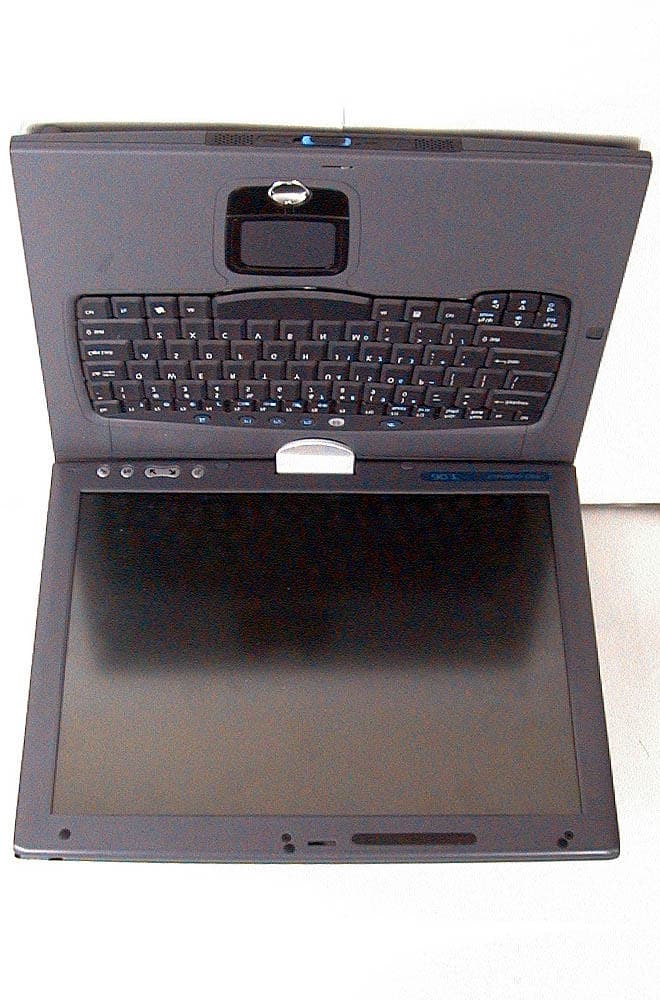
Click to zoom
Application Details
- Equipment Class
- DTS - Digital Transmission System
- Date of Grant
- Jun 20, 2005
- Application Purpose
- Original Equipment
- Date of Application
- Jun 20, 2005
- Equipment Note
- Acer Travelmate PC w/ built-in WLAN and Bluetooth
- Frequency Range
- 2412.00000000 - 2462.00000000
- Company
- Acer Incorporated
- Country
- Taiwan
Documents & Files
Document Text
Text extracted from the exhibit documents filed with the FCC. Open a document above to read the original.
Users Manual
TravelMate C310 Series User's Guide Changes may be made periodically to the information in this publication without obligation to notify any person of such revisions or changes. Such changes will be incorporated in new editions of this manual or supplementary documents and publications. This company makes no representations or warranties, either expressed or implied, with respect to the contents hereof and specifically disclaims the implied warranties of merchantability or fitness for a particular purpose. Record the model number, serial number, purchase date, and place of purchase information in the space provided below. The serial number and model number are recorded on the label affixed to your computer. All correspondence concerning your unit should include the serial number, model number, and purchase information. No part of this publication may be reproduced, stored in a retrieval system, or transmitted, in any form or by any means, electronically, mechanically, by photocopy, recording, or otherwise, without the prior written permission of Acer Incorporated. Model number: __________________________________ Serial number: ___________________________________ Purchase date: ___________________________________ Place of purchase: ________________________________ Copyright © 2005. Acer Incorporated. All Rights Reserved. TravelMate C310 Series User's Guide Original Issue: April 2005 TravelMate C310 Series Notebook Computer Acer and the Acer logo are registered trademarks of Acer Incorporated. Other companies' product names or trademarks are used herein for identification purposes only and belong to their respective companies. iii First things first We would like to thank you for making the TravelMate series of notebook computers your choice for meeting your mobile computing needs. Your guides To help you use your TravelMate, we have designed a set of guides: Basic care and tips for using your computer Turning your computer on and off To turn on the computer, simply press and release the power switch below the LCD screen beside the launch keys. See "Front view" on page 1 for the location of the power switch. To turn the power off, do any of the following: •Use the Windows shutdown command Click on Start, Turn Off Computer, then click on Turn Off. First off, the Just for Starters... poster helps you get started with setting up your computer. The printed User's Guide introduces you to the basic features and functions of your new computer. For more on how your computer can help you to be more productive, please refer to the AcerSystem User's Guide. This guide contains detailed information on such subjects as system utilities, data recovery, expansion options, and troubleshooting. In addition it contains warranty information and the general regulations and safety notices for your notebook. It is available in Portable Document Format (PDF) and comes preloaded on your notebook. Follow these steps to access it: 1 Click on Start, All Programs, AcerSystem. 2 Click on AcerSystem User's Guide. Note: Viewing the file requires Adobe Acrobat Reader. If Adobe Acrobat Reader is not installed on your computer, clicking on AcerSystem User's Guide will run the Acrobat Reader setup program first. Follow the instructions on the screen to complete the installation. For instructions on how to use Adobe Acrobat Reader, access the Help and Support menu. iv •Use the power switch Note: You can also use the power switch to perform power management functions. See "Moving around" on page 31 of the AcerSystem User's Guide. •Use the customized functions for power management You can also shut down the computer by closing the display cover, or by pressing the sleep hotkey <Fn> + <F4>. See "Moving around" on page 31 of the AcerSystem User's Guide. Note: If you cannot power off the computer normally, press and hold the power switch for more than four seconds to shut down the computer. If you turn off the computer and want to turn it on again, wait at least two seconds before powering up. Taking care of your computer Your computer will serve you well if you take care of it. •Do not expose the computer to direct sunlight. Do not place it near sources of heat, such as a radiator. •Do not expose the computer to temperatures below 0 ºC (32 ºF) or above 50 ºC (122 ºF). •Do not subject the computer to magnetic fields. •Do not expose the computer to rain or moisture. •Do not spill water or any liquid on the computer. •Do not subject the computer to heavy shock or vibration. •Do not expose the computer to dust or dirt. •Never place objects on top of the computer. •Do not slam the computer display when you close it. •Never place the computer on uneven surfaces. Taking care of your AC adaptor Here are some ways to take care of your AC adaptor: •Do not connect the adaptor to any other device. •Do not step on the power cord or place heavy objects on top of it. Carefully route the power cord and any cables away from foot traffic. •When unplugging the power cord, do not pull on the cord itself but pull on the plug. v •The total ampere ratings of the equipment plugged in should not exceed the ampere rating of the cord if you are using an extension cord. Also, the total current rating of all equipment plugged into a single wall outlet should not exceed the fuse rating. Taking care of your battery pack Here are some ways to take care of your battery pack: •Use only batteries of the same kind as replacements. Turn the power off before removing or replacing batteries. •Do not tamper with batteries. Keep them away from children. •Dispose of used batteries according to local regulations. Recycle if possible. Cleaning and servicing When cleaning the computer, follow these steps: 1Turn off the computer and remove the battery pack. 2Disconnect the AC adaptor. 3Use a soft, moist cloth. Do not use liquid or aerosol cleaners. If either of the following occurs: •the computer has been dropped or the body has been damaged; •the computer does not operate n…
Text truncated - open the document above for the full version.
Cover Letter(s)
Rev 2 C:\tmp\05LR012 TMC310bg\fcc\AP FORM.doc 02/08/02 American Telecommunications Certification Body, Inc. 6731 Whittier Avenue McLean, VA 22101 Ph: (703) 847-4700 FAX: (703) 847-6888 Certification Application Package AmericanTCB CERTIFICATION APPLICATION Rev 2 C:\tmp\05LR012 TMC310bg\fcc\AP FORM.doc 02/08/02 Acer Inc. 8F, 88, Sec. 1, Hsin Tai Wu Rd., Hsichih,Taipei Hsien 221, Taiwan, R.O.C. This TESTING AND CERTIFICATION AGREEMENT ("Agreement") is made effective as of the latter date of execution below, by and between American Telecommunication Certification Body (ATCB) and Acer Inc. (Applicant), collectively referred to as "the Parties". Equipment Description Equipment Description: Notebook Personal Computer Model Number: TravelMate C310; MS2161 FCC Rule Part(s): 15C In consideration of the mutual covenants in this Agreement, ATCB or its subcontractors will perform certification inspection services to determine if Applicant's device(s) identified above under Equipment Description (hereinafter "Devices") are in compliance with the laws, regulations and technical standards (hereinafter "Certification Regulations") of the national authorities specified by Applicant in Schedule A. 1. General 1.1 This Agreement is for the purpose of testing and certification and applies to all tests, audits, and certifications for the Devices, and will be performed in accordance with the Certification Regulations of the national authorities specified in Schedule A. 1.2 ATCB retains full discretion to determine if the Devices are compliant with the Certification Regulations of the Countries. In the event that certification is not issued for the aforementioned Devices, ATCB agrees to advise Applicant in writing of the reasons thereof. 1.3 This Agreement may not be assigned to or acquired by any other person, firm, or corporation without ATCB's written authorization. 2. Scope of Performance 2.1 The scope of performance between the Parties shall be agreed to by contract, purchase order or other mutually agreed-upon schedule or order. 2.2 Except as provided in Section 2.3 hereof, testing of all Devices shall take place at ATCB facilities. 2.3 In lieu of section 2.2 above, ATCB may agree to accept test data from any ISO/IEC Guide 25 accredited laboratory or FCC-Listed Laboratory and evaluate the Devices on the basis of this data. ATCB may also choose to accept test data from ISO Guide 25 accredited laboratories owned by Applicant, provided the requirements of 2.3.1. are met. 2.3.1 Employees of Applicant shall not participate in any tests, evaluations, or assessments described in sections 2.2 or 2.3 above without the presence and supervision of an ATCB engineer or technician. 2.4 If requested for sample purposes (as required by the FCC), client shall supply ATCB, at no charge, with at least one test sample of each Device, including the necessary peripherals, connecting cables, accessories or other hardware or software (hereinafter collectively referred to as "support equipment") required for testing, evaluation, and assessment. 2.5 Applicant shall supply ATCB, at no charge, with all technical documentation and materials required for the testing, evaluation, and assessment of such Devices and support equipment. 2.5.1 Technical documentation and materials include, but are not limited to, any relevant operating instructions, schematics, block diagrams, photographs, prior tests and certificates concerning the safety of the Devices, its components or support equipment. 2.6 Applicant recognizes that Device samples, including support equipment, may be damaged or completely destroyed when subjected to ATCB's testing and evaluation process. Applicant shall hold ATCB harmless for any such damage or destruction to its equipment. 2.7 If necessary ATCB shall test, evaluate, or assess Applicant's equipment within 30 business days of ATCB's receipt of such Devices, support equipment and technical documentation, and to work diligently until certification is granted or denied, or Applicant decides to abandon testing, evaluation, and assessment on such Devices. AmericanTCB CERTIFICATION APPLICATION Rev 2 C:\tmp\05LR012 TMC310bg\fcc\AP FORM.doc 02/08/02 2.8 Upon completion of testing, evaluation, or assessment, ATCB shall advise Applicant via an abbreviated report whether the results are favorable, and what, if any, conditions, limitations or qualifications to the requested Certification exist. 2.9 Applicant agrees that a full report is available to Applicant only by special request, and for the separate charge specified. 2.10 Where testing, evaluation, and assessment results in certification, ATCB shall certify Applicant's equipment as compliant with the laws, regulations and/or standards of the Countries within 30 business days from the date testing, evaluation, and assessment is completed. 2.10.1 Section 2.11 may be dependent upon a timely response by the United States Federal Communications Commission (FCC) or its foreign equivalent. 2.10.2 In the event of product certification, Applicant may request that ATCB return or destroy Applicant's Device sample(s), equipment support, and technical documentation. Applicant shall bear all costs associated with the return or destruction of such equipment test sample(s) and support equipment. 2.11 Where testing, evaluation, and assessment does not result in certification, ATCB shall provide cost-free storage for each Device sample, support equipment, and technical documentation for a period not to exceed 30 days, provided Applicant agrees to re-testing within this period when notified of the Device's failure. 2.12 If Applicant does not collect or accept receipt of the Device sample(s), support equipment and technical documentation, despite ATCB having sent notice pursuant to subsection 2.12.1, ATCB reserves the right to dispose of them at Applicant's expense. 2.13 Applicant shall retain all documents forwarded to it by ATCB as required by the Certification Regulations of the Countries. 2.1…
Text truncated - open the document above for the full version.
Cover Letter(s)
May 24, 2005 RE: Acer, Inc. FCC ID: HLZMS2161BG Dear Bill, Here are our answers, 1.) Kindly review your Radiated Band Edge measurements. If you note your data in Section 4.5.3 of the 802.11b report, you will find a measurement of about +112dBuV feeding the antenna. Assuming a 2dBi antenna combined with the expected path loss of 11.7dB on a typical 3M site, I would expect to see a radiated value easily more than 100dBuV at 3 meters. Using your own plots of Section 4.5.6, we find a radiated value using a 1MHz RBW and a 3MHz RBW we have a peak radiated value of just 67dBuV. This makes me suspect that the EUT was not properly peaked for maximum emissions before performing this band edge test. Please review your restricted band edge data. An example calculation would also be useful. ANS: 67.7dBuV/m is the value of spectrum reading , 103.2 dBuV/m is the real value after added correction factor (Correction Factor=Antenna Factor + cable loss– amplifier gain). Please refer to data list in Section 4.5.6 for detail. 2.) Is the SAR report required for evaluation of this device? The Manual seems to indicate that antennas for this product are more than 20cm away from the operator, and RF category “Mobile” rules would apply. Please review and advise. ANS: It’s a tablet PC, so it must need SAR test. I will try let you know in my cover letter next time. And, for 20cm, did you see it? I have already removed “20cm” wording in my first uploading. 3.) The Manual does not have any required SAR values to inform users of potential RF hazards. Please be sure the manual has these SAR values, assuming SAR testing applies. Otherwise simple 20cm restrictions should be on the Manual instead. ANS: SAR’s value was added on manual page 58 The maximum spatial peak SAR value for the sample device average over 1g was found to be 0.250W/Kg. 4.) The Manual also has a prohibition against co-location. How can this be true with the possibility of a Bluetooth transmitter operating at the same time as a WLAN? ANS: Sorry, we have removed the words. See manual p58 5.) It is not clear from the SAR report that the Bluetooth transmitter was operating simultaneously with the WLAN. Please advise. ANS: Please refer to page 6 of SAR report. 6.) The Manual claims this device “may or may not contain wireless radio devices (such as wireless LAN and/or Bluetooth modules).” Please be advised that this filing will refer to a product that has both WLAN and Bluetooth transmitters installed. Removal of either transmitter will invalidate this filing and this FCC ID. ANS: I have removed the wording. See manual P57 7.) Schematics and Block Diagrams for the Bluetooth transmitter appear to be missing. Please review your Exhibits and advise. ANS: I have got the Schematics and Block Diagrams for the Bluetooth, and uploaded. 8.) Label placement information (but not the actual label) is missing. Please advise. FYI: All references to the FCC ID of the Intel wireless card and the Bluetooth card must be removed from this device before installation. ANS: Label location was on the page 2 of file “Label and Location. Pdf ”. Please try to find it. For module’s label, I will forward your comment to my client to remind they removing it. 9.) There are two identical copies of the 2200BG Wireless Card specification sheets (file names are different only) in the Operational Description, but no references to the Bluetooth transmitter. Please review your Exhibits. ANS: I have got the specification for the Bluetooth, and uploaded 10.) Kindly indicate the location of the Bluetooth antenna as well as the WLAN antennas in your SAR report. ANS: Please refer to page 5 of SAR report. The location of Bluetooth antenna is under touch pad of notebook. 11.) FYI: In the future, please upload all SAR reports to the RF Exposure exhibit. It will aid me greatly in moving about your application freely. ANS: OK 12.) Were both antennas evaluated during the SAR test? It is unclear exactly whether “Canary main” and/or “Canary aux” antennas were tested. Please provide more details. ANS: Please refer to page 6 of SAR report. 13.) Were radiated Spurious Emissions tested with both the Bluetooth and WLAN transmitters operating simultaneously? FCC is now very interested in the potential interaction of multiple transmitters when operating in the same band due to the potential for intermodulation products. How was “worst case” determined for this test? Kindly review your findings. ANS: Both of Bluetooth and WLAN have larger Peak Output Power at low channel, same as spurious emissions test. So, we determined “Bluetooth low channel” and “WLAN low channel” transmitters operating simultaneously was worst case in this case. Note: According our information (conclusion of TCB Training Course May,11~13,2005), it doesn’t care about Spurious Emissions for co-located transmitters except used the same antenna. Please review and give your comments Thank You Daphne Liu 2005/06/09
Cover Letter(s)
American Telecommunications Certification Body Inc. 6731 Whittier Ave, McLean, VA 22101 May 17, 2005 RE: Acer Inc. FCC ID: HLZMS2161BG I have a few comments on this Application. Depending on your responses, kindly understand there will be additional comments on this complex filing. 1.) This device consists of a notebook computer with 802.11b/g WLAN card and a separately approved Bluetooth module FCC ID:QDS-BRCM1009. This makes for a little bit of a confusing filing, so let me give you a helping hand. According to your Form 731, you are only seeking approval for the notebook computer when the WLAN card is installed. Although test reports were provided for the BT module, this device was tested and Certified as a separate device with its own FCC ID. No test data was provided for the BT module in its current configuration inside the Travel Mate C310 computer. This means you have two choices: (a.) Allow the BT FCC ID to be displayed on the outside of the computer within the statement “Contains Inside FCC ID: QDS-BRCM1009” in addition to the labeling you have already submitted, or (b.) allow the existing labeling for FCC ID: HLZMS2161BG to refer to the entire notebook computer, complete with BT transmitter. The first case (a.) does not require a great deal of retesting, but will require a Class II PC to FCC ID: QDS-BRCM1009 when associated with the Travel Mate C310 and in a co-located situation with the Intel WLAN card. The second case (b.) will require full retesting of the BT transmitter where the FCC ID will refer to the entire notebook with co- located BT and WLAN. This option will produce two Grants under equipment codes DTS and DSS, but with just one ID. You will need to instruct me how you want me to go before I can continue my evaluation. 2.) The antennas for this device are located in both the upper lid lip and the left side lip of the display. Currently there are no standards for evaluation of SAR reports with antennas in this configuration. It does appear that the antennas may be 20cm from the end user’s body (excluding hands and wrists) when used in a normal operating position. This means that a simple MPE evaluation and not a SAR report would be more appropriate for this device. I can accept the SAR report only upon condition that it is for “informational purposes only” and not to be used as a basis for my evaluation. If using the SAR report is necessary as a basis for Certification (instead of MPE estimation), then this filing must go to the FCC. Please advise. William H. Graff President and Director of Engineering mailto: [email protected] The items indicated above must be submitted before processing can continue on the above referenced application. Failure to provide the requested information may result in application termination. Correspondence should be considered part of the permanent submission and may be viewed from the Internet after a Grant of Equipment Authorization is issued. z Page 2 May 17, 2005 Please do not respond to this correspondence using the email reply button. In order for your response to be processed expeditiously, you must submit your documents through the AmericanTCB.com website. Also, please note that partial responses increase processing time and should not be submitted. Any questions about the content of this correspondence should be directed to the sender.
Cover Letter(s)
American Telecommunications Certification Body Inc. 6731 Whittier Ave, McLean, VA 22101 May 24, 2005 RE: Acer, Inc. FCC ID: HLZMS2161BG I have a few comments on this Application. Depending on your responses, kindly understand there may be additional comments. 1.) Kindly review your Radiated Band Edge measurements. If you note your data in Section 4.5.3 of the 802.11b report, you will find a measurement of about +112dBuV feeding the antenna. Assuming a 2dBi antenna combined with the expected path loss of 11.7dB on a typical 3M site, I would expect to see a radiated value easily more than 100dBuV at 3 meters. Using your own plots of Section 4.5.6, we find a radiated value using a 1MHz RBW and a 3MHz RBW we have a peak radiated value of just 67dBuV. This makes me suspect that the EUT was not properly peaked for maximum emissions before performing this band edge test. Please review your restricted band edge data. An example calculation would also be useful. 2.) Is the SAR report required for evaluation of this device? The Manual seems to indicate that antennas for this product are more than 20cm away from the operator, and RF category “Mobile” rules would apply. Please review and advise. 3.) The Manual does not have any required SAR values to inform users of potential RF hazards. Please be sure the manual has these SAR values, assuming SAR testing applies. Otherwise simple 20cm restrictions should be on the Manual instead. 4.) The Manual also has a prohibition against co-location. How can this be true with the possibility of a Bluetooth transmitter operating at the same time as a WLAN? 5.) It is not clear from the SAR report that the Bluetooth transmitter was operating simultaneously with the WLAN. Please advise. 6.) The Manual claims this device “may or may not contain wireless radio devices (such as wireless LAN and/or Bluetooth modules).” Please be advised that this filing will refer to a product that has both WLAN and Bluetooth transmitters installed. Removal of either transmitter will invalidate this filing and this FCC ID. 7.) Schematics and Block Diagrams for the Bluetooth transmitter appear to be missing. Please review your Exhibits and advise. 8.) Label placement information (but not the actual label) is missing. Please advise. FYI: All references to the FCC ID of the Intel wireless card and the Bluetooth card must be removed from this device before installation. 9.) There are two identical copies of the 2200BG Wireless Card specification sheets (file names are different only) in the Operational Description, but no references to the Bluetooth transmitter. Please review your Exhibits. 10.) Kindly indicate the location of the Bluetooth antenna as well as the WLAN antennas in your SAR report. 11.) FYI: In the future, please upload all SAR reports to the RF Exposure exhibit. It will aid me greatly in moving about your application freely. 12.) Were both antennas evaluated during the SAR test? It is unclear exactly whether “Canary main” and/or “Canary aux” antennas were tested. Please provide more details. 13.) Were radiated Spurious Emissions tested with both the Bluetooth and WLAN transmitters operating simultaneously? FCC is now very interested in the potential interaction of multiple transmitters when operating in the same band due to the potential for intermodulation products. How was “worst case” determined for this test? Kindly review your findings. z Page 2 May 24, 2005 William H. Graff President and Director of Engineering mailto: [email protected] The items indicated above must be submitted before processing can continue on the above referenced application. Failure to provide the requested information may result in application termination. Correspondence should be considered part of the permanent submission and may be viewed from the Internet after a Grant of Equipment Authorization is issued. Please do not respond to this correspondence using the email reply button. In order for your response to be processed expeditiously, you must submit your documents through the AmericanTCB.com website. Also, please note that partial responses increase processing time and should not be submitted. Any questions about the content of this correspondence should be directed to the sender.
External Photos
International Standards Laboratory Report Number: ISL-05LR012P HC LAB:NVLAP:200234-0;VCCI: R-341,C-354;NEMKO:ELA 113a,113c;BSMI:SL2-IN-E-0037;SL2-R1-E-0037;CNLA:1178 LT LAB:NVLAP:200234-0;VCCI: R-1435,C-1440;NEMKO:ELA 113b,113d;BSMI:SL2-IN-E-0013;CNLA:0997 Appendix Photographs of EUT of Product Name Notebook Personal Computer (with Intel PRO/Wireless 2200BG Network Connection and Broadcom USB Bluetooth Module BCM92035NMD inside) Model TravelMate C310;MS2161 (Brand: acer) International Standards Laboratory Report Number: ISL-05LR012P HC LAB:NVLAP:200234-0;VCCI: R-341,C-354;NEMKO:ELA 113a,113c;BSMI:SL2-IN-E-0037;SL2-R1-E-0037;CNLA:1178 LT LAB:NVLAP:200234-0;VCCI: R-1435,C-1440;NEMKO:ELA 113b,113d;BSMI:SL2-IN-E-0013;CNLA:0997 -1- EUT-1. International Standards Laboratory Report Number: ISL-05LR012P HC LAB:NVLAP:200234-0;VCCI: R-341,C-354;NEMKO:ELA 113a,113c;BSMI:SL2-IN-E-0037;SL2-R1-E-0037;CNLA:1178 LT LAB:NVLAP:200234-0;VCCI: R-1435,C-1440;NEMKO:ELA 113b,113d;BSMI:SL2-IN-E-0013;CNLA:0997 -2- EUT-2. International Standards Laboratory Report Number: ISL-05LR012P HC LAB:NVLAP:200234-0;VCCI: R-341,C-354;NEMKO:ELA 113a,113c;BSMI:SL2-IN-E-0037;SL2-R1-E-0037;CNLA:1178 LT LAB:NVLAP:200234-0;VCCI: R-1435,C-1440;NEMKO:ELA 113b,113d;BSMI:SL2-IN-E-0013;CNLA:0997 -3- EUT-3.
ID Label/Location Info
LABEL This device complies with Part 15 of the FCC Rules. Operation is subject to the following two conditions: (1) This device may not cause harmful interference, and (2) this device must accept any interference received, including interference that may cause undesired operation. Label & Location Label
Internal Photos
International Standards Laboratory Report Number: ISL-05LR012P HC LAB:NVLAP:200234-0;VCCI: R-341,C-354;NEMKO:ELA 113a,113c;BSMI:SL2-IN-E-0037;SL2-R1-E-0037;CNLA:1178 LT LAB:NVLAP:200234-0;VCCI: R-1435,C-1440;NEMKO:ELA 113b,113d;BSMI:SL2-IN-E-0013;CNLA:0997 -4- EUT-4. International Standards Laboratory Report Number: ISL-05LR012P HC LAB:NVLAP:200234-0;VCCI: R-341,C-354;NEMKO:ELA 113a,113c;BSMI:SL2-IN-E-0037;SL2-R1-E-0037;CNLA:1178 LT LAB:NVLAP:200234-0;VCCI: R-1435,C-1440;NEMKO:ELA 113b,113d;BSMI:SL2-IN-E-0013;CNLA:0997 -5- EUT-5. International Standards Laboratory Report Number: ISL-05LR012P HC LAB:NVLAP:200234-0;VCCI: R-341,C-354;NEMKO:ELA 113a,113c;BSMI:SL2-IN-E-0037;SL2-R1-E-0037;CNLA:1178 LT LAB:NVLAP:200234-0;VCCI: R-1435,C-1440;NEMKO:ELA 113b,113d;BSMI:SL2-IN-E-0013;CNLA:0997 -6- EUT-6. International Standards Laboratory Report Number: ISL-05LR012P HC LAB:NVLAP:200234-0;VCCI: R-341,C-354;NEMKO:ELA 113a,113c;BSMI:SL2-IN-E-0037;SL2-R1-E-0037;CNLA:1178 LT LAB:NVLAP:200234-0;VCCI: R-1435,C-1440;NEMKO:ELA 113b,113d;BSMI:SL2-IN-E-0013;CNLA:0997 -7- EUT-7. International Standards Laboratory Report Number: ISL-05LR012P HC LAB:NVLAP:200234-0;VCCI: R-341,C-354;NEMKO:ELA 113a,113c;BSMI:SL2-IN-E-0037;SL2-R1-E-0037;CNLA:1178 LT LAB:NVLAP:200234-0;VCCI: R-1435,C-1440;NEMKO:ELA 113b,113d;BSMI:SL2-IN-E-0013;CNLA:0997 -8- EUT-8. International Standards Laboratory Report Number: ISL-05LR012P HC LAB:NVLAP:200234-0;VCCI: R-341,C-354;NEMKO:ELA 113a,113c;BSMI:SL2-IN-E-0037;SL2-R1-E-0037;CNLA:1178 LT LAB:NVLAP:200234-0;VCCI: R-1435,C-1440;NEMKO:ELA 113b,113d;BSMI:SL2-IN-E-0013;CNLA:0997 -9- EUT-9. International Standards Laboratory Report Number: ISL-05LR012P HC LAB:NVLAP:200234-0;VCCI: R-341,C-354;NEMKO:ELA 113a,113c;BSMI:SL2-IN-E-0037;SL2-R1-E-0037;CNLA:1178 LT LAB:NVLAP:200234-0;VCCI: R-1435,C-1440;NEMKO:ELA 113b,113d;BSMI:SL2-IN-E-0013;CNLA:0997 -10- EUT-10. International Standards Laboratory Report Number: ISL-05LR012P HC LAB:NVLAP:200234-0;VCCI: R-341,C-354;NEMKO:ELA 113a,113c;BSMI:SL2-IN-E-0037;SL2-R1-E-0037;CNLA:1178 LT LAB:NVLAP:200234-0;VCCI: R-1435,C-1440;NEMKO:ELA 113b,113d;BSMI:SL2-IN-E-0013;CNLA:0997 -11- EUT-11.
RF Exposure Info
FCC ID. : HLZMS2161BG Report No.: EME-050554 Page 1 of 88 0597 ILAC MRA Specific Absorption Rate (SAR) Test Report for Acer Incorporated on the Notebook PC Model Number: MS2161, TravelMate C310 Test Report: EME-050554 Issue date: June 6, 2005 Total No of Pages Contained in this Report: 88 Accredited for testing to FCC Part 15 Tested by: Kevin Chen Reviewed by: Jerry Liu Review Date: June 6, 2005 All services undertaken are subject to the following general policy: Reports are submitted for exclusive use of the client to whom they are addressed. Their significance is subject to the adequacy and representative character of the samples and to the comprehensiveness of the tests, examinations or surveys made. This report shall not be reproduced except in full, without written consent of Intertek Testing Services, Taiwan Ltd. FCC ID. : HLZMS2161BG Report No.: EME-050554 Page 2 of 88 Table of Contents 1.0 General information: ................................................................................................... 3 1.1 Client Information ................................................................................................... 3 1.2 Equipment under test (EUT) ................................................................................... 4 1.3 Test plan reference................................................................................................... 4 1.4 Test configuration .................................................................................................... 5 1.4.1 Support equipment & EUT antenna position ....................................................... 5 1.4.2 Test Condition ................................................…
Text truncated - open the document above for the full version.
Contact Information
Applicant
RU Jan(Sr. Manager)
Technical Contact
International Standards LaboratoryDaphne Liu
[email protected]+886 3 407 1718
No. 65, Ku Dai Keng St · Hsichih · Taiwan
Test Firm
International Standards LaboratoryDavid Wu
Technical Specifications
| # | Rule Parts | Frequency Range | Power Output |
|---|---|---|---|
| 1 | 15C | 2.41 GHz - 2.46 GHz | 50.00 mW |
Other Applications from Acer Incorporated
HLZA26007
Aug 07, 2026Tablet PC
Equipment Class
DTS - Digital Transmission SystemHLZA26003
Jul 28, 2026Tablet PC
Equipment Class
6XD - 15E 6 GHz Low Power Indoor ClientHLZAMR570
Apr 21, 2026Acer Wireless Mouse
Equipment Class
DTS - Digital Transmission SystemHLZ-NSK510
Apr 09, 2026Gaming sound bar
Equipment Class
DSS - Part 15 Spread Spectrum TransmitterHLZA26002
Apr 01, 2026Tablet PC
Equipment Class
NII - Unlicensed National Information Infrastructure TX