HLZN30n30 Hand Held Bluetooth PDA
Acer Incorporated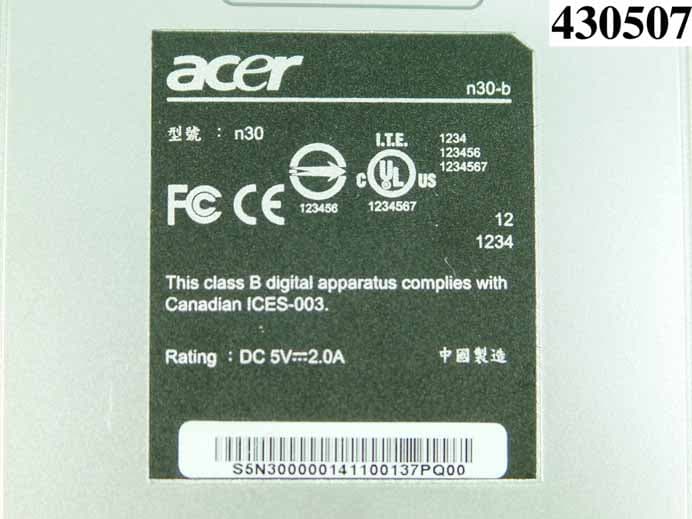
Click to zoom
Application Details
- Equipment Class
- DSS - Part 15 Spread Spectrum Transmitter
- Date of Grant
- Apr 29, 2005
- Application Purpose
- Original Equipment
- Date of Application
- Apr 29, 2005
- Equipment Note
- n30 Hand Held Bluetooth PDA
- Frequency Range
- 2402.00000000 - 2480.00000000
- Company
- Acer Incorporated
- Country
- Taiwan
Documents & Files
Document Text
Text extracted from the exhibit documents filed with the FCC. Open a document above to read the original.
Users Manual
Manual for Acer n30 Handheld COPYRIGHT Copyright © 2004 Acer Inc. or its subsidiaries All Rights Reserved. Printed in Taiwan. Acer n30 Handheld Manual Original issue: April 2004 Acer and the Acer logo are registered trademarks of Acer Inc. Microsoft, ActiveSync, Outlook, Pocket Outlook, Windows, Windows NT, and the Windows logo are either registered trademarks or trademarks of Microsoft Corporation in the United States and/or other countries. Microsoft products are licensed to OEMs by Microsoft Licensing, Inc., a wholly owned subsidiary of Microsoft Corporation. Other company’s product names or trademarks are used herein for identification purpose only and belong to their respective companies. Changes may be made periodically to the information in this publication without obligation to notify any person of such revision or changes. Such changes will be incorporated in new editions of this Manual or supplementary documents and publications. No part of this publication may be reproduced, stored in a retrieval system, or transmitted, in any form or by any means, electronic, mechanical, photocopy, recording, or otherwise, without the prior written permission of Acer Inc. DISCLAIMER AND LIMITATION OF LIABILITY Acer and its subsidiaries makes no representations or warranties, either expressed or implied, with respect to the contents hereof and specifically disclaims the implied warranties of merchantability or fitness for a particular purpose. Acer and its subsidiaries assume no responsibility for any damage or loss resulting from the use of this Acer n30 Handheld Manual. NOTES Record the serial number, purchase date, and place of purchase information in the space provided below. The serial number is recorded on the label affixed to your Acer n30. All correspondence concerning your unit should include the serial number, and purchase information. Acer n30 Handheld S/N: _______________________________________ Purchase Date: ____________________________ Place of Purchase: _________________________ About this Manual iii About this Manual Welcome to the Acer n30 Handheld Manual. This Manual is designed to help you get up and running quickly with your new Acer n30—a Windows ® Powered Pocket PC 2003 handheld. It describes all you need to know about how to use your handheld as well as the application programs that come with it. This Manual will discuss the following topics: • A tour of the Acer n30 system • Setup and maintenance procedures • Viewing and entering data • Using the application programs bundled with you handheld • Taking advantage of your handheld’s expansion features • Synchronising data between your handheld and your computer • Connecting your handheld to a computer, a network, or the Internet • Personalising your handheld with your own preference settings This Manual introduces you to the many ways your Acer n30 can help you organise and manage both business and personal information to make your everyday activities a more productive and satisfying experience. About this Manual iv First things first Your guides v First things first We would like to thank you for making Acer n30 your choice for your handheld needs. Your new sleek Acer n30 is a multi-functional tool packed with user-friendly features and high-performance applications designed to make organising work- related information and synchronising it with your personal activities a time-efficient task. We hope you enjoy using your Acer n30 as much as we enjoyed creating it for you. Use your Acer n30 to effectively manage information related to both business and personal tasks. • Use the Microsoft ® Pocket PC 2003 software to perform organising and computing tasks • Synchronise the information on your computer with the information on your handheld using Microsoft ® ActiveSync ® • Get connected to the Internet with the Microsoft ® Pocket Internet Explorer • Create an on-the-go backup file • Expand your handheld’s capabilities using either the built-in SD/MMC slot • Exchange information between devices that have Bluetooth capabilities. • Beam information to another IR-enabled device • Customise your handheld based on your personal requirements and preferences Your guides To help you use your Acer n30, we have designed a set of guides: For information on:Refer to: Programs on your handheldThis Manual. Bundled in the Acer n30 Handheld Companion CD, it provides online reference for using your Acer n30. The Acer n30 Handheld Help. To view Help, tap and then Help. Programs on your handheld Additional programs that can be installed on your handheld The Acer n30 Handheld Companion CD. Connecting to and synchronising with your computer The Acer n30 Handheld Quick Guide. ActiveSync Help on your computer. To view Help, click Help and then Microsoft ActiveSync Help. First things first Package contents vi Package contents Your Acer n30 comes packed in a cardboard box. Carefully unpack the box and remove the contents. If any of the following items are missing or damaged, contact your dealer immediately: Maintaining your Acer n30 This section provides information on the following: • Proper care and usage of your handheld • Resetting your handheld Proper care and usage of your Acer n30 Your Acer n30’s rugged and tough construction is designed to provide you with years of reliable and trouble-free service. Observing the following general maintenance procedures will help ensure this: 1Take care not to scratch the screen of your handheld. Keep the screen clean. When working with your handheld, use the supplied stylus or plastic-tipped pens intended for use with touch-sensitive screens. Never use an actual pen or pencil or other sharp object on the screen surface. 2Your handheld is not waterproof and should not be exposed to rain or moisture. Under extreme conditions, water may enter the circuitry through the front panel buttons or expansion slots. In general, treat your handheld as you would a pocket calculator or other small electronic device. 3Take c…
Text truncated - open the document above for the full version.
Cover Letter(s)
Acer Incorporated 8F, 88, Sec. 1, Hsin Tai Wu Rd., Hsichih Taipei Hsien 221, Taiwan, R.O.C. Tel : 886-2-2696-1234 Fax : 886-2-2696-3535 www.acer.com Apr. 22, 2005 Federal Communications Commission Authorization and Evaluation Division FCC ID HLZN30 Confidentiality Request Pursuant to Sections 0.457 and 0.459 of the Commission’s Rules, the Applicant Hereby requests confidential treatment of information applied this Application As outlined below: 1. Block Diagram 2. Circuit Diagram 3. Operational Description The above materials contain trade secrets and proprietary information not customarily Released to the public. The public disclosure of these matters might be harmful to the Applicant and provide unjustified benefits to its competitors. The Applicant understands that pursuant to Rule 0.457, disclosure of this Application and all accompanying documentation will not be made before the date of the Grant for this application Sincerely, Mr. Easy Lai / Director Acer Incorporated TEL: 02-26961234*3089 FAX: 02-86913000 EMAIL: [email protected]
External Photos
1190 率 ILAC MRA : O430507 行 : 93年 04 12 北路樓 : 27 1 TEL : 886-2-2696-2468 FAX : 886-2-2696-2255 錄A. 1190 率 ILAC MRA : O430507 行 : 93年 04 12 北路樓 : 27 2 TEL : 886-2-2696-2468 FAX : 886-2-2696-2255 1190 率 ILAC MRA : O430507 行 : 93年 04 12 北路樓 : 27 3 TEL : 886-2-2696-2468 FAX : 886-2-2696-2255 1190 率 ILAC MRA : O430507 行 : 93年 04 12 北路樓 : 27 4 TEL : 886-2-2696-2468 FAX : 886-2-2696-2255 1190 率 ILAC MRA : O430507 行 : 93年 04 12 北路樓 : 27 5 TEL : 886-2-2696-2468 FAX : 886-2-2696-2255
ID Label/Location Info
Label Location
Internal Photos
1190 率 ILAC MRA : O430507 行 : 93年 04 12 北路樓 : 27 6 TEL : 886-2-2696-2468 FAX : 886-2-2696-2255 1190 率 ILAC MRA : O430507 行 : 93年 04 12 北路樓 : 27 7 TEL : 886-2-2696-2468 FAX : 886-2-2696-2255 1190 率 ILAC MRA : O430507 行 : 93年 04 12 北路樓 : 27 8 TEL : 886-2-2696-2468 FAX : 886-2-2696-2255 1190 率 ILAC MRA : O430507 行 : 93年 04 12 北路樓 : 27 9 TEL : 886-2-2696-2468 FAX : 886-2-2696-2255 1190 率 ILAC MRA : O430507 行 : 93年 04 12 北路樓 : 27 10 TEL : 886-2-2696-2468 FAX : 886-2-2696-2255 1190 率 ILAC MRA : O430507 行 : 93年 04 12 北路樓 : 27 11 TEL : 886-2-2696-2468 FAX : 886-2-2696-2255 1190 率 ILAC MRA : O430507 行 : 93年 04 12 北路樓 : 27 12 TEL : 886-2-2696-2468 FAX : 886-2-2696-2255 1190 率 ILAC MRA : O430507 行 : 93年 04 12 北路樓 : 27 13 TEL : 886-2-2696-2468 FAX : 886-2-2696-2255 1190 率 ILAC MRA : O430507 行 : 93年 04 12 北路樓 : 27 14 TEL : 886-2-2696-2468 FAX : 886-2-2696-2255 1190 率 ILAC MRA : O430507 行 : 93年 04 12 北路樓 : 27 15 TEL : 886-2-2696-2468 FAX : 886-2-2696-2255 1190 率 ILAC MRA : O430507 行 : 93年 04 12 北路樓 : 27 16 TEL : 886-2-2696-2468 FAX : 886-2-2696-2255 1190 率 ILAC MRA : O430507 行 : 93年 04 12 北路樓 : 27 17 TEL : 886-2-2696-2468 FAX : 886-2-2696-2255 1190 率 ILAC MRA : O430507 行 : 93年 04 12 北路樓 : 27 18 TEL : 886-2-2696-2468 FAX : 886-2-2696-2255 1190 率 ILAC MRA : O430507 行 : 93年 04 12 北路樓 : 27 19 TEL : 886-2-2696-2468 FAX : 886-2-2696-2255 1190 率 ILAC MRA : O430507 行 : 93年 04 12 北路樓 : 27 20 TEL : 886-2-2696-2468 FAX : 886-2-2696-2255 1190 率 ILAC MRA : O430507 行 : 93年 04 12 北路樓 : 27 21 TEL : 886-2-2696-2468 FAX : 886-2-2696-2255 1190 率 ILAC MRA : O430507 行 : 93年 04 12 北路樓 : 27 22 TEL : 886-2-2696-2468 FAX : 886-2-2696-2255 1190 率 ILAC MRA : O430507 行 : 93年 04 12 北路樓 : 27 23 TEL : 886-2-2696-2468 FAX : 886-2-2696-2255 1190 率 ILAC MRA : O430507 行 : 93年 04 12 北路樓 : 27 24 TEL : 886-2-2696-2468 FAX : 886-2-2696-2255 1190 率 ILAC MRA : O430507 行 : 93年 04 12 北路樓 : 27 25 TEL : 886-2-2696-2468 FAX : 886-2-2696-2255 1190 率 ILAC MRA : O430507 行 : 93年 04 12 北路樓 : 27 26 TEL : 886-2-2696-2468 FAX : 886-2-2696-2255 1190 率 ILAC MRA : O430507 行 : 93年 04 12 北路樓 : 27 27 TEL : 886-2-2696-2468 FAX : 886-2-2696-2255
Operational Description
FCC ID:HLZN30 BT Description of Operation EUT is a hand-held PDA (Personal Digital Assistant), it’s very popular in the world now. And it has a Bluetooth version 1.1 class 2 radio in the terminal. Bluetooth wireless technology is a short-range radio technology. In this terminal, the communicated distance will be 10 meters. And Bluetooth is wasted power is very less. The Bluetooth wireless technology comprises hardware, software and interoperability requirements. And Frequency-Hopping scheme is to make the link robust, even in radio noise environments. In order to Bluetooth can be popular in the world, Bluetooth SIG defined the frequency band is in 2.4 GHz ISM. There are total 79 channels in normal. And every channel is 1 MHz. The radio RF output power is about 0 dBm or so of the Bluetooth module. In modulation, Bluetooth is used GFSK (Gaussian Frequency Shift Keying). There is an embedded chip ceramic antenna in this EUT. The chip antenna is for the transmitter and receiver radio signals. WLAN Description of Operation EUT is a hand-held PDA (Personal Digital Assistant), it’s very popular in the world now. And it has an IEEE 802.11 b/g Wireless LAN (local area network). EUT us a 802.11 Wireless SiP module which refers as “Sip-g module” is a full function 54 Mbps wireless networking module that provides PCMCIA /CF host interface via 60 pins board to board connector. This terminal provided a convergence procedure for the 1, 2 ,5,5,11, 6, 9, 12, 18, 24, 36, 48,54 Mbps. It adapts DSSS ( Direct Sequence Spread Spectrum) and Orthogonal Frequency Division Multiplexing (OFDM) modulation. And the antenna is used an embedded PIFA (Planar F Inverted Antenna), it used a Hirose W.FL connector. This SiP-G WLAN module is an IEEE 802.11 b/g adapter. It allow your PDA to connect to a wireless network and to share resources, such as files or printers without being bound to the network wires. And it will also be used for VoIP (Voice of Internet Phone), it’s be fashioned this year or next year. In addition to WEP 64/128, WPA and TKIP, AES will be supported to provide the security on your network.
Test Report
FCC ID: HLZN30 Issued on Apr. 22, 2005 Report No.: FR430507-04 SPORTON International Inc. TEL : 886-2-2696-2468 FAX : 886-2-2696-2255 FCC TEST REPORT CATEGORY : Portable PRODUCT NAME PDA FCC ID. : HLZN30 FILING TYPE : Certification BRAND NAME : Acer MODEL NAME : n30 APPLICANT : Acer Incorporated 8F, 88, Sec. 1, Hsin Tai Wu Rd., Hsichih Taipei Hsien 221, Taiwan, R.O.C. MANUFACTURER : 1. Acer Information Services (Zhong Shan) Co., Ltd. 2F, C Building, XinYe Rd, Export Processing District In Torch, Zhongshan, Guangdong, P.R.C. 2. Beijing Acer Information Co., Ltd. Huade Building, No.18 ChuangYe Rd., ShangDi Zone, HaiDian District, Beijing, P.R.C. 3. SILITEK ELECTRONICS (G . Z.) CO., LTD Guangzhou Science City,Yi Heng Road,Dong Pu, Tian He Area, Guangzhou, Guan Dong Province, China ISSUED BY : SPORTON INTERNATIONAL INC. 6F, No. 106, Sec. 1, Hsin Tai Wu Rd., His Chih, Taipei Hsien, Taiwan, R.O.C. Statements: The test result in this report refers exclusively to the presented test model / sample. Without written approval of SPORTON International Inc., the test report shall not be reproduced except in full. Certificate or Test Report could not be used by the applicant to claim the product endorsement by CNLA, NVLAP or any agency of U.S. government. The test equipments used to perform the test are calibrated and traceable to NML/ROC or NIST/USA. 1190 ILAC MRA FCC ID: HLZN30 Issued on Apr. 22, 2005 Report No.: FR430507-04 SPORTON International Inc. Page No. : i TEL : 886-2-2696-2468 Issued Date : Apr. 22, 2005 FAX : 886-2-2696-2255: Table of Contents HISTORY OF THIS TEST REPORT .....................................................................................................................II CERTIFICATE OF COMPLIANCE.......................................................................................................................III 1. GENERAL DESCRIPTION OF EQUIPMENT UNDER TEST...........................................................................1 1.1. Applicant ......................................................................................................................................................................................... 1 1.2. Manufacturer ................................................................................................................................................................................... 1 1.3. Basic Description of Equipment under Test.................................................................................................................................... 1 1.4. Features of Equipment under Test ................................................................................................................................................. 1 1.5. Table for Carrier Frequencies ......................................................................................................................................................... 2 2. TEST CONFIGURATION OF THE EQUIPMENT UNDER TEST .....................................................................3 2.1. Connection Diagram of Test System .............................................................................................................................................. 3 2.2. The Test Mode Description............................................................................................................................................................. 3 3. GENERAL INFORMATION OF TEST ..............................................................................................................4 3.1. Test Facility ..................................................................................................................................................................................... 4 3.2. Test Conditions ............................................................................................................................................................................... 4 3.3. Standards for Methods of Measurement......................................................................................................................................... 4 3.4. Frequency Range Investigated ....................................................................................................................................................... 4 3.5. Test Distance .................................................................................................................................................................................. 4 4. LIST OF MEASUREMENTS .............................................................................................................................5 4.1. Summary of the Test Results.......................................................................................................................................................... 5 5. TEST RESULT ..................................................................................................................................................6 5.1. Test of Hopping Channel Bandwidth .............................................................................................................................................. 6 5.2. Test of Hopping Channel Separation............................................................................................................................................ 10 5.3. Test of Number of Hopping Frequency......................................................................................................................................... 14 5.4. Test of Dwell Time of Each Frequency ......................................................................................................................................... 16 5.5. Maximum Peak Output Power ...................................................................................................................................................... 20 5.6. Test of Band Edges E…
Text truncated - open the document above for the full version.
Test Setup Photos
率 : O430507 行 : 93年 04 17 北路樓 : 39 60 TEL : 886-2-2696-2468 FAX : 886-2-2696-2255 4.7 輻度量 率 : O430507 行 : 93年 04 17 北路樓 : 58 60 TEL : 886-2-2696-2468 FAX : 886-2-2696-2255 8.7 率 : O430507 行 : 93年 04 17 北路樓 : 59 60 TEL : 886-2-2696-2468 FAX : 886-2-2696-2255
Contact Information
Applicant
RU Jan(Sr. Manager)
Technical Contact
Sporton International Inc.Dr. Alan Lane
[email protected]+886 3 327 3456
No. 52, Hwa Ya 1st Road, · Taoyuan · Taiwan
Test Firm
SPORTON International IncKathy Lin
Technical Specifications
| # | Rule Parts | Frequency Range | Power Output |
|---|---|---|---|
| 1 | 15C | 2.40 GHz - 2.48 GHz | 300.00 µW |
Other Applications from Acer Incorporated
HLZA26007
Aug 07, 2026Tablet PC
Equipment Class
DTS - Digital Transmission SystemHLZA26003
Jul 28, 2026Tablet PC
Equipment Class
6XD - 15E 6 GHz Low Power Indoor ClientHLZAMR570
Apr 21, 2026Acer Wireless Mouse
Equipment Class
DTS - Digital Transmission SystemHLZ-NSK510
Apr 09, 2026Gaming sound bar
Equipment Class
DSS - Part 15 Spread Spectrum TransmitterHLZA26002
Apr 01, 2026Tablet PC
Equipment Class
NII - Unlicensed National Information Infrastructure TX