HLZRXMG1Notebook Computer
Acer Incorporated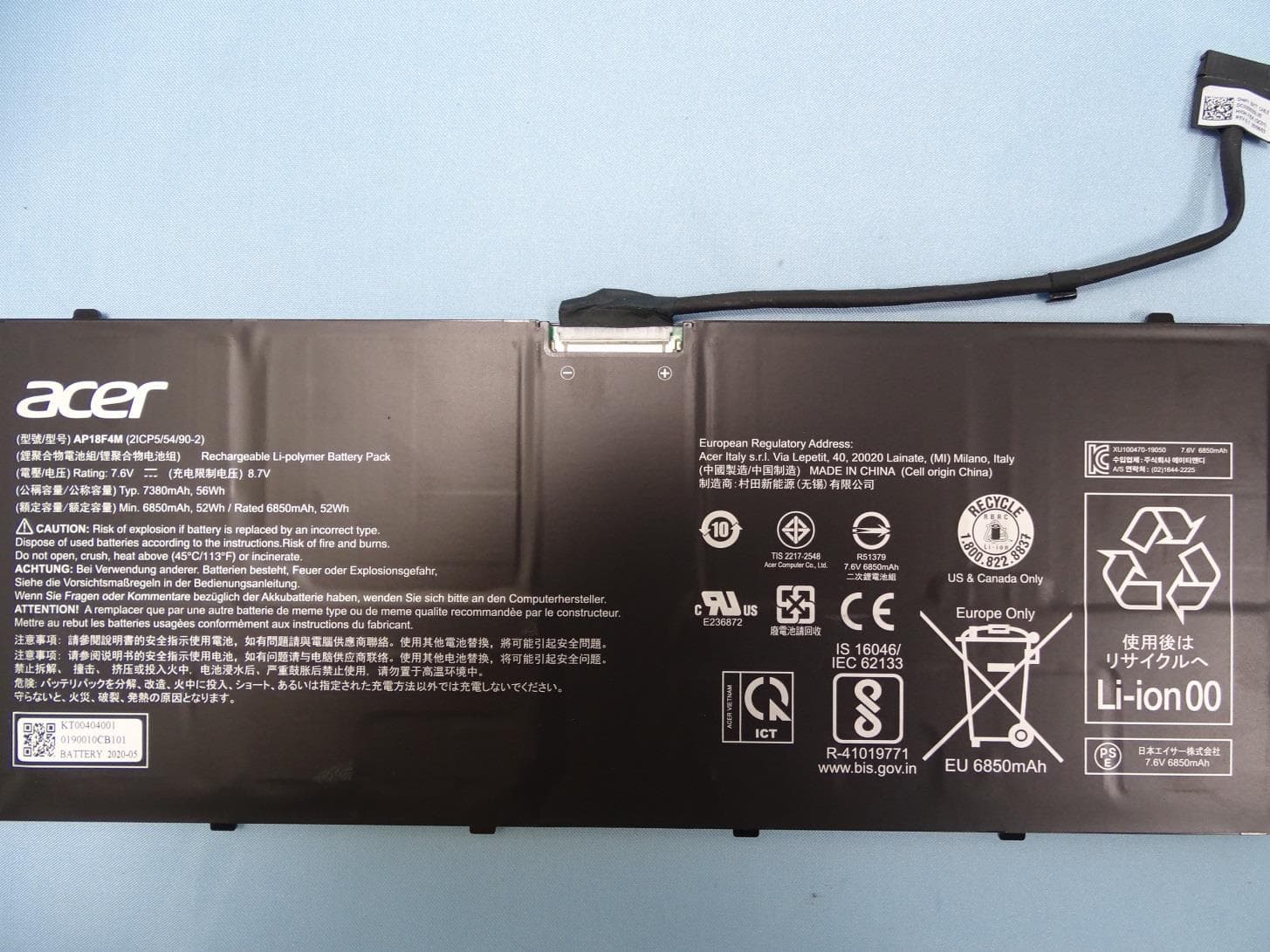
Click to zoom
Application Details
- Equipment Class
- PCB - PCS Licensed Transmitter
- Date of Grant
- Nov 15, 2020
- Application Purpose
- Original Equipment
- Date of Application
- Oct 12, 2020
- Equipment Note
- Notebook Computer
- Frequency Range
- 673.00000000 - 688.00000000
- Company
- Acer Incorporated
- Country
- Taiwan
Documents & Files
Document Text
Text extracted from the exhibit documents filed with the FCC. Open a document above to read the original.
Users Manual
English 1 © 2020. All Rights Reserved. Spin 7 Covers: SP714-61N / SP714-61NA This revision: September 2020 This manual contains proprietary information that is protected by copyright laws. The information contained in this manual is subject to change without notice. Some features described in this manual may not be supported depending on the Operating System version. Images provided herein are for reference only and may contain information or features that do not apply to your computer. Acer Group shall not be liable for technical or editorial errors or omissions contained in this manual. Model number: ________________________________________ Serial number: _________________________________________ Date of purchase: ______________________________________ Place of purchase: _____________________________________ ENVIRONMENT Temperature: - Operating: 5 °C to 35 °C - Storage: -20 °C to 60 °C Humidity (non-condensing): - Operating: 20% to 80% - Storage: 20% to 60% WARNING! To reduce the possibility of heat-related injuries or of overheating the computer, do not place the computer directly on your lap or obstruct the computer air vents. Use the computer only on a hard, flat surface. Do not allow another hard surface, such as an adjoining optional printer, or a soft surface, such as pillows or rugs or clothing, to block airflow. Also, do not allow the AC adapter to come into contact with the skin or a soft surface, such as pillows or rugs or clothing, during operation. 2 English First things first We would like to thank you for making this Acer notebook your choice for meeting your mobile computing needs. Your guides To help you use your Acer notebook, we have designed a set of guides: First off, the Setup Guide helps you get started with setting up your computer. The Quick Guide introduces you to the basic features and functions of your new computer. For more on how your computer can help you to be more productive, please refer to the Spin 7 User’s Manual. The Spin 7 User’s Manual contains useful information applying to your new computer. It covers basic topics such as using the keyboard and audio, etc. This guide contains detailed information on such subjects as system utilities, data recovery, expansion options and troubleshooting. In addition it contains warranty information and the general regulations and safety notices for your notebook. The User’s Manual can be downloaded from the Acer support website by going to: http://go.acer.com/?id=17883 Software installation The first time you turn on your computer, it will automatically install software and set up for use. This may take some time, please do not turn off your computer; wait until the installation has finished. Recovery You should create recovery backups as soon as you can. The Acer Recovery Management program allows you to create recovery backups and then to restore or reinstall applications and drivers provided by Acer. Having trouble? Acer provides several options to support your purchase. Acer support Make sure you write down your computer serial number, date and place of purchase and model name on the area provided in this guide; save your proof of purchase. Before you call us, please write down any error message that accompanies the 3 English problem, and have the computer in front of you and switched on if possible. Having these items to hand when contacting us will ensure better and quicker service. Acer website Remember to visit www.acer.com and refer to the support section for up-to-date information, help, drivers and downloads. Warranty and contact information You can find information about the warranty for your computer and how to contact technical support in your computer’s Warranty. Your Acer notebook tour 4 English Your Acer notebook tour After setting up your computer as illustrated in the Setup Guide, let us show you around your new Acer computer. Screen view #IconItemDescription 1MicrophonesInternal digital microphones for sound recording. 2Webcam Web camera for video communication. A light next to the webcam indicates that the webcam is active. 3Touchscreen Displays computer output, supports multi-touch input. 2 3 1 5 English Keyboard view #IconItemDescription 1SpeakersDeliver stereo audio output. 2Backlit keyboard For entering data into your computer. See "Using the keyboard" on page 8. 3Touchpad Touch-sensitive pointing device. The touchpad and selection buttons form a single surface. Press down firmly on the touchpad surface to perform a left click. Press down firmly on the lower right corner to perform a right click. 4Fingerprint readerFingerprint reader for Windows Hello and security. 3 1 2 4 Your Acer notebook tour 6 English Left view USB Type-C information • USB 3.2 Gen 2 with transfer speeds up to 10 Gbps. • Supports DisplayPort ™ audio/video output. • Delivers up to 3 A at 5 V DC for USB charging. • DC-in: requires power adapter or power source providing 65 W at 19~20 V. For optimal performance, please use a certified Acer power adapter or USB Power Delivery device. #IconItemDescription 1 USB Type-C port with DC-in and power-off charging Connects to the provided USB Type-C power adapter and to USB devices with a USB Type-C connector. 2Battery indicator Indicates the computer’s battery status. Charging: The light shows amber when the battery is charging. Fully charged: The light shows blue when in AC mode. 3 USB Type-C port with DC-in and power-off charging Connects to the provided USB Type-C power adapter and to USB devices with a USB Type-C connector. 123 7 English Right view Rear view #IconItemDescription 1 Rechargeable active stylus Draws, writes or highlights the text. 2Power buttonPress to turn the computer on and off. 3Power indicatorIndicates the computer’s power status. 4Headset/speaker jack Connects to audio devices (e.g., speakers, headphones) or a headset with microphone. 5Noble lock slotConnects to a Noble-compatible security lock. #IconItemDescription 1SIM card slotInsert a nano SIM card into…
Text truncated - open the document above for the full version.
Users Manual
Regulatory Information and Safety Guide 2 - © 2017. All Rights Reserved. Regulatory Information and Safety Guide This revision: 04/2017 Table of contents - 3 TABLE OF CONTENTS Important safety information for children 4 Tips and information for comfortable use 5 Finding your comfort zone .......................... 5 Taking care of your vision ........................... 6 Developing good work habits...................... 7 Protecting your hearing............................... 7 Basic care and tips for using your computer 8 Turning your computer on and off............... 8 Taking care of your computer ..................... 8 General ....................................................... 9 Pack your computer carefully...................... 9 Safety instructions ................................. 10 Product servicing ...................................... 10 Cleaning and servicing.............................. 10 Battery and adapter information ............ 11 Accessing the power................................. 11 Disconnecting the power source............... 11 Using electrical power............................... 11 Guidelines for safe battery usage ............. 13 Internal battery....................................... 15 Warnings and regulatory information 16 Optical drives ......................................... 16 T elephone line safety............................. 17 Emergency calls........................................ 17 Medical devices ..................................... 17 Vehicles ................................................. 18 Potentially explosive environments........ 18 Disposal instructions.............................. 19 ENERGY STAR ..................................... 19 Wireless adapter regulatory information 20 Radio frequency interference.................... 20 Use on aircraft........................................... 21 The wireless adapter and your health....... 21 USA — FCC and FAA............................... 21 FCC radio frequency interference requirements ............................................. 22 RF exposure ............................................. 24 Canada — Industry Canada (IC) .............. 24 European Union ........................................ 26 Compliant with Russian regulatory certification................................................ 29 4 - Important safety information for children IMPORTANT SAFETY INFORMATION FOR CHILDREN CAUTION - ELECTRICALLY OPERATED PRODUCT. THIS IS NOT A TOY. TO AVOID RISK OF ELECTRIC SHOCK OR FIRE IT SHOULD NOT BE USED WITHOUT ADULT SUPERVISION OR PLACED WHERE SMALL CHILDREN CAN REACH IT. CAUTION - ELECTRICALLY OPERATED PRODUCT. Not recommended for children under 3 years of age. As with all electrical products, precautions should be observed during handling and use of electrical products to reduce the risk of electric shock. "CAUTION for film bag - Keep away from small children; the thin film may cling to nose and mouth and prevent breathing." • As with the power supply (adapter) should not be handled by the children, precautions should be observed during handling and use to prevent electric shock and high temperature. • Children should be very careful while handling the power supply (adapter), in particular plugging the power supply into the receptacle (power outlet). • The product should not be placed on the bare skin (e.g. lap of a child) for long periods. The laptop should be placed on a flat surface, like a desk or tabletop, if intending to use it for more than a few minutes. • The product, including power supply and battery pack, as applicable should not be left in the rain or exposure to water. If cleaning is necessary do not immerse in water; wipe clean with a damp cloth. • The product, including power supply and battery pack, as applicable should not be dropped, crushed (stepped on) or otherwise abused. • Children should be careful with the cable (wiring) between the power supply (adapter) and laptop, in particular as a potential trip hazard. An adult should periodically inspect the product for damage, including the power supply and casing around the battery pack, (as applicable, and replace or send for repair if necessary. Similarly, if a child notices damage or broken parts, this should be reported to an adult immediately so that the damaged parts can be replaced or repaired. Tips and information for comfortable use - 5 TIPS AND INFORMATION FOR COMFORTABLE USE Computer users may complain of eyestrain and headaches after prolonged use. Users are also at risk of physical injury after long hours of working in front of a computer. Long work periods, bad posture, poor work habits, stress, inadequate working conditions, personal health and other factors greatly increase the risk of physical injury. Incorrect computer usage may lead to carpal tunnel syndrome, tendonitis, tenosynovitis or other musculoskeletal disorders. The following symptoms may appear in the hands, wrists, arms, shoulders, neck or back: • Numbness, or a burning or tingling sensation. • Aching, soreness or tenderness. • Pain, swelling or throbbing. • Stiffness or tightness. • Coldness or weakness. If you have these symptoms, or any other recurring or persistent discomfort and/or pain related to computer use, consult a physician immediately and inform your company's health and safety department. The following section provides tips for more comfortable computer use. Finding your comfort zone Find your comfort zone by adjusting the viewing angle of the monitor, using a footrest, or raising your sitting height to achieve maximum comfort. Observe the following tips: • Refrain from staying too long in one fixed posture. Important Some of the information in this guide may not apply to your computer. 6 - Tips and information for comfortable use • Avoid slouching forward and/or leaning backward. • Stand up and walk around regularly to remove the strain on your leg muscles. • Take short rests to relax your neck and shoulders. • Avo…
Text truncated - open the document above for the full version.
Cover Letter(s)
Acer Incorporated 8F, 88, Sec. 1, Hsin Tai Wu Rd., Hsichih New Taipei City 22181, Taiwan, R.O.C. TEL: +886-2-2696-3131 ext.3089 Fax : 886-2-8691-3120 www.acer.com Date:2011/8/22 To who may concern, I, the undersigned, responsible for the designated person in FCC grant communicator / IC company code contactor, hereby authorized RU Jan to sign the FCC / IC application form for certification process. Thank you, Sincerely Yours, Contact Person: Harriot S.L. Lee Company Name: Acer Incorporated E-Mail: [email protected]
External Photos
PHOTOGRAPHS OF EUT Report No.: EP070206 Brand Name: ACER / Model Name: N20C7 TEL : 886-3-327-3456 Page Number : 1 of 32 FAX : 886-3-328-4978 Issued Date : Oct. 02, 2020 Report Version : 01 1. External Photograph of EUT PHOTOGRAPHS OF EUT Report No.: EP070206 Brand Name: ACER / Model Name: N20C7 TEL : 886-3-327-3456 Page Number : 2 of 32 FAX : 886-3-328-4978 Issued Date : Oct. 02, 2020 Report Version : 01 PHOTOGRAPHS OF EUT Report No.: EP070206 Brand Name: ACER / Model Name: N20C7 TEL : 886-3-327-3456 Page Number : 3 of 32 FAX : 886-3-328-4978 Issued Date : Oct. 02, 2020 Report Version : 01 PHOTOGRAPHS OF EUT Report No.: EP070206 Brand Name: ACER / Model Name: N20C7 TEL : 886-3-327-3456 Page Number : 4 of 32 FAX : 886-3-328-4978 Issued Date : Oct. 02, 2020 Report Version : 01 PHOTOGRAPHS OF EUT Report No.: EP070206 Brand Name: ACER / Model Name: N20C7 TEL : 886-3-327-3456 Page Number : 5 of 32 FAX : 886-3-328-4978 Issued Date : Oct. 02, 2020 Report Version : 01 PHOTOGRAPHS OF EUT Report No.: EP070206 Brand Name: ACER / Model Name: N20C7 TEL : 886-3-327-3456 Page Number : 6 of 32 FAX : 886-3-328-4978 Issued Date : Oct. 02, 2020 Report Version : 01 PHOTOGRAPHS OF EUT Report No.: EP070206 Brand Name: ACER / Model Name: N20C7 TEL : 886-3-327-3456 Page Number : 7 of 32 FAX : 886-3-328-4978 Issued Date : Oct. 02, 2020 Report Version : 01 PHOTOGRAPHS OF EUT Report No.: EP070206 Brand Name: ACER / Model Name: N20C7 TEL : 886-3-327-3456 Page Number : 8 of 32 FAX : 886-3-328-4978 Issued Date : Oct. 02, 2020 Report Version : 01 720510 PHOTOGRAPHS OF EUT Report No.: EP070206 Brand Name: ACER / Model Name: N20C7 TEL : 886-3-327-3456 Page Number : 9 of 32 FAX : 886-3-328-4978 Issued Date : Oct. 02, 2020 Report Version : 01 Specification of Accessory AC Adapter Brand Name ACER Model Name ADP-45HG B Battery Brand Name ACER Model Name AP18F4M Remark: For accessories equipped with this EUT, please refer to the following photos. 2. Photograph of Accessory PHOTOGRAPHS OF EUT Report No.: EP070206 Brand Name: ACER / Model Name: N20C7 TEL : 886-3-327-3456 Page Number : 10 of 32 FAX : 886-3-328-4978 Issued Date : Oct. 02, 2020 Report Version : 01 720510 PHOTOGRAPHS OF EUT Report No.: EP070206 Brand Name: ACER / Model Name: N20C7 TEL : 886-3-327-3456 Page Number : 11 of 32 FAX : 886-3-328-4978 Issued Date : Oct. 02, 2020 Report Version : 01 AC Adapter PHOTOGRAPHS OF EUT Report No.: EP070206 Brand Name: ACER / Model Name: N20C7 TEL : 886-3-327-3456 Page Number : 12 of 32 FAX : 886-3-328-4978 Issued Date : Oct. 02, 2020 Report Version : 01 Battery
Internal Photos
PHOTOGRAPHS OF EUT Report No.: EP070206 Brand Name: ACER / Model Name: N20C7 TEL : 886-3-327-3456 Page Number : 13 of 34 FAX : 886-3-328-4978 Issued Date : Nov. 02, 2020 Report Version : 02 720510 3. Internal Photograph of EUT PHOTOGRAPHS OF EUT Report No.: EP070206 Brand Name: ACER / Model Name: N20C7 TEL : 886-3-327-3456 Page Number : 14 of 34 FAX : 886-3-328-4978 Issued Date : Nov. 02, 2020 Report Version : 02 PHOTOGRAPHS OF EUT Report No.: EP070206 Brand Name: ACER / Model Name: N20C7 TEL : 886-3-327-3456 Page Number : 15 of 34 FAX : 886-3-328-4978 Issued Date : Nov. 02, 2020 Report Version : 02 PHOTOGRAPHS OF EUT Report No.: EP070206 Brand Name: ACER / Model Name: N20C7 TEL : 886-3-327-3456 Page Number : 16 of 34 FAX : 886-3-328-4978 Issued Date : Nov. 02, 2020 Report Version : 02 PHOTOGRAPHS OF EUT Report No.: EP070206 Brand Name: ACER / Model Name: N20C7 TEL : 886-3-327-3456 Page Number : 17 of 34 FAX : 886-3-328-4978 Issued Date : Nov. 02, 2020 Report Version : 02 PHOTOGRAPHS OF EUT Report No.: EP070206 Brand Name: ACER / Model Name: N20C7 TEL : 886-3-327-3456 Page Number : 18 of 34 FAX : 886-3-328-4978 Issued Date : Nov. 02, 2020 Report Version : 02 PHOTOGRAPHS OF EUT Report No.: EP070206 Brand Name: ACER / Model Name: N20C7 TEL : 886-3-327-3456 Page Number : 19 of 34 FAX : 886-3-328-4978 Issued Date : Nov. 02, 2020 Report Version : 02 PHOTOGRAPHS OF EUT Report No.: EP070206 Brand Name: ACER / Model Name: N20C7 TEL : 886-3-327-3456 Page Number : 20 of 34 FAX : 886-3-328-4978 Issued Date : Nov. 02, 2020 Report Version : 02 PHOTOGRAPHS OF EUT Report No.: EP070206 Brand Name: ACER / Model Name: N20C7 TEL : 886-3-327-3456 Page Number : 21 of 34 FAX : 886-3-328-4978 Issued Date : Nov. 02, 2020 Report Version : 02 WWAN Module PHOTOGRAPHS OF EUT Report No.: EP070206 Brand Name: ACER / Model Name: N20C7 TEL : 886-3-327-3456 Page Number : 22 of 34 FAX : 886-3-328-4978 Issued Date : Nov. 02, 2020 Report Version : 02 PHOTOGRAPHS OF EUT Report No.: EP070206 Brand Name: ACER / Model Name: N20C7 TEL : 886-3-327-3456 Page Number : 23 of 34 FAX : 886-3-328-4978 Issued Date : Nov. 02, 2020 Report Version : 02 WLAN Module PHOTOGRAPHS OF EUT Report No.: EP070206 Brand Name: ACER / Model Name: N20C7 TEL : 886-3-327-3456 Page Number : 24 of 34 FAX : 886-3-328-4978 Issued Date : Nov. 02, 2020 Report Version : 02 WWAN Tx1 Antenna PHOTOGRAPHS OF EUT Report No.: EP070206 Brand Name: ACER / Model Name: N20C7 TEL : 886-3-327-3456 Page Number : 25 of 34 FAX : 886-3-328-4978 Issued Date : Nov. 02, 2020 Report Version : 02 WWAN Tx2 Antenna PHOTOGRAPHS OF EUT Report No.: EP070206 Brand Name: ACER / Model Name: N20C7 TEL : 886-3-327-3456 Page Number : 26 of 34 FAX : 886-3-328-4978 Issued Date : Nov. 02, 2020 Report Version : 02 WWAN Rx1Antenna PHOTOGRAPHS OF EUT Report No.: EP070206 Brand Name: ACER / Model Name: N20C7 TEL : 886-3-327-3456 Page Number : 27 of 34 FAX : 886-3-328-4978 Issued Date : Nov. 02, 2020 Report Version : 02 WWAN Rx2 and GPS Antenna PHOTOGRAPHS OF EUT Report No.: EP070206 Brand Name: ACER / Model Name: N20C7 TEL : 886-3-327-3456 Page Number : 28 of 34 FAX : 886-3-328-4978 Issued Date : Nov. 02, 2020 Report Version : 02 Bluetooth and WLAN Main Antenna PHOTOGRAPHS OF EUT Report No.: EP070206 Brand Name: ACER / Model Name: N20C7 TEL : 886-3-327-3456 Page Number : 29 of 34 FAX : 886-3-328-4978 Issued Date : Nov. 02, 2020 Report Version : 02 PHOTOGRAPHS OF EUT Report No.: EP070206 Brand Name: ACER / Model Name: N20C7 TEL : 886-3-327-3456 Page Number : 30 of 34 FAX : 886-3-328-4978 Issued Date : Nov. 02, 2020 Report Version : 02 WLAN Aux. Antenna PHOTOGRAPHS OF EUT Report No.: EP070206 Brand Name: ACER / Model Name: N20C7 TEL : 886-3-327-3456 Page Number : 31 of 34 FAX : 886-3-328-4978 Issued Date : Nov. 02, 2020 Report Version : 02 PHOTOGRAPHS OF EUT Report No.: EP070206 Brand Name: ACER / Model Name: N20C7 TEL : 886-3-327-3456 Page Number : 32 of 34 FAX : 886-3-328-4978 Issued Date : Nov. 02, 2020 Report Version : 02 mmWave Antenna 0 PHOTOGRAPHS OF EUT Report No.: EP070206 Brand Name: ACER / Model Name: N20C7 TEL : 886-3-327-3456 Page Number : 33 of 34 FAX : 886-3-328-4978 Issued Date : Nov. 02, 2020 Report Version : 02 mmWave Antenna 1 PHOTOGRAPHS OF EUT Report No.: EP070206 Brand Name: ACER / Model Name: N20C7 TEL : 886-3-327-3456 Page Number : 34 of 34 FAX : 886-3-328-4978 Issued Date : Nov. 02, 2020 Report Version : 02 ─────THE END──── mmWave Antenna 2
RF Exposure Info
Test Laboratory: Sporton International Inc. SAR/HAC Testing Lab Date: 2020/8/25 System Check_Head_750MHz DUT: D750V3-1107 Communication System: CW ; Frequency: 750 MHz;Duty Cycle: 1:1 Medium: HSL_750_200825 Medium parameters used: f = 750 MHz; σ = 0.898 S/m; ε r = 43.666; ρ = 1000 kg/m 3 Ambient Temperature:23.2 °C; Liquid Temperature:22.2 °C DASY5 Configuration: - Probe: EX3DV4 - SN7515; ConvF(9.88, 9.88, 9.88) @ 750 MHz; Calibrated: 2019/10/22 - Sensor-Surface: 1.4mm (Mechanical Surface Detection) - Electronics: DAE4 Sn854; Calibrated: 2020/5/26 - Phantom: ELI v5.0; Type: QDOVA002AA; Serial: 1131 - Measurement SW: DASY52, Version 52.10 (4);SEMCAD X Version 14.6.14 (7483) Pin=250mW/Area Scan (61x61x1): Interpolated grid: dx=1.500 mm, dy=1.500 mm Maximum value of SAR (interpolated) = 2.74 W/kg Pin=250mW/Zoom Scan (5x5x7)/Cube 0: Measurement grid: dx=8mm, dy=8mm, dz=5mm Reference Value = 56.30 V/m; Power Drift = -0.12 dB Peak SAR (extrapolated) = 3.22 W/kg SAR(1 g) = 2.24 W/kg; SAR(10 g) = 1.5 W/kg Maximum value of SAR (measured) = 2.78 W/kg 0 dB = 2.74 W/kg = 4.38 dBW/kg Test Laboratory: Sporton International Inc. SAR/HAC Testing Lab Date: 2020/8/27 System Check_Head_750MHz DUT: D750V3-1107 Communication System: CW ; Frequency: 750 MHz;Duty Cycle: 1:1 Medium: HSL_750_200827 Medium parameters used: f = 750 MHz; σ = 0.913 S/m; ε r = 41.797; ρ = 1000 kg/m 3 Ambient Temperature:23.5 °C; Liquid Temperature:22.5 °C DASY5 Configuration: - Probe: EX3DV4 - SN7515; ConvF(9.88, 9.88, 9.88) @ 750 MHz; Calibrated: 2019/10/22 - Sensor-Surface: 1.4mm (Mechanical Surface Detection) - Electronics: DAE4 Sn854; Calibrated: 2020/5/26 - Phantom: ELI v5.0; Type: QDOVA002AA; Serial: 1131 - Measurement SW: DASY52, Version 52.10 (4);SEMCAD X Version 14.6.14 (7483) Pin=250mW/Area Scan (61x61x1): Interpolated grid: dx=1.500 mm, dy=1.500 mm Maximum value of SAR (interpolated) = 2.78 W/kg Pin=250mW/Zoom Scan (5x5x7)/Cube 0: Measurement grid: dx=8mm, dy=8mm, dz=5mm Reference Value = 56.30 V/m; Power Drift = -0.08 dB Peak SAR (extrapolated) = 3.28 W/kg SAR(1 g) = 2.28 W/kg; SAR(10 g) = 1.53 W/kg Maximum value of SAR (measured) = 2.83 W/kg 0 dB = 2.78 W/kg = 4.44 dBW/kg Test Laboratory: Sporton International Inc. SAR/HAC Testing Lab Date: 2020/9/1 System Check_Head_750MHz DUT: D750V3-1107 Communication System: CW ; Frequency: 750 MHz;Duty Cycle: 1:1 Medium: HSL_750_200901 Medium parameters used: f = 750 MHz; σ = 0.899 S/m; ε r = 43.678; ρ = 1000 kg/m 3 Ambient Temperature:23.4 °C; Liquid Temperature:22.4 °C DASY5 Configuration: - Probe: ES3DV3 - SN3169; ConvF(6.57, 6.57, 6.57) @ 750 MHz; Calibrated: 2020/5/27 - Sensor-Surface: 3mm (Mechanical Surface Detection) - Electronics: DAE4 Sn778; Calibrated: 2020/6/4 - Phantom: ELI v5.0; Type: QDOVA002AA; Serial: 1131 - Measurement SW: DASY52, Version 52.10 (4);SEMCAD X Version 14.6.14 (7483) Pin=250mW/Area Scan (61x61x1): Interpolated grid: dx=1.500 mm, dy=1.500 mm Maximum value of SAR (interpolated) = 2.40 W/kg Pin=250mW/Zoom Scan (5x5x7)/Cube 0: Measurement grid: dx=8mm, dy=8mm, dz=5mm Reference Value = 53.42 V/m; Power Drift = -0.05 dB Peak SAR (extrapolated) = 2.98 W/kg SAR(1 g) = 2.05 W/kg; SAR(10 g) = 1.36 W/kg Maximum value of SAR (measured) = 2.38 W/kg 0 dB = 2.40 W/kg = 3.80 dBW/kg Test Laboratory: Sporton International Inc. SAR/HAC Testing Lab Date: 2020/9/2 System Check_Head_750MHz DUT: D750V3-1107 Communication System: CW; Frequency: 750 MHz;Duty Cycle: 1:1 Medium: HSL_750_200902 Medium parameters used: f = 750 MHz; σ = 0.896 S/m; ε r = 43.596; ρ = 1000 kg/m 3 Ambient Temperature:23.3 °C; Liquid Temperature:22.3 °C DASY5 Configuration: - Probe: ES3DV3 - SN3169; ConvF(6.57, 6.57, 6.57) @ 750 MHz; Calibrated: 2020/5/27 - Sensor-Surface: 3mm (Mechanical Surface Detection) - Electronics: DAE4 Sn778; Calibrated: 2020/6/4 - Phantom: ELI v5.0; Type: QDOVA002AA; Serial: 1131 - Measurement SW: DASY52, Version 52.10 (4);SEMCAD X Version 14.6.14 (7483) Pin=250mW/Area Scan (61x61x1): Interpolated grid: dx=1.500 mm, dy=1.500 mm Maximum value of SAR (interpolated) = 2.31 W/kg Pin=250mW/Zoom Scan (5x5x7)/Cube 0: Measurement grid: dx=8mm, dy=8mm, dz=5mm Reference Value = 53.33 V/m; Power Drift = 0.06 dB Peak SAR (extrapolated) = 2.97 W/kg SAR(1 g) = 2.02 W/kg; SAR(10 g) = 1.35 W/kg Maximum value of SAR (measured) = 2.31 W/kg 0 dB = 2.31 W/kg = 3.92 dBW/kg Test Laboratory: Sporton International Inc. SAR/HAC Testing Lab Date: 2020/9/8 System Check_Head_750MHz DUT: D750V3-1107 Communication System: CW; Frequency: 750 MHz;Duty Cycle: 1:1 Medium: HSL_750_200908 Medium parameters used: f = 750 MHz; σ = 0.895 S/m; ε r = 43.476; ρ = 1000 kg/m 3 Ambient Temperature:23.6 °C; Liquid Temperature:22.6 °C DASY5 Configuration: - Probe: ES3DV3 - SN3169; ConvF(6.57, 6.57, 6.57) @ 750 MHz; Calibrated: 2020/5/27 - Sensor-Surface: 3mm (Mechanical Surface Detection) - Electronics: DAE4 Sn778; Calibrated: 2020/6/4 - Phantom: ELI v5.0; Type: QDOVA002AA; Serial: 1131 - Measurement SW: DASY52, Version 52.10 (4);SEMCAD X Version 14.6.14 (7483) Pin=250mW/Area Scan (61x61x1): Interpolated grid: dx=1.500 mm, dy=1.500 mm Maximum value of SAR (interpolated) = 2.39 W/kg Pin=250mW/Zoom Scan (5x5x7)/Cube 0: Measurement grid: dx=8mm, dy=8mm, dz=5mm Reference Value = 53.42 V/m; Power Drift = -0.08 dB Peak SAR (extrapolated) = 2.97 W/kg SAR(1 g) = 2.04 W/kg; SAR(10 g) = 1.36 W/kg Maximum value of SAR (measured) = 2.37 W/kg 0 dB = 2.39 W/kg = 3.78 dBW/kg Test Laboratory: Sporton International Inc. SAR/HAC Testing Lab Date: 2020/9/9 System Check_Head_750MHz DUT: D750V3-1107 Communication System: CW; Frequency: 750 MHz;Duty Cycle: 1:1 Medium: HSL_750_200909 Medium parameters used: f = 750 MHz; σ = 0.903 S/m; ε r = 43.806; ρ = 1000 kg/m 3 Ambient Temperature:23.7 °C; Liquid Temperature:22.7 °C DASY5 Configuration: - Probe: ES3DV3 - SN3169; ConvF(6.57, 6.57, 6.57) @ 750 MHz; Calibrated: 2020/5/27 - Sensor-Surface: 3mm (Mechanical Surface Detection) - Electronics: DAE4 Sn778; Calibrated: 2020/6/4 - Phantom: ELI v5.0; Type:…
Text truncated - open the document above for the full version.
RF Exposure Info
Test Laboratory: Sporton International Inc. SAR/HAC Testing Lab Date: 2020/9/6 #1_WCDMA II_RMC 12.2Kbps_Bottom Face_0mm_Ch9262 Communication System: WCDMA; Frequency: 1852.4 MHz;Duty Cycle: 1:1 Medium: HSL_1900_200906 Medium parameters used: f = 1852.4 MHz; σ = 1.338 S/m; ε r = 40.544; ρ = 1000 kg/m 3 Ambient Temperature:23.1 °C; Liquid Temperature:22.1 °C DASY5 Configuration: - Probe: ES3DV3 - SN3169; ConvF(5.1, 5.1, 5.1) @ 1852.4 MHz; Calibrated: 2020/5/27 - Sensor-Surface: 3mm (Mechanical Surface Detection) - Electronics: DAE4 Sn778; Calibrated: 2020/6/4 - Phantom: ELI v5.0; Type: QDOVA002AA; Serial: 1131 - Measurement SW: DASY52, Version 52.10 (4);SEMCAD X Version 14.6.14 (7483) Area Scan (71x61x1): Interpolated grid: dx=1.500 mm, dy=1.500 mm Maximum value of SAR (interpolated) = 1.76 W/kg Zoom Scan (5x5x7)/Cube 0: Measurement grid: dx=8mm, dy=8mm, dz=5mm Reference Value = 25.69 V/m; Power Drift = -0.00 dB Peak SAR (extrapolated) = 2.97 W/kg SAR(1 g) = 1.12 W/kg; SAR(10 g) = 0.508 W/kg Maximum value of SAR (measured) = 1.59 W/kg 0 dB = 1.76 W/kg = 2.46 dBW/kg Test Laboratory: Sporton International Inc. SAR/HAC Testing Lab Date: 2020/9/7 #2_WCDMA IV_RMC 12.2Kbps_Bottom Face_0mm_Ch1513 Communication System: WCDMA; Frequency: 1752.6 MHz;Duty Cycle: 1:1 Medium: HSL_1750_200907 Medium parameters used: f = 1753 MHz; σ = 1.407 S/m; ε r = 40.688; ρ = 1000 kg/m 3 Ambient Temperature:23.1 °C; Liquid Temperature:22.1 °C DASY5 Configuration: - Probe: ES3DV3 - SN3169; ConvF(5.28, 5.28, 5.28) @ 1752.6 MHz; Calibrated: 2020/5/27 - Sensor-Surface: 3mm (Mechanical Surface Detection) - Electronics: DAE4 Sn778; Calibrated: 2020/6/4 - Phantom: ELI v5.0; Type: QDOVA002AA; Serial: 1131 - Measurement SW: DASY52, Version 52.10 (4);SEMCAD X Version 14.6.14 (7483) Area Scan (71x61x1): Interpolated grid: dx=1.500 mm, dy=1.500 mm Maximum value of SAR (interpolated) = 1.43 W/kg Zoom Scan (5x5x7)/Cube 0: Measurement grid: dx=8mm, dy=8mm, dz=5mm Reference Value = 23.59 V/m; Power Drift = -0.15 dB Peak SAR (extrapolated) = 2.39 W/kg SAR(1 g) = 0.996 W/kg; SAR(10 g) = 0.425 W/kg Maximum value of SAR (measured) = 1.36 W/kg 0 dB = 1.43 W/kg = 1.55 dBW/kg Test Laboratory: Sporton International Inc. SAR/HAC Testing Lab Date: 2020/9/3 #3_WCDMA V_RMC 12.2Kbps_Bottom Face_0mm_Ch4182 Communication System: WCDMA; Frequency: 836.4 MHz;Duty Cycle: 1:1 Medium: HSL_850_200903 Medium parameters used: f = 836.4 MHz; σ = 0.931 S/m; ε r = 43.288; ρ = 1000 kg/m 3 Ambient Temperature:23.3 °C; Liquid Temperature:22.3 °C DASY5 Configuration: - Probe: ES3DV3 - SN3169; ConvF(6.31, 6.31, 6.31) @ 836.4 MHz; Calibrated: 2020/5/27 - Sensor-Surface: 3mm (Mechanical Surface Detection) - Electronics: DAE4 Sn778; Calibrated: 2020/6/4 - Phantom: ELI v5.0; Type: QDOVA002AA; Serial: 1131 - Measurement SW: DASY52, Version 52.10 (4);SEMCAD X Version 14.6.14 (7483) Area Scan (81x71x1): Interpolated grid: dx=1.500 mm, dy=1.500 mm Maximum value of SAR (interpolated) = 1.14 W/kg Zoom Scan (5x5x7)/Cube 0: Measurement grid: dx=8mm, dy=8mm, dz=5mm Reference Value = 42.93 V/m; Power Drift = -0.04 dB Peak SAR (extrapolated) = 4.69 W/kg SAR(1 g) = 1.08 W/kg; SAR(10 g) = 0.467 W/kg Maximum value of SAR (measured) = 1.59 W/kg 0 dB = 1.14 W/kg = 0.57 dBW/kg Test Laboratory: Sporton International Inc. SAR/HAC Testing Lab Date: 2020/9/4 #4_LTE Band 7_20M_QPSK_1_0_Bottom of Laptop_0mm_Ch21350 Communication System: LTE; Frequency: 2560 MHz;Duty Cycle: 1:1 Medium: HSL_2600_200904 Medium parameters used: f = 2560 MHz; σ = 1.911 S/m; ε r = 38.936; ρ = 1000 kg/m 3 Ambient Temperature:23.2 °C; Liquid Temperature:22.2 °C DASY5 Configuration: - Probe: ES3DV3 - SN3169; ConvF(4.36, 4.36, 4.36) @ 2560 MHz; Calibrated: 2020/5/27 - Sensor-Surface: 3mm (Mechanical Surface Detection) - Electronics: DAE4 Sn778; Calibrated: 2020/6/4 - Phantom: ELI v5.0; Type: QDOVA002AA; Serial: 1131 - Measurement SW: DASY52, Version 52.10 (4);SEMCAD X Version 14.6.14 (7483) Area Scan (111x101x1): Interpolated grid: dx=1.200 mm, dy=1.200 mm Maximum value of SAR (interpolated) = 1.32 W/kg Zoom Scan (9x8x7)/Cube 0: Measurement grid: dx=5mm, dy=5mm, dz=5mm Reference Value = 24.01 V/m; Power Drift = -0.12 dB Peak SAR (extrapolated) = 1.93 W/kg SAR(1 g) = 1.05 W/kg; SAR(10 g) = 0.526 W/kg Maximum value of SAR (measured) = 1.22 W/kg 0 dB = 1.32 W/kg = 1.21 dBW/kg Test Laboratory: Sporton International Inc. SAR/HAC Testing Lab Date: 2020/9/2 #5_LTE Band 12_10M_QPSK_1_0_Bottom Face_0mm_Ch23095 Communication System:…
Text truncated - open the document above for the full version.
Contact Information
Applicant
RU Jan(Sr. Manager)
Test Firm
Sporton International Inc.Alex Chen
Technical Specifications
| # | Rule Parts | Frequency Range | Power Output | Emission | Tolerance |
|---|---|---|---|---|---|
| 143 | 27 | 673 MHz - 688 MHz | 247.00 mW | 18M9D7W | 2.5 ppm |
Other Applications from Acer Incorporated
HLZA26007
Aug 07, 2026Tablet PC
Equipment Class
DTS - Digital Transmission SystemHLZA26003
Jul 28, 2026Tablet PC
Equipment Class
6XD - 15E 6 GHz Low Power Indoor ClientHLZAMR570
Apr 21, 2026Acer Wireless Mouse
Equipment Class
DTS - Digital Transmission SystemHLZ-NSK510
Apr 09, 2026Gaming sound bar
Equipment Class
DSS - Part 15 Spread Spectrum TransmitterHLZA26002
Apr 01, 2026Tablet PC
Equipment Class
NII - Unlicensed National Information Infrastructure TX