HLZSHM900DFSmart Handheld
Acer Incorporated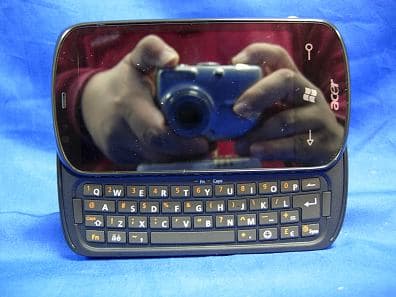
Click to zoom
Application Details
- Equipment Class
- PCE - PCS Licensed Transmitter held to ear
- Date of Grant
- Jan 15, 2010
- Application Purpose
- Original Equipment
- Date of Application
- Jan 13, 2010
- Equipment Note
- Smart Handheld
- Frequency Range
- 1852.40000000 - 1907.60000000
- Company
- Acer Incorporated
- Country
- Taiwan
Documents & Files
Document Text
Text extracted from the exhibit documents filed with the FCC. Open a document above to read the original.
Users Manual
1 Acer M900DF User Guide Acer M900DF Smartphone User Guide2 © 2010. All Rights Reserved Acer M900DF Smartphone User Guide First issue: 01/2010 Acer M900DF Smartphone Model number: __________________________________ Serial number: ___________________________________ Date of purchase: ________________________________ Place of purchase: ________________________________ 3 Table of Contents Get to know your Acer M900DF Smartphone Features and functions . . . . . . . . . . . . . . . . . . . . . . . . 7 Other sources of help . . . . . . . . . . . . . . . . . . . . . . . . . 8 Product registration . . . . . . . . . . . . . . . . . . . . . . . . . . . 9 Chapter 1: Set Up Unpack your smartphone . . . . . . . . . . . . . . . . . . . . . 11 Get to know your smartphone . . . . . . . . . . . . . . . . . 12 Install the SIM card . . . . . . . . . . . . . . . . . . . . . . . . . . 15 Remove the SIM card and battery . . . . . . . . . . . . . . 16 Charge the battery . . . . . . . . . . . . . . . . . . . . . . . . . . 17 Turn on for the first time . . . . . . . . . . . . . . . . . . . . . 18 The Home screen . . . . . . . . . . . . . . . . . . . . . . . . . . . . 20 Connect to your PC and synchronize data . . . . . . . . 23 Chapter 2: Making Calls Before making a call . . . . . . . . . . . . . . . . . . . . . . . . . 25 The onscreen number pad . . . . . . . . . . . . . . . . . . . . 26 Make a voice/video call . . . . . . . . . . . . . . . . . . . . . . . 26 The voice call screen . . . . . . . . . . . . . . . . . . . . . . . . . 28 Onscreen call options . . . . . . . . . . . . . . . . . . . . . . . . 31 Chapter 3: Input Devices The stylus . . . . . . . . . . . . . . . . . . . . . . . . . . . . . . . . . . 35 The fingerprint reader . . . . . . . . . . . . . . . . . . . . . . . . 35 The application buttons . . . . . . . . . . . . . . . . . . . . . . 36 The onscreen keyboard . . . . . . . . . . . . . . . . . . . . . . . 37 The QWERTY keyboard . . . . . . . . . . . . . . . . . . . . . . . 38 Chapter 4: Messaging The messaging screen . . . . . . . . . . . . . . . . . . . . . . . . 43 Text (SMS) messages . . . . . . . . . . . . . . . . . . . . . . . . . 44 Acer M900DF Smartphone User Guide4 MMS messages . . . . . . . . . . . . . . . . . . . . . . . . . . . . . . 45 Email . . . . . . . . . . . . . . . . . . . . . . . . . . . . . . . . . . . . . . 48 Chapter 5: Home Screen Overview The Home screen . . . . . . . . . . . . . . . . . . . . . . . . . . . . 49 Customize basic settings . . . . . . . . . . . . . . . . . . . . . . 52 Chapter 6: Using the Camera Camera icons and indicators . . . . . . . . . . . . . . . . . . . 55 Take a photo . . . . . . . . . . . . . . . . . . . . . . . . . . . . . . . 57 Shoot a video . . . . . . . . . . . . . . . . . . . . . . . . . . . . . . . 57 Photo and video options . . . . . . . . . . . . . . . . . . . . . . 58 Chapter 7: The Fingerprint Reader Security settings . . . . . . . . . . . . . . . . . . . . . . . . . . . . . 61 Navigate with the fingerprint reader . . . . . . . . . . . . 62 Chapter 8: Advanced Operation Put your Acer M900DF Smartphone in flight mode 65 Comm. Manager . . . . . . . . . . . . . . . . . . . . . . . . . . . . 66 Adjust connection settings . . . . . . . . . . . . . . . . . . . . 66 Phone settings . . . . . . . . . . . . . . . . . . . . . . . . . . . . . . 71 Manage contacts . . . . . . . . . . . . . . . . . . . . . . . . . . . . 73 Namecard Manager . . . . . . . . . . . . . . . . . . . . . . . . . . 76 SIM Manager . . . . . . . . . . . . . . . . . . . . . . . . . . . . . . . 77 Connect to a PC and install software . . . . . . . . . . . . 79 Other functions . . . . . . . . . . . . . . . . . . . . . . . . . . . . . 80 Multimedia playback . . . . . . . . . . . . . . . . . . . . . . . . . 81 Satellite Data Update . . . . . . . . . . . . . . . . . . . . . . . . 84 Reset your Acer M900DF Smartphone . . . . . . . . . . . 89 Chapter 9: Accessories and Tips Use the stereo headset . . . . . . . . . . . . . . . . . . . . . . . 93 Use a Bluetooth headset . . . . . . . . . . . . . . . . . . . . . . 93 Use your Acer M900DF Smartphone as a modem . . 94 Insert a micro SD card . . . . . . . . . . . . . . . . . . . . . . . . 98 Appendix 5 FAQ, troubleshooting and error messages . . . . . . . 99 Specifications . . . . . . . . . . . . . . . . . . . . . . . . . . . . . . 102 Warnings and precautions . . . . . . . . . . . . . . . . . . . 104 Emergency calls . . . . . . . . . . . . . . . . . . . . . . . . . . . . 110 Disposal and recycling information . . . . . . . . . . . . 110 Taking care of your Acer M900DF Smartphone . . . 111 Safety regulations . . . . . . . . . . . . . . . . . . . . . . . . . . 113 Acer M900DF Smartphone User Guide6 7Features and functions Get to know your Acer M900DF Smartphone Features and functions Your new Acer M900DF Smartphone is a multi-functional tool packed with intuitive features and powerful applications that make organizing your information and synchronizing it with your personal activities an easy, efficient task. Your Acer M900DF Smartphone lets you: • Synchronize email with your server while on the move. • Make voice calls and video calls when connected to a 3G/EDGE/GPRS/HSUPA/HSDPA network. • Connect wirelessly to your local network to access the internet and other network features. • Use the customizable Home screen to access a wide range of software to perform common tasks on the Windows Mobile 6.1 Professional platform. • Synchronize the information on your computer with the information on your Acer M900DF Smartphone. • Exchange information between devices that have Bluetooth/WLAN capabilities. Acer M900DF Smartphone User Guide8 Other sources of help To help you use your Acer M900DF Smartphone, we have designed a set of guides: Accessing the help menus Your Acer M900DF Smartphone features detailed help menus to aid you in making connections and using the embedded applications. 1. Tap Start > Help to access the Help menus. 2. Tap Contents to vi…
Text truncated - open the document above for the full version.
Users Manual
61Security settings Chapter 7: The Fingerprint Reader Security settings Your Acer M900DF Smartphone has an integrated fingerprint reader that you can use to secure your phone and personal information or as a navigation device. To start using the security features of your phone, you will need to enroll your fingerprint as described in “Set up fingerprint security“ on page 19. Once you have successfully enrolled your fingerprint, you will be able set up a private folder and other security settings. To set up security, tap Start > Settings > Golden Finger and swipe your enrolled finger or enter your password (default is four zeroes: 0000). Tap the Protection tab to adjust the settings. From the Protection tab, you can choose to require a fingerprint when starting up your Acer M900DF Smart- phone and how long to wait before locking the phone again. You can also elect to protect your personal information. Select the Fingertab to enroll another finger. From the Pass- word tab, you can change the default password and enter a hint to remind you. Acer M900DF Smartphone User Guide62 Note: The password should be between four and 12 alphanumeric characters. Ensure it is a password you won’t forget and that other people won’t be able to guess easily. Private Folder Your Acer M900DF Smartphone sup- ports a Private Folder that is only acces- sible via a fingerprint or password. To set up the private folder, tap Start > Settings > Golden Finger > Private tab. Important: You can only have one pri- vate folder on the phone. If you wish to set up a new private folder, you will need to delete any exisiting folder first. From this tab you can give your private folder a name, set how large it will be and where it will be located. Tap Create to create the folder with the parameters you set. To open the private folder, you can simply tap Private Folder at the bottom of the Home page. Navigate with the fingerprint reader To enable the fingerprint reader navigation features, tap Start > Settings > System tab > Finger Navigation. You can use the fingerprint reader to navigate around the screen by sliding your finger across the reader. The navigation feature can per- form many of the same actions as a mouse on a computer. 63Navigate with the fingerprint reader Once you’ve moved the cursor to the desired location, tap the fingerprint reader lightly to activate a link, launch a program or do any other function that would normally be done by right-click- ing a mouse. The top slider adjusts the sensitivity of the fingerprint reader, controlling how fast the mouse or cursor moves when the reader detects finger motion. Higher sensitivity settings will result in faster mouse/cursor motion with rela- tively less finger motion. Nav Mode determines the performance mode, which controls how quickly readings are taken as you slide your finger on the reader. The Nav Emulation feature has the following settings: ModeDescription HPHigher Performance: Requires higher power and drains the battery faster. MPMedium Performance: Offers the optimal balance between performance and battery life. LPLower Performance: Offers the best battery life. ModeDescription DPADGives you 8-way directional control. It simulates the up, down, left and right arrow keys on the keyboard. RockerMimics a 4-way rocker control, which allows motion in only one direction at any time. JoystickEmulates a 4-way joystick using simulated arrow key presses. Acer M900DF Smartphone User Guide64 When you select DPAD, Rocker or Joystick emulation, a Delay before first repeat control will be displayed. Use this control to set the delay between the first motion and repeat motions. Tip: When the slider is moved fully over towards “Long”, the time delay is infinite, and you must remove your finger from the reader before another motion is generated. The Tap Sensitivity control is used to adjust tap settings. The default value that should be acceptable to a wide range of users. If you move the slider towards “Slow,” you can rest your finger on the reader for a longer period while still being able to tap. Tip: To disable tapping, move the slider all the way over to “Fast.” This effectively disabled tapping since it is impossible to tap that quickly. Touch stick Delivers mouse movement in any direction with instant automatic motion repeat and has tapping enabled (has a similar action to a touch stick embedded in a notebook keyboard). MouseDelivers mouse movement in any direction and has tapping enabled. OffNavigation features will not be used. ModeDescription 65Put your Acer M900DF Smartphone in flight Chapter 8: Advanced Operation Put your Acer M900DF Smartphone in flight mode You can enter flight mode to turn off telephone, Bluetooth and WLAN functions and use the Acer M900DF Smartphone as a handheld device during a flight. Check with your airline to make sure this is permitted onboard. Some airlines may provide wireless Internet services on board that can be accessed via the WLAN feature. Check prior to your departure whether this service is available on your flight. Switch your Acer M900DF Smartphone off during takeoff and landing as it may interfere with aircraft electronic systems. Enter flight mode 1. Access the Comm. Manager (refer to “Comm. Manager” on page 66). 2. Tap Flight Mode ON to turn off all phone, Bluetooth and WLAN functions. Tip: Press and hold for five seconds to exit flight mode and re-activate wireless con- nections (note: only connec- tions that were enabled prior to entering flight mode will be re-activated). Acer M900DF Smartphone User Guide66 Comm. Manager Your Acer M900DF Smartphone features phone, Bluetooth and WLAN functions. This section will explain how to activate and set basic phone, Bluetooth and wireless network (WLAN) connection settings through the Comm. Manager screen. Tip: Tap and hold the name of any communication type to open its associated Settings page. Use the Comm. Manager To access the Comm. Manager, tap any of the communication icon…
Text truncated - open the document above for the full version.
Cover Letter(s)
Acer Incorporated 8F, 88, Sec. 1, Hsin Tai Wu Rd., Hsichih Taipei Hsien 221, Taiwan, R.O.C. Tel : 886-2-2696-1234 Fax : 886-2-2696-3535 www.acer.com Power of Attorney To whom it may concern, I, the undersigned, Easy Lai , hereby authorize the person listed below to act in behalf of me to sign all related documents for Acer FCC application. Name : Harriot Lee Company : Acer Incorporated Company Address : 8F, No. 88, Sec. 1, Hsin Tai Wu Rd., Hsichih, Taipei Hsien 221, Taiwan Tel : 886-2-6606-3131 ext. 3811 FAX : 886-2-6606-5353 Authorization period : Jan. 1 st , 2010 ~ Dec. 31th, 2010 Should you have any question regarding this power of attorney, please don’t hesitate to contact me. Sincerely, _______________ Easy Lai/ Acer Incorporated Tel : +886-2 86913089 FAX : +886-2 86913120 E-Mail: [email protected]
Cover Letter(s)
Acer Incorporated 8F, 88, Sec. 1, Hsin Tai Wu Rd., Hsichih, Taipei Hsien 221, Taiwan Tel: 886-26961234 FAX: 886-26913000 Declaration of Authorization We Name: Acer Incorporated Address: 8F, 88, Sec. 1, Hsin Tai Wu Rd., Hsichih, Taipei Hsien 221, Taiwan City: Taipei ............................................................ . ............ Country: Taiwan ............................................................... . Declare that: Name Representative of agent: Gene Chang (1) Agent Company name: QuieTek Corp. Address: Fl.2, No.345, Xin-hu 2 nd Rd., Nei-hu District City: Taipei Country Taiwan is authorized to apply for Certification of the following product(s): Product description: Smart Handheld Type designation: M900DF Trademark: acer on our behalf. Date: ...... 2010/01/07 ... .. City: ...... Taipei ...... .. Name: ...... Harriot S.L. Lee ...... .. (2) Signature: -------------------------------------- Notes: (1): Required for FCC application (2): For FCC it must be the Grantee Code “owner” or the authorized agent.
Cover Letter(s)
Acer Incorporated 8F, 88, Sec. 1, Hsin Tai Wu Rd., Hsichih, Taipei Hsien 221, Taiwan Tel: 886-26961234 FAX: 886-26913000 Federal Communications Commission Data: Jan. 07, 2010 Authorization and Evaluation Division ATTESTATION FCC ID: HLZSHM900DF Product: Smart Handheld Model: M900DF We don't provide any controls or software to allow operation outside the USA frequency band when we sell this product in USA. Sincerely, -------------------------------------- Harriot S.L. Lee Acer Incorporated Tel: 886-26961234 FAX: 886-26913000 Email:[email protected]
Cover Letter(s)
Federal Communications Commission Authorization and Evaluation Division Data: Jan. 07, 2010 Confidential Statement We have understood that the following request for confidential documents has been and viewable since the date of grant, since it has been granted. Confidentiality Request Pursuant to Sections 0.457 and 0.459 of the Commission’s Rules, the Applicant Hereby requests confidential treatment of information accompanying this Application As outlined below: Schematics: (M900DF) Schematics Block Diagram: (M900DF) Block Diagram BOM: (M900DF) BOM Tune up Procedure: (M900DF) Tune up Procedure Operation Description: (M900DF) Operation Description Above mentioned document contains detailed system and equipment description are considered as proprietary information in operation of the equipment. The public disclosure of above documents might be harmful to our company and would give competitor an unfair advantage in the market. In additional to above mentioned documents, pursuant to Public Notice DA 04-1705 of the Commission’s policy, in order to comply with the marketing regulations in 47 DFR 2.803 and the importation rules in 47 CFR 2.1204, while ensuring that business sensitive information remains confidential until the actual marketing of newly authorized divices. We are requesting the commission to grant short-thrm confidentiality request on the following attachments: User Manual: (M900DF) User Manual ExtPho: (M900DF) ExtPho IntPho: (M900DF) IntPho TestSetup Photo: (M900DF) TestSetup Photo It is our understanding that all measurement test reports, FCC ID label format and correspondent during certification review process cannot be granted as confidential documents and those information will be available for public review once the grant of equipment authorization is issued. Sincerely, -------------------------------------- Harriot S.L. Lee Acer Incorporated Tel: 886-26961234 FAX: 886-26913000 Email:[email protected]
External Photos
Report No.: 09C210R-RFUSP43V01 Page : 1 of 24 Attachment 2 : EUT Detailed Photographs (1) EUT Photo (2) EUT Photo Report No.: 09C210R-RFUSP43V01 Page : 2 of 24 (3) EUT Photo (4) EUT Photo Report No.: 09C210R-RFUSP43V01 Page : 3 of 24 (5) EUT Photo (6) EUT Photo Report No.: 09C210R-RFUSP43V01 Page : 4 of 24 (7) EUT Photo (8) EUT Photo
ID Label/Location Info
LableSmpl
Internal Photos
Report No.: 09C210R-RFUSP43V01 Page : 5 of 24 (9) EUT Photo (10) EUT Photo Report No.: 09C210R-RFUSP43V01 Page : 6 of 24 (11) EUT Photo (12) EUT Photo Report No.: 09C210R-RFUSP43V01 Page : 7 of 24 (13) EUT Photo (14) EUT Photo WLAN & Bluetooth Antenna Report No.: 09C210R-RFUSP43V01 Page : 8 of 24 (15) EUT Photo (16) EUT Photo Report No.: 09C210R-RFUSP43V01 Page : 9 of 24 (17) EUT Photo (18) EUT Photo GSM / WCDMA Antenna Report No.: 09C210R-RFUSP43V01 Page : 10 of 24 (19) EUT Photo (20) EUT Photo Report No.: 09C210R-RFUSP43V01 Page : 11 of 24 (21) EUT Photo (22) EUT Photo Report No.: 09C210R-RFUSP43V01 Page : 12 of 24 (23) EUT Photo (24) EUT Photo Report No.: 09C210R-RFUSP43V01 Page : 13 of 24 (25) EUT Photo (26) EUT Photo Report No.: 09C210R-RFUSP43V01 Page : 14 of 24 (27) EUT Photo (28) EUT Photo GPS Antenna Report No.: 09C210R-RFUSP43V01 Page : 15 of 24 (29) EUT Photo (30) EUT Photo Report No.: 09C210R-RFUSP43V01 Page : 16 of 24 (31) EUT Photo (32) EUT Photo Report No.: 09C210R-RFUSP43V01 Page : 17 of 24 (33) EUT Photo (34) EUT Photo Report No.: 09C210R-RFUSP43V01 Page : 18 of 24 (35) EUT Photo (36) EUT Photo Report No.: 09C210R-RFUSP43V01 Page : 19 of 24 (37) EUT Photo (38) EUT Photo Report No.: 09C210R-RFUSP43V01 Page : 20 of 24 (39) EUT Photo (40) EUT Photo Report No.: 09C210R-RFUSP43V01 Page : 21 of 24 (41) EUT Photo (42) EUT Photo 100mm WLAN & BT ANTENNA 3G ANTENNA Report No.: 09C210R-RFUSP43V01 Page : 22 of 24 (43) EUT Photo (44) EUT Photo Report No.: 09C210R-RFUSP43V01 Page : 23 of 24 (45) EUT Photo (46) EUT Photo
RF Exposure Info
Report No:09C210R-HPUSP10V01 Page: 1 of 35 SAR Test Report Product Name:Smart Handheld Model No. :M900DF Applicant : Acer Incorporated Address : 8F, 88, Sec. 1, Hsin Tai Wu Rd., Hsichih, Taipei Hsien 221, Taiwan Date of Receipt:2009/12/09 Issued Date :2010/01/15 Report No. :09C210R-HPUSP10V01 Report Version :V1.0 The test results relate only to the samples tested. The test report shall not be reproduced except in full without the written approval of Quie Tek Corporation. Report No:09C210R-HPUSP10V01 Page: 2 of 35 Test Report Certification Issued Date: 2010/01/15 Report No.:09C210R-HPUSP10V01 Product Name : Smart Handheld Applicant : Acer Incorporated Address : 8F, 88, Sec. 1, Hsin Tai Wu Rd., Hsichih, Taipei Hsien 221, Taiwan Manufacturer : Compal Communications, INC. Trade Name : acer FCC ID : HLZSHM900DF Model No. : M900DF Applicable Standard : FCC Oet65 Supplement C June 2001 IEEE Std. 1528-2003 47CFR § 2.1093 Test Result : Max. SAR Measurement (1g) GSM 850MHz: 1.01 W/kg PCS 1900MHz: 1.09 W/kg WCDMA Band V: 0.297 W/kg WCDMA Band II: 0.857 W/kg The test results relate only to the samples tested. The test report shall not be reproduced except in full without the written approval of Quie Tek Corporation. Documented By : (Adm. Specialist / Nicole Huang) Tested By : (Engineer / Jung Chang) Approved By : (Manager /Vincent Lin) Report No:09C210R-HPUSP10V01 Page: 3 of 35 TABLE OF CONTENTS Description Page 1. General Information.............................................................................. 5 1.1 EUT Description ............................................................................................................5 1.2 Test Environment ...........................................................................................................6 2. SAR Measurement System .................................................................. 7 2.1 DASY5 System Description .......................................................................................... 7 2.1.1 Applications ................................................................................................................ 8 2.1.2 Area Scans................................................................................................................... 8 2.1.3 Zoom Scan (Cube Scan Averaging)............................................................................ 8 2.1.4 Uncertainty of Inter-/Extrapolation and Averaging .................................................... 8 2.2 DASY5 E-Field Probe ................................................................................................... 9 2.2.1 Isotropic E-Field Probe Specification ......................................................................... 9 2.3 Boundary Detection Unit and Probe Mounting Device ............................................... 10 2.4 DATA Acquisition Electronics (DAE) and Measurement Server ............................... 10 2.5 Robot ............................................................................................................................ 11 2.6 Light Beam Unit........................................................................................................... 11 2.7 Device Holder ..............................................................................................................12 2.8 SAM Twin Phantom .................................................................................................... 12 3. Tissue Simulating Liquid ................................................................... 13 3.1 The composition of the tissue simulating liquid .......................................................... 13 3.2 Tissue Calibration Result ............................................................................................. 13 3.3 Tissue Dielectric Parameters for Head and Body Phantoms ....................................... 16 4. SAR Measurement Procedure ........................................................... 17 4.1 SAR System Validation................................................................................................ 17 4.1.1 Validation Dipoles..................................................................................................... 17 4.1.2 Validation Result ....................................................................................................... 17 4.2 Arrangement Assessment Setup ................................................................................... 18 5. SAR Exposure Limits ......................................................................... 19 6. Test Equipment List............................................................................ 20 7. Measurement Uncertainty .................................................................. 21 8. Conducted Power Measurement ....................................................... 22 9. Test Results......................................................................................... 29 9.1 SAR Test Results Summary ......................................................................................... 29 Appendix ............................................................................................................................ 35 Appendix A. SAR System Validation Data........................................................................ 35 Report No:09C210R-HPUSP10V01 Page: 4 of 35 Appendix B. SAR measurement Data................................................................................ 35 Appendix C. Test Setup Photographs & EUT Photographs............................................... 35 Appendix D. Probe Calibration Data ................................................................................. 35 Appendix E. Dipole Calibration Data ................................................................................ 35 Report No:09C210R-HPUSP10V01 Page: 5 of 35 1. General Information 1.1 EUT Description Product Name Smart Handheld Mod…
Text truncated - open the document above for the full version.
Test Report
Report No.:09C210R-HPUSP07V01 Page: 1 of 137 Test Report Product Name : Smart Handheld Model No : M900DF FCC ID : HLZSHM900DF Applicant : Acer Incorporated Address : 8F, 88, Sec. 1, Hsin Tai Wu Rd., Hsichih, Taipei Hsien 221, Taiwan Date of Receipt:2009/12/09 Issued Date :2010/01/07 Report No. :09C210R-HPUSP07V01 Report Version:V1.0 The test results relate only to the samples tested. The test report shall not be reproduced except in full without the written approval of Quie Tek Corporation. This report must not be used to claim product endorsement by NVLAP any agency of the U.S. Government Report No.:09C210R-HPUSP07V01 Page: 2 of 137 Test Report Certification Issued Date : 2010/01/07 Report No.: 09C210R-HPUSP07V01 Test results relate only to the samples tested. The test report shall not be reproduced except in full without the written approval of Quie Tek Corporation. This report must not be used to claim product endorsement by NVLAP any agency of the U.S. Government Product Name : Smart Handheld Applicant : Acer Incorporated Address : 8F, 88, Sec. 1, Hsin Tai Wu Rd., Hsichih, Taipei Hsien 221, Taiwan Manufacturer : Compal Communications, INC. Trade Name : acer Model No. : M900DF EUT Rated Voltage : AC 100-240V, 50-60Hz EUT Test Voltage : AC 120 V / 60 Hz Measurement Standard : FCC CFR Title 47 Part 2 22 24 Measurement Reference : TIA/EIA 603-C Test Result : Complied Documented By : (Adm. Specialist / Nicole Huang) Tested By : (Engineer / Vorana Chen) Approved By : (Manager / Vincent Lin) Accredited by NIST (NVLAP) NVLAP Lab Code: 200533-0 Report No.:09C210R-HPUSP07V01 Page: 3 of 137 TABLE OF CONTENTS Description Page 1. GENERAL INFORMATION ............................................................................................ 4 1.1. EUT Description ........................................................................................................... 4 1.2. Operational Description............................................................................................... 5 1.3. Configuration of tested System .................................................................................. 6 1.4. EUT Setup Procedures ................................................................................................ 6 1.5. Test Facility ...................................................................................................................7 1.6. Type of Emission .......................................................................................................... 8 1.7. DC voltages and DC currents ...................................................................................... 9 2. Peak Power Output .................................................................................................... 10 2.1. Test Equipment........................................................................................................... 10 2.2. Test Setup ................................................................................................................... 10 2.3. Limits ........................................................................................................................... 11 2.4. Test Procedure............................................................................................................ 11 2.5. Test Specification ....................................................................................................... 11 2.6. Test Result of Peak Power Output ............................................................................ 12 3. Occupied Bandwidth.................................................................................................. 28 3.1. Test Equipment........................................................................................................... 28 3.2. Test Setup ................................................................................................................... 28 3.3. Test Procedure............................................................................................................ 28 3.4. Test Specification ....................................................................................................... 29 3.5. Test Result of Occupied Bandwidth ......................................................................... 30 4. Spurious Emission At Antenna Terminals (+/-1MHz) .............................................. 56 4.1. Test Equipment........................................................................................................... 56 4.2. Setup ...........................................................................................................................56 4.3. Limits ........................................................................................................................... 57 4.4. Test Procedure............................................................................................................ 57 4.5. Test Specification ....................................................................................................... 57 4.6. Test Result of Spurious Emission At Antenna Terminals (+/-1MHz)...................... 58 5. Spurious Emission ..................................................................................................... 70 5.1. Test Equipment........................................................................................................... 70 5.2. Test Setup ................................................................................................................... 71 5.3. Limits ........................................................................................................................... 71 5.4. Test Procedure..…
Text truncated - open the document above for the full version.
Contact Information
Applicant
RU Jan(Sr. Manager)
Technical Contact
QuieTek CorporationSabina Chen
[email protected]886-2-8601-3788
No. 5-22, Ruei-Shu Valley, Ruei-Ping Tsuen, · Taipei County · Taiwan
Test Firm
Quietek Linkou EMC LabotortyJames Chang
Technical Specifications
| # | Rule Parts | Frequency Range | Power Output | Emission | Tolerance |
|---|---|---|---|---|---|
| 6 | 24E | 1.85 GHz - 1.91 GHz | 330.00 mW | 4M20F9W | 0.1 ppm |
Other Applications from Acer Incorporated
HLZA26007
Aug 07, 2026Tablet PC
Equipment Class
DTS - Digital Transmission SystemHLZA26003
Jul 28, 2026Tablet PC
Equipment Class
6XD - 15E 6 GHz Low Power Indoor ClientHLZAMR570
Apr 21, 2026Acer Wireless Mouse
Equipment Class
DTS - Digital Transmission SystemHLZ-NSK510
Apr 09, 2026Gaming sound bar
Equipment Class
DSS - Part 15 Spread Spectrum TransmitterHLZA26002
Apr 01, 2026Tablet PC
Equipment Class
NII - Unlicensed National Information Infrastructure TX