HLZT7Connect T7 Wi-Fi 7 Mesh Router
Acer Incorporated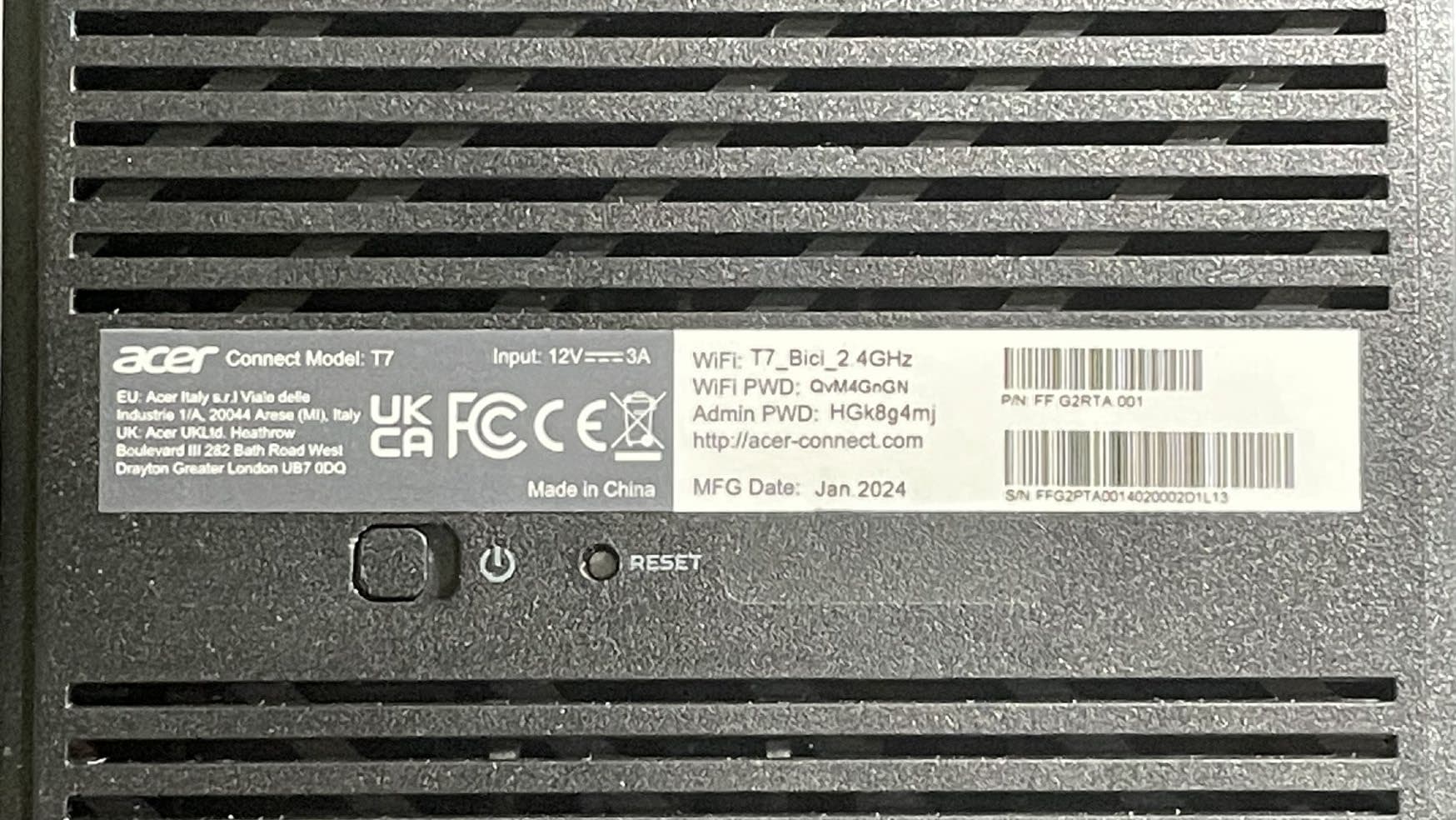
Click to zoom
Application Details
- Equipment Class
- 6ID - 15E 6 GHz Low Power Indoor Access Point
- Date of Grant
- Jul 09, 2024
- Application Purpose
- Original Equipment
- Date of Application
- Jul 02, 2024
- Equipment Note
- Connect T7 Wi-Fi 7 Mesh Router
- Frequency Range
- 6895.00000000 - 7115.00000000
- Company
- Acer Incorporated
- Country
- Taiwan
Documents & Files
Document Text
Text extracted from the exhibit documents filed with the FCC. Open a document above to read the original.
Users Manual
PREDATOR CONNECT T7 Wi-Fi 7 MESH ROUTER © 2024 ACER INC. 02 Quick Start Guide Kurzanleitung Guida introduttiva Guide de démarrage rapide Guía rápida de inicio Skrócona instrukcja obsługi Stručná referenční příručka Guia de início rápido Guia de Inicialização rápida 快速入門指南 1. Plug in AC adapter. 1. Stecken Sie das Netzteil ein. 1. Branchez l'adaptateur secteur. 1. Conecte el adaptador de CA. 1. Collegare l’adattatore CA. 1. Ligue o transformador AC. 1. Podłącz zasilacz prądu zmiennego. 1. Připojte síťový adaptér. 1. 插入 AC 變壓器。 1. Dugja be a hálózati adaptert. 1. Sluit de wisselstroomadapter aan. 1. Liitä verkkolaite. 1. Tilslut vekselstrømsadapteren (AC). 1. Plugg inn strømadapteren. 1. Koppla in AC-adaptern. 3. Plug in internet cable. 3. Schließen Sie das Internetkabel an. 3. Branchez le câble internet. 3. Conecte el cable de Internet. 3. Collegare il cavo Internet. 3. Ligue o cabo de Internet. 3. Podłącz kabel internetowy. 3. Připojte internetový kabel. 3. 插入網際網路纜線。 3. Csatlakoztassa az internetkábelt. 3. Sluit de internetkabel aan. 3. Liitä internet-kaapeli. 3. Tilslut internetkablet. 3. Plugg inn internetkabelen. 3. Koppla in internetkabeln. 2. Plug into outlet. 2. Schließen Sie es an die Steckdose an. 2. Branchez dans la prise. 2. Conéctelo a la toma de corriente. 2. Inserire nella presa. 2. Ligue à tomada elétrica. 2. Podłącz do gniazda zasilania. 2. Připojte do elektrické zásuvky. 2. 插入插座。 2. Dugja be a konnektorba. 2. Steek de stekker in het stopcontact. 2. Liitä pistorasiaan. 2. Slut den til stikkontakten. 2. Plugg inn i stikkontakten. 2. Anslut i ett uttag. 4. Power on device. 4. Schalten Sie das Gerät ein. 4. Mettez l’appareil sous tension. 4. Encienda el dispositivo. 4. Accendere il dispositivo. 4. Ligue o dispositivo. 4. Włącz zasilanie urządzenia. 4. Zapněte napájení zařízení. 4. 開啟裝置電源。 4. Kapcsolja be a készüléket. 4. Schakel het apparaat in. 4. Käynnistä laite. 4. Tænd enheden. 4. Slå på enheten. 4. Slå på enheten. Predator connect T7 Quick Steup 03 Please update your computer’s WiFi drivers. Bitte aktualisieren Sie die WLAN-Treiber Ihres Computers. Veuillez mettre à jour les pilotes WiFi de votre ordinateur. Actualice los controladores WiFi de su ordenador. Aggiornare i driver Wi-Fi del computer. Atualize os controladores WiFi do seu computador. Zaktualizuj sterowniki WiFi komputera. Zaktualizujte ovladače WiFi v počítači. 請更新您電腦的 WiFi 驅動程式。 Kérjük, frissítse a számítógép WiFi-illesztőprogramjait. Werk de WiFi-stuurprogramma’s van de computer bij. Päivitä tietokoneen Wi-Fi-ohjaimet. Opdater Wi-Fi-driverne på din computer. Oppdater datamaskinens WiFi-drivere. Uppdatera datorns WiFi-drivrutiner. 5. Connect to T7 Wi-Fi. 5. Stellen Sie eine Verbindung zum T7-WLAN her. 5. Connectez-vous au Wi-Fi T7. 5. Conecte a T7 Wi-Fi. 5. Connettere al Wi-Fi T7. 5. Ligue à rede Wi-Fi T7. 5. Połącz z siecią Wi-Fi T7. 5. Připojte k zařízení T7 Wi-Fi. 5. 連接至 T7 Wi-Fi 。 5. Csatlakozzon a T7 Wi-Fi-hez. 5. Maak verbinding met T7 Wi-Fi. 5. Liitä T7 Wi-Fi-verkkoon. 5. Opret en Wi-Fi-forbindelse til T7. 5. Koble til T7 Wi-Fi. 5. Anslut till T7 WiFi. 7. Enter acer-connect.com to browser. 7. Geben Sie acer-connect.com in den Browser ein. 7. Entrez acer-connect.com dans le navigateur. 7. Escriba acer-connect.com en el navegador. 7. Immettere acer-connect.com nel browser. 7. Aceda a acer-connect.com para navegar. 7. Wprowadź w przeglądarce adres acer-connect.com. 7. Do prohlížeče zadejte adresu acer-connect.com. 7. 在瀏覽器中輸入 acer-connect.com 。 7. Írja be a böngészőbe az acer-connect.com címet. 7. Typ acer-connect.com in de browser. 7. Syötä selaimeen acer-connect.com. 7. Indtast acer-connect.com i din browser. 7. Skriv inn acer-connect.com i nettleseren. 7. Skriv in acer-connect.com i webbläsaren. 6. Important info at bottom of device. 6. Wichtige Informationen an der Unterseite des Gerätes. 6. Informations importantes au bas de l’appareil. 6. En la parte inferior del dispositivo hallará información importante. 6. Informazioni importanti nella parte inferiore del dispositivo. 6. Informações importantes na parte inferior do dispositivo. 6. Ważne informacje na spodzie urządzenia. 6. Důležité informace na spodní straně zařízení. 6. 重要資訊位於裝置底部。 6. Fontos információk a készülék alján. 6. Belangrijke info op de onderkant van het apparaat. 6. Tärkeitä tietoja laitteen pohjassa. 6. Der står vigtige oplysninger på bunden af enheden. 6. Viktig informasjon nederst på enheten. 6. Viktig information på enhetens undersida. 8. Enter Admin Password. 8. Geben Sie das Admin-Kennwort ein. 8. Entrez le mot de passe Admin. 8. Cambiar la contraseña de administrador. 8. Immettere la password amministratore. 8. Introduza a palavra-passe de administrador. 8. Wprowadź hasło administratora. 8. Zadejte heslo správce. 8. 輸入管理員密碼。 8. Adja meg az Admin jelszót. 8. Voer Admin-wachtwoord in. 8. Syötä järjestelmänvalvojan salasana. 8. Indtast administratoradgangskoden. 8. Angi adminpassord. 8. Ange admin-lösenordet. 04 Predator connect T7 Quick Steup UK Acer warrants any Acer product, including genuine Acer parts and components (offered as “Options” and/or “Accessories”) which have been installed in your Acer product at the time of purchase: - Carry In Service (Customer returns defective product to nearest Acer center) - Consumable Parts (batteries): 6 months warranty - Accessories (Adapters, headsets, mice, Keyboards, docking stations, stylus pens, dongles and cables, ...): 24 months warranty - CastMaster: 36 months warranty - eKinekt: 12 months warranty - Halo Smart Speaker: 12 months warranty - Charging Cart: Parts only-5Y mechanical. Parts / 2Y electronic parts - Acer / Predator Connect: 12 months warranty Acer terms & conditions apply. For more information please visit our website or contact an Acer call center. This Limited Warranty does not limit any more expansive rights you may have by applicable law. Consumers have legal rights under applicable legislation governing the sale of consumer goods and this Limited Warranty does not …
Text truncated - open the document above for the full version.
Attestation Statements
Acer Incorporated Covered Equipment Attestation Letter For Certification Service in the USA Federal Communication Commission Authorization and Evaluation Division 7435 Oakland Mills Road Columbia, MD 21046 To whom it may concern Pursuant to Section 2.911(d)(5)(i)-(ii) of the Commission’s Rules (47 C.F.R.) we attest as follows for the product listed below: FCC ID Model name HLZT7 T7 We, applicant Company Name: Acer Incorporated Address: 8F, 88, Sec. 1, Xintai 5th Rd., Xizhi, New Taipei City 221, Taiwan, R.O.C. Phone: +886 2 2696 1234 Acer Incorporated certifies that the equipment for which authorization is sought is not “covered” equipment prohibited from receiving an equipment authorization pursuant to section 2.903 of the FCC rules. Acer Incorporated certifies that, as of the date of the filing of the application, the applican is not identified on the Covered List as an entity producing “covered” equipment . If you have any questions, please feel free to contact us at the address shown below. Acer Incorporated Sincerely, Signature Date Printed Name of Signee: RU Jan Company: Acer Incorporated Address: 8F, 88, Sec. 1, Xintai 5th Rd., Xizhi, New Taipei City 221, Taiwan, R.O.C. Phone: +886 2 2696 1234 Fax: Email: [email protected] 2024/05/21
Attestation Statements
Acer Incorporated 8F, 88, Sec. 1, Xintai 5th Rd., Xizhi New Taipei City 221, Taiwan Rev 1/26/2023 Federal Communications Commission Authorization and Evaluation Division 7435 Oakland Mills Road Columbia, MD 21046 USA Date: 02-15-2023 Ref: Attestation Statements Part 2.911(d)(7) Filing [Acer Incorporated] (“the applicant”) certifies that, as of the date of the filing of the application, [Acer America Corporation] is our designated U.S. agent for service of process. [Acer Incorporated] accepts to maintain an agent for no less than one year after the grantee has terminated all marketing and importation or the conclusion of any Commission-related proceeding involving the equipment. [Acer America Corporation] accepts, as of the date of the filing of the application, the obligation of the designated U.S. agent for service of process. Sincerely, Designated U.S. Agent Information: Name: Acer America Corporation FRN: 0033486168 Contact Person: Young Kim Address: 1730 North First Street, Suite 400, San Jose, CA 95112 Tel.: (408) 533 7700 Email: [email protected] U.S. Agent Signature: Applicant: Company Name: Acer Incorporated Grantee Code: HLZ Contact Person: RU Jan Tel.: +886-2-8691-3289 Email: [email protected] Applicant Signature:
Attestation Statements
Acer Incorporated 8F, 88, Sec. 1, Xintai 5th Rd., Xizhi, New Taipei City 221, Taiwan, R.O.C. Attestation letter To: Federal Communications Commission 7435 Oakland Mills Road Columbia, MD 21046 We Name: Acer Incorporated Address: 8F, 88, Sec. 1, Xintai 5th Rd., Xizhi, New Taipei City 221, Taiwan, R.O.C. City: New Taipei City Country: R.O.C Product description: Connect T7 Wi-Fi 7 Mesh Router Type designation: T7 Trademark: Predator FCC ID: HLZT7 We, Acer Incorporated, attest that this device under FCC ID:HLZT7 complies with device protocol requirements and operational restrictions: for (all that apply - indoor client 6XD, subordinate 6PP, Dual Client 6CD). Indoor Access Point 6ID: 1. Device Protocol Attestation Statement: a. Statement describing the method the indoor access point uses to control the associated client/subordinate power control. 2. Statement acknowledging device restrictions: a. Low-power indoor Access Point. Access Point operating in the 5.925-7.125 GHz band shall be supplied power from a wired connection, has an integrated antenna, is not battery-powered, and does not have a weatherized enclosure. b. This device's operation will not be allowed on oil platforms, cars, trains, boats, and aircraft, except that operation of this device is permitted in large aircraft while flying above 10,000 feet only in the 5.925-6.425 GHz band. c. Indoor access points are prohibited for control of or communications with unmanned aircraft systems, including drones. Acer Incorporated 8F, 88, Sec. 1, Xintai 5th Rd., Xizhi, New Taipei City 221, Taiwan, R.O.C. Sincerely (Signed) Name / Title: RU Jan Sr. Manager Company: Acer Incorporated Address: 8F, 88, Sec. 1, Xintai 5th Rd., Xizhi, New Taipei City 221, Taiwan, R.O.C. Phone: +886 2 2696 1234 Fax: +886 2 2696 1234 Email: [email protected]
Cover Letter(s)
Acer Incorporated 8F, 88, Sec. 1, Xintai 5th Rd., Xizhi, New Taipei City 221, Taiwan, R.O.C. Declaration of Authorization We Name: Acer Incorporated Address: 8F, 88, Sec. 1, Xintai 5th Rd., Xizhi, New Taipei City 221, Taiwan, R.O.C. City: New Taipei City Country: R.O.C Declare that: Name Representative of agent: Riley Wei Agent Company name: BTL Inc. Address: No. 29, Jintang Road, Tangzhen Industry Park,Pudong New Area, Shanghai, China City: Shanghai Country: China is authorized to apply for Certification of the following product(s), and sign all related documents, including the 731 forms: Product description: Connect T7 Wi-Fi 7 Mesh Router Type designation: T7 Trademark: Predator FCC ID: HLZT7 on our behalf. Date: 2024-05-21 City: New Taipei City Name: RU Jan Function: Signature: .
Cover Letter(s)
Acer Incorporated To: Federal Communications Commission 7435 Oakland Mills Road Columbia, MD 21046 Subject: Request for confidentiality FCC ID: HLZT7 Dear FCC TCB: 1. Long-Term Confidentiality Pursuant to 47 CFR Section 0.459(a) & (b), we hereby requests non-disclosure and confidential treatment of the following materials submitted in support of FCC certification application: Schematic Block diagram Operational description Above materials contain secrets, proprietary and technical information, which would customarily be guarded from competitors under 47 CFR, section 0.457(d)(2). Disclosure or publication or any portion of this company confidential material to other parties could cause substantial competitive harm and provide unjustified benefits for competitors. Sincerely, RU Jan 2024-05-21
Cover Letter(s)
Acer Incorporated 8F, 88, Sec. 1, Xintai 5th Rd., Xizhi, New Taipei City 221, Taiwan, R.O.C. Ad Hoc Mode Declaration We, Acer Incorporated Name: Acer Incorporated Address: 8F, 88, Sec. 1, Xintai 5th Rd., Xizhi, New Taipei City 221, Taiwan, R.O.C. City: New Taipei City Country: R.O.C Hereby confirm that the following products: Product description: Connect T7 Wi-Fi 7 Mesh Router Type designation: T7 Brand: Predator FCC ID: HLZT7 Doesn’t have Ad Hoc Mode function on “non-US frequencies”. In addition, the frequency selection feature is disabled by firmware for devices marketed to the US. For this product, only channels 1~11 will be used in USA. Country code selection is disabled. Signature: ________________________ Name: RU Jan / Sr. Manager Date: 2024-05-21
External Photos
Appendix No.: EP-2311H013-1 APPENDIX-EUT PHOTOS Project No.: 2311H013 Page 1 of 31 Appendix No.: EP-2311H013-1 APPENDIX-EUT PHOTOS Project No.: 2311H013 Page 2 of 31 Appendix No.: EP-2311H013-1 APPENDIX-EUT PHOTOS Project No.: 2311H013 Page 3 of 31 Appendix No.: EP-2311H013-1 APPENDIX-EUT PHOTOS Project No.: 2311H013 Page 4 of 31 Appendix No.: EP-2311H013-1 APPENDIX-EUT PHOTOS Project No.: 2311H013 Page 5 of 31 Appendix No.: EP-2311H013-1 APPENDIX-EUT PHOTOS Project No.: 2311H013 Page 6 of 31 Appendix No.: EP-2311H013-1 APPENDIX-EUT PHOTOS Project No.: 2311H013 Page 7 of 31 Appendix No.: EP-2311H013-1 APPENDIX-EUT PHOTOS Project No.: 2311H013 Page 8 of 31 Appendix No.: EP-2311H013-1 APPENDIX-EUT PHOTOS Project No.: 2311H013 Page 9 of 31 Appendix No.: EP-2311H013-1 APPENDIX-EUT PHOTOS Project No.: 2311H013 Page 10 of 31
ID Label/Location Info
Label Label location
Internal Photos
Appendix No.: EP-2311H013-1 APPENDIX-EUT PHOTOS Project No.: 2311H013 Page 11 of 31 Appendix No.: EP-2311H013-1 APPENDIX-EUT PHOTOS Project No.: 2311H013 Page 12 of 31 Appendix No.: EP-2311H013-1 APPENDIX-EUT PHOTOS Project No.: 2311H013 Page 13 of 31 Appendix No.: EP-2311H013-1 APPENDIX-EUT PHOTOS Project No.: 2311H013 Page 14 of 31 Appendix No.: EP-2311H013-1 APPENDIX-EUT PHOTOS Project No.: 2311H013 Page 15 of 31 Appendix No.: EP-2311H013-1 APPENDIX-EUT PHOTOS Project No.: 2311H013 Page 16 of 31 Appendix No.: EP-2311H013-1 APPENDIX-EUT PHOTOS Project No.: 2311H013 Page 17 of 31 Appendix No.: EP-2311H013-1 APPENDIX-EUT PHOTOS Project No.: 2311H013 Page 18 of 31 Appendix No.: EP-2311H013-1 APPENDIX-EUT PHOTOS Project No.: 2311H013 Page 19 of 31
Internal Photos
Appendix No.: EP-2311H013-1 APPENDIX-EUT PHOTOS Project No.: 2311H013 Page 20 of 31 Appendix No.: EP-2311H013-1 APPENDIX-EUT PHOTOS Project No.: 2311H013 Page 21 of 31
Internal Photos
Appendix No.: EP-2311H013-1 APPENDIX-EUT PHOTOS Project No.: 2311H013 Page 22 of 31
Internal Photos
Appendix No.: EP-2311H013-1 APPENDIX-EUT PHOTOS Project No.: 2311H013 Page 23 of 31 Appendix No.: EP-2311H013-1 APPENDIX-EUT PHOTOS Project No.: 2311H013 Page 24 of 31 Appendix No.: EP-2311H013-1 APPENDIX-EUT PHOTOS Project No.: 2311H013 Page 25 of 31 Appendix No.: EP-2311H013-1 APPENDIX-EUT PHOTOS Project No.: 2311H013 Page 26 of 31
Internal Photos
Appendix No.: EP-2311H013-1 APPENDIX-EUT PHOTOS Project No.: 2311H013 Page 27 of 31
Internal Photos
Appendix No.: EP-2311H013-1 APPENDIX-EUT PHOTOS Project No.: 2311H013 Page 28 of 31
Internal Photos
Appendix No.: EP-2311H013-1 APPENDIX-EUT PHOTOS Project No.: 2311H013 Page 29 of 31 Appendix No.: EP-2311H013-1 APPENDIX-EUT PHOTOS Project No.: 2311H013 Page 30 of 31 Appendix No.: EP-2311H013-1 APPENDIX-EUT PHOTOS Project No.: 2311H013 Page 31 of 31
RF Exposure Info
Report No.: BTL-FCCP-5-2311H013 Page 1 of 7 FCC RF EXPOSURE REPORT FCC ID: HLZT7 Report No. : BTL-FCCP-5-2311H013 Equipment : Connect T7 Wi-Fi 7 Mesh Router Model Name : T7 Brand Name : Predator Applicant : Acer Incorporated Address : 8F, 88, Sec. 1, Xintai 5th Rd., Xizhi, New Taipei City 221, Taiwan, R.O.C. Radio Function : WLAN 2.4 GHz, RLAN 5 GHz (U-NII 1, U-NII 2A, U-NII 2C, U-NII 3), U-NII 6 GHz (U-NII 5, U-NII 6, U-NII 7, U-NII 8) FCC Rule Part(s) : FCC Guidelines for Human Exposure IEEE C95.1 & FCC Part 2.1091 FCC Title 47 Part 2.1091 Date of Receipt : 2023/11/9 Date of Test : 2023/12/4 ~ 2024/3/14 Issued Date : 2024/6/12 The above equipment has been tested and found in compliance with the requirement of the above standards by BTL Inc. Prepared by : Jerry Chuang, Supervisor Approved by : Peter Chen, Manager BTL Inc. No.18, Ln. 171, Sec. 2, Jiuzong Rd., Neihu Dist., Taipei City 114, Taiwan Tel: +886-2-2657-3299 Fax: +886-2-2657-3331 Web: www.newbtl.com Service mail: [email protected] Report No.: BTL-FCCP-5-2311H013 Page 2 of 7 REPORT ISSUED HISTORY Report No. Version Description Issued Date Note BTL-FCCP-5-2311H013 R00 Original Report. 2024/5/20 Invalid BTL-FCCP-5-2311H013 R01 Revised report to address comments. 2024/6/12 Valid Report No.: BTL-FCCP-5-2311H013 Page 3 of 7 1. TEST FACILIT The test locations stated below are under the TAF Accreditation Number 0659. The test location(s) used to collect the test data in this report are: No. 68-1, Ln. 169, Sec. 2, Datong Rd., Xizhi Dist., New Taipei City 221, Taiwan (FCC DN: TW0659) ☐ C05 ☐ CB08 ☐ CB11 ☐ SR10 ☒ SR11 2. MPE CALCULATION METHOD Calculation Method of RF Safety Distance: where: S = power density P = power input to the antenna G = power gain of the antenna in the direction of interest relative to an isotropic radiator R = distance to the center of radiation of the antenna Report No.: BTL-FCCP-5-2311H013 Page 4 of 7 3. ANTENNA SPECIFICATION For 2.4GHz: Ant. Brand Part number Type Connector Gain (dBi) 1 SH23227IB65-1 PIFA I-PEX 1.43 2 SH23227IB65-2 PIFA I-PEX 0.84 NOTE: a) The EUT incorporates a CDD function. Physically, the EUT provides two completed transmitters and receivers (2T2R). b) For Output Power For N ANT = 2 < 5, Direction gain = G ANT + 0 = 1.43 + 0 = 1.43 dBi. The Direction gain is less than 6 dBi, so output power limits will not be reduced. c) For Beamforming: Beamforming Gain: 3dB so Directional gain=1.43+3 =4.43dBi. , so output power limits will not be reduced. For 5GHz: Ant. Brand Part number Type Connector Gain (dBi) 1 SH23227IB65-1 PIFA I-PEX 5.38 2 SH23227IB65-2 PIFA I-PEX 4.06 Note: a) The EUT incorporates a CDD function. Physically, the EUT provides two completed transmitters and receivers (2T2R). b) For Output Power For No Beamforming, N ANT = 2 < 5; so Directional gain=5.38. The Direction gain is less than 6 dBi, so output power limits will not be reduced. For Beamforming, Beamforming Gain: 3 dBi, so Directional gain=5.38+3 = 8.38dBi. To UNII-1, UNII-3, the reduced output power limits (dBm) = 30 - (8.38 - 6) =27.62. To UNII-2A, UNII-2C, the reduced output power limits (dBm) = 24 - (8.38 - 6) = 21.62 c) For Power Spectral Density Directional Gain = 10log [(10 G1/20 + 10 G2/20 + ... + 10 Gn/20 ) 2 /N ANT ] = 7.76 dBi > 6dBi. To UNII-1, the reduced power spectral density limits (dBm/MHz) = 17 - (7.76 - 6) = 15.24. To UNII-2A, UNII-2C, the reduced power spectral density limits (dBm/MHz) = 11 - (7.76 - 6) = 9.24. To UNII-3, the reduced power spectral density limits (dBm/500 kHz) = 30 - (7.76 - 6) = 28.24. For WIFI 6E: Ant. Brand Part number Type Connector Frequency Range (MHz) Gain (dBi) 1 SH23227IB65-1 PIFA I-PEX 5950-7120 3.23 2 SH23227IB65-2 PIFA I-PEX 5950-7120 3.61 Note: CDD Directional Gain = Antenna Gain + Array Gain, Array Gain = 0 dB for N ANT ≤ 4; CDD Directional Gain =3.61+0=3.61 Beamforming Directional Gain = Antenna Gain + 10*log (N ANT /N SS ). Beamforming Directional Gain =3.61+3=6.61 Report No.: BTL-FCCP-5-2311H013 Page 5 of 7 4. TABLE FOR ANTENNA CONFIGURATION For 2.4GHz: For No Beamforming: Operating Mode TX Mode 2TX IEEE 802.11b V (Ant. 1+Ant. 2) IEEE 802.11g V (Ant. 1+Ant. 2) IEEE 802.11n (HT20) V (Ant. 1+Ant. 2) IEEE 802.11n (HT40) V (Ant. 1+Ant. 2) IEEE 802.11ax (HE20) V (Ant. 1+Ant. 2) IEEE 802.11ax (HE40) V (Ant. 1+Ant. 2) IEEE 802.11be (EHT20) V (Ant. 1+Ant. 2) IEEE 802.11be (EHT40) V (Ant. 1+Ant. 2) For Beamforming: Operating Mode TX Mode 2TX IEEE 802.11n (HT20) V (Ant. 1+Ant. 2) IEEE 802.11n (HT40) V (Ant. 1+Ant. 2) IEEE 802.11ax (HE20) V (Ant. 1+Ant. 2) IEEE 802.11ax (HE40) V (Ant. 1+Ant. 2) IEEE 802.11be (EHT20) V (Ant. 1+Ant. 2) IEEE 802.11be (EHT40) V (Ant. 1+Ant. 2) For 5GHz: For No Beamforming Operating Mode TX Mode 2TX IEEE 802.11a V (Ant. 1+Ant. 2) IEEE 802.11n (HT20) V (Ant. 1+Ant. 2) IEEE 802.11n (HT40) V (Ant. 1+Ant. 2) IEEE 802.11ac (VHT80) V (Ant. 1+Ant. 2) IEEE 802.11ac (VHT160) V (Ant. 1+Ant. 2) IEEE 802.11ax (HE20) V (Ant. 1+Ant. 2) IEEE 802.11ax (HE40) V (Ant. 1+Ant. 2) IEEE 802.11ax (HE80) V (Ant. 1+Ant. 2) IEEE 802.11ax (HE160) V (Ant. 1+Ant. 2) IEEE 802.11be (EHT20) V (Ant. 1+Ant. 2) IEEE 802.11be (EHT40) V (Ant. 1+Ant. 2) IEEE 802.11be (EHT80) V (Ant. 1+Ant. 2) IEEE 802.11be (EHT160) V (Ant. 1+Ant. 2) Report No.: BTL-FCCP-5-2311H013 Page 6 of 7 For Beamforming Operating Mode TX Mode 2TX IEEE 802.11n (HT20) V (Ant. 1+Ant. 2) IEEE 802.11n (HT40) V (Ant. 1+Ant. 2) IEEE 802.11ac (VHT80) V (Ant. 1+Ant. 2) IEEE 802.11ac (VHT160) V (Ant. 1+Ant. 2) IEEE 802.11ax (HE20) V (Ant. 1+Ant. 2) IEEE 802.11ax (HE40) V (Ant. 1+Ant. 2) IEEE 802.11ax (HE80) V (Ant. 1+Ant. 2) IEEE 802.11ax (HE160) V (Ant. 1+Ant. 2) IEEE 802.11be (EHT20) V (Ant. 1+Ant. 2) IEEE 802.11be (EHT40) V (Ant. 1+Ant. 2) IEEE 802.11be (EHT80) V (Ant. 1+Ant. 2) IEEE 802.11be (EHT160) V (Ant. 1+Ant. 2) For WIFI 6E: Operating Mode TX Mode 2TX IEEE 802.11ax (HE20) V (Ant. 1 + Ant. 2) IEEE 802.11ax (HE40) V (Ant. 1 + Ant. 2) IEEE 802.11ax (HE80) V (Ant. 1 + Ant. 2) IEEE 802.11ax (HE160) V (Ant. 1 + Ant. 2) IEEE 802.…
Text truncated - open the document above for the full version.
Test Report
Shanghai Sunnyway Communication Technology Limited Company Temporary antenna specification Customer:GUANGYI The project:FG18WIFI version Operating frequency band:2.4G+5GWIFI+6E Motherboard version: Shangyuan material specifications Specifications and modelsShangyuan material numberCustomer part number ANT0天线 SH23227IB98-1 ANT1天线 SH23227IB98-2 ANT2天线 SH23227IB98-3 ANT3天线 SH23227IB98-4 ANT7天线 SH23227IB98-5 ANT8天线 SH23227IB98-6 WIFI1天线 SH23227IB65-1 WIFI2天线 SH23227IB65-2 The record of project changes Date of preparation/changeChangesChange of personversion Sunnyway counter-signature bar Research and development ME :Auditor: QE: Approver: RF :Auditor: Client Counter-signature bar EEPMRFQE Tel :+ 86-021-60835368 (Shanghai);+86-0755-82504258(Shenzhen) Shanghai R&D Center Address: 1st Floor, Building 4, No. 99, Lane 215, Gaoguang Road, Qingpu District, Shanghai Shenzhen R & D Center Address: Shenzhen Guangming District South Taiyun Chuanggu Center 5 Building 6 floor Chongqing R&D Center Address: C08-1 Building-1, No. 19 Xiantao Data Valley East Road, Yubei District, Chongqing 目录 1.Project picture............................................................................ 3 2.Test fixtures....................................................................................... 4 3.Matching circuits.................................................................................. 4 4. S11 test................................................................................................... 5 4.1 S11 Test Method Description.............................................................................. 5 4.2 S11 parameter.......................................................................................................5 5 . DARKROOM TEST DATA..........................................................................7 5.1 Passive test data.................................................................................................8 5.2 Active test data.......................................................................................24 6.Mass production antenna indicators.................................................25 7. Drawing................................................................................................26 Shanghai Shangyuan Communication Technology Co., Ltd. antenna recognition 1.Project information Machine information Antenna information Note: The customer finally verified that the antenna performance prototype was retained in our company for at least one year, which is convenient for analysis and solution to abnormal situations in antenna mass production. Ensure antenna shipment quality. 版本 2.4g/5gwifi white 1 2.4g/5g WiFi white 2 2.4g/5g WiFi black short 2.4g/5g WiFi black long WiFi 6E black WiFi 6E white 3. Matching circuits WIFI 2.Test fixtures Purpose: To test the passive parameters of the antenna as accurately as possible. How to make: The prototyping mechanism is made of a 50 ohm coaxial cable, one end is connected to the test point at the back of the matching circuit of the prototype motherboard (the front of the RF test hole), and the other end is connected to the SMA connector. The schematic diagram is as follows: Shanghai Shangyuan Communication Technology Co., Ltd. antenna recognition Elemen t Value Specification C1600Ω L84NC R200Ω L85NC 4.2 S11 parameter 2.4g/5gwifi white 1 S11 main frequency (MHz) SWR 2400 1.9 2500 2.2 5150 1.5 5850 1.3 4.S11 test 4.1 S11 Test Method Description Test Equipment: Network Analyzer (E5071C) Test method: A 50 ohm CABLE cable is derived from the instrument test port, and the SMA connector of the prototype is connected after calibration using the calibrator to record the return loss and standing wave ratio corresponding to the relevant frequency point. The test diagram is as follows: Shanghai Shangyuan Communication Technology Co., Ltd. antenna recognition Test the schematic 2.4g/5g WiFi white 2 S11 2.4g/5g WiFi black short S11 main frequency (MHz) SWR 2400 1.8 2500 2.9 5150 1.1 5850 1.9 main frequency (MHz) SWR 2400 2.4 2500 2.2 5150 2.6 5850 1.8 2.4g/5g WiFi black long S11 main frequency (MHz) SWR 2400 2.0 2500 3.2 5150 1.4 5850 1.5 Shanghai Shangyuan Communication Technology Co., Ltd. antenna recognition WiFi 6E black S11 main frequency (MHz) SWR 5950 1.4 7125 1.6 WiFi 6E white S11 main frequency (MHz) SWR 5950 1.4 7125 2.5 Shanghai Shangyuan Communication Technology Co., Ltd. antenna recognition 5Darkroom test data Test system: Shielded darkroom Test environment: temperature 22°C±3°C, humidity 50%±15% Test equipment: When testing passive data, use the Network Analyzer Agilent E5062C When testing active data, the Comprehensive Tester Agilent 8960 /CMW500/E4438C is used 5.1 Passive test data 2.4g/5gwifi white 1 antenna efficiency Shanghai Shangyuan Communication Technology Co., Ltd. antenna recognition FreqEffiGainFreqEffiGainFreqEffiGain (MHz)(%)(dBi)(MHz)(%)(dBi)(MHz)(%)(dBi) 2400 52.121.53 5150 43.553.81 5510 41.822.58 2410 52.970.73 5160 43.553.26 5520 41.822.33 2420 53.951.03 5170 42.813.34 5530 42.722.2 2430 52.121.43 5180 43.553.31 5540 41.991.82 2440 50.930.09 5190 43.833.43 5550 41.991.52 2450 50.70.28 5200 44.783.66 5560 41.91.25 2460 48.190.41 5210 44.883.27 5570 42.991.47 2470 49.320.04 5220 45.762.97 5580 43.641.5 2480 48.980.88 5230 45.852.74 5590 43.831.65 2490 49.321.03 5240 45.952.75 5600 44.781.66 2500 520.69 5250 45.852.58 5610 44.211.34 5260 44.882.62 5620 43.641.46 5270 44.022.31 5630 43.461.22 5280 42.632.08 5640 43.551.31 5290 41.191.79 5650 44.111.49 5300 41.111.8 5660 44.211.26 5310 40.761.47 5670 44.31.32 5320 41.111.42 5680 44.691.13 5330 40.51.71 5690 44.980.92 5340 41.551.96 5700 43.550.57 5350 40.931.61 5710 44.210.66 5360 42.452.1 5720 44.41.05 5370 43.462.35 5730 45.071.29 5380 43.462.63 5740 44.591.03 5390 43.832.73 5750 46.151.22 5400 44.52.56 5760 45.661.37 5410 43.182.59 5770 46.051.51 5420 43.362.26 5780 45.951.37 5430 44.212.35 5790 45.071.73 5440 41.992.27 5800 45.871.96 5450 43.362.3 …
Text truncated - open the document above for the full version.
Test Report
Report No.: BTL-FCCP-4-2311H013 Report Version: R02 Project No.: 2311H013 Page 1 of 425 FCC Radio Test Report FCC ID: HLZT7 Report No. : BTL-FCCP-4-2311H013 Equipment : Connect T7 Wi-Fi 7 Mesh Router Model Name : T7 Brand Name : Predator Applicant : Acer Incorporated Address : 8F, 88, Sec. 1, Xintai 5th Rd., Xizhi, New Taipei City 221, Taiwan, R.O.C. Equipment Class : 6ID - 15E 6 GHz Low Power Indoor Access Point Radio Function : U-NII 6 GHz (U-NII 5, U-NII 6, U-NII 7, U-NII 8) FCC Rule Part(s) : FCC CFR Title 47, Part 15, Subpart E (15.407) Measurement Procedure(s) : ANSI C63.10-2013 Date of Receipt : 2023/11/9 Date of Test : 2023/12/4 ~ 2024/1/4 Issued Date : 2024/6/24 The above equipment has been tested and found in compliance with the requirement of the above standards by BTL Inc. Prepared by : Jerry Chuang, Supervisor Approved by : Peter Chen, Manager BTL Inc. No.18, Ln. 171, Sec. 2, Jiuzong Rd., Neihu Dist., Taipei City 114, Taiwan Tel: +886-2-2657-3299 Fax: +886-2-2657-3331 Web: www.newbtl.com Service mail: [email protected] Report No.: BTL-FCCP-4-2311H013 Report Version: R02 Project No.: 2311H013 Page 2 of 425 Declaration BTL represents to the client that testing is done in accordance with standard procedures as applicable and that test instruments used has been calibrated with standards traceable to international standard(s) and/or national standard(s). BTL's reports apply only to the specific samples tested under conditions. It is manufacture’s responsibility to ensure that additional production units of this model are manufactured with the identical electrical and mechanical components. BTL shall have no liability for any declarations, inferences or generalizations drawn by the client or others from BTL issued reports. This report is the confidential property of the client. As a mutual protection to the clients, the public and ourselves, the test report shall not be reproduced, except in full, without our written approval. BTL’s laboratory quality assurance procedures are in compliance with the ISO/IEC 17025 requirements, and accredited by the conformity assessment authorities listed in this test report. BTL is not responsible for the sampling stage, so the results only apply to the sample as received. The information, data and test plan are provided by manufacturer which may affect the validity of results, so it is manufacturer’s responsibility to ensure that the apparatus meets the essential requirements of applied standards and in all the possible configurations as representative of its intended use. Limitation For the use of the authority's logo is limited unless the Test Standard(s)/Scope(s)/Item(s) mentioned in this test report is (are) included in the…
Text truncated - open the document above for the full version.
Contact Information
Applicant
RU Jan(Sr. Manager)
Test Firm
BTL Inc.Jackie Chiu
Technical Specifications
| # | Rule Parts | Frequency Range | Power Output |
|---|---|---|---|
| 4 | 15E | 6.89 GHz - 7.12 GHz | 666.80 mW |
Other Applications from Acer Incorporated
HLZA26007
Aug 07, 2026Tablet PC
Equipment Class
DTS - Digital Transmission SystemHLZA26003
Jul 28, 2026Tablet PC
Equipment Class
6XD - 15E 6 GHz Low Power Indoor ClientHLZAMR570
Apr 21, 2026Acer Wireless Mouse
Equipment Class
DTS - Digital Transmission SystemHLZ-NSK510
Apr 09, 2026Gaming sound bar
Equipment Class
DSS - Part 15 Spread Spectrum TransmitterHLZA26002
Apr 01, 2026Tablet PC
Equipment Class
NII - Unlicensed National Information Infrastructure TX