HQKKMEMR325Wireless Mouse
Key Mouse Electronic Enterprise Co Ltd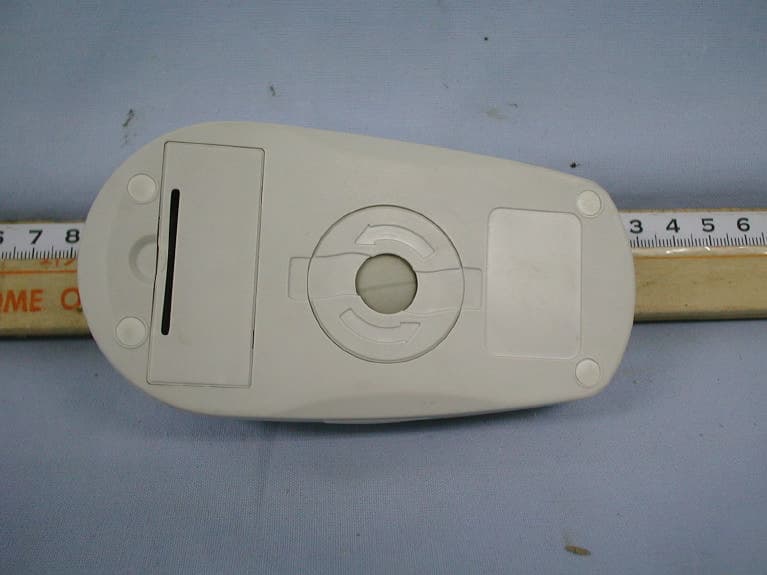
Click to zoom
Application Details
- Equipment Class
- DXX - Part 15 Low Power Communication Device Transmitter
- Date of Grant
- Mar 07, 2002
- Application Purpose
- Original Equipment
- Date of Application
- Mar 07, 2002
- Equipment Note
- Wireless Mouse
- Frequency Range
- 27.04500000 - 27.19500000
- Country
- Taiwan
Documents & Files
Document Text
Text extracted from the exhibit documents filed with the FCC. Open a document above to read the original.
Users Manual
MR-325 WIRELESS MOUSE USER’S MANUAL CONTENTS Chapter one: Introduction of the product 1.1 Abstract 1.2 List of contents Chapter two: Installation and setup 2.1 Hardware installation 2.2 Software installation 2.3 Function setups Chapter three: Hardware maintenance, Troubleshooting, Technical supports and service and Product specification 3.1 Easy maintenance of the hardware 3.2 Troubleshooting 3.3 Technical supports & services 3.4 Product specification 1.1 ABSTRACT First of all, we would like to thank you for purchasing our RF wireless mouse- MR-325. MR-325 is 5-buttons mouse with multi-functional design. With its elegant appearance and ergonomic design, it provides you with comforts as well as the smoothness. Furthermore MR-325 is also assigned with an unique driver’s program to activate the extra functions such as the magnifying glass, auto scrolling, double clicks...etc. It not only allows you to operate more efficiently but also more conveniently. 1.2 LIST OF THE CONTENTS When you have opened the package of MR-325, please make sure that you have the following accessories: l Wireless mouse –MR-325 ×1 l The receiver of the mouse ×1 l Setup disk ×1 l User’s manual ×1 l AAA size batteries ×2 In case of missing or damages of the above accessories, please contact your dealer immediately. 2.1 HARDWARE INSTALLATION Please follow the steps below in order to install your wireless mouse Firstly please switch off your computer and then connect the receiver (PS2 or USB) to your PC. Secondly please check the back of the receiver if the frequency channel has been switch to CH1 (factory setting). Finally open the lid of the battery at the back of the wireless mouse and check if the frequency channel has been switched to CH1 then all you have to do now is to put two of AAA size batteries into the mouse itself. (P.S. You are also free to switch the frequency channel to CH2 under one condition in which both of the mouse and the receiver have to be switched to the same channels. If one is CH1 and other is CH2 then the wireless mouse won’t be able to activate.) 2.2 SOFTWARE INSTALLATION The attached setup disk “MR SERIES 5.1” is capable of supporting a different editions of DOS 5.0 plus, WINDOWS3.1/95/98/2000NT/ME/XP. This setup disk not only installs the driver program needed for mouse but also provides a various functions. Once the procedure of the hardware installation has been done, you will be able to process the software installation and firstly please put the setup disk in the disk drive and carry out the process of A:\setup.exe then finally follow the steps below: Step1: The “WELCOME” icon will be showing to you and please follow the instructions to complete the installation. Please click on the “NEXT”. Step2: Choose the location that you wish to save this program (C:/ or D:/). Step3: The program can be installed according to the individual demand and it means that you will be able to save the program folder (ie mouse) to one of the existing folders. Step4: When you have finished the duplications of the files, please restart your computer and this will finish your installation. 2.3 FUNCTION SETUPS After you have finished the installation of the driver, a folder named MOUSE will be established. It will contain two files called MOUSE 5.1 and UNISTALL MOUSE 5.1. Afterward when you have activated WINDOWS system, this mouse will always exist in the system. 2.31 THE FILE OF MOUSE 5.1 Please move the cursor to the file called MOUSE 5.1 and double click on the item. Following there will be a picture of a white mouse and you then move to this item and double click it in order to activate the function setups of MOUSE 5.1. 2.32 SETUPS OF THE BUTTONS AND THE SCROLLING WHEEL Once the setup program MOUSE 5.1 has been activated, you may also setup the special functions on the buttons that was originally attached in this setup program: Choose “BUTTON” selection, you could then setup the functions for the 3 rd , 4 th and 5 th button according to your own personal favorites, for example you have the functions such as Auto scrolling, Universal scrolling, Double Click...etc. 2.33 SETUP THE FUNCTION FOR WHEEL SCROLLING Choose “WHEEL” selection and this is mainly providing the setup function for wheel mode as well as the wheel speed. If the program has the supports from INTELLI-MOUSE system, it is then capable of providing smooth operation for the mouse. For the program without such support will lead to a result of not able to activate the function of the wheel. In regards to the setup of the wheel speed, you will be able to definite the number of rolling line or pages according to your personal favorites. CHAPTER THREE: MAINTANCE OF THE HARDWARE AND TROUBLESHOOTING 3.1 EASY SOFTWARE MAINTANCE: If the moving speed of the mouse is not working smoothly or moving with an abnormal speed, you will need to clean up the ball and the rolling axle of the mouse itself. Here are the cleaning procedures: Step1: Firstly you need to remove the lid of the mouse by turning it to clock-wise direction and get the ball out from the mouse. Step2: You can see there are 3 black rolling axles in the hole where it is used to place the ball. The parts having the most contacts with the ball usually attracts more stains and dusts. Please use the cotton bar to clean them. In case of the tough stains, please clean it with alcohol solution. (Please prevent the cotton from remaining on the rolling axles) Step3: Use a piece of clean cloth to wipe out all the stains on ball, then place it back with the lid covered and lock it by turning it to the anti clock-wise direction. 3.2 TROUBLESHOOTING When your mouse is not able to work properly, please try the following procedures in order to fix the problems. Step1: Please make sure that the transmitter and the receiver are switched to the same channels. (Both of them need to set in the position of either CH1 or CH2) Step2: Please make sure that the connection between the receiver and your PC is connected pr…
Text truncated - open the document above for the full version.
Cover Letter(s)
From: Rita Hsiao [[email protected]] Sent: Friday, March 08, 2002 3:19 AM To: [email protected] Subject: Answer for AN02T1792 Dear Mike, Thank you for your advice. Regarding AN02T1792, the answers as below: Answer 1: The correct FCC ID is HQKKMEMR325 and the FCC ID Label had modified as Appendix 1. Answer 2: Please see Appendix 2. Answer 3: Sorry for typing error. I had modified the datas, please see Appendix 3. Answer 4: Pleasde see Appendix 4. Should you have any further question, please let me know. Thanks again! Nancy ----- Original Message ----- From: "Mike Kuo" <[email protected]> To: "Nancy (E-mail)" <[email protected]> Sent: Thursday, February 28, 2002 11:34 AM Subject: FW: KEY MOUSE ELECTRONIC ENTERPRISE, FCC ID:KMEMR325, AN02T1792 > > > -----Original Message----- > From: CERTADM > Sent: Wednesday, February 27, 2002 7:28 PM > To: '[email protected]' > Subject: KEY MOUSE ELECTRONIC ENTERPRISE, FCC ID:KMEMR325, AN02T1792 > > > Notice_content > ------------- > Question #1: Key Mouse Electronic is not the owner of Grantee code:KME. The > correct Grantee code for Key Mouse should be HQK. Please provide revised > FCC ID label format to correct the FCC ID number. > > Question #2: Schematic diagram can not be read. Please provide a clear copy > of schematic. > > Question #3: There are several spurious emissions are higher than the > fundamental field strength. In accordance with 15.215(b) of FCC rules, > unwanted emission field strength can not be higher than fundamental field > strength. This product is not compliance with FCC rules. > > Question #4: The two spectrum plots provided does not show the start and > stop frequencies. Please provide spectrum plots to demonstrate bandedge > compliance. > > Best Regards > > Mike Kuo / TCB Certifier > The items indicated above must be submitted before processing can continue > on the above referenced application. Failure to provide the requested > information within 60 days of the original e-mail date may result in > application dismissal and forfeiture of the filing fee. Also, please note > that partial responses increase processing time and should not be submitted. > Any questions about the content of this correspondence should be directed to > the e-mail address listed below the name of the sender.
ID Label/Location Info
Appendix 1 FCC ID Label FCC ID LABEL FORMAT AND LOCATION Applicant: KEY MOUSE ELECTRONIC ENTERPRISE CO., LTD. FCC ID: HQKKMEMR325 FCC ID: HQKKMEMR325 This device complies with part 15 of the FCC Rules. Operation is subject to the following two conditions: (1) This device may not cause harmful interference, and (2) this device must accept any interference received, including interference that may cause undesired operation. FCC ID LABEL AREA
Operational Description
Operational Description The Mouse transmitter is a low powered, hand held unit for remote control and key in data to the computer . See the function descriptions in attached. The transmitter is powered by two1.5 Volt batteries. It is designed to operate on a single fixed frequency at 27 MHz. See the attached block diagram and schematic. When keybuttom pressed or mouse moved , the mouse control will generate the digital control signals and will modulate the carrier signal. The carrier signal is generated by a crystal oscillator / frequency circuit comprised of a 27.045/27.195 MHz FSK .The frequency depend on the select channel switch to changed. The modulated output of the RF amplifier stage is coupled to the strip antenna. The transmitter is manually operated by the buttons pushed and automatically deactivate instant after the button being released. This feature is incorporated by the mouse control internally. All tuning and verification are performed by the manufacture and there are no adjustments can be made by the user . No external ground is required or used with this transmitter.
Schematics
Appendix 2 Schematics ZCOM Q1 A733 VCC C1 20PF PATH BITS TECHNICAL CORPORATION S2R D4 DL4148/CYL PT2 C3 0.47uF S3M R2 10K Wed,Sep 06,2001 APPROVED D8DL4148/CYL R5 10K CHECKED KEY MOUSE ELECTROINC ENTERPRISE CO.,LTD IR2 Y_LED D2 DL4148/CYL Y1 2MHZ MR325 TX DESIGNED RF_DATA IR1 X_LED D1 DL4148/CYL MODEL U1 EM84100 14 4 10 11 6 7 8 12 9 17 18 1 2 13 16 15 5 VDD /RESET DATA XferEna L R M S1 S3 X1/NEXT X1/Pre Z1/Y1 Z2/Y2 S2 OSCI OSCO VSS S4 PRE S1L S5 NEXT R1 100K R3 10K 1 OF 1 Size DATE D5DL4148/CYL C2 20PF VCC A RF_CH1 D9DL4148/CYL NAME D7DL4148/CYL PT1 R6 100K PCB NO DRAWN D6DL4148/CYL SHEET MOUSE KME D3 DL4148/CYL R4 10K Rev Sw7 Z_axis S6 RESET VCC VCC VCC VCC VCC VCC VCC CON4 CABLE 1 2 3 4 C1 20P RECEIVER MODULE RX_MOD 1 2 3 4 5 6 7 8 R2 4.7K U1 EM84110 1 2 3 4 5 6 7 8 910 11 12 13 14 15 16 17 18 P52 P53 TCC RESET GND P60 P61 P62 P63P64 P65 P66 P67 VCC OSCO OSCI P50 P51 ID_SW1 SW1 ANT1 ANTENNA C2 20P L110UH L210UH +CM4 6P SW SPST1 CHNO1 X1 4MHZ L410UH R1 4.7K D1 DATA L310UH +CB4 100uF 1 OF 1 Size MOUSE MODEL DESIGNED PCB NO APPROVEDDRAWN NAMEWed,Sep 06,2001DATE MR325 RX PATH KEY MOUSE ELECTROINC ENTERPRISE CO.,LTD BITS TECHNICAL CORPORATION KME A SHEET RevCHECKED
Test Report
ELECTROMAGNETIC EMISSIONS COMPLIANCE REPORT CERTIFICATION TO FCC PART 15 REQUIREMENTS for INTENTIONAL RADIATOR 27 MHZ WIRELESS MOUSE MODEL: MR-325 PRODUCT FAMILY: MQ-323; MQ-353; MR-355; MU-325; MU-355; MV-325; MV-355; MX-325; MX-355; MY-325; MY-355; MZ-325; MZ-355 FCC ID NO: KMEMR325 REPORT NO: 01R9831 ISSUE DATE: January 11, 2002 Prepared for KEY MOUSE ELECTRONIC ENTERPRISE CO., LTD. 6F-9, No. 3, Wu-Chuan 1 st Rd., Hsin Chuang City, Taipei, Taiwan, R. O. C. Prepared by COMPLIANCE ENGINE ERING SERVICES, INC. NO. 199, CHUNG SHENG ROAD, HSIN TIEN CITY, TAIPEI, TAIWAN, R. O. C. d.b.a. COMPLIANCE CERTIFICATION SERVICES REPORT NO: 01R9831 FCC ID: KMEMR325 DATE: January 11, 2002 COMPLIANCE ENGINEERING SERVICES, INC. TEL: (02) 2217-0894 FAX: (02) 2217-1254 NO. 199, CHUNG SHENG ROAD, HSIN TIEN CITY, TAIPEI, TAIWAN, R. O. C. This report shall not be reproduced except in full, without the written approval of CES. This document may be altered or revised by Compliance Engineering Services personnel only, and shall be noted in the revision section of the document. (CCS DOCUMENT NO: CCSUP4002B) TABLE OF CONTENTS PAGE 1. VERIFICATION OF COMPLIANCE........................................................................................1 2. PRODUCT DESCRIPTION........................................................................................................2 3. TEST FACILITY.........................................................................................................................2 4. MEASUREMENT STANDARDS..............................................................................................2 5. TEST METHODOLOGY............................................................................................................2 6. MEASUREMENT EQUIPMENT USED....................................................................................2 7. POWERLINE RFI LIMIT...........................................................................................................2 8. RADIATED EMISSION LIMITS...............................................................................................3 9. SYSTEM TEST CONFIGURATION.........................................................................................4 10. SYSTEM TEST CONFIGURATION.......................................................................................5 11. TEST PROCEDURE AND RESULT.......................................................................................5 11. 1 RADIATED EMISSION TEST PROCEDURE And RESULT.............................................5 l TEST DATA l EXTERNAL & INTERNAL PHOTOS l SCHEMATICS l BLOCK DIAGRAM l USER MANUAL REPORT NO: 01R9831 FCC ID: KMEMR325 DATE: January 11, 2002 PAGE NO: 1 COMPLIANCE ENGINEERING SERVICES, INC. TEL: (02)2217-0894 FAX: (02)2217-1254 NO. 199, CHUNG SHENG ROAD, HSIN TIEN CITY, TAIPEI, TAIWAN, R. O. C. This report shall not be reproduced except in full, without the written approval of CES. This document may be altered or revised by Compliance Engineering Services personnel only, and shall be noted in the revision section of the document. (CCS DOCUMENT NO: CCSTP4005) 1. VERIFICATION OF COMPLIANCE COMPANY NAME: KEY MOUSE ELECTRONIC ENTERPRISE CO., LTD. 6F-9, No. 3, Wu-Chuan 1 st Rd., Hsin Chuang City, Taipei, Taiwan, R. O. C. CONTACT PERSON: Nell Wu / R&D Assistant TELEPHONE NO.: 02-2298-2929 EUT DESCRIPTION: 27 MHZ WIRELESS MOUSE MODEL NAME/NUMBER: MR-325 PRODUCT FAMILY: MQ-323; MQ-353; MR-355; MU-325; MU-355; MV-325; MV-355; MX-325; MX-355; MY-325; MY-355; MZ-325; MZ-355 FCC ID: KMEMR325 DATE TESTED: December 10, 2001 REPORT NUMBER: 01R9831 TYPE OF EQUIPMENT REMOTE CONTROL EQUIPMENT TYPE 27 MHz WIRELESS MOUSE MEASUREMENT PROCEDURE ANSI C63.4 / 1992 LIMIT TYPE CERTIFICATION FCC RULE CFR 47, PART 15 The above equipment was tested by Compliance Engineering Services, Inc. for compliance with the requirements set forth in the FCC CFR 47, PART 15. The results of testing in this report apply to the product/system which was tested only. Other similar equipment will not necessarily produce the same results due to production tolerance and measurement uncertainties. Warning : This document reports conditions under which testing was conducted and results of tests performed. This document may not be altered or revised in any way unless done so by Compliance Engineering Services, Inc. and all revisions are duly noted in the revisions section. Any alteration of this document not carried out by Compliance Engineering Services, Inc. will constitute fraud and shall nullify the document. RICK YEO / EMC MANAGER COMPLIANCE ENGINEERING SERVICES, INC. REPORT NO: 01R9831 FCC ID: KMEMR325 DATE: January 11, 2002 PAGE NO: 2 COMPLIANCE ENGINEERING SERVICES, INC. TEL: (02)2217-0894 FAX: (02)2217-1254 NO. 199, CHUNG SHENG ROAD, HSIN TIEN CITY, TAIPEI, TAIWAN, R. O. C. This report shall not be reproduced except in full, without the written approval of CES. This document may be altered or revised by Compliance Engineering Services personnel only, and shall be noted in the revision section of the document. (CCS DOCUMENT NO: CCSTP4005) 2. PRODUCT DESCRIPTION CHASSIS TYPE Plastic Fundamental Frequency 27.045MHz ; 27.195MHz Power source 3.0V Battery Transmitting Time Continuous Local Oscillators N/A 3. TEST FACILITY The open area test sites and conducted measurement facilities used to collect the radiated data are located at No. 199, Chung Sheng Road, Hsin Tien City, Taipei, Taiwan R.O.C. The sites are constructed in conformance with the requirements of ANSI C63.7, ANSI C63.4 and CISPR Publication 22. 4. MEASUREMENT STANDARDS The site is constructed and calibrated in conformance with the requirements of ANSI C63.4/1992. 5. TEST METHODOLOGY For an intentional radiator, the spectrum shall be investigated from the lowest radio frequency signal generated in the device, without going below 9 KHz, up to at least the tenth harmonic of the highest fundamental frequency or to 40 GHz, whichever is lower. (CFR 4…
Text truncated - open the document above for the full version.
Test Setup Photos
REPORT NO: 01R9831 FCC ID: KMEMR325 DATE: January 11, 2002 PAGE NO: 4 COMPLIANCE ENGINEERING SERVICES, INC. TEL: (02)2217-0894 FAX: (02)2217-1254 NO. 199, CHUNG SHENG ROAD, HSIN TIEN CITY, TAIPEI, TAIWAN, R. O. C. This report shall not be reproduced except in full, without the written approval of CES. This document may be altered or revised by Compliance Engineering Services personnel only, and shall be noted in the revision section of the document. (CCS DOCUMENT NO: CCSTP4005) 9. SYSTEM TEST CONFIGURATION The EUT was configured for testing in a typical fashion ( as a customer would normally use it). Radiated Open Site Test Set-up
Contact Information
Applicant
MS. Hingis Chen(Manager)
Test Firm
Compliance Engineering ServicesSteve Hsu
Technical Specifications
| # | Rule Parts | Frequency Range | Power Output |
|---|---|---|---|
| 1 | 15C | 27.045 MHz - 27.195 MHz | - |
Other Applications from Key Mouse Electronic Enterprise Co Ltd

HQKKMEKA3381J
Apr 06, 2010Wireless Keyboard
Equipment Class
DXX - Part 15 Low Power Communication Device Transmitter
HQKKMEMAC233J
Apr 06, 2010Wireless Mouse
Equipment Class
DXX - Part 15 Low Power Communication Device Transmitter
HQKKMERGG5J
Apr 06, 2010Wireless Dongle
Equipment Class
DXX - Part 15 Low Power Communication Device Transmitter
HQKKMEMYX138
May 09, 200527 MHz Wireless Mouse
Equipment Class
DXX - Part 15 Low Power Communication Device Transmitter
HQKKMEMFB033
Apr 20, 200527MHz Wireless Mouse
Equipment Class
DXX - Part 15 Low Power Communication Device Transmitter