IHDP56MA2WCDMA/GSM TRANSCEIVER WITH BT & WLAN
Motorola Mobility LLC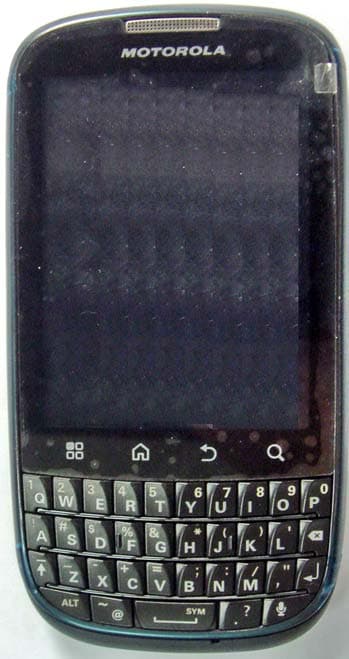
Click to zoom
Application Details
- Equipment Class
- DTS - Digital Transmission System
- Date of Grant
- Aug 29, 2011
- Application Purpose
- Original Equipment
- Date of Application
- Aug 22, 2011
- Equipment Note
- WCDMA/GSM TRANSCEIVER WITH BT & WLAN
- Frequency Range
- 2412.00000000 - 2462.00000000
- Company
- Motorola Mobility LLC
- Country
- United States
Documents & Files
Document Text
Text extracted from the exhibit documents filed with the FCC. Open a document above to read the original.
Users Manual
Touch tipsWelcomeAppsHome screenStart hereYour phone MOTOROLA PRO+ with MOTOBLUR TM Certain features, services and applications are network dependent and may not be available in all areas; additional terms, conditions and/or charges may apply. Contact your service provider for details. All features, functionality, and other product specifications, as well as the information contained in this guide, are based upon the latest available information and believed to be accurate at the time of printing. Motorola reserves the right to change or modify any information or specifications without notice or obligation. Note: The images in this guide are examples only. MOTOROLA and the Stylized M Logo are trademarks or registered trademarks of Motorola Trademark Holdings, LLC. Google, the Google logo, Google Maps, Google Talk, Google Latitude, Gmail, YouTube, Picasa, Android and Android Market are trademarks of Google, Inc. All other product or service names are the property of their respective owners. © 2011 Motorola Mobility, Inc. All rights reserved. Product ID: MOTOROLA PRO+ (Model MB632) Manual Number: 68016326001-A Part Welcome Part business, part casual and all smartphone. •Speed—1Ghz processor for fast web browsing. •Easy viewing—Emails, Documents, and Calendar. •Business ready—enterprise level security. Note: This phone supports data-intensive apps and services. It is strongly recommended that you purchase a data plan that meets your needs. Contact your service provider for details. 11:35 929:29:22P2P2 PMMM Work week done! Dance floor here I come! John Renaldi I have 1 extra ticket for the... 3m3m3 miinutestesmminuinutestes naldi extra sagssa a 11:3355 flfoorr i raa t icckeektt foorr ththe.e.. aggaagaggg a Eskridge Your phone Most of what you need is in the touchscreen and four keys on the front: •Menu: Open menu options. •Home: Go to the home screen. •Back: Go back a screen. •Search: Touch for text search. Note: Certain apps and features may not be available in all countries. 11:35 929:29:22P2P2 PMMM Work week done! Dance floor here I come! John Renaldi I have 1 extra ticket for the... 3m3m3 minuinutestesmminuinutestes naldi extra ticket for the.... sagossag agoo Menu Key Home Key Micro USB Connector Charge or connect to PC. 3.5mm Headset Jack Sensor Back Key Volume Keys/ Camera Zoom Microphone Power Key Search Key Press=Sleep/ Wake up. Hold=Turn on/off. Notification Indicator On=Charged. Flashing=New notification. Use the full keypad for texting, emailing, or searching. Tip: To lock the screen, press the Power Key. To unlock, press the Power Key, then drag right. Note: Your touchscreen might stay dark if the sensor just above it is covered. Don't use covers or screen protectors (even clear ones) that cover this sensor. 11:35 929:29:22P2P2 PMMM Work week done! Dance floor here I come! John Renaldi I have 1 extra ticket for the... 3m3m3 mininutestesmminuinutestes naldi extra ticket for the.... ssagagossag agoo Delete Enter Shift Space Alternate Voice Recognition Symbol Start here Let’s get you up and running. Tip: Your phone comes with a microSD memory card already installed. Caution: Before assembling, charging, or using your phone for the first time, please read the important safety, regulatory and legal information packaged with your product. SIM in. Cover on. Charge. 1 3 4 2 Battery in. 3H Create or log into a MOTOBLUR account. Use an existing email account and a memorable password—these will become your MOTOBLUR account ID and password. Registration is secure and should only take a few minutes. Note: To use MOTOBLUR, please read the terms and conditions during registration and, if you agree, choose to continue. 11:35 929:29:22P2P2 PMMM Work week done! Dance floor here I come! John Renaldi I have 1 extra ticket for the... 3m3m3 minuinutestesmminuinutestes na ex ssagagssag ag k e all xt ggg Add accounts. If you use any of the services below, tap the icon to set it up. Setup accounts Email Yahoo! Mail Google PhotobucketBebo Corporate Sync Facebook If you use any of the services below, tap the icon to set it up. Setup accounts Last FM Email Ad Picasa MySpace Twitter Skyrock Select a language. Please choose a language English StartEmergency Call To make an emergency call during esskey.setup, press the “Menu Key.” Turn on.Tu 1 4 S la 2 Register or log in. MOTOBLUR ID: Enter email address Password: NextBack 3 Creating your MOTOBLUR account To uch tip s It’s all in the touch: •Touch: Choose an icon or option. •Touch & hold: Open options. •Drag: Scroll or move slowly. •Flick: Scroll or move quickly. •Pinch: To zoom maps, web pages, or photos, slide fingers apart or together. 11:35 Camera roll134 items Touch to open. Touch & hold to show options. Drag or flick to scroll. Zoom in or out. Home screen The home screen gives you all your latest information in one place. It’s what you see when you turn on the phone or touch Home from a menu. Add widgets and shortcuts to your home screen to see what’s important to you. To make the home screen yours, see “Personalize”. 11:35 999::222222 PPPMMM Work week done! Dance floor here I come! John Renaldi I have 1 extra ticket for the... 333 mmiinutteessmmiinnuutteess naldi extra ticket for the.... ssaagoss aaggoo Widgets See your latest updates, and more. Flick left or right to see more panels. Shortcuts Touch to open. Open the app menu. Phone Status & Notifications Flick down to see details. Apps All your apps, all together: •App menu: To open the app menu, touch in the home screen. To close the app menu, touch Home or Back. •Want more?: No problem. To download more apps, touch > Market. Tip: Choose your apps carefully, from trusted sites like Market, as some may impact your phone’s performance. Market Featured Google Goggles FREE Google Inc. Google Maps FREE Google Inc. FREE Finance Google Inc. SearchMy apps SettingsHelp Open the app menu and touch Market. Touch to see your downloaded apps, settings, or help. Touch an app to open its details or install it.
Users Manual
WEB & MAPSMORE WIRELESSsGalleryMediaMESSAGESUpdatesCONTACTsCALLSPersonalize Personalize Go ahead, add your personal touch. Change your widgets, wallpaper, ringtone, and more—make it yours. •Home screen: Touch and hold an empty spot until you see the Add to Home screen menu. Tip: To move or delete something, touch and hold it to drag to a new location or to the trash bin at the top of your screen. •Ringtones & sounds: Touch Menu> Settings > Sound. 11:35 Work week done! Dance floor here I come! John Renaldi I have 1 extra ticket for the... See all your apps. Touch the Launcher icon. 1111111111111111111111:::::::::3333333333355555555555 9:99:222222PP PMMM 333 imiminunutettess agagoo Work week done! Dance floor here I come! John Renaldi I have 1 extra ticket for the... all your apps. Touch the Launcher icon. a Sound settings Always Vibrate Silence all sounds except media & alarms Volume General Silent mode Touch and hold an empty spot to open the home screen menu. Add to Home Screen Motorola Widgets Android Widgets Shortcuts Folders Wallpapers Calls Your dialpad, call lists, contacts and favorites are just a touch or two away—no menus needed. Just touch Dialerin the home screen. Tip: During a call, touch Homeor Back to hide the active call display and use other apps. To reopen it, touch Dialer. DEF TUVPQRSWXYZ 8 7 9 * + # 0 GHIMNO 465 JKL ABC 123 Colleen Pham Mobile 555-555-2505 Dialpad 11:34 11:34 Active call Add callEnd call BluetoothMuteSpeaker Dialer Colleen Pham 555-555-2505 RecentContactsFavorites 00:03 Call Timer Active Call Open a list. Add Contact Voice Command Contacts Contacts like you’ve never had before, downloaded from your accounts and backed up on MOTOBLUR. To u ch> Contacts or Dialer > Contacts. •Scroll: Flick or drag the list. •Search: Touch to open, then type the contact name. •More: To transfer your contacts to your phone, or get your contacts organized, go to www.motorola.com/mymotoblur. 11:30 Andrew Luis Andy Fanning Anna Fui Amber Mathews Displaying 214 contacts A FavoritesContactsRecentDialler u Contacts List Touch to call or text. Touch & hold to edit, delete, and more. Touch to import/export, show display options, and more. Add Contact Groups Search Contacts Select group to show. Updates Find out what everyone is doing. Touch your Social Networking or Social Status widgets to see the newest update, then: •See more: Flick left to see more updates or messages. •See details: Touch Social Networking, then touch the social network’s icon for more access. Tip: To add social network accounts, touch Menu > Settings > Accounts > Add account. Kristine Kelley Status update May 17, 7:12 AM Not even ready to go back to school. Alex Pico likes this. Set statusSocial networking 11:30 Kristine Kelley Not even ready to go back to school 10 minutes ago Kristine Kelley Not even ready to go back tbkt es ago n ready to to schoolthl Messages All of your messages stay in one place—text, IM, email, Facebook™, and more. Touch > Messaging > Universal Inbox. To edit the message types shown in the Universal inbox, touch Menu > Edit Universal Inbox. Tip: To add email and Gmail™ accounts, just touch Menu > Settings > Accounts > Add account and follow the instructions. Great news, congratulations! May 7 May 6 May 4 May 4 Universal inbox Alex Pico Hi. Meet at my house at... John Harris Let’s get a bite to eat. Brendan Asnell Are you watching the game? Tom Smith 11:30 Message List Touch to open a message. Touch & hold to delete. Touch to select multiple messages to move, or delete. Or, touch Menu > Select all or Unselect all. Create a Message Refresh. Media See it, capture it, share it! You’ll even have time to relax to some music. •Photos: Touch > Camera. To take the photo, touch . •Videos: To u ch> Camcorder. To start and stop the video, touch . •Music: To u ch> Music, then touch a category. Play your songs or listen to an online radio station. Music controls. Open last photo. Capture. Song title Song lyrics... Open options. Zoom. Media Your photos and videos plus your friends photos and videos all in one place, touch > Gallery: •View: Touch Camera roll to see the photos and videos you have taken, or touch My library to sort photos and videos by Albums, Locations, Tags, or Timeline. •Share: To u ch Online, or Friends. ric Upl Yes richie Uploaded a photo Yesterday Online i eeeee aad ddd eeed dd aaaaa ppp hhhhh o rrr ddda aaay yyy richie Uploaded a photo Yesterday 3 Camera roll 11:35 Friends My library View your captured photos & videos. Sort your photos & videos. See your online albums (like Picasa, Flickr, or Facebook). Go to your friends’ online albums. Web & maps Browse, download, and search. And if you need to know where you are or where you’re going, we’ve got that covered, too. •Browser: Touch> Browser and surf to your heart’s content. •Rich web content: With Adobe™ Flash™ Player 10.1 support you can access your favorite websites. •Maps: Touch> Maps to use the Google Maps™ you know and love. With built-in GPS, you’ll have pinpoint turn-by-turn navigation all the way. http://www.google.... 11:34 11:34 ImagesPlacesNewsmore Instant (beta) is off: Turn on Web New window Refresh Bookmarks Forward Windows More Messaging N Clark St Wacker Dr M E Ohio St N Rush St N Wabash Ave N Dearborn St E Grand Av N Micigan Ave N Micigan Ave W Lake StW Lake St E Wacker Pl State/Lake Grand Red Lake Randolph St Metra Randolph/ Wabash Washington-Blue E S WaterSt M M M M E Randolph St Ontario St E Ontario St aaaaaa nnnnnnnnnnnnnn RRRRaannnnddoollpppppppppppphhhh SSSSSSSSSSSSSSSSSSSSSSSSSSSSSSSStttttttttttttttttttttttMMMMMMMMMMMMMMMMMMMMMeeeeeeeeeeeeeeettttttttttttttttttttttrrrrrrrrrrrrrrrrrrraaaaaaaaaaaa Search Clear MapJoin LatitudeMore Directions Starred Places Search Maps Connection Mobile Network: , , Wi-Fi: Wireless Lose the wires—touch Menu > Settings > Wireless & networks . •Bluetooth™: For handsfree calls and wireless music, touch Bluetooth settings and connect to your accessory. •Wi-Fi: For fast internet ac…
Text truncated - open the document above for the full version.
Users Manual
Safety, Regulatory & Legal Information 1 Safety, Regulatory & Legal Battery Use & Safety Battery Use & Safety Important: Handle and store batteries properly to avoid injury or damage. Most battery issues arise from improper handling of batteries, and particularly from the continued use of damaged batteries. DON’Ts • Don’t disassemble, crush, puncture, shred, or otherwise attempt to change the form of your battery. • Don’t let the mobile device or battery come in contact with liquids.* Liquids can get into the mobile device’s circuits, leading to corrosion. • Don’t allow the battery to touch metal objects. If metal objects, such as jewelry, stay in prolonged contact with the battery contact points, the battery could become very hot. • Don’t place your mobile device or battery near a heat source.* High temperatures can cause the battery to swell, leak, or malfunction. • Don’t dry a wet or damp battery with an appliance or heat source, such as a hair dryer or microwave oven. DOs • Do avoid leaving your mobile device in your car in high temperatures.* • Do avoid dropping the mobile device or battery.* Dropping these items, especially on a hard surface, can potentially cause damage.* • Do contact your service provider or Motorola if your mobile device or battery has been damaged by dropping, liquids or high temperatures. * Note: Always make sure that the battery compartment and any connector covers are closed and secure to avoid direct exposure of the battery to any of these conditions, even if your product information states that your mobile device can resist damage from these conditions. Important: Motorola recommends you always use Motorola-branded batteries and chargers for quality assurance and safeguards. Motorola’s warranty does not cover damage to the mobile device caused by non-Motorola batteries and/or chargers. To help you identify authentic Motorola batteries from non-original or counterfeit batteries (that may not have adequate safety protection), Motorola provides holograms on its 2 batteries. You should confirm that any battery you purchase has a “Motorola Original” hologram. If you see a message on your display such as Invalid Battery or Unable to Charge, take the following steps: •Remove the battery and inspect it to confirm that it has a “Motorola Original” hologram; •If there is no hologram, the battery is not a Motorola battery; •If there is a hologram, replace the battery and try charging it again; •If the message remains, contact a Motorola authorized service center. Warning: Use of a non-Motorola battery or charger may present a risk of fire, explosion, leakage, or other hazard. Proper and safe battery disposal and recycling: Proper battery disposal is not only important for safety, it benefits the environment. You can recycle your used batteries in many retail or service provider locations. Additional information on proper disposal and recycling can be found at www.motorola.com/recycling Disposal: Promptly dispose of used batteries in accordance with local regulations. Contact your local recycling center or national recycling organizations for more information on how to dispose of batteries. Warning: Never dispose of batteries in a fire because they may explode. Battery Charging Battery Charging Notes for charging your product’s battery: • During charging, keep your battery and charger near room temperature for efficient battery charging. •New batteries are not fully charged. •New batteries or batteries stored for a long time may take more time to charge. •Motorola batteries and charging systems have circuitry that protects the battery from damage from overcharging. Third Party Accessories Use of third party accessories, including but not limited to batteries, chargers, headsets, covers, cases, screen protectors and memory cards, may impact your mobile device’s performance. In some circumstances, third party accessories can be dangerous and may void your mobile device’s warranty. For a list of Motorola accessories, visit www.motorola.com/products 032375o 3 Driving Precautions Responsible and safe driving is your primary responsibility when behind the wheel of a vehicle. Using a mobile device or accessory for a call or other application while driving may cause distraction. Using a mobile device or accessory may be prohibited or restricted in certain areas, always obey the laws and regulations on the use of these products. While driving, NEVER: •Type or read texts. •Enter or review written data. •Surf the web. •Input navigation information. •Perform any other functions that divert your attention from driving. While driving, ALWAYS: •Keep your eyes on the road. •Use a handsfree device if available or required by law in your area. •Enter destination information into a navigation device before driving. •Use voice activated features (such as voice dial) and speaking features (such as audible directions), if available. •Obey all local laws and regulations for the use of mobile devices and accessories in the vehicle. •End your call or other task if you cannot concentrate on driving. Remember to follow the “Smart Practices While Driving” in this guide and at www.motorola.com/callsmart (in English only). Seizures/Blackouts Some people may be susceptible to epileptic seizures or blackouts when exposed to flashing lights, such as when playing videos or games. These may occur even if a person has never had a previous seizure or blackout. If you have experienced seizures or blackouts, or if you have a family history of such occurrences, please consult with your physician before playing videos or games or enabling a flashing-lights feature (if available) on your mobile device. Discontinue use and consult a physician if any of the following symptoms occur: convulsion, eye or muscle twitching, loss of awareness, involuntary movements, or disorientation. It is always a good idea to hold the screen away from your eyes, leave the lights on in the room, take a 15-minute break every hour, a…
Text truncated - open the document above for the full version.
Attestation Statements
APPLICANT: MOTOROLA MOBILITY, INC. FCC ID: IHDP56MA2 Motorola Mobility, Inc.; 600 N. U.S. Highway 45, Libertyville, IL 60048, USA Pag e 2 - 1 Exhibit 2. Statements of Certification -- Pursuant to 47 CFR 2.907 2.1. Specification Compliance Transceiver type described herein (IHDP56MA2) has been tested in accordance with the requirements contained in the appropriate Commission regulations. To the best of my knowledge, these tests were performed using measurement procedures consistent with industry or Commission standards, and demonstrate that this equipment complies with the appropriate standards. Each unit manufactured, imported, or marketed will conform to the samples tested herein, within the statistical variations that can be expected due to high volume production and test measurement error. NAME: Scott E. Bawinkel SIGNATURE DATE: 27 July 2011 TITLE: Product Hardware EE Lead APPLICANT: MOTOROLA MOBILITY, INC. FCC ID: IHDP56MA2 Motorola Mobility, Inc.; 600 N. U.S. Highway 45, Libertyville, IL 60048, USA Pag e 2 - 2 2.2. Statement of Certification I hereby certify that the above application was prepared under my direction and that to the best of my knowledge and belief, the facts set forth in this application and accompanying technical data are true and correct. The technical data supplied with this application was taken under my supervision and is hereby duly certified. I also certify that this transmit equipment (IHDP56MA2) is in compliance with all applicable parts of the FCC Rules. NAME: John Lewczak SIGNATURE: DATE 27 July 2011 TITLE: Engineering Manager, Product Safety and Compliance 2.3. Attestation Statement (Equipment Class DTS and DSS - Bluetooth/Wi-Fi) This device contains an embedded Bluetooth / Wi-Fi device that Motorola Mobility confirms is compliant with the applicable Part 15C regulations. 15.247(a)(1) • The hopping sequence must be pseudorandom. • All Channels are used equally on average. • The receiver input bandwidth is approximately equal to the transmit bandwidth. • The receiver hops in sequence with the transmitted signal. 15.247(g) The system is designed to comply with all of the regulations in Section 15.247 when the transmitter is presented with a continuous data (or information). 15.247(h) The system does not coordinate its channel selection/hopping sequence with other frequency hopping systems for the express purpose of avoiding the simultaneous occupancy of individual hopping frequencies by multiple transmitters. NAME: Scott E. Bawinkel SIGNATURE: DATE: 27 July 2011 TITLE: Product Hardware EE Lead APPLICANT: MOTOROLA MOBILITY, INC. FCC ID: IHDP56MA2 Motorola Mobility, Inc.; 600 N. U.S. Highway 45, Libertyville, IL 60048, USA Pag e 2 - 3 2.4. Attestation Statement (Equipment Class PCE – Hearing Aid Compatibility) Motorola Mobility hereby declares that typical production units were evaluated for Hearing Aid Compatibility (HAC) compliance. NAME: Scott E. Bawinkel SIGNATURE: DATE: 27 July 2011 TITLE: Product Hardware EE Lead 2.5. Attestation (Equipment Class PCE) Motorola Mobility hereby declares that the DUT utilized for SAR testing was found to be operating in a manner consistent with its design characteristics, and the drift values reported for the licensed GSM/WCDMA services (between -0.25 and +0.39 dB in 850/1900MHz bands) have been confirmed as inherent to the operation of the device. NAME: Scott E. Bawinkel SIGNATURE: DATE: 27 July 2011 TITLE: Product Hardware EE Lead
Cover Letter(s)
APPLICANT: MOTOROLA MOBILITY, INC. FCC ID: IHDP56MA2 Motorola Mobility, Inc.; 8000 W. Sunrise Blvd, Suite A; Plantation, FL 33322, USA www.motorola.com August 8, 2011 Authorization & Evaluation Division Federal Communications Commission Laboratory 7435 Oakland Mills Road Columbia, MD 21046 Subject: Application for Certification of transmitter with FCC ID: IHDP56MA2, PCS Handsets, with Wi-Fi and Bluetooth. Gentlemen; Motorola Mobility, Inc.; 8000 W. Sunrise Blvd.; Plantation, FL 33322 herein submits its application for certification of the multi-mode handset with FCC ID: IHDP56MA2. The primary transceiver in this composite device operates in the 850 MHz and 1900 MHz bands as a WCDMA/GSM portable transceiver. It employs HSPA data transmission capabilities. This device also operates in other non-FCC regulated bands outside of the US territory. This radio product is also equipped with a Wi-Fi (802.11b/g/n) transceiver. The Wi-Fi Band of operation is 2.412 - 2.462 GHz, with channels up to 17 MHz in bandwidth for 802.11g operation. The Wi-Fi device complies 15.247 (c), 15.205, and 15.209 (b). This radio product is equipped with a Bluetooth (BT) transceiver. BT supports both voice and data for short range wireless communications. The Bluetooth Band of Operation is 2.4 - 2.4835 GHz (1 MHz channel bandwidth). The BT device also complies with the requirements of FCC Rule Parts 15.247 (c), 15.205 and 15.209 (b). All transmitters contained in this radio product have been subjected to routine environmental evaluation (as applicable) according to 47 CFR Part 2.1093 (c) for RF exposure and found to be compliant with the limits specified in 47 CFR 2.1093(d)(2). This radio product features an integrated GPS receiver, and is designed to function as a computer peripheral device when functioning as an RF modem, while connected to a computer via a data cable, as described in 47 CFR Part 15.3(r). A Part 15B test report is included for certification. Enclosed is a complete Certification Application. Contact me at (954) 723-6272 if you require any additional information. Page 13a - 1 APPLICANT: MOTOROLA MOBILITY, INC. FCC ID: IHDP56MA2 Motorola Mobility, Inc.; 8000 W. Sunrise Blvd, Suite A; Plantation, FL 33322, USA www.motorola.com Regards, FCC Liaison Motorola Mobility, Inc. 8000 W. Sunrise Blvd.; Suite A Mail Stop 52-5JJ Plantation, FL 33322 E-mail: [email protected] Page 13a - 2
Cover Letter(s)
FCC ID: IHDP56MA2 Motorola Mobility, Inc.; 8000 W. Sunrise Blvd, Suite A; Plantation, FL 33322, USA www.motorola.com Page 13b - 1 CONFIDENTIALITY REQUEST 8 Auguest 2011 Federal Communications Commission Laboratory Authorization & Evaluation Division 7435 Oakland Mills Road Columbia, MD 21046 Subject: Confidentiality Request Regarding Application for Certification of FCC ID: IHDP56MA2. Dear Sir or Madam: Pursuant to Sections 0.457 and 0.459 of the Commission’s Rules, we hereby respectfully request confidential treatment of information accompanying this application as outlined below: Exhibit Type File Name Block Diagrams. IHDP56MA2_Ex_04 (Block Diagrams).pdf Schematic Diagrams. IHDP56MA2_Ex_05 (Schematic Diagrams).pdf Parts List and Tune Up Procedures. IHDP56MA2_Ex_10 (Parts List and Tune Up).pdf Transmitter Characteristics. IHDP56MA2_Ex_12 (TX Characteristics).pdf Motorola Mobility, Inc. requests that these exhibits be held as Permanently Confidential, and not be made routinely available for public inspection. Motorola considers that the information in these exhibits should be classified as trade secrets, pursuant to 47 CFR Section 0.457(d) and Section 552(b)(4) of the Freedom of Information Act. The public disclosure of these materials may be harmful to the applicant and provide unjustified benefits to its competitors. Motorola Mobility, Inc. understands that, pursuant to Section 0.457 of the Rules, disclosure of this application and all accompanying documentation will not be made before the date of the Grant for this application. FCC ID: IHDP56MA2 Motorola Mobility, Inc.; 8000 W. Sunrise Blvd, Suite A; Plantation, FL 33322, USA www.motorola.com SHORT TERM ONFIDENTIALITY REQUEST – 180 DAYS Pursuant to the Commission’s public notice DA 04-1705 (June 15, 2004), Motorola Mobility, Inc. is also requesting Temporary Confidentiality treatment of information accompanying this application as outlined below. This provision will give Motorola Mobility, Inc. temporary confidentiality prior to product launch. Exhibit Type File Name External product photographs. IHDP56MA2_Ex_03 (External_Photos).pdf Test set-up photographs. IHDP56MA2_Ex_07b (SAR Test Set- up_Details).pdf IHDP56MA2_Ex_07c (Part 15 Test Set- up_Details).pdf IHDP56MA2_Ex_07d (HAC Test Set- up_Details).pdf User’s Manual. IHDP56MA2_Ex_08 (User Guide).pdf Internal product photographs. IHDP56MA2_Ex_09 (Internal Photos).pdf Please contact me if you require any additional information. Regards, FCC Liaison Motorola Mobility, Inc. 600 N. U.S. Highway 45 Libertyville, IL 60048-5343 E-mail: [email protected] Page 13b - 2
External Photos
APPLICANT: MOTOROLA, INC. F CC ID : IHDP56MA2 FRONT OF PHONE BACK OF PHONE FOR NO BATTERY BACK OF PHONE 1 EXHIBIT 3 APPLICANT: MOTOROLA, INC. F CC ID : IHDP56MA2 2 EXHIBIT 3 SIDE OF PHONE
Internal Photos
APPLICANT: MOTOROLA, INC. FCC ID: IHDP56MA2 Main Board EXHIBIT 9 1 APPLICANT: MOTOROLA, INC. FCC ID: IHDP56MA2 Sub Board-Top Sub Board-Top (Shielding removed) EXHIBIT 9 2 APPLICANT: MOTOROLA, INC. FCC ID: IHDP56MA2 Sub Board-Bottom Sub Board-Bottom (Shielding removed) EXHIBIT 9 3 APPLICANT: MOTOROLA, INC. FCC ID: IHDP56MA2 Touch panel and Main LCM Front Housingand keypad EXHIBIT 9 4 APPLICANT: MOTOROLA, INC. FCC ID: IHDP56MA2 EXHIBIT 9 5 Back Housing Inside Back Housing
RF Exposure Info
MOTOROLA, INC. Portable Cellular Phone SAR Test Report Number: 24596-1F E E x x h h i i b b i i t t 1 1 1 1 P P a a g g e e 3 3 8 8 o o f f 3 3 9 9 Appendix 8 Dipole Characterization Certificate MOTOROLA, INC. Portable Cellular Phone SAR Test Report Number: 24596-1F E E x x h h i i b b i i t t 1 1 1 1 P P a a g g e e 3 3 9 9 o o f f 3 3 9 9 END OF REPORT
RF Exposure Info
2450 MHz Simulated Body Tissue Measurement Log Log Date/TimeFreqCond% DiffPermittivity% DiffTemp 10/4/10 9:51 AM24502.044.7%50.6-4.0%19.°C 10/6/10 1:35 PM24502.023.6%50.60-4.0%19.0°C 10/8/10 8:56 AM24501.87-4.2%50.70-3.8%18.7°C 10/12/10 9:34 AM24502.013.1%49.70-5.7%19.0°C 10/13/10 9:19 AM24502.002.6%50.30-4.6%18.6°C 10/14/10 10:14 AM24502.034.2%50.10-5.0%19.0°C 10/18/10 8:44 AM24502.034.2%50.00-5.2%19.2°C 10/20/10 9:19 AM24502.034.2%49.70-5.7%19.1°C 10/21/10 8:52 AM24502.023.6%49.50-6.1%19.°C 10/24/10 5:59 AM24501.91-2.1%49.90-5.4%19.1°C 10/25/10 9:28 AM24501.992.1%48.90-7.3%19 10/27/10 11:47 PM24502.013.1%49.50-6.1%18.8°C 10/31/10 9:02 AM24502.023.6%49.40-6.3%18.3°C 11/2/10 10:57 AM24502.034.2%49.60-5.9%18.3°C 11/12/10 5:02 PM24501.981.6%49.10-6.9%19.2°C 11/16/10 2:32 PM24502.023.6%48.70-7.6%19.°C 11/19/10 10:12 AM24502.044.7%48.50-8.0%19.°C 11/20/10 9:21 AM24502.034.2%48.80-7.5%19.°C 11/21/10 9:18 AM24502.002.6%48.90-7.3%19.6°C 11/23/10 8:26 AM24501.91-2.1%50.70-3.8%20.0°C 11/24/10 8:34 AM24501.92-1.6%50.80-3.7%20.0°C 11/25/10 8:53 AM24501.92-1.6%50.60-4.0%19.2°C 11/26/10 8:56 AM24501.90-2.6%50.00-5.2%19.8°C 11/27/10 9:51 AM24501.960.6%50.40-4.4%20.3°C 11/28/10 9:52 AM24501.960.6%50.00-5.2%20.5°C 11/29/10 8:36 AM24501.92-1.6%50.10-5.0%19.2°C 11/30/10 11:55 AM24501.87-4.2%50.10-5.0%19.5°C 12/7/10 1:17 PM24501.981.6%50.40-4.4%19.5°C 12/8/10 7:08 AM24502.013.1%50.50-4.2%19.0°C 12/18/10 8:29 AM24501.93-1.1%50.1-5.0%19.0°C 12/20/10 2:57 PM24501.91-2.1%49.9-5.4%19.3°C 12/22/10 6:50 AM24501.971.1%50.4-4.4%20.2°C 1/5/11 10:36 AM24501.981.6%50.00-5.2%19.3°C 1/13/11 9:55 AM24502.013.1%50.00-5.2%19.2°C 1/19/11 4:01 PM24502.002.6%50.10-5.0%19.2°C 1/21/11 8:17 AM24502.023.6%49.60-5.9%19.1°C 1/22/11 6:31 AM24501.992.1%49.40-6.3%20°C 1/26/11 3:20 PM24502.034.2%49.70-5.7%19.4 1/28/11 9:01 AM24501.981.6%49.30-6.5%19.7*C 1/30/11 6:39 AM24501.992.1%49.20-6.7%19.5*C 2/3/11 3:08 PM24501.981.6%49.30-6.5%19.7*C 2/4/11 11:20 AM24502.044.7%49.50-6.1%19.3 2/6/11 8:14 AM24502.013.1%49.00-7.1%19.2 2/10/11 8:24 AM24502.044.7%49.10-6.9%19.2*C 2/11/11 1:42 PM24502.013.1%47.90-9.2%19.2*C 2/12/11 9:23 AM24502.023.6%48.20-8.6%19.1*C 2/13/11 8:14 AM24502.044.7%48.50-8.0%19.*C 2/19/11 6:28 AM24502.023.6%48.40-8.2%19.5 2/21/11 8:53 AM24502.023.6%48.00-9.0%19.2*C 2/23/11 8:21 AM24502.023.6%48.10-8.8%19.3°C 2/24/11 6:53 AM24502.023.6%48.40-8.2%19.1°C 2/28/11 8:48 AM24502.013.1%48.10-8.8%20.3 3/1/11 8:39 AM24502.013.1%48.30-8.4%20.3*C 3/2/11 8:47 AM24502.023.6%48.20-8.6%20.3*C 3/3/11 8:18 AM2450…
Text truncated - open the document above for the full version.
Contact Information
Applicant
Jeff Narducci(Director Product Compliance)
Test Firm
Motorola Inc.Albert Patapack
Technical Specifications
| # | Rule Parts | Frequency Range | Power Output |
|---|---|---|---|
| 1 | 15C | 2.41 GHz - 2.46 GHz | 330.00 mW |
Other Applications from Motorola Mobility LLC
IHDT56AW9
May 12, 2026Smart Watch
Equipment Class
NII - Unlicensed National Information Infrastructure TXIHDT56AW5
Apr 08, 2026Mobile Cellular Phone
Equipment Class
DTS - Digital Transmission SystemIHDT56AW6
Mar 18, 2026Smart Watch
Equipment Class
JBP - Part 15 Class B Computing Device PeripheralIHDT56AX4
Mar 17, 2026Mobile Cellular Phone
Equipment Class
PCE - PCS Licensed Transmitter held to earIHDT56AW3
Mar 03, 2026Mobile Cellular Phone
Equipment Class
6XD - 15E 6 GHz Low Power Indoor Client