IHDP56MD3Portable Cellular/ PCS CDMA Transceiver with WLAN and Bluetooth
Motorola Mobility LLC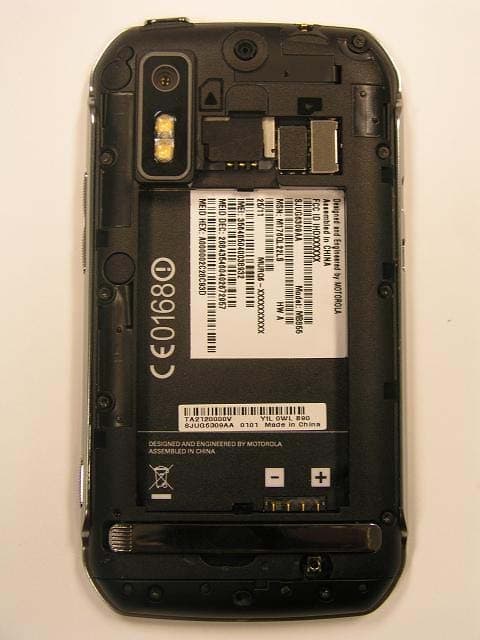
Click to zoom
Application Details
- Equipment Class
- PCE - PCS Licensed Transmitter held to ear
- Date of Grant
- Sep 08, 2011
- Application Purpose
- Original Equipment
- Date of Application
- Sep 01, 2011
- Equipment Note
- Portable Cellular/ PCS CDMA Transceiver with WLAN and Bluetooth
- Frequency Range
- 1851.25000000 - 1908.75000000
- Company
- Motorola Mobility LLC
- Country
- United States
Documents & Files
Document Text
Text extracted from the exhibit documents filed with the FCC. Open a document above to read the original.
Users Manual
APPLICANT: MOTOROLA MOBILITY, INC. FCC ID: IHDP56MD3 INSTRUCTION MANUAL A representative version of the user's manual follows: Exhibit 8 MOTOROLA ELECTRIFY TM 1 Congratulations CongratulationsMOTOROLA ELECTRIFY™Stay connected, organize your life, and absolutely own the web with MOTOROLA ELECTRIFY.• Surf the web with a blistering fast 1 GHz dual-core processor. • International roaming lets y ou make calls and stay in touch wherever you travel. • Watch streaming videos on your 4.3” qHD touchscreen, or use mirror mode to view your phone on your TV screen for gaming, videos, web browsing, and more. • Capture life’s moments in full 1080p HD video. Use the gallery to gather all your photos and your friends’ online albums in one place. • Connect your phone into the optional Lapdock TM or HD Station and use it as a computer. Access and manage your files, photos, emails and web on a larger screen virtually anywhere you go. Note: Certain apps and features may not be available in all countries. More•Answers: Touch > Help Center . •Updates: Smartphone updates, computer software, user guides, online help, and more at www.motorola.com/support . • Accessories: Find accessories for your smartphone at www.motorola.com/products . Caution: Before assembling, charging, or using your phone for the first time, please read the important legal and safety information packaged with your product. 2 Your phone Your phonethe important keys & connectorsNote: Your phone might look a little different. tt p ://www . ht Text MessText M eeees sssssss ssssssssss Market Camera Voicemail C TM Mk See all your apps.Touch the Launcher icon. 1 of 6 11:35 Front F aci n g C a mer a 3.5 mm He a dset M ic ro USB Conne c tor M ic ro HDMI Conne c tor Menu Key B ac k Key Home Key C a mer a Key Se a r c h Key To u c hs c reen Volume Keys Power/Lo c k ContentsLet’s go. . . . . . . . . . . . . . . . . . . . . . . . . . . . . . . . . . . . . . . . . . . . . . . . . 3Touchscreen & keys . . . . . . . . . . . . . . . . . . . . . . . . . . . . . . . . . . . . 5Home screen & apps . . . . . . . . . . . . . . . . . . . . . . . . . . . . . . . . . . . . 8Webtop application . . . . . . . . . . . . . . . . . . . . . . . . . . . . . . . . . . . 11Calls . . . . . . . . . . . . . . . . . . . . . . . . . . . . . . . . . . . . . . . . . . . . . . . . . . 12Contacts . . . . . . . . . . . . . . . . . . . . . . . . . . . . . . . . . . . . . . . . . . . . . . 15Messaging. . . . . . . . . . . . . . . . . . . . . . . . . . . . . . . . . . . . . . . . . . . . . 17Text entry . . . . . . . . . . . . . . . . . . . . . . . . . . . . . . . . . . . . . . . . . . . . 20Tips & tricks. . . . . . . . . . . . . . . . . . . . . . . . . . . . . . . . . . . . . . . . . . . 22Photos & videos . . . . . . . . . . . . . . . . . . . . . . . . . . . . . . . . . . . . . . . 24Music. . . . . . . . . . . . . . . . . . . . . . . . . . . . . . . . . . . . . . . . . . . . . . . . . . 29Social networking . . . . . . . . . . . . . . . . . . . . . . . . . . . . . . . . . . . . 34Web . . . . . . . . . . . . . . . . . . . . . . . . . . . . . . . . . . . . . . . . . . . . . . . . . . . 35Personalize. . . . . . . . . . . . . . . . . . . . . . . . . . . . . . . . . . . . . . . . . . . 36Location . . . . . . . . . . . . . . . . . . . . . . . . . . . . . . . . . . . . . . . . . . . . . . 38Apps for all . . . . . . . . . . . . . . . . . . . . . . . . . . . . . . . . . . . . . . . . . . 40Connections . . . . . . . . . . . . . . . . . . . . . . . . . . . . . . . . . . . . . . . . . . 42Digital living. . . . . . . . . . . . . . . . . . . . . . . . . . . . . . . . . . . . . . . . . . 42Wi-Fi . . . . . . . . . . . . . . . . . . . . . . . . . . . . . . . . . . . . . . . . . . . . . . . . . 44Memory card & file management . . . . . . . . . . . . . . . . . . . . . . 46Tools. . . . . . . . . . . . . . . . . . . . . . . . . . . . . . . . . . . . . . . . . . . . . . . . . . 49Management . . . . . . . . . . . . . . . . . . . . . . . . . . . . . . . . . . . . . . . . . . 54Security. . . . . . . . . . . . . . . . . . . . . . . . . . . . . . . . . . . . . . . . . . . . . . . 56Troubleshooting. . . . . . . . . . . . . . . . . . . . . . . . . . . . . . . . . . . . . . 58Safety, Regulatory & Legal. . . . . . . . . . . . . . . . . . . . . . . . . . . . 59 3 Contents Let’s golet’s get you up and runningAssemble & charge 1 Cover off. 2 SIM in. 3 microSD in. 4 Battery in. 5 Cover on. 6 Charge up. HD VIDEO HD VIDEO 3H Caution: Please read “ Battery Use & Safety ” on page 59.Note: GSM and UMTS-based global services work only with a SIM card supplied by your service provider or by another GSM or UMTS service provider. When you set your phone to use a GSM or UMTS network (see “ network mode (International) ” on page 55), you may be prompted to enter a subsidy code. To get this code, contact your service provider.Tip: To save battery life, see “ Battery tips ” on page 23. Set up & goThe first time you turn on your phone, a setup wizard guides you through signing in to your Gmail™ account. If you don’t have one, don’t worry, the wizard will help you create one.After you log in to Gmail you can set up social networking, or you can do it later.Note: Your phone supports data-intensive apps and services. It is strongly recommended that you purchase a data plan that meets your needs. Contact your service provider for details. 4 Let’s go 1 Press and hold Power/Lock on top of your phone to turn it on. 2 Select a language. 3 Follow the setup wizard to create or log in to your Gmail account. Note: If you have an existing Google Gmail account, your contacts from that account are synced to your phone. Wi-Fi connectIf you want to use a Wi-Fi network for even faster Internet access, touch > Settings > Wireless & networks > Wi-Fi settings . Touch Wi-Fi to search for and connect to wireless networks. There’s more in “ Wi-Fi ” on page 44. KickstandYou can use the kickstand to sit your phone upright to watch videos. To open the kickstand, us…
Text truncated - open the document above for the full version.
Users Manual
26 Photos & videos Tag photosTag your photos so you can group them in different folders.To create a tag: 1 In the viewfinder, touch Menu > Tags > Active Custom Tags . 2 Enter a tag name under Edit custom tags , touch Done , then touch Done again. 3 If necessary, activate the tag you created by touching Custom Tags . (A check box on the right turns green when activated.) 4 Touch Back to return to the camera viewfinder. The tag you created will be applied to any photo you take, until you deactivate the tag.Note: To add a location tag to your photo, touch Menu > Settings > Location & security and select a location service to turn on. Multi-shot Take several shots in rapid succession when you touch and hold . Options VideosRecord & share videosFind it: > Camcorder Note: To get the clearest videos, wipe the lens clean with a soft, dry cloth before you record a video.To record a video, touch . Touch to stop the recording.Open your gallery and touch and hold a video to view options. ww 55 44 000 666 - 7 - 2222 0000000 88888 22 444 555 44 555 Video CaptureSettingsAdjust for greatercreative contol. Go to your gallery. Zoom in or out. Settings Counter 27 Photos & videos HD videosYou can capture HD-quality videos to watch on an HDTV or monitor.To record an HD quality video, be sure to select the correct Video resolution . From the active camcorder viewfinder, touch Menu > Settings > Video resolution > High Definition (720p) . To enhance the video quality, touch Scenes or Effects on the right side of the camcorder viewfinder. (You may need to touch the screen to see these options.) Options Play To play the video, touch . Upload To upload the video to an online album, touch . Share To send the video in a message or post it online, touch . For more info on sharing your video, see “ Share photos & videos ” on page 28. Delete To delete the video, press Menu > Delete . Video options You can make adjustments to optimize your video. Touch one of the buttons on the right side of the viewfinder to make changes (you may need to touch the screen to make the buttons appear). Camcorder settingsIn the viewfinder, touch Menu > Settings to open the camcorder menu and adjust settings like Video Resolution , Focus Options , and more. Options Scenes Adjust for better audio capture in different environments: Everyday , Outdoors , Concert , Narrative , or Subject . Effects Change video look: Normal , Black and White , Negative , and more. Light Turn a light on or off to adjust for the lighting where you are recording. Front/Back Switch between the forward facing and rear facing cameras. Switch to Toggle between camcorder and camera. 28 Photos & videos View photos & videosFind it: > > Gallery View your captured photos & videos. Sort your photos & videos. See your online albums (like Picasa, Flickr, or Facebook). Go to your friends’ online albums.See media from DNLA Connected devices on your Wi-Fi network. Share photos & videosFind it: > Gallery 1 Touch a photo or video, then touch . 2 Choose how you want to share—like Bluetooth , Email , Text Messaging , or an online album. Manage photos & videosFind it: > Gallery Touch a thumbnail image from your camera roll or library, then:• To delete the photo or video, touch Menu > Delete . • To set the photo as a contact picture, social network profile picture, or wallpaper, touch Menu > Set as . Tip: To copy photos to/from a computer, go to “ View & transfer files ” on page 47. Edit photos & videosFind it: > Gallery > Camera roll , select a picture, and press Menu > Edit You can choose advanced editing features to resize, crop, or change the color. 29 Music Musicwhen music is what you need...Quick start: MusicFind it: > Music My library Podcasts FM radio Internet radio Recommended songabout a minute ago The Downtown Fiction When You're Around 11:35 Music stored on your phone. Listen to and download podcasts. Listen to Internet radio.Listen to FM Radio. Touch a category, then touch the song or playlist you want to play. Touch Menu > Party shuffle to randomly play all your songs, or touch Search to find a song.Tip: When a song is playing, you can add it to a playlist by touching Menu > Add to playlist . Tip: To listen to music during a flight, turn off all your network and wireless connections: Press and hold Power/Lock then touch Airplane mode . Set up musicWhat music transfer tools do I need?To put music on your computer and then load it on your phone, you need:• Microsoft™ Windows™ computer or Apple™ Macintosh™. • USB data cable (included with your phone). • Optional microSD memory card (sold separately).Your phone supports removable microSD memory cards up to 32GB capacity. To make sure your memory card is installed, go to “ Assemble & charge ” on page 3.Tip: To see the available memory on your memory card, touch > Settings > Storage . 30 Music What audio file formats can I play?Your phone can play many types of files: AAC, AMR, MP3, WAV, WMA, AAC+, and MIDI.What headphones can I use?Your phone has a 3.5mm headset jack for wired stereo listening (required for FM radio). You can also go wireless with Bluetooth™ stereo headphones or speakers (see “ Bluetooth™ wireless ” on page 43). Get musicTransfer music from your computer to your phone using a USB cable connection. See “ View & transfer files ” on page 47 to learn how. Note: Copyright—do you have the right? Always follow the rules. See “Content Copyright” in your legal and safety information. Play musicTouch a song or playlist to start playing music. Recommended SongJon LevyMakes Me Better 1 of 5 The Downtown Fiction When You're Around The Downtown Fiction (EP) 11:35 Play/PausePlaylist Fast Forward/Skip to next Rewind/Skip to previous Artist Information Create Playlist 31 Music Music player controls To . . .Play/pause Touch / . Select previous/next song To u ch / . Fast forward/rewind Touch and hold / . Create playlist Touch . View playlist Touch . Shuffle Touch > . Repeat Touch > . Adjust volume Press side volume keys. Manage …
Text truncated - open the document above for the full version.
Attestation Statements
APPLICANT: MOTOROLA MOBILITY, INC. FCC ID: IHDP56MD3 Motorola Mobility, Inc.; 8000 W. Sunrise Blvd, Suite A; Plantation, FL 33322, USA www.motorola.com Exhibit 2. Statements of Certification -- Pursuant to 47 CFR 2.907 2.1. Specification Compliance Transceiver type described herein (IHDP56MD3) has been tested in accordance with the requirements contained in the appropriate Commission regulations. To the best of my knowledge, these tests were performed using measurement procedures consistent with industry or Commission standards, and demonstrate that this equipment complies with the appropriate standards. Each unit manufactured, imported, or marketed will conform to the samples tested herein, within the statistical variations that can be expected due to high volume production and test measurement error. NAME: Jacob Marvin SIGNATURE: /s/ Jacob Marvin DATE: 25 July 2011 TITLE: Engineering Manager 2.2. Statement of Certification I hereby certify that the above application was prepared under my direction and that to the best of my knowledge and belief, the facts set forth in this application and accompanying technical data are true and correct. The technical data supplied with this application was taken under my supervision and is hereby duly certified. I also certify that this transmit equipment (IHDP56MD3) is in compliance with all applicable parts of the FCC Rules. NAME: John Lewczak SIGNATURE: DATE 25 July 2011 TITLE: Engineering Manager, Product Safety and Compliance Page 2 - 1 APPLICANT: MOTOROLA MOBILITY, INC. FCC ID: IHDP56MD3 Motorola Mobility, Inc.; 8000 W. Sunrise Blvd, Suite A; Plantation, FL 33322, USA www.motorola.com Page 2 - 2 2.3. Attestation Statement (Equipment Class DTS and DSS - Bluetooth/Wi-Fi) This device contains an embedded Bluetooth device, Wi-Fi device, and MOTOtalk capabilities that Motorola Mobility confirms are compliant with the applicable Part 15C regulations. 15.247(a)(1) • The hopping sequence must be pseudorandom. • All Channels are used equally on average. • The receiver input bandwidth is approximately equal to the transmit bandwidth. • The receiver hops in sequence with the transmitted signal. 15.247(g) The system is designed to comply with all of the regulations in Section 15.247 when the transmitter is presented with a continuous data (or information). 15.247(h) The system does not coordinate its channel selection/hopping sequence with other frequency hopping systems for the express purpose of avoiding the simultaneous occupancy of individual hopping frequencies by multiple transmitters. NAME: Jacob Marvin SIGNATURE: /s/ Jacob Marvin DATE: 25 July 2011 TITLE: Engineering Manager APPLICANT: MOTOROLA MOBILITY, INC. FCC ID: IHDP56MD3 Motorola Mobility, Inc.; 8000 W. Sunrise Blvd, Suite A; Plantation, FL 33322, USA www.motorola.com Page 2 - 3 2.4. Attestation Statement (Equipment Class PCE – CDMA 850/1900 MHz - Hearing Aid Compatibility) Motorola Mobility hereby declares that typical production units were evaluated for Hearing Aid Compatibility (HAC) compliance. Features List: Model – Motorola Electrify CDMA 800/1900 MHz Location Based Services WLAN Voice Commands Talking Phone Photo Camera Video Camera Video Player Bluetooth (Stereo) Music Player HTML Browser Text Messaging NAME: Jacob Marvin SIGNATURE: /s/ Jacob Marvin DATE: 25 July 2011 TITLE: Engineering Manager 2.5. Declaration of Available Operating Bands and Modes (Equipment Class PCE – CDMA 850/1900 MHz) Motorola Mobility hereby declares that, while this product features GSM and WCDMA capabilities that operate within frequency bands regulated by the FCC, these modes are locked out for use within the territories of the United States. These modes have been disabled in the product’s firmware, and are SIM locked by all US operators. This application, therefore, does not seek certification for these modes. NAME: Jacob Marvin SIGNATURE: /s/ Jacob Marvin DATE: 25 July 2011 TITLE: Engineering Manager
Cover Letter(s)
APPLICANT: MOTOROLA MOBILITY, INC. FCC ID: IHDP56MD3 Aug 9, 2011 CO NFIDENTIALITY REQUEST CONTAINED WITHIN Federal Communications Commission Authorization and Evaluation Division 7435 Oakland Mills Road Columbia, Maryland 21046 Re: Application for Cellular/PCS Transceiver Certification Dear Sir/Madame: Pursuant to sections 0.457 & 0.49 of the commission’s rules, Motorola Mobility, Inc., 600 N. U.S. Highway 45, Libertyville, Illinois 60048 herein submits Application for Equipment Authoriz ation for Certification of a Cellular/PCS Transceiver, FCC ID: IHDP56MD 3. Motorola Mobility is also the manufacturer of this equipment. Con fidentiality: Pursuant to Section 0.459 of the Commission’s rule s (CFR 47), Motorola Mobility requests confidentiality for portions of the material contained in this application and that the identified material be withheld from public inspection following the grant of this authorization. This material contains Motorola’s trade secrets and confidential information that Motorola does not customarily release to the public and which is otherwise not generally available to the public. Confidentiality is requested for the following exhibits: • Exhibit 4 Block Diagrams • Exhibit 5 Schematics • Exhibit 10 Parts List • Exhibit 12 Operational Description Description: This equipment is a CDMA transceiver operat ing in the 850/1900 MHz bands. It employs EVDO data transission in the network and contains 2.4 GHz Bluetooth and WiFi functions (part 15.247). It is connected to a computer via a USB connection(Part 15B). The WCDMA/GSM network functions have been disabled by the firmware and are SIM locked by all US operators on this device. Note: This device also contains functions that are not operational in the U.S. territories. This filing is only applicable for US operations. Contact Information: If there are any further questions or additional information needed concerning this filing, please contact me, John Lewczak, by telephone at (954) 723-6272 or via E-mail at: [email protected] . Regards, FCC Liaison Motorola Mobility, Inc. 600 N. U.S. Highway 45 Libertyville, IL 60048-5343 E-mail: [email protected] Exhibit 13 1
Cover Letter(s)
APPLICANT: MOTOROLA MOBILITY, INC. FCC ID: IHDP56MD3 SHORT TERM CONFIDENTIALITY REQUEST 180 DAYS Federal Communications Commission Authorization and Evaluation Division 7435 Oakland Mills Road Columbia, Maryland 21046 Re: Cellular/PCS Transceiver FCC ID IHDP56MD 3 Gentlemen: Introduction: Pursuant to Section 0.459 of the Commission's rules (CFR 47) and Section 552(b)(4) of the Freedom of Information Act, Pursuant to sections 0.457 & 0.49 of the commission’s rules, Motorola requests confidentiality for portions of the material contained in this application; and that the identified material be withheld from public inspection following the grant of this authorization. This material contains Motorola's trade secrets and confidential information that Motorola does not customarily release to the public and which is otherwise not generally available to the public. Standard Confidentiality Request: Confidentiality is requested for the following exhibits: • Exhibit 4 Block Diagrams • Exhibit 5 Schematics • Exhibit 10 Parts List / Tune up Information • Exhibit 12 Operational Description Short Term Confidentiality Request: Furthermore, due to sensitive business information, Motorola requests the following exhibits be withheld from public viewing for 180 days: • Exhibit 3 External Photographs • Exhibit 7 and 7A Photographs of the device under test • Exhibit 8 User’s Manual • Exhibit 9 Internal Photographs Contact Information: Please contact me by telephone at (954) 723-6272, or by e-mail ([email protected]) , if there are questions or additional information needed concerning this filing. Regards, John Lewczak FCC Liaison Mobile Devices 600 N. U.S. Highway 45 Libertyville, IL 60048-5343 Exhibit 13A
External Photos
APPLICANT: MOTOROLA MOBILITY, I NC. FCC ID: IHDP56M3 BACK OF PHONE WITH BATTERY COVER REMOVED BACK OF PHONE FRONT OF PHONE EXHIBIT 3 APPLICANT: MOTOROLA MOBILITY, I NC. FCC ID: IHDP56M3 BOTTOM OF PHONE SIDE OF PHONE TOP OF PHONE EXHIBIT 3
ID Label/Location Info
APPLICANT: MOTOROLA MOBILITY, INC. FCC ID: IHDP56MD3 EXHIBIT 1 FCC IDENTIFICATION (NAMEPLATE) INFORMATION The FCC label shown is representative of the label that will appear on the radio when in production. It will be placed on the outside of the equipment as shown in Exhibit 3, and is readily visible at the time of purchase. Other information may also be included on this label. FCC ID: IHDP56MD3
Internal Photos
APPLICANT: MOTOROLA MOBILITY, INC. FCC ID: IHDP56MD3 Main Board Back With Shields Main Board Back Without Shields NOTE: WiMAX circuitry is not placed, including the antenna launches (i.e. pogo pins) EXHIBIT 9 1 of 4 APPLICANT: MOTOROLA MOBILITY, INC. FCC ID: IHDP56MD3 Main Board Front No shields placed on this side EXHIBIT 9 2 of 4 APPLICANT: MOTOROLA MOBILITY, INC. FCC ID: IHDP56MD3 INSIDE FRONT HOUSING INSIDE BACK HOUSING EXHIBIT 9 3 of 4 APPLICANT: MOTOROLA MOBILITY, INC. FCC ID: IHDP56MD3 Diversity Antenna WiMAX1Antenna GPSAntenna WiMAX2Antenna OUTSIDE BACK HOUSING MainAntenna OUTSIDE BACK HOUSING (Side view) BT/WiFi Antenna NOTE: BT/WiFi and GPS antennas are covered by tasuta material. Black coverlay is used on the WiMAX and Diversity antennas. Main antenna is covered by paint for cosmetic purposes. EXHIBIT 9 4 of 4
RF Exposure Info
FCC ID: IHDP56MD3 SAR COMPLIANCE REPORT Reviewed by: Quality Manager Filename: Test Dates: EUT Type: Page 1 of 50 0Y1107191265-R1.IHD 04/18/11 - 04/29/11, 08/08/11-08/09/11 Cellular/PCS CDMA/EVDO Phone with Bluetooth and WLAN © 2011 PCTEST Engineering Laboratory, Inc. REV 8.9.1M 04/07/2011 Applicant Name: Date of Testing: Motorola Mobility, Inc. 04/18/11 - 04/29/11, 08/08/11-08/09/11 8000 W. Sunrise Blvd. Test Site/Location: Plantation, FL 33322 USA PCTEST Lab, Columbia, MD, USA Test Report Serial No.: 0Y1107191265-R1.IHD FCC ID: IHDP56MD3 APPLICANT: MOTOROLA MOBILITY, INC. EUT Type: Cellular/PCS CDMA/EVDO Phone with Bluetooth and WLAN Application Type: Certification FCC Rule Part(s): CFR §2.1093; FCC/OET Bulletin 65 Supplement C [June 2001] Tx Frequency: 824.70 - 848.31 MHz (Cellular CDMA) / 1851.25 - 1908.75 MHz (PCS CDMA) 2412 - 2462 MHz (WLAN) / 2402 - 2480 MHz (Bluetooth) Conducted Power: 25.19 dBm Cell. CDMA / 24.48 dBm PCS CDMA 13.97 dBm 2.4 GHz WLAN / 9.05 dBm Bluetooth Max. SAR Measurement: 0.93 W/kg Cell. CDMA Head SAR / 0.70 W/kg Cell. CDMA Body-Worn SAR 0.22 W/kg Cell. CDMA Hotspot SAR / 0.99 W/kg PCS CDMA Head SAR 0.68 W/kg PCS CDMA Body-Worn SAR / 0.89 W/kg PCS CDMA Hotspot SAR 0.26 W/kg 2.4 GHz WLAN Head SAR / 0.18 W/kg 2.4 GHz WLAN Body-Worn SAR 0.31 W/kg 2.4 GHz WLAN Hotspot SAR Test Device S/N: Pre-Production [S/N: LSNW260017 SJUG6093AA, LSNW230069 SJUG6093AA, TA2120001M, TA2120001J] This wireless portable device has been shown to be capable of compliance for localized specific absorption rate (SAR) for uncontrolled environment/general population exposure limits specified in ANSI/IEEE C95.1-1992 and has been tested in accordance with the measurement procedures specified in FCC/OET Bulletin 65 Supplement C (2001), IEEE 1528-2003 and in applicable Industry Canada Radio Standards Specifications (RSS); for North American frequency bands only. Note: This revised Test Report (S/N: 0Y1107191265-R1.IHD) supersedes and replaces the previously issued test report on the same subject EUT for the same type of testing as indicated. Please discard or destroy the previously issued test report(s) and dispose of it accordingly. I attest to the accuracy of data. All measurements reported herein were performed by me or were made under my supervision and are correct to the best of my knowledge and belief. I assume full responsibility for the completeness of these measurements and vouch for the qualifications of all persons taking them. Test results reported herein relate only to the item(s) tested. PCTEST certifies that no party to this application has been subject to a denial of Federal benefits that includes FCC benefits pursuant to Section 5301 of the Anti-Drug Abuse Act of 1988, 21 U.S.C. 862. PCTEST ENGINEERING LABORATORY, INC. 6660-B Dobbin Road, Columbia, MD 21045 USA Tel. +1.410.290.6652 / Fax +1.410.290.6554 http://www.pctestlab.com SAR COMPLIANCE EVALUATION REPORT FCC ID: IHDP56MD3 SAR COMPLIANCE REPORT Reviewed by: Quality Manager Filename: Test Dates: EUT Type: Page 2 of 50 0Y1107191265-R1.IHD 04/18/11 - 04/29/11, 08/08/11-08/09/11 Cellular/PCS CDMA/EVDO Phone with Bluetooth and WLAN © 2011 PCTEST Engineering Laboratory, Inc. REV 8.9.1M 04/07/2011 TABLE OF CONTENTS 1 INTRODUCTION ..............................................................................................................................3 2 TEST SITE LOCATION ....................................................................................................................4 3 SAR MEASUREMENT SETUP ........................................................................................................5 4 DASY E-FIELD PROBE SYSTEM ...................................................................................................7 5 PROBE CALIBRATION PROCESS .................................................................................................8 6 PHANTOM AND EQUIVALENT TISSUES .......................................................................................9 7 DOSIMETRIC ASSESSMENT & PHANTOM SPECS................................................................... 10 8 DEFINITION OF REFERENCE POINTS ...................................................................................... 11 9 TEST CONFIGURATION POSITIONS ......................................................................................... 12 10 FCC RF EXPOSURE LIMITS ........................................................................................................ 15 11 FCC 3G MEASUREMENT PROCEDURES .................................................................................. 16 12 SAR TESTING WITH IEEE 802.11 TRANSMITTERS .................................................................. 20 13 PERSONAL WIRELESS ROUTER CONSIDERATIONS ............................................................. 24 14 SYSTEM VERIFICATION .............................................................................................................. 26 15 SAR DATA SUMMARY ................................................................................................................. 29 16 FCC MULTI-TX AND ANTENNA SAR CONSIDERATIONS ......................................................... 35 17 MULTIPLE TRANSMITTER SAR EVALUATION .......................................................................... 37 18 EQUIPMENT LIST ......................................................................................................................... 40 19 MEASUREMENT UNCERTAINTIES ............................................................................................ 41 20 CONCLUSION ............................................................................................................................... 42 21 REFERENCES .............................................................................................................................. 43 22 SAR TEST SETUP PHOTOGRAPHS ..........................................................…
Text truncated - open the document above for the full version.
RF Exposure Info
APPENDIX A: SAR TEST DATA PCTEST ENGINEERING LABORATORY, INC. DUT: IHDP56MD3; Type: Cellular/PCS CDMA/EVDO Phone with Bluetooth and WLAN Serial: LSNW230069 SJUG6093AA Communication System: Cellular CDMA; Frequency: 824.7 MHz;Duty Cycle: 1:1 Medium: 835 Head; Medium parameters used (interpolated): f = 824.7 MHz; σ = 0.872 mho/m; ε r = 40.5; ρ = 1000 kg/m 3 Phantom section: Right Section Test Date: 04-20-2011; Ambient Temp: 24.5 °C; Tissue Temp: 22.9 °C Probe: ES3DV2 - SN3022; ConvF(6.02, 6.02, 6.02); Calibrated: 9/21/2010 Sensor-Surface: 4mm (Mechanical Surface Detection) Electronics: DAE4 Sn704; Calibrated: 3/17/2011 Phantom: SAM with CRP; Type: SAM; Serial: TP1375 Measurement SW: DASY4, V4.7 Build 80; Postprocessing SW: SEMCAD, V1.8 Build 186 Mode: Cellular CDMA, Right Head, Touch, Low.ch Area Scan (7x14x1) : Me asurement grid: dx=15mm, dy=15mm Zoom Scan (5x5x7)/Cube 0: Measurement grid: dx=8mm, dy=8mm, dz=5mm Reference Value = 34.7 V/m Peak SAR (extrapolated) = 1.17 W/kg SAR(1 g) = 0.922 mW/g; SAR(10 g) = 0.694 mW/g 0 dB = 0.966mW/g PCTEST ENGINEERING LABORATORY, INC. DUT: IHDP56MD3; Type: Cellular/PCS CDMA/EVDO Phone with Bluetooth and WLAN Serial: LSNW230069 SJUG6093AA Communication System: Cellular CDMA; Frequency: 836.52 MHz;Duty Cycle: 1:1 Medium: 835 Head Medium; parameters used (interpolated): f = 836.52 MHz; σ = 0.883 mho/m; ε r = 40.4; ρ = 1000 kg/m 3 Phantom section: Right Section Test Date: 04-20-2011; Ambient Temp: 24.5 °C; Tissue Temp: 22.9 °C Probe: ES3DV2 - SN3022; ConvF(6.02, 6.02, 6.02); Calibrated: 9/21/2010 Sensor-Surface: 4mm (Mechanical Surface Detection) Electronics: DAE4 Sn704; Calibrated: 3/17/2011 Phantom: SAM with CRP; Type: SAM; Serial: TP1375 Measurement SW: DASY4, V4.7 Build 80; Postprocessing SW: SEMCAD, V1.8 Build 186 Mode: Cellular CDMA, Right Head, Tilt, Mid.ch Area Scan (7x14x1): Measurement grid: dx=15mm, dy=15mm Zoom Scan (5x5x7)/Cube 0: Measurement grid: dx=8mm, dy=8mm, dz=5mm Reference Value = 25.4 V/m Peak SAR (extrapolated) = 0.646 W/kg SAR(1 g) = 0.516 mW/g; SAR(10 g) = 0.391 mW/g 0 dB = 0.536mW/g PCTEST ENGINEERING LABORATORY, INC. DUT: IHDP56MD3; Type: Cellular/PCS CDMA/EVDO Phone with Bluetooth and WLAN Serial: LSNW230069 SJUG6093AA Communication System: Cellular CDMA; Frequency: 836.52 MHz;Duty Cycle: 1:1 Medium: 835 Head; Medium parameters used (interpolated): f = 836.52 MHz; σ = 0.883 mho/m; ε r = 40.4; ρ = 1000 kg/m 3 Phantom section: Left Section Test Date: 04-20-2011; Ambient Temp: 24.5 °C; Tissue Temp: 22.9 °C Probe: ES3DV2 - SN3022; ConvF(6.02, 6.02, 6.02); Calibrated: 9/21/2010 Sensor-Surface: 4mm (Mechanical Surface Detection) Electronics: DAE4 Sn704; Calibrated: 3/17/2011 …
Text truncated - open the document above for the full version.
Contact Information
Applicant
Jeff Narducci(Director Product Compliance)
Technical Contact
PCTEST Engineering Laboratory, Inc.Randy Ortanez
[email protected]410-290-6652
6660-B Dobbin Road · Columbia, Maryland · United States
Test Firm
PCTEST Engineering Laboratory, Inc.Randy Ortanez
Technical Specifications
| # | Rule Parts | Frequency Range | Power Output | Emission | Tolerance |
|---|---|---|---|---|---|
| 2 | 24E | 1.85 GHz - 1.91 GHz | 1.127 W | 1M28F9W | 2.5 ppm |
Other Applications from Motorola Mobility LLC
IHDT56AW9
May 12, 2026Smart Watch
Equipment Class
NII - Unlicensed National Information Infrastructure TXIHDT56AW5
Apr 08, 2026Mobile Cellular Phone
Equipment Class
DTS - Digital Transmission SystemIHDT56AW6
Mar 18, 2026Smart Watch
Equipment Class
JBP - Part 15 Class B Computing Device PeripheralIHDT56AX4
Mar 17, 2026Mobile Cellular Phone
Equipment Class
PCE - PCS Licensed Transmitter held to earIHDT56AW3
Mar 03, 2026Mobile Cellular Phone
Equipment Class
6XD - 15E 6 GHz Low Power Indoor Client