IHDP6LO1Car Kit
Motorola Mobility LLC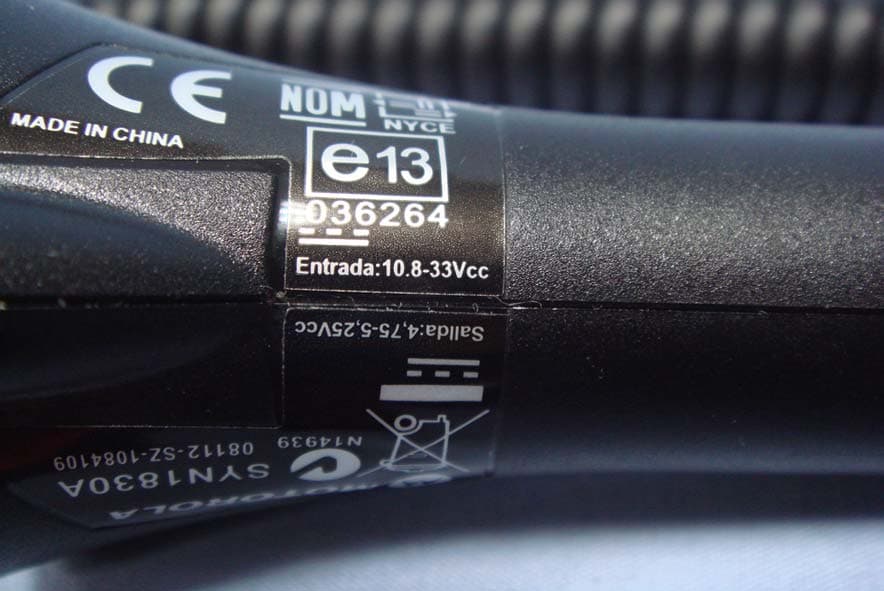
Click to zoom
Application Details
- Equipment Class
- DXX - Part 15 Low Power Communication Device Transmitter
- Date of Grant
- Sep 16, 2010
- Application Purpose
- Original Equipment
- Date of Application
- Sep 16, 2010
- Equipment Note
- Car Kit
- Frequency Range
- 88.30000000 - 107.90000000
- Company
- Motorola Mobility LLC
- Country
- United States
Documents & Files
Document Text
Text extracted from the exhibit documents filed with the FCC. Open a document above to read the original.
Users Manual
1Congratulations Congratulations Your MOTOROLA ROADSTER™ Bluetooth® Car Kit allows you to make and receive calls and play music from your phone while safely keeping your hands on the steering wheel. With the ROADSTER, you can: •Simultaneously connect with two phones. •Hear caller’s name or number, and use your voice to answer or ignore calls. •Switch between your FM radio and car kit speaker. •Hear voice prompts to guide you on connections, battery level, and other functions. We’ve crammed all of the main features of your car kit into this handy guide, and in a matter of minutes we’ll show you just how easy your car kit is to use. So go on, check it out. More information On the web: www.motorola.com/support Caution: Before using your car kit for the first time, please read the important Safety, Regulatory & Legal information at the back of this guide. 2Your car kit Your car kit the important parts Call Button Power Switch Status Light Mute Button Voice Dial Button Charge Light Micro USB Charging Connector Music Button Volume / FM Tune Down Button Volume / FM Tune Up Button FM / Speaker Button Speaker 3Charge it Charge it let’s get you up and running You can use your car kit while unplugged or plugged into the charger. Note: Your battery is designed to last the life of your product. It should only be removed by a recycling facility. Any attempt to remove or replace your battery will damage your car kit. Charge Light Red = charging Green = fully charged 4Basics Basics a few essentials to get your started Install it Turn it on & off The car kit automatically turns off when your phone is moved away from the car for more than 1 minute. When you return (open the car door), the car kit turns back on and reconnects to your phone. Note: Moving the car kit or the power switch off and on also turns it on. Slide onto car visor OnOff 5Basics Listen to music Note: This feature is phone dependent. Your car kit allows you to stream Bluetooth music from your phone. Press to play/pause music from your phone on your car kit speaker or car radio. To stop music, press and hold until you hear a tone. While a call is active, music pauses. When the call ends, music resumes playing. Note: The volume setting on your phone may impact volume on your car kit. Some call features Voice commands Answer or ignore calls using your voice—just say “answer” or “ignore”. Note: This feature does not work for second incoming calls. Hear caller’s name If your phone knows your caller’s name, then you hear “call from <name>” on an incoming call. Note: If the caller is not in your phone’s contact list (or your phone does not support this feature), then you hear the incoming call’s number. 6Pair & connect Pair & connect connect and go Pair & connect with your phone 1Turn off any Bluetooth devices previously paired with your car kit. 2Turn on the Bluetooth feature on your phone. 3Turn on your car kit (see “Turn it on & off” on page 4). The status light becomes steadily lit in blue and you hear “ready to pair”. 4Follow the voice prompts to connect your phone to your car kit. Note: When prompted for the passkey, enter 0000. When your car kit successfully pairs with your phone, you hear “pairing complete”. Note: After pairing, you may be asked by your phone to grant phonebook access to your car kit. If prompted, say "always accept". For daily use, make sure your car kit is turned on, and your phone’s Bluetooth feature is on. Your car kit and phone will connect automatically. 7Pair & connect Pair & connect a second phone 1Turn off the first phone and any other Bluetooth devices previously paired with your car kit. 2Turn your car kit off. 3Turn on the Bluetooth feature on your phone. 4Turn on your car kit. The status light becomes steadily lit in blue and you hear “ready to pair”. 5Follow the voice prompts to connect your phone to your car kit. Note: When prompted for the passkey, enter 0000. When your car kit successfully pairs with your phone, you hear “pairing complete”. Note: After pairing, you may be asked by your phone to grant phonebook access to your car kit. If prompted, say "always accept". To connect both phone(s) and/or music device, turn these on and then turn your car kit off and on. When you hear “<phone 1 name> connected”, and “<phone 2 name> connected”, your car kit is ready to go. The last paired phone is your primary phone for calling features. 8Pair & connect Test your connection 1Ensure your car kit is turned on. 2On your phone, dial a phone number and press the Call/Send key. If successfully connected for calls, you hear ringing on the car kit speaker or car radio. 9Audio mode Audio mode choose where to listen Listen to calls and music from your phone on your car radio (FM mode) or car kit (speaker mode). Press to switch between modes. Note: Audio broadcast to your FM radio may be heard by other radios (call audio on your internal speaker is not affected). Set FM mode frequency Use and to select the FM radio frequency to listen to your calls and music. •Press and hold button to scan for next open frequency. •Tap button to increase or decrease current frequency. The selected frequency is saved when the car kit is powered off or audio mode is switched to speaker. Note: While in FM mode, adjust volume using the controls on your car radio. FM/Speaker Button 10Calls Calls it’s good to talk Note: Some features are phone/network dependent. Tip: When connected to two phones, follow the voice prompts to perform functions such as voice dial and redial on the desired phone. To . . . answer callSay “answer” or press . ignore callSay “ignore” or press until you hear a tone. make a voice dial call Press and you hear a tone. Follow prompts to make call. redial last callPress . mute or unmute a call Press and you hear “mute on” or “mute off”. When mute is on, the red light flashes on . answer second incoming call Press . The first call is placed on hold. reject second incoming call Press until you hear a tone. end a callPress . 11S…
Text truncated - open the document above for the full version.
Cover Letter(s)
FCC ID: IHDP6LO1 iDEN, Motorola Inc., 600 North US Hwy 45, Libertyville, IL 60048, USA Pag e 13a - 1 20 May 2010 Authorization of Agent Federal Communications Commission Authorization and Evaluation Division 7435 Oakland Mills Road Columbia, Maryland 21046 RE: Grantee Code IHD . Authorization: I, Andrew Bachler, the FCC contact for Grantee Code “IHD,” hereby authorize the following company (agent) to act on behalf of Motorola Inc. Mobile Devices for the application specified below. This includes: • Form 731, Attestation Statement Exhibit, and Confidentiality Request Signatures. • Technical Contact. • Non-Technical Contact. • Test Firm Contact Information. The grant should still be mailed to the applicant of record for Grantee Code “IHD.” Authorized Agent: Ms. Calien Kang/ Section Manager Cheng Uei Precision Industry Co., Ltd. (Foxlink) No.18, Chung Shan Rd., Tu-Cheng City, Taipei Hsien, Taiwan Email: [email protected] Tel: 886-03-5636565 Ext.13712 Specific Application: FCC ID: IHDP6LO1 Contact Information: Please contact me by telephone at (847) 523-6167, or by e-mail ([email protected] ), if there are questions or additional information needed concerning this authorization Regards, FCC Liaison Mobile Devices 600 N. U.S. Highway 45 Libertyville, IL 60048-5343
External Photos
Report No: T100817301 Page 1 / 9 EXTERNAL PHOTOGRAPHS OF EUT Report No: T100817301 Page 2 Report No: T100817301 Page 3
ID Label/Location Info
2010-04-08 V0 Add some notes 1 2 New V1 2010-04-20 3 Update printing content for beta V2 2010-06-14 4 remove ID from IC,change ‘0’ to ‘O’ V3 2010-06-23 5 Update printing content for pre-pilot V4 2010-08-05 6 Update printing content for pilot V5 2010-08-18 7 Change the text color to pantone 425C V6 2010-08-28 30 mm 3 0 m m R2.0 Scale 2:1 標簽粘貼下部有凹陷部分,其處有進膠點 標簽粘貼時容易出現氣泡現象,廠商選材時需要注意 4 m m 4 mm R2.0 Printing content for MP Beta sample Not For Sale Alpha B017082 O O O 1,Material: PET+Matte Film(可打印霧膜) 2,HF Requirement,prohibit PVC and BFR YYDDD-1098746-----year and day ,for example:10099(2010年第99天) Notes: blue text is printed by foxlink 藍色文字空出由Fxolink列印 Others is printed by supply 其他文字和圖案由廠商列印 ZONEDESCRIPTIONREVISION REVISIONS RECORD DATE ECN NO. CHECKED BY TITLE: INTENDED USE: DWG. NO.: APPD.: CHKD.: DR.: SCALE: N/A UNIT: mm PAGE: 1/1 REV: V6 MAT’L SEE NOTES: =CRITICAL DIM =TOOLING DIM =PROCESS DIM =DIMENSION ID xx 需與塑膠殼的黑色接近 Process Black C 90% 425C TOLERANCE UINLESS OTHERWISE SPECIFIED 0.2 T 0.00 5849-53F7-0070M2 Label Sonia tang Yeliee wang Jason Chen MBT-9173_Aero Yeliee wang Yeliee wang Yeliee wang Yeliee wang Yeliee wang Yeliee wang Yeliee wang NA NA NA NA NA NA NA B017082 B017082 O O O B017082 Add QD ID No. Add QD ID and adjust position for logo base on customer file Aero_rearlabel_061110(outlines).ai
Internal Photos
Report No: T100817301 Page 4 INTERNAL PHOTOGRAPHS OF EUT Report No: T100817301 Page 5 Report No: T100817301 Page 6 Report No: T100817301 Page 7 Report No: T100817301 Page 8 Report No: T100817301 Page 9
Test Report
Report No: T100817301-RP2 FCC ID: IHDP6LO1 Date of Issue: Sep. 10, 2010 Page 1 / 27 FCC 47 CFR PART 15 SUBPART C TEST REPORT For Car Kit Model: TZ700 Trade Name: Motorola Issued to Motorola Inc Mobile Devices 600 N. U.S. Highway 45 Libertyville Illinois 60048-5343 Issued by Compliance Certification Services Inc. No. 81-1, Lane 210, Pa-De 2nd Rd., Luchu Hsiang, Taoyuan Shien, (338) Taiwan, R.O.C. TEL: 886-3-324-0332 FAX: 886-3-324-5235 http://www.ccsrf.com [email protected] Note: This report shall not be reproduced except in full, without the written approval of Compliance Certification Services Inc. This document may be altered or revised by Compliance Certification Services Inc. personnel only, and shall be noted in the revision section of the document. The client should not use it to claim product endorsement by TAF, A2LA, NIST or any government agencies. The test results in the report only apply to the tested sample. Report No: T100817301-RP2 FCC ID: IHDP6LO1 Date of Issue: Sep. 10, 2010 Page 2 This report shall not be reproduced except in full, without the written approval of Compliance Certification Services. Revision History Rev. Issue Date Revisions Effect Page Revised By 00 Sep. 10, 2010 Initial Issue ALL Jill Shiau Report No: T100817301-RP2 FCC ID: IHDP6LO1 Date of Issue: Sep. 10, 2010 Page 3 This report shall not be reproduced except in full, without the written approval of Compliance Certification Services. TABLE OF CONTENTS 1. TEST RESULT CERTIFICATION......................................................................................4 2. EUT DESCRIPTION ..........................................................................................................5 3. TEST METHODOLOGY ....................................................................................................6 3.1 EUT CONFIGURATION............................................................................................6 3.2 EUT EXERCISE........................................................................................................6 3.3 GENERAL TEST PROCEDURES ............................................................................6 3.4 FCC PART 15.205 RESTRICTED BANDS OF OPERATIONS ................................7 3.5 DESCRIPTION OF TEST MODES ...........................................................................8 4. INSTRUMENT CALIBRATION..........................................................................................9 4.1 MEASURING INSTRUMENT CALIBRATION...........................................................9 4.2 MEASUREMENT EQUIPMENT USED.....................................................................9 4.3 MEASUREMENT UNCERTAINTY .........................................................................10 5. FACILITIES AND ACCREDITATIONS ...........................................................................11 5.1 FACILITIES.............................................................................................................11 5.2 EQUIPMENT...........................................................................................................11 5.3 LABORATORY ACCREDITATIONS AND LISTINGS.............................................11 5.4 TABLE PF ACCREDITATIONS AND LISTINGS ....................................................12 6. SETUP OF EQUIPMENT UNDER TEST.........................................................................13 6.1 SETUP CONFIGURATION OF EUT.......................................................................13 6.2 SUPPORT EQUIPMENT ........................................................................................13 7. FCC PART 15.239 REQUIREMENTS .............................................................................14 7.1 20 DB BANDWIDTH ...............................................................................................14 7.2 BAND EDGES MEASUREMENT ...........................................................................17 7.3 RADIATED EMISSIONS .........................................................................................20 7.4 POWERLINE CONDUCTED EMISSIONS .............................................................26 APPENDIX 1 PHOTOGRAPHS OF TEST SETUP...............................................................27 Report No: T100817301-RP2 FCC ID: IHDP6LO1 Date of Issue: Sep. 10, 2010 Page 4 This report shall not be reproduced except in full, without the written approval of Compliance Certification Services. 1. TEST RESULT CERTIFICATION Applicant: Motorola Inc Mobile Devices 600 N. U.S. Highway 45 Libertyville Illinois 60048-5343 Equipment Under Test: Car Kit Trade Name: Motorola Model: TZ700 Date of Test: August 19 ~ September 10, 2010 APPLICABLE STANDARDS STANDARD TEST RESULT FCC 47 CFR Part 15 Subpart C No non-compliance noted We hereby certify that: The above equipment was tested by Compliance Certification Services Inc. The test data, data evaluation, test procedures, and equipment configurations shown in this report were made in accordance with the procedures given in ANSI C63.4: 2003 and the energy emitted by the sample EUT tested as described in this report is in compliance with the requirements of FCC Rules Part 15.207, 15.209, 15.239. The test results of this report relate only to the tested sample EUT identified in this report. Approved by: Reviewed by: Stan Lin Supervisor Alonso Lu Engineer Report No: T100817301-RP2 FCC ID: IHDP6LO1 Date of Issue: Sep. 10, 2010 Page 5 This report shall not be reproduced except in full, without the written approval of Compliance Certification Services. 2. EUT DESCRIPTION Product Car Kit Trade Name Motorola Model Number TZ700 Model Name Discrepancy N/A EUT Power Rating 5VDC Car Charger Motorola Model N/A Car Charger Power Rating I/P: 10.8-33Vcc O/P: 4.75-5.25Vcc FM Transmitter Manufacturer Slilcon Lab Model SI4712 Frequency Range 88.3-107.9 MHz Transmit Power 46.68dBuV/m Modulation Technique FM Channel Spacing 200KHz Number of Channels 98…
Text truncated - open the document above for the full version.
Test Setup Photos
Report No: T100817301-RP2 FCC ID: IHDP6LO1 Date of Issue: Sep. 10, 2010 Page 27 This report shall not be reproduced except in full, without the written approval of Compliance Certification Services. APPENDIX 1 PHOTOGRAPHS OF TEST SETUP Radiated Emission Set up Photos
Contact Information
Applicant
Jeff Narducci(Director Product Compliance)
Test Firm
Compliance Certification Services Inc.Kurt Chen
Technical Specifications
| # | Rule Parts | Frequency Range | Power Output |
|---|---|---|---|
| 1 | 15C | 88.3 MHz - 107.9 MHz | - |
Other Applications from Motorola Mobility LLC
IHDT56AW9
May 12, 2026Smart Watch
Equipment Class
NII - Unlicensed National Information Infrastructure TXIHDT56AW5
Apr 08, 2026Mobile Cellular Phone
Equipment Class
DTS - Digital Transmission SystemIHDT56AW6
Mar 18, 2026Smart Watch
Equipment Class
JBP - Part 15 Class B Computing Device PeripheralIHDT56AX4
Mar 17, 2026Mobile Cellular Phone
Equipment Class
PCE - PCS Licensed Transmitter held to earIHDT56AW3
Mar 03, 2026Mobile Cellular Phone
Equipment Class
6XD - 15E 6 GHz Low Power Indoor Client