IHDT56MA1CDMA/GSM TRANSCEIVER WITH BT & WLAN
Motorola Mobility LLC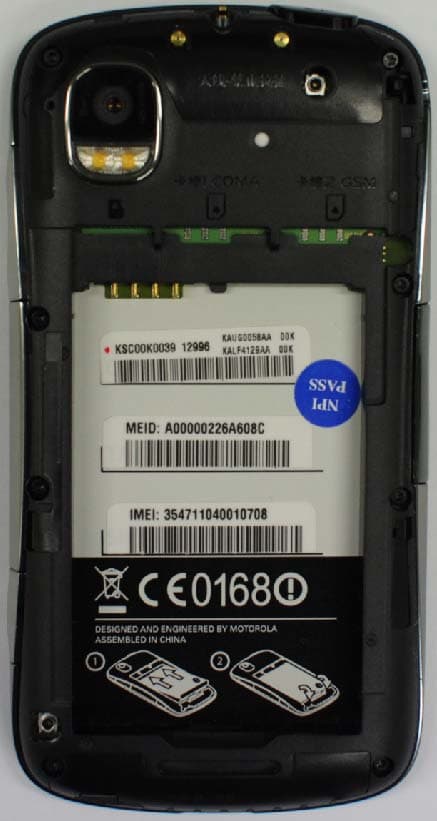
Click to zoom
Application Details
- Equipment Class
- JBP - Part 15 Class B Computing Device Peripheral
- Date of Grant
- Mar 20, 2011
- Application Purpose
- Original Equipment
- Date of Application
- Mar 17, 2011
- Equipment Note
- CDMA/GSM TRANSCEIVER WITH BT & WLAN
- Company
- Motorola Mobility LLC
- Country
- United States
Documents & Files
Document Text
Text extracted from the exhibit documents filed with the FCC. Open a document above to read the original.
Users Manual
APPLICANT: MOTOROLA MOBILITY, INC. FCC ID: IHDT56MA1 INSTRUCTION MANUAL A preliminary draft of the User’s Manual follows this page. EXHIBIT 8 1 Congratulations CongratulationsMOTOROLA XT882 Yo u r M O TO R O L A XT882 phone is loaded with premium features, including videos, music, Web access, a powerful set of business tools, and more—all in a stylish, touch tablet phone design.• Dual mode: CDMA/GSM phone with dual core processor for fast speed & multi-tasking. • Mobile video: Record and watch videos in high-quality 720p HD. Download or stream videos to watch on your phone, or play them on your HDTV with DLNA sharing. • Photos: Take and share great photos with a high performance 8MP camera. •Web: Get more from the Web, with a huge screen, full HTML and support for Adobe® Flash® Player. Search, browse, everything you want to do, all made easier. Note: Certain apps and features may not be available in all countries. Caution: Before assembling, charging, or using your phone for the first time, please read the important legal and safety information packaged with your product. More• Support: Phone updates, PC software, online help and more at www.mo torola.com/support . •MOTOBLUR: After you create a MOTOBLUR account, open it at www. motorola.com/ mymotoblur . • Accessories: Find accessories for your phone at www.motorola.c om/products . 2 Your phone Your phone 3.5mm He a dset J ac k Home Key B ac k Key M ic ro p hone Menu Key M ic ro USB/ M i n i HDMI Conne c tor Charge or connect to PC/HDTV. C a mer a (Front) Volume Keys Se a r c h Key C a mer a Key Press=Sleep/ W ake up. Hold=Turn on/off. Power Key Not i f ica t i on LEDOn=Charged.Flashing=New notification. When you turn your phone, the screen adjusts for you.Note: Your phone might look a little different. . , Go 11:35 11:35 3 Let’s go ContentsLet’s go . . . . . . . . . . . . . . . . . . . . . . . . . . . . . . . . . . . 3Touchscreen & keys . . . . . . . . . . . . . . . . . . . . . . . . . 6Home screen . . . . . . . . . . . . . . . . . . . . . . . . . . . . . . 9App menu . . . . . . . . . . . . . . . . . . . . . . . . . . . . . . . . . 12Social networking . . . . . . . . . . . . . . . . . . . . . . . . . . . 12Calls . . . . . . . . . . . . . . . . . . . . . . . . . . . . . . . . . . . . . 14Contacts . . . . . . . . . . . . . . . . . . . . . . . . . . . . . . . . . . 18Messaging . . . . . . . . . . . . . . . . . . . . . . . . . . . . . . . 21Media Share . . . . . . . . . . . . . . . . . . . . . . . . . . . . . . 23Photos & videos . . . . . . . . . . . . . . . . . . . . . . . . . . . 25Music . . . . . . . . . . . . . . . . . . . . . . . . . . . . . . . . . . . 30Web . . . . . . . . . . . . . . . . . . . . . . . . . . . . . . . . . . . . 36Apps for all . . . . . . . . . . . . . . . . . . . . . . . . . . . . . . . 38Location . . . . . . . . . . . . . . . . . . . . . . . . . . . . . . . . . 39Tips & tricks . . . . . . . . . . . . . . . . . . . . . . . . . . . . . . 41Text entry . . . . . . . . . . . . . . . . . . . . . . . . . . . . . . . . 43Personalize . . . . . . . . . . . . . . . . . . . . . . . . . . . . . . . 44Tools . . . . . . . . . . . . . . . . . . . . . . . . . . . . . . . . . . . . 45Bluetooth™ wireless . . . . . . . . . . . . . . . . . . . . . . . 48Wi-Fi™ . . . . . . . . . . . . . . . . . . . . . . . . . . . . . . . . . . 50USB, memory card & file transfer. . . . . . . . . . . . . . 52Synchronize. . . . . . . . . . . . . . . . . . . . . . . . . . . . . . . 55Management . . . . . . . . . . . . . . . . . . . . . . . . . . . . . 55Security. . . . . . . . . . . . . . . . . . . . . . . . . . . . . . . . . . 56Troubleshooting . . . . . . . . . . . . . . . . . . . . . . . . . . . 59Safety, Regulatory & Legal . . . . . . . . . . . . . . . . . . . 60 Let’s golet’s get you up and runningAssemble & charge Caution: Please read “Battery Use & Safety” on page 60. 1 cover off 2 UIM and/or SIM in 3 microSD in (already done) 4 battery in 5 cover on 6 charge up 3H 4 Let’s go .Tip: To save battery life, see “Battery tips” on page 42. Set up & goCreate or log into a MOTOBLUR account to get your contacts, email, messages, and status information, for all your accounts, all in one place. Registration is secure, and should only take a few minutes.Note: This phone supports apps and services that use a lot of data, so make sure your data plan meets your needs. For details, contact your service provider. 1 Tu r n o n . 2 Select a language. 3 Register or log in.If you have not created a MOTOBLUR account, you’ll need to register: Enter your name, your current email address (where MOTOBLUR can send account information), and a new MOTOBLUR password.Tip: Turn your phone to type. 4 Add your accounts to MOTOBLUR. Power Key To add an account, touch it. Then, enter the user name or email and password that you set up on that account.Tip: For more, or to add accounts anytime, go to “Add accounts” on page 12. 5 After you sign in, your phone imports your contacts from your SIM card. To open your contacts, touch Contacts . Tip: To manually import contacts from the SIM card, touch Menu > More > Copy to Card/ Device > G card to Device or C card to Device . Your MOTOBLUR accountOnly MOTOBLUR syncs contacts, posts, feeds, messages, emails, photos and much more—from sources like Facebook™, Twitter, MySpace, your work email, Picasa™, and Photobucket™—and serves them up just the way you want them. No opening and closing apps and menus, it’s all front and center on your home screen and throughout the entire phone, so you can communicate anyway you like.To add or edit the email, social networking, and other accounts in your MOTOBLUR, Menu > Settings > Accounts > Add account . To set up email accounts, see “Email” on page 22. 5 Let’s go You can log into MOTOBLUR from a computer to upload contacts, reset your password, get help, or even locate your pho ne: www.motorola.com/ mymotoblurTurn it on & offTo turn on your phone, press Power (on the top left). To turn off your phone, pre…
Text truncated - open the document above for the full version.
Users Manual
12 App menu App menuall your apps in one placeQuick start: App menuThe app menu shows you all of your applications. To open it from the home screen, touch . To close it, touch Home . Note: Your main menu will vary. Recent appsTouch and hold Home to see the last few apps you used, then touch the app you want. Touch Home to return to the home screen. Social networkingmy life, your lifeAdd accountsWhen you add your Facebook , MySpace , or Twitter social networking accounts to MOTOBLUR, friends appear in your phone’s Contacts , and status updates appear in Social Status and Social Networking widgets.Find it: Menu > Settings > Accounts > Add accountSign into your social networking account with the user name or email and password that you set up on that account (the same as on your computer). If you don’t have social networking accounts, you can visit their web sites to set them up.Note: Your network or other factors might affect the speed of widget updates. To download updates faster, see “Wi-Fi™” on page 50. Update your statusAfter you add a social networking account to MOTOBLUR, you can update your status in a Social Status widget. 13 Social networking To add a Social Status widget, touch and hold an empty spot on your home screen, then touch Motorola widgets . To update your status, just touch a Social Status widget and enter text. If you have more than one account, you can use the pull-down menu to limit which accounts are updated. When you open the widget, a number on the right side means you have unread status comments (touch it to open them). View account updates & featuresAfter you add a social networking account to MOTOBLUR, you can open and respond to friends’ updates with a Social Networking widget. To add a Social Networking widget, touch and hold an empty spot on your home screen, then touch Motorola widgets . To open the Social Networking widget, touch it. Then:• Touch a person’s name to open their info. Kristine KelleyNot even ready to go back to school 10 minutes ago Kristine KelleyNot even ready togo back t bkt e s a g o n rea dy to to schoolt h l o Kristine Kelley10 minutes ago Status update Kristine Kelley Not even ready to go back to school Comments (3) Kristine Kelle y 1 of 24 Happenings Add Comment Like 14 Calls • Touch the widget title to open a list view. • Touch to open the full update, then touch the social network’s icon to open its web site. To change which accounts or contacts appear in a Social Networking widget, open the widget and touch Menu . Then, choose Services (accounts), or Show updates for (contacts). Edit & delete accountsFind it: Menu > Settings > Accounts Touch and hold an account, then touch Open account to edit it, or touch Remove account to remove it (along with its contacts and messages). Callsit’s good to talkQuick start: CallsDialing optionsFind it: Phone When you enter a number to dial, touch Menu to add a pause (pauses two seconds), or wait (waits for your confirmation). 12:09 212-555-1212314-555-2121Alex PicoMobile 513-555-1212 2 mins ago1 hour ago 18 hours ago Phone Call log Contacts Favorites Cont ac t L i st Touch to open, then touch an entry to call.DeleteTouch to delete a digit you entered.C a ll Lo g Touch to open, then touch an entry to call.GSM C a ll Touch to m ake your call over a GSM network.CDMA C a ll Touch to m ake your call over a CDMA network.F a vor i tes Touch to open, then touch Menu to add & m ore. Touch to close dialer. 15 Calls In-call optionsDuring a call, touch Menu to choose Bluetooth (to use a wireless headset). Your touchscreen goes dark to avoid accidental touches. To wake it up, press Power . Tip: You can touch Home or Back to hide the active call display. To reopen it, touch Phone . 12:09 ? 077-388-09026 Incoming call GSM network Hold Add call Voice Record Mute Speaker End Dialpad 01:23 C a ll T i mer HoldTouch to put the call on hold.D ia l pa d Touch to open a dialpad, to enter nu m bers during a call. S p e a ker p hone Touch to turn the speakerphone on or off.End C a ll Touch to hang up. Make, answer & end callsTo make a call, touch Phone , enter a number, then touch C to make the call over a CDMA network, or touch G to make the call over a GSM network.Tip: To enter the international dialing code, touch and hold . To answer a call, drag to the right.To ignore a call, drag to the left.To end a call, touch End . FavoritesFind it: Phone > Favorites • To call a number, touch it. • To search, add, or delete entries, touch Menu . HandsfreeNote: Using a mobile device or accessory while driving may cause distraction and may be illegal. Always obey the laws and drive safely.During a call: 12:09 ? 077-388-09026 Incoming call GSM network 0 + 16 Calls • To use the speakerphone, touch Speaker . • To use a Bluetooth™ device, touch Menu > Bluetooth . Tip: You can purchase a Motorola car dock to turn your phone into an on-board navigator, handsfee device, music player and more, all while recharging it. Follow the dock’s instructions to dock your phone. Then, touch > CarDock and choose an option before you drive. Mute, hold & recordDuring a call:• To mute the current call, touch Mute . • To put a call on hold, touch Hold . • To record the current call, touch Voice Record . Enter numbers during a callTo enter numbers during a call, touch Dialpad . Recent callsFind it: Phone > Cal l log • Touch an entry to call it, send a text message, view call details, add the number to a firewall list of blocked calls or add the number to a firewall VIP list. • To filter the list, touch the view name (like Al l cal ls ) at the top. • To delete a call from the list, touch Menu > Delete . Conference callsTo start a conference call, call the first number. After they answer, touch Add cal l and call the next number. When the next number answers, touch Merge cal ls . Your phone numberFind it: Menu > Settings > About phone > Status > CDMA status or GSM status The status page lists your phone number.Your caller IDTo hide your number from the people…
Text truncated - open the document above for the full version.
Attestation Statements
APPLICANT: Motorola Mobility Holdings, Inc FCC ID: IHDT56MA1 Page 1 of 3 EXHIBIT 2 SPECIFICATION COMPLIANCE STATEMENT Transceiver type (IHDT56MA1) has been tested in accordance with the requirements contained in the appropriate Commission regulations. To the best of my knowledge, these tests were performed using measurement procedures consistent with industry or Commission standards and demonstrate that this equipment complies with the appropriate standards. Each unit manufactured imported or marketed, will conform to the sample tested within the variations that can be expected due to quantity production and testing on a statistical basis. I further certify that the necessary measurements were made at Motorola Mobility 600 N. U.S. Highway 45, Libertyville, IL 60048. NAME: Janghwan, Oh TITLE: Engineering Manager Motorola Mobility Holdings, Inc Date: Jan, 27, 2011 APPLICANT: Motorola Mobility Holdings, Inc FCC ID: IHDT56MA1 Page 2 of 3 EXHIBIT 2 STATEMENT OF CERTIFICATION I hereby certify that the above application was prepared under my direction and that to the best of my knowledge and belief, the facts set forth in this application and accompanying technical data are true and correct. The technical data supplied with this application was taken under my supervision and is hereby duly certified. I also certify that this transmit equipment (IHDT56MA1) is in compliance with all applicable parts of the FCC Rules. NAME: Janghwan, Oh TITLE: Engineering Manager Motorola Mobility Holdings, Inc Date: Jan, 27, 2011 APPLICANT: Motorola Mobility Holdings, Inc FCC ID: IHDT56MA1 Page 3 of 3 EXHIBIT 2 ATTESTATION STATEMENT This device contains an embedded Bluetooth device that Motorola confirms compliance with the following Part 15 regulations. 15.247(a)(1) • the hopping sequence must be pseudorandom • all Channels are used equally on average • the receiver input bandwidth is approximately equal to the transmit bandwidth • the receiver hops in sequence with the transmitted signal 15.247(g) the system is designed to comply with all of the regulations in Section 15.247 when the transmitter is presented with a continuous data (or information) 15.247(h) the system does not coordinate its channel selection/hopping sequence with other frequency hopping systems for the express purpose of avoiding the simultaneous occupancy of individual hopping frequencies by multiple transmitters NAME: Janghwan, Oh TITLE: Engineering Manager Motorola Mobility Holdings, Inc Date: Jan, 27, 2011
Cover Letter(s)
APPLICANT: MOTOROLA MOBILITY, INC. FCC ID: IHDT56MA1 January 29, 2011 CONFIDENTIALITY REQUEST CONTAINED WITHIN Federal Communications Commission Authorization and Evaluation Division 7435 Oakland Mills Road Columbia, Maryland 21046 Re: Application for Cellular/PCS Transceiver Certification Dear Sir/Madame: Motorola Mobility, Inc., 600 N. U.S. Highway 45, Libertyville, Illinois 60048 herein submits Application for Equipment Authorization for Certification of a Cellular/PCS Transceiver, FCC ID: IHD T56MA1. Motorola Mobility is also the manufacturer of this equip ment. Confidentiality: Pursuant to Section 0.459 of the Commission’s rules (CFR 47), Motorola Mobility requests confidentiality for portions of the material contained in this application and that the identified material be withheld from public inspection following the grant of this authorization. This material contains Motorola’s trade secrets and confidential information that Motorola does not customarily release to the public and which is otherwise not generally available to the public. Confidentiality is requested for the following exhibits: • Exhibit 4 Block Diagrams • Exhibit 5 Schematics • Exhibit 10 Parts List • Exhibit 12 Operational Description Description: This equipment is a Digital CDMA 800 portable transceiver, it employs EVDO data transmission in the network and contains 2.4 GHz Bluetooth and WiFi functions (part 15.247). This unit also operates in the GSM1900 network and has GPRS/EDGE for data transmission. It is connected to a computer via a USB connection. (Part 15B). Note: This device also contains functions that are not operational in the U.S. territories. This filing is only applicable for US operations. Contact Information: If there are any further questions or additional information needed concerning this filing, please contact me, John Lewczak, by telephone at (954) 723-6272 or via E-mail at: [email protected] . Reg ards, FCC Liaison Motorola Mobility, Inc. 600 N. U.S. Highway 45 Libertyville, IL 60048-5343 E-mail: [email protected] Exhibit 13 1
Cover Letter(s)
APPLICANT: MOTOROLA MOBILITY, INC. FCC ID: IHDT56MA1 SHORT TERM CONFIDENTIALITY REQUEST 180 DAYS Federal Communications Commission Authorization and Evaluation Division 7435 Oakland Mills Road Columbia, Maryland 21046 Re: Cellular/PCS Transceiver FCC ID IHD T56MA1 Gentlemen: Introduction: Pursuant to Section 0.459 of the Commission's rules (CFR 47) and Section 552(b)(4) of the Freedom of Information Act, Motorola requests confidentiality for portions of the material contained in this application; and that the identified material be withheld from public inspection following the grant of this authorization. This material contains Motorola's trade secrets and confidential information that Motorola does not customarily release to the public and which is otherwise not generally available to the public. Standard Confidentiality Request: Confidentiality is requested for the following exhibits: • Exhibit 4 Block Diagrams • Exhibit 5 Schematics • Exhibit 10 Parts List / Tune up Information • Exhibit 12 Operational Description Short Term Confidentiality Request: Furthermore, due to sensitive business information, Motorola requests the following exhibits be withheld from public viewing for 180 days: • Exhibit 3 External Photographs • Exhibit 7 and 7A Photographs of the device under test • Exhibit 8 User’s Manual • Exhibit 9 Internal Photographs Contact Information: Please contact me by telephone at (954) 723-6272, or by e-mail ([email protected]) , if there are questions or additional information needed concerning this filing. Regards, John Lewczak FCC Liaison Mobile Devices 600 N. U.S. Highway 45 Libertyville, IL 60048-5343 Exhibit 13A
External Photos
APPLICANT: Motorola Mobility Holdings, Inc. FCC ID IHDT56MA1 EXHIBIT 3 2 of 2 FRONT OF PHONE BACK OF PHONE BACK OF PHONE WITH BATTERY COVER REMOVED APPLICANT: Motorola Mobility Holdings, Inc. FCC ID IHDT56MA1 EXHIBIT 3 2 of 2 SIDE OF PHONE TOP OF PHONE BOTTOM OF PHONE
ID Label/Location Info
APPLICANT: MOTOROLA MOBILITY, INC. FCC ID: IHDT56MA1 EXHIBIT 1 FCC IDENTIFICATION (NAMEPLATE) INFORMATION The FCC label shown is representative of the label that will appear on the radio when in production. It will be placed on the outside of the equipment as shown in Exhibit 3, and is readily visible at the time of purchase. Other information may also be included on this label. FCC ID: IHDT56MA1
Internal Photos
APPLICANT : Motorola Mobility Holdings, Inc. FCC ID: IHDT56MA1 EXHIBIT 9 1 of 6 Main Board Top W/ Shields Main Board Top W/O Shields Main Board Bottom W/ shields Main Board Bottom W/O shields APPLICANT : Motorola Mobility Holdings, Inc. FCC ID: IHDT56MA1 EXHIBIT 9 2 of 6 Daughter Board Top W/ Ground Plate Daughter Board Top W/O Ground Plate Daughter Board Bottom Speaker flex Top W/ Holder Speaker flex Top W/ Holder APPLICANT : Motorola Mobility Holdings, Inc. FCC ID: IHDT56MA1 EXHIBIT 9 3 of 6 Speaker flex Top Speaker flex Bottom Receiver flex Top W/ Holder Receiver flex Bottom W/ Holder Receiver flex Top Receiver flex Bottom APPLICANT : Motorola Mobility Holdings, Inc. FCC ID: IHDT56MA1 EXHIBIT 9 4 of 6 8M camera flex Top 8M camera flex Bottom VGA camera flex Top VGA camera flex Bottom LCD Bridge flex Top LCD Bridge flex Bottom APPLICANT : Motorola Mobility Holdings, Inc. FCC ID: IHDT56MA1 EXHIBIT 9 5 of 6 Touch flex Top Touch flex Bottom Battery door Inside Battery door Outside APPLICANT : Motorola Mobility Holdings, Inc. FCC ID: IHDT56MA1 EXHIBIT 9 6 of 6 Front Housing Ass’y Outside LCD Module Front LCD Bracket Front Rear Housing Ass’y Inside Front Housing Ass’y Inside LCD Module Back LCD Bracket Back Rear Housing Ass’y Outside
Test Report
APPLICANT: MOTOROLA MOBILITY, INC FCC ID: IHDT56MA1 Test Report Number: 24307-1 Supplement 1 of 9 EXHIBIT 6A4 PRODUCT SAFETY AND COMPLIANCE EMC LABORATORY EMC TEST REPORT Test Report Number – 24307-1 Supplement Report Date – 2010-12-16 The test results contained herein relate only to the model(s) identified. It is the manufacturer’s responsibility to assure that additional production units of this model are manufactured with identical electrical and mechanical characteristics. Signature: Name: Lei Yang Title: EMC Project Manager Test: 2010-12-08 to 2010-12-16 As the responsible test lab manager, I hereby declare that the model tested as specified in this report conforms to the requirements indicated. Signature: Name: Yilin Zhao Title: Test Lab Manager Date: 2010-12-16 This report must not be reproduced, except in full, without written approval from this laboratory. FCC Registration Number: 177885 IC Registration Number: 109AW-1 ADR Testing Service location ADR BJ ISO/IEC-17025:2005 accredited by UKAS 2404 APPLICANT: MOTOROLA MOBILITY, INC FCC ID: IHDT56MA1 Test Report Number: 24307-1 Supplement 2 of 9 EXHIBIT 6A4 Table of Contents Description Page Test Report Details 3 Applicable Standards 3 Summary of Testing 4 General and Special Conditions 4 Equipment and Cable Configuration 5 Measurement Procedures and Data 6 APPLICANT: MOTOROLA MOBILITY, INC FCC ID: IHDT56MA1 Test Report Number: 24307-1 Supplement 3 of 9 EXHIBIT 6A4 Test Report Details Tests Performed By: Motorola (Beijing) Mobility Technologies Co., Ltd. Asia Global Compliance Labs No. 1 Wang Jing East Road Chao Yang District Beijing, 100102, P. R. China Phone: +86 10 8473 2610 FCC Registration Number: 177885 IC Registration Number: 109AW-1 Tests Requested By: Motorola Mobility, Inc. 600 North US Hwy 45 Libertyville, IL 60048 United States Product Type: Cellular Phone Signaling Capability: CDMA 800, GSM 1900, Edge 1900, Bluetooth, 802.11 b & g & n FCC ID: IHDT56MA1 IMEI: 354711040002408 Testing Complete Date: 12-16-2010 Applicable Standards All tests and measurements indicated in this document were performed in accordance with the Code of Federal Regulations Title 47: X Part 15 Subpart B – Unintentional Radiators Applicable Standards: ANSI C63.4-2003, RSS-Gen Issue 2 APPLICANT: MOTOROLA MOBILITY, INC FCC ID: IHDT56MA1 Test Report Number: 24307-1 Supplement 4 of 9 EXHIBIT 6A4 Summary of Testing Test Test Name # Pass/Fail _________ 1 Field Strength of Spurious Emissions Pass from Unintentional Radiators 2 AC Line Conducted Emissions Pass Test Test Name Margin with respect # to the Limit_________ 1 Field Strength of Spurious Emissions see results from Unintentional Radiators 2 AC Line Conducted Emissions see results The margin with respect to the limit is the minimum margin for all modes and bands. General and Special Conditions The EUT was tested using a fully charged Model SNN5879A 1930mAH battery. All testing was done in an indoor controlled environment. The temperature and the relative humidity were maintained within the ANSI C63.4-2003 Standard requirements during the entire duration of testing. APPLICANT: MOTOROLA MOBILITY, INC FCC ID: IHDT56MA1 Test Report Number: 24307-1 Supplement 5 of 9 EXHIBIT 6A4 Equipment List Through the test, the EUT was installed in an evaluation board. Equipment Model/type Serial number Operational range Date of calibration EMI analyzers ESU 40 100036 20 Hz – 40 GHz 11.05.2010 PA-02-0001: 2007343 (10 kHz – 3 GHz) 06.26.2010 PA-02-218 2007344 3 GHz – 18 GHz 06.26.2010 Pre Amplifiers PA-02-5 2007345 18 GHz – 40 GHz 06.26.2010 Radio com. Tester CMU 200 112790 GSM 850/900/1800/1900 UMTS, CDMA, Bluetooth N/A WRCD N/A GSM 850/900/1800/1900 UMTS, CDMA N/A Band Reject Filter 4N45-24241/3/6 N/A WLAN N/A EMI analyzers R&S ESCI 100650 9 kHz – 3 GHz 03.07.2010 LISN ENV216 100055 9 kHz – 30 MHz 12.19.2008 The antennas used in the various tests are listed in the below table. Antenna Type Serial number Operational range Date of calibration Hybrid-log periodic TDK HLP 3003C 130361 30 MHz – 3 GHz 11.07.08 Double ridged Horn TDK HRN0118130303 1 GHz – 18 GHz 03.26.09 Double ridged Horn ETS HRN3116 0007193818 GHz – 40 GHz 10.17.08 All test equipment was within their calibration date during the time of testing. When equipment went out of calibration during testing it was replaced using a similar piece of calibrated equipment. All these equipments are listed in the equipment list. The LISN is on a two-year calibration cycle. The antennas are on a three-year calibration cycle. All other equipments are on a one-year calibration cycle. The Dell D620 Laptop Computer, D-Link DI-624+A Router and the Sony D-600 L Camera are labeled as DoC. APPLICANT: MOTOROLA MOBILITY, INC FCC ID: IHDT56MA1 Test Report Number: 24307-1 Supplement 6 of 9 EXHIBIT 6A4 Measurement Procedures and Data FIELD STRENGTH OF EMISSIONS FROM UNINTENTIONAL RADIATORS Measurement Procedure The equipment under test is placed inside the semi-anechoic chamber on a Styrofoam table on the turntable center. For each radiated emission, the antenna mast is raised and lowered from 1 to 4 meters and the turntable is rotated 360 degrees to obtain a maximum peak reading on the spectrum analyzer. The final radiated emissions are then measured using an EMI receiver employing a CISPR quasi-peak detector function below 1000 MHz and an average detector function above 1000 MHz. This is repeated for both horizontal and vertical polarizations of the receive antenna. The field strength of each radiated emission is calculated by correcting the EMI receiver level for cable loss, amplifier gain, and antenna correction factors. Field Strength (dBuV/m) = EMI Receiver Level (dBuV) + Cable Loss (dB) - Amplifier Gain (dB) + Antenna Correction Factor (3/m) Test Setup The EUT and the host equipment were setup according to the procedures in ANSI C63.4- 2003. The EUT was connected to a laptop computer using a USB data cable. The USB data cable is 1 m in length. The parallel and the serial ports …
Text truncated - open the document above for the full version.
Test Report
Date: Mar 16, 2011 Subject: Request for additional information regarding FCC ID: IHDT56MA1 Reference: Reference Number: JOB 400UC11 Date of Original Email: Mar 6, 2011 Prepared by: Lillian Li Motorola Mobility, Inc. Libertyville, Illinois 60048 Questions and responses follow: JBP – Test report: 13. Part 15.33(b)(1): a. Please identify the maximum frequency used and/or generated within the computer peripheral portion of this device (e.g. processor speed, xtal, video clock, etc.) RESPONSE: Processor Speed – Upto 1 GHz Xtal – 26 MHz, 19.2 MHz TCXO – 19.2 MHz b. Please provide a brief description of features installed in the unit tested (i.e memory size, video resolution, refresh rates, etc.). RESPONSE: Memory Size – 512MB LPDDR2 SDRAM, 8 GB eMMC. Video Resolution – 540x960 (qHD) Video Clock : Max 250 MHz Refresh rate – 60 Hz c. Please specify the highest frequency of investigation based on 13.a. RESPONSE: Highest Frequency of Measurement is 5 GHz. 14. Please indicate whether user controls were adjusted to maximize emissions (i.e. brightness & contrast for display, etc.) 1 2 RESPONSE: For Computer Peripheral testing, the Computer display settings were not adjusted. 15. Please indicate whether the EUT was tested in 3 orthogonal positions to determine worst- case emissions? RESPONSE: For Computer Peripheral testing the EUT was not tested in 3 Orthogonal positions. See Updated Exhibit 7 that includes all Test Setup photos submitted under job#400UC11. 16. ANSI C63.4 Section 8.3 – Were (interconnecting) cables position manipulated to maximize emissions during both radiated and conducted emissions testing? Please explain and/or revise report. RESPONSE: All cables were set according to ANSI C63.4 2003 standard. There were no manipulations required to maximize emissions within the typical equipment arrangements. 17. Was the phone also tested for compliance with part 15 subpart B while connected to a video display unit using the HDMI and VGA output ports? Please explain. RESPONSE: Yes. The HDMI port of the phone was tested with phone attached to TV/monitor and playing a video. This is performed as a verification test and no DoC or certification is being requested for this test.
Test Setup Photos
EMC TEST SETUP PHOTOS Radiated Emissions Radiated Emissions – Computer Peripheral APPLICANT: MOTOROLA MOBILITY, INC.FCC ID: IHDT56MA1 EXHIBIT 7 AC Line Conducted Emissions AC Line Conducted Emissions – Computer Peripheral APPLICANT: MOTOROLA MOBILITY, INC.FCC ID: IHDT56MA1 EXHIBIT 7
Contact Information
Applicant
Jeff Narducci(Director Product Compliance)
Test Firm
Motorola Inc.Albert Patapack
Technical Specifications
| # | Rule Parts | Frequency Range | Power Output |
|---|---|---|---|
| 1 | 15B | - | - |
Other Applications from Motorola Mobility LLC
IHDT56AW9
May 12, 2026Smart Watch
Equipment Class
NII - Unlicensed National Information Infrastructure TXIHDT56AW5
Apr 08, 2026Mobile Cellular Phone
Equipment Class
DTS - Digital Transmission SystemIHDT56AW6
Mar 18, 2026Smart Watch
Equipment Class
JBP - Part 15 Class B Computing Device PeripheralIHDT56AX4
Mar 17, 2026Mobile Cellular Phone
Equipment Class
PCE - PCS Licensed Transmitter held to earIHDT56AW3
Mar 03, 2026Mobile Cellular Phone
Equipment Class
6XD - 15E 6 GHz Low Power Indoor Client