IHDT56MR1i412/i420 Portable iDEN Handset with Bluetooth
Motorola Mobility LLC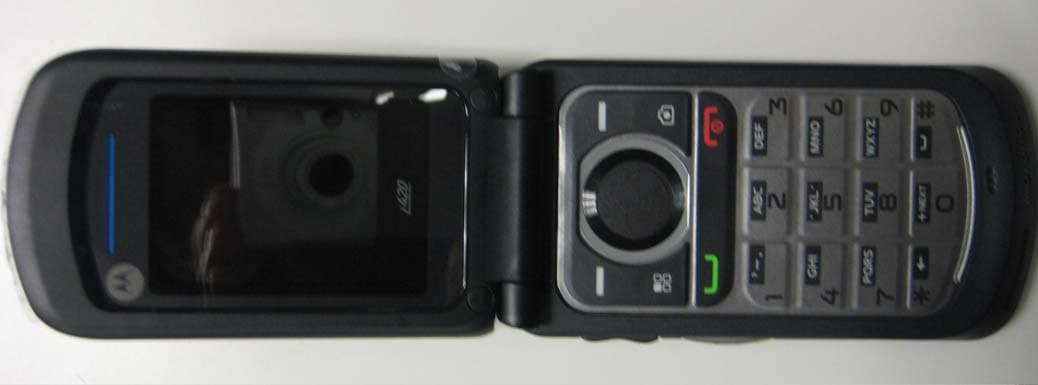
Click to zoom
Application Details
- Equipment Class
- PCE - PCS Licensed Transmitter held to ear
- Date of Grant
- Mar 13, 2011
- Application Purpose
- Original Equipment
- Date of Application
- Mar 13, 2011
- Equipment Note
- i412/i420 Portable iDEN Handset with Bluetooth
- Frequency Range
- 901.00000000 - 902.00000000
- Company
- Motorola Mobility LLC
- Country
- United States
Documents & Files
Document Text
Text extracted from the exhibit documents filed with the FCC. Open a document above to read the original.
Users Manual
FCC Filing Package for Motorola i412/i420 Series Transceivers FCC ID: IHDT56MR1 Temporary Confidentiality Requested Motorola Mobility, Inc.; 8000 W. Sunrise Blvd, Suite A; Plantation, FL 33322, USA www.motorola.com Page 8 - 1 Exhibit 8: Draft User’s Manual -- 47 CFR 2.1033(b)(3) The attached User’s Manual is the final production-intended version of the generic Motorola International English User Manual. This guide will be adapted to carrier-specific versions, but the key information herein will be retained. Translations into other languages will also be done to support the needs of other markets. Minor revisions may be made to these manuals, prior to and subsequent to, placing this product onto the market. Selected portions of the User Guide can be found as indicated below: 8.1 Safety and Regulatory Section: Part 2,Page 14 8.2 Part 15B Declaration of Conformity (Pursuant to 47 CFR 2.1077): Part 2 Page 24 8.3 Specific Absorption Rate (SAR) Data: Part 2, Page 21 8.4 Guidance for use with Hearing Aids (Pursuant to 47 CFR 20.19(f)(1): Part 2 Page 10 Part 2 Page 32 MOTOROLA i420 1Congratulations Congratulations MOTOROLA i420 Get the convenience of push-to-talk calls together with a sleek design in an affordable package. •Private Calls: Stay in touch with your family, friends, and colleagues with the simple touch of a button. •FM Radio: Listen to your favorite stations wherever you go. • My Phone, My Way: It’s your phone—make it that way. Customize your home screen with personal pictures, and change wallpapers and ringtones. More information On your computer—Go to www.motorola.com/support/ . Caution: Before assembling, charging or using your phone for the first time, please read the important legal and safety information packaged with your product. 2Your phone Your phone the important keys & connectors 10:05pm 01/24 Ready ContcsMesg Send Key ` ? Camera Key @ End/Power Key Soft Key - - Soft Key Menu Key / r OK Key Navigation Key 3Your phone Note: Your phone might look a little different. Volume Key Speaker Key ) Camera ( Smart Key PTT Button 2.5 mm Headphone Jack Micro USB Connector 4Contacts Contacts Menu map . . . . . . . . . . . . . . . . . . . . . . . . . . . . . . . . 5 Let’s go . . . . . . . . . . . . . . . . . . . . . . . . . . . . . . . . . . . 9 Basics . . . . . . . . . . . . . . . . . . . . . . . . . . . . . . . . . . . . 11 Calls . . . . . . . . . . . . . . . . . . . . . . . . . . . . . . . . . . . . . 14 Push-to-Talk. . . . . . . . . . . . . . . . . . . . . . . . . . . . . . . . 16 SDG calls . . . . . . . . . . . . . . . . . . . . . . . . . . . . . . . . . 18 Web . . . . . . . . . . . . . . . . . . . . . . . . . . . . . . . . . . . . . 19 Text entry . . . . . . . . . . . . . . . . . . . . . . . . . . . . . . . . 20 Contacts . . . . . . . . . . . . . . . . . . . . . . . . . . . . . . . . . 22 Messaging . . . . . . . . . . . . . . . . . . . . . . . . . . . . . . . 23 Personalize . . . . . . . . . . . . . . . . . . . . . . . . . . . . . . . 26 Camera . . . . . . . . . . . . . . . . . . . . . . . . . . . . . . . . . . 28 Media center. . . . . . . . . . . . . . . . . . . . . . . . . . . . . . 29 FM radio . . . . . . . . . . . . . . . . . . . . . . . . . . . . . . . . . 30 Bluetooth™ wireless . . . . . . . . . . . . . . . . . . . . . . . 31 Tools . . . . . . . . . . . . . . . . . . . . . . . . . . . . . . . . . . . . 33 Security. . . . . . . . . . . . . . . . . . . . . . . . . . . . . . . . . . 36 Safety, Regulatory & Legal . . . . . . . . . . . . . . . . . . . 38 5Menu map Menu map main menu Call Alert Bluetooth® • Hands Free • Link to Devices • Device History • Setup •Find Me Settings •(see settings menu) Ring Tones • Vibrate All: On/Off • Ringtones •Vibrate • Silent Java Apps • Java System •FM Radio GPS • Position • Privacy • Interface Media Center Camera Net My Info •My name • Line 1 • Line 2 • Private ID • Group ID • Carrier IP •IP1 Address •IP2 Address Datebook VoiceRecord • [New VoiceRec] Memo Recent Calls Shortcuts • [Help] • 1)Shortcuts • 2)Cntcs[New Contact] • 3)Recent Calls • 4)Contacts • 5)Datebook • 6)Messages • 7)VoiceRecord •8)Net • 9)Call Forward 6Menu map main menu (con’t.) Contacts • [New Contact] • [New SDG List] • [New Msg Group] Note: Your service provider may not offer the Message Group feature. Call Forward Quick PTT Profiles • [New Profile] • Standard •Car • Meeting •Office • Outdoors • Headset •PRVT Only • CNTCS Only • Surveillance Call Timers • Last Call • Phone Reset • Phone Lifetime • Prvt/Grp Reset •Prvt/Grp Life • Kbytes Reset PT Manager •Quick PTT • Send Message • Send Picture • Send Event • Send My Info • Send Contact • Configure Messages • [Create Message] •Voice Mail •Inbox •Drafts •Outbox •Fax Mail • Net alert • Sent Items FM Radio Note: Your service provider may not offer the FM Radio feature. This is the standard main menu layout. Your phone’s menu may be different. 7Menu map settings menu Display/Info • Wallpaper •Text Size •Theme • Home Icons • Backlight •Clock • Menu View • Large Dialing • Language Phone Calls • Set Line • Any Key Ans • Auto Redial • Call Waiting •Auto Ans •Flip Activation • Minute Beep • Call Duration •TTY •Hearing Aid • Notifications • DTMF Dialing • Prepend 2-Way Radio •Tkgrp Silent •Tkgrp Area • One Touch PTT •Alert Type • PTT Quick Notes • On/Off PTT • Store Rcvd Info Personalize • Menu Options •Up Key • Down Key •Left Key •Right Key • Center Key •Left Softkey •Right Softkey •Power Up Volu m e • Line 1 • Line 2 • Messages • Earpiece • Speaker •Keypad • Java Earpiece • Java Spkr • Data 8Menu map settings menu (con’t.) Security • Phone Lock • Keypad Lock • SIM PIN •GPS PIN • Change Passwds Advanced •Alert Timeout • Headset/Spkr • Connectivity • Reset Defaults • Return to Home • Transmitters • Phone Only •Baud Rate 9Let’s go Let’s go let’s get you up and running Assemble & charge Caution: Please read “Battery Use & Safety” on page 38. 1Remove cover2SIM in 3Batter y in4Cover on 5Charge up 3H 10Let’s go Turn it on & off To turn on y…
Text truncated - open the document above for the full version.
Users Manual
12Basics Note: Your home screen might look different from the one shown, depending on your service provider. Soft key labels in the home screen show the current soft key functions. Indicators at the top of your phone’s display provide important status information. Adjust volume Press the volume keys up or down to: •change the earpiece volume during calls •change the ringer volume from the home screen •turn off a call alert before answering the call indicators zSignal Strength~No Service $Active Phone Line2New Message !Speaker On7Packet Data "Speaker OffdBattery Level ,Ringer OffcBluetooth On 5Vibrate All3New Voicemail Volume Keys 13Basics Tip: While on the home screen, press and hold the volume key down until your phone vibrates to set your ringer to Vibrate All. Navigation key Press the navigation key up, down, left, or right to scroll to items in the display. When you highlight the desired item, press r to select it. Transmitters Consult airline staff about the use of the Transmitters Off feature during a flight. Turn off your phone whenever instructed to do so by airline staff. Find it: Menu/ > Settings > Advanced > Transmitters > Off Transmitters Off turns off your phone’s calling and Bluetooth features in situations where wireless phone use is prohibited. You can use the phone’s other non-calling features when the transmitters are turned off. Note: When you select Transmitters Off, all wireless services are disabled. Emergency calls to your region’s emergency number (e.g., 911) can still be made. 14Calls Calls it’s good to talk Make & answer calls Enter a number, then press Talk`. To answer a call, press Talk`. To end a call, press End/Power@. Handsfree Note: Using a mobile device or accessory while driving may cause distraction and may be illegal. Always obey the laws and drive safely. During a call: •To use the speakerphone, press Spkr. •To connect a Bluetooth™ device, press Menu/ > Use Bluetooth. Recent calls Find it: Menu/ > Recent Calls Tip: When you’re in the home screen, you can press Ta l k` to go to Recent Calls. When the phone is closed, press the Smart Key( to go to Recent Calls. The recent calls list contains information associated with the last 20 calls you have made and received. To display call details, highlight an entry and press r. 15Calls Emergency calls Note: Your service provider programs one or more emergency phone numbers (such as 911 or 112) that you can call under any circumstances, even when your phone is locked. Emergency numbers vary by country. Your pre-programmed emergency numbers may not work in all locations, and sometimes an emergency call cannot be placed due to network, environmental, or interference issues. 1Enter the emergency number. 2Press Talk` to call the emergency number. Note: Emergency calls can’t be placed while the keypad is locked, or if the phone is displaying a No Service message. To unlock the keypad, press Menu/ > *. Note: Your mobile device can use AGPS satellite signals to help emergency services find you (see “GPS & AGPS” on page 50). Cool down In very limited circumstances, such as where your phone has been exposed to extreme heat, “Cool Down” message screens will appear. To avoid possible damage to your battery and phone, you should follow these instructions until the phone is within its recommended temperature range. When your phone is in “Cool Down” mode, only emergency calls can be made. 16Push-to-Talk Push-to-Talk one or more, talk to them all Private calls Private calls are push-to-talk calls between two people. Make and answer private calls To make a private call: •Enter the recipient’s PTT number. •Press Menu/ > Contacts, and select a contact that has a PTT number. To talk, press and hold the PTT Button. To listen, release the PTT Button. To answer a private call, press the PTT Button after the caller has stopped talking. To end a private call, press End/Power@ or do nothing. The call will end after a few seconds. Set push-to-talk speaker You can listen to push-to-talk calls through your phone’s speaker or earpiece. Press Speaker) to turn the speaker on or off. PTT Button 17Push-to-Talk Call alerts Use call alerts to tell someone you want to speak to them. To send a call alert: •Enter a Private ID, and press Alert. When prompted, press the PTT Button. •Press Contacts, and highlight a contact containing a Private ID. Press Alert, and press the PTT Button when prompted. When you receive a call alert, you can: •Answer: Press the PTT Button to begin a private call with the sender. • Queue: Press Queue to store the call alert to the call alert queue. •Clear: Press Clear to dismiss and delete the call alert. Note: Call alerts will automatically be moved to the queue after a few minutes of inactivity. You won’t be able to make phone calls or private calls until the call alert is moved, or you’ve chosen one of the options above. Turn off a call alert You can press the volume keys to turn off a call alert before answering the call. 18SDG calls SDG calls Need to talk to more than one person at a time? With SDG (Selective Dynamic Group) calls you can talk to up to 20 people at a time. Note: To store groups on your phone you need a group-call-capable SIM card. Contact your service provider for more information. Create SDG lists in contacts Find it: Menu/ > Contacts 1Select [New SDG List]. 2If you want to assign a name to the SDG list, enter the name. Note: If you do not assign a name, the SDG list is named “SDG” followed by the number of members in the SDG list. For example, “SDG (8)” for an SDG list with eight members. 3Add Private IDs. 4Press Save. Make SDG calls 1From Contacts or the recent calls list, scroll to or select the SDG list you want. 2Press the PTT button. 19Web Web Find it: Menu/ > Net Note: Your service provider may charge you to surf the Web or download data. Go to a Web site 1From the home page, select Go to URL. 2Press Edit. 3Enter the Web address and press Done. 4Press Ok to go to the Web site. Create a bookmark …
Text truncated - open the document above for the full version.
Users Manual
FCC Filing Package for Motorola i412/i420 Series Transceivers FCC ID: IHDT56MR1 Temporary Confidentiality Requested Motorola Mobility, Inc.; 8000 W. Sunrise Blvd, Suite A; Plantation, FL 33322, USA www.motorola.com Page 8 - 1 Exhibit 8: Draft User’s Manual -- 47 CFR 2.1033(b)(3) The attached User’s Manual is the final production-intended version of the generic Motorola International English User Manual. This guide will be adapted to carrier-specific versions, but the key information herein will be retained. Translations into other languages will also be done to support the needs of other markets. Minor revisions may be made to these manuals, prior to and subsequent to, placing this product onto the market. Selected portions of the User Guide can be found as indicated below: 8.1 Safety and Regulatory Section: Part 2,Page 14 8.2 Part 15B Declaration of Conformity (Pursuant to 47 CFR 2.1077): Part 2 Page 24 8.3 Specific Absorption Rate (SAR) Data: Part 2, Page 21 8.4 Guidance for use with Hearing Aids (Pursuant to 47 CFR 20.19(f)(1): Part 2 Page 10 Part 2 Page 32 26Personalize Personalize Ringtones Find it: Menu/ > Ring Tones 1Make sure Vibrate All is set to Off. 2Scroll through the list of ringtones and select one to assign. Vibrate sets your phone to vibrate instead of making a sound. Silent sets your phone to neither vibrate nor make a sound. 3Select the features you want to assign the ringtone to. 4When you’re finished press Done. Note: This icon , appears on the display if the phone is set to Silent. This icon 5 appears on the display if the phone is set to Vibrate All. Set to vibrate You can set your phone to vibrate for all calls and alerts. Find it: Menu/ > Ring Tones > Vibrate All Set this option to On or Locked. Setting this option to On lets you turn Vibrate All off by pressing the up volume control. Setting this option to Locked requires you to press and hold the up volume control to turn Vibrate All off. 27Personalize Backlight Set the amount of time the backlight remains on for the display and java applications, or turn off the backlight feature to extend battery life. Find it: Menu/ > Settings > Display/Info > Backlight Wallpaper Find it: Menu/ > Settings > Display/Info > Wallpaper 1Select Wallpaper. 2Scroll through the list of pictures and press r to select a picture. You can set the wallpapers to change automatically by turning on Auto Cycle. Menu Language Find it: Menu/ > Settings > Display/Info > Language Profiles Your phone has different profiles. You can customize ringtones, display settings, call settings, volume, and call filters. Find it: Menu/ > Profiles 28Camera Camera Take photos Find it: Press Camera? 1Aim the camera lens and press the navigation key up to zoom in or down to zoom out. To change the picture size, press the navigation key left or right. 2Press Capture or press r to take the picture. 3To save the picture to memory, Store, press Discard to delete it, or you can press Send to send it in an MMS message. Share To send the picture you’ve just taken via Bluetooth, PTT, or MMS message, press Menu/ > Send Via ... Camera options To set camera options such as Zoom, Picture Quality, and Picture Size, press Menu/. 29Media center Media center Find it: Menu/ > Media Center The Media Center lets you view and manage your pictures and audio recordings stored in your phone’s memory. Tip: Press * or # to scroll through the different media types in Media Center. View pictures 1Press the navigation key to scroll to Media: Pictures. 2Select a picture to view it. You can also press the navigation key left or right to scroll through all the pictures stored on your phone. Manage sounds 1Press the navigation key to scroll to Media: Audio. 2Select an audio file to play it. To stop playing an audio file, press the navigation key down. To play the audio file again, press r. Press the navigation key left or right to scroll through the audio files stored on your phone. Share To send a picture or audio file via Bluetooth, PTT, or MMS, highlight it and press Menu/ > Send via ... 30FM radio FM radio Note: Your service provider may not support this feature. Find it: Menu/ > FM Radio Note: A wired 2.5mm headset is required for FM radio use. Find a station Seek Press the navigation key up or down to search for the next available station Enter a station frequency Press Menu/ > Enter Freq. to use your key pad to enter a station frequency. Station Presets Your phone can store up to nine station presets. Store a station to a preset To store a station to your presets, tune into it and then press and hold the corresponding number (1-9) on your keypad. Use station presets To tune in a station preset, press the corresponding number on your keypad. 31Bluetooth™ wireless Bluetooth™ wireless lose the wires and go wireless Turn Bluetooth power on or off Find it: Menu/ > Bluetooth > Setup > Power Note: To extend battery life, turn Bluetooth power off when not in use. Connect devices Note: This feature requires an optional accessory. 1Make sure the Bluetooth device is in discoverable mode. Note: Refer to the guide that came with the Bluetooth device for details. 2Press Menu/ > Bluetooth > Hands Free > [Find Devices] to connect to an audio Bluetooth device. Press Menu/ > Bluetooth > Link to Devices to connect to any other type of Bluetooth device. Your phone will scan for the device. 3Select your Bluetooth device from the list. 4Press Yes when you’re prompted to bond. 5Enter the Bluetooth PIN, such as 0000. Some Bluetooth devices require a PIN. Please refer to your Bluetooth device’s user guide to locate this information. 32Bluetooth™ wireless If your device doesn’t have a Bluetooth PIN, you can enter any PIN for that device. 6Press Ok. Note: Using a mobile device or accessory while driving may cause distraction and may be illegal. Always obey the laws and drive safely. Reconnect devices To automatically reconnect your phone to a paired device, simply turn on the device. To manually reconnect your ph…
Text truncated - open the document above for the full version.
Attestation Statements
FCC Filing Package for Motorola i412/i420 Series Transceivers FCC ID: IHDT56MR1 Motorola Mobility, Inc.; 8000 W. Sunrise Blvd, Suite A; Plantation, FL 33322, USA www.motorola.com Exhibit 2. Statements of Certification -- Pursuant to 47 CFR 2.907 2.1. Specification Compliance Transceiver type described herein has been tested in accordance with the requirements contained in the appropriate Commission regulations. To the best of my knowledge, these tests were performed using measurement procedures consistent with industry or Commission standards, and demonstrate that this equipment complies with the appropriate standards. Each unit manufactured, imported, or marketed will conform to the samples tested herein, within the statistical variations that can be expected due to high volume production and test measurement error. NAME: Amit Verma SIGNATURE: /s/ Amit Verma DATE: 25-Feb-11 TITLE: Principle Staff Engineer 2.2. Statement of Certification I hereby certify that the above application was prepared under my direction and that to the best of my knowledge and belief, the facts set forth in this application and accompanying technical data are true and correct. The technical data supplied with this application was taken under my supervision and is hereby duly certified. I also certify that this transmit equipment (IHDT67JC1) is in compliance with all applicable parts of the FCC Rules. NAME: John Lewczak SIGNATURE: DATE: 25-Feb-11 TITLE: Engineering Manager, Product Safety and Compliance Page 2 - 1 FCC Filing Package for Motorola i412/i420 Series Transceivers FCC ID: IHDT56MR1 Motorola Mobility, Inc.; 8000 W. Sunrise Blvd, Suite A; Plantation, FL 33322, USA www.motorola.com Page 2 - 2 2.3. Attestation Statement (Bluetooth) This device contains an embedded Bluetooth device, and MOTOtalk capabilities, that Motorola confirms are compliant with the applicable Part 15 regulations. 15.247(a)(1) • The hopping sequence must be pseudorandom. • All Channels are used equally on average. • The receiver input bandwidth is approximately equal to the transmit bandwidth. • The receiver hops in sequence with the transmitted signal. 15.247(g) The system is designed to comply with all of the regulations in Section 15.247 when the transmitter is presented with a continuous data (or information). 15.247(h) The system does not coordinate its channel selection/hopping sequence with other frequency hopping systems for the express purpose of avoiding the simultaneous occupancy of individual hopping frequencies by multiple transmitters. NAME: Amit Verma SIGNATURE: /s/ Amit Verma DATE: 25-Feb-11 TITLE: Principle Staff Engineer 2.4. Attestation Statement (Hearing Aid Compatibility) Motorola hereby declares that typical production units were evaluated for Hearing Aid Compatibility (HAC) compliance. NAME: Amit Verma SIGNATURE: /s/ Amit Verma DATE: 25-Feb-11 TITLE: Principle Staff Engineer FCC Filing Package for Motorola i412/i420 Series Transceivers FCC ID: IHDT56MR1 Motorola Mobility, Inc.; 8000 W. Sunrise Blvd, Suite A; Plantation, FL 33322, USA www.motorola.com 2.5. Part 15B Declaration of Conformity Attestation We, the undersigned, hereby attest to the fact that we will apply the Declaration of Conformity procedure to the Class B computer peripheral portion of this composite filing. NAME: John Lewczak SIGNATURE: DATE: 25-Feb-11 TITLE: Engineering Manager, Product Safety and Compliance Page 2 - 3
Cover Letter(s)
FCC Filing Package for Motorola i412/i420 Series Transceivers FCC ID: IHDT56MR1 Motorola Mobility, Inc.; 8000 W. Sunrise Blvd, Suite A; Plantation, FL 33322, USA www.motorola.com 21 February 2011 Authorization & Evaluation Division Federal Communications Commission Laboratory 7435 Oakland Mills Road Columbia, MD 21046 Subject: Application for Certification of transmitter with FCC ID: IHDT56MR1, i412/i420-Series Handsets, with Bluetooth. Gentlemen; Motorola Mobility, Inc.; 8000 W. Sunrise Blvd.; Plantation, FL 33322 herein submits its application for certification of the multi-mode handset with FCC ID: IHDT56MR1. This is a variable output power (0.22 to 640 milliwatts) transmitter that is part of a handheld transceiver used in SMR and EA SMR trunking systems operating within the United States 806-821/851-866 MHz and 896-901/935-940 MHz frequency bands. Operation is also extended for use in a Narrowband PCS system operating in the United States in the spectrum between 901-902/940-941 MHz, on channels which the licensee has aggregated together to form twenty-one 25 kHz operating channels. To facilitate global roaming it is kindly requested that the grant for Part 90 800 MHz SMR operation reflects an extended frequency range (806 – 825 MHz) beyond that permitted under that part. Pursuant the guidance provide in KDB 634817 D01 (Freq Range Listing for Grants, v02r01), this application qualifies under the requirements of paragraph (d)(iii): use in other countries. This product will be distributed to operators in ITU Region 1 (Middle East), Region 2 (South America), and Region 3 (Asia) in countries that accept a United States FCC Grant for Equipment Authorization. This product is of the ‘receive first’ type of equipment, which can only transmit on frequencies assigned to it by a compatible Authorized Base Station. Therefore, no unauthorized transmission can occur within the United States or its territories, thus the product will not jeopardize United States public safety or other services licensed to operate in the 821-825 MHz frequency band, as no compatible base station may be authorized for those frequencies in the United States. This radio product is equipped with a Bluetooth (BT) transceiver. BT supports both voice and data for short range wireless communications. The Bluetooth Band of Operation is 2.4 - 2.4835 GHz (1 MHz channel bandwidth). It is a Class 1 type device, with power rated +4 to +10 dBm (typically +8 dBm). The physical location of the Bluetooth antenna is shown in Exhibit 7b. The BT device complies with the requirements of FCC Rule Parts 15.247 (c), 15.205 and 15.209 (b). All transmitters contained in this radio product have been subjected to routine environmental evaluation (as applicable) according to 47 CFR Part 2.1093 (c) for RF exposure and found to be compliant with the limits specified in 47 CFR 2.1093(d)(2). Page 13a - 1 FCC Filing Package for Motorola i412/i420 Series Transceivers FCC ID: IHDT56MR1 Motorola Mobility, Inc.; 8000 W. Sunrise Blvd, Suite A; Plantation, FL 33322, USA www.motorola.com This radio product features integrated GPS and FM broadcast receivers, and is designed to function as a computer peripheral device when functioning as an RF modem, while connected to a computer via a data cable, as described in 47 CFR Part 15.3(r). For these reasons a Declaration of Conformity has been prepared and provided as part of the User Guide (Exhibit 8), as shown on the exhibit cover page. Enclosed is a complete Certification Application. Contact me at (847) 523-6167 if you require any additional information. Regards, FCC Liaison Motorola Mobility, Inc. 8000 W. Sunrise Blvd.; Suite A Mail Stop 52-5JJ Plantation, FL 33322 E-mail: [email protected] Page 13a - 2
Cover Letter(s)
FCC ID: IHDT56MR1 Motorola Mobility, Inc.; 8000 W. Sunrise Blvd, Suite A; Plantation, FL 33322, USA www.motorola.com Page 13b - 1 CONFIDENTIALITY REQUEST 21 February 2011 Federal Communications Commission Laboratory Authorization & Evaluation Division 7435 Oakland Mills Road Columbia, MD 21046 Subject: Confidentiality Request Regarding Application for Certification of FCC ID: IHDT56MR1. Dear Sir or Madam: Pursuant to Sections 0.457 and 0.459 of the Commission’s Rules, we hereby respectfully request confidential treatment of information accompanying this application as outlined below: Exhibit Type File Name Block Diagrams. T56MR1_Ex_04 (Block Diagrams).pdf Schematic Diagrams. T56MR1_Ex_05 (Schematic Diagrams).pdf Parts List and Tune Up Procedures. T56MR1_Ex_10 (Active Components).pdf Transmitter Characteristics. T56MR1_Ex_12 (TX Characteristics).pdf Motorola Mobility, Inc. requests that these exhibits be held as Permanently Confidential, and not be made routinely available for public inspection. Motorola considers that the information in these exhibits should be classified as trade secrets, pursuant to 47 CFR Section 0.457(d) and Section 552(b)(4) of the Freedom of Information Act. The public disclosure of these materials may be harmful to the applicant and provide unjustified benefits to its competitors. Motorola Mobility, Inc. understands that, pursuant to Section 0.457 of the Rules, disclosure of this application and all accompanying documentation will not be made before the date of the Grant for this application. FCC ID: IHDT56MR1 Motorola Mobility, Inc.; 8000 W. Sunrise Blvd, Suite A; Plantation, FL 33322, USA www.motorola.com SHORT TERM ONFIDENTIALITY REQUEST – 60 DAYS (to 4/29/2011) Pursuant to the Commission’s public notice DA 04-1705 (June 15, 2004), Motorola Mobility, Inc. is also requesting Temporary Confidentiality treatment of information accompanying this application as outlined below. This provision will give Motorola Mobility, Inc. temporary confidentiality prior to product launch. Exhibit Type File Name External product photographs. T56MR1_Ex_03 (External_Photos).pdf Test set-up photographs. T56MR1_Ex_07b (SAR Test Set- up_Details).pdf T56MR1_Ex_07c (Part 15 Test Set- up_Details).pdf T56MR1_Ex_07d (HAC Test Set- up_Details).pdf User’s Manual. T56MR1_Ex_08 (User Guide).pdf Internal product photographs. T56MR1_Ex_09 (Internal Photos).pdf Please contact me if you require any additional information. Regards, FCC Liaison Motorola Mobility, Inc. 600 N. U.S. Highway 45 Libertyville, IL 60048-5343 E-mail: [email protected] Page 13b - 2
External Photos
FCC Filing Package for Motorola i412/i420 Series Transceivers FCC ID: IHDT56MR1 Temporary Confidentiality Requested Motorola Mobility, Inc.; 8000 W. Sunrise Blvd, Suite A; Plantation, FL 33322, USA www.motorola.com Exhibit 3. External Photographs -- Pursuant to 47 CFR 2.1033(c)(12) The radio product shapes, colors and housings/bezels may vary. Figure 3-1. Front of radio Figure 3-2. Back of radio Page 3 - 1 FCC Filing Package for Motorola i412/i420 Series Transceivers FCC ID: IHDT56MR1 Temporary Confidentiality Requested Motorola Mobility, Inc.; 8000 W. Sunrise Blvd, Suite A; Plantation, FL 33322, USA www.motorola.com Figure 3-3. Front of radio (Closed) Figure 3-4. Back of radio (Closed) Page 3 - 2 FCC Filing Package for Motorola i412/i420 Series Transceivers FCC ID: IHDT56MR1 Temporary Confidentiality Requested Motorola Mobility, Inc.; 8000 W. Sunrise Blvd, Suite A; Plantation, FL 33322, USA www.motorola.com Figure 3-3. Button Side of radio Figure 3-4. Opposite Side of radio Page 3 - 3 FCC Filing Package for Motorola i412/i420 Series Transceivers FCC ID: IHDT56MR1 Temporary Confidentiality Requested Motorola Mobility, Inc.; 8000 W. Sunrise Blvd, Suite A; Plantation, FL 33322, USA www.motorola.com Figure 3-5. Top of radio Figure 3-6. Bottom of radio Page 3 - 4 FCC Filing Package for Motorola i412/i420 Series Transceivers FCC ID: IHDT56MR1 Temporary Confidentiality Requested Motorola Mobility, Inc.; 8000 W. Sunrise Blvd, Suite A; Plantation, FL 33322, USA www.motorola.com Figure 3-7. Interior Compartment of radio FCC Label Location. See Exhibit 1 for details. Page 3 - 5
ID Label/Location Info
FCC Filing Package for Motorola i412/i420 Series Transceivers FCC ID: IHDT56MR1 Motorola Mobility, Inc.; 8000 W. Sunrise Blvd, Suite A; Plantation, FL 33322, USA www.motorola.com Exhibit 1: Identification Label -- Pursuant to 47 CFR 2.925 and 2.1033(c)(11) 1.1 Location On the rear (back) side of the radio product chassis, beneath the battery (see also Exhibit 3). 1.2 Type The label is of a white polyester film laminate with a pressure sensitive adhesive backing. The adhesive is a permanent type acrylic with minimum peel strength of 5 lbs/in. 1.3 Markings (Text) The FCC label shown is representative of the label that will appe…
Text truncated - open the document above for the full version.
Contact Information
Applicant
Jeff Narducci(Director Product Compliance)
Test Firm
Advanced Compliance Solutions, Inc.Randy Abernathy
Technical Specifications
| # | Rule Parts | Frequency Range | Power Output | Emission | Tolerance |
|---|---|---|---|---|---|
| 3 | 24D | 901 MHz - 902 MHz | 691.00 mW | 18K3D7W | 0.5 ppm |
Other Applications from Motorola Mobility LLC
IHDT56AW9
May 12, 2026Smart Watch
Equipment Class
NII - Unlicensed National Information Infrastructure TXIHDT56AW5
Apr 08, 2026Mobile Cellular Phone
Equipment Class
DTS - Digital Transmission SystemIHDT56AW6
Mar 18, 2026Smart Watch
Equipment Class
JBP - Part 15 Class B Computing Device PeripheralIHDT56AX4
Mar 17, 2026Mobile Cellular Phone
Equipment Class
PCE - PCS Licensed Transmitter held to earIHDT56AW3
Mar 03, 2026Mobile Cellular Phone
Equipment Class
6XD - 15E 6 GHz Low Power Indoor Client