IHDT56NG7QUAD-BAND GSM/GPRS/EDGE AND TRI-BAND WCDMA/HSDPA MODULE
Motorola Mobility LLC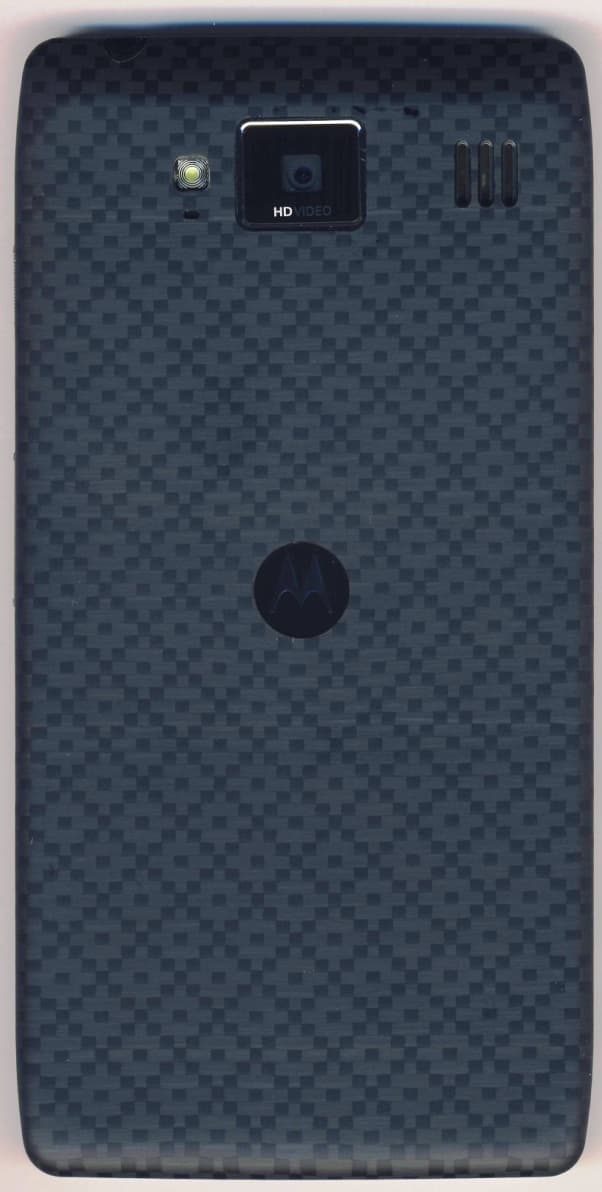
Click to zoom
Application Details
- Equipment Class
- NII - Unlicensed National Information Infrastructure TX
- Date of Grant
- Aug 30, 2012
- Application Purpose
- Original Equipment
- Date of Application
- Aug 12, 2012
- Equipment Note
- QUAD-BAND GSM/GPRS/EDGE AND TRI-BAND WCDMA/HSDPA MODULE
- Frequency Range
- 5180.00000000 - 5240.00000000
- Company
- Motorola Mobility LLC
- Country
- United States
Documents & Files
Document Text
Text extracted from the exhibit documents filed with the FCC. Open a document above to read the original.
Users Manual
APPLICANT: MOTOROLA MOBILITY, LLC. FCC ID: IHDT56NG7 Temporary Confidentiality Requested Motorola Mobility, Inc.; 8000 W. Sunrise Blvd, Suite A; Plantation, FL 33322, USA www.motorola.com Page 8 - 1 Exhibit 8: Draft User’s Manual -- 47 CFR 2.1033(b)(3) The attached User’s Manual is the final production-intended version of the generic Motorola International English User Manual. This guide will be adapted to carrier-specific versions i , but the key information herein will be retained. Translations into other languages will also be done to support the needs of other markets. Minor revisions may be made to these manuals, prior to and subsequent to, placing this product onto the market. Selected portions of the User Guide can be found as indicated below: 8.1 Safety and Regulatory Section: Part 3, Page 21 8.2 Specific Absorption Rate (SAR) Data: Part 3, Page 24 8.3 Guidance for use with Hearing Aids (Pursuant to 47 CFR 20.19(f)(1): Part 3, Page 12, 27 i Motorola Mobility attests that the User’s Guide provided with product shipping into Canada will provide any required Industry Canada notices and/or statements in both English and French, per the requirements of RSS-Gen. 2012.06.15 FCC DRAFT 2012.06.15 FCC DRAFT 1 Congratulations CongratulationsMOTOROLA RAZR HDCombining a huge HD display, blistering fast processor, and long-life battery in an impossibly thin design, MOTOROLA RAZR™ HD has tons of advanced features for everything you want to do—remote media access, intuitive smart apps, multitasking, and more.• Your phone's large 4.7" Super AMOLED 720p HD display makes video playback crisper and more vivid than ever before. • The powerful long-life battery gives you all day and all night performance. • Smart actions let you set the rules to customize your phone and optimize power usage. • The Google™ Android Ice Cream Sandwich operating system gives you direct access to the latest apps, widgets, and power management features. Note: Certain apps and features may not be available in all countries. Caution: Before assembling, charging, or using your phone for the first time, please read the important safety, regulatory and legal information provided with your product. This product meets the applicable limit for exposure to radio waves (known as SAR) of 2.0 W/kg (ICNIRP). The limits and guidelines include a substantial safety margin designed to assure the safety of all persons, regardless of age and health. The highest SAR values measured for this device are listed in the regulatory information packaged with your product.Note: When using the product while worn on your body, either use an approved accessory such as a holster or maintain a distance of 2.5 cm (1 inch) from the body to ensure compliance with SAR requirements. Note that the product may be transmitting even if you are not making a phone call. More•Answers: Touch Apps > Help Center . • Support: Go to www.motorola.com/support or call 1-800-734-5870 (United States), 1-888-390-6456 (TTY/TDD United States for hearing impaired) or 1-800-461-4575 (Canada). • Updates: Phone updates, PC software, user’s guides, online help, and more at www.motorola.com/myrazrhd . • Accessories: Find more for your phone at www.motorola.com/products . 2012.06.15 FCC DRAFT 2 Your phone •Social: The latest news, tips & tricks, videos, and so much more—join us on: YouTube™ www.youtube.com/motorola Facebook™ www.facebook.com/motorola Tw i t t e r www.twitter.com/motomobile Notes:• All screens in this guide are simulated. Actual displays may vary. • Instructions to perform tasks in this guide may change depending on the software version on your phone. • Unless specified, instructions to perform tasks in this guide assume that you are starting from the home screen. Your phonethe important keys & connectorsNote: Your phone might look a little different. 63° L 80° H 77 ° Chicago 100% Jul 26 Thursday My Music Smart Actions Play Store YouTube People Phone Camera Text Messagi 4:00 M ic ro USB Conne c tor M ic ro HDMI Conne c tor HD Front C a mer a M ic roSD Slot M ic ro SIM Slot Ch a r gi n g L ig ht 8MP Photo/ 1080 p V i deo C a mer a (on back) Volume Keys4 .7" Su p er AMOLED Adv a n c ed To u c hs c reen Power Key Press = Screen On/Off Hold = Phone On/Off 3.5mmHe a dset 2012.06.15 FCC DRAFT 3 Let’s go ContentsLet’s go . . . . . . . . . . . . . . . . . . . . . . . . . . . . . . . . . . . . . . . . . . . . . . . . . . 3Control . . . . . . . . . . . . . . . . . . . . . . . . . . . . . . . . . . . . . . . . . . . . . . . . . 6Home screen . . . . . . . . . . . . . . . . . . . . . . . . . . . . . . . . . . . . . . . . . . . . . 11Apps & updates. . . . . . . . . . . . . . . . . . . . . . . . . . . . . . . . . . . . . . . . . . 14Calls . . . . . . . . . . . . . . . . . . . . . . . . . . . . . . . . . . . . . . . . . . . . . . . . . . . . 16Contacts. . . . . . . . . . . . . . . . . . . . . . . . . . . . . . . . . . . . . . . . . . . . . . . . 20Messages . . . . . . . . . . . . . . . . . . . . . . . . . . . . . . . . . . . . . . . . . . . . . . . 23Text entry . . . . . . . . . . . . . . . . . . . . . . . . . . . . . . . . . . . . . . . . . . . . . . 25Social networking . . . . . . . . . . . . . . . . . . . . . . . . . . . . . . . . . . . . . 27Tips & tricks . . . . . . . . . . . . . . . . . . . . . . . . . . . . . . . . . . . . . . . . . . . . 28Digital living . . . . . . . . . . . . . . . . . . . . . . . . . . . . . . . . . . . . . . . . . . . 29Photos & videos. . . . . . . . . . . . . . . . . . . . . . . . . . . . . . . . . . . . . . . . . 30Music . . . . . . . . . . . . . . . . . . . . . . . . . . . . . . . . . . . . . . . . . . . . . . . . . . . 34Web. . . . . . . . . . . . . . . . . . . . . . . . . . . . . . . . . . . . . . . . . . . . . . . . . . . . . 36Personalize . . . . . . . . . . . . . . . . . . . . . . . . . . . . . . . . . . . . . . . . . . . . 37Location . . . . . . . . . . . . . . . . . . . . . . . . . . . . . . . . . . . . . . . . . . . . . . . . 39Wireless. . . . . . …
Text truncated - open the document above for the full version.
Users Manual
25 Text entry VoicemailWhen you have a new voicemail, appears in the status bar. Drag down the status bar and touch the New voicemail notification to listen to your voicemail message.If you need to change your voicemail number, in the home screen touch Phone >Menu > Settings > Voicemail settings . Text entrykeys when you need themTouchscreen keypadYou can open a keypad on your screen by touching a text box.Tip: To close the keypad without saving any text (for example, to select a different text box), touch Back . Tip: To enter text by voice, touch and say what you want to type. asdfgh j k l zxcvbnm . ertyuiop qw 2 1 0 9 8 7 6 5 4 3 !?, :; ?123 Dinner at Bistro Fanta Done Open a keypad for nu m bers & sy m bols. Vo ic e In p ut/ D ic t a t i on DeleteSh i ft S pac e Return/New L i ne Text BoxTouch to open touchscreen keypad.Sh i ft 2012.06.15 FCC DRAFT 26 Text entry Input methodsTo select a text input method, touch and hold Space to open the Select input method menu, then touch the method you want. Motorola inputEnter text a letter at a time. As you type, your phone suggests words from your dictionary and chosen language. The phone also automatically enters apostrophes in some words, like “dont.”To add a word to your dictionary, touch the word, then select + add to dictionary . Swype TM Enter words with one continuous motion. Just drag your finger over the letters in the word. Anne Annex Abbey Abbr Abbe asd f gh j k l zxcvbnm er tyuiop qw 21 09876543 @$& _ () : ; ” EN !# = / + ? + ! = Anne Done 123 To enter a word, just trace a path through the letters. To capitalize, go above the keypad. For double letters, circle the letter. + 3 @ + aa nn ee aa ee Tips:• To enter apostrophes in common words (like “I’ll”), drag through the n as though it was an apostrophe. • To enter other punctuation, numbers, or symbols, touch Symbols . • To correct a word, double-touch it (tap twice, quickly). Swype shows a small menu of other word options. Swype might also show a menu if it can’t guess your word. • If Swype doesn’t know a word, you can still touch the letter keys to enter it. Swype remembers, so next time you can just drag over the letters. Typing tips To . . .Enter one capital letter To u ch S h i ft . Enter only capital letters Touch and hold Shift . Touch again to revert to lowercase. Move the text entry cursor Touch the text where you want the cursor to go. 2012.06.15 FCC DRAFT 27 Text entry Select text Touch and hold or double-touch text to select it. Tabs mark the boundaries of the selected text. Drag the tabs to select the text you want. Cut or Copy selected text Touch icons at the top of the screen to Cut or Copy selected text. In a landscape display, touch Edit > Cut or Copy . Paste cut or copied text at cursor location Touch the Paste icon at the top of the screen. In a landscape display, touch Edit > Paste . Delete character to left of cursor Touch Delete (hold to delete more). To . . . Text input settingsFind it: Apps > Settings > Language & input • To change the language for your phone and touchscreen keypad, touch Locale . • To change the default text input method, touch Default under KEYBOARD & INPUT METHODS . • To change text input settings, touch next to Motorola Input or Swype . 2012.06.15 FCC DRAFT 28 Social networking Social networkingmy life, your lifeBrowser access to social sitesYou can use the Browser to track your social networking accounts on sites like Google+, Facebook®, Twitter, and LinkedIn. If you don’t have accounts on these sites, visit their websites to set them up. Social networking appsMany social networks offer dedicated apps that you can install on your phone. You can also download social networking apps from the Google Play™ Store by touching Apps > Play Store . Sync accounts with your phoneWhen you log in to a social networking account on your phone, you may be prompted to sync account contacts, pictures, and status with your People app. You can accept or decline to sync. You can change your sync settings at any time by touching Menu > Settings in the social networking app. Tips & tricksa few handy hintsGeneral tips• Screen brightness changes as your phone senses the current lighting conditions. • To see recently dialed numbers, touch Phone > Recent . • To sleep/wake your phone, press the Power key. • To set screen timeout, touch Apps > Settings > Display > Sleep . • To search, touch Search . To voice search, touch and hold Search . • To automate everyday tasks, touch Apps > Smart Actions . • To see the most recent apps you’ve used, touch Recent apps . • To change a shortcut in the favorites tray at the bottom of the home screen, touch and hold a shortcut, then drag it in or out of the favorites tray. • To turn sound on/off, press and hold the Power key, then touch a sound setting. • To turn airplane mode on/off, press and hold the Power key > Airplane mode . 2012.06.15 FCC DRAFT 29 Tips & tricks Battery LifeYour phone is like a small computer, giving you a lot of information and apps, at blazing fast speeds, with a touch display! Depending on what you use, that can take a lot of power.To start getting the most out of your battery, touch Apps > Settings > Battery . This shows you what’s using the most battery power.To save even more battery life between charges, try these:• To help minimize battery use, touch Apps > Smart Actions . Check out the sample rules that enable battery savings: Nighttime Battery Saver , and Battery Extender . • Turn off background data transfers: Touch Apps > Settings > Data usage > Menu > Restrict background data . • Turn off Wi-Fi and Bluetooth™ power when not in use: Touch Apps > Settings , then touch the switch next to Wi-Fi or Bluetooth to turn them . • Reduce recording or watching videos, listening to music, or taking pictures. • Remove widgets that stream information to your home screen, like news or weather. • Reduce GPS use: Touch Apps > Settings > Location services , and uncheck GPS satellites . OFF • Reduce display brightnes…
Text truncated - open the document above for the full version.
Users Manual
4 1 Location Locationwhere you are, where you’re goingGoogle Maps TM Find it: Apps > Maps Note: The map image you see may be a little different. g hts Arlington Heights Schaumburg ElmhurstElmhurst Oak Park AddisonAddison CiceroCicero Oak LawnOak Lawn EastEast Chicag o Chicago EvanstonEvanston Des PlainesDes Plaines ElmwoodElmwood Park La GrangeLa Grange Harvey CalumetCalumet City Hammond Orland Park G Tinley Park Blue IslandBlue Island NorthbrookNorthbrook ChicagoChicago Hei g hts Heights HighlandHighland Highland ParkHighland Park Grove Buffalo Grove e lein g hts Elmhurst Oak Park Addison Cicero Oak Lawn East Chicag o Chicago Evanston Des Plaines Elmwood Park La Grange Harvey Calumet City Hammond Orland Park G Tinley Park Blue Island Northbrook Chicago Hei g hts Highland Highland Park Grove e lein 294 3 55 290 94 94 90 80 kk k Chicago, IL CCC A AAAAAAAAA CC y HHH y CiC d H O kkk O GG il P kkk g C ago o ChicagoChicagoChiChCCCC gg ChicagChicagCCCCCC caca oo hicagohicagohh aa gggg oooo CC ii Chicago yy yyyy HarveyHarvey ey y HarveyHarvey yyyyyy eeee aaaa vvvv rrrr HHHHHH aa ee HHHHH Harvey City y yyyy CityCityCityC yyyy CCCCCitCit City ammondammond oo mmo o amamammoammo nn mmmmmmmmmmm mmmmmmmmmmmmmm HHHH ammondammondaaaa oooooooo monmonmmmm mmmmmmmm HHHHHH aaaaaa ondondoooo H Hammond Orland Park da kkkk d Pard Parkdd and land d OrlandOrland dd rland Parkrland Park kk ParkPark kkk andand dd Orland ParkOrland Park kk Orland POrland P Orland Park G GG G T Ti l P Ti l P kk Ti l P Ti l P kkkk il Pil P Ti l P k a araraa rr aa ara araraa ar kkkk ParPark aa rkrk Park HHHHHHHHHHHHHHHH H ein eine elee ein lein ee eeee eeee eeee leinlein eeee ee elein Maps Select a m ap or navigation view.Add infor m ation Layers . See m ap options. Find nearby Places . Get Directions . Center the m ap on m y location.Search m aps. Google Maps offers powerful, user-friendly mapping technology and local busine ss information—including business locations, contact information, and driving directions.For help, touch Menu > Help . Tip: Want to know what’s in your immediate area? Try Google Places™. Touch Apps > Maps , touch the Maps view control in the upper-left, then touch Places to see listings for restaurants, cafes, bars, and more based on your current location. Google Maps Navigation Beta TM Google Maps Navigation Beta is a complete GPS navigation system with voice guidance that shows you the way.Find it: Apps > Maps > Maps > Navigation Follow the prompts to speak or type your destination.For more information, go to www.google.com/mobile/navigation . Google Latitude TM See where your friends and family are on Google Maps. Plan to meet up, check that your parents got home safely, or just stay in touch.Don’t worry, your location is not shared unless you agree to it. You need to join Google Latitude, and then invite 2012.05.29 FCC DRAFT 4 2 Wireless your friends to view your location or accept their invitations.To get started, touch Apps > Maps > Maps > Join Latitude . Then: • To start Google Latitude, touch Apps > Maps > Maps > Latitude . • To add friends, touch FRIENDS LIST >. • To remove friends, touch FRIENDS LIST , touch a friend in your list, then touch Remove this friend . • To turn off Google Latitude, touch your Latitude name tag in map view, then touch Edit privacy settings > Sign out of Latitude . Wirelesslose the wiresQuick start: WirelessConnect your smartphone to fast Wi-Fi networks or Bluetooth™ devices.To connect, touch Apps > Settings > Wi-Fi or Bluetooth . ON Wi-Fi Network 1 NameConnectedNetwork 2 NameNetwork security typeNetwork 3 NameNetwork security type SCAN ADD NETWORK ON Bluetooth AVAILABLE DEVICES DROID RAZR HD Not visible to other Bluetooth devices TOUCH TO PAIR Motorola Headset SEARCH FOR DEVICES Connect to this network.Turn W i-Fi power on & off. Connect to this device. Turn Bluetooth power on & off. 2012.05.29 FCC DRAFT 4 3 Wireless Wi-Fi networksTurn Wi-Fi power on or offTouch Apps > Settings , then touch the Wi-Fi power switch to turn it or . Note: To extend battery life, turn off Wi-Fi power when not in use. Wi-Fi search & connectWhen Wi-Fi is on , the Wi-Fi in range indicator appears in the status bar when a network is available. Drag down the status bar and touch the Wi-Fi networks available notification to select and connect to a network. To search for a network when Wi-Fi is off : 1 Touch Apps > Settings > Wi-Fi . 2 Touch the Wi-Fi power switch to turn it and scan. Your smartphone lists the networks it finds within range.Tip: To see your smartphone’s MAC address or other Wi-Fi details, touch Menu > Advanced . 3 Touch a network to connect. If necessary, enter Network SSID , Security , and Password , and touch Connect . When your smartphone is connected to the network, the Wi-Fi connected indicator appears in the status bar. ON OFF ON Tip: When you are in range and Wi-Fi power is on, you will automatically reconnect to available networks you’ve connected to before.Wi-Fi hotspotYou can make your smartphone a Wi-Fi hotspot to provide portable, convenient internet access to other Wi-Fi enabled devices.Caution: This application significantly impacts battery life. You may want to run this application with the charger connected.Note: You need to subscribe to Wi-Fi hotspot service to use this feature. Contact your service provider.To set up your smartphone as a Wi-Fi hotspot: 1 Touch Apps > Settings > Tethering & Mobile Hotspot > Mobile Hotspot to turn on the hotspot. 2 To u ch Mobile Hotspot settings > Configure Mobile Hotspot to change hotspot security and configuration settings: • Network SSID : Enter a unique name for your hotspot and touch Next . • Security : Select the type of security you want: WEP , WPA , or WPA2 . Enter a unique password. Other users can access your Wi-Fi hotspot only if they enter the correct password. 2012.05.29 FCC DRAFT 44 Wireless Note: Keep it secure. To protect your smartphone and hotspot from unauthorized access, it is strongly recommended that you set up hot…
Text truncated - open the document above for the full version.
Cover Letter(s)
FCC ID: IHDT56NG7 Motorola Mobility, Inc.; 8000 W. Sunrise Blvd, Suite A; Plantation, FL 33322, USA www.motorola.com Page 13b - 1 CONFIDENTIALITY REQUEST 28 June 2012 Federal Communications Commission Laboratory Authorization & Evaluation Division 7435 Oakland Mills Road Columbia, MD 21046 Subject: Confidentiality Request Regarding Application for Certification of FCC ID: IHDT56NG7. Dear Sir or Madam: Pursuant to Sections 0.457 and 0.459 of the Commission’s Rules, we hereby respectfully request confidential treatment of information accompanying this application as outlined below: Exhibit Type File Name Block Diagrams. IHDT56NG7_Ex_04 (Block Diagrams).pdf Schematic Diagrams. IHDT56NG7 _Ex_05 (Schematic Diagrams).pdf Parts List and Tune Up Procedures. IHDT56NG7 _Ex_10 (Active Components).pdf Transmitter Characteristics. IHDT56NG7 _Ex_12 (TX Characteristics).pdf Motorola Mobility, Inc. requests that these exhibits be held as Permanently Confidential, and not be made routinely available for public inspection. Motorola considers that the information in these exhibits should be classified as trade secrets, pursuant to 47 CFR Section 0.457(d) and Section 552(b)(4) of the Freedom of Information Act. The public disclosure of these materials may be harmful to the applicant and provide unjustified benefits to its competitors. Motorola Mobility, Inc. understands that, pursuant to Section 0.457 of the Rules, disclosure of this application and all accompanying documentation will not be made before the date of the Grant for this application. FCC ID: IHDT56NG7 Motorola Mobility, Inc.; 8000 W. Sunrise Blvd, Suite A; Plantation, FL 33322, USA www.motorola.com Page 13b - 2 SHORT TERM ONFIDENTIALITY REQUEST – 180 DAYS Pursuant to the Commission’s public notice DA 04-1705 (June 15, 2004), Motorola Mobility, Inc. is also requesting Temporary Confidentiality treatment of information accompanying this application as outlined below. This provision will give Motorola Mobility, Inc. temporary confidentiality prior to product launch. Exhibit Type File Name External product photographs. IHDT56NG7 _Ex_03 (External_Photos).pdf Test set-up photographs. IHDT56NG7 _Ex_07D (RF Exposure Test Set-up_Details).pdf IHDT56NG7_Ex_07 (EMC Test Set-up Photographs).pdf User’s Manual. IHDT56NG7 _Ex_08 (User Guide).pdf Internal product photographs. IHDT56NG7 _Ex_09 (Internal Photos).pdf Please contact me if you require any additional information. Regards, FCC Liaison Motorola Mobility, Inc. 8000 W. Sunrise Blvd.; Suite A Mail Stop 52-5JJ Plantation, FL 33322 E-mail: [email protected]
Cover Letter(s)
APPLICANT: MOTOROLA MOBILITY, INC. FCC ID: IHDT56NG7 Motorola Mobility, Inc.; 8000 W. Sunrise Blvd, Suite A; Plantation, FL 33322, USA www.motorola.com Page 13a - 1 28 August 2012 Authorization & Evaluation Division Federal Communications Commission Laboratory 7435 Oakland Mills Road Columbia, MD 21046 Subject: Application for Certification of transmitter with FCC ID: IHDT56NG7, PCS Handsets, with Wi-Fi and Bluetooth. Gentlemen; Motorola Mobility, Inc.; 8000 W. Sunrise Blvd.; Plantation, FL 33322 herein submits its application for certification of the multi-mode handset with FCC ID: IHDT56NG7. The primary transceiver in this composite device operates in the 850 MHz and 1900 MHz bands as a WCDMA/GSM portable transceiver and employs HSPA/EDGE&GPRS data transmission capabilities. Note: This device also contains functions, and operates within frequency bands, that are not authorized within the United States or its territories. This filing is only applicable to supported US operations. This radio product is also equipped with a Wi-Fi (802.11a/b/g/n) transceiver. Wi-Fi supports both voice and data for short range wireless communications. The Wi-Fi Bands of Operation is 2.412 - 2.462 GHz, 5.180 – 5.240 GHz, and 5.745 – 5.825 MHz for 802.11a/b/g/n operation. The Wi-Fi device complies 15.247 (c), 15.407, 15.205 and 15.209 (b). This radio product is equipped with a Bluetooth (BT) transceiver. BT supports both voice and data for short range wireless communications. The Bluetooth Band of Operation is 2.402 - 2.480 GHz (1 MHz channel bandwidth). The BT device complies with the requirements of FCC Rule Parts 15.247 (c), 15.205 and 15.209 (b). This product also supports NFC operation as a low-power itinerant transmitter. All transmitters contained in this radio product have been subjected to routine environmental evaluation (as applicable) according to 47 CFR Part 2.1093 (c) for RF exposure and found to be compliant with the limits specified in 47 CFR 2.1093(d)(2). APPLICANT: MOTOROLA MOBILITY, INC. FCC ID: IHDT56NG7 Motorola Mobility, Inc.; 8000 W. Sunrise Blvd, Suite A; Plantation, FL 33322, USA www.motorola.com Page 13a - 2 This radio product features an integrated GPS receiver, and is designed to function as a computer peripheral device when functioning as an RF modem, while connected to a computer via a data cable, as described in 47 CFR Part 15.3(r). A Part 15B test report is included for certification. Enclosed is a complete Certification Application. Contact me at (954) 723-6272 if you require any additional information. Regards, FCC Liaison Motorola Mobility, Inc. 8000 W. Sunrise Blvd.; Suite A Mail Stop 52-5JJ Plantation, FL 33322 E-mail: [email protected]
Cover Letter(s)
APPLICANT: MOTOROLA MOBILITY, LLC. FCC ID: IHDT56NG7 Motorola Mobility, Inc.; 8000 W. Sunrise Blvd, Suite A; Plantation, FL 33322, USA www.motorola.com Page 3 - 1 Exhibit 2. Statements of Certification -- Pursuant to 47 CFR 2.907 2.1. Specification Compliance Transceiver type described herein (IHDT56NG7) has been tested in accordance with the requirements contained in the appropriate Commission regulations. To the best of my knowledge, these tests were performed using measurement procedures consistent with industry or Commission standards, and demonstrate that this equipment complies with the appropriate standards. Each unit manufactured, imported, or marketed will conform to the samples tested herein, within the statistical variations that can be expected due to high volume production and test measurement error. NAME: Tom Neckopulas SIGNATURE: /s/ Tom Neckopulos DATE: July 26, 2012 TITLE: Engineering Manager 2.2. Statement of Certification I hereby certify that the above application was prepared under my direction and that to the best of my knowledge and belief, the facts set forth in this application and accompanying technical data are true and correct. The technical data supplied with this application was taken under my supervision and is hereby duly certified. I also certify that this transmit equipment (IHDT56NG7) is in compliance with all applicable parts of the FCC Rules. NAME: John Lewczak SIGNATURE: DATE: July 26, 2012 TITLE: Engineering Manager, Product Safety and Compliance APPLICANT: MOTOROLA MOBILITY, LLC. FCC ID: IHDT56NG7 Motorola Mobility, Inc.; 8000 W. Sunrise Blvd, Suite A; Plantation, FL 33322, USA www.motorola.com Page 3 - 2 2.3. Attestation Statement (Equipment Class DTS and DSS - Bluetooth/Wi-Fi) This device contains an embedded Bluetooth device, Wi-Fi device capabilities that Motorola Mobility confirms are compliant with the applicable Part 15C regulations. Personal Hotspot operation is supported in the 2.4 GHz band. 15.247(a)(1) • The hopping sequence must be pseudorandom. • All Channels are used equally on average. • The receiver input bandwidth is approximately equal to the transmit bandwidth. • The receiver hops in sequence with the transmitted signal. 15.247(d) In order to ensure compliance with band edge emissions requirements at the upper end of the authorized spectrum, the conducted RF power of this device is reduced when operating on Channels 1 and 11, in the 802.11 b/g/n modes. 15.247(g) The system is designed to comply with all of the regulations in Section 15.247 when the transmitter is presented with a continuous data (or information). 15.247(h) The system does not coordinate its channel selection/hopping sequence with other frequency hopping systems for the express purpose of avoiding the simultaneous occupancy of individual hopping frequencies by multiple transmitters. NAME: Tom Neckopulas SIGNATURE: /s/ Tom Neckopulos DATE: July 26, 2012 TITLE: Engineering Manager APPLICANT: MOTOROLA MOBILITY, LLC. FCC ID: IHDT56NG7 Motorola Mobility, Inc.; 8000 W. Sunrise Blvd, Suite A; Plantation, FL 33322, USA www.motorola.com Page 3 - 3 2.4. Attestation Statement (Equipment Class NII - U-NII Wi-Fi) This device contains an embedded U-NII Wi-Fi device that Motorola Mobility confirms to be compliant with the applicable Part 15E regulations. Note that Personal Hotspot operation is supported in this band, but only in the 5.725–5.825 GHz portion. 15.407(c) The device will automatically discontinue transmission in case of either the absence of information to transmit or operational failure. 15.407(h)(1) This device does not operate in the bands between 5.25 – 5.35 GHz and 5.47 – 5.725 GHz, and as such Transmit Power Control (TPC) is not required. 15.407(h)(2) This device does not operate in the bands between 5.25 – 5.35 GHz and 5.47 – 5.725 GHz, and as such Radar Detection Function of Dynamic Frequency Selection (DFS) is not required. NAME: Tom Neckopulas SIGNATURE: /s/ Tom Neckopulos DATE: July 26, 2012 TITLE: Engineering Manager
External Photos
APPLICANT: MOTOROLA MOBILITY, LLC. FCC ID: IHDT56NG7 Temporary Confidentiality Requested Motorola Mobility, Inc.; 8000 W. Sunrise Blvd, Suite A; Plantation, FL 33322, USA www.motorola.com Page 3 - 1 Exhibit 3. External Photographs -- Pursuant to 47 CFR 2.1033(c)(12) The radio product colors, housings/bezels may vary, but only consistent with the requirements of FCC Class I Permissive Change rules and guidance (47 CFR 2.1043 and KDB 178919 D01). Figure 3-1. Front of device Figure 3-2. Back of device APPLICANT: MOTOROLA MOBILITY, LLC. FCC ID: IHDT56NG7 Temporary Confidentiality Requested Motorola Mobility, Inc.; 8000 W. Sunrise Blvd, Suite A; Plantation, FL 33322, USA www.motorola.com Page 3 - 2 Figure 3-3. Right and Left Sides of device APPLICANT: MOTOROLA MOBILITY, LLC. FCC ID: IHDT56NG7 Temporary Confidentiality Requested Motorola Mobility, Inc.; 8000 W. Sunrise Blvd, Suite A; Plantation, FL 33322, USA www.motorola.com Page 3 - 3 Figure 3-4. Top and Bottom Sides of Device.
ID Label/Location Info
APPLICANT: MOTOROLA MOBILITY, LLC. FCC ID: IHDT56NG7 Motorola Mobility, Inc.; 8000 W. Sunrise Blvd, Suite A; Plantation, FL 33322, USA www.motorola.com Page 1 - 1 Exhibit 1: Identification Label -- Pursuant to 47 CFR 2.925 and 2.1033(c)(11) 1.1 Location On the rear (back) side of the radio product chassis, etched into the housing, near the bottom edge of the device (see Figure 1.3.2, and also Exhibit 3). 1.2 Type The label will be laser etched into the rear housing of the device. 1.3 Markings (Text) The FCC label shown is representative of the label that will appear on the radio when in production. Figure 1.3.1. Representation of FCC Label information. This information will be permanently etched onto the equipment rear cover as shown below, and in Exhibit 3. Other information may also be present. FCC ID: IHDT56NG7 Model No. XT925 APPLICANT: MOTOROLA MOBILITY, LLC. FCC ID: IHDT56NG7 Motorola Mobility, Inc.; 8000 W. Sunrise Blvd, Suite A; Plantation, FL 33322, USA www.motorola.com Page 1 - 2 Figure 1.3.2. Location of FCC Label (position, orientation, and other information shown may vary). Please note that this label and its placement complies with the requirement of FCC Rule 47 CFR 2.925(d) that the label be permanently affixed to the product, and be readily visible to the purchaser at the time of purchase. The product’s Market or Trade Name is also indelibly printed on the back cover of the product, as shown in Exhibit 3. FCC Label Back of Device APPLICANT: MOTOROLA MOBILITY, LLC. FCC ID: IHDT56NG7 Motorola Mobility, Inc.; 8000 W. Sunrise Blvd, Suite A; Plantation, FL 33322, USA www.motorola.com Page 1 - 3 Exhibit 1A: General Information 1A.1 Production Plans Quan…
Text truncated - open the document above for the full version.
Contact Information
Applicant
Jeff Narducci(Director Product Compliance)
Test Firm
Motorola Inc.Albert Patapack
Technical Specifications
| # | Rule Parts | Frequency Range | Power Output |
|---|---|---|---|
| 1 | 15E | 5.18 GHz - 5.24 GHz | 40.00 mW |
Other Applications from Motorola Mobility LLC
IHDT56AW9
May 12, 2026Smart Watch
Equipment Class
NII - Unlicensed National Information Infrastructure TXIHDT56AW5
Apr 08, 2026Mobile Cellular Phone
Equipment Class
DTS - Digital Transmission SystemIHDT56AW6
Mar 18, 2026Smart Watch
Equipment Class
JBP - Part 15 Class B Computing Device PeripheralIHDT56AX4
Mar 17, 2026Mobile Cellular Phone
Equipment Class
PCE - PCS Licensed Transmitter held to earIHDT56AW3
Mar 03, 2026Mobile Cellular Phone
Equipment Class
6XD - 15E 6 GHz Low Power Indoor Client