IHDT56NJ1MODEL XT621 UMTS/GSM TRANSCEIVER WITH BT & WLAN
Motorola Mobility LLC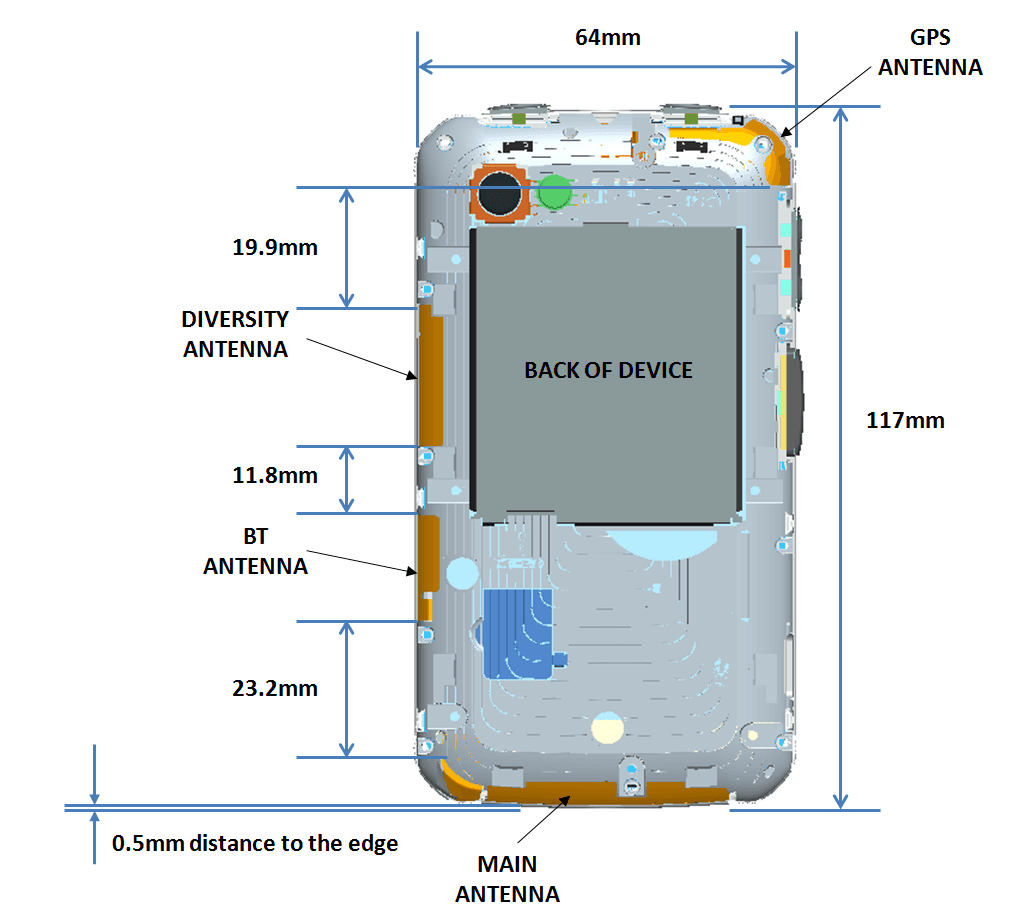
Click to zoom
Application Details
- Equipment Class
- PCB - PCS Licensed Transmitter
- Date of Grant
- Sep 05, 2012
- Application Purpose
- Original Equipment
- Date of Application
- Aug 13, 2012
- Equipment Note
- MODEL XT621 UMTS/GSM TRANSCEIVER WITH BT & WLAN
- Frequency Range
- 1712.40000000 - 1752.60000000
- Company
- Motorola Mobility LLC
- Country
- United States
Documents & Files
Document Text
Text extracted from the exhibit documents filed with the FCC. Open a document above to read the original.
Users Manual
MOTOROLA XT621 EN 08/02/2012 FCC 08/02/2012 FCC 1 Congratulations CongratulationsMOTOROLA XT621Stay connected, organize your life, and absolutely own the web with MOTOROLA XT621.• Direct Connect calls. Keep in touch with your family, friends, and colleagues with the simple touch of a button. • Organization. Check your email, calendar, and contacts wherever you are. •Browsing. Get more from the web with a huge screen. Search, browse, everything you want to do, all made easier. • Maps, entertainment, and more. The latest technology and apps. Google Maps™ to find your way. YouTube™ to stay entertained. Easy access to Google™ and thousands of Android™ apps to expand your world. Note: Certain apps and features may not be available in all countries. This product meets the applicable SAR limits of 1.6 W/kg (FCC & IC) and 2.0 W/kg (ICNIRP). The Caution: Before using your phone, please read the safety, regulatory and legal information provided with your product. limits and guidelines include a substantial safety margin designed to assure the safety of all persons, regardless of age and health. The highest SAR values measured for this device are listed in the regulatory information packaged with your product.Note: When using the product while worn on your body, maintain a distance of 2.5 cm (1 inch) from the body to ensure compliance with SAR requirements. Note that the product may be transmitting even if you are not making a phone call.More•Answers: Touch Apps > Help Center . • Updates: Get phone updates, PC software, online help, guides, and more at www.motorola.com/myXT621 • Accessories: Find accessories for your phone at www.motorola.com/mobility . • Apps: Touch Apps > Play Store . •News: Get the latest news, apps, tips & tricks, videos and so much more—join us on: YouTube™ www.youtube.com/motorola Facebook™ www.facebook.com/motorola Twitter www.twitter.com/motomobile Google+ www.google.com/+ 08/02/2012 FCC 2 Your phone Your phonethe important keys & connectorsNote: Your phone might look a little different. S p e a ker Key Home Key B ac k Key Menu Key M ic ro USB Conne c tor Charge or connect to PC. Volume Keys Se a r c h Key D i re c t Conne c t Button Power/Lo c k Key Press=Sleep/ W ake. Hold=Turn on/off. 3.5mm He a dset J ac k ContentsLet’s go . . . . . . . . . . . . . . . . . . . . . . . . . . . . . . . . . . . . . . . . . . . . . . . . . . 3Touchscreen & keys . . . . . . . . . . . . . . . . . . . . . . . . . . . . . . . . . . . . . . 4Home screen & apps . . . . . . . . . . . . . . . . . . . . . . . . . . . . . . . . . . . . . . 6Calls . . . . . . . . . . . . . . . . . . . . . . . . . . . . . . . . . . . . . . . . . . . . . . . . . . . . . 9Direct Connect . . . . . . . . . . . . . . . . . . . . . . . . . . . . . . . . . . . . . . . . . . 12Contacts . . . . . . . . . . . . . . . . . . . . . . . . . . . . . . . . . . . . . . . . . . . . . . . . 15Messaging. . . . . . . . . . . . . . . . . . . . . . . . . . . . . . . . . . . . . . . . . . . . . . . 18Text entry . . . . . . . . . . . . . . . . . . . . . . . . . . . . . . . . . . . . . . . . . . . . . . 20Tips & tricks. . . . . . . . . . . . . . . . . . . . . . . . . . . . . . . . . . . . . . . . . . . . . 22Photos & videos . . . . . . . . . . . . . . . . . . . . . . . . . . . . . . . . . . . . . . . . . 23Music . . . . . . . . . . . . . . . . . . . . . . . . . . . . . . . . . . . . . . . . . . . . . . . . . . . 29Web . . . . . . . . . . . . . . . . . . . . . . . . . . . . . . . . . . . . . . . . . . . . . . . . . . . . . 33Personalize. . . . . . . . . . . . . . . . . . . . . . . . . . . . . . . . . . . . . . . . . . . . . 34Location . . . . . . . . . . . . . . . . . . . . . . . . . . . . . . . . . . . . . . . . . . . . . . . . 36Apps for all. . . . . . . . . . . . . . . . . . . . . . . . . . . . . . . . . . . . . . . . . . . . . 38Bluetooth™ wireless. . . . . . . . . . . . . . . . . . . . . . . . . . . . . . . . . . . . 40Wi-Fi . . . . . . . . . . . . . . . . . . . . . . . . . . . . . . . . . . . . . . . . . . . . . . . . . . . . 41Memory card & file management . . . . . . . . . . . . . . . . . . . . . . . . 43Tools . . . . . . . . . . . . . . . . . . . . . . . . . . . . . . . . . . . . . . . . . . . . . . . . . . . 46Management . . . . . . . . . . . . . . . . . . . . . . . . . . . . . . . . . . . . . . . . . . . . 50Security . . . . . . . . . . . . . . . . . . . . . . . . . . . . . . . . . . . . . . . . . . . . . . . . 51Troubleshooting . . . . . . . . . . . . . . . . . . . . . . . . . . . . . . . . . . . . . . . 54Safety, Regulatory & Legal. . . . . . . . . . . . . . . . . . . . . . . . . . . . . . 55 08/02/2012 FCC 3 Let’s go Let’s golet’s get you up and runningAssemble & chargeTip: To save battery life, see “ Battery tips ” on page 23. 6 Charge 1 Cover off 2 microSD in 3 SIM in 5 Cover on Battery inB 4 3H SIM microSIM microSIM + Adapter Set up & goNote: If you have a Gmail™ account, your contacts from that account are synced to your phone.Note: This phone supports apps and services that use a lot of data, so make sure your data plan meets your needs. Contact your service provider for details. 1 Turn on. 2 Select a language. 3 Create account,or log in. Kim Vonesh Welcome Touch the android to begin. Emergency dial Change language Set up your Google Account 4 Add accounts. Don’t have a Google Account?Already have a Google Account? Want to set up an account later? Create Sign in Skip Set Up Accounts If you use any of the services below, tap the icon to set it up. Corporate Sync Email Google Photobucket Picasa (Gallery) LastFM Windows Live Hotmail YouTube (Gallery) 08/02/2012 FCC 4 Touchscreen & keys Wi-Fi connectIf you want to use a Wi-Fi network for even faster Internet access, touch Apps > Settings > Wireless & networks > Wi-Fi settings . Touch Wi-Fi to search for and connect to wireless networks. There’s more in “ Wi-Fi ” on page 41. Cool content & moreBrowse and download thousands of the coolest apps on the planet from Google Play™ Store. …
Text truncated - open the document above for the full version.
Users Manual
19 Messaging formats can be converted to HTML for faster viewing, and your phone will show Get HTML version . While viewing the attachment, touch it to save it, share it, and more.Tip: To send and receive large attachments faster, use a Wi-Fi connection (see“ Wi-Fi ” on page 41). EmailSet up emailTo add email accounts, touch Apps > Accounts > Add account . • Corporate Sync is for Exchange server work email accounts. Enter details from your IT administrator.Tip: You might need to enter your domain name with your user name (like domain/username ). • Email is for most personal email accounts. For account details, contact the account provider.Note: To add other email accounts to your Messaging widget, touch Apps > Messaging , then touch Menu > Manage accounts > Add account > Email . To change your settings, touch Apps > Messaging > Menu , then touch: • Manage accounts to add or remove an account. Account Manager • Messaging Settings to set the notification for each account type and more. Create a new emailFind it: Apps > Email > Enter the recipient email address and message, then touch Send . Tip: Touch Menu for options, like Attach or Add Cc/Bcc . Gmail™Create a new emailFind it: Apps > Gmail > Menu > Compose Enter the recipient email address and message, then touch Send . Tip: Touch Menu for options, like Attach or Add Cc/Bcc . Featuressearch for emailTo u ch S e a r ch . choose email notificationsTouch Menu > More > Settings > Gmail account > Email notifications . 08/02/2012 FCC 20 Text entry Google Talk™Google Talk instant messaging lets you chat via instant message with other Google Talk users on phones or on the web.Find it: Apps > Talk Touch Menu to send invitations, add new friends, and more.Tip: You can also download an instant messaging app from the Google Play™ Store.VoicemailWhen you have a new voicemail, appears at the top of your screen. Drag down the notification bar and touch the notification.If you need to change your voicemail number, in the home screen touch Apps > Settings > Call settings > Voicemail settings . apply a label to a threadTouch and hold a message, then touch Change labels . Features Text entrykeys when you need themTouchscreen keypadsSwype keypadSwype™ lets you enter a word with one continuous motion. To enter a word, just drag your finger over the letters.• To enter the small number or symbol at the top of a key, touch and hold the key. • To enter several symbols, touch SYM . • To enter apostrophes in common words (like “I’ll”), drag through the apostrophe key. Send :-) asdfghj k l qwe r t y u i o p z xcvbnm @# 12 3 _ %() !7890 / ? &$456 + :; “ , , . SYM EN AnneAnneAnne a e n a e n To enter a word, just trace a path through the letters.To capitalize, go above the keypad.For double letters, circle the letter. 08/02/2012 FCC 21 Text entry • To correct a word, double-tap it. Swype shows a small menu of other word options. Swype might also show a menu if it can’t guess your word. • If Swype doesn’t know a word, touch individual letters to enter it. Swype remembers, so next time you can just drag over the letters. Multi-touch keypadYou can open a keypad on your screen by touching a text field, or touching and holding Menu . To close the keypad, touch Back . Compose message Send using iDEN Send using UMTS ?123 DeleteReturn S pac e Sym b ols/Num b ers Sh i ft Text EntryTouch to open touchscreenkeyboard. Multi-touch Typing tips To...Enter alternate characters From the number keypad, touch Alternate . Touch again to return to numbers. Enter one capital letter Touch Shift . Enter only capital letters, until you touch Shift Lock again Touch Shift Lock twice. Touch again to revert to lowercase. Select text Touch and hold text to select it. Cut or Copy selected text Touch and hold text, then touch Cut or Copy . Paste cut or copied text Touch and hold location to paste then touch Paste . Move the cursor Touch the location you want to go to. Delete a character (hold to delete more) Touch Delete . ALT x 08/02/2012 FCC 22 Tips & tricks Text input settingsFind it: Apps > Settings > Language & keyboard • To edit your dictionary, touch User dictionary . • To change the language and the style for your touchscreen keypad, touch Select locale . • To change input method and settings, touch Swype or Multi-touch keyboard . Tips & tricksa few handy hintsGeneral tips To...Return to home screen Touch Home . See recently dialed numbers Touch Dialer > Call log . Sleep/wake your phone Press Power/Lock . Set screen timeout Touch Apps > Settings > Display > Screen timeout . Search Touch Search . Use voice search Touch and hold Search . See recently opened apps Touch and hold Home . 08/02/2012 FCC 23 Photos & videos Battery tipsWant to extend your battery life? Try these:• To select a battery profile that suits your phone use, touch Apps > Settings > Battery & data manager > Battery mode . • To turn off automatic applications sync, touch Apps > Settings > Battery & data manager > Data Saver . • To turn off Bluetooth power, touch Apps > Settings > Wireless & networks > Bluetooth . • To turn off Wi-Fi, touch Apps > Settings > Wireless & networks > Wi-Fi . Choose apps for Quick Launch Area Touch and hold an app icon in the Quick Launch Area. Then, select an app from the Add to Dock menu. Tu r n sound on/off Press and hold Power/Lock > Silent mode . Tu r n airplane mode on/off Press and hold Power/Lock > Airplane mode . To . . . Photos & videossee it, capture it, share it!PhotosTake & share photosTake that family photo, and post it online for everyone to see.Find it: Apps > Camera 10241024 Breckenridge, COBreckenridge, CO Zoo m in/out. Ta ke photo. Shots Rem ai n i n g See your last photo. Adjust ca m era settings. Autofo c us Box Touch screen to change focus location. Switch to ca m corder. 08/02/2012 FCC 2 4 Photos & videos Note: To get the clearest photos, wipe the lens clean with a soft, dry cloth before you take a photo.To take the photo, touch . Note: Photos are stored on your phone’s inte…
Text truncated - open the document above for the full version.
Attestation Statements
APPLICANT: MOTOROLA MOBILITY LLC FCC ID: IHDT56NJ1 Motorola Mobility LLC; 8000 W. Sunrise Blvd, Suite A; Plantation, FL 33322, USA www.motorola.com Page 2 - 1 Exhibit 2. Statements of Certification -- Pursuant to 47 CFR 2.907 2.1. Specification Compliance Transceiver type described herein (IHDT56NJ1) has been tested in accordance with the requirements contained in the appropriate Commission regulations. To the best of my knowledge, these tests were performed using measurement procedures consistent with industry or Commission standards, and demonstrate that this equipment complies with the appropriate standards. Each unit manufactured, imported, or marketed will conform to the samples tested herein, within the statistical variations that can be expected due to high volume production and test measurement error. NAME: Keane Tan SIGNATURE: /s/ Keane Tan DATE: 1 August 2012 TITLE: Title 2.2. Statement of Certification I hereby certify that the above application was prepared under my direction and that to the best of my knowledge and belief, the facts set forth in this application and accompanying technical data are true and correct. The technical data supplied with this application was taken under my supervision and is hereby duly certified. I also certify that this transmit equipment (IHDT56NJ1) is in compliance with all applicable parts of the FCC Rules. NAME: John Lewczak SIGNATURE: DATE: 1 August 2012 TITLE: Engineering Manager, Product Safety and Compliance APPLICANT: MOTOROLA MOBILITY LLC FCC ID: IHDT56NJ1 Motorola Mobility LLC; 8000 W. Sunrise Blvd, Suite A; Plantation, FL 33322, USA www.motorola.com Page 2 - 2 2.3. Attestation Statement (Equipment Class DTS and DSS - Bluetooth/Wi-Fi) This device contains an embedded Bluetooth device, Wi-Fi device, and MOTOtalk capabilities that Motorola Mobility confirms are compliant with the applicable Part 15C regulations. Personal Hotspot operation is only supported in the 2.4 GHz band. 15.247(a)(1) • The hopping sequence must be pseudorandom. • All Channels are used equally on average. • The receiver input bandwidth is approximately equal to the transmit bandwidth. • The receiver hops in sequence with the transmitted signal. 15.247(g) The system is designed to comply with all of the regulations in Section 15.247 when the transmitter is presented with a continuous data (or information). 15.247(h) The system does not coordinate its channel selection/hopping sequence with other frequency hopping systems for the express purpose of avoiding the simultaneous occupancy of individual hopping frequencies by multiple transmitters. NAME: Keane Tan SIGNATURE: /s/ Keane Tan DATE: 1 August 2012 TITLE: Title 2.4. Declaration of Available Operating Bands and Modes (Equipment Class PCE – GSM 850/1900 MHz, WCDMA 1700/1900 MHz) Motorola Mobility hereby declares that, while this product features GSM and WCDMA capabilities that operate within frequency bands regulated by the FCC, these modes are locked out for use within the territories of the United States. These modes have been disabled in the product’s firmware, and are SIM locked by all US operators. This application, therefore, does not seek certification for these modes. NAME: Keane Tan SIGNATURE: /s/ Keane Tan DATE: 1 August 2012 TITLE: Title
Cover Letter(s)
APPLICANT: MOTOROLA MOBILITY LLC FCC ID: IHDT56NJ1 Motorola Mobility LLC; 8000 W. Sunrise Blvd, Suite A; Plantation, FL 33322, USA www.motorola.com Page 7A - 1 Exhibit 7A. Registry of KDB Publications Utilized for this Application. 7.1 Registry of KDB Publications Applied to this Application. APPLICANT: MOTOROLA MOBILITY LLC FCC ID: IHDT56NJ1 Motorola Mobility LLC; 8000 W. Sunrise Blvd, Suite A; Plantation, FL 33322, USA www.motorola.com Page 7A - 2 7A.1 Registry of KDB Publications Applied to this Application 7A.1.1 Applicable KDB Publications The following KDB Publications were applied in the collection of test data, and the generation of test reports and other exhibits comprising this application: KDB Publication Title KDB 248227 D01, v 01r02 SAR Measurement Procedures for 802.11 a/b/g Transmitters KDB 285076 D01, v02v01 Equipment Authorization Guidance for Hearing Aid Compatibility. KDB 388624 D01, v09r01 Permit But Ask Procedure. KDB 388624 D02, v10 Permit But Ask List. KDB 450824 D01, v01r01 SAR Probe Calibration and System Verification Considerations for Measurements at 150 MHz – 3 GHz. KDB 450824 D02, v01 Dipole Requirements for SAR System Validation and Verification. KDB 558074 D01, v01 Guidance for Performing Compliance Measurements on Digital Transmission Systems (DTS) Operating Under §15.247. KDB 594280 D01, v01r01 Restrictions on Software Configuration for devices not approved as Software Defined Radios. KDB 628591 D01, v12r02 TCB Exclusion List. KDB 648474 D01, v01r05 SAR Evaluation Considerations for Handsets with Multiple Transmitters and Antennas. KDB 648474 D02, v01r01 Review and Approval Policies for SAR Evaluation of Handsets with Multiple Transmitters and Antennas. KDB 784748 D01, v07 Guidelines for Labeling and User Information for Devices Subject to Part 15 and Part 18. KDB 865664, Rev 1.1 SAR Measurement Requirements for 3 – 6 GHz. KDB 941225 D01, v02 SAR Tests for 3G Devices. KDB 941225 D02, v02v01 3GPP R6 HSPA and R7 HSPA+ SAR Guidance. APPLICANT: MOTOROLA MOBILITY LLC FCC ID: IHDT56NJ1 Motorola Mobility LLC; 8000 W. Sunrise Blvd, Suite A; Plantation, FL 33322, USA www.motorola.com Page 7A - 3 KDB Publication Title KDB 941225 D03, v01 Recommended SAR Test Reduction Procedures for GSM/GPRS/EDGE. KDB 941225 D04, v01 Evaluating SAR for GSM/(E)GPRS Dual Transfer Mode. KDB 941225 D06, v01 SAR Evaluation Procedures for Portable Devices with Wireless Router Capabilities. KDB 971168 D01, v01 Procedures for Compliance Measurement of the Fundamental Emission Power of Licensed Wideband (> 1 MHz) Digital Transmission Systems. 7A.1.2 Variations and/or Exceptions to the Procedures in the Published KDBs. Motorola Mobility has taken no liberties with respect to the procedures published in the above KDB documents. We claim full compliance with these procedures.
Cover Letter(s)
APPLICANT: MOTOROLA MOBILITY LLC FCC ID: IHDT56NJ1 Motorola Mobility LLC; 8000 W. Sunrise Blvd, Suite A; Plantation, FL 33322, USA www.motorola.com Page 13a - 1 18 July 2012 Authorization & Evaluation Division Federal Communications Commission Laboratory 7435 Oakland Mills Road Columbia, MD 21046 Subject: Application for Certification of transmitter with FCC ID: IHDT56NJ1, PCS Handset, with Bluetooth. Gentlemen; Motorola Mobility LLC; 8000 W. Sunrise Blvd.; Plantation, FL 33322 herein submits its application for certification of the multi-mode handset with FCC ID: IHDT56NJ1. The primary transceiver in this composite device operates in the 850 MHz Public Mobile Service (PMS) and the 1900 MHz Personal Communications Service (PCS). It supports GSM signaling. This transceiver also operates in the WCDMA mode in the 1700 MHz Advanced Wireless Service (AWS) band, and in the 1900 MHz PCS band. The device supports HSPA, EDGE, and GPRS signaling capabilities. Note: This device also contains functions, and operates within frequency bands, that are not authorized within the United States or its territories. This filing is only applicable to supported US operations. This radio product is also equipped with a Wi-Fi (802.11b/g/n) transceiver. Wi-Fi supports both voice and data for short range wireless communications. The Wi-Fi Band of Operation is 2.412 - 2.462 GHz. The Wi-Fi device complies 15.247 (c), 15.407, 15.205 and 15.209 (b). This radio product is equipped with a Bluetooth (BT) transceiver. BT supports both voice and data for short range wireless communications. The Bluetooth Band of Operation is 2.402 - 2.480 GHz (1 MHz channel bandwidth). The BT device complies with the requirements of FCC Rule Parts 15.247 (c), 15.205 and 15.209 (b). All transmitters contained in this radio product have been subjected to routine environmental evaluation (as applicable) according to 47 CFR Part 2.1093 (c) for RF exposure and found to be compliant with the limits specified in 47 CFR 2.1093(d)(2). This radio product features integrated GPS and FM broadcast receivers, and is designed to function as a computer peripheral device when functioning as an RF modem, while connected to a computer via a data cable, as described in 47 CFR Part 15.3(r). A Part 15B test report is included for certification. APPLICANT: MOTOROLA MOBILITY LLC FCC ID: IHDT56NJ1 Motorola Mobility LLC; 8000 W. Sunrise Blvd, Suite A; Plantation, FL 33322, USA www.motorola.com Page 13a - 2 Enclosed is a complete Certification Application. Contact me at (954) 723-6272 if you require any additional information. Regards, FCC Liaison Motorola Mobility LLC 8000 W. Sunrise Blvd.; Suite A Mail Stop 52-5JJ Plantation, FL 33322 E-mail: [email protected]
Internal Photos
APPLICANT: MOTOROLA MOBILITY LLC FCC ID: IHDT56NJ1 Temporary Confidentiality Requested Motorola Mobility LLC; 8000 W. Sunrise Blvd, Suite A; Plantation, FL 33322, USA www.motorola.com Page 9 - 1 Exhibit 9: Internal Photographs -- Pursuant to 47 CFR 2.1033(c)(12) Photograph 9-1: Front side view of the device’s Personality PC Board, Shields in place. APPLICANT: MOTOROLA MOBILITY LLC FCC ID: IHDT56NJ1 Temporary Confidentiality Requested Motorola Mobility LLC; 8000 W. Sunrise Blvd, Suite A; Plantation, FL 33322, USA www.motorola.com Page 9 - 2 Photograph 9-2: Front side view of the device’s Main PC Board, Shields in place. APPLICANT: MOTOROLA MOBILITY LLC FCC ID: IHDT56NJ1 Temporary Confidentiality Requested Motorola Mobility LLC; 8000 W. Sunrise Blvd, Suite A; Plantation, FL 33322, USA www.motorola.com Page 9 - 3 Photograph 9-3: Back side view of the device’s Personality PC Board, Populated. APPLICANT: MOTOROLA MOBILITY LLC FCC ID: IHDT56NJ1 Temporary Confidentiality Requested Motorola Mobility LLC; 8000 W. Sunrise Blvd, Suite A; Plantation, FL 33322, USA www.motorola.com Page 9 - 4 Photograph 9-4: Back side view of the device’s Main PC Board, Shields in place. APPLICANT: MOTOROLA MOBILITY LLC FCC ID: IHDT56NJ1 Temporary Confidentiality Requested Motorola Mobility LLC; 8000 W. Sunrise Blvd, Suite A; Plantation, FL 33322, USA www.motorola.com Page 9 - 5 Photograph 9-5: Front side view of the device’s Personality PC Board. APPLICANT: MOTOROLA MOBILITY LLC FCC ID: IHDT56NJ1 Temporary Confidentiality Requested Motorola Mobility LLC; 8000 W. Sunrise Blvd, Suite A; Plantation, FL 33322, USA www.motorola.com Page 9 - 6 Photograph 9-6: Front side view of the device’s Main PC Board, Shields Removed. APPLICANT: MOTOROLA MOBILITY LLC FCC ID: IHDT56NJ1 Temporary Confidentiality Requested Motorola Mobility LLC; 8000 W. Sunrise Blvd, Suite A; Plantation, FL 33322, USA www.motorola.com Page 9 - 7 Photograph 9-7: Back side view of the device’s Main PC Board, Shields Removed. APPLICANT: MOTOROLA MOBILITY LLC FCC ID: IHDT56NJ1 Temporary Confidentiality Requested Motorola Mobility LLC; 8000 W. Sunrise Blvd, Suite A; Plantation, FL 33322, USA www.motorola.com Page 9 - 8 Photograph 9-8: Interior Housing View. Rear Bezel Assembly Rear Housing Assembly Rear Main Chassis Assembly Main Front Housing Assembly LCD Bracket APPLICANT: MOTOROLA MOBILITY LLC FCC ID: IHDT56NJ1 Temporary Confidentiality Requested Motorola Mobility LLC; 8000 W. Sunrise Blvd, Suite A; Plantation, FL 33322, USA www.motorola.com Page 9 - 9 Photograph 9-9: Antenna Locations and Spacing.
RF Exposure Info
MOTOROLA MOBILITY, INC. Portable Cellular Phone SAR Test Report Number: 25079-1F Supplemental FCC ID: IHDT56NJ1 Exhibit 11 Portable Cellular Phone Supplemental SAR Test Report Tests Requested By: Motorola Mobility, Inc. 600 N. US Highway 45 Libertyville, IL 60048 Test Report #: 25079-1F Supplemental Date of Report: Aug 2, 2012 Date of Test: Jul 9, 2012 – Jul 25, 2012 FCC ID #: IHDT56NJ1 Generic Name: M0CE5 Test Laboratory: Motorola Mobility, Inc. - ADR Test Services Laboratory 600 N. US Highway 45 Libertyville, IL 60048 Report Author: Katerina Bruggemann Engineer Accreditation: 2404 This laboratory is accredited to ISO/IEC 17025-2005 to perform the following tests: Tests : Procedures: Electromagnetic Specific Absorption Rate IEC 62209-1 RSS-102 IEEE 1528 - 2003 FCC OET Bulletin 65 (including Supplement C) Australian Communications Authority Radio Communications (Electromagnetic Radiation – Human Exposure) Standard 2003 CENELEC EN 50360 ARIB Std. T-56 (2002) On the following products or types of products: Wireless Communications Devices (Examples): Two Way Radios; Portable Phones (including Cellular, Licensed Non-Broadcast and PCS); Low Frequency Readers; and Pagers Statement of Compliance: Motorola declares under its sole responsibility that the portable cellular telephone model to which this declaration relates, is in conformity with the appropriate General Population/Uncontrolled RF exposure standards, recommendations and guidelines (FCC 47 CFR §2.1093) as well as with CENELEC en50360:2001 and ANSI / IEEE C95.1. It also declares that the product was tested in accordance with IEEE 1528 / CENELEC EN62209-1 (2006), as well as other appropriate measurement standards, guidelines and recommended practices. Any deviations from these standards, guidelines and recommended practices are noted below: (none) ©Motorola Mobility, Inc. 2012 This test report shall not be reproduced except in full, without written approval of the laboratory. The results and statements contained herein relate only to the items tested. The names of individuals involved may be mentioned only in connection with the statements or results from this report. Motorola encourages all feedback, both positive and negative, on this test report. MOTOROLA MOBILITY, INC. Portable Cellular Phone SAR Test Report Number: 25079-1F Supplemental FCC ID: IHDT56NJ1 Rev. 0 Exhibit 11 Page 2 Table of Contents 1. Introduction 3 2. Description of the Device Under Test 3 2.1 Device Signaling .................................................................................................................................................. 3 2.2.1 Power limit reduction schemes ..................................................................................................................... 4 3. Test Equipment Used 5 3.1 Dosimetric System ............................................................................................................................................... 5 3.2 Additional Equipment .......................................................................................................................................... 5 4. Electrical parameters of the tissue simulating liquid 6 5. System Accuracy Verification 7 6. Test Results 8 References 10 Appendix 1: SAR distribution comparison for the system accuracy verification Appendix 2: SAR distribution plots for Mobile Hotspot Configuration Appendix 3: Measurement Uncertainty Budget Appendix 4: Probe Calibration Certificate Appendix 5: Dipole Characterization Certificate Revision History Revision Version Date Notes Rev. 0 02-Aug-2012 Initial report release MOTOROLA MOBILITY, INC. Portable Cellular Phone SAR Test Report Number: 25079-1F Supplemental FCC ID: IHDT56NJ1 Rev. 0 Exhibit 11 Page 3 1. Introduction The Motorola Mobility ADR Test Services Laboratory has performed measurements of the maximum potential exposure to the user of the portable cellular phone covered by this test report. The Specific Absorption Rate (SAR) of this product was measured. The portable cellular phone was tested in accordance with [1], [4] and [5]. The SAR values measured for the portable cellular phone are below the maximum recommended levels of 1.6 W/kg in a 1 g average set in [3] and 2.0 W/kg in a 10 g average set in [2]. Per direction of the FCC, the following SAR test data is being provided to demonstrate the device's effective utilization of power reduction conditions specified in Exhibit 12 - Operational Description. The values in the tables in Section 6.0 are provided solely for the purpose of confirming compliant power reduction operation and do not represent maximum SAR values of the product. For maximum reported SAR compliance values, refer to the Exhibit 11 SAR test report. 2. Description of the Device Under Test 2.1 Device Signaling Serial Number(s) (Functional Use) 352507050007739 (GSM//WCDMA conducted power measurements, GSM/WCDMA head/body SAR testing/ mobile hotspot SAR testing, Wi-Fi 2.4 GHz SAR testing) Production Unit or Identical Prototype (47 CFR §2..908) Identical Prototype Device Category Portable (Mobile Station Class B) RF Exposure Limits General Population / Uncontrolled Mode(s) of Operation Modulation Mode(s) Maximum Output Power Setting Duty Cycle Transmitting Frequency Range(s) GSM 850 GMSK 33.5 dBm 1:8 824.2 - 848.8 MHz GSM 1900 GMSK 30.5 dBm 1:8 1850.2 - 1909.8 MHz WCDMA 1700 QPSK 24.0 dBm 1:1 1712.4 – 1752.6 MHz WCDMA 1900 QPSK 24.0 dBm 1:1 1852.4 - 1907.6 MHz GSM Data Functionality GPRS/EDGE Class 12 (4 uplink timeslots; 4 downlink timeslots; 5 total timeslots per frame) Class B (DTM not supported) Mode(s) of Operation GPRS 850 GPRS 900 GPRS 1800 GPRS 1900 Modulation GMSK GMSK GMSK GMSK Maximum Output Power Setting (dBm) 33.5 30.5 28.7 27.5 33.5 30.5 28.7 27.5 30.5 27.5 25.7 24.5 30.5 27.5 25.7 24.5 Time Average Output Power Setting (dBm) 24.5 24.5 24.5 24.5 24.5 24.5 24.5 24.5 21.5 21.5 21.5 21.5 21.5 21.5 21.5 21.5 Duty Cycle 1:8 2:8 3:8 4:8 1:8 2:8 3:8 4:8 1:8 2:8 3:8…
Text truncated - open the document above for the full version.
RF Exposure Info
MOTOROLA MOBILITY, INC. Portable Cellular Phone SAR Test Report Number: 25079-1F Supplemental FCC ID: IHDT56NJ1 Exhibit 11 Appendix 5 Dipole Characterization Certificate MOTOROLA MOBILITY, EME Laboratories Extension of Dipole Calibration Interval FCD‐1954, Rev.1 Dipole SN: Date of last external calibration: External calibration performed by: 1st Extension Original Calibration Data: Internal Verification: <3/18/11><3/8/12> Return loss (dB): Verify < ‐20dB ‐31.1Verified Impedance, Real (Ω): Verify within +/‐5Ω of original 51.450.4 Impedance, Imaginary (Ω): Verify within +/‐5Ω of or…
Text truncated - open the document above for the full version.
Contact Information
Applicant
Jeff Narducci(Director Product Compliance)
Test Firm
Motorola Inc.Albert Patapack
Technical Specifications
| # | Rule Parts | Frequency Range | Power Output | Emission | Tolerance |
|---|---|---|---|---|---|
| 6 | 27 | 1.71 GHz - 1.75 GHz | 210.00 mW | 4M14F9W | 0.023 ppm |
Other Applications from Motorola Mobility LLC
IHDT56AW9
May 12, 2026Smart Watch
Equipment Class
NII - Unlicensed National Information Infrastructure TXIHDT56AW5
Apr 08, 2026Mobile Cellular Phone
Equipment Class
DTS - Digital Transmission SystemIHDT56AW6
Mar 18, 2026Smart Watch
Equipment Class
JBP - Part 15 Class B Computing Device PeripheralIHDT56AX4
Mar 17, 2026Mobile Cellular Phone
Equipment Class
PCE - PCS Licensed Transmitter held to earIHDT56AW3
Mar 03, 2026Mobile Cellular Phone
Equipment Class
6XD - 15E 6 GHz Low Power Indoor Client