IHDT56PF1XT1032/XT1033/XT1035 GSM/WCDMA HANDSET
Motorola Mobility LLC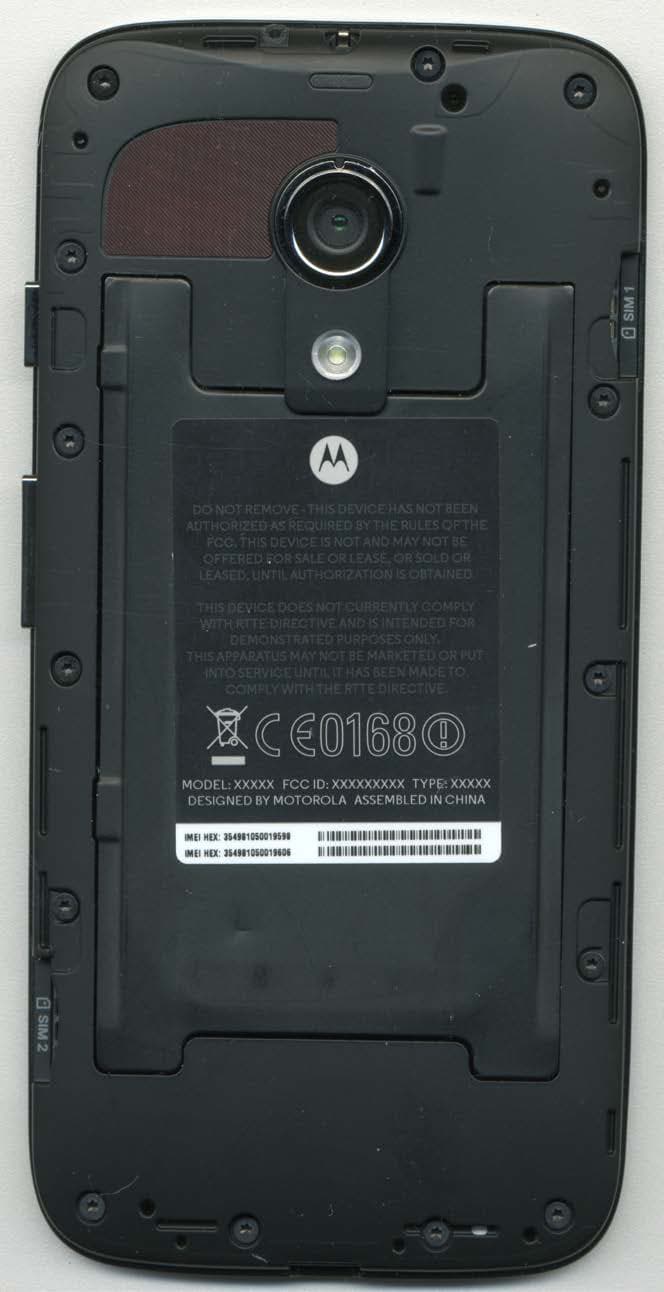
Click to zoom
Application Details
- Equipment Class
- PCE - PCS Licensed Transmitter held to ear
- Date of Grant
- Aug 28, 2013
- Application Purpose
- Original Equipment
- Date of Application
- Aug 27, 2013
- Equipment Note
- XT1032/XT1033/XT1035 GSM/WCDMA HANDSET
- Frequency Range
- 1852.40000000 - 1907.60000000
- Company
- Motorola Mobility LLC
- Country
- United States
Documents & Files
Document Text
Text extracted from the exhibit documents filed with the FCC. Open a document above to read the original.
Users Manual
APPLICANT: MOTOROLA MOBILITY LLC FCC ID: IHDT56PF1 / IC ID: 109O-T56PF1 Temporary Confidentiality Requested Motorola Mobility LLC; 8000 W. Sunrise Blvd, Suite A; Plantation, FL 33322, USA www.motorola.com Page 8 - 1 Exhibit 8: Draft User’s Manual -- 47 CFR 2.1033(b)(3) and RSP100, Section 5. The attached User’s Manual is the final production-intended version of the generic Motorola International English User Manual. This guide will be adapted to carrier-specific versions i , but the key information herein will be retained. Translations into other languages will also be done to support the needs of other markets. Minor revisions may be made to these manuals, prior to and subsequent to, placing this product onto the market. Selected portions of the User Guide can be found as indicated below: 8.1 Safety and Regulatory Section: Part 2; Page 26 8.2 Specific Absorption Rate (SAR) Data: Part 2; Page 28 i Motorola Mobility attests that the User’s Guide provided with product shipping into Canada will provide any required Industry Canada notices and/or statements in both English and French, per the requirements of RSS-Gen. Socialize Browse Photos & videos Calls Contacts Top topics Search topics Control & customize Start Home screen & apps Safety Type qwe r t y 45 6 12 3 Locate 44 West Street Messages Protect At a glance Want More? Work Connect & transfer Music Troubleshoot Books PLAYLISTS #1 www. Gmail™ Google+™ Motorola XT103 5 pick a topic, get what you need 13 AUG 2013 FCC Back Next Menu More At a glancea quick look First lookYour new XT1035 has a bright display that goes from one side all the way to the other. Its curved body fits in your hand. And you’ll rarely have to plug it in.Note: Your phone may look a little different. Play Store Google TEMP WALLPAPER 2:37 Headphone Jack Volume Keys Press Volume down + Power to take a pic of your screen. Power Key Micro SIM Slot Micro USB/Charger Microphone 2 :37 WED, DEC 18 Second Micro SIM Card Slot (optional) Front Camera Back Camera(on center back) Ti p s & t r i c k s •Start: Micro SIM in, charge up, and register. See “ Start ”. •Top topics: Just want a quick list of what your phone can do? See “ Top topics ”. •More: All your questions about your new phone, right on your phone. Touch Apps > Moto Care . Want even more? See “ Get more ”. Note: Certain apps and features may not be available in all countries. This product meets the applicable limit for exposure to radio waves (known as SAR) of 1.6 W/kg (FCC & IC). The limits and guidelines include a substantial safety margin designed to assure the safety of all persons, regardless of age and health. The highest SAR values measured for this device are listed in the regulatory information packaged with your product.Note: When using the product while worn on your body, maintain a distance of 1.5 cm (3/4 inch) from the body to ensure compliance with SAR requirements. Note that the product may be transmitting even if you are not making a phone call. At a glance First look Top topics 13 AUG 2013 FCC Back Next Menu More At a glance Top topicsCheck out what your phone can do. • Personalize your phone: see “ Redecorate your home ”. • Make a quick change: see “ Quick settings ”. • Go online: see “ Browse ”. • Explore: see “ Google Play™ ”. • Find apps: see “ Download apps ”. • Be social: see “ Socialize ”. • Find it yourself: see “ Locate & navigate ”. • Take a photo: see “ Take photos ”. • Connect to Wi-Fi: see “ Wi-Fi Networks ”. • Watch a movie: see “ Play Movies & TV ”. • Protect your phone: see “ Screen lock ”. • Watch interactive guided tutorials: see “ Moto Care ”. • Get all the help you need: see “ Get more ”. Ti p s & t r i c k s •Intuitive: To get started quickly, touch Apps > Moto Care for interactive tutorials. At a glance First look Top topics 13 AUG 2013 FCC Back Next Menu More Startlet’s get up & running Charge upPut the SIM in, charge up, and power on. (Your SIM may already be in your phone. If it is, just charge up and power on.)Note: With some phones, you can use a second SIM card. Caution: Before using your phone, please read the safety, regulatory, and legal information provided with your product. 2 1 Charge up. 3 H 3 Power on. C harge up . C Press & hold the Power key. Turn the phone over. With gold contacts facing down, push in the first micro SIM till it clicks. Then, push in the second SIM (if your phone supports it) on the lower, oppposite side. Ti p s & t r i c k s •Power Key: To make the screen sleep or wake up, press the Power key. To turn your phone on or off, press and hold it. • Battery: Squeeze every bit of juice out of your battery, see “ Battery life ”. Warning: Don't try to remove or replace the battery yourself—doing so may damage the battery and could cause burning and injury. If your phone becomes unresponsive, try a reboot—press and hold both the Power and the Volume Down keys until the screen goes dark, and your phone restarts. Start Charge up Battery life Sign in Old phone to new phone Google Play™ 13 AUG 2013 FCC Back Next Menu More Start Battery lifeYour phone is like a small computer, giving you tons of information and apps, at lightning fast speed. Depending on what you use, that can take a lot of power.To see what's using up battery power, touch Apps > Settings > Battery . To set automatic rules to save power, touch Apps > Assist . See “ Motorola Assist ”. Ti p s & t r i c k sTo save even more battery life between charges, you could reduce: • Recording or watching videos, listening to music, or taking pictures. • Widgets that stream information to your home screen, like news or weather. • Unused online accounts that you registered: Touch Apps > Settings . Under ACCOUNTS , touch the one you want to remove, then touch Menu > Remove account . • Wi-Fi and Bluetooth® use: Touch Apps > Settings , then touch the switch next to Wi-Fi or Bluetooth to turn them when you don’t need them. • GPS use: Touch Apps > Settings > Location access , and uncheck GPS satellites . • Display…
Text truncated - open the document above for the full version.
Users Manual
APPLICANT: MOTOROLA MOBILITY LLC FCC ID: IHDT56PF1 / IC ID: 109O-T56PF1 Temporary Confidentiality Requested Motorola Mobility LLC; 8000 W. Sunrise Blvd, Suite A; Plantation, FL 33322, USA www.motorola.com Page 8 - 1 Exhibit 8: Draft User’s Manual -- 47 CFR 2.1033(b)(3) and RSP100, Section 5. The attached User’s Manual is the final production-intended version of the generic Motorola International English User Manual. This guide will be adapted to carrier-specific versions i , but the key information herein will be retained. Translations into other languages will also be done to support the needs of other markets. Minor revisions may be made to these manuals, prior to and subsequent to, placing this product onto the market. Selected portions of the User Guide can be found as indicated below: 8.1 Safety and Regulatory Section: Part 2; Page 26 8.2 Specific Absorption Rate (SAR) Data: Part 2; Page 28 i Motorola Mobility attests that the User’s Guide provided with product shipping into Canada will provide any required Industry Canada notices and/or statements in both English and French, per the requirements of RSS-Gen. Back Next Menu More Browseexplore & find Quick start: Chrome™Find it: Apps > Chrome • Go to a webpage: Touch the address bar at the top of a page and enter an address. • Add or open bookmarks: Open the address bar (flick down if you don’t see it), then touch Menu > or Bookmarks . www.googl e .com/s e a r ch?cli e W e b Imag e s moon landing conspi r a Vid e os N e ws Mo re Moon landing conspriracy t h e o r i e s - Wikip e dia, t h e f ree ... e n.wikip e dia.o r g/.../Moon_landing... Th e Moon landing conspi r acy t h e o r i e s claim t ha t som e o r all e l e m e n t s of t h e Apollo... O r igins - P ublic opinion - Mo t iv e s Images for moon landing conspiracy Th e Moon Landings W ere Fak e d - Touch a link to select it. Touch & hold for more options. Open options.Show other browser tabs, or open a new one. Ti p s & t r i c k s • Home screen shortcut: In your home screen, touch the Google Search widget at the top and enter a website address.Note: If you can’t connect, contact your service provider. • Mobile sites: Some websites automatically show you a “mobile” version of their page. If you want to see the standard computer versions of all websites, touch Menu > Request desktop site . •Reload: If a page doesn’t load correctly, try touching . • Clear history: In the browser, touch Menu > Settings > Privacy > CLEAR BROWSING DATA at the bottom of the page. Then choose history, cache, cookies, and other options. • Help: For more about Google Chrome, visit www.support.google.com/chrome . Browse Quick start: Chrome™ Web connection Bookmarks Downloads Browser options Safe surfing & searching 13 AUG 2013 FCC Back Next Menu More Browse Web connectionTo access the web, your phone uses your Wi-Fi network (or your mobile phone network if no Wi-Fi network is connected).Note: Your service provider may charge to surf the web or download data over your mobile phone network.To connect to a Wi-Fi network, see “ Wi-Fi Networks ”. BookmarksTo bookmark a page in your browser, touch Menu > . To go to a bookmark, touch Menu > Bookmarks , then touch the bookmark. DownloadsWarning: Apps downloaded from the web can be from unknown sources. To protect your phone and personal data, only download apps on Google Play.To download a file, picture, or webpage, touch Chrome and go to the website, and then: •Files: Touch the download link. To show the file or app, touch Apps > Downloads . • Pictures: Touch and hold it to choose Save image . To show the picture, touch Apps > Gallery > Download . To download apps or phone updates, see “ Download apps ” or “ Update your phone ”. Browser optionsTo change your browser security settings, text size, and other options, touch Menu > Settings . Safe surfing & searchingKeep track of what your browser and searches show: • Browse incognito: To open a tab that won’t appear in your browser or search history, touch Chrome >Menu > New incognito tab . • Browser history, cache, and passwords: To c l e a r y o u r browser history and other saved information, touch Chrome >Menu > Settings > Privacy . • Automatic form completion: When you enter your name in an online form, your browser can automatically enter your address information. If you don’t want that, touch Chrome >Menu > Settings > Autofill forms . • Browser pop-ups: To stop pop-up windows from opening, touch Chrome >Menu > Settings > Content settings > Block pop-ups . •Voice search: Touch the search bar, then touch X > . Browse Quick start: Chrome™ Web connection Bookmarks Downloads Browser options Safe surfing & searching 13 AUG 2013 FCC Back Next Menu More Photos & videossee it, capture it, share it! Quick start: Photos & VideosTake super clear photos and share them.Find it: Apps > Camera • Take a photo: Touch anywhere on the screen to take the photo. •Share it: Swipe the screen left to view a photo or video from your gallery, then touch Share . Touch anywhere to take the photo. Touch & hold to take rapid shots. Who’s a good boy?Max is. Yes, he is.Drag up or down with one finger to zoom. Swipe right to open effects & settings. Rotate the dial to see more options. Ti p s & t r i c k s • Take a photo: Open the camera, then touch anywhere on the screen to take the photo. • Take a selfie: Touch to switch the camera to the front to take a self portrait. • Record a video: Touch in the camera to temporarily switch to the video camera and start recording. Then touch to start or stop recording. • Capture a still shot during a video: Touch anywhere on the screen while recording to save a photo. • View, share, or delete: Swipe the screen left to open your gallery. Pick a photo or video. You can choose share, delete, or Menu for more options, like Crop or Edit . • Change settings: To open camera options, swipe the screen right. •Zoom: Drag the screen up or down using one finger. • Multi-shot: When you’re ready, touch and hold th…
Text truncated - open the document above for the full version.
Cover Letter(s)
APPLICANT: MOTOROLA MOBILITY LLC FCC ID: IHDT56PF1 / 109O-T56PF1 Motorola Mobility LLC; 8000 W. Sunrise Blvd, Suite A; Plantation, FL 33322, USA www.motorola.com Page 2 - 1 Exhibit 2. Statements of Certification -- Pursuant to 47 CFR 2.907, and RSP100, Section 5 2.1. Specification Compliance Transceiver type described herein (IHDT56PF1 and 109O-T56PF1) has been tested in accordance with the requirements contained in the appropriate regulations. To the best of my knowledge, these tests were performed using measurement procedures consistent with industry or Commission standards, and demonstrate that this equipment complies with the appropriate standards. Each unit manufactured, imported, or marketed will conform to the samples tested herein, within the statistical variations that can be expected due to high volume production and test measurement error. NAME: Solomon Hong SIGNATURE: /s/ Solomon Hong DATE: 20 August 2013 TITLE: Engineering Manager 2.2. Statement of Certification I hereby certify that the above application was prepared under my direction and that to the best of my knowledge and belief, the facts set forth in this application and accompanying technical data are true and correct. The technical data supplied with this application was taken under my supervision and is hereby duly certified. I also certify that this transmit equipment (IHDT56PF1) is in compliance with all applicable parts of the FCC Rules. The technical data supplied with this application was taken under my supervision and is hereby duly certified. I also certify that this transmit equipment (109O-T56PF1) is in compliance with all applicable Industry Canada Rules and Procedures. NAME: John Lewczak SIGNATURE: DATE: 20 August 2013 TITLE: Engineering Manager, Product Safety and Compliance APPLICANT: MOTOROLA MOBILITY LLC FCC ID: IHDT56PF1 / 109O-T56PF1 Motorola Mobility LLC; 8000 W. Sunrise Blvd, Suite A; Plantation, FL 33322, USA www.motorola.com Page 2 - 2 2.3. Attestation Statement (Equipment Class DTS and DSS - Bluetooth/Wi-Fi) This device contains an embedded Bluetooth device, Wi-Fi device, and MOTOtalk capabilities that Motorola Mobility confirms are compliant with the applicable Part 15C regulations. Personal Hotspot operation is only supported in the 2.4 GHz band. 15.247(a)(1) • The hopping sequence must be pseudorandom. • All Channels are used equally on average. • The receiver input bandwidth is approximately equal to the transmit bandwidth. • The receiver hops in sequence with the transmitted signal. 15.247(g) The system is designed to comply with all of the regulations in Section 15.247 when the transmitter is presented with a continuous data (or information). 15.247(h) The system does not coordinate its channel selection/hopping sequence with other frequency hopping systems for the express purpose of avoiding the simultaneous occupancy of individual hopping frequencies by multiple transmitters. NAME: Solomon Hong SIGNATURE: /s/ Solomon Hong DATE: 20 August 2013 TITLE: Engineering Manager APPLICANT: MOTOROLA MOBILITY LLC FCC ID: IHDT56PF1 / 109O-T56PF1 Motorola Mobility LLC; 8000 W. Sunrise Blvd, Suite A; Plantation, FL 33322, USA www.motorola.com Page 2 - 3 2.4. Statement Concerning SPEAG Probe Calibration Motorola acknowledges the 5 February 2013 TCB Conference Call agenda item concerning the use of DASY52.8.5 (1059) software, and specifically the FCC’s concerns with bundled SAR probe calibration for LTE and WLAN supported therein. Motorola asserts that standard probe calibration methods used by SPEAG have not changed in recent years. Motorola does not have probes calibrated using the "bundle options" available from SPEAG. NAME: John Lewczak SIGNATURE: DATE: 20 August 2013 TITLE: Engineering Manager, Product Safety and Compliance
Cover Letter(s)
APPLICANT: MOTOROLA MOBILITY LLC FCC ID: IHDT56PF1 / IC ID: 109O-T56PF1 Motorola Mobility LLC; 8000 W. Sunrise Blvd, Suite A; Plantation, FL 33322, USA www.motorola.com Page 7A - 1 Exhibit 7A. Registry of KDB Publications Utilized for this Application. 7.1 Registry of KDB Publications Applied to this Application. APPLICANT: MOTOROLA MOBILITY LLC FCC ID: IHDT56PF1 / IC ID: 109O-T56PF1 Motorola Mobility LLC; 8000 W. Sunrise Blvd, Suite A; Plantation, FL 33322, USA www.motorola.com Page 7A - 2 7A.1 Registry of KDB Publications Applied to this Application 7A.1.1 Applicable KDB Publications The following KDB Publications were applied in the collection of test data, and the generation of test reports and other exhibits comprising this application: KDB Publication Title KDB 248227 D01, v 01r02 SAR Measurement Procedures for 802.11 a/b/g Transmitters KDB 388624 D01, v09r02 Permit But Ask Procedure. KDB 388624 D02, v13r03 Permit But Ask List. KDB 447498 D01, v05r01 Mobile and Portable Device RF Exposure Procedures and Equipment Authorization Policies. KDB 558074 D01, v03r01 Guidance for Performing Compliance Measurements on Digital Transmission Systems (DTS) Operating Under §15.247. KDB 594280 D01, v01r02 Restrictions on Software Configuration for devices not approved as Software Defined Radios. KDB 628591 D01, v15r01 TCB Exclusion List. KDB 648474 D04, v01r01 SAR Evaluation Considerations for Handsets with Multiple Transmitters and Antennas. KDB 662911 D01, v02 Emissions Testing of Transmitters with Multiple Outputs in the Same Band (e.g., MIMO, Smart Antenna, etc). KDB 662911 D02, v01 MIMO with Cross-Polarized Antenna. KDB 784748 D01, v07 Guidelines for Labeling and User Information for Devices Subject to Part 15 and Part 18. KDB 865664 D01, v01r01 SAR Measurement Requirements for 100 MHz to 6 GHz. KDB 865664 D02, v01r01 RF Exposure Compliance Reporting and Documentation Considerations. KDB 941225 D01, v02 SAR Tests for 3G Devices. KDB 941225 D02, v02v02 3GPP R6 HSPA and R7 HSPA+ SAR Guidance. APPLICANT: MOTOROLA MOBILITY LLC FCC ID: IHDT56PF1 / IC ID: 109O-T56PF1 Motorola Mobility LLC; 8000 W. Sunrise Blvd, Suite A; Plantation, FL 33322, USA www.motorola.com Page 7A - 3 KDB Publication Title KDB 941225 D03, v01 Recommended SAR Test Reduction Procedures for GSM/GPRS/EDGE. KDB 941225 D04, v01 Evaluating SAR for GSM/(E)GPRS Dual Transfer Mode. KDB 941225 D06, v01r01 SAR Evaluation Procedures for Portable Devices with Wireless Router Capabilities. KDB 971168 D01, v02r01 Procedures for Compliance Measurement of the Fundamental Emission Power of Licensed Wideband (> 1 MHz) Digital Transmission Systems. 7A.1.2 Variations and/or Exceptions to the Procedures in the Published KDBs. Motorola Mobility has taken no liberties with respect to the procedures published in the above KDB documents. We claim full compliance with these procedures.
Cover Letter(s)
APPLICANT: MOTOROLA MOBILITY LLC FCC ID: IHDT56PF1 Motorola Mobility LLC; 8000 W. Sunrise Blvd, Suite A; Plantation, FL 33322, USA www.motorola.com Page 13a - 1 16 August 2013 Authorization & Evaluation Division Federal Communications Commission Laboratory 7435 Oakland Mills Road Columbia, MD 21046 Subject: Application for Certification of transmitter with FCC ID: IHDT56PF1, PCS Handsets, with Bluetooth. Gentlemen; Motorola Mobility LLC; 8000 W. Sunrise Blvd.; Plantation, FL 33322 herein submits its application for certification of the multi-mode handset with FCC ID: IHDT56PF1. The primary transceiver in this composite device operates in the 850 MHz Public Mobile Service (PMS) and the 1900 MHz Personal Communications Service (PCS). It supports GSM signaling, and employs GPRS Class 12 and EDGE Class 12 capabilities. This transceiver also operates in the WCDMA mode in these bands. Note: This device also contains functions, and operates within frequency bands, that are not authorized within the United States or its territories. This filing is only applicable to supported US operations. This radio product is also equipped with a Wi-Fi (802.11b/g/n) transceiver. Wi-Fi supports both voice and data for short range wireless communications. The Wi-Fi band of operation is 2.412 - 2.462 GHz, for 802.11b/g/n operation. The Wi-Fi device complies 15.247 (c) and 15.209 (b). This radio product is equipped with a Bluetooth (BT) transceiver. BT supports both voice and data for short range wireless communications. The Bluetooth Band of Operation is 2.402 - 2.480 GHz. The BT device complies with the requirements of FCC Rule Parts 15.247 (c), 15.205 and 15.209 (b). All transmitters contained in this radio product have been subjected to routine environmental evaluation (as applicable) according to 47 CFR Part 2.1093 (c) for RF exposure and found to be compliant with the limits specified in 47 CFR 2.1093(d)(2). APPLICANT: MOTOROLA MOBILITY LLC FCC ID: IHDT56PF1 Motorola Mobility LLC; 8000 W. Sunrise Blvd, Suite A; Plantation, FL 33322, USA www.motorola.com Page 13a - 2 This radio product features an integrated GPS receiver, and is designed to function as a computer peripheral device when functioning as an RF modem, while connected to a computer via a data cable, as described in 47 CFR Part 15.3(r). A Part 15B test report is included for certification. Enclosed is a complete Certification Application. Contact me at (954) 723-6272 if you require any additional information. Regards, FCC Liaison Motorola Mobility LLC 8000 W. Sunrise Blvd.; Suite A Mail Stop 52-5JJ Plantation, FL 33322 E-mail: [email protected]
Cover Letter(s)
FCC ID: IHDT56PF1 Motorola Mobility LLC; 8000 W. Sunrise Blvd, Suite A; Plantation, FL 33322, USA www.motorola.com Page 13b - 1 CONFIDENTIALITY REQUEST 16 August 2013 Federal Communications Commission Laboratory Authorization & Evaluation Division 7435 Oakland Mills Road Columbia, MD 21046 Subject: Confidentiality Request Regarding Application for Certification of FCC ID: IHDT56PF1. Dear Sir or Madam: Pursuant to Sections 0.457 and 0.459 of the Commission’s Rules, we hereby respectfully request confidential treatment of information accompanying this application as outlined below: Exhibit Type File Name Block Diagrams. IHDT56PF1_Ex_04 (Block Diagrams).pdf Schematic Diagrams. IHDT56PF1 _Ex_05 (Schematic Diagrams).pdf Parts List and Tune Up Procedures. IHDT56PF1 _Ex_10 (Active Components).pdf Transmitter Characteristics. IHDT56PF1 _Ex_12 (TX Characteristics).pdf Motorola Mobility LLC requests that these exhibits be held as Permanently Confidential, and not be made routinely available for public inspection. Motorola considers that the information in these exhibits should be classified as trade secrets, pursuant to 47 CFR Section 0.457(d) and Section 552(b)(4) of the Freedom of Information Act. The public disclosure of these materials may be harmful to the applicant and provide unjustified benefits to its competitors. Motorola Mobility LLC understands that, pursuant to Section 0.457 of the Rules, disclosure of this application and all accompanying documentation will not be made before the date of the Grant for this application. FCC ID: IHDT56PF1 Motorola Mobility LLC; 8000 W. Sunrise Blvd, Suite A; Plantation, FL 33322, USA www.motorola.com Page 13b - 2 SHORT TERM ONFIDENTIALITY REQUEST – 180 DAYS Pursuant to the Commission’s public notice DA 04-1705 (June 15, 2004), Motorola Mobility LLC is also requesting Temporary Confidentiality treatment of information accompanying this application as outlined below. This provision will give Motorola Mobility LLC temporary confidentiality prior to product launch. Exhibit Type File Name External product photographs. IHDT56PF1 _Ex_03 (External_Photos).pdf Test set-up photographs. IHDT56PF1 _Ex_07B ( EMC Test Set- up_Details).pdf IHDT56PF1 _Ex_07C ( SAR Test Set- up_Details).pdf User’s Manual. IHDT56PF1 _Ex_08 (User Guide).pdf Internal product photographs. IHDT56PF1 _Ex_09 (Internal Photos).pdf Please contact me if you require any additional information. Regards, FCC Liaison Motorola Mobility LLC 8000 W. Sunrise Blvd.; Suite A Mail Stop 52-5JJ Plantation, FL 33322 E-mail: [email protected]
External Photos
APPLICANT: MOTOROLA MOBILITY LLC FCC ID: IHDT56PF1 / IC ID: 109O-T56PF1 Temporary Confidentiality Requested Motorola Mobility LLC; 8000 W. Sunrise Blvd, Suite A; Plantation, FL 33322, USA www.motorola.com Page 3 - 1 Exhibit 3. External Photographs -- Pursuant to 47 CFR 2.1033(c)(12), and RSP100, Section 5. The radio product colors, housings/bezels may vary, but only consistent with the requirements of FCC Class I Permissive Change rules and guidance (47 CFR 2.1043 and KDB 178919 D01). Figure 3-1. Front of device APPLICANT: MOTOROLA MOBILITY LLC FCC ID: IHDT56PF1 / IC ID: 109O-T56PF1 Temporary Confidentiality Requested Motorola Mobility LLC; 8000 W. Sunrise Blvd, Suite A; Plantation, FL 33322, USA www.motorola.com Page 3 - 2 Figure 3-2. Back of device APPLICANT: MOTOROLA MOBILITY LLC FCC ID: IHDT56PF1 / IC ID: 109O-T56PF1 Temporary Confidentiality Requested Motorola Mobility LLC; 8000 W. Sunrise Blvd, Suite A; Plantation, FL 33322, USA www.motorola.com Page 3 - 3 Figure 3-3. Button Side of device Figure 3-4. Opposite Side of device APPLICANT: MOTOROLA MOBILITY LLC FCC ID: IHDT56PF1 / IC ID: 109O-T56PF1 Temporary Confidentiality Requested Motorola Mobility LLC; 8000 W. Sunrise Blvd, Suite A; Plantation, FL 33322, USA www.motorola.com Page 3 - 4 Figure 3-5. Top of radio Figure 3-6. Bottom of radio APPLICANT: MOTOROLA MOBILITY LLC FCC ID: IHDT56PF1 / IC ID: 109O-T56PF1 Temporary Confidentiality Requested Motorola Mobility LLC; 8000 W. Sunrise Blvd, Suite A; Plantation, FL 33322, USA www.motorola.com Page 3 - 5 Figure 3-7. Interior Compartment of radio FCC Label Location. See Exhibit 1 for details.
ID Label/Location Info
APPLICANT: MOTOROLA MOBILITY LLC FCC ID: IHDT56PF1 / IC ID: 109O-T56PF1 Motorola Mobility LLC; 8000 W. Sunrise Blvd, Suite A; Plantation, FL 33322, USA www.motorola.com Page 1 - 1 Exhibit 1: Identification Label -- Pursuant to 47 CFR 2.925 and 2.1033(c)(11), and RSP100, Section 5. 1.1 Location On the rear (back) side of the radio product chassis, beneath the back cover (see also Exhibit 3). 1.2 Type The label is of a polyester film laminate with a pressure sensitive adhesive backing. The adhesive is a permanent type acrylic with minimum peel strength of 5 lbs/in. 1.3 Markings (Text) The FCC label shown is representative of the label that will appear on the radio when in production. Figure 1.3.1. Representation of FCC Label information. The above label representation is applicable to the following versions/variants of the device that is the subject of this application: Model Number 1 XT1032 2 , XT1033, XT1035 2 1 Depending upon the device version, or market into which it ships, the Model Number shown on the label may be any of the numbers shown above. All such variants will be electrically identical, consistent with the requirements of FCC Class I Permissive Change rules and guidance (47 CFR 2.1043 and KDB 178919 D01). 2 These models may ship into Canada. This label will be placed on the equipment (beneath the Rear Housing Cover) as shown below. Other information may also be included on this label, and other labels may also be present. FCC ID IHDT56PF1 IC: 109O-T56PF1 Model No. MODEL 1 APPLICANT: MOTOROLA MOBILITY LLC FCC ID: IHDT56PF1 / IC ID: 109O-T56PF1 Motorola Mobility LLC; 8000 W. Sunrise Blvd, Suite A; Plantation, FL 33322, USA www.motorola.com Page 1 - 2 Figure 1.3.2. Location of FCC Label (position, orientation, and other information shown may vary). Please note that this label and its placement complies with the requirement of FCC Rule 47 CFR 2.925(d) that the label be permanently affixed to the product, and be readily visible to the purchaser at the time of purchase. Further, at the time of purchase, batteries are shipped in a separate section or compartment of the radio packaging, and are not attached to the radio. In some instances they may be shipped in separate boxes. So, the end user needs to physically install the battery by removing the battery cover, if any, or attach the battery before using the radio. Further, the placement of the label in the battery compartment is done because space is limited on the exterior of the device. The battery compartment also helps to protect the label from getting obliterated or made unreadable through regular handling and use. The product’s Market or Trade Name is indelibly printed on the face of the product, as shown in Exhibit 3. FCC Label Back of Device APPLICANT: MOTOROLA MOBILITY LLC FCC ID: IHDT56PF1 / IC ID: 109O-T56PF1 Motorola Mobility LLC; 8000 W. Sunrise Blvd, Suite A; Plantation, FL 33322, USA www.motorola.com Page 1 - 3 Exhibit 1A: General Information 1A.1 Production Plans Quantity production is planned. 1A.2 Data Submittal Procedure The information in this application is provided in accordance with requirements for certification as outlined in the FCC Rules and Regulations: 47 CFR Part 2; Subpart J; Part 15, Subparts B and C; Part 22 Subpart H; and Part 24 Subparts B and E. 1A.3 Similar, currently Certified Transceiver FCC ID: IHDT56NE1 1A.4 Additional Considerations In addition to the radio receivers associated with the services authorized within this application, this device integrates a receiver designed to process signals from Global Positioning System satellites. Compliance with FCC requirements was done via the Verification process (47 CFR 2.902). This device may be considered to be a digital device, per 47 CFR 15.3(k), and can function as a computer peripheral device when functioning as an RF modem, as described in 47 CFR 15.3(r).
Internal Photos
APPLICANT: MOTOROLA MOBILITY LLC FCC ID: IHDT56PF1 / IC ID: 109O-T56PF1 Temporary Confidentiality Requested Motorola Mobility LLC; 8000 W. Sunrise Blvd, Suite A; Plantation, FL 33322, USA www.motorola.com Page 9 - 1 Exhibit 9: Internal Photographs -- Pursuant to 47 CFR 2.1033(c)(12) and RSP100, Section 5. Photograph 9-1: Component side view of the device’s PC Board, Shields in place. APPLICANT: MOTOROLA MOBILITY LLC FCC ID: IHDT56PF1 / IC ID: 109O-T56PF1 Temporary Confidentiality Requested Motorola Mobility LLC; 8000 W. Sunrise Blvd, Suite A; Plantation, FL 33322, USA www.motorola.com Page 9 - 2 Photograph 9-2: Keypad side view of the d…
Text truncated - open the document above for the full version.
Contact Information
Applicant
Jeff Narducci(Director Product Compliance)
Test Firm
Motorola Mobility LLCDanny Palaniswami
[email protected]847-523-3775
Technical Specifications
| # | Rule Parts | Frequency Range | Power Output | Emission | Tolerance |
|---|---|---|---|---|---|
| 6 | 24E | 1.85 GHz - 1.91 GHz | 217.00 mW | 4M76F9W | 0.011 ppm |
Other Applications from Motorola Mobility LLC
IHDT56AW9
May 12, 2026Smart Watch
Equipment Class
NII - Unlicensed National Information Infrastructure TXIHDT56AW5
Apr 08, 2026Mobile Cellular Phone
Equipment Class
DTS - Digital Transmission SystemIHDT56AW6
Mar 18, 2026Smart Watch
Equipment Class
JBP - Part 15 Class B Computing Device PeripheralIHDT56AX4
Mar 17, 2026Mobile Cellular Phone
Equipment Class
PCE - PCS Licensed Transmitter held to earIHDT56AW3
Mar 03, 2026Mobile Cellular Phone
Equipment Class
6XD - 15E 6 GHz Low Power Indoor Client