IHDT56UB2UMTS/LTE Transceiver with WLAN, BT, and NFC
Motorola Mobility LLC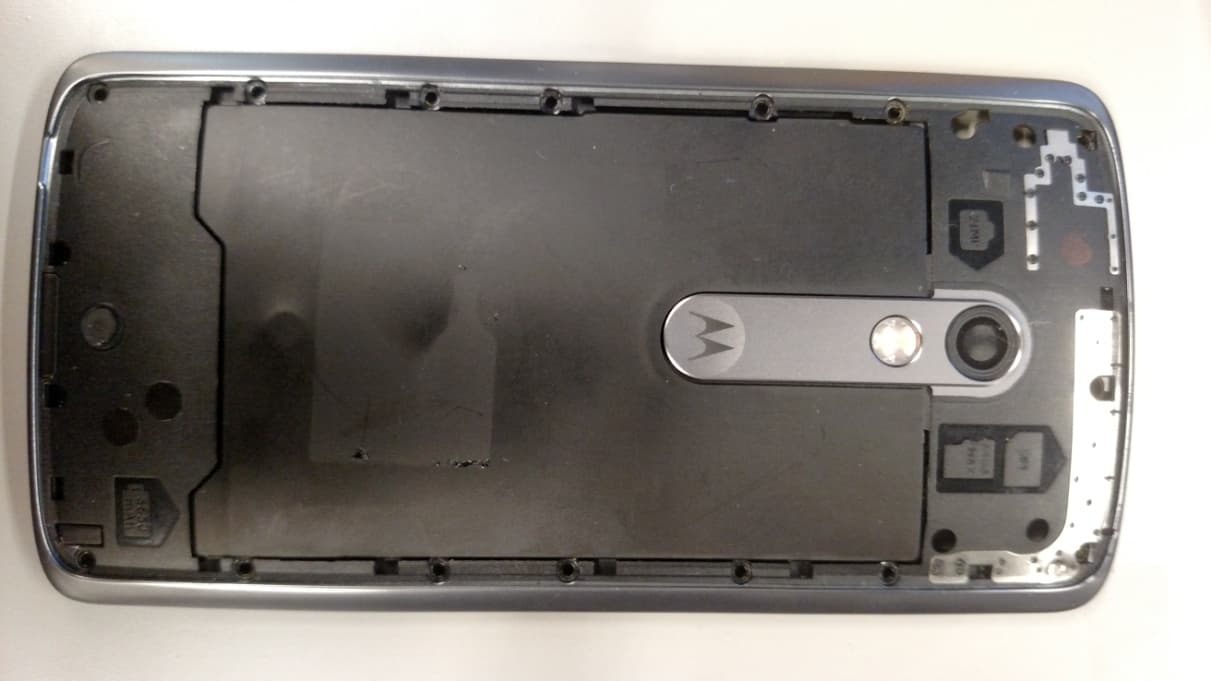
Click to zoom
Application Details
- Equipment Class
- PCE - PCS Licensed Transmitter held to ear
- Date of Grant
- Jul 19, 2015
- Application Purpose
- Original Equipment
- Date of Application
- Jul 19, 2015
- Equipment Note
- UMTS/LTE Transceiver with WLAN, BT, and NFC
- Frequency Range
- 2510.00000000 - 2560.00000000
- Company
- Motorola Mobility LLC
- Country
- United States
Documents & Files
Document Text
Text extracted from the exhibit documents filed with the FCC. Open a document above to read the original.
Users Manual
APPLICANT: MOTOROLA MOBILITY LLC FCC ID: IHDT56UB2 / IC ID: 109O-T56UB2 Temporary Confidentiality Requested Motorola Mobility LLC; 8000 W. Sunrise Blvd, Suite A; Plantation, FL 33322, USA www.motorola.com Page 8 - 1 Exhibit 8: Draft User’s Manual -- 47 CFR 2.1033(b)(3) and RSP100, Section 5. The attached User’s Manual is the final production-intended version of the generic Motorola International English User Manual. This guide will be adapted to carrier-specific versions i , but the key information herein will be retained. Translations into other languages will also be done to support the needs of other markets. Minor revisions may be made to these manuals, prior to and subsequent to, placing this product onto the market. Selected portions of the User Guide can be found as indicated below: 8.1 Safety and Regulatory Section: Page 4 8.2 Specific Absorption Rate (SAR) Data: Page 2 and 8 8.3 Guidance for use with Hearing Aids (Pursuant to 47 CFR 20.19(f)(1): Page 11 i Motorola Mobility attests that the User’s Guide provided with product shipping into Canada will provide any required Industry Canada notices and/or statements in both English and French, per the requirements of RSS-Gen. en read me Caution: Before using your phone, please read the safety, regulatory and legal information provided with your product. motorola.com This product meets the applicable national or international RF exposure guidance (SAR guideline) when used normally against your head or, when worn or carried, at a distance of 1.5 cm from the body. The SAR guideline includes a considerable safety margin designed to assure the safety of all persons, regardless of age and health. At a glance Let’s get started! We'll guide you through startup and tell you a bit about your phone’s features. Note: Software updates happen frequently, so your phone may look a little different. 11:35 GooglePlay Store Volume Buttons Power Button Micro USB/ Charger Microphone Front Camera Nano SIM & MicroSD Press: Display on/off. Press & hold: Phone on/off. Back Home Overview Card Tray Memory Camera & Flash (on back) Headset Jack Start Put in the cards & power on Caution: Make sure you use the correct size SIM card, don’t cut the SIM card, and don’t use adapters with your SIM card. Push the tray back into your phone with gold contacts facing up. PPPPu 2 1 Put the nano SIM and memory card in. Nano SIM microSD (on back & optional) SIM Put the SIM card into the tray with gold contacts facing up. Turn tray over to put in memory card. Power on. Press & hold Power until the screen lights up. PP 3 Insert the tool into the hole in the SIM tray and gently push to pop out the tray. Sign in Just follow the screen prompts to get started. If you use Gmail™, you already have a Google™ account—if not, you can create an account during setup. Signing into your Google account lets you access, sync, and backup your stuff. See your Google apps, contacts, calendar, photos, and more. Enter your email Or create a new account Add your account SKIP 11:35 i Sign in to get the most out of your device. Sign in to access and sync your contacts, calendar, and photos. Motorola Migrate Copying your personal stuff from your old phone to your new phone is easy. If you did not migrate during set up you can do it anytime. Note: If your old phone is an Android™ phone, download the Motorola Migrate app on Google Play™ on your old phone before you get started. Find it: On your new phone, tap Apps > Migrate Migrate your stuff Copy stuff from your old phone to this one in just a few minutes. You may be able to transfer photos, videos, music, call history, messages, contacts and more. Select your old phone type EXITNEXT Send data TO this device Send data FROM this device 11:35 Select your old phone type. Home screen & apps Home screen & settings From the home screen, you can explore apps, check notifications, speak commands, and more. •Add a shortcut: Tap Apps , tap and hold an app, then drag it to your home screen. •Settings: To change your Wi-Fi, display brightness, and more, swipe the status bar down with two fingers. To open more settings, tap . •Share your phone: To add a guest user, swipe the status bar down with two fingers and tap . 11:35 GooglePlay Store Search by typing, or say "OK, Google". Tap Apps to see all your apps. Swipe down with one finger for notifications, or with two fingers for profiles and settings. Touch and hold an empty spot to change widgets, wallpaper, and more. Volume & interruptions Press the side volume button up or down to select a ringer volume from high to vibrate . Or, tap an option: •All: Receive all interruptions and alarms. •Priority: Tap to select which interruptions to receive and more. You will always hear alarms. •None: Turn off all sounds and alarms. Override sound settings from other apps. 11:35 GooglePlay Store 11:35 NonePriorityAll Set the volume using the side Volume Keys. Set the notifications and alarms to hear. Change to vibrate or back to ring. Discover your Moto apps Find it: Apps > Moto •Assist: Set your phone to adapt to what you're doing, where you are. •Actions: Learn how to open your camera with two twists of your wrist using Quick Capture. •Voice: Set your custom launch phrase and control your Moto X with your voice. •Display: See messages, calls, and other notifications—even if your phone is asleep. Note: Your phone may not have all features. 11:35 See what I can do. Assist I adjust automatically Actions I react to motion Voice I listen and respond Display I notify you at a glance Tap an option to learn more. Browse Photos With two twists of the wrist and a tap on the screen, take crisp, clear photos with the 21 megapixel camera. •Launch it: Even when your phone is asleep, open your camera with two twists of your wrist. •See it: Swipe left for your photo gallery ( Gallery). •Share it: View a photo or video from your gallery, then tap Share . Tip: Swipe right for effects and settings, like panorama. Swipe right for effects and set…
Text truncated - open the document above for the full version.
Users Manual
en safe, smart, protected 1enSafety, Regulatory, & Legal Safety, Regulatory, & Legal Battery Use & Safety Battery Use & Safet y Warning : Your mobile device contains a battery that should only be removed by a Motorola approved service center or recycler. •Don’t try to remove or replace the battery yourself. Attempting to remove or replace the battery may damage the battery and may cause burning and injury. •Don’t try to take apart or fix your mobile device. Attempting to take apart or fix your device may damage the battery and may cause burning and injury. •Don’t crush, bend, or expose your mobile device to heat or liquid. This may damage the battery and may cause burning and injury. Battery Charging Battery Chargi ng Charge your Motorola mobile device using a compatible Motorola charger, another brand class 2 Limited Power Source USB charger that complies with USB 1.1 or 2.0 and complies with EN301489-34, IEC62684 or equivalent, or a high-power USB port on a PC. Chargers that do not comply with these standards may be unsafe, and may cause slow charging, product damage, or reduced device performance. •Your mobile device will not charge if the temperature is too high or low. •New batteries and batteries that have been stored for a while may take longer to charge. •Only use genuine Motorola batteries, which contain safety circuitry and are designed to give the best performance in your Motorola mobile device. Driving Precautions Driving Precauti ons Responsible and safe driving is your primary responsibility when driving a vehicle. Always obey local laws and regulations. While driving, ALWAYS: •Keep your eyes on the road. •Use a handsfree device if available or required by law in your area. •Enter destination information into a navigation device before driving. •Use voice activated features (such as voice dial) and speaking features (such as audible directions), if available. •Concentrate on driving, and stop using the device if you can’t concentrate. Pull over safely before using your mobile device to send messages, surf the web, or use other applications. Seizures, Blackouts, Eyestrain, & Discomfort Seizu r es & Blac kou ts & Eyest rain Prolonged use of any device may cause discomfort in hands, fingers, arms, neck, and other parts of your body, and may cause eyestrain and headaches. It is good practice to use your device in a safe area with comfortable ambient lighting, and take frequent breaks if you feel discomfort. Seek medical advice if symptoms persist. In rare cases, flashing patterns or lights, for example in video games or movies, may cause seizures or blackouts. If you suffer any seizures or blackouts, or have a history of seizures, stop using your device and seek medical advice. Caution about High Volume Usage High Volume Warning : Exposure to loud noise from any source for extended periods of time may affect your hearing. The louder the sound, the less time is required before your hearing could be affected. To protect your hearing: •Limit the amount of time you use headsets or headphones at high volume. •Avoid turning up the volume to block out noisy surroundings. 2Safety, Regulatory, & Legalen •Turn the volume down if you can’t hear people speaking near you. If you experience hearing discomfort, including the sensation of pressure or fullness in your ears, ringing in your ears, or muffled speech, you should stop listening to the device through your headset or headphones and have your hearing checked. Children Child ren Keep your mobile device and its accessories away from small children. These products are not toys and may be hazardous to small children. For example, a choking hazard may exist for small, detachable parts. Supervise access. If a child does use your mobile device and accessories, monitor their access to help prevent loss of data or unexpected charges for data or application purchases. Glass Parts Glass Parts Some parts of your mobile device may be made of glass. If the glass breaks, don’t attempt to service the device yourself. Stop using your mobile device until the glass is replaced by a qualified service center. Allergens Allergens Motorola Mobility avoids using known allergens in our products. From time to time, trace amounts of an allergen may be added during manufacture of a mobile device or device component that could cause discomfort for some individuals. This approach is common for many types of products. We recommend that you monitor any products that may be in prolonged contact with your skin, and remove them if you experience skin irritation. Use & Care Use & Care To care for your Motorola mobile device, please observe the following: liquids Don’t expose your mobile device to water, rain, extreme humidity, sweat, or other liquids. drying Don’t try to dry your mobile device using a microwave oven, conventional oven, or dryer. extreme heat or cold Don’t store or use your mobile device in temperatures below -10°C (14°F) or above 60°C (140°F). Don’t recharge your mobile device in temperatures below 0°C (32°F) or above 45°C (113°F). dust and dirt Don’t expose your mobile device to dust, dirt, sand, food, or similar materials. cleaning To clean your mobile device, use only a dry soft cloth. Don’t use alcohol or other cleaning solutions. 3enSafety, Regulatory, & Legal shock and vibration Don’t drop your mobile device or expose it to strong vibration. protection To help protect your mobile device, always make sure that all connector and compartment covers are closed and secure, and avoid carrying it with hard objects such as keys or coins. Operational Warnings Operat ional Warnings Obey all posted signs when using mobile devices in public areas. Potentially Explosive Areas Potentially explosive areas are often, but not always, posted and can include blasting areas, fueling stations, fueling areas (such as below decks on boats), fuel or chemical transfer or storage facilities, or areas where the air contains chemicals or particles, such as grain dust, or meta…
Text truncated - open the document above for the full version.
Cover Letter(s)
FCC ID: IHDT56UB2 Motorola Mobility LLC; 8000 W. Sunrise Blvd, Suite A; Plantation, FL 33322, USA www.motorola.com Page 13b - 1 CONFIDENTIALITY REQUEST 13 July 2015 Federal Communications Commission Laboratory Authorization & Evaluation Division 7435 Oakland Mills Road Columbia, MD 21046 Subject: Confidentiality Request Regarding Application for Certification of FCC ID: IHDT56UB2. Dear Sir or Madam: Pursuant to Sections 0.457 and 0.459 of the Commission’s Rules, we hereby respectfully request confidential treatment of information accompanying this application as outlined below: Exhibit Type File Name Block Diagrams. IHDT56UB2_Ex_04 (Block Diagrams).pdf Schematic Diagrams. IHDT56UB2 _Ex_05 (Schematics).pdf Parts List and Tune Up Procedures. IHDT56UB2 _Ex_10 (Parts List and Tune- up).pdf Transmitter Characteristics. IHDT56UB2 _Ex_12 (Transceiver Characteristics).pdf IHDT56UB2_Ex_12E (U-NII Software Security).pdf Motorola Mobility LLC requests that these exhibits be held as Permanently Confidential, and not be made routinely available for public inspection. Motorola considers that the information in these exhibits should be classified as trade secrets, pursuant to 47 CFR Section 0.457(d) and Section 552(b)(4) of the Freedom of Information Act. The public disclosure of these materials may be harmful to the applicant and provide unjustified benefits to its competitors. Motorola Mobility LLC understands that, pursuant to Section 0.457 of the Rules, disclosure of this application and all accompanying documentation will not be made before the date of the Grant for this application. FCC ID: IHDT56UB2 Motorola Mobility LLC; 8000 W. Sunrise Blvd, Suite A; Plantation, FL 33322, USA www.motorola.com Page 13b - 2 SHORT TERM ONFIDENTIALITY REQUEST – 180 DAYS Pursuant to Sections 0.457 and 0.459 of the Commission’s Rules, and the guidance in KDB Publication 726920 D01, Motorola Mobility LLC is also requesting Temporary Confidentiality treatment of information accompanying this application as outlined below. This provision will give Motorola Mobility LLC temporary confidentiality prior to product launch. Exhibit Type File Name External product photographs. IHDT56UB2 _Ex_03 (External_Photos).pdf Test set-up photographs. IHDT56UB2 _Ex_07B (various EMC Test Set- up Photos) – 8 files. IHDT56UB2 _Ex_07B (NII DFS Test Set-up Photographs).pdf IHDT56UB2 _Ex_07C (SAR Test Set-up Photos) 1 User’s Manual. IHDT56UB2 _Ex_08 (User Guide).pdf Internal product photographs. IHDT56UB2 _Ex_09 (Internal Photos).pdf 1 This exhibit not applicable to the JBP application, per 47 CFR 2.1031 Please contact me if you require any additional information. Regards, Distinguished Member of Technical Staff Motorola Mobility LLC 8000 W. Sunrise Blvd.; Suite A Mail Stop 52-5JJ Plantation, FL 33322 E-mail: [email protected]
Cover Letter(s)
APPLICANT: MOTOROLA MOBILITY LLC FCC ID: IHDT56UB2 Motorola Mobility LLC; 8000 W. Sunrise Blvd, Suite A; Plantation, FL 33322, USA www.motorola.com Page 13a - 1 13 July 2015 Authorization & Evaluation Division Federal Communications Commission Laboratory 7435 Oakland Mills Road Columbia, MD 21046 Subject: Application for Certification of transmitter with FCC ID: IHDT56UB2, PCS CDMA and UMTS Handsets, with LTE, Wi-Fi, Bluetooth, and NFC. Gentlemen; Motorola Mobility LLC; 8000 W. Sunrise Blvd.; Plantation, FL 33322 herein submits its application for certification of the multi-mode handset with FCC ID: IHDT56UB2. The primary transceiver in this composite device operates in the 850 MHz Public Mobile Service (PMS), the 1700 MHz Advanced Wireless Service (AWS), and the 1900 MHz Personal Communications Service (PCS). It supports GSM signaling, and employs GPRS Class 12 and EDGE Class 12 capabilities. This transceiver also operates in the WCDMA mode in these bands. This mobile device is also equipped with an LTE transceiver. This LTE transceiver supports high-speed wireless data communications within LTE Bands 2, 4, 5, 7, 12, and 17, with channels up to 20 MHz in bandwidth. The LTE device complies with Part 22 (Subpart H), Part 24 (Subpart E), Part 27 (Subpart C), Part 22 (Subpart H), and Part 27 (Subpart C). Note: This device also contains functions, and operates within frequency bands, that are not authorized within the United States or its territories. This filing is only applicable to supported US operations. This radio product is also equipped with a Wi-Fi (802.11a/b/g/n) transceiver. Wi-Fi supports both voice and data for short range wireless communications. The Wi-Fi Bands of Operation are 2400 – 2483.5 MHz ISM band, 5150 – 5250 MHz U-NII Band 1, 5250 – 5350 MHz U-NII Band 2A band, 5470 – 5725 MHz U-NII Band 2C, and 5725 – 5850 MHz U-NII Band 3 for 802.11a/b/g/n operation. The Wi-Fi device complies 15.247, 15.407, 15.205 and 15.209. APPLICANT: MOTOROLA MOBILITY LLC FCC ID: IHDT56UB2 Motorola Mobility LLC; 8000 W. Sunrise Blvd, Suite A; Plantation, FL 33322, USA www.motorola.com Page 13a - 2 This radio product is equipped with a Bluetooth (BT) transceiver. BT supports both voice and data for short range wireless communications. The Bluetooth Band of Operation is 2.402 - 2.480 GHz (1 MHz channel bandwidth). The BT device complies with the requirements of FCC Rule Parts 15.247, 15.205 and 15.209. This product also supports NFC operation as a low-power itinerant transmitter. All transmitters contained in this radio product have been subjected to routine environmental evaluation (as applicable) according to 47 CFR Part 2.1093 (c) for RF exposure and found to be compliant with the limits specified in 47 CFR 2.1093(d)(2). This radio product features integrated GPS and FM Broadcast receivers, and is designed to function as a computer peripheral device when functioning as an RF modem, while connected to a computer via a data cable, as described in 47 CFR Part 15.3(r). A Part 15B test report is included for certification. Enclosed is a complete Certification Application. Contact me at (954) 590-0254 if you require any additional information. Regards, Distinguished Member of Technical Staff Motorola Mobility LLC 8000 W. Sunrise Blvd.; Suite A Mail Stop 52-5JJ Plantation, FL 33322 E-mail: [email protected]
External Photos
APPLICANT: MOTOROLA MOBILITY LLC FCC ID: IHDT56UB2 / IC ID: 109O-T56UB2 Temporary Confidentiality Requested Motorola Mobility LLC; 8000 W. Sunrise Blvd, Suite A; Plantation, FL 33322, USA www.motorola.com Page 3 - 1 Exhibit 3. External Photographs -- Pursuant to 47 CFR 2.1033(c)(12) and RSP100, Section 5.2. The radio product colors, housings/bezels may vary, but only consistent with the requirements of FCC Class I Permissive Change rules and guidance (47 CFR 2.1043 and KDB 178919 D01). Figure 3-1. Front of device APPLICANT: MOTOROLA MOBILITY LLC FCC ID: IHDT56UB2 / IC ID: 109O-T56UB2 Temporary Confidentiality Requested Motorola Mobility LLC; 8000 W. Sunrise Blvd, Suite A; Plantation, FL 33322, USA www.motorola.com Page 3 - 2 Figure 3-2. Back of device APPLICANT: MOTOROLA MOBILITY LLC FCC ID: IHDT56UB2 / IC ID: 109O-T56UB2 Temporary Confidentiality Requested Motorola Mobility LLC; 8000 W. Sunrise Blvd, Suite A; Plantation, FL 33322, USA www.motorola.com Page 3 - 3 Figure 3-3. Button Side of device Figure 3-4. Opposite Side of device APPLICANT: MOTOROLA MOBILITY LLC FCC ID: IHDT56UB2 / IC ID: 109O-T56UB2 Temporary Confidentiality Requested Motorola Mobility LLC; 8000 W. Sunrise Blvd, Suite A; Plantation, FL 33322, USA www.motorola.com Page 3 - 4 Figure 3-5. Top of radio Figure 3-6. Bottom of radio APPLICANT: MOTOROLA MOBILITY LLC FCC ID: IHDT56UB2 / IC ID: 109O-T56UB2 Temporary Confidentiality Requested Motorola Mobility LLC; 8000 W. Sunrise Blvd, Suite A; Plantation, FL 33322, USA www.motorola.com Page 3 - 5 Figure 3-7. Interior Compartment of radio FCC Label Location. See Exhibit 1 for details.
ID Label/Location Info
APPLICANT: MOTOROLA MOBILITY LLC FCC ID: IHDT56UB2 Motorola Mobility LLC; 8000 W. Sunrise Blvd, Suite A; Plantation, FL 33322, USA www.motorola.com Page 1 - 1 Exhibit 1: Identification Label -- Pursuant to 47 CFR 2.925 and 2.1033(c)(11); and RSP100, Section 5 and RSS Gen, Section 5.2. 1.1 Location On the rear (back) side of the radio product chassis, beneath the rear cover (see also Exhibit 3). 1.2 Type The label is of a white polyester film laminate with a pressure sensitive adhesive backing. The adhesive is a permanent type acrylic with minimum peel strength of 5 lbs/in. 1.3 Markings (Text) The FCC label shown is representative of the label that will appear on the radio when in production. Figure 1.3.1. Representation of FCC Label information. The above label representation is applicable to the following versions/variants of the device that is the subject of this application: Model Number 1 1 Depending upon the device version, or market into which it ships, the Model Number shown on the label may vary. All such variants will be electrically identical, consistent with the requirements of FCC Class I Permissive Change rules and guidance (47 CFR 2.1043 and KDB 178919 D01). This label will be placed on the equipment (beneath the rear cover) as shown below. Other information may also be included on this label, and other labels may also be present. FCC ID IHDT56UB2 Model No. MODEL APPLICANT: MOTOROLA MOBILITY LLC FCC ID: IHDT56UB2 Motorola Mobility LLC; 8000 W. Sunrise Blvd, Suite A; Plantation, FL 33322, USA www.motorola.com Page 1 - 2 Figure 1.3.2. Location of FCC Label (position, orientation, and other information shown may vary). Please note that this label and its placement complies with the requirement of FCC Rule 47 CFR 2.925(d) that the label be permanently affixed to the product, and be readily visible to the purchaser at the time of purchase. Further, at the time of purchase, the rear covers are shipped in a separate section or compartment of the radio packaging, and are not attached to the radio. So, the end user needs to physically install the rear cover, and can readily view the FCC ID label. Further, the placement of the label beneath the rear cover is done because space is limited on the exterior of the device. This placement also helps to protect the label from getting obliterated or made unreadable through regular handling and use. The product’s Market or Trade Name is indelibly printed on the face of the product, as shown in Exhibit 3. Interior Battery Compartment FCC Label Back of Device
Internal Photos
APPLICANT: MOTOROLA MOBILITY LLC FCC ID: IHDT56UB2 / IC ID: 109O-T56UB2 Temporary Confidentiality Requested Motorola Mobility LLC; 8000 W. Sunrise Blvd, Suite A; Plantation, FL 33322, USA www.motorola.com Page 9 - 1 Exhibit 9: Internal Photographs -- Pursuant to 47 CFR 2.1033(c)(12) and RSP100, Section 5. Photograph 9-1: Front side view of the device’s PC Board, Shields in place. APPLICANT: MOTOROLA MOBILITY LLC FCC ID: IHDT56UB2 / IC ID: 109O-T56UB2 Temporary Confidentiality Requested Motorola Mobility LLC; 8000 W. Sunrise Blvd, Suite A; Plantation, FL 33322, USA www.motorola.com Page 9 - 2 Photograph 9-2: Back side view of the device’s PC Board, Shields in place. APPLICANT: MOTOROLA MOBILITY LLC FCC ID: IHDT56UB2 / IC ID: 109O-T56UB2 Temporary Confidentiality Requested Motorola Mobility LLC; 8000 W. Sunrise Blvd, Suite A; Plantation, FL 33322, USA www.motorola.com Page 9 - 3 Photograph 9-3: Front side view of the device’s PC Board, Shields Removed. APPLICANT: MOTOROLA MOBILITY LLC FCC ID: IHDT56UB2 / IC ID: 109O-T56UB2 Temporary Confidentiality Requested Motorola Mobility LLC; 8000 W. Sunrise Blvd, Suite A; Plantation, FL 33322, USA www.motorola.com Page 9 - 4 Photograph 9-4: Interior Housing View. APPLICANT: MOTOROLA MOBILITY LLC FCC ID: IHDT56UB2 / IC ID: 109O-T56UB2 Temporary Confidentiality Requested Motorola Mobility LLC; 8000 W. Sunrise Blvd, Suite A; Plantation, FL 33322, USA www.motorola.com Page 9 - 1 Photograph 9-6: Antenna Locations and Spacings Viewed from Rear (Antenna Outlines as Red Polygons).
RF Exposure Info
SPORTON INTERNATIONAL INC. TEL : 886-3-327-3456 / FAX : 886-3-328-4978 Issued Date : Jun. 28, 2015 FCC ID : IHDT56UB2 Page 1 of 63 Form version. : 150415 FCC SAR Test Report Report No. : FA550147-02A FCC SAR Test Report APPLICANT : Motorola Mobility, LLC EQUIPMENT : Mobile Cellular Phone BRAND NAME : Motorola MODEL NAME : 4603 FCC ID : IHDT56UB2 STANDARD : FCC 47 CFR Part 2 (2.1093) ANSI/IEEE C95.1-1992 IEEE 1528-2003 We, SPORTON INTERNATIONAL INC., would like to declare that the tested sample has been evaluated in accordance with the procedures and had been in compliance with the applicable technical standards. The test results in this report apply exclusively to the tested model / sample. Without written approval of SPORTON INTERNATIONAL INC., the test report shall not be reproduced except in full. SPORTON INTERNATIONAL INC. No.52, Hwa Ya 1st Rd., Hwa Ya Technology Park, Kwei-Shan District, Taoyuan City, Taiwan (R.O.C.) Approved by: Jones Tsai / Manager Reviewed by: Eric Huang / Deputy Manager SPORTON INTERNATIONAL INC. TEL : 886-3-327-3456 / FAX : 886-3-328-4978 Issued Date : Jun. 28, 2015 FCC ID : IHDT56UB2 Page 2 of 63 Form version. : 150415 FCC SAR Test Report Report No. : FA550147-02A Table of Contents 1. Statement of Compliance ............................................................................................................................................. 4 2. Administration Data ...................................................................................................................................................... 5 3. Guidance Standard ....................................................................................................................................................... 5 4. Equipment Under Test (EUT) ....................................................................................................................................... 6 4.1 General Information ............................................................................................................................................... 6 4.2 General LTE SAR Test and Reporting Considerations ........................................................................................... 7 5. RF Exposure Limits....................................................................................................................................................... 9 5.1 Uncontrolled Environment ...................................................................................................................................... 9 5.2 Controlled Environment .......................................................................................................................................... 9 6. Specific Absorption Rate (SAR) ..................................................................................................................................10 6.1 Introduction ...........................................................................................................................................................10 6.2 SAR Definition .......................................................................................................................................................10 7. System Description and Setup ...................................................................................................................................11 8. Measurement Procedures ...........................................................................................................................................12 8.1 Spatial Peak SAR Evaluation ................................................................................................................................12 8.2 Power Reference Measurement............................................................................................................................13 8.3 Area Scan .............................................................................................................................................................13 8.4 Zoom Scan ............................................................................................................................................................14 8.5 Volume Scan Procedures ......................................................................................................................................14 8.6 Power Drift Monitoring ...........................................................................................................................................14 9. Test Equipment List .....................................................................................................................................................15 10. System Verification ....................................................................................................................................................16 10.1 Tissue Verification ...............................................................................................................................................16 10.2 System Performance Check Results ...................................................................................................................18 11. RF Exposure Positions ..............................................................................................................................................19 11.1 Ear and handset reference point .........................................................................................................................19 11.2 Definition of the cheek position ............................................................................................................................20 11.3 Definition of the tilt position..................................................................................................................................21 11.4 Body Worn Accessory ....................................…
Text truncated - open the document above for the full version.
RF Exposure Info
Test Laboratory: Sporton International Inc. SAR/HAC Testing Lab Date: 2015/5/22 System Check_Head_750MHz_15…
Text truncated - open the document above for the full version.
Contact Information
Applicant
Jeff Narducci(Director Product Compliance)
Test Firm
Sporton International Inc.Alex Chen
Technical Specifications
| # | Rule Parts | Frequency Range | Power Output | Emission | Tolerance |
|---|---|---|---|---|---|
| 28 | 27 | 2.51 GHz - 2.56 GHz | 84.00 mW | 18M5W7D | 0.01 ppm |
Other Applications from Motorola Mobility LLC
IHDT56AW9
May 12, 2026Smart Watch
Equipment Class
NII - Unlicensed National Information Infrastructure TXIHDT56AW5
Apr 08, 2026Mobile Cellular Phone
Equipment Class
DTS - Digital Transmission SystemIHDT56AW6
Mar 18, 2026Smart Watch
Equipment Class
JBP - Part 15 Class B Computing Device PeripheralIHDT56AX4
Mar 17, 2026Mobile Cellular Phone
Equipment Class
PCE - PCS Licensed Transmitter held to earIHDT56AW3
Mar 03, 2026Mobile Cellular Phone
Equipment Class
6XD - 15E 6 GHz Low Power Indoor Client