IHDT6GE1Portable PCS GSM/ EDGE Transceiver with Bluetooth
Motorola Mobility LLC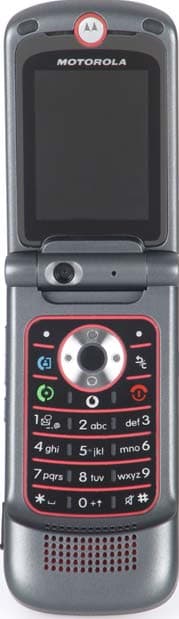
Click to zoom
Application Details
- Equipment Class
- JBP - Part 15 Class B Computing Device Peripheral
- Date of Grant
- Oct 15, 2006
- Application Purpose
- Original Equipment
- Date of Application
- Oct 15, 2006
- Equipment Note
- Portable PCS GSM/ EDGE Transceiver with Bluetooth
- Company
- Motorola Mobility LLC
- Country
- United States
Documents & Files
Document Text
Text extracted from the exhibit documents filed with the FCC. Open a document above to read the original.
Users Manual
APPLICANT: MOTOROLA, INC. FCC ID: IHDT6GE1 INSTRUCTION MANUAL • A preliminary draft copy of the User’s Manual follows this cover page. • The User’s Manual will have the following text added to it: "NOTE: This equipment has been tested and found to comply with the limits for a Class B digital device, pursuant to Part 15 of the FCC Rules. These limits are designed to provide reasonable protection against harmful interference in a residential installation. This equipment generates, uses and can radiate radio frequency energy and, if not installed and used in accordance with the instructions, may cause harmful interference to radio communications. However, there is no guarantee that interference will not occur in a particular installation. If this equipment does cause harmful interference to radio or television reception, which can be determined by turning the equipment off and on, the user is encouraged to try to correct the interference by one or more of the following measures: . Reorient or relocate the receiving antenna. . Increase the separation between the equipment and receiver. . Connect the equipment into an outlet on a circuit different from that to which the receiver is connected. . Consult the dealer or an experienced radio/TV technician for help." EXHIBIT 8 Introduction 1 Introduction 1 1IntroductionWelcome to the world of Motorola digital mobile communications! We are pleased that you have chosen the Motorola 3G mobile phone. Note: Your phone may not appear exactly as the phone images below and throughout this manual. However all key locations, sequences, and functions are the same. www.motorola.comCertain mobile phone features are dependent on the capabilities and settings of your service provider’s network. Additionally, certain features may not be activated by your service provider, and/or the provider's network settings may limit the feature’s functionality. Always contact your service provider about feature availability and functionality. All features, functionality, and other product specifications, as well as the information contained in this user's guide are based upon the latest available information and are believed to be accurate at the time of printing. Motorola reserves the right to change or modify any information or specifications without notice or obligation. Left Soft Key Video Call Key Volume Keys Smart Key Navigation Key Navigate menus Vodafone live! Centre Key Open menus, select menu items. Right Soft Key Camera Key Clear/Back Key Power/End Key Turn on & off, hang up, exit menus. Internal Camera Lens Send Key Make & answer calls Accessory Connector Port Insert battery charger & phone accessories. Volume Keys Scroll and adjust volume. Smart Key Camera KeyExternal Camera Lens External Display See incoming call information, use as camera viewfinder when flip is closed. Touch-Sensitive Audio Player Key s Previous trackPlay/PauseNext track V1100.3G.UG.book Page 1 Wednesday, August 9, 2006 4:19 PM 1 Introduction 2 Introduction MOTOROLA and the Stylised M Logo are registered in the US Patent & Trademark Office.The Bluetooth trademarks are owned by their proprietor and used by Motorola, Inc. under license.Java and all other Java-based marks are trademarks or registered trademarks of Sun Microsystems, Inc. in the U.S. and other countries.All other product or service names are the property of their respective owners.© Motorola, Inc., 2006.Software Copyright Notice The Motorola products described in this manual may include copyrighted Motorola and third-party software stored in semiconductor memories or other media. Laws in the United States and other countries preserve for Motorola and third-party software providers certain exclusive rights for copyrighted software, such as the exclusive rights to distribute or reproduce the copyrighted software. Accordingly, any copyrighted software contained in the Motorola products may not be modified, reverse-engineered, distributed, or reproduced in any manner to the extent allowed by law. Furthermore, the purchase of the Motorola products shall not be deemed to grant either directly or by implication, estoppel, or otherwise, any licence under the copyrights, patents, or patent applications of Motorola or any third-party software provider, except for the normal, non-exclusive, royalty-free licence to use that arises by operation of law in the sale of a product.While features may be subject to change without notice, every effort is made to ensure that user manuals reflect product functionality revisions. However, in the unlikely event that your manual version does not fully reflect the functionality of your product, please let us know. You may also be able to access up-to-date versions of our manuals in the consumer section of our Motorola web site, at http:// www.motorola.com . V1100.3G.UG.book Page 2 Wednesday, August 9, 2006 4:19 PM Contents 2 Contents 3 Introduction . . . . . . . . . . . . . . . . . . . . . . . . . . . . . . . . . . . . 1 Safety Information . . . . . . . . . . . . . . . . . . . . . . . . . . . . . . 5 EU Conformance . . . . . . . . . . . . . . . . . . . . . . . . . . . . . . . 12 Recycling Information . . . . . . . . . . . . . . . . . . . . . . . . . . 13 Basics . . . . . . . . . . . . . . . . . . . . . . . . . . . . . . . . . . . . . . . 14 About This Guide. . . . . . . . . . . . . . . . . . . . . . . . . . . . . 14 Installing the USIM, SIM, or Memory Card . . . . . . . . 14 Memory Card . . . . . . . . . . . . . . . . . . . . . . . . . . . . . . . 15User Memory . . . . . . . . . . . . . . . . . . . . . . . . . . . . . . . 16Battery Tips . . . . . . . . . . . . . . . . . . . . . . . . . . . . . . . . . 16Installing the Battery . . . . . . . . . . . . . . . . . . . . . . . . . . 17Using Your Charger. . . . . . . . . . . . . . . . . . . . . . . . . . . 17Charging the Battery . . . . . . . . . . . . . . . . . . . . . . . . . . 18Turning Your Phone On . . . . . . . . . . . . . . . . . . . . . . . . 18Adjusting Vol…
Text truncated - open the document above for the full version.
Users Manual
10 Learning to Use Your Phone 54 Learning to Use Your Phone 10Learning to Use Your PhoneSee page 1 for a basic phone diagram.10.1 Using the DisplayThe home screen is displayed when you are not on a call or using the menu. You must be in the home screen to dial a phone number. To dial a number from the home screen, press the number keys and . Note: Your home screen may look different from the display shown above, depending on your service provider. Labels at the bottom corners of the display show the current soft key functions. Press the left soft key or right soft key to perform the function indicated by the left or right soft key label. For soft key locations see page 1.The following status indicators can display:1. Signal Strength IndicatorVertical bars show the strength of the network connection. You cannot make or receive calls when the (no signal) indicator or (no transmit) indicator is displayed. Date Left Soft Key Label Clock Right Soft Key Label Vodafone18/07/06 Menu Music Press S right to see more news, if available. News and graphics from your Service Provider 12:00 Vodafone18/07/06 Menu Music News and graphics from your Service Provider 12:00 5. Active Line 1. Signal Strength 2. GPRS 3. Data 4. Roam 7. Messages 8. Ring Style 9. Battery Level 6. Messaging Presence S V1100.3G.UG.book Page 54 We dnesday, August 9, 2006 4:19 PM Using the Display 10.1 Learning to Use Your Phone 55 2. GPRS Indicator Shows that your phone is using a high-speed General Packet Radio Service (GPRS) network connection. GPRS allows faster data transfer speeds. Indicators can include: 3. Data Transmission IndicatorShows connection and data transmission status. Indicators can include: 4. Roam Indicator Shows when your phone is seeking or using another network outside your home network. Indicators can include: = GPRS PDP context activate = GPRS attach = GPRS packet data available = secure packet data transfer = unsecure packet data transfer = secure application connection = unsecure application connection = secure Circuit Switch Data (CSD) call = unsecure CSD call = Bluetooth TM connection is active = HSDPA home = HSDPA roam = 3G home = 3G roam = 2.5G home = 2.5G roam = 2G home = 2G roam V1100.3G.UG.book Page 55 We dnesday, August 9, 2006 4:19 PM 10.1 Using the Display 56 Learning to Use Your Phone 5. Active Line Indicator Shows to indicate an active call, or to indicate when call diverting is on. Icons for dual-line SIM cards can include: 6. Messaging Presence Indicator Shows when Instant Messaging (IM) is active. Indicators can include: When a Java application is active, can display here. 7. Message Indicator Displays when you receive a new message. Indicators can include: 8. Ring Style IndicatorShows the ring style setting.9. Battery Level IndicatorVertical bars show the battery charge level. Recharge the battery when Low Battery displays and the battery alert sounds. = line 1 active = line 2 active = line 1 active, call divert on = line 2 active, call divert on = IM active = invisible to IM = busy = text message = voicemail message = voice and text message = IM message = loud ring = soft ring = vibrate and ring = vibrate then ring = vibrate = silent V1100.3G.UG.book Page 56 We dnesday, August 9, 2006 4:19 PM Using the 5-Way Navigation Key 10.2 Learning to Use Your Phone 57 10.2 Using the 5-Way Navigation KeyUse the 5-way navigation key ( S ) to scroll up, down, left, or right in the menu system. Press the centre of the key ( s ) to select a highlighted menu item. 10.3 Using MenusFrom the home screen, press s to enter the main menu. Press S to scroll to and highlight a menu feature icon in the main menu. The following icons may display in the main menu, depending on your service provider and service subscription options. Select Back Messaging Select highlighted menu feature. Scroll up, down, left, or right. Press centre to select highlighted menu feature. Exit any menu without making changes.Name of Highlighted Menu Feature Icon V1100.3G.UG.book Page 57 We dnesday, August 9, 2006 4:19 PM 10.3.1 Selecting a Menu Feature 58 Learning to Use Your Phone 10.3.1 Selecting a Menu FeatureTo select a menu feature, starting from the home screen:This example shows that from the home screen, you must press s to open the menu, highlight and select Calls > Options > Filter by > Dialled Numbers , then highlight and select the call.Press the navigation key ( S ) up, down, left or right to highlight items, and press it in ( s ) to select items. Press the left/right soft keys to select the functions listed in the bottom left and right corners of the display. 10.3.2 Selecting a Feature OptionSome features require you to select an option from a list: • Press S to scroll up or down to highlight the option you want. • In a numbered list, press a number key to highlight the option. • In an alphabetised list, press a key repeatedly to cycle through the letters on the key and highlight the closest matching list option. Icon Feature Icon Feature Entertainment Organiser & Tools Vodafone live! Contacts Music SIM Tool Kit Camera Connectivity Messaging Calls My Files Settings Find the Feature s Calls > Options > Filter by > Dialled Numbers Press the Options key to see the sub-menu Options Back Dialled Numbers Highlighted Option Press S to scroll down to other options. 10] John Smith 9] Lisa Owns8] Adda Thomas7] Jack Bradshaw6] Dave Thompson5] John Smith4] John Smith3] John Smith V1100.3G.UG.book Page 58 We dnesday, August 9, 2006 4:19 PM Smart Key 10.4 Learning to Use Your Phone 59 • When an option has a list of possible values, press S left or right to scroll through and select a value. • When an option has a list of possible numeric values, press a number key to set the value. 10.4 Smart KeyThe smart key gives you another way to do things. For example, when you highlight a menu item, you can press the smart key to select it (instead of pressing s ). The smart key usually does the same thing as s . To find the smart key, see page 1. T…
Text truncated - open the document above for the full version.
Attestation Statements
APPLICANT: MOTOROLA INC. FCC ID: IHDT6GE1 SPECIFICATION COMPLIANCE STATEMENT Transceiver type (IHDT6GE1) has been tested in accordance with the requirements contained in the appropriate Commission regulations. To the best of my knowledge, these tests were performed using measurement procedures consistent with industry or Commission standards and demonstrate that this equipment complies with the appropriate standards. Each unit manufactured imported or marketed, will conform to the sample tested within the variations that can be expected due to quantity production and testing on a statistical basis. I further certify that the necessary measurements were made at Motorola, 600 N. U.S. Highway 45, Libertyville, IL 60048. NAME: Marcus Buchan TITLE: Engineering Manager Motorola Mobile Devices Business Date: September 29, 2006 Page 1 of 3 EXHIBIT 2 APPLICANT: MOTOROLA INC. FCC ID: IHDT6GE1 STATEMENT OF CERTIFICATION I hereby certify that the above application was prepared under my direction and that to the best of my knowledge and belief, the facts set forth in this application and accompanying technical data are true and correct. The technical data supplied with this application was taken under my supervision and is hereby duly certified. I also certify that this transmit equipment (IHDT6GE1) is in compliance with all applicable parts of the FCC Rules. NAME: Marcus Buchan TITLE: Engineering Manager Motorola Mobile Devices Business Date: September 29, 2006 Page 2 of 3 EXHIBIT 2 APPLICANT: MOTOROLA INC. FCC ID: IHDT6GE1 ATTESTATION STATEMENT This device contains an embedded Bluetooth device that Motorola confirms compliance with the following Part 15 regulations. 15.247(a)(1) • the hopping sequence must be pseudorandom • all Channels are used equally on average • the receiver input bandwidth is approximately equal to the transmit bandwidth • the receiver hops in sequence with the transmitted signal 15.247(g) the system is designed to comply with all of the regulations in Section 15.247 when the transmitter is presented with a continuous data (or information) 15.247(h) the system does not coordinate its channel selection/hopping sequence with other frequency hopping systems for the express purpose of avoiding the simultaneous occupancy of individual hopping frequencies by multiple transmitters NAME: Marcus Buchan TITLE: Engineering Manager Motorola Mobile Devices Business Date: September 29, 2006 Page 3 of 3 EXHIBIT 2
Cover Letter(s)
APPLICANT: MOTOROLA, INC. FCC ID: IHDT6GE1 September 29, 2006 SHORT TERM CONFIDENTIALITY REQUEST 45 DAYS Federal Communications Commission Authorization and Evaluation Division 7435 Oakland Mills Road Columbia, Maryland 21046 Re: Cellular/PCS Transceiver FCC ID IHDT6GE1 Gentlemen: Introduction: Pursuant to Section 0.459 of the Commission's rules (CFR 47) and Section 552(b)(4) of the Freedom of Information Act, Motorola requests confidentiality for portions of the material contained in this application; and that the identified material be withheld from public inspection following the grant of this authorization. This material contains Motorola's trade secrets and confidential information that Motorola does not customarily release to the public and which is otherwise not generally available to the public. Standard Confidentiality Request: Confidentiality is requested for the following exhibits: • Exhibit 4 Block Diagrams • Exhibit 5 Schematics • Exhibit 10 Parts List / Tune up Information • Exhibit 12 Operational Description Short Term Confidentiality Request: Furthermore, due to sensitive business information, Motorola requests the following exhibits be withheld from public viewing for 45 days: • Exhibit 3 External Photographs • Exhibit 7 Photographs of the device under test for EMC Tests (GSM and Computer Peripheral) • Exhibit 7A Photographs of the device under test for the RF Exposure (SAR) Test • Exhibit 8 User’s Manual • Exhibit 9 Internal Photographs Contact Information: Please contact me by telephone at (847) 523-6167, or by e-mail ( [email protected]), if there are questions or additional information needed concerning this filing. Regards, Andrew J. Bachler FCC Liaison Mobile Devices 600 N. U.S. Highway 45 Libertyville, IL 60048-5343 Exhibit 13A
Cover Letter(s)
2. Please verify that the statement required by Section 15.21 of the Rules will be included in the user’s manual prior to shipment of the EUT. Response: Confirmed; the final version of the manual will contain the statement required by Section 15.21. 3. Please specify the detector function used to measure spurious radiated emissions for the Part 24 EMC test. Response: peak detector 4. Please provide a list of the support equipment used to perform the part 15B radiated and AC line conducted tests, as well as the FCC ID, or indication of DoC, for each item. Response: The support equipment is listed in the original test report (Exhibit 6A3). Each item (computer, Zip Drive, & camera) are labeled as DoC.
External Photos
APPLICANT: MOTOROLA, INC. FCC ID: IHDT6GE1 EXHIBIT 3 1 of 2 FRONT OF PHONE FLIP OPEN BACK OF PHONE FLIP OPEN APPLICANT: MOTOROLA, INC. FCC ID: IHDT6GE1 EXHIBIT 3 2 of 2 FRONT OF PHONE BACK OF PHONE BACK OF PHONE WITH BATTERY COVER REMOVED
ID Label/Location Info
APPLICANT: MOTOROLA INC. FCC ID: IHDT6GE1 FCC IDENTIFICATION (NAMEPLATE) INFORMATION FCC ID: IHDT6GE1 The FCC label shown is representative of the label that will appear on the radio when in production. It will be placed on the outside of the equipment as shown in Exhibit 3, and is readily visible at the time of purchase. Other information may also be included on this label. EXHIBIT 1
Internal Photos
APPLICANT: MOTOROLA, INC. FCC ID: IHDT6GE1 Main Board Bottom Without Shields Main Board Bottom W ith Shields EXHIBIT 9 1 of 6 APPLICANT: MOTOROLA, INC. FCC ID: IHDT6GE1 Main Board Top Without Shields Main Board Top With Shields EXHIBIT 9 2 of 6 APPLICANT: MOTOROLA, INC. FCC ID: IHDT6GE1 Flip LCD EXHIBIT 9 3 of 6 APPLICANT: MOTOROLA, INC. FCC ID: IHDT6GE1 EXHIBIT 9 4 of 6 Error! LCD Board Inside Front Housing APPLICANT: MOTOROLA, INC. FCC ID: IHDT6GE1 Housing EXHIBIT 9 5 of 6 APPLICANT: MOTOROLA, INC. FCC ID: IHDT6GE1 Housing Keypad EXHIBIT 9 6 of 6
Test Report
August 31, 2006 Motorola Inc. Attn: Mr. Doug Hammers 600 N. US HWY 45 Libertyville, IL 60048 US UL Reference: File MC15003, Project 06CA41960 Subject: EMC Test and Measurement Report for Cell Phone FCC ID - IHDT6GE1 18950-1 Dear Mr. Hammers: We have provided with this letter your EMC Test Report for the above referenced model. The product was determined to comply with the requirements noted in the report. Please review the attached report and direct any questions or comments to me. We appreciate your interest in UL’s EMC Services, and encourage you to contact us in the future should you need EMC test services. This closes Project 06CA41960. Best regards, Reviewed by: Lou Madjarov (Ext 43957) Jack Steiner EMC Sr. Project Engineer Section Manager International EMC Services International EMC Services UL International EMC Services 333 Pfingsten Road Northbrook, Illinois 60062-2096 (800) 873-8536 Fax No. (847) 272-8864 http://www.ul.com/hitech/emc/ FCC ID - IHDT6GE1 File MC15003 Project 06CA41960 Page 1 of 10 UL International EMC Services www.ul.com/hitech/emc (800) USE UL EMC EMC – TEST REPORT Issue Date: August 31, 2006 √ EMISSIONS IMMUNITY Test Report File No. : MC15003 Project No. : 06CA41960 Kind of Product : Bluetooth Cell Phone Applicant : Motorola Inc. License Holder : Motorola Inc. Address : 600 N. US HWY 45 : Libertyville, IL 60048 : US Manufacturer : Same as Applicant : : : Test Result : COMPLIANT This report without appendices consists of 10 pages. Appendix A contains test photos, Appendix B contains original test data and Appendix C contains operating instructions provided by the manufacturer. The data contained in this report reflects only the items tested in the configurations and mode of operations described. An attempt has been made to arrange the EUT, with the equipment provided, into a test configuration which maximizes the observed emissions of the EUT while simulating, as close as practical, a typical end-use installation. Underwriters Laboratories Inc. authorizes the above company to reproduce this report provided it is reproduced in its entirety. Underwriters Laboratories Inc. 333 Pfingsten Rd. Northbrook, IL 60062 Fax: (847) 272-8864 FCC ID - IHDT6GE1 File MC15003 Project 06CA41960 Page 2 of 10 UL International EMC Services www.ul.com/hitech/emc (800) USE UL EMC REPORT DIRECTORY SECTION TITLE GENERAL 1.0 General Product Description 1.1 Model Differences 1.2 Environmental Conditions in Test Lab 1.3 Calibration Details of Equipment Used for Measurement 1.4 EUT (Equipment Under Test) Configuration 1.5 EUT Operating Mode 1.6 Device Modifications EMISSIONS 2.0 Emissions Test Regulations Radiated Electric Field Emissions IMMUNITY 3.0 Immunity Test Regulations CONCLUSION 4.0 General Remarks 4.1 Summary APPENDICIES A Test Setups (Photos, Diagrams and Drawings) B Test Data C Operating instructions provided by the manufacturer FCC ID - IHDT6GE1 File MC15003 Project 06CA41960 Page 3 of 10 UL International EMC Services www.ul.com/hitech/emc (800) USE UL EMC 1.0 GENERAL PRODUCT DESCRIPTION The equipment under test (EUT) is a BlueTooth cell phone FCC ID - IHDT6GE1 18950-1. 1.0.1 Equipment Mobility: Hand-held 1.0.2 Test Voltage and Frequency: Voltage (V) Frequency (Hz) Cell phone battery DC 1.1 MODEL DIFFERENCES Any other model(s) represented by the models tested in this investigation will be documented by the manufacturer. 1.2 ENVIRONMENTAL CONDITIONS IN TEST LAB Temperature: 20-25 °C Relative Humidity: 30-60% RH Atmospheric Pressure: 860-1060 mbar FCC ID - IHDT6GE1 File MC15003 Project 06CA41960 Page 4 of 10 UL International EMC Services www.ul.com/hitech/emc (800) USE UL EMC 1.3 CALIBRATION OF EQUIPMENT USED FOR MEASUREMENT All test equipment and test accessories are calibrated on a regular basis. The maximum time between calibrations is one year or what is recommended by the manufacturer, whichever is less. All test equipment calibrations are traceable to the National Institute of Standards and Technology (NIST), therefore, all test data recorded in this report is traceable to NIST. Equipment Calibration Data Manufacturer Name Item Name Description Model # Serial Number Calibration Date Calibration Due Date Hewlett Packard QP Adapter 85650A 2811A01069 1/06/06 1/06/07 Hewlett Packard S/A Display 8566B 2542A12974 1/06/06 1/06/07 Hewlett Packard S/A 8566B 2637A03376 1/06/06 1/06/07 Rohde & Schwartz S/A FSEK20 DE2525315 3/15/06 3/15/07 Electro-Metrics Bi-Con Antenna 30-300MHz EM912A 114 3/01/06 3/01/07 Chase Log-Periodic Antenna UPA6109 1060 3/17/06 3/17/07 EMCO Horn Antenna 1-18GHz 3115 6546 10/18/05 10/18/06 EMCO Horn Antenna 2-4GHz 3161-02 9906-1052 N/A N/A EMCO Horn Antenna 4-8GHz 3161-03 9905-1041 N/A N/A EMCO Horn Antenna 8-12GHz 3160-07 9902-1114 N/A N/A EMCO Horn Antenna 12-18GHz 3160-08 9904-1100 N/A N/A EMCO Horn Antenna 18-26.5GHz 3160-09 990345-003 N/A N/A UL 40 GHz BOMS Signal Path ULBOMS - 02/2005 02/2007 FCC ID - IHDT6GE1 File MC15003 Project 06CA41960 Page 5 of 10 UL International EMC Services www.ul.com/hitech/emc (800) USE UL EMC 1.4 EUT CONFIGURATION(s) See Appendix A for individual set-up configuration(s). In addition to the EUT, the following peripheral devices and/or cables were connected during the measurement: Phone was tested in battery mode only. No external cables (USB, Headphone or Charger) were attached per manufacturer’s request. Device Manufacturer Model Serial # FCC ID EUT Motorola Corp - - IHDT6GE1 18950-1 1.5 EUT OPERATING MODE(s) The equipment under test was operated during the measurements under the following conditions: ß Per manufacturer’s request tests were performed in the Bluetooth mode only. See Appendix C for manufacturer's provided instructions for configuring the phone to operate in this mode. ß Tests were performed at low, mid and high channels. ß Tests were performed with EUT orientated along X, Y and Z orthogonal axis. 1.6 DEVICE MODIFICATIONS The following modifications were necessary for compliance: None FCC ID - IHDT6GE1 File MC15003…
Text truncated - open the document above for the full version.
Test Report
APPLICANT: MOTOROLA INC FCC ID: IHDT6GE1 Test Report Number: 18950-1 Supplement 1 EXHIBIT 6A3 MOBILE DEVICES BUSINESS PRODUCT SAFETY AND COMPLIANCE EMC LABORATORY EMC TEST REPORT Test Report Number – 18950-1 Supplement Report Date – September 11, 2006 The test results contained herein relate only to the model(s) identified. It is the manufacturer’s responsibility to assure that additional production units of this model are manufactured with identical electrical and mechanical characteristics. As the responsible EMC Engineer, I hereby declare that the equipment tested as specified in this report conforms to the requirements indicated. Signature: Name: Thanigaiselvan Palaniswami Title: EMC Engineer Date: September 11, 2006 This report must not be reproduced, except in full, without written approval from this laboratory. THIS REPORT MUST NOT BE USED TO CLAIM PRODUCT ENDORSEMENT BY A2LA OR ANY AGENCY OF THE U.S. GOVERNMENT. A2LA Certificate Number: 1651-01 APPLICANT: MOTOROLA INC FCC ID: IHDT6GE1 Test Report Number: 18950-1 Supplement EXHIBIT 6A3 2 Table of Contents Description Page Test Report Details 3 Applicable Standards 3 Summary of Testing 4 General and Special Conditions 4 Equipment and Cable Configuration 5 Measurement Procedures and Data 6 Appendix A - Radiated Emissions Test Setup Photos 10 Appendix B – AC Line Conducted Emissions Test Setup Photos 11 APPLICANT: MOTOROLA INC FCC ID: IHDT6GE1 Test Report Number: 18950-1 Supplement EXHIBIT 6A3 3 Test Report Details Tests Performed By: Motorola Mobile Devices business (MDb) Product Safety and Compliance Group 600 North US Hwy 45 Libertyville, IL 60048 PH (847) 523-6167 Fax (847) 523-4538 Motorola MDb FRN: 0004321311 FCC Registration Number: 316588 Industry Canada Number: IC3908-1 Tests Requested By: Motorola Inc. Mobile Devices business 600 North US Hwy 45 Libertyville, IL 60048 Signaling Capability: GSM 1900, Bluetooth FCC ID : IHDT6GE1 Serial Numbers: 004401020895096, 004401020892549, 004401020892549 Testing Complete Date: September 6, 2006 Applicable Standards All tests and measurements indicated in this document were performed in accordance with the Code of Federal Regulations Title 47: X Part 15 Subpart B – Unintentional Radiators Applicable Standards: ANSI 63.4 2003 APPLICANT: MOTOROLA INC FCC ID: IHDT6GE1 Test Report Number: 18950-1 Supplement EXHIBIT 6A3 4 Summary of Testing Test Test Name # Pass/Fail 1 Field Strength of Spurious Emissions Pass from Unintentional Radiators 2 AC Line Conducted Emissions Pass Test Test Name Margin with respect # to the Limit_________ 1 Field Strength of Spurious Emissions see results from Unintentional Radiators 2 AC Line Conducted Emissions see results The margin with respect to the limit is the minimum margin for all modes and bands. General and Special Conditions The EUT was tested using a fully charged battery. All testing was done in an indoor controlled environment with an average temperature of 22º C and relative humidity of 50%. APPLICANT: MOTOROLA INC FCC ID: IHDT6GE1 Test Report Number: 18950-1 Supplement EXHIBIT 6A3 5 Equipment List Manufacturer Equipment Type Model No. Serial Number Calibration Due Date Rohde Schwarz Receiver ESI26 100001 3/08/07 Rohde Schwarz Receiver ESI40 100226 6/05/07 A.H. Systems Inc. DRG Horn Antenna SAS 200/571 365 5/12/07 ETS Log-Periodic Antenna 3148 1188 5/12/07 ETS Biconical Antenna 3110B 3370 3/03/07 Attenuator Weinschel AS-6 6675 1/10/07 Attenuator Weinschel AS-6 6677 11/14/06 ETS LISN 3810/2NM 00062907 5/10/07 ETS LISN 3810/2NM 00062912 5/10/07 Dell Laptop Computer M20 NA NA Iomega Zip Drive Z250S P9HM1992CK NA Olympus Camera D-600L 4020727 NA All equipment is on a one-year calibration cycle. APPLICANT: MOTOROLA INC FCC ID: IHDT6GE1 Test Report Number: 18950-1 Supplement EXHIBIT 6A3 6 Measurement Procedures and Data FIELD STRENGTH OF EMISSIONS FROM UNINTENTIONAL RADIATORS Measurement Procedure The equipment under test is placed inside the semi-anechoic chamber on a wooden table on the turntable center. For each radiated emission, the antenna mast is raised and lowered from 1 to 4 meters and the turntable is rotated 360 degrees to obtain a maximum peak reading on the spectrum analyzer. The final radiated emissions are then measured using an EMI receiver employing a CISPR quasi-peak detector function below 1000 MHz and an average detector function above 1000 MHz. This is repeated for both horizontal and vertical polarizations of the receive antenna. The field strength of each radiated emission is calculated by correcting the EMI receiver level for cable loss, amplifier gain, and antenna correction factors. Field Strength (dBuV/m) = EMI Receiver Level (dBuV) + Cable Loss (dB) - Amplifier Gain (dB) + Antenna Correction Factor (1/m) Test Setup The EUT and the host equipment were setup according to the procedures in ANSI C63.4- 2003. The EUT was connected to a laptop computer using a USB data cable. The USB data cable is 1 m in length. The parallel and the serial ports of the computer were populated. The EUT was communicating with the laptop computer continuously. APPLICANT: MOTOROLA INC FCC ID: IHDT6GE1 Test Report Number: 18950-1 Supplement EXHIBIT 6A3 7 Measurement Results Operating Mode – Rx Mode, Data Transfer Mode. 30 MHz – 1000 MHz Frequency Level Measured Antenna Factor Cable Loss Limit Margin Height Angle Pol. MHz dBuV/m dBuV dB dB dBuV/m dB cm deg 35.08 36.96 16.89 12.2 7.8 40 3 100 129 VERT 107.4 40.61 19.55 11.6 9.5 43.5 2.9 100 174 VERT 133.28 36.86 14.79 12.2 9.9 43.5 6.6 100 224 VERT 196.36 39.86 14.09 15.2 10.6 43.5 3.6 185 89 HORI Above 1 GHz Frequency Level Measured Antenna Factor Gain Limit Margin Height Angle Pol. MHz dBμV/m dBμV dB dB dBμV/m dB cm deg 1507.1 35.98 18.15 25.4 7.6 53.9 17.9 202 254 VERT 1949.6 39.91 17.92 28.1 6.2 53.9 14 231 25 HORI 1967.3 39.85 17.78 28.1 6 53.9 14.1 272 193 VERT 2000 40.82 17.99 28…
Text truncated - open the document above for the full version.
Contact Information
Applicant
Jeff Narducci(Director Product Compliance)
Technical Contact
PCTEST Engineering Laboratory, Inc.Randy Ortanez
[email protected]410-290-6652
6660-B Dobbin Road · Columbia, Maryland · United States
Test Firm
Motorola Inc.Albert Patapack
Technical Specifications
| # | Rule Parts | Frequency Range | Power Output |
|---|---|---|---|
| 1 | 15B | - | - |
Other Applications from Motorola Mobility LLC
IHDT56AW9
May 12, 2026Smart Watch
Equipment Class
NII - Unlicensed National Information Infrastructure TXIHDT56AW5
Apr 08, 2026Mobile Cellular Phone
Equipment Class
DTS - Digital Transmission SystemIHDT56AW6
Mar 18, 2026Smart Watch
Equipment Class
JBP - Part 15 Class B Computing Device PeripheralIHDT56AX4
Mar 17, 2026Mobile Cellular Phone
Equipment Class
PCE - PCS Licensed Transmitter held to earIHDT56AW3
Mar 03, 2026Mobile Cellular Phone
Equipment Class
6XD - 15E 6 GHz Low Power Indoor Client