IHDT6PB1DECK
Motorola Mobility LLC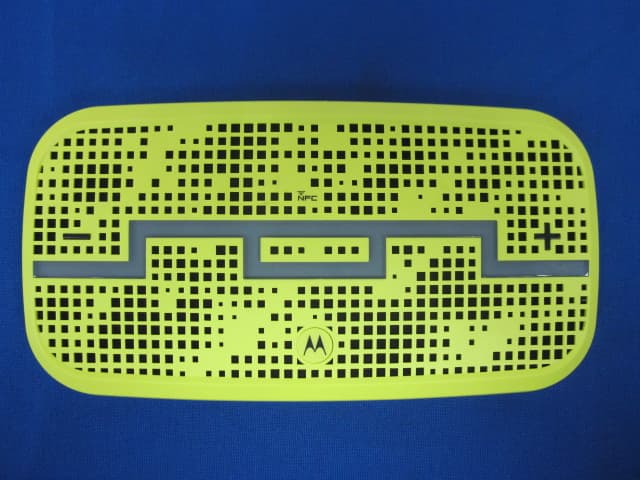
Click to zoom
Application Details
- Equipment Class
- DTS - Digital Transmission System
- Date of Grant
- Aug 01, 2013
- Application Purpose
- Original Equipment
- Date of Application
- Aug 01, 2013
- Equipment Note
- DECK
- Frequency Range
- 2402.00000000 - 2480.00000000
- Company
- Motorola Mobility LLC
- Country
- United States
Documents & Files
Document Text
Text extracted from the exhibit documents filed with the FCC. Open a document above to read the original.
Users Manual
safe, smart, protected en 23 JULY 2013 23 JULY 2013 1enSafety, Regulatory, & Legal Safety, Regulatory, & Legal Battery Use & Safety Warning: Your product contains a battery which should only be removed by a Motorola approved service center or recycler. •Don’t try to remove or replace the battery yourself. Attempting to remove or replace the battery may damage the battery and may cause burning and injury. •Don’t try to take apart or fix your product. Attempting to take apart or fix your product may damage the battery and may cause burning and injury. •Don’t crush, bend, or expose your product to heat or liquid. This may damage the battery and may cause burning and injury. Battery Charging Battery Charging Notes for charging your product’s battery: •During charging, keep your product and charger near room temperature for efficient battery charging. •New batteries are not fully charged. •New batteries or batteries stored for a long time may take more time to charge. •Motorola batteries and charging systems have circuitry that protects the battery from damage from overcharging. Third Party Accessories Using third party accessories, including but not limited to batteries, chargers, headsets, covers, cases, screen protectors, and memory cards, may impact your product’s performance. Using a non-Motorola battery or charger may present a risk of fire, explosion, leakage, or other hazard. Motorola’s warranty doesn’t cover damage to the product caused by non-Motorola batteries and/or chargers. For a list of Motorola accessories, visit www.motorola.com/us/consumers/Accessories/accessories,en_US,sc.ht ml (in English only). Driving Precautions Responsible and safe driving is your primary responsibility when driving a vehicle. Making calls or using applications while driving may cause distraction, and may be prohibited or restricted in certain areas—always obey local laws and regulations for the use of mobile devices and accessories in the vehicle. While driving, ALWAYS: •Keep your eyes on the road. 23 JULY 2013 2Safety, Regulatory, & Legalen •Use a handsfree device if available or required by law in your area. •Enter destination information into a navigation device before driving. •Use voice activated features (such as voice dial) and speaking features (such as audible directions), if available. •Concentrate on driving, and stop using the mobile device if you can’t concentrate. Pull over safely before using your mobile device to send messages, surf the web, or use other applications. Remember to follow the “Responsible Driving” tips at www.motorola.com/callsmart (in English only). Caution About High Volume Usage Warning: Exposure to loud noise from any source for extended periods of time may affect your hearing. The louder the volume sound level, the less time is required before your hearing could be affected. To protect your hearing: •Limit the amount of time you use headsets or headphones at high volume. •Avoid turning up the volume to block out noisy surroundings. •Turn the volume down if you can’t hear people speaking near you. If you experience hearing discomfort, including the sensation of pressure or fullness in your ears, ringing in your ears, or muffled speech, you should stop listening to the device through your headset or headphones and have your hearing checked. Children Children Keep your product and its accessories away from small children. These products are not toys and may be hazardous to small children. For example, a choking hazard may exist for small, detachable parts. Use & Care Use & Care To care for your Motorola product, please observe the following: liquids Don’t expose your product to water, rain, extreme humidity, sweat, or other liquids. drying Don’t try to dry your product using a microwave oven, conventional oven, or dryer. 23 JULY 2013 3enSafety, Regulatory, & Legal extreme heat or cold Avoid temperatures below -10°C (14°F) or above 60°C (140°F). For battery powered accessories, do not recharge your accessory in temperatures below 0°C (32°F) or above 45°C (113°F). dust and dirt Don’t expose your product to dust, dirt, sand, food, or similar materials. cleaning To clean your product, use only a dry soft cloth. Don’t use alcohol or other cleaning solutions. shock and vibration Don’t drop your product or expose it to strong vibration. protection To help protect your product, always make sure that all connector and compartment covers are closed and secure, and avoid carrying it with hard objects such as keys or coins. Symbol Key Your battery, charger, accessory product, user’s guide, or packaging may contain symbols, defined as follows: SymbolDefinition Important safety information follows. Do not dispose of your product or battery in a fire. Your product or battery may require recycling in accordance with local laws. Contact your local regulatory authorities for more information. 032374o 032376o 032375o 23 JULY 2013 4Safety, Regulatory, & Legalen European Union Directives Conformance Statement EU Conformance The following CE compliance information is applicable to Motorola products that carry one of the following CE marks: Hereby, Motorola declares that this product is in compliance with: •The essential requirements and other relevant provisions of Directive 1999/5/EC •All other relevant EU Directives For products that support Wi-Fi 802.11a (as defined in your product information): This device is restricted to indoor use when operating in the 5.15 to 5.25 GHz (802.11a) Wi-Fi frequency band. The following gives an example of a typical Product Approval Number: Don’t dispose of your product or battery with your household waste. See “Disposal & Recycling” for more information. For indoor use only. SymbolDefinition 0168 Product Approval Number 23 JULY 2013 5enSafety, Regulatory, & Legal You can view your product’s Declaration of Conformity (DoC) to Directive 1999/5/EC (to R&TTE Directive) at www.motorola.com/rtte (in English only). To find your DoC, enter the Product Approval Nu…
Text truncated - open the document above for the full version.
Users Manual
DECK USER MANUAL CONGRATULATIONS. YOU’RE ENTERING A NEW WORLD OF SOUND. OVERVIEW THE GOODS 4 POWER 6 CONNECT 8 SINGLE USER MODE 10 HEIST MODE ™ 12 ADVANCED 14 TROUBLE 15 SAFETY, REGULATORY & LEGAL 15 CAUTION Before using this product, please read the safet y, regulator y and leg al information in the legal booklet. PREPARE TO: Experience music like you’ve never heard or felt before. Play the mix you want or swap out DJ duties with up to four friends. Choose indoor or outdoor EQ for sound sculpted to your location. Make and take crystal clear calls on your DECK Bluetooth speaker. THE GOODS STATUS LIGHTNFC READER LOCATION Touch device here to pair. POWER BUTTON Press & hold to turn on or off. VOLUME DOWNVOLUME UPMICROPHONEMULTI-FUNCTION BUTTON Press to play & pause music, answer & end calls, Outdoor Mode, Heist™ Lock. ENUSER GUIDE 5 4THE GOODS 3.5mm line out 3.5mm Line in Status light Charge Power Selector Switch 7 POWER First thing’s first: give DECK a charge. Plug the small end of the USB into the micro USB port located on the side of DECK. Then plug the large end into the included AC adaptor and plug that into the wall outlet. Your speaker needs power, so load it all the way before you use it. It is fully charged when the status light turns green. NOTES For optimum block-rocking power, always use the charger and cable included in this package. Turn off the speaker when you’re not using it. CAUTION This batter y is designed to last the life of your device. So you don’t need to take it out or mess with it. If you tr y to remove or replace your batter y it will void your warranty and could cause injur y and damage your device. If you suspect battery trouble, see “Trouble” section. If that doesn’t help, take it to an authorized facility. ENUSER GUIDE 7 6POWER NFC ™ CONNECT Now let’s get DECK and your device talking to each other. There are two ways to do it: the Bluetooth ® EASYPAIR ™ Method and the NFC ™ way. EASYPAIR ™ works for everybody. NFC ™ people — you know who you are. EASYPAIR ™ METHOD STEP 1 If you have an NFC enabled device, turn on Bluetooth ® and NFC. STEP 2 Turn on DECK. STEP 3 Tap your NFC enabled phone to the top of DECK; and like magic, the device tells you when pairing is complete. NOTE The NFC™ reader location and function can var y between devices. See your device user’s guide for more details. If you are having difficulty pairing use the EASYPAIR™ mode. NOTE Device paired while in HEIST MODE™ will only pair for music play, if you wish to also use your device for phone calls, please pair in Single User Mode first. STEP 4 When the device and DECK are connected, you’ll get a pairing complete tone. STEP 1 Turn on Bluetooth ® o n your device. STEP 2 Turn on DECK and it will auto- matically go into pairing mode. STEP 3 Go to the Bluetooth ® menu on your device and select DECK. Enter 0000 if requested. ENUSER GUIDECONNECT 9 8 SINGLE USER MODE To activate Single User Mode, slide the selector switch to . Single User Mode lets you stream music from your phone directly to DECK for unrivaled sound quality. If you want to make or receive a phone call, DECK seamlessly converts to a fully functioning speakerphone. MUSIC — HOW TO DO STUFF Stream music from your device to DECK by star ting and controlling music playback from the device. Music will automatically pause when you make or receive a call and will resume when the call ends. STATUS LIGHT The status light nex t to the power button shows Bluetooth ® and batter y status. Here’s a guide to reading it. TO Play/Pause music Skip to nex t track Skip to previous track Turn the volume up or down Switch between Indoor and Outdoor EQ mode Hear remaining batter y life TO Answer a call Reject a call Make a voice dial call Mute or unmute a call End a call IF THE LIGHT IS Flashing blue Steady blue for three seconds, then off Red Ye l l o w Green PRESS The button once. The button two times. The button three times. Volume + / – on DECK or your device one or more times. The button and hold until you hear “indoor” or “outdoor”. Both volume buttons while music playback is paused. PRESS The button. The volume button and hold until you hear a tone. The button and hold to activate your phone’s voice commands. The volume buttons at the same time and hold until you hear “mute on” or “mute of f.” The button. YOUR SPEAKER IS Powered on & searching for a device. Connected to a device. Charging, and at low power. Charging, and at medium power. Plug ged in and fully charged. CALL ENUSER GUIDE 11 10SINGLE USER MODE 13 HEIST MODE ™ Enjoy music with your friends. HEIST MODE ™ let’s you connect up to five mobile devices to DECK and have everyone take turns playing their favorite mixes. To activate HEIST MODE ™ , slide the selector switch to . NOTE HEIST MODE™ is all about music. Phone calling features are not available in this mode. CONNECTING DEVICES Connect each device to DECK as normal. You don’t have to turn off DECK to connect a new device as long as you do it within five minutes of turning on DECK. To connect a new device af ter five minutes have passed, slide the selector switch to to put DECK back into Bluetooth ® discoverable mode for another five minutes. The SOL REPUBLIC logo illuminates in different colors. as each device is paired to DECK. To reconnect using previously connected devices, just turn them on. You’ll see the logo flash. PLAY MUSIC Once you and your friends are connected, just push play — the first one starts the party. You control the par ty as long as your DJ skills don’t run out. Others can join in by simply hitting play on their device. You’ll know who’s in charge by the changing color of the LED lights on DECK. Avoid getting heisted by pressing the button. To unlock it, hit the button again. NOTE The but ton will not control music while in HEIST MODE™ NOTE Each mobile device gets a unique color when it connects to the speaker. The LED-illuminated SOL REPUBLIC logo indicates which device is currently playing. NOTE If the device list…
Text truncated - open the document above for the full version.
Cover Letter(s)
Motorola Mobility, LLC. Date: July 29, 2013 Federal Communications Commission Authorization and Evaluation Division FCC ID: IHDT6PB1 ATTESTATION FCC ID: IHDT6PB1 Product: DECK Model: EQ700 We don't provide any controls or software to allow operation outside the USA frequency band when we sell this product in USA. Sincerely, __________________ Matt Li /Certification Engineer Weifang GoerTek Electronics Co., Ltd
Cover Letter(s)
RF_160, Issue 02 Motorola Mobility, LLC. We Name: Motorola Mobility, LLC. Address: 8000 W. Sunrise Blvd, Suite A Plantation, FL 33322, USA City: Florida............................................................................ Country: United States ............................................................................ Declare that: Name Representative of agent: Gene Chang (1) Agent Company name: QuieTek Corp. Address: Fl.2, No.345, Xin-hu 2 nd Rd., Nei-hu District City: Taipei Country Taiwan is authorized to apply for Certification of the following product(s): Product description: DECK ............ Type designation: EQ700 .................. Trademark: Motorola on our behalf. Date: ...... 2013-7-29.............. City: ...... Weifang .......................... Name: ...... Matt Li ................................ Function: ...... Certification Engineer ............................ Signature: ... .......................................... Notes: (1): Required for FCC application (2): For FCC it must be the Grantee Code “owner” or the authorized agent.
Cover Letter(s)
FCC ID: IHDT6PB1 Motorola Mobility LLC., 8000 W. Sunrise Blvd, Suite A; Plantation, FL 33322, USA Pag e 13A - 1 25 June 2013 Power of Attorney RE: Power of Attorney. We, the undersigned Motorola Mobility LLC hereby authorize QuieTek Corporation Weifang GoerTek Electronics Co., Ltd (GoerTek) to act on our behalf in all matters relating to any and all processes required in obtaining FCC approval for FCC ID: IHDT6PB1, and any communication required with the national authority. Any and all acts carried out by GoerTek on our behalf shall have the same effects as acts of our own, subject to this Power of Attorney. This Power of Attorney will be effective between 25 June 2013 and 31 July 2013, and will expire thereafter. If you have any questions regarding this authorization, please don’t hesitate to contact us. Sincerely yours, FCC Liaison Motorola Mobility LLC 8000 W. Sunrise Blvd, Suite A Plantation, FL 33322 Phone: (954) 723-6272 FAX: (954) 337-2377 Mail: [email protected]
Cover Letter(s)
Motorola Mobility, LLC. 8000 W. Sunrise Blvd, Suite A Plantation, FL 33322, USA Attestation for FCC Declaration of Conformity FCC ID: IHDT6PB1 Date: 2013/07/29 Please be notified that we, the undersigned, Motorola Mobility, LLC. declares that the product which bears the above FCC ID is also compliant with the FCC requirements for DOC. The test report number supporting the DOC is 137163R-ITUSP01V02 Testing in regards to this report was done by QuieTek Corp., located at No.5-22, Rueishu Keng, Rueiping Tsuen, Linkou Shiang, Taipei County 244, Taiwan, which has been accredited in accordance to all of the requirements of 47CFR 2.948 (d) and (e) of the FCC rules and KDB349827. Sincerely Matt Li/Certification Engineer Weifang GoerTek Electronics Co., Ltd
Cover Letter(s)
FCC ID: IHDT6PB1 Motorola Mobility LLC., 8000 W. Sunrise Blvd, Suite A; Plantation, FL 33322, USA Pag e 13B - 1 25 June 2013 Authorization of Agent Federal Communications Commission Authorization and Evaluation Division 7435 Oakland Mills Road Columbia, Maryland 21046 RE: Grantee Code IHD. Authorization: I, John Lewczak, the FCC contact for Grantee Code “IHD,” hereby authorize the following company (agent) to act on behalf of Motorola Mobility LLC. for the application specified below. This includes: • Form 731, Attestation Statement Exhibit, and Confidentiality Request Signatures. • Technical Contact. • Non-Technical Contact. • Test Firm Contact Information. Notifications of grant issuance should be routed to the applicant of record for Grantee Code “IHD,” as should any audit requests concerning this device. Authorized Agent: Matt Li, Weifang GoerTek Electronics Co., Ltd Gaoxin 2 Road, Free Trade Zone Weifang, Shandong, 261205, P.R.China Email: [email protected] Phone: 86-532-8897-3250. Specific Application: FCC ID: IHDT6PB1 Contact Information: Please contact me by telephone at (954) 723-6272, or by e-mail ( [email protected]), if there are questions or additional information needed concerning this authorization Regards, FCC Liaison Motorola Mobility LLC. 8000 W. Sunrise Blvd, Suite A Plantation, FL 33322
Cover Letter(s)
Motorola Mobility, LLC. Date:July 29, 2013 Federal Communications Commission Authorization and Evaluation Division FCC ID: IHDT6PB1 Confidentiality Request Pursuant to Sections 0.457 and 0.459 of the Commission’s Rules, the Applicant hereby requests confidential treatment of information accompanying this Application as outlined below: 1 Schematics 2 Block Diagram 3 Operational Description The above materials contain trade secrets and proprietary information not customarily released to the public. The public disclosure of these matters might be harmful to the Applicant and provide unjustified benefits to its competitors. In additional to above mentioned documents, pursuant to Public Notice DA 04-1705 of the Commission’s policy, in order to comply with the marketing regulations in 47 DFR § 2.803 and the importation rules in 47 CFR § 2.1204, while ensuring that business sensitive information remains confidential until the actual marketing of newly authorized devices.. We are requesting the commission to grant forty-five days short-term confidentiality request on the following attachments: External Photos Internal Photos Test Setup Photos User Manual The Applicant understands that pursuant to Rule 0.457, disclosure of this Application and all accompanying documentation will not be made before the date of the Grant for this application. Sincerely, Matt Li /Certification Engineer Weifang GoerTek Electronics Co., Ltd
External Photos
EUT Photograph (1) EUT Photo (2) EUT Photo (3) EUT Photo (4) EUT Photo (5) EUT Photo (6) EUT Photo (7) EUT Photo (8) EUT Photo (9) EUT Photo (10) EUT Photo
Internal Photos
EUT Photograph (1) EUT Photo (2) EUT Photo (3) EUT Photo (4) EUT Photo (5) EUT Photo (6) EUT Photo (7) EUT Photo
RF Exposure Info
RF Exposure Evaluation Declaration Product Name : DECK Model No. : EQ700 FCC ID : IHDT6PB1 Applicant : Motorola Mobility, LLC. Address : 8000 W. Sunrise Blvd, Suite A Plantation, FL 33322, USA Date of Receipt : 21/06/2013 Issued Date : 10/07/2013 Report No. : 136S051R-RF-US-P20V01 Report Version : V 1.0 The test results relate only to the samples tested. The test results shown in the test report are traceable to the national/international standard through the calibration of the equipment and evaluated measurement uncertainty herein. This report must not be used to claim product endorsement by TAF, CNAS or any agency of the Government. The test report shall not be reproduced except in full without the written approval of QuieTek Corporation. Report No: 136S051R-RF-US-P20V01 Page: 2 of 5 Test Report Certification Issued Date : 10/07/2013 Report No. : 136S051R-RF-US-P20V01 Product Name : DECK Applicant : Motorola Mobility, LLC. Address : 8000 W. Sunrise Blvd, Suite A Plantation, FL 33322, USA Manufacturer : Motorola Mobility, LLC. Address : 8000 W. Sunrise Blvd, Suite A Plantation, FL 33322, USA Model No. : EQ700 FCC ID : IHDT6PB1 EUT Voltage : DC: 3.7V Brand Name : Motorola Applicable Standard : FCC OET 65 IEEE Std. 1528-2003; 47CFR § 2.1093 Test Result : Complied Performed Location : Suzhou EMC Laboratory No.99 Hongye Rd., Suzhou Industrial Park Loufeng Hi-Tech Development Zone., Suzhou, China TEL: +86-512-6251-5088 / FAX: +86-512-6251-5098 FCC Registration Number: 800392 Documented By : Reviewed By : Approved By : Report No: 136S051R-RF-US-P20V01 Page: 3 of 5 Laboratory Information We, QuieTek Corporation, are an independent EMC and safety consultancy that was established the whole facility in our laboratories. The test facility has been accredited/accepted(audited or listed) by the following related bodies in compliance with ISO 17025, EN 45001 and specified testing scope: The related certificate for our laboratories about the test site and management system can be downloaded from QuieTek Corporation’s Web Site :http://www.quietek.com/tw/ctg/cts/accreditations.htm The address and introduction of QuieTek Corporation’s laboratories can be founded in our Web site : http://www.quietek.com/ If you have any comments, Please don’t hesitate to contact us. Our contact information is as below: HsinChu Testing Laboratory : No.75-2, 3rd Lin, Wangye Keng, Yonghxing Tsuen, Qionglin Shiang, Hsinchu County 307, Taiwan, R.O.C. TEL:+886-3-592-8858 / FAX:+886-3-592-8859 E-Mail : [email protected] LinKou Testing Laboratory : No.5-22, Ruishukeng, Linkou Dist., New Taipei City 24451, Taiwan, R.O.C. TEL : 886-2-8601-3788 / FAX : 886-2-8601-3789 E-Mail : [email protected] Suzhou Testing Laboratory : No.99 Hongye Rd., Suzhou Industrial Park Loufeng Hi-Tech Development Zone., SuZhou, China TEL : +86-512-6251-5088 / FAX : 86-512-6251-5098 E-Mail : [email protected] Taiwan R.O.C. :BSMI, NCC, TAF Germany :TUV Rheinland Norway :Nemko, DNV USA :FCC Japan :VCCI China :CNAS Report No: 136S051R-RF-US-P20V01 Page: 4 of 5 1. RF Exposure Evaluation 1.1. Limits According to FCC 1.1310: The criteria listed in the following table shall be used to evaluate the environment impact of human exposure to radio frequency (RF) radiation as specified in 1.1307(b) LIMITS FOR MAXIMUM PERMISSIBLE EXPOSURE (MPE) Frequency Range (MHz) Electric Field Strength (V/m) Magnetic Field Strength (A/m) Power Density (mW/cm2) Average Time (Minutes) (A) Limits for Occupational/ Control Exposures 300-1500 -- -- F/300 6 1500-100,000 -- -- 5 6 (B) Limits for General Population/ Uncontrolled Exposures 300-1500 -- -- F/1500 6 1500-100,000 -- -- 1 30 F= Frequency in MHz Friis Formula Friis transmission formula: Pd = (Pout*G)/(4*pi*r2) Where Pd = power density in mW/cm2 Pout = output power to antenna in mW G = gain of antenna in linear scale Pi = 3.1416 R = distance between observation point and center of the radiator in cm Pd id the limit of MPE, 1 mW/cm2 . If we know the maximum gain of the antenna and the total power input to the antenna, through the calculation, we will know the distance r where the MPE limit is reached. Report No: 136S051R-RF-US-P20V01 Page: 5 of 5 1.2. Test Procedure Software provided by client enabled the EUT to transmit and receive data at lowest, middle and highest channel individually. The temperature and related humidity: 18°Cand 78% RH. 1.3. Test Result of RF Exposure Evaluation Product : DECK Test Item : RF Exposure Evaluation Test Site : AC-6 Antenna Gain: Antenna Gain: The maximum Gain measured in fully anechoic chamber is -2.08dBi in logarithm scale. Output Power into Antenna & RF Exposure Evaluation Distance: Frequency Band (MHz) Maximum Output Power to Antenna (mW) Power Density at R = 20 cm (mW/cm2) 2402 - 2480 MHz 9.8628 0.001215 Note: The power density Pd (4th column) at a distance of 20 cm calculated from the Friis transmission formula is far below the limit of 1 mW/cm2. The End
Test Report
FCC Part15.247 Test Report Product Name : DECK Model No. : EQ700 FCC ID : IHDT6PB1 Applicant : Motorola Mobility, LLC. Address : 8000 W. Sunrise Blvd, Suite A Plantation, FL 33322, USA Date of Receipt : 21/06/2013 Test Date : 22/06/2013~19/07/2013 Issued Date : 23/07/2013 Report No. : 136S051R-RF-US-P06V01 Report Version : V 1.1 The test results relate only to the samples tested. The test results shown in the test report are traceable to the national/international standard through the calibration of the equipment and evaluated measurement uncertainty herein. This report must not be used to claim product endorsement by TAF, CNAS or any agency of the Government. The test report shall not be reproduced except in full without the written approval of QuieTek Corporation. Report No.: 136S051R-RF-US-P06V01 Page: 2 of 139 Test Report Certification Issued Date : 23/07/2013 Report No. : 136S051R-RF-US-P06V01 Product Name : DECK Applicant : Motorola Mobility, LLC. Address : 8000 W. Sunrise Blvd, Suite A Plantation, FL 33322, USA Manufacturer : Motorola Mobility, LLC. Address : 8000 W. Sunrise Blvd, Suite A Plantation, FL 33322, USA Model No. : EQ700 FCC ID : IHDT6PB1 EUT Voltage : DC: 3.7V Trade Name : Motorola Applicable Standard : FCC CFR Title 47 Part 15 Subpart C: 2012 ANSI C63.4: 2009; ANSI C63.10: 2009 Test Result : Complied Performed Location : Suzhou EMC Laboratory No.99 Hongye Rd., Suzhou Industrial Park Loufeng Hi-Tech Development Zone., Suzhou, China TEL: +86-512-6251-5088 / FAX: +86-512-6251-5098 FCC Registration Number: 800392 Documented By : Reviewed By : Approved By : Report No.: 136S051R-RF-US-P06V01 Page: 3 of 139 Laboratory Information We, QuieTek Corporation, are an independent EMC and safety consultancy that was established the whole facility in our laboratories. The test facility has been accredited/accepted(audited or listed) by the following related bodies in compliance with ISO 17025, EN 45001 and specified testing scope: The related certificate for our laboratories about the test site and management system can be downloaded from QuieTek Corporation’s Web Site :http://www.quietek.com/tw/ctg/cts/accreditations.htm The address and introduction of QuieTek Corporation’s laboratories can be founded in our Web site : http://www.quietek.com/ If you have any comments, Please don’t hesitate to contact us. Our contact information is as below: HsinChu Testing Laboratory : No.75-2, 3rd Lin, Wangye Keng, Yonghxing Tsuen, Qionglin Shiang, Hsinchu County 307, Taiwan, R.O.C. TEL:+886-3-592-8858 / FAX:+886-3-592-8859 E-Mail : [email protected] LinKou Testing Laboratory : No.5-22, Ruishukeng, Linkou Dist., New Taipei City 24451, Taiwan, R.O.C. TEL : 886-2-8601-3788 / FAX : 886-2-8601-3789 E-Mail : [email protected] Suzhou Testing Laboratory : No.99 Hongye Rd., Suzhou Industrial Park Loufeng Hi-Tech Development Zone., SuZhou, China TEL : +86-512-6251-5088 / FAX : 86-512-6251-5098 E-Mail : [email protected] Taiwan R.O.C. :BSMI, NCC, TAF Germany :TUV Rheinland Norway :Nemko, DNV USA :FCC Japan :VCCI China :CNAS Report No.: 136S051R-RF-US-P06V01 Page: 4 of 139 TABLE OF CONTENTS Description Page 1. General Information.................................................................................................... 7 1.1. EUT Description ......................................................................................................... 7 1.2. Mode of Operation ..................................................................................................... 9 1.3. Tested System Details .............................................................................................. 10 1.4. Configuration of Tested System ............................................................................... 11 1.5. EUT Exercise Software ............................................................................................ 13 2. Technical Test ........................................................................................................... 14 2.1. Summary of Test Result ........................................................................................... 14 2.2. Test Environment ..................................................................................................... 15 3. Conducted Emission ................................................................................................ 16 3.1. Test Equipment ........................................................................................................ 16 3.2. Test Setup ................................................................................................................ 16 3.3. Limit .......................................................................................................................... 17 3.4. Test Procedure ......................................................................................................... 17 3.5. Uncertainty ............................................................................................................... 17 3.6. Test Result ............................................................................................................... 18 4. Radiated Emission ................................................................................................... 20 4.1. Test Equipment ........................................................................................................ 20 4.2. Test Setup ................................................................................................................ 21 4.3. Limit .......................................................................................................................... 22 4.4. Test Procedure ......................................................................................................... 22 4.5. Uncertainty ............................................................................................................... 23 4.6. Test Result .............…
Text truncated - open the document above for the full version.
Test Setup Photos
Test Setup Photograph for FCC 15.247/IC Description: Front of Conducted Emission Test Setup Description: Side of Conducted Emission Test Setup Description: Radiated Emission Test Setup for Below 30MHz Description: Radiated Emission Test Setup for Below 1GHz Description: Radiated Emission Test Setup for 1~18GHz Description: Radiated Emission Test Setup for Above 18GHz Test Setup Photograph for FCC 15.225/IC Description: Front of Conducted Emission Test Setup Description: Side of Conducted Emission Test Setup Description: Radiated Emission Test Setup for Below 30MHz Description: Radiated Emission Test Setup for Below 1GHz
Contact Information
Applicant
Jeff Narducci(Director Product Compliance)
Technical Contact
QuieTek Technology (Suzhou) Co.,Ltd.Robin Wu
[email protected]86-0512-6251-5088
No.99 Hongye RD.Suzhou Industrial Park, · Suzhou · China
Test Firm
DEKRA Testing and Certification (Suzhou) Co., Ltd.Jerry Pan
Technical Specifications
| # | Rule Parts | Frequency Range | Power Output |
|---|---|---|---|
| 1 | 15C | 2.40 GHz - 2.48 GHz | 9.42 mW |
Other Applications from Motorola Mobility LLC
IHDT56AW9
May 12, 2026Smart Watch
Equipment Class
NII - Unlicensed National Information Infrastructure TXIHDT56AW5
Apr 08, 2026Mobile Cellular Phone
Equipment Class
DTS - Digital Transmission SystemIHDT56AW6
Mar 18, 2026Smart Watch
Equipment Class
JBP - Part 15 Class B Computing Device PeripheralIHDT56AX4
Mar 17, 2026Mobile Cellular Phone
Equipment Class
PCE - PCS Licensed Transmitter held to earIHDT56AW3
Mar 03, 2026Mobile Cellular Phone
Equipment Class
6XD - 15E 6 GHz Low Power Indoor Client