IHDT6QG1BT headset
Motorola Mobility LLC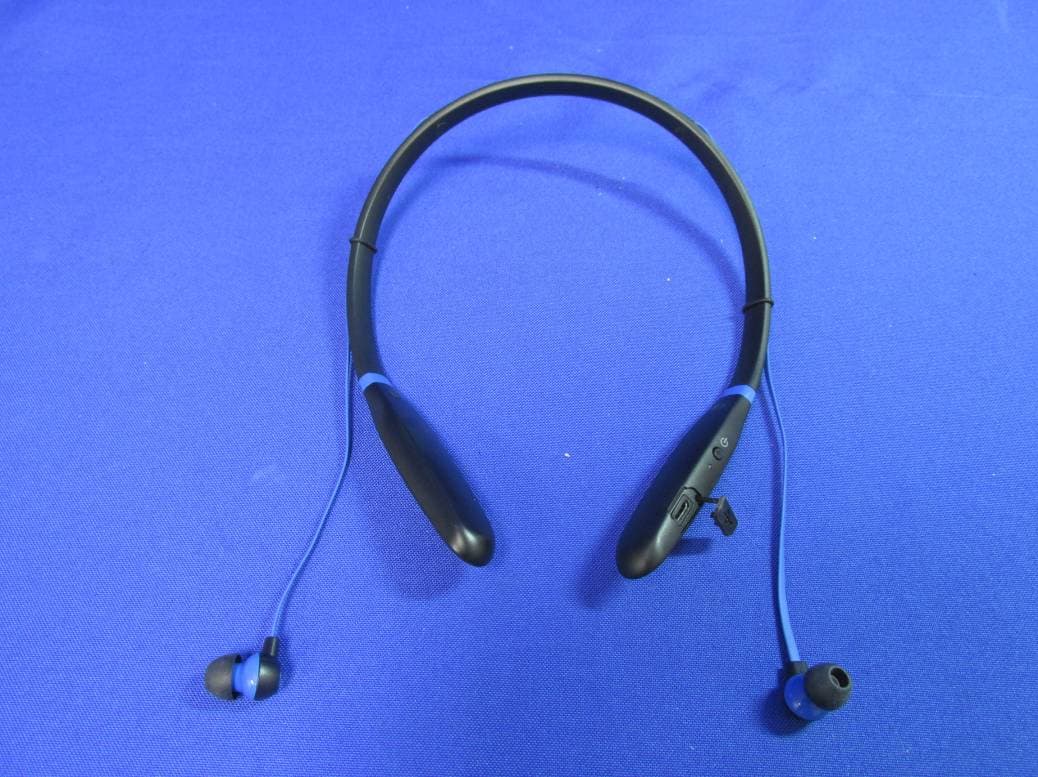
Click to zoom
Application Details
- Equipment Class
- DSS - Part 15 Spread Spectrum Transmitter
- Date of Grant
- Jul 21, 2015
- Application Purpose
- Original Equipment
- Date of Application
- Jul 19, 2015
- Equipment Note
- BT headset
- Frequency Range
- 2402.00000000 - 2480.00000000
- Company
- Motorola Mobility LLC
- Country
- United States
Documents & Files
Document Text
Text extracted from the exhibit documents filed with the FCC. Open a document above to read the original.
Users Manual
en-USen-US safe, smart, protected enSafety, Regulatory & Legal1 Safety, Regulatory & Legal Battery Use & Safety Warni ng: Your product contains a battery that should only be removed by a Motorola approved service center or recycler. •Don’t try to remove or replace the battery yourself. Attempting to remove or replace the battery may damage the battery and may cause burning and injury. •Don’t try to take apart or fix your product. Attempting to take apart or fix your produc t may damage the battery and may cause burning and injury. •Don’t crush, bend, or expose your product to heat or liquid. This may damage the battery and may cause burning and injury. Battery Charging Battery Charging Notes for charging your product’s battery: •During charging, keep your product and charger near room temperature for efficient battery charging. •New batteries are not fully charged. •New batteries and batteries that have been stored for a while may take longer to charge. •Motorola batteries and charging systems have circuitry that protects the battery from damage from overcharging. Third Party Accessories Using third party accessories, including but not limited to batteries, chargers, headsets, covers, cases, screen protectors, and memory cards, may impact 2Safety, Regulatory & Legalen your product’s performance. Using a non-Motorola battery or charger may present a risk of fire, explosion, leakage, or other hazard. Motorola’s warranty doesn’t cover damage to the product caused by non-Motorola batteries and/or chargers. For a list of Motorola accessories, visit www.motorola.com/us/consumers/Accessories/accessories,en_US,sc.html (in English only). Driving Precautions Driving Precaut ions Responsible and safe driving is your primary responsibility when driving a vehicle. Always obey local laws and regulations. While driving, ALWAYS: •Keep your eyes on the road. •Use a handsfree device if available or required by law in your area. •Enter destination information into a navigation device before driving. •Use voice activated features (such as voice dial) and speaking features (such as audible directions), if available. •Concentrate on driving, and stop using the device if you can’t concentrate. Pull over safely before using your mobile device to send messages, surf the web, or use other applications. Caution About High Volume Usage Warni ng: Exposure to loud noise from any source for extended periods of time may affect your hearing. The louder the sound, the less time is required before your hearing could be affected. To protect your hearing: •Limit the amount of time you use headsets or headphones at high volume. •Avoid turning up the volume to block out noisy surroundings. •Turn the volume down if you can’t hear people speaking near you. enSafety, Regulatory & Legal3 If you experience hearing discomfort, including the sensation of pressure or fullness in your ears, ringing in your ears, or muffled speech, you should stop listening to the device through your headset or headphones and have your hearing checked. Children Children Keep your mobile device and its accessories away from small children. These products are not toys and may be hazardous to small children. For example, a choking hazard may exist for small, detachable parts. Supervise access. If a child does use your mobile device and accessories, monitor their access to help prevent loss of data or unexpected charges for data or application purchases. Allergens Glass Parts Motorola Mobility avoids using known allergens in our products. From time to time, trace amounts of an allergen may be added during manufacture of a device or device component that could cause discomfort for some individuals. This approach is common for many types of products. We recommend that you monitor any products that may be in prolonged contact with your skin, and remove them if you experience skin irritation. Use & Care Use & C are To care for your Motorola product, please observe the following. •Liquids: Don’t expose your product to water, rain, extreme humidity, sweat, or other liquids. •Drying: Don’t try to dry your product using a microwave oven, conventional oven, or dryer. 4Safety, Regulatory & Legalen •Extreme heat or cold: Avoid temperatures below -10°C (14°F) or above 60°C (140°F). For battery powered accessories, do not recharge your accessory in temperatures below 0°C (32°F) or above 45°C (113°F). •Dust and dirt: Don’t expose your product to dust, dirt, sand, food, or similar materials. •Cleaning: To clean your product, use only a dry soft cloth. Don’t use alcohol or other cleaning solutions. • Shock and vibration: Don’t drop your product or expose it to strong vibration. •Protection: To help protect your product, always make sure that all connector and compartment covers are closed and secure, and avoid carrying it with hard objects such as keys or coins. Symbol Key Your battery, charger, accessory product, user’s guide, or packaging may contain symbols, defined as follows: SymbolDefinition Important safety information follows. Don’t dispose of your battery or accessory product in a fire. 032374o 032376o enSafety, Regulatory & Legal5 Your battery or accessory product may require recycling in accordance with local laws. Contact your local regulatory authorities for more information. Don’t dispose of your battery or accessory product with your household waste. See “Disposal & Recycling” for more information. Fo r i n d o or u s e o nl y. Only use your charger indoors. SymbolDefinition 032375o 6Safety, Regulatory & Legalen European Union Directives Conformance Statement EU Conformance The following CE compliance information is applicable to Motorola products that carry one of the following CE marks: Hereby, Motorola declares that this product is in compliance with: •The essential requirements and other relevant provisions of Directive 1999/5/EC •All other relevant EU Directives For products that support Wi-Fi 802.11a/ac (as defined in your product information): This d…
Text truncated - open the document above for the full version.
Users Manual
en-US read me 1-JUL-15 1-JUL-15 enYour wireless earbuds1 Your wireless earbuds Wear Power Status Light Volume & Track Control + _ / Calls, Voice & Music / Calls, Voice & Music 1-JUL-15 2Step 1: Charge up & power onen Step 1: Charge up & power on Note: Before use, charge until the status light turns green. (Wall charger not included.) Charge up. Power on. Press and hold Power 1-JUL-15 enStep 2: Pair your earbuds3 Step 2: Pair your earbuds Pair with Motorola Connect Note: You can use this app on most devices with Android 4.3 or later. If your device is not compatible with Motorola Connect, follow the steps in “Pair with Bluetooth™” on page 4. 1Download the free Motorola Connect app from Google Play™. 2Turn on your wireless earbuds. 3Open Motorola Connect, touch +, and select Moto Surround from the list of devices. Ti p : You can also use Motorola Connect to check your battery, see the last known location where you connected, or get more help. 1-JUL-15 4Step 2: Pair your earbudsen Pair with Bluetooth™ Pair without the Motorola Connect app. 1 Turn on Bluetooth on your device. 2 Turn on your wireless earbuds. 3 On your device, go to the Bluetooth menu to pair & connect. Enter 0000 if prompted. 4 When the device and earbuds connect, you’ll hear a tone. Light is solid blue. Light blinks blue. 1-JUL-15 enCalls, Voice & Music Control5 Calls, Voice & Music Control The buttons at the ends of your earbuds perform the same functions. Press either button to control calls, voice commands, and music. Note: Voice control may not work on some devices or in all languages. Note: Some features are phone/network dependent. Volume down Or press & hold to restart a track or play the last track. Volume up Or press & hold to play the next track. + Music Play/Pause Answer/End Calls Start Voice Command Music Play/Pause Answer/End Calls Start Voice Command 1-JUL-15 6Calls, Voice & Music Controlen Music play/pausepress volume down/uppress next/previous trackpress and hold Note: Depends on your phone’s music controls. change EQ settings press at the same time to go to the next sound profile Calls answer/end callpress mute during callpress reject a callpress and hold or + or + or + and or + and + or 1-JUL-15 enCalls, Voice & Music Control7 Voice To issue a voice command press and hold , then say a command or 1-JUL-15 8Advanceden Advanced Status Lights Pairing modeblinking blue Connectedsteady blue Low batteryblinking red Chargingsteady red Full chargesteady green Charge level checksteady green for two seconds Power offfading in/out blue 1-JUL-15 enAdvanced9 Charge Level Check Note: Not available on all models. Note: Your battery is designed to last the life of the product. It should only be removed by a recycling facility. Any attempt to remove or replace your battery may damage the product and void your warranty. Power Press quickly to hear remaining play time. 1-JUL-15 10Advanceden Reset Turn off Bluetooth for all connected devices. Turn on the wireless earbuds, then press and hold and both Volume buttons until the status light shows alternating red and blue. You’ll hear a tone. Note: This product contains exposed magnets and may damage magnetic information, such as credit card strips and ID cards. Second device Do you use a phone and a tablet? Or two phones? Connect with both of them at the same time. 1Pair with your first device using the steps in “Pair with Bluetooth™” on page 4. 2Turn off Bluetooth on your first device (your phone, tablet, or computer). 3Turn off the wireless earbuds. Then turn them back on. or 1-JUL-15 enAdvanced11 4Pair with your second device using the steps in “Pair with Bluetooth™” on page 4. 5On your first device, turn Bluetooth back on to connect to it simultaneously. You’ll hear a tone when the first device connects. Ti p : To switch and play audio from the second connected device, pause the current music device, then press play on the second device. 1-JUL-15 12Help & moreen Help & more •Get help: Visit www.motorola.com/support. • Accessories: Find more accessories at www.motorola.com/products. MOTOROLA and the Stylized M Logo are trademarks or registered trademarks of Motorola Trademark Holdings, LLC. All other product or service names are the property of their respective owners. © 2015 Motorola Mobility LLC. All rights reserved. Caution: Motorola does not take responsibility for changes/modification to the transceiver. Bluetooth ID: D023372 Product ID: Motorola SF520 Manual Number: 68017957001-B 1-JUL-15 enHelp & more13 1-JUL-15 1-JUL-15 es-US léeme es-US 1-JUL-15 1-JUL-15 es-USTus auriculares inalámbricos1 Tus auriculares inalámbricos Uso Encendido Luz de estado + _ / Llamadas, Voz y Música / Control de pistas y volumen Llamadas, Voz y Música 1-JUL-15 2Paso 1: Carga y enciendees-US Paso 1: Carga y enciende Nota: Antes de usar, cárgalos hasta que la luz de estado se encienda de color verde. Cárgalo. Enciéndelo. (No se incluye el cargador de pared). Mantén presionado Encendido 1-JUL-15 es-USPaso 2: Vincula tus auriculares3 Paso 2: Vincula tus auriculares Vincula con Motorola Connect Nota: Puedes utilizar esta aplicación en la mayoría de los dispositivos con Android 4.3 o posterior. Si tu dispositivo no es compatible con Motorola Connect, sigue los pasos en “Vincula con Bluetooth™” en la página 4. 1Descarga la aplicación gratuita Motorola Connect desde Google Play™. 2Activa tus auriculares inalámbricos. 3Abre Motorola Connect, toca + y selecciona Moto Surround de la lista de dispositivos. Consejo: También, puedes utilizar Motorola Connect para verificar la batería, ver la última ubicación en la que te conectaste u obtener más ayuda. 1-JUL-15 4Paso 2: Vincula tus auriculareses-US Vincula con Bluetooth™ Vincula sin la aplicación Motorola Connect. Activa Bluetooth en tu dispositivo. Enciende tus auriculares inalámbricos. En el dispositivo, dirígete al menú de Bluetooth para vincular y conectar. Si se te solicita, ingresa 0000. Cuando el dispositivo y los auriculares se conecten, escucharás u…
Text truncated - open the document above for the full version.
Cover Letter(s)
FCC ID: IHDT6QG1 Motorola Mobility LLC; 8000 W. Sunrise Blvd, Suite A; Plantation, FL 33322, USA www.motorola.com Page 13b - 1 CONFIDENTIALITY REQUEST 30 June 2015 Federal Communications Commission Laboratory Authorization & Evaluation Division 7435 Oakland Mills Road Columbia, MD 21046 Subject: Confidentiality Request Regarding Application for Certification of FCC ID: IHDT6QG1. Dear Sir or Madam: Pursuant to Sections 0.457 and 0.459 of the Commission’s Rules, we hereby respectfully request confidential treatment of information accompanying this application as outlined below: Exhibit Type File Name Block Diagrams. IHDT6QG1_Ex_4 (Block Diagrams).pdf Schematic Diagrams. IHDT6QG1 _Ex_5 (Schematics).pdf Parts List and Tune Up Procedures. IHDT6QG1 _Ex_10 (Parts List and Tune- up).pdf Transmitter Characteristics. IHDT6QG1 _Ex_12 (Transceiver Characteristics).pdf Motorola Mobility LLC requests that these exhibits be held as Permanently Confidential, and not be made routinely available for public inspection. Motorola considers that the information in these exhibits should be classified as trade secrets, pursuant to 47 CFR Section 0.457(d) and Section 552(b)(4) of the Freedom of Information Act. The public disclosure of these materials may be harmful to the applicant and provide unjustified benefits to its competitors. Motorola Mobility LLC understands that, pursuant to Section 0.457 of the Rules, disclosure of this application and all accompanying documentation will not be made before the date of the Grant for this application. FCC ID: IHDT6QG1 Motorola Mobility LLC; 8000 W. Sunrise Blvd, Suite A; Plantation, FL 33322, USA www.motorola.com SHORT TERM ONFIDENTIALITY REQUEST – 180 DAYS Pursuant to the Commission’s public notice DA 04-1705 (June 15, 2004), Motorola Mobility LLC is also requesting Temporary Confidentiality treatment of information accompanying this application as outlined below. This provision will give Motorola Mobility LLC temporary confidentiality prior to product launch. Exhibit Type File Name External product photographs. IHDT6QG1 _Ex_3 (External Photos).pdf Test set-up photographs. IHDT6QG1 _Ex_7B (Test Set up Photos).pdf User’s Manual. IHDT6QG1 _Ex_8 (User Guide).pdf Internal product photographs. IHDT6QG1 _Ex_9 (Internal Photos).pdf 1 This exhibit not applicable to the JBP application, per 47 CFR 2.1031 Please contact me if you require any additional information. Regards, FCC Liaison Motorola Mobility LLC 8000 W. Sunrise Blvd.; Suite A Mail Stop 52-5JJ Plantation, FL 33322 E-mail: [email protected] Page 13b - 2
Cover Letter(s)
APPLICANT: MOTOROLA MOBILITY LLC FCC ID: IHDT6QG1 Motorola Mobility LLC; 8000 W. Sunrise Blvd, Suite A; Plantation, FL 33322, USA www.motorola.com 30 June 2015 Authorization & Evaluation Division Federal Communications Commission Laboratory 7435 Oakland Mills Road Columbia, MD 21046 Subject: Application for Certification of transmitter with FCC ID: IHDT6QG1, Bluetooth Headset. Gentlemen; Motorola Mobility LLC; 8000 W. Sunrise Blvd.; Plantation, FL 33322 herein submits its application for certification of the multi-mode handset with FCC ID: IHDT6QG1. This radio product is equipped with a Bluetooth (BT) transceiver. BT supports both voice and data for short range wireless communications. The Bluetooth Band of Operation is 2.402 - 2.480 GHz (1 MHz channel bandwidth). The BT device complies with the requirements of FCC Rule Parts 15.247, 15.205 and 15.209. Enclosed is a complete Certification Application. Contact me at (954) 590-0254 if you require any additional information. Regards, FCC Liaison Motorola Mobility LLC 8000 W. Sunrise Blvd.; Suite A Mail Stop 52-5JJ Plantation, FL 33322 E-mail: [email protected] Page 13a - 1
Cover Letter(s)
APPLICANT: MOTOROLA MOBILITY LLC FCC ID: IHDT6QG1 / 109O-T6QG1 Motorola Mobility LLC; 8000 W. Sunrise Blvd, Suite A; Plantation, FL 33322, USA www.motorola.com Exhibit 2. Statements of Certification -- Pursuant to 47 CFR 2.907. 2.1. Specification Compliance Transceiver type described herein (IHDT6QG1 and 109O-T6QG1) has been tested in accordance with the requirements contained in the appropriate regulations. To the best of my knowledge, these tests were performed using measurement procedures consistent with industry or Commission standards, and demonstrate that this equipment complies with the appropriate standards. Each unit manufactured, imported, or marketed will conform to the samples tested herein, within the statistical variations that can be expected due to high volume production and test measurement error. NAME: Marc Riley SIGNATURE: /s/ Marc Riley DATE: 7/1/2015 TITLE: Engineering Manager 2.2. Statement of Certification I hereby certify that the above application was prepared under my direction and that to the best of my knowledge and belief, the facts set forth in this application and accompanying technical data are true and correct. The technical data supplied with this application was taken under my supervision and is hereby duly certified. I also certify that this transmit equipment (IHDT6QG1) is in compliance with all applicable parts of the FCC Rules. The technical data supplied with this application was taken under my supervision and is hereby duly certified. I also certify that this transmit equipment (109O-T6QG1) is in compliance with all applicable Industry Canada Rules and Procedures. NAME: John Lewczak SIGNATURE: DATE: Date TITLE: Engineering Manager, Product Safety and Compliance Page 2 - 1 APPLICANT: MOTOROLA MOBILITY LLC FCC ID: IHDT6QG1 / 109O-T6QG1 Motorola Mobility LLC; 8000 W. Sunrise Blvd, Suite A; Plantation, FL 33322, USA www.motorola.com Page 2 - 2 2.3. Attestation Statement (Equipment Class DSS - Bluetooth) This device contains an embedded Bluetooth device that Motorola Mobility confirms are compliant with the applicable Part 15C regulations. Personal Hotspot operation is only supported in the 2.4 GHz band for this equipment class. 15.247(a)(1) • The hopping sequence must be pseudorandom. • All Channels are used equally on average. • The receiver input bandwidth is approximately equal to the transmit bandwidth. • The receiver hops in sequence with the transmitted signal. 15.247(g) The system is designed to comply with all of the regulations in Section 15.247 when the transmitter is presented with a continuous data (or information). 15.247(h) The system does not coordinate its channel selection/hopping sequence with other frequency hopping systems for the express purpose of avoiding the simultaneous occupancy of individual hopping frequencies by multiple transmitters. NAME: Marc Riley SIGNATURE: /s/ Marc Riley DATE: 7/1/2015 TITLE: Engineering Manager
External Photos
EUT External Photograph (1) EUT Photo (2) EUT Photo (3) EUT Photo (4) EUT Photo (5) EUT Photo
ID Label/Location Info
APPLICANT: MOTOROLA MOBILITY LLC FCC ID: IDHT6QG1 / IC ID: 109O-T6QG1 Motorola Mobility LLC; 8000 W. Sunrise Blvd, Suite A; Plantation, FL 33322, USA www.motorola.com Exhibit 1: Identification Label -- Pursuant to 47 CFR 2.925 and 2.1033(c)(11); and RSP100, Section 5 and RSS Gen, Section 5.2. 1.1 Location The regulatory information label (which includes the FCC and IC IDs) for this device is located etched on the earpiece of the device. 1.2 Type The label will be pad etched onto earpiece of the device. 1.3 Markings (Text) The FCC label shown is representative of the label that will appear on the radio when in production. Figure 1.3.1. Representation of FCC Label information. The above label representation is applicable to the following versions/variants of the device that is the subject of this application: Model No. Motorola SF520 FCC ID IHDT6QG1 IC: 109O-T6 QG1 Model Number 1 1 Depending upon the device version, or market into which it ships, the Model Number shown on the label may vary. All such variants will be electrically identical, consistent with the requirements of FCC Class I Permissive Change rules and guidance (47 CFR 2.1043 and KDB 178919 D01). This information will be permanently etched onto the equipment rear cover as shown below, and in Exhibit 3. Other information may also be present. Please note that this label and its placement complies with the requirement of FCC Rule 47 CFR 2.925(d) that the label be permanently affixed to the product, and be readily visible to the purchaser at the time of purchase. Page 1 - 1 APPLICANT: MOTOROLA MOBILITY LLC FCC ID: IDHT6QG1 / IC ID: 109O-T6QG1 Motorola Mobility LLC; 8000 W. Sunrise Blvd, Suite A; Plantation, FL 33322, USA www.motorola.com Page 1 - 2 The product’s Market or Trade Name is indelibly printed on the face of the product, as shown in Exhibit 3.
ID Label/Location Info
APPLICANT: MOTOROLA MOBILITY LLC FCC ID: IDHT6QG1 / IC ID: 109O-T6QG1 Motorola Mobility LLC; 8000 W. Sunrise Blvd, Suite A; Plantation, FL 33322, USA www.motorola.com Exhibit 1: Identification Label -- Pursuant to 47 CFR 2.925 and 2.1033(c)(11); and RSP100, Section 5 and RSS Gen, Section 5.2. 1.1 Location The regulatory information label (which includes the FCC and IC IDs) for this device is located etched on the earpiece of the device. 1.2 Type The label will be pad etched onto earpiece of the device. 1.3 Markings (Text) The FCC label shown is representative of the label that will appear on the radio when in production. Figure 1.3.1. Representation of FCC Label information. The above label representation is applicable to the following versions/variants of the device that is the subject of this application: Model No. Motorola SF520 FCC ID IHDT6QG1 IC: 109O-T6 QG1 Model Number 1 1 Depending upon the device version, or market into which it ships, the Model Number shown on the label may vary. All such variants will be electrically identical, consistent with the requirements of FCC Class I Permissive Change rules and guidance (47 CFR 2.1043 and KDB 178919 D01). This information will be permanently etched onto the equipment rear cover as shown below, and in Exhibit 3. Other information may also be present. Please note that this label and its placement complies with the requirement of FCC Rule 47 CFR 2.925(d) that the label be permanently affixed to the product, and be readily visible to the purchaser at the time of purchase. Page 1 - 1 APPLICANT: MOTOROLA MOBILITY LLC FCC ID: IDHT6QG1 / IC ID: 109O-T6QG1 Motorola Mobility LLC; 8000 W. Sunrise Blvd, Suite A; Plantation, FL 33322, USA www.motorola.com Page 1 - 2 The product’s Market or Trade Name is indelibly printed on the face of the product, as shown in Exhibit 3.
Internal Photos
EUT Internal Photograph (1) EUT Photo (2) EUT Photo (3) EUT Photo
Test Report
Test Report FCC Part15 Subpart C Product Name : MOTOROLA SF520 Model No. : MOTOROLA SF520 FCC ID : IHDT6QG1 IC : 109O-T6QG1 Applicant : Motorola Mobility, LLC. Address : 8000 W. Sunrise Blvd, Suite A Plantation, FL 33322, USA Date of Receipt : May. 29, 2015 Test Date : May. 29, 2015~ Jun. 05, 2015 Issued Date : Jul. 09, 2015 Report No. : 1560091R-RF-US-P06V01 Report Version : V 2.0 The test results relate only to the samples tested. The test results shown in the test report are traceable to the national/international standard through the calibration of the equipment and evaluated measurement uncertainty herein. This report must not be used to claim product endorsement by any agency of the government. The test report shall not be reproduced without the written approval of QuieTek Corporation. Report No.: 1560091R-RF-US-P06V01 Page: 3 of 107 Laboratory Information We, QuieTek Corporation, are an independent EMC and safety consultancy that was established the whole facility in our laboratories. The test facility has been accredited/accepted(audited or listed) by the following related bodies in compliance with ISO 17025, EN 45001 and specified testing scope: The related certificate for our laboratories about the test site and management system can be downloaded from QuieTek Corporation’s Web Site :http://www.quietek.com/tw/ctg/cts/accreditations.htm The address and introduction of QuieTek Corporation’s laboratories can be founded in our Web site : http://www.quietek.com/ If you have any comments, Please don’t hesitate to contact us. Our contact information is as below: HsinChu Testing Laboratory : No.75-2, 3rd Lin, Wangye Keng, Yonghxing Tsuen, Qionglin Shiang, Hsinchu County 307, Taiwan, R.O.C. TEL:+886-3-592-8858 / FAX:+886-3-592-8859 E-Mail : [email protected] LinKou Testing Laboratory : No.5-22, Ruishukeng, Linkou Dist., New Taipei City 24451, Taiwan, R.O.C. TEL : 886-2-8601-3788 / FAX : 886-2-8601-3789 E-Mail : [email protected] Suzhou Testing Laboratory : No.99 Hongye Rd., Suzhou Industrial Park Loufeng Hi-Tech Development Zone., SuZhou, China TEL : +86-512-6251-5088 / FAX : 86-512-6251-5098 E-Mail : [email protected] Taiwan R.O.C. : BSMI, NCC USA : FCC Japan : VCCI China : CNAS Report No.: 1560091R-RF-US-P06V01 Page: 4 of 107 TABLE OF CONTENTS Description Page 1. General Information.................................................................................................... 8 1.1. EUT Description ......................................................................................................... 8 1.1. Mode of Operation ................................................................................................... 10 1.2. Tested System Details .............................................................................................. 11 1.3. Configuration of Tested System ............................................................................... 12 1.4. EUT Exercise Software ............................................................................................ 13 2. Technical Test ........................................................................................................... 14 2.1. Summary of Test Result ........................................................................................... 14 2.2. Test Environment ..................................................................................................... 16 3. Conducted Emission ................................................................................................ 17 3.1. Test Equipment ........................................................................................................ 17 3.2. Test Setup ................................................................................................................ 17 3.3. Limit .......................................................................................................................... 18 3.4. Test Procedure ......................................................................................................... 18 3.5. Uncertainty ............................................................................................................... 18 3.6. Test Result ............................................................................................................... 19 4. Radiated Emission ................................................................................................... 21 4.1. Test Equipment ........................................................................................................ 21 4.2. Test Setup ................................................................................................................ 22 4.3. Limit .......................................................................................................................... 23 4.4. Test Procedure ......................................................................................................... 23 4.5. Uncertainty ............................................................................................................... 24 4.6. Test Result ............................................................................................................... 25 5. 20dB Bandwidth ....................................................................................................... 31 5.1 Test Equipment ........................................................................................................ 31 5.2 Test Setup ................................................................................................................ 31 5.3 Limit .......................................................................................................................... 31 5.4 Test Procedure ......................................................................................................... 32 5.5 Uncertainty ...........................................................................…
Text truncated - open the document above for the full version.
Test Setup Photos
Test Setup Photograph for Part 15.247 Description: Conducted Emission Test Setup Test Mode : Mode 2: Charging Mode Description : Back View of Conducted Test Description: Radiated Emission Test Setup for Below 30MHz Description: Radiated Emission Test Setup for Below 1GHz Description: Radiated Emission Test Setup for 1~18GHz Description: Radiated Emission Test Setup for Above 18GHz
Contact Information
Applicant
Jeff Narducci(Director Product Compliance)
Test Firm
DEKRA Testing and Certification (Suzhou) Co., Ltd.Jerry Pan
Technical Specifications
| # | Rule Parts | Frequency Range | Power Output |
|---|---|---|---|
| 1 | 15C | 2.40 GHz - 2.48 GHz | 4.00 mW |
Other Applications from Motorola Mobility LLC
IHDT56AW9
May 12, 2026Smart Watch
Equipment Class
NII - Unlicensed National Information Infrastructure TXIHDT56AW5
Apr 08, 2026Mobile Cellular Phone
Equipment Class
DTS - Digital Transmission SystemIHDT56AW6
Mar 18, 2026Smart Watch
Equipment Class
JBP - Part 15 Class B Computing Device PeripheralIHDT56AX4
Mar 17, 2026Mobile Cellular Phone
Equipment Class
PCE - PCS Licensed Transmitter held to earIHDT56AW3
Mar 03, 2026Mobile Cellular Phone
Equipment Class
6XD - 15E 6 GHz Low Power Indoor Client