JNZ128481Wireless Keyboard
Logitech Far East Ltd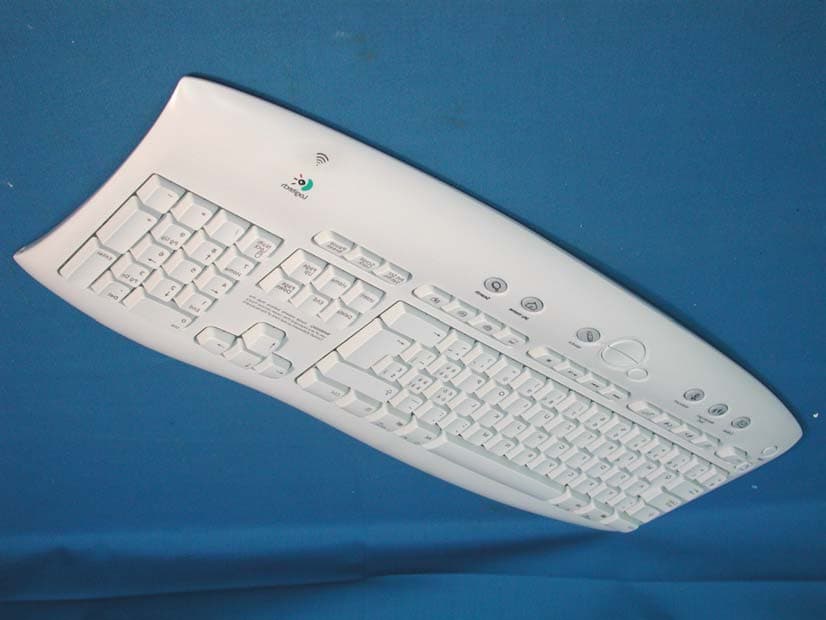
Click to zoom
Application Details
- Equipment Class
- DXX - Part 15 Low Power Communication Device Transmitter
- Date of Grant
- Aug 06, 2002
- Application Purpose
- Original Equipment
- Date of Application
- Aug 06, 2002
- Equipment Note
- Wireless Keyboard
- Frequency Range
- 26.96000000 - 27.28000000
- Company
- Logitech Far East Ltd
- Country
- Taiwan
Documents & Files
Document Text
Text extracted from the exhibit documents filed with the FCC. Open a document above to read the original.
Users Manual
Setup Logitech ® Cordless Access Duo ™ ©2002 Logitech. All rights reserved. Logitech, the Logitech logo, and other Logitech marks are owned by Logitech and may be registered. All other trademarks are the property of their respective owners. Logitech assumes no responsibility for any errors that may appear in this manual. Information contained herein is subject to change without notice. Part number: 623057-0403 Logitech ® on the world wide web: www.logitech.com 5 Software El Software Le logiciel O Software Features Funciones Fonctions Recursos Troubleshooting Resolución de problemas Dépannage Solução de Problemas English To enjoy all the features of the keyboard and mouse, you must install the software. For Macintosh ® , use the F12 key to eject (open) the CD tray for systems that use keyboard ejection. After software installation, use the Media key to eject the CD tray. Español Para disponer de todas las funciones del teclado y el ratón, debe instalar el software. En Macintosh ® , pulse la tecla F12 para extraer CDs, si su sistema utiliza el método de extracción mediante teclado. Tras la instalación del software, use el botón Media para extraer CDs. Français Pour profiter pleinement de toutes les fonctions du clavier et de la souris, vous devez installer le logiciel. Pour les Macintosh ® dotés d’une touche clavier d’éjection de CD, appuyez sur la touche F12 pour ouvrir le plateau CD. Une fois le logiciel installé, appuyez sur la touche Media pour ouvrir le plateau CD et retirer le CD. Português Para utilizar todos os recursos do teclado e do mouse, é necessário instalar o software. Para Macintosh ® , use a tecla F12 para ejetar (abrir) a bandeja do CD em sistemas que utilizam ejeção de teclado. Após instalar o software, use a tecla Media para ejetar a bandeja do CD. English 1. Suspend key 2. F-Lock key 3. Communication keys 4. Multimedia keys 5. Internet keys. For more information, refer to the online help system located on your hard disk. Español 1. Botón de suspensión 2. Botón Bloq teclas F 3. Botones de comunicación 4. Botones multimedia 5. Botones de Internet. Para más información, consulte la Ayuda ubicada en el disco duro. Français 1. Touche d’interruption 2. Touche Verr. F 3. Touches de communication 4. Touches multimédias 5. Touches Internet Pour de plus amples informations, consultez l’aide en ligne située sur votre disque dur. Português 1. Tecla Suspender 2. Tecla de Bloqueio F 3. Teclas de Comunicação 4. Teclas de Multimídia 5. Teclas da Internet. Para obter mais informações, consulte o sistema de ajuda on-line, no disco rígido. English Troubleshooting. Keyboard/mouse do not work: 1. Check the receiver's cable connections. 2. Press the connect button on the receiver; press the connect button on the bottom of keyboard and mouse. 3. Refer tthe help system on the hard disk. Español El teclado/ratón no funciona: 1. Compruebe las conexiones del cable del receptor. 2. Pulse el botón de conexión del receptor y, a continuación, el botón de conexión situado en la parte inferior del teclado y del ratón. 3. Consulte la Ayuda ubicada en el disco duro. Français Le clavier/la souris ne fonctionnent pas: 1. Vérifiez les connexions des câbles du récepteur. 2. Appuyez sur le bouton de connexion du récepteur, puis sur le bouton de connexion situé sous le clavier et la souris. 3. Consultez l’aide en ligne qui se trouve sur le disque dur. Português Teclado/mouse não funcionam. 1. Verifique as conexões do cabo do receptor. 2. Pressione o botão de conexão no receptor e, em seguida, pressione o botão de conexão na parte inferior do teclado e do mouse. 3. Consulte o sistema de ajuda no disco rígido. 4 Connect Conexión Connexion Conecte a a b c PC: USB PC: PS/2 Macintosh ® : USB 1Contents Contenido Contenu Conteúdo 2 Receiver Receptor Récepteur Receptor 3 Batteries Pilas Piles Pilhas iTouch ™ 1.6 For Microsoft ® Windows ® 95 Windows ® 98 Windows NT ® 4.0 Windows ® 2000 Installation: Insert CD into CD-ROM drive and follow on-screen instructions. Part #: 601691-0902 Pat. Pend. www.logitech.com Logitech 1 2 3 5 4 S us pe nd E-Mai l M es s a ger / S M S Web ca m 2 @ 1 ! 3 # 4 $ 5 % 6 ^ 7 & 8 * 9 ( 0 ) _ — = + Backspace O P [ { ] } L ; : ' " | \ U I K J R T Y F G H Q WE A S D Caps Lock Tab Shift Z X Ctrl Alt / C V B M N , < > . Alt Gr / ? Shift Ctrl Num Lock / * – + Enter Home Pg Up 9 87 6 5 4 End Pg Dn 3 2 1 Ins 0 Del . Media My Home Search Esc New Reply Forward Send My Com My Doc My Pic My Music S cro l l Lo c k Paus e B re ak S y s R q Prt S cr F1 F2 F3 F4 F5F6F7F8 F 9 F 1 0 F 1 1 F 12 DeleteEnd Page Down InsertHome Page Up Enter alt option alt option d 8 in 20 cm a c b d Su spe n d E - M a il Me s s a g e r/ S M S W e b c a m 2 @ 1 ! 3 # 4 $ 5 % 6 ^ 7 & 8 * 9 ( 0 ) _ — = + Backspace O P [ { ] } L ; : ' " | \ U I K J R T Y F G H Q WE A S D Caps Lock Tab Shift Z X Ctrl Alt / C V B M N , < > . Alt Gr / ? Shift Ctrl Num Lock / * – + Enter Home Pg Up 9 87 6 5 4 End Pg Dn 3 2 1 Ins 0 Del . Media My Home Search Esc New Reply Forward Send My Com My Doc My Pic My Music S cr o l l L o c k P a u s e B r e a k S y s R q P r t S cr F1 F2 F3 F4 F 5 F 6 F 7 F 8 F9 F1 0 F1 1 F1 2 DeleteEndPage Down InsertHome Page Up Enter alt option alt option 1 4 2 5 3 Important Ergonomic Information Información sanitaria importante Informations importantes relatives au confort Importantes informações sobre Conforto English Important Ergonomic Information. Long periods of repetitive motions using an improperly set-up workspace, incorrect body position, and poor work habits may be associated with physical discomfort and injury to nerves, tendons, and muscles. If you feel pain, numbness, weakness, swelling, burning, cramping, or stiff- ness in your hands, wrists, arms, shoulders, neck, or back, see a qualified health professional. For more information, please read the Comfort Guidelines located in the help system and on the Logitech ® web site at http://www.logitech.com/comfort Español Información sanitaria importante. Realizar tareas…
Text truncated - open the document above for the full version.
Block Diagram
Napoleon II/Chromis II & Jellyfish functional block diagram INTERNET OPTIONS DIGITAL MODULE MCU CERAMIC RESONATOR MCU WAKE UP MATRIX RESET BUTTON TRANSMITTER MODULE MATCHING CIRCUIT AMPLIFIER DUAL OSCILLATOR POWER MODULE POWER SUPPLY LEVEL DETECTION & POWER CUT OFF MM MEMBRANE VDIAL ANTENNA STRAP INAV uP / RF INTERFACE Note: - INAV & VDIAL are not implemented in Jellyfish and Chrmis2 keyboards.
External Photos
Report No.: 027H006FI Page: 1 of 4 Version:1.0 Attachment 2 : EUT Detailed Photographs (1) EUT Photo (2) EUT Photo
ID Label/Location Info
FCC ID.: JNZ128481 #2 Creation Rd., 4, Science-Based Ind. Park, Hsinchu, Taiwan, R.O.C. Tel: 886 3 577 8241 Fax: 886 3 579 2393 LabelLoc The FCC ID and DoC Label will be placed on the equipment as shown in the photograph below. FCC ID Label Sample Wireless Keyboard Model No.: Y-RH35 F F C C C C I I D D : : J J N N Z Z 1 1 2 2 8 8 4 4 8 8 1 1 This device complies with Part 15 of the FCC Rules. Operation is subject to the following two conditions: (1) this device may not cause harmful interference and (2) this device must accept any interference received, including interference that may cause undesired operation. S/N: Made in Taiwan DoC Wireless Keyboard Logitech Model No.: Y-RH35 TESTED TO COMPLY WITH FCC STANDARDS FOR HOME OR OFFICE USE S/N: Made in Taiwan
Internal Photos
Report No.: 027H006FI Page: 2 of 4 Version:1.0 (3) EUT Photo (4) EUT Photo Report No.: 027H006FI Page: 3 of 4 Version:1.0 (5) EUT Photo (6) EUT Photo Report No.: 027H006FI Page: 4 of 4 Version:1.0 (7) EUT Photo
Operational Description
1.1. Operation Description The EUT is a 27MHz Wireless Keyboard intends to use in household and office PC system. The device adapts FSK modulation. The antenna Soldered on PCB Provides diversity function to improve the transmitting function.
Test Report
Report No. 027H006FI Page : 1 of 22 Version:1.0 Test Report Product Name: Wireless Keyboard Model No.: Y-RH35 FCC ID.: JNZ128481 Applicant : Logitech Far East Ltd. Address : #2 Creation Rd., 4, Science-Based Ind. Park, Hsinchu, Taiwan, R.O.C. Date of Receipt : June 27, 2002 Date of Test : June 28, 2002 Report No. : 027H006FI The Test Results relate only to the samples tested. The test report shall not be reproduced except in full without the written approval of QuieTek Corporation. This report must not be used to claim product endorsement by NVLAP any agency of the U.S. Government Report No. 027H006FI Page : 3 of 22 Version:1.0 TABLE OF CONTENTS Description Page 1. GENERAL INFORMATION..............................................................................................................4 1.1. EUT Description ....................................................................................................................................4 1.2. Operation Description ............................................................................................................................4 1.3. Tested System Details ............................................................................................................................5 1.4. Configuration of tested System ..............................................................................................................5 1.5. EUT Exercise Software..........................................................................................................................5 1.6. Test Facility ............................................................................................................................................6 2. Conducted Emission ............................................................................................................................7 2.1. Test Equipment ......................................................................................................................................7 2.2. Test Setup ...............................................................................................................................................7 2.3. Limits .....................................................................................................................................................8 2.4. Test Procedure ........................................................................................................................................8 2.5. Test Result ..............................................................................................................................................8 3. Radiated Emission................................................................................................................................9 3.1. Test Equipment ......................................................................................................................................9 3.2. Test Setup ...............................................................................................................................................9 3.3. Limits ...................................................................................................................................................10 3.4. Test Procedure ......................................................................................................................................11 3.5. Test Result ............................................................................................................................................11 4. Band Edge ...........................................................................................................................................12 4.1. Test Equipment ....................................................................................................................................12 4.2. Test Setup .............................................................................................................................................12 4.3. Limit.....................................................................................................................................................13 4.4. Test Procedure ......................................................................................................................................13 4.5. Test Result ............................................................................................................................................13 5. EMI Reduction Method During Compliance Testing .....................................................................14 6. Summary of Test Datas......................................................................................................................15 6.1. Test Data of Conducted Emission ........................................................................................................16 6.2. Test Data of Radiated Emission ...........................................................................................................17 6.3. Test Result of Band Edge .....................................................................................................................19 Attachment 1: EUT Test Photographs Attachment 2: EUT Detailed Photographs Report No. 027H006FI Page : 4 of 22 Version:1.0 1. GENERAL INFORMATION 1.1. EUT Description Product Name : Wireless Keyboard Trade Name : Logitech FCC ID. : JNZ128481 Model No. : Y-RH35 EUT Voltage : DC 3V(Power by Battery) Frequency Range : 27.095MHz~27.145MHz Type of Modulation : FSK Type of antenna : Soldered on PCB Channel Number : 2 Channel Control : Manual Frequency of Each Channel: Channel Frequency Channel Frequency Channel 1: 27.095 MHz Channel 2: 27.145 MHz Note: 1. The EUT is a Wireless Keyboard intends to use in household and office PC system or related application. 2. These tests were conducted on a sample of the equipment for the …
Text truncated - open the document above for the full version.
Test Setup Photos
Report No.: 027H006FI Page: 1 of 1 Version:1.0 Attachment 1: EUT Test Setup Photographs Front View of Radiated Test Back View of Radiated Test
Contact Information
Applicant
Rick Lien(Head of Product Compliance)
Test Firm
DEKRA Testing and Certification Co., Ltd.Sky Hsu
Technical Specifications
| # | Rule Parts | Frequency Range | Power Output |
|---|---|---|---|
| 1 | 15C | 26.96 MHz - 27.28 MHz | - |
Other Applications from Logitech Far East Ltd
JNZYR0126
Jul 30, 2026Wireless Keyboard
Equipment Class
DTS - Digital Transmission SystemJNZYR0116
Jul 30, 2026Wireless Keyboard
Equipment Class
DTS - Digital Transmission SystemJNZYR0115
Jul 30, 2026Wireless Keyboard
Equipment Class
DTS - Digital Transmission SystemJNZMR0143
Jul 21, 2026Wireless Mouse
Equipment Class
DTS - Digital Transmission SystemJNZMR0136
Jul 09, 2026Wireless Mouse
Equipment Class
DTS - Digital Transmission System