JNZ2015578Trackball
Logitech Far East Ltd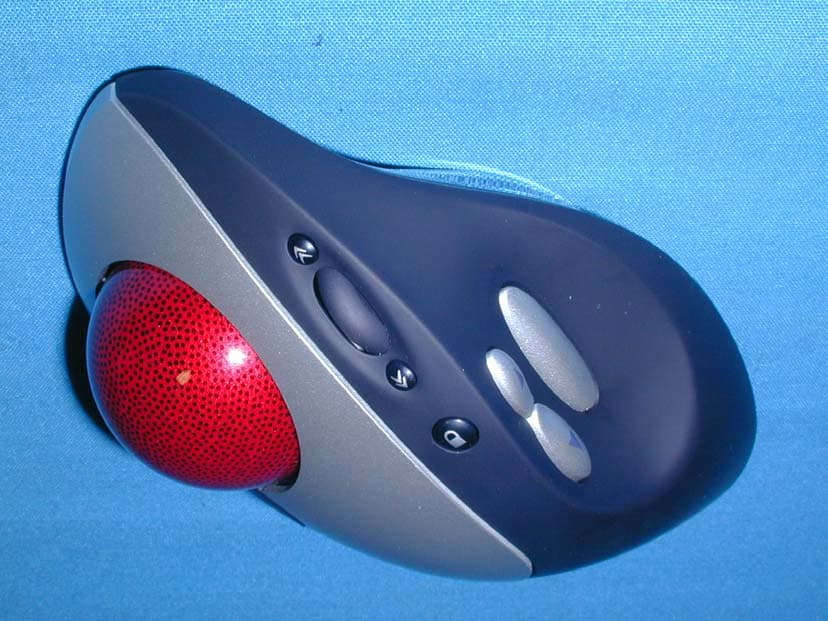
Click to zoom
Application Details
- Equipment Class
- DXX - Part 15 Low Power Communication Device Transmitter
- Date of Grant
- Jul 16, 2002
- Application Purpose
- Original Equipment
- Date of Application
- Jul 16, 2002
- Equipment Note
- Trackball
- Frequency Range
- 27.04500000 - 27.04500000
- Company
- Logitech Far East Ltd
- Country
- Taiwan
Documents & Files
Document Text
Text extracted from the exhibit documents filed with the FCC. Open a document above to read the original.
Users Manual
Cordless Optical TrackMan ® Setup FEDERAL COMMUNICATIONS COMMISSION INTERFERENCE STATEMENT This equipment has been tested and found to comply with the limits for a Class B digital device, pursuant to Part 15 of the FCC Rules. These limits are designed to provide reasonable protection against harmful interference in a residential installation. This equipment generates, uses and can radiate radio frequency energy and, if not installed and used in accordance with the instructions, may cause harmful interference to radio communications. However, there is no guarantee that interference will not occur in a particular installation. If this equipment does cause harmful interference to radio or television reception, which can be determined by turning the equipment off and on, the user is encouraged to try to correct the interference by one or more of the following measures: -- Reorient or relocate the receiving antenna. -- Increase the separation between the equipment and receiver. -- Connect the equipment into an outlet on a circuit different from that to which the receiver is connected. -- Consult the dealer or an experienced radio/TV technician for help. CAUTION: Any changes or modifications not expressly approved by the grantee of this device could void the user's authority to operate the equipment. English Your product comes with a limited warranty, and is FCC compliant. For more information, refer to the online User’s Guide located on your hard disk. Español El producto se entrega con una garantía limitada y cumple con las normativas FCC. Para más información, consulte el Manual del usuario en pantalla ubicado en el disco duro. Français Votre produit est livré avec une garantie limitée, et est conforme FCC. Pour de plus amples informations, consultez le Guide de l’utilisateur situé sur votre disque dur. Português Seu produto é oferecido com uma garantia limitada e está em conformidade com FCC. Para obter mais informações, consulte o Guia do Usuário on-line, localizado em seu disco rígido. Warranty and FCC Garantie et FCC Garantía y FCC Garantia e FCC c a b d e f g h i English a Cruise Control ™ : Press to scroll forward without moving Scroll Wheel. Set scrolling speed in soft- ware. b Scroll Wheel/Button: Scroll up and down in documents. c Cruise Control ™ : Press to scroll backward without moving Scroll Wheel. Español a Cruise Control ™ : Pulse para avanzar sin mover el botón rueda. Configure la velocidad de desplazamiento en el software. b Botón rueda/botón: Para ascender y descender en un documento. c Cruise Control ™ : Pulse para retroceder sin mover el botón rueda. Français a Cruise Control ™ : appuyez sur ce bouton pour effectuer un défile- ment avant sans utiliser la roulette. Réglez la vitesse de défilement au niveau du logiciel. b Roulette/ bouton de défilement: permet de faire défiler les docu- ments vers le haut ou vers le bas. c Cruise Control ™ : appuyez sur ce bouton pour effectuer un défile- ment arrière sans utiliser la roulette de défilement. Português a Cruise Control ™ : Pressione para rolar para a frente sem mover a Roda de Rolagem. Defina a velocidade da rolagem no software. b Roda de Rolagem/Botão: Efetua rolagem acima e abaixo em documentos. c Cruise Control ™ : Pressione para rolar para trás sem mover a Roda de Rolagem. conexão no receptor; pressione o botão de conexão no trackball. Cordless Optical TrackMan ® English d Drag Lock: Locks highlighted objects/text for moving/editing. Use Click/Select button and trackball to highlight text/object. Press Drag Lock to lock selected item, then move or edit it. Press any button to release Drag Lock. Español d Bloquear arrastre: Bloquea el texto y objetos resaltados para moverlos o editarlos. Use el trackball y el botón asignado a Hacer clic/Seleccionar para resaltar texto u objetos. Pulse Bloquear arrastre para bloquear el elemento seleccionado antes de moverlo o editarlo. Pulse un botón cualquiera para anular el bloqueo de arrastre. Français d Cliquer-glisser: verrouille les objets ou le texte en surbrillance pour les déplacer ou les modifier. Utilisez le bouton Cliquer/ Sélectionner et déplacez le trackball pour mettre en surbrillance du texte ou un objet. Appuyez sur le bouton Cliquer-Glisser pour verrouiller l’élément sélectionné, puis déplacez- le ou modifiez-le. Appuyez sur n’importe quel bouton pour inter- rompre la fonction Cliquer-Glisser. Português d Trava de Arrasto: Trava objetos/ texto realçados para mover/editar. Use o botão Clicar/Selecionar e o trackball para realçar texto/objeto. Pressione Trava de Arrasto para selecionar um item, depois mova-o ou edite-o. Pressione qualquer botão para liberar a Trava de Arrasto. Cordless Optical TrackMan ® English e Marble ® technology optical track- ball; smooth fingertip precision. f Right button. g Forward button. h Backward button. Use Forward and Backward to browse Internet pages or applications that support these functions. Español e Trackball óptico de tecnología Marble ® ; un toque de sutil precisión. f Botón derecho. g Botón de avance. h Botón de retroceso. Use las funciones de avance y retroceso para navegar por Internet o aplicaciones compatibles con estas funciones. Français e Trackball optique de la techno- logie Marble ® ; précision extrême. f Bouton droit. g Bouton Suivant. h Bouton Précédent. Utilisez les boutons Suivant et Précédent pour parcourir les pages Internet ou les applications qui prennent en charge ces fonctions. Português e Trackball óptico de tecnologia Marble ® ; precisão macia na ponta dos dedos. f Botão direito. g Botão Avançar. h Botão Voltar. Use Avançar e Voltar para navegar páginas da Internet ou aplicativos que suportam essas funções. Cordless Optical TrackMan® English i Click/Select button. Use MouseWare ® software (Start/ Programs/Logitech MouseWare/ Mouse Properties) to assign different functions to Drag Lock, Right Button, and Scroll Wheel/Button (push down wheel for button function). Español i Botón Hacer clic/Seleccionar. Use el so…
Text truncated - open the document above for the full version.
External Photos
Report No.: 024H051FI Page: 1 of 6 Version:1.0 Attachment 2 : EUT Detailed Photographs (1) EUT Photo (2) EUT Photo
ID Label/Location Info
#2 Creation Rd., 4, Science-Based Ind. Park, Hsinchu, Taiwan, R.O.C. Tel: 886 3 577 8241 Fax: 886 3 579 2393 Logitech Far East Ltd. http://www.Logitech.com.tw TEL +886-3-577 8241 FAX +886-3-579 2393 The FCC ID Label will be placed on the equipment as shown in the photograph below. Trackball Model No.: T-RB22 F F C C C C I I D D : : J J N N Z Z 2 2 0 0 1 1 5 5 5 5 7 7 8 8 This device complies with Part 15 of the FCC Rules. Operation is subject to the following two conditions: (1) this device may not cause harmful interference and (2) this device must accept any interference received, including interference that may cause undesired operation. S/N: Made in Taiwan
ID Label/Location Info
Report No.: 024H051FI Page: 2 of 6 Version:1.0 (3) EUT Photo (4) EUT Photo
Internal Photos
Report No.: 024H051FI Page: 3 of 6 Version:1.0 (5) EUT Photo (6) EUT Photo Report No.: 024H051FI Page: 4 of 6 Version:1.0 (7) EUT Photo (8) EUT Photo Report No.: 024H051FI Page: 5 of 6 Version:1.0 (9) EUT Photo (10) EUT Photo Report No.: 024H051FI Page: 6 of 6 Version:1.0 (11) EUT Photo (12) EUT Photo
Operational Description
1.1. Operation Description The EUT is a 27MHz Wireless Keyboard intends to use in household and office PC system. The transmission antenna is Loop antenna. The super generations type receiver was used. An external excitation was used when the test of receiver was performed.
Test Report
Report No. 024H051FI Page : 1 of 18 Version:1.0 Test Report Product Name: Trackball Model No.: T-RB22 FCC ID.: JNZ2015578 Applicant : Logitech Far East Ltd. Address : #2 Creation Rd., 4, Science-Based Ind. Park, Hsinchu, Taiwan, R.O.C. Date of Receipt : Apr. 18, 2002 Date of Test : Apr. 23, 2002 Report No. : 024H051FI The Test Results relate only to the samples tested. The test report shall not be reproduced except in full without the written approval of QuieTek Corporation. This report must not be used to claim product endorsement by NVLAP any agency of the U.S. Government Report No. 024H051FI Page : 3 of 18 Version:1.0 TABLE OF CONTENTS Description Page 1. GENERAL INFORMATION..............................................................................................................4 1.1. EUT Description ....................................................................................................................................4 1.2. Operation Description ............................................................................................................................4 1.3. Tested System Details ............................................................................................................................5 1.4. Configuration of tested System ..............................................................................................................5 1.5. EUT Exercise Software..........................................................................................................................6 1.6. Test Facility ............................................................................................................................................6 2. Conducted Emission ............................................................................................................................7 2.1. Test Equipment List ...............................................................................................................................7 2.2. Test Setup ...............................................................................................................................................7 2.3. Limits .....................................................................................................................................................8 2.4. Test Procedure ........................................................................................................................................8 2.5. Test Result ..............................................................................................................................................8 3. Radiated Emission................................................................................................................................9 3.1. Test Equipment ......................................................................................................................................9 3.2. Test Setup ...............................................................................................................................................9 3.3. Limits ...................................................................................................................................................10 3.4. Test Procedure ......................................................................................................................................11 3.5. Test Result ............................................................................................................................................11 4. EMI Reduction Method During Compliance Testing .....................................................................12 5. Summary of Test Datas......................................................................................................................13 5.1. Test Data of Conducted Emission ........................................................................................................14 5.2. Test Data of Radiated Emission ...........................................................................................................14 Attachment 1: EUT Test Photographs Attachment 2: EUT Detailed Photographs Report No. 024H051FI Page : 4 of 18 Version:1.0 1. GENERAL INFORMATION 1.1. EUT Description Product Name : Trackball Trade Name : Logitech FCC ID. : JNZ2015578 Model No. : T-RB22 EUT Voltage : DC 3.0V (Battery) Frequency Range : 27.045MHz Type of Modulation : FSK Type of antenna : Soldered on PCB Note: 1. The EUT is a Trackball intends to use in household and office PC system or related application. 2. These tests were conducted on a sample of the equipment for the purpose of demonstrating compliance with Part 15 Subpart C Paragraph 15.227. EMI Mode: Transmit 1.2. Operation Description The EUT is a 27MHz Trackball intends to use in household and office PC system. The device adapts FSK modulation. The antenna Soldered on PCB Provides diversity function to improve the transmitting function. The super generation type receiver was used. An external excitation was used when the test of receiver was performed. Report No. 024H051FI Page : 5 of 18 Version:1.0 1.3. Tested System Details The types for all equipment, plus descriptions of all cables used in the tested system (including inserted cards) are: None. 1.4. Configuration of tested System EUT Report No. 024H051FI Page : 6 of 18 Version:1.0 1.5. EUT Exercise Software (1) Setup the EUT and simulators as shown on 1.3. (2) Enable RF signal and confirm EUT active. (3) Modulate output capacity of EUT up to specification. 1.6. Test Facility Ambient conditions in the laboratory: Items Required (IEC 68-1) Actual Temperature (°C) 15-35 20-35 Humidity (%RH) 25-75 50-65 Barometric pressure (mbar) 860-1060 950-1000 Site Description: August 30, 2001 Accreditation on NVLAP NVLAP Lab Code: 200347-0 February 23, 1999 Accreditation on DNV Statement No. : 413-99-LAB11 January 04, 1999 Accreditation on …
Text truncated - open the document above for the full version.
Test Report
Report No. 024H051FI Page : 14 of 22 Version:1.0 4.5. Test Result of Band Edge Product : Trackball Test Item : Band Edge Data Test Site : No.1 OATS Test Mode : Transmit RF Radiated Measurement: Test Frequency (MHz) Reading Level (dBuV) Emission Level (dBuV/m) Limit (dBuV/m) Result (Horizontal) 27.306 32.22 38.68 49.5 Pass (Vertical) 26.941 32.63 39.09 49.5 Pass (Horizontal) Report No. 024H051FI Page : 15 of 22 Version:1.0 Product : Trackball Test Item : Band Edge Data Test Site : No.1 OATS Test Mode : Transmit RF Radiated Measurement: Test Frequency (MHz) Reading Level (dBuV) Emission Level (dBuV/m) Limit (dBuV/m) Result (Horizontal) 26.954 29.99 36.45 49.5 Pass (Vertical) 27.313 32.15 38.61 49.5 Pass (Vertical)
Test Setup Photos
Report No.: 024H051FI Page: 1 of 1 Version:1.0 Attachment 1: EUT Test Setup Photographs Front View of Radiated Test Back View of Radiated Test
Contact Information
Applicant
Rick Lien(Head of Product Compliance)
Test Firm
DEKRA Testing and Certification Co., Ltd.Sky Hsu
Technical Specifications
| # | Rule Parts | Frequency Range | Power Output |
|---|---|---|---|
| 1 | 15C | 27.045 MHz - 27.045 MHz | - |
Other Applications from Logitech Far East Ltd
JNZYR0126
Jul 30, 2026Wireless Keyboard
Equipment Class
DTS - Digital Transmission SystemJNZYR0116
Jul 30, 2026Wireless Keyboard
Equipment Class
DTS - Digital Transmission SystemJNZYR0115
Jul 30, 2026Wireless Keyboard
Equipment Class
DTS - Digital Transmission SystemJNZMR0143
Jul 21, 2026Wireless Mouse
Equipment Class
DTS - Digital Transmission SystemJNZMR0136
Jul 09, 2026Wireless Mouse
Equipment Class
DTS - Digital Transmission System