JNZ201598Receiver
Logitech Far East Ltd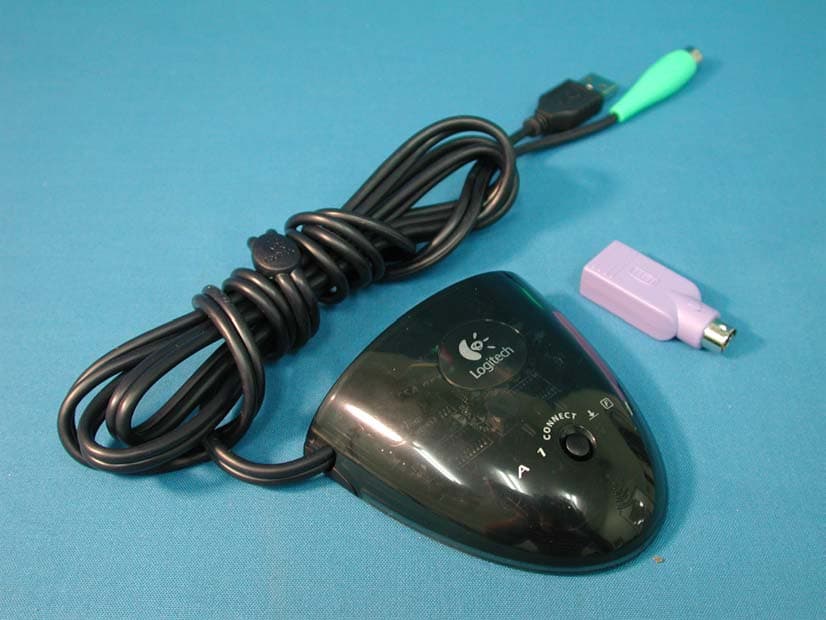
Click to zoom
Application Details
- Equipment Class
- CYY - Communications Receiver used w/Pt 15 Transmitter
- Date of Grant
- Jul 07, 2003
- Application Purpose
- Original Equipment
- Date of Application
- Jun 16, 2003
- Equipment Note
- Receiver
- Frequency Range
- 27.04500000 - 27.19500000
- Company
- Logitech Far East Ltd
- Country
- Taiwan
Documents & Files
Document Text
Text extracted from the exhibit documents filed with the FCC. Open a document above to read the original.
Users Manual
Logitech Far East Ltd. Logitech Singapore Pte Ltd. Logitech Addresses and Phone Numbers World Wide Web: http://www.logitech.comFTP: ftp://ftp.logitech.com/pub 羅技電子股份有限公司 6F-4, No. 123, Sec. 4, Pa-Teh Road, Taipei, Taiwan 臺北市八德路四段12 3號6樓之4 886-2-2761 5235 886-2-2762 1943 [email protected] www.logitech.com.tw 1 Maritime Square #09-65 World Trade Centre (Lobby C) Singapore 099253 65-6270 5515 65-6270 5016 [email protected] www.logitech.com 86-21-64711188 86-21-64313193 [email protected] www.logitech.com.cn 86-10-6581 3833 86-10-6581 5757 [email protected] www.logitech.com.cn Fax Fax Fax Fax RegionAddressTechnical Help ᛂэᘲԫ̄ѣࢨ̳Φ ˯ঔξᚗᇉྮ1ཱི Ѻಱ๔̂ງ1501-1504ވ ΔִഈวડЍරྮϥ8ཱིಕ̂ງ3ሁ 325ވ ˯ঔᏱְ ᛂэᘲԫ̄ѣࢨ̳Φ ְᏱִΔ Setup Logitech ™ Cordless Freedom ™ ©2002 Logitech. All rights reserved. Logitech, the Logitech logo, and other Logitech marks are owned by Logitech and may be registered. All other trademarks are the property of their respective owners. Logitech assumes no responsibility for any errors that may appear in this manual. Information contained herein is subject to change without notice. Part number: 623057-0311 Logitech on the world wide web: www.logitech.com English To enjoy all the features of the keyboard and mouse, you must install the software. For Macintosh®, use the F12 key to eject (open) the CD tray for systems that use keyboard ejection. After software installation, use the Media key to eject the CD tray. 5 Software English 1. Suspend key 2. F-Lock key 3. Communication keys 4. Multimedia keys 5. Internet keys. For more information, refer to the online help system located on your hard disk. Feature English Keyboard/mouse do not work: 1. Check the receiver's cable connections. 2. Press the connect button on the receiver; press the connect button on the bottom of keyboard and mouse. 3. Refer to the help system on the hard disk. Troubleshooting Important Ergonomic Information English Important Ergonomic Information. Long periods of repetitive motions using an improperly set-up workspace, incorrect body position, and poor work habits may be associated with physical discomfort and injury to nerves, tendons, and muscles. If you feel pain, numbness, weakness, swelling, burning, cramping, or stiff- ness in your hands, wrists, arms, shoulders, neck, or back, see a quali- fied health professional. For more in- formation, please read the Comfort Guidelines located in the help system and on the Logitech web site at http://www.logitech.com/comfort English Package Contents: 1. Receiver and PS/2 adaptor 2. Batteries 3. Software 4. Keyboard 5. Mouse 1Contents b d a c English Turn off the computer. For PCs, connect the receiver to the desktop via the PS/2 ports , or to the notebook via the USB port only . (Use PS/2 connec- tions when possible.) NOTE: For any USB connection, DO NOT use the PS/2 mouse connector. For Macintosh®, connect receiver to a single USB port only . Place receiver away from electronic devices . 2 Receiver English Install the batteries. Refer to the battery diagram inside the battery compart- ment. Note where the positive and negative ends of the batteries are to be inserted. 3 Batteries English Turn on computer. After system boot is finished, press connect button on re- ceiver , and then press connect but- ton on mouse . Next, press connect button on receiver again and press connect button on keyboard . 4 Connect b d a c ™ ™ ™ ᓄវ͛̚ᖎវ͛̚ 한글 한글 ᓄវ͛̚ ᖎវ͛̚ 한글한글한글한글 ᓄវ͛̚ᖎវ͛̚ 한글한글 ᓄវ͛̚ ᖎវ͛̚ 한글한글 ᓄវ͛̚ ᖎវ͛̚ 한글 한글 한글한글 ᓄវ͛̚ ᖎវ͛̚ 한글 한글 ࢋࢦˠវ̍ጯྤੈ ̆ࡁֱտពϯĂܜॡม۞ͅᖬજүăֹϡ̙ ༊੨ཉ۞̍ү۩มă̙Υቁ۞֗វҜཉĂͽ ̙̈́։۞̍ү௫ၚౌΞਕᄃ֗វ۞̙ዋ̈́၆ ৠགྷăඏ҉҇۞๋चѣᙯĄтڍଋᛇ ᗕ͘ă͘ඦă͘ᓖă۷჻ăᐚొٕࡦొѣূ ൭ă౫͢ăו൭ăऴăཚණăլ൭ă٩ඏ ăٕᆉർ۞ன෪ĂኛࠀྙЪॾ۞ᗁᒚຽˠ ࣶĄ୬ᒢྋՀྎྤੈĂኛણዦᘲԫშ৭ (http://www.logitech.com/comfort)ٕᘲԫ హវЍჄ˯ֹϡ۰͔̚۞щБݑĄ िܫˠវ̍ጯࢋࢦ ̆ࡁֱտពϯĂܜॡม۞ͅೇજүăֹϡ̙ ༊੨ཉ۞̍ү۩มă̙Υቁ۞֗វҜཉĂͽ ̙̈́։۞̍ү௫ၚౌΞਕᄃ֗វ۞̙ዋ၆ ৠགྷăඏ҉҇۞๋चѣᙯĄтڍଋᛇ ᗕ͘ă͘ඦă͘ᓖă۷჻ăᐚొٕࡦొѣূ ൭ă౫͢ăו൭ăऴăཚණăլ൭ă٩ඏ ăٕᆉർ۞ன෪ĂኛݗྙЪॾ۞ᗁᒚຽˠ ࣶĄ୬ᒢྋՀྎܫिĂኛણዦᘲԫშ৭ (http://www.logitech.com/comfort)ٕᘲԫ హІЍሹ˯ֹϡ۰͔̚۞щБݑĄ யݡ̰टĞ֍Πဦğ யݡΒ྅̰ӣĈ 1.ତќጡܢPS/2ᖼତᐝ 2.Ѱ 3.హវЍჄ 4.ᔣሹ 5.ဂ யݡ̰टĞ֍Πဦğ யݡΒ྅̰ӣĈ 1.ତќጡܢPS/2ᖼତᐝ 2.Ѱ 3. హІЍሹ 4.ᔣሹ 5.ဂᇾ Ѱщ྅ щ྅ѰॡĂኛֶѰᇿ̰ဦϯ۞͞Ш ཉˢĂڦ֭ຍဦϯΥໂ۞͞ШĄ Ѱщ྅ щ྅ѰॡĂኛֶѰᇿ̰ဦϯ۞͞Ш ཉˢĂڦ֭ຍဦϯѰཉˢॡΥໂᄃໂ ۞͞ШĄ ੈཱིాତ ኛฟୁཝĄ༊үຽրୁજԆјޢĂ ̆˭ତќጡ˯۞ต(Πဦ )Ăତ ̆˭ဂ˯۞ాତ(Connect)ต (Πဦ )ĄޢГ ̆˭ତќጡ˯۞ ต(Πဦ )Ăତ ̆˭ᔣሹغొ۞ా ତ(Connect)ต(Πဦ )Ą b d a c ܫཱིాତ ኛฟୁཝĄ༊үຽրୁજԆјЬĂ ̆˭ତќጡ˯۞ต(Πဦ )Ăତ ̆˭ဂᇾ˯۞ాତ(Connect)ต (Πဦ )ĄЬГ ̆˭ତќጡ˯۞ ต(Πဦ )Ăତ ̆˭ᔣሹغొ۞ా ତ(Connect)ต(Πဦ )Ą b d a c 중요 정보. 비능률적인 작업 환경, 잘못된 자세와 작업 습관 등으로 오랫동안 작업하면 신체적 피로를 유발하거나 신경, 혈관 및 근육 등에 손상을 줄 수 있습니다. 통증 또는 마비가 있거나, 힘이 없거나 붓고, 열이 나거나 손, 손목, 팔, 어깨, 등이 뻣뻣해지는 것이 느껴진다면 전문의를 찾아가 상담을 받으십시오. 자세한 내용은 도움말과 Logitech 웹 사이트 http://www.logitech.com/comfort 에 있는 Comfort Guidelines를 참조하십시오. 목차 패키지 내용물 1. 수신기 및 PS/2 어댑터 2. 배터리 3. 소프트웨어 4. 키보드 5.마우스 수신기 컴퓨터를 끕니다. 일반 PC의 경우, 데스크탑 컴퓨터에는 PS/2 포트를 통해 수신기를 연결하고, 노트북에는 USB 포트를 통해서만 연결합니다. 가능하다면 PS/2 포트로 연결하십시오. 참고: USB 연결에는 PS/2 마우스 커넥터를 사용하지 마십시오. Macintosh ®® 경우 하나의 USB 포트에만 연결합니다. 수신기를 다른 전기 장치로부터 멀리 놓습니다. 배터리 배터리를 장착합니다. 배터리 전극 표시 그림을 보고 양극과 음극이 위치하는 부분에 맞춰 정확히 장착합니다. 연결 컴퓨터를 켭니다. 시스템 부팅이 완료되고 나면 수신기에 있는 연결 단추를 누른 후 마우스에 있는 연결 단추를 누릅니다. 그런 다음 수신기에 있는 연결 단추를 다시 한번 누른 후에 키보드에 있는 연결 단추를 누릅니다. 소프트웨어: 키보드와 마우스의 모든 기능을 사용하려면 소프트웨어를 설치해야 합니다. Macintosh ®® 키보드 배출 기능을 사용하는 시스템의 경우 F12 키를 사용해 CD 트레이를 엽니다. 소프트웨어를 설치하고 나면 Media 키를 사용하여 CD 트레이를 엽니다. 컴퓨터의 기능 1. 중지 키 2. F-Lock 키 3. 통신 키 4. 멀티미디어 조작 키 5. 인터넷 키. 자세한 내용은 해당 하드 디스크에 있는 온라인 도움말을 참조하십시오. 문제 해결 키보드/마우스가 작동하지 않을 때는 다음과 같이 하십시오. 1. 수신기의 케이블 연결 상태를 점검합니다. 2. 수신기에 있는 연결 단추를 누르고 키보드와 마우스 맨 아래에 있는 연결 단추를 누릅니다. 3. 해당 하드 디스크에 있는 도움말을 참조하십시오. ᓄវ͛̚ ᖎវ͛̚ ᓄវ͛̚ ᖎវ͛̚ ତќጡщ྅ ኛАᙯౕཝĄֹࡶϡॸ˯ݭཝĂ ኛତќጡ̝PS/2ాତᐝତдཝ۞ ဂ̈́ᔣሹాତૂ˯(Πဦ )ćֹϡඊ ݭཝĂኛాତUSBૂ(Πဦ )ϡֹĄ USBాତૂĂኛତќጡ˯۞PS/2ᖼତ ᐝொੵĄֹϡMacintosh®ཝॡĂΪᅮ ాତUSBૂӈΞ (Πဦ )Ąତќጡᕚيٴ ۞ҜཉĂኛᗓ̄ݡۏҌ͌20̶̳ ͽ˯(Πဦ )Ą ତќጡщ྅ ኛАᙯౕཝĄֹࡶϡPCĂኛତќ ጡ۞PS/2ాତᐝତдॸ˯ݭཝ۞ဂᇾ̈́ ᔣሹాତ˾˯(Πဦ )ݭϡඊֹࡶć ཝĂኛాତUSBତ˾(Πဦ )ϡֹࡶĄ USBాତ˾Ăኛତќጡ˯۞PS/2ᖼତᐝ ொੵĄֹϡMacintosh®ཝॡĂΪᅮాତ USBତ˾ӈΞ (Πဦ )Ąତќጡᕚيٴ۞Ҝ ཉĂኛᗓ̄ݡۏҌ͌20ᲔѼͽ˯ (Πဦ )Ą b d a c b d a c హវщ྅ ଋᅮࢋщ྅யܢݡᙑ۞హវĂͽ·̶ᑕϡ ဂ̈́ᔣሹ۞ΑਕĄֹϡMacintosh® ཝր۞ᔣሹฟୁ…
Text truncated - open the document above for the full version.
Block Diagram
Power supply: USB plug: 4.4 to 5.25 V PS2 plug: 4.5 to 5.5 V MCU 27 MHz FSK receiver 27 MHz FSK receiver Matching and balancing circuit Sleep and Suspend timer EEPROM Loop Antenna RX Data RX Data LO LO enable Connect button 5 x USB / PS2 connector PS2 connector 35 4 4 8 C-BG17-DUAL BLOCK DIAGRAMM
External Photos
Report No.: 036H053F Page : 1 of 5 Version:1.0 Attachment 2 : EUT Detailed Photographs (1) EUT Photo (2) EUT Photo
ID Label/Location Info
FCC ID.: JNZ201598 #2 Creation Rd., 4, Science-Based Ind. Park, Hsinchu, Taiwan, R.O.C. Tel: 886 3 577 8241 Fax: 886 3 579 2393 LabelLoc The FCC ID and DoC Label will be placed on the equipment as shown in the photograph below. FCC ID Label Sample Receiver Model No.: C-BG17-DUAL, C-BG17-KBD F F C C C C I I D D : : J J N N Z Z 2 2 0 0 1 1 5 5 9 9 8 8 This device complies with Part 15 of the FCC Rules. Operation is subject to the following two conditions: (1) this device may not cause harmful interference and (2) this device must accept any interference received, including interference that may cause undesired operation. S/N: Made in Taiwan DoC Receiver Logitech Model No.: Y-RH35 TESTED TO COMPLY WITH FCC STANDARDS FOR HOME OR OFFICE USE S/N: Made in Taiwan
ID Label/Location Info
FCC ID.: JNZ201598 #2 Creation Rd., 4, Science-Based Ind. Park, Hsinchu, Taiwan, R.O.C. Tel: 886 3 577 8241 Fax: 886 3 579 2393 LabelLoc The FCC ID and DoC Label will be placed on the equipment as shown in the photograph below. FCC ID Label Sample Receiver Model No.: C-BG17-DUAL, C-BG17-KBD F F C C C C I I D D : : J J N N Z Z 2 2 0 0 1 1 5 5 9 9 8 8 This device complies with Part 15 of the FCC Rules. Operation is subject to the following two conditions: (1) this device may not cause harmful interference and (2) this device must accept any interference received, including interference that may cause undesired operation. S/N: Made in Taiwan DoC Receiver Logitech Model No.: Y-RH35 TESTED TO COMPLY WITH FCC STANDARDS FOR HOME OR OFFICE USE S/N: Made in Taiwan
Internal Photos
Report No.: 036H053F Page : 2 of 5 Version:1.0 (3) EUT Photo (4) EUT Photo Report No.: 036H053F Page : 3 of 5 Version:1.0 (5) EUT Photo Report No.: 036H053F Page : 4 of 5 Version:1.0 (6) EUT Photo Report No.: 036H053F Page : 5 of 5 Version:1.0 (7) EUT Photo
Operational Description
1.1. Operation Description The EUT is a Receiver of Wireless keyboard and Wireless Mouse intends to use in household and office PC system. For PCs, connect the receiver to the desktop via the PS/2 ports, or to the notebook via the USB port only. The Voltage rating DC 5V shall be provided for EUT operation.
Test Report
Report No. 036H053F Page : 1 of 22 Version:1.0 Test Report Product Name: Receiver Model No.: C-BG17-DUAL, C-BG17-KBD FCC ID. : JNZ201598 Applicant : Logitech Far East Ltd. Address : #2 Creation Rd., 4, Science-Based Ind. Park, Hsinchu, Taiwan, R.O.C. Date of Receipt : Sep. 19, 2002 Date of Test : Sep. 26, 2002 Report No. : 036H053F The test results relate only to the samples tested. The test report shall not be reproduced except in full without the written approval of QuieTek Corporation. This report must not be used to claim product endorsement by NVLAP any agency of the U.S. Government Report No. 036H053F Page : 2 of 22 Version:1.0 Test Report Certification Test Date : Sep. 26, 2002 Report No. : 036H053F Product Name : Receiver Applicant : Logitech Far East Ltd. Address : #2 Creation Rd., 4, Science-Based Ind. Park, Hsinchu, Taiwan, R.O.C. Manufacturer : Logitech Far East Ltd. Model No. : C-BG17-DUAL, C-BG17-KBD FCC ID. : JNZ201598 Rated Voltage : DC 5V (Power by PC) Trade Name : Logitech, DELL Measurement Standard : FCC Part 15 Subpart B: 2002 Measurement Procedure : ANSI C63.4: 1992 Classification : Class B Test Result : Complied The Test Results relate only to the samples tested. The test report shall not be reproduced except in full without the written approval of QuieTek Corporation. This report must not be used to claim product endorsement by NVLAP any agency of the U.S. Government Documented By : ( Lydia Tsai ) Tested By : ( Ken Hsu ) Approved By : ( Kevin Wang ) Accredited by NIST (NVLAP) NVLAP Lab Code: 200347-0 Report No. 036H053F Page : 3 of 22 Version:1.0 TABLE OF CONTENTS Description Page 1. GENERAL INFORMATION ....................................................................................................4 1.1. EUT Description...........................................................................................................................4 1.2. Tested System Details...................................................................................................................5 1.3. Configuration of tested System ....................................................................................................6 1.4. EUT Exercise Software ................................................................................................................6 1.5. Test Facility ..................................................................................................................................7 2. Conducted Emission...................................................................................................................8 2.1. Test Equipment.............................................................................................................................8 2.2. Test Setup .....................................................................................................................................8 2.3. Limits ...........................................................................................................................................9 2.4. Test Procedure ..............................................................................................................................9 2.5. Test Result ....................................................................................................................................9 3. Radiated Emission ....................................................................................................................10 3.1. Test Equipment...........................................................................................................................10 3.2. Test Setup ...................................................................................................................................10 3.3. Limits .........................................................................................................................................11 3.4. Test Procedure ............................................................................................................................12 3.5. Test Result ..................................................................................................................................12 4. EMI Reduction Method During Compliance Testing ...........................................................13 5. Summary of Test Datas ............................................................................................................14 5.1. Test Data of conducted Emission ...............................................................................................15 5.2 Test Data of Radiated Emission.................................................................................................19 Attachment 1: EUT Test Photographs Attachment 2: EUT Detailed Photographs Report No. 036H053F Page : 4 of 22 Version:1.0 1. GENERAL INFORMATION 1.1. EUT Description Product Name : Receiver Trade Name : Logitech, DELL Model No. : C-BG17-DUAL, C-BG17-KBD Signal Cable : Shielded, 1.5m PS/2 adaptor : 1 Set Note: 1. This EUT is a Receiver. 2. The variation of model is for different trade. The circuit of each model is identical. 3. QuieTek has verified both construction and function in typical operation. All the test modes were carried out with the EUT in normal operation, which was shown in this test report and defined as: EMI Mode: Mode 1: Receiver PS2 Mode Mode 2: Receiver USB Mode Report No. 036H053F Page : 5 of 22 Version:1.0 1.2. Tested System Details The types for all equipment, plus descriptions of all cables used in the tested system (including inserted cards) are: Product ManufacturerModel No. Serial No. Power Cord (1) PC HP DTPC27 SG21200950 Non-shielded, 1.8m (2) Monitor VIEWSONIC VCDTS21490-1PER0150850 Non-shielded, 1.8m (3) Wireless keyboardLogitech Y-RH35 N/A -- (4) Wireless Mouse Logitech M-RP67 N/A -- (5) Microphone & Earphone TOKTO SX-MI N/A -- (6) Walkman TOBISHI TB-21984 N/A -- (7) Printer HP C5884A SG86G…
Text truncated - open the document above for the full version.
Test Setup Photos
Report No.: 036H053F Page : 1 of 4 Version:1.0 Attachment 1: EUT Test Setup Photographs Front View of Conducted Test (Mode 1) Back View of Conducted Test (Mode 1) Report No.: 036H053F Page : 2 of 4 Version:1.0 Front View of Conducted Test (Mode 2) Back View of Conducted Test (Mode 2) Report No.: 036H053F Page : 3 of 4 Version:1.0 Front View of Radiated Test (Mode 1) Back View of Radiated Test (Mode 1) Report No.: 036H053F Page : 4 of 4 Version:1.0 Front View of Radiated Test (Mode 2) Back View of Radiated Test (Mode 2)
Contact Information
Applicant
Rick Lien(Head of Product Compliance)
Test Firm
DEKRA Testing and Certification Co., Ltd.Sky Hsu
Technical Specifications
| # | Rule Parts | Frequency Range | Power Output |
|---|---|---|---|
| 1 | 15B | 27.045 MHz - 27.195 MHz | - |
Other Applications from Logitech Far East Ltd
JNZYR0126
Jul 30, 2026Wireless Keyboard
Equipment Class
DTS - Digital Transmission SystemJNZYR0116
Jul 30, 2026Wireless Keyboard
Equipment Class
DTS - Digital Transmission SystemJNZYR0115
Jul 30, 2026Wireless Keyboard
Equipment Class
DTS - Digital Transmission SystemJNZMR0143
Jul 21, 2026Wireless Mouse
Equipment Class
DTS - Digital Transmission SystemJNZMR0136
Jul 09, 2026Wireless Mouse
Equipment Class
DTS - Digital Transmission System