JNZ201774Wireless Keyboard
Logitech Far East Ltd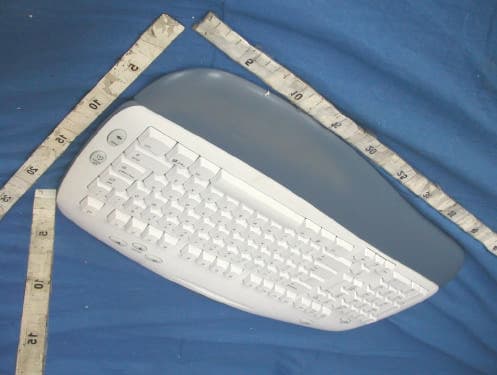
Click to zoom
Application Details
- Equipment Class
- DXX - Part 15 Low Power Communication Device Transmitter
- Date of Grant
- Feb 05, 2004
- Application Purpose
- Original Equipment
- Date of Application
- Feb 05, 2004
- Equipment Note
- Wireless Keyboard
- Frequency Range
- 27.09500000 - 27.09500000
- Company
- Logitech Far East Ltd
- Country
- Taiwan
Documents & Files
Document Text
Text extracted from the exhibit documents filed with the FCC. Open a document above to read the original.
Users Manual
Installation Guide 1 English Package Contents: 1. Keyboard 2. Palm rest 3. Mouse 4. Receiver 5. Software 6. Four batteries Español Contenido de la caja: 1. Teclado 2. Reposamanos 3. Ratón 4. Receptor 5. Software 6. Cuatro pilas Français Contenu: 1. Clavier 2. Appuie-poignets 3. Souris 4. Récepteur 5. Logiciel 6. Quatre pilesPortuguês Conteúdo do pacote: 1. Teclado 2. Descanso para as palmas 3. Rato 4. Receptor 5. Software 6. Quatro pilhas 6 iTouch ™ 2.2 www.logitech.com Logitech 5 English Turn OFF computer. Español Apague el ordenador. Français Mettez l’ordinateur hors tension . Português Desligue o computador. OFF 2 3 English Plug receiver cables into computer: keyboard connector (purple) plus mouse connector (green). Español Conecte al ordenador los cables del receptor: el conector de teclado (morado) y el conector de ratón (verde). Français Branchez les câbles du récepteur dans l’ordinateur: le connecteur du clavier (violet) et le connecteur de la souris (vert). Português Ligue os cabos do receptor ao computador: conector do teclado (roxo) e conector do rato (verde). 4 English Place receiver away from electrical devices. Avoid metallic surfaces. Español NO coloque el receptor cerca de dispositivos eléctricos. Evite las superficies metálicas. Français Eloignez le récepteur de tout appareil électrique. Evitez tout contact avec une surface métallique. Português Coloque o receptor longe de aparelhos eléctricos. Evite superfícies metálicas. English Turn ON computer. Español Encienda el ordenador. Français Mettez l’ordinateur sous tension . Português Ligue o computador. ON English To enjoy all the features of the keyboard and mouse, you must install the software. Español Para disponer de todas las funciones del teclado y el ratón, debe instalar el software. Français Pour profiter pleinement de toutes les fonctions du clavier et de la souris, vous devez installer le logiciel. Português Para utilizar todos os recursos do teclado e do mouse, é necessário instalar o software. English Install the batteries: the mouse uses 2 large AA batteries; the keyboard uses 2 small AAA batteries. Follow the diagram for battery orientation. Español Coloque las pilas: el ratón utiliza dos 2 pilas AA grandes; el teclado utiliza 2 pilas AAA pequeñas. El diagrama muestra la posición correcta. Français Insérez les piles: la souris utilise 2 grosses piles AA, le clavier utilise 2 petites piles AAA. Suivez le schéma pour la disposition des piles. Português Introduza as pilhas: o rato utiliza 2 pilhas AA; o teclado utiliza 2 pilhas AAA. Siga o diagrama para a posição das pilhas. English Press Connect button on receiver, and then press Connect button under mouse. Wait 20 seconds. Press Connect button on receiver, and then press Connect button under keyboard. Español Pulse el botón Connect del receptor y luego el botón de conexión situado en la parte inferior del ratón. Espere 20 segundos. Pulse el botón de conexión del receptor y luego el botón de conexión situado en la parte inferior del teclado. Français Appuyez sur le bouton Connect du récepteur, puis sur le bouton Connect situé sous la souris. Patientez 20 secondes. Appuyez sur le bouton Connect du récepteur, puis sur le bouton Connect situé sous le clavier. Português Prima o botão Connect no receptor e, em seguida, prima o botão Connect em baixo do rato. Aguarde 20 segundos. Prima o botão Connect no receptor e, em seguida, prima o botão Connect em baixo do teclado. 5 6 7 8 4 M y H o m e B a c k V o l u m e E M a i l C a l c 1 2 @ 1 ! 3 # 4 $ 5 % 6 ^ 7 & 8 * 9 ( 0 ) _ = + Backspace O P [ { ] } L ; : ' " | \ U I K J R T Y F G H Q W E A S D Ta b Shift NumLock – + Enter Home Pg Up 9 8 7 6 5 4 End Pg Dn 3 2 1 Ins 0 Delete . Home End Delete Pg Up Pg Dn Enter Caps Lock Z X C V B M N , < > . / ? Shift Ctrl Start Alt Alt Ctrl Esc F1 F2 F3 F4 F5 F6 F7 F8 F9 F10 F11 F12 S y s R q P r t S c r S c r L c k I n s e r t B r e a k P a u s e My Home Back Volume E Mail Calc 2 2 @ 1 ! 3 # 4 $ 5 % 6 ^ 7 & 8 * 9 ( 0 ) _ = + Backspace O P [ { ] } L ; : ' " | \ U I K J R T Y F G H Q W E A S D Ta b Shift NumLock – + Enter Home Pg Up 9 8 7 6 5 4 End Pg Dn 3 2 1 Ins 0 Delete . Home End Delete Pg Up Pg Dn Enter Caps Lock Z X C V B M N , < > . / ? Shift Ctrl Start Alt Alt Ctrl Esc F1 F2 F3 F4 F5 F6 F7 F8 F9 F10 F11 F12 S y s R q P r t S c r S c r L c k I n s e r t B r e a k P a u s e My Home Back Volume E Mail Calc 3 20 sec. 20 sec. 1 3 2 4
Users Manual
? 11 22 33 44 English Solving Setup Problems. 1. Check cable connections. 2. Place receiver away from electrical devices, and avoid metallic surfaces. 3. Check battery installation. The mouse uses 2 AA batteries; the keyboard uses 2 AAA batteries. 4. Establish communications. Press Connect button on receiver, and then press Connect button under mouse. Wait 20 seconds. Press Connect button on receiver, and then press Connect button under keyboard. Español Resolución de problemas de instalación. 1. Compruebe las conexiones de los cables. 2. No coloque el receptor cerca de dispositivos eléctricos o sobre superficies metálicas. 3. Compruebe la colocación de las pil as. El ratón utiliza dos 2 pilas AA; el teclado utiliza 2 pilas AAA. 4. Establezca la comunicación. Pulse el botón Connect del receptor y luego el botón Connect situado en la parte inferior del ratón. Espere 20 segundos. Pulse el botón Connect del receptor y luego el botón Connect situado en la parte inferior del teclado. Français Résolutions des problèmes d’installation. 1. Vérifiez les connexions des câbles. 2. Eloignez le récepteur des autres appareils électriques et évitez les surfaces métalliques. 3. Vérifiez que les piles sont bien installées. La souris utilise 2 piles AA et le clavier 2 piles AAA. 4. Etablissez la communication. Appuyez sur le bouton Connect du récepteur, puis sur le bouton Connect situé sous la souris. Patientez 20 secondes. Appuyez sur le bouton Connect du récepteur, puis sur le bouton Connect situé sous le clavier. Português Resolvendo problemas de configuração. 1. Verifique as ligações dos cabos. 2. Coloque o receptor longe de aparelhos eléctricos e evite superfícies metálicas. 3. Verifique a instalação das pilhas. O rato utiliza 2 pilhas AA; o tecl ado utiliza 2 pilhas AAA. 4. Estabeleça comunicações. Prima o botão Connect no receptor e, em seguida, prima o botão Connect em baixo do rato. Aguarde 20 segundos. Prima o botão Connect no receptor e, em seguida, prima o botão Connect em baixo do teclado. English 1. Internet keys. 2. Volume control. 3. Stylus rest. 4. E-mail key. 5. Calculator key. 6. Mouse wheel and buttons. For more information, refer to the online help system located on your hard disk. Español 1. Botones de Internet. 2. Control de volumen. 3. Portalápiz. 4. Botón E-Mail. 5. Botón Calculadora. 6. Botones y botón rueda del ratón. Para más información, consulte el sistema de ayuda en pantalla, ubicado en el disco duro. i English Important Ergonomic Information. Read the Comfort Guidelines in the software help system or at http://www.logitech.com/comfort . Warning! Read the battery warning in the software help system. Warranty and FCC. Your product comes with a limited warranty, is UL tested, and is FCC compliant. For more information, refer to the online help system on your hard disk. Español Información sanitaria importante. Lea las recomendaciones para evitar el cansancio, en el sistema de ayuda del software o en la dirección http://www.logitech.com/comfort . ¡Advertencia! Lea la advertencia sobre las pilas en el sistema de ayuda del software. Garantía y FCC. El producto se entrega con una garantía limitada, ha pasado las pruebas UL y cumple con las normativas FCC. Para más información, consulte el sistema de ayuda en pantalla, ubicado en el disco duro. Français Informations importantes relatives au confort. Veuillez lire le guide Logitech et votre confort dans l’Aide du logiciel ou sur le site Web http://www.logitech.com/comfort . Attention! Veuillez lire l’avertissement relatif aux piles dans l’Aide du logiciel. Garantie et FCC. Votre produit, certifié UL, est livré avec une garantie limitée et est conforme aux normes FCC. Pour de plus amples informations, consultez l’aide en ligne située sur votre disque dur. Português Informações importantes sobre ergonomia. Leia as orientações de conforto no sistema de ajuda do software ou no endereço http://www.logitech.com/comfort . Atenção! Leia o aviso sobre pilhas no sistema de ajuda do software. Garantia e FCC. Este produto tem uma garantia limitada, foi submetido ao teste UL e está em conformidade com FCC. Para mais informações, consulte o sistema de ajuda online no seu disco rígido. © 2004 Logitech. All rights reserved. Logitech, the Logitech logo, and other Logitech marks are owned by Logitech and may be registered. All other trademarks are the property of their respective owners. Logitech assumes no responsibility for any errors that may appear in this manual. Information contained herein is subject to change without notice.© 2004 Logitech. Tous droits réservés. Logitech, le logo Logitech et les autres marques Logitech sont la propriété exclusive de Logitech et sont susceptibles d’être des marques déposées. Toutes les autres marques sont la propriété exclusive de leurs détenteurs respectifs. Logitech décline toute responsabilité en cas d'erreurs dans ce manuel. Les informations énoncées dans le présent document peuvent faire l’objet de modifications sans avis préalable. 623406-0914 2 @ 1 ! 3 # 4 $ 5 % 6 ^ 7 & 8 * 9 ( 0 ) _ = + Backspace O P [ { ] } L ; : ' " | \ U I K J R T Y F G H Q W E A S D Ta b Shift NumLock – + Enter Home Pg Up 9 8 7 6 5 4 End Pg Dn 3 2 1 Ins 0 Delete . Home End Delete Pg Up Pg Dn Enter Caps Lock Z X C V B M N , < > . / ? Shift Ctrl Start Alt Alt Ctrl Esc F1 F2 F3 F4 F5 F6 F7 F8 F9 F10 F11 F12 S y s R q P r t S c r S c r L c k I n s e r t B r e a k P a u s e My Home Back Volume E Mail Calc M y H o m e B a c k V o lu m e E M a i l C a l c 20 sec. 20 sec. 1 3 2 4 1 2 @ 1 ! 3 # 4 $ 5 % 6 ^ 7 & 8 * 9 ( 0 ) _ = + Backspace O P [ { ] } L ; : ' " | \ U I K J R T Y F G H Q W E A S D Ta b Shift NumLock – + Enter Home Pg Up 9 8 7 6 5 4 End Pg Dn 3 2 1 Ins 0 Delete . Home End Delete Pg Up Pg Dn Enter Caps Lock Z X C V B M N , < > . / ? Shift Ctrl Start Alt Alt Ctrl Esc F1 F2 F3 F4 F5 F6 F7 F8 F9 F10 F11 F12 S y s R q P r t S c r S c r L c k I n s e r t B r e a k P a u s e My Home Back Volume E Mail Calc 2 3 4 5 6 Français 1. Touch…
Text truncated - open the document above for the full version.
Cover Letter(s)
[email protected] www.adt.com.tw ADVANCE DATA TECHNOLOGY CORPORATION FEDERAL COMMUNICATIONS COMMISSION DECLARATION OF CONFORMITY (DoC) FOR THE FOLLOWING EQUIPMENT: PRODUCT NAME: Wireless Keyboard MODEL NO: Y-RQ57 TRADE NAME: Logitech IS HEREWITH CONFIRMED AND FOUND TO COMPLY WITH THE REQUIREMENTS OF CFR 47 PART 15 REGULATION. THE RESULTS OF ELECTROMAGNETIC EMISSION EVALUATION ARE SHOWN IN THE REPORT NO : D930110H02 THIS DEVICE COMPLIES WITH PART 15 OF THE FCC RULES. OPERATION IS SUBJECT TO THE FOLLOWING TWO CONDITIONS: (1) THIS DEVICE MAY NOT CAUSE HARMFUL INTERFERENCE AND, (2) THIS DEVICE MUST ACCEPT ANY INTERFERENCE RECEIVED, INCLUDING INTERFERENCE THAT MAY CAUSE UNDESIRED OPERATION. THE FOLLOWING LOCAL MANUFACTURER/IMPORTER IS RESPONSIBLE FOR THIS DECLARATION ManufacturerUSA Local Representative Company name: LOGITECH FAR EAST LTD. To Be Determined. Address: #2 Creation Rd. 4, Science-Based Ind. Park Hsinchu Taiwan, R.O.C. Contact Person: T.C.Chang Title: Compliance technical manager Tel/Fax: Tel: Fax:
External Photos
Page 1 CONSTRUCTION PHOTOS OF EUT
Internal Photos
Page 1 CONSTRUCTION PHOTOS OF EUT Page 2
Operational Description
FCC ID: JNZ201774 ADT No. 930110H02 Operational Description The transmitter of the EUT (Wireless Keybaord) is powered by 3V Battery. The antenna is Loop Antenna. The output power of this device is very low. Under normal use condition, the transmitter and the receiver are quite close, so high EIRP power is neither necessary nor allowed because of interference.
Test Report
FCC ID: JNZ201774 Report No.: RF930110H021Issued: Jan. 19, 2004 FCC TEST REPORT REPORT NO.: RF930110H02 MODEL NO.: Y-RQ57 RECEIVED: Jan. 12, 2004 TESTED: Jan. 14 to 18, 2004 APPLICANT: LOGITECH FAR EAST LTD. ADDRESS: #2 Creation Rd. 4, Science-Based Ind. Park Hsinchu Taiwan, R.O.C. ISSUED BY: Advance Data Technology Corporation LAB LOCATION: No. 81-1, Lu Liao Keng, 9 Ling, Wu Lung Tsuen, Chiung Lin Hsiang, Hsin Chu Hsien, Taiwan, R.O.C. This test report consists of 15 pages in total. It may be duplicated completely for legal use with the approval of the applicant. It should not be reproduced except in full, without the written approval of our laboratory. The test results in the report only apply to the tested sample. 0536 ILAC MRA FCC ID: JNZ201774 Report No.: RF930110H022Issued:Jan. 19, 2004 Table of Contents 1CERTIFICATION.........................................................................................................3 2SUMMARY OF TEST RESULTS.............................................................................4 3GENERAL INFORMATION.......................................................................................5 3.1GENERAL DESCRIPTION OF EUT........................................................................5 3.2DESCRIPTION OF TEST MODES..........................................................................6 3.3GENERAL DESCRIPTION OF APPLIED STANDARDS.....................................6 3.4DESCRIPTION OF SUPPORT UNITS...................................................................7 4TEST PROCEDURE AND RESULT........................................................................8 4.1CONDUCTED EMISSION MEASUREMENT........................................................8 4.2RADIATED EMISSION MEASUREMENT..............................................................8 4.2.1LIMITS OF RADIATED EMISSION MEASUREMENT.........................................8 4.2.2TEST INSTRUMENT.................................................................................................9 4.2.3TEST PROCEDURE................................................................................................10 4.2.4DEVIATION FROM TEST STANDARD.................................................................10 4.2.5TEST SETUP............................................................................................................11 4.2.6EUT OPERATING CONDITION.............................................................................11 4.2.7TEST RESULT..........................................................................................................12 5PHOTOGRAPHS OF THE TEST CONFIGURATION.........................................14 6INFORMATION ON THE TESTING LABORATORIES.......................................15 FCC ID: JNZ201774 Report No.: RF930110H023Issued:Jan. 19, 2004 1 CERTIFICATION PRODUCT : Wireless Keyboard BRAND NAME : Logitech MODEL NO : Y-RQ57 APPLICANT : LOGITECH FAR EAST LTD. STANDARDS : 47 CFR Part 15, Subpart C (15.227) ANSI C63.4-1992 We, Advance Data Technology Corporation, hereby certify that one sample of the designation has been tested in our facility on Jan. 14 to 18, 2004. The test record, data evaluation and Equipment Under Test (EUT) configurations represented herein are true and accurate accounts of the measurements of the sample's EMC characteristics under the conditions herein specified. PREPARED BY:, DATE:Jan. 19, 2004 ( Carol Liao ) APPROVED BY:, DATE:Jan. 19, 2004 ( Eric Lin, Manager ) FCC ID: JNZ201774 Report No.: RF930110H024Issued:Jan. 19, 2004 2 SUMMARY OF TEST RESULTS The EUT has been tested according to the following specifications: APPLIED STANDARD: 47 CFR Part 15, Subpart C STANDARD PARAGRAPH TEST TYPERESULTREMARK 15.207Conducted Emission TestN/A Power supply is 3VDC from batteries 15.227Radiated Emission TestPASS Minimum passing margin is –13.10 dBuV at 847.27 MHz and 927.27 MHz NOTE: The receiver part to communicate with the EUT has been verified to comply with FCC Part 15, Subpart B, Class B (DoC). The test report can be provided upon request. FCC ID: JNZ201774 Report No.: RF930110H025Issued:Jan. 19, 2004 3 GENERAL INFORMATION 3.1 GENERAL DESCRIPTION OF EUT PRODUCT Wireless Keyboard MODEL NO. Y-RQ57 POWER SUPPLY 3VDC from battery MODULATION TYPE FSK CARRIER FREQUENCY OF EACH CHANNEL 27.095MHz, 27.145MHz NUMBER OF CHANNEL 2 ANTENNA TYPE Loop antenna DATA CABLE NA I/O PORTS NA ASSOCIATED DEVICES NA NOTE: 1. The EUT is the transmitter part of Wireless Keyboard. 2. For more detailed features description of the EUT, please refer to the manufacturer's specifications or the User's Manual. FCC ID: JNZ201774 Report No.: RF930110H026Issued:Jan. 19, 2004 3.2 DESCRIPTION OF TEST MODES There are two channels have been pretested in our facility which are identical to each other in all aspects except for the following: ModeFrequency 127.145MHz 227.095MHz NOTE: 1 channel sample, the worst case, was chosen for final test and it’s data was recorded in this report as bellows, ModeFrequency 127.145MHz 3.3 GENERAL DESCRIPTION OF APPLIED STANDARDS The EUT is the transmitter part of a Wireless Keyboard. According to the specifications of the manufacturer, it must comply with the requirements of the following standards: 47 CFR Part 15, Subpart C (15.227) ANSI C63.4-1992 All tests have been performed and recorded as per the above standards. FCC ID: JNZ201774 Report No.: RF930110H027Issued:Jan. 19, 2004 3.4 DESCRIPTION OF SUPPORT UNITS The EUT has been tested as an independent unit together with other necessary accessories or support units. The following support units or accessories were used to form a representative test configuration during the tests. No.ProductBrandModel No.Serial No.FCC ID 1NOTEBOOKCOMPAQPP2130470048-515FCC DoC 2MONITORADICM100026058T10200538FCC DoC 3Matrix PrinterEPSONLQ-300+DCGY017079FCC DoC 4RECEIVERLogitechC-SF17LZB23601908- 5USB MOUSEDEXINA2U800A71001839NIYA2U800A No. Signal cable description 1 NA 2 1.8 m braid shielded wire, te…
Text truncated - open the document above for the full version.
Test Setup Photos
FCC ID: JNZ201774 Report No.: RF930110H0214Issued:Jan. 19, 2004 5 PHOTOGRAPHS OF THE TEST CONFIGURATION RADIATED EMISSION TEST
Contact Information
Applicant
Rick Lien(Head of Product Compliance)
Technical Contact
Advance Data Technology CorporationEric Lin
[email protected]+886 3 593 5343
81-1 Luliaoken, 9th Lin, Wulung Tsuen Chiunglin · Hsinchu · Taiwan
Test Firm
Bureau Veritas CPS (H.K.) Ltd. Taoyuan BranchRichard Chen
Technical Specifications
| # | Rule Parts | Frequency Range | Power Output |
|---|---|---|---|
| 2 | 15C | 27.095 MHz - 27.095 MHz | - |
Other Applications from Logitech Far East Ltd
JNZYR0126
Jul 30, 2026Wireless Keyboard
Equipment Class
DTS - Digital Transmission SystemJNZYR0116
Jul 30, 2026Wireless Keyboard
Equipment Class
DTS - Digital Transmission SystemJNZYR0115
Jul 30, 2026Wireless Keyboard
Equipment Class
DTS - Digital Transmission SystemJNZMR0143
Jul 21, 2026Wireless Mouse
Equipment Class
DTS - Digital Transmission SystemJNZMR0136
Jul 09, 2026Wireless Mouse
Equipment Class
DTS - Digital Transmission System