JNZ202198Cordless Keyboard
Logitech Far East Ltd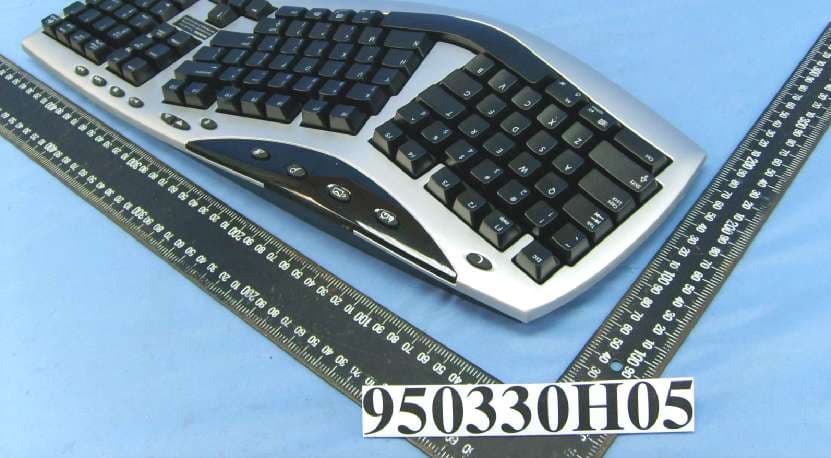
Click to zoom
Application Details
- Equipment Class
- DXX - Part 15 Low Power Communication Device Transmitter
- Date of Grant
- Apr 16, 2006
- Application Purpose
- Original Equipment
- Date of Application
- Apr 16, 2006
- Equipment Note
- Cordless Keyboard
- Frequency Range
- 27.09500000 - 27.14500000
- Company
- Logitech Far East Ltd
- Country
- Taiwan
Documents & Files
Document Text
Text extracted from the exhibit documents filed with the FCC. Open a document above to read the original.
Users Manual
Installation Guide OFF ON USB PS/2 CONNECT ON / OFF 1 2 3 45 6 English Deutsch Français Italiano Español Português Nederlands Svenska Dansk Norsk Suomi Ελληνικά По-русски Magyar Česká verze Po polsku 2 3 4 5 6 Logitech ® www.logitech.com 1 English Turn OFF computer. Deutsch Schalten Sie den Computer aus. Français Mettez l'ordinateur hors tension. Italiano Spegnere il computer. Español Apague el ordenador. Português Desligue o computador. Nederlands Zet de computer uit. Svenska Stäng av datorn. Dansk Sluk computeren. Norsk Slå av maskinen. Suomi Sammuta tietokone. Ελληνικά Απενεργοποιήστε τον υπολογιστή. По-русски Выключите компьютер. Magyar Kapcsolja ki a számítógépet. Česká verze Vypněte počítač. Po polsku Wyłącz komputer. English Turn ON computer. Deutsch Schalten Sie den Computer ein. Français Mettez l’ordinateur sous tension. Italiano Accendere il computer. Español Encienda el ordenador. Português Ligue o computador. Nederlands Zet de computer aan. Svenska Starta datorn. Dansk Tænd for computeren. Norsk Slå på datamaskinen. Suomi Käynnistä tietokone. Ελληνικά Ενεργοποιήστε τον υπολογιστή. По-русски Включите компьютер. Magyar Kapcsolja be a számítógépet. Česká verze Zapněte počítač. Po polsku Włącz komputer. English To enjoy all the features of your product, you must install the software. Deutsch Damit Sie den gesamten Funktionsumfang der Maus nutzen können, müssen Sie die Software installieren. Français Pour pouvoir utiliser pleinement toutes les fonc- tions du produit, vous devez installer le logiciel. Italiano Per potere utilizzare tutte le funzionalità del prodotto, occorre installare il software. Español Para disponer de todas las funciones del producto, debe instalar el software. Português Para utilizar todas as funções do produto, deve instalar o software. Nederlands U dient de software te installeren om alle functies van uw product te kunnen gebruiken. Svenska Installera programmet om du vill kunna dra nytta av produktens samtliga funktioner. Dansk Hvis du vil have fuldt udbytte af alle produktets funktioner, skal du installere softwaren. Norsk Hvis du ønsker å kunne bruke alle funksjonene til denne enheten, må du installere programvaren. Suomi Sinun pitää asentaa ohjelma, jotta voit käyttää kaikkia tuotteen toimintoja. Ελληνικά Για να εκμεταλλευτείτε όλες τις λειτουργίες του προϊόντος σας, πρέπει να εγκαταστήσετε το λογισμικό. По-русски Для использования всех возможностей устройств установите программное обеспечение. Magyar A termék összes szolgáltatásának kihasználása érdekében telepítse a szoftvert. Česká verze Chcete-li využívat všechny funkce produktu, je třeba nainstalovat příslušný software. Po polsku Zainstaluj oprogramowanie, żeby korzystać ze wszystkich możliwości tego produktu. English Package Contents: 1. Keyboard 2. Palm rest 3. Mouse 4. Receiver 5. Four AA batteries 6. Software Deutsch Inhalt: 1. Tastatur 2. Handballenauflage 3. Maus 4. Empfänger 5. Vier Batterien (Typ AA) 6. Software Français Contenu: 1. Clavier 2. Repose-paume 3. Souris 4. Récepteur 5. Quatre piles AA 6. Logiciel Italiano Contenuto della confezione: 1. Tastiera 2. Supporto per i polsi 3. Mouse 4. Ricevitore 5. Quattro batterie AA 6. Software Español Contenido de la caja: 1. Teclado 2. Reposamanos 3. Ratón 4. Receptor 5. Cuatro pilas alcalinas AA 6. Software Português Conteúdo do pacote: 1. Teclado 2. Descanso para as palmas 3. Rato 4. Receptor 5. Quatro pilhas AA 6. Software Nederlands Pakketinhoud: 1. Toetsenbord 2. Handsteun 3. Muis 4. Ontvanger 5. Vier AA-batterijen 6. Software Svenska Innehåll: 1. Tangentbord 2. Handlovsstöd 3. Mus 4. Mottagare 5. 4 AA-batterier 6. Programvara Dansk Kassen indeholder: 1. Tastatur 2. Håndledsstøtte 3. Mus 4. Modtager 5. Fire AA-batterier 6. Software Norsk Pakningens innhold: 1. Tastatur 2. Håndleddstøtte 3. Mus 4. Mottaker 5. Fire AA-batterier 6. Programvare Suomi Pakkauksen sisältö: 1. Näppäimistö 2. Kämmentuki 3. Hiiri 4. Vastaanotin 5. Neljä AA-paristoa 6. Ohjelmisto Ελληνικά Περιεχόμενα συσκευασίας: 1. Πληκτρολόγιο 2. Υποστήριγμα παλάμης 3. Ποντίκι 4. Δέκτης 5. Τέσσερις μπαταρίες AA 6. Λογισμικό По-русски Содержимое упаковки: 1. Клавиатура 2. Подставка для кистей рук 3. Мышь 4. Приемник 5. Четыре батареи типа AA 6. Программное обеспечение Magyar A csomag tartalma: 1. Billentyűzet 2. Kéztámasz 3. Egér 4. Vevőegység 5. Négy darab ceruzaelem 6. Szoftver Česká verze Obsah balení: 1. Klávesnice 2. Opěrka dlaní 3. Myš 4. Přijímač 5. Čtyři AA baterie 6. Software Po polsku Zawartość opakowania: 1. Klawiatura 2. Podpórka nadgarstka 3. Mysz 4. Odbiornik 5. Cztery baterie AA 6. Oprogramowanie English Plug receiver cables into computer: PC desktops with PS/2 port use keyboard connector (PURPLE) plus mouse connector (GREEN). PC desktops with USB port only and PC notebooks use black USB connector only. Deutsch Schließen Sie den Empfänger am Computer an: PC mit PS/2-Anschluss verwenden lila Tastaturstecker und grüne Mausstecker. PC, die nur über USB-Anschluss verfügen, und Notebooks verwenden nur den schwarzen USB-Anschluss. Français Branchez les câbles du récepteur dans l’ordinateur: les ordinateurs de bureau avec port PS/2 utilisent le connecteur du clavier (VIOLET) et le connecteur de la souris (VERT). Les ordinateurs de bureau avec ports USB uniquement et les ordinateurs portables utilisent le connecteur USB noir uniquement. Italiano Collegare i cavi del ricevitore al computer: Nei PC desktop con porta PS/2 vengono utilizzati un connettore tastiera (VIOLA) e un connettore mouse (VERDE). Nei PC desktop con sola porta USB e nei notebook viene utilizzato soltanto un connettore USB nero. Español Conecte al ordenador los cables del receptor: Los PC de sobremesa con puerto PS/2 usan el conector de teclado (MORADO) y el conector de ratón (VERDE). Los PC de sobremesa con puerto USB y los portátiles usan sólo el conector USB negro. Português Ligue os cabos do receptor ao computador: PC de secretária com porta PS/2 utiliza conector de teclado (ROXO) e conector de rato (VERDE…
Text truncated - open the document above for the full version.
External Photos
Page 1 CONSTRUCTION PHOTOS OF EUT
ID Label/Location Info
(Fig. 1) FCC ID: JNZ202198 FCC LABEL LOCATION The label will be permanently affixed at a conspicuous location on the device. FCC Label
Internal Photos
Page 2 Page 3 Page 4 Page 5 Page 6 Page 7
Test Report
Report No.: RF950330H05 1Report Format Version 2.0.4 FCC TEST REPORT REPORT NO.: RF950330H05 MODEL NO.: Y-RAU7 RECEIVED: March 30, 2006 TESTED: March 31, 2006 ISSUED: April 5, 2006 APPLICANT: LOGITECH FAR EAST LTD. ADDRESS: #2 Creation Rd. 4, Science-Based Ind. Park Hsinchu Taiwan, R.O.C. ISSUED BY: Advance Data Technology Corporation LAB LOCATION: No. 81-1, Lu Liao Keng, 9 Ling, Wu Lung Tsuen, Chiung Lin Hsiang, Hsin Chu Hsien, Taiwan, R.O.C. This test report consists of 17 pages in total. It may be duplicated completely for legal use with the approval of the applicant. It should not be reproduced except in full, without the written approval of our laboratory. The client should not use it to claim product endorsement by CNLA, A2LA or any government agencies. The test results in the report only apply to the tested sample. No. 2177-01 Report No.: RF950330H05 2Report Format Version 2.0.4 Table of Contents 1CERTIFICATION.............................................................................................3 2SUMMARY OF TEST RESULTS.....................................................................4 3GENERAL INFORMATION.............................................................................5 3.1GENERAL DESCRIPTION OF EUT................................................................5 3.2DESCRIPTION OF TEST MODES..................................................................6 3.3GENERAL DESCRIPTION OF APPLIED STANDARDS.................................6 3.4DESCRIPTION OF SUPPORT UNITS............................................................6 4EMISSION TEST.............................................................................................7 4.1RADIATED EMISSION & OCCUPIED BANDWIDTH MEASUREMENT.........7 4.1.1LIMITS OF RADIATED EMISSION MEASUREMENT.....................................7 4.1.2TEST INSTRUMENT.......................................................................................8 4.1.3TEST PROCEDURE.......................................................................................9 4.1.4DEVIATION FROM TEST STANDARD.........................................................10 4.1.5TEST SETUP (RADIATED EMISSION)..........................................................11 4.1.6EUT OPERATING CONDITION.....................................................................11 4.1.7TEST RESULT (RADIATED EMISSION).......................................................12 4.1.8TEST RESULT (RADIATED EMISSION).......................................................13 4.1.9TEST RESULTS (BAND EDGES MEASUREMENT)....................................14 5PHOTOGRAPHS OF THE TEST CONFIGURATION....................................15 6INFORMATION ON THE TESTING LABORATORIES..................................16 APPENDIX-A....................................................................................................A-1 Report No.: RF950330H05 3Report Format Version 2.0.4 1 CERTIFICATION PRODUCT : Cordless Keyboard BRAND NAME : Logitech MODEL NO : Y-RAU7 TESTED: March 31, 2006 APPLICANT : LOGITECH FAR EAST LTD. STANDARDS : 47 CFR Part 15, Subpart C(Section 15.227) ANSI C63.4: 2003 The above equipment (Model: Y-RAU7) has been tested by Advance Data Technology Corporation, and found compliance with the requirement of the above standards. The test record, data evaluation & Equipment Under Test (EUT) configurations represented herein are true and accurate accounts of the measurements of the sample’s EMC characteristics under the conditions specified in this report. PREPARED BY: , DATE:April 5, 2006 ( Carol Liao ) TECHNICAL ACCEPTANCE: , DATE:April 5, 2006 Responsible for RF ( Hank Chung ) APPROVED BY:, DATE:April 5, 2006 ( May Chen, Deputy Manager ) Report No.: RF950330H05 4Report Format Version 2.0.4 2 SUMMARY OF TEST RESULTS The EUT has been tested according to the following specifications: APPLIED STANDARD: 47 CFR Part 15, Subpart C STANDARD PARAGRAPH TEST TYPERESULTREMARK 15.207Conducted Emission TestNA Power supply are 3 VDC from batteries 15.227 / 15.209Radiated Emission TestPASS Minimum passing margin is –11.5 dB at 54.19 MHz 15.227 Band Edges TestPASS Meet the requirement of limit NOTE: The receiver part to communicate with the EUT has been verified to comply with FCC Part 15, Subpart B, Class B (DoC). The test report can be provided upon request. Report No.: RF950330H05 5Report Format Version 2.0.4 3 GENERAL INFORMATION 3.1 GENERAL DESCRIPTION OF EUT PRODUCT Cordless Keyboard MODEL NO. Y-RAU7 FCC ID JNZ202198 POWER SUPPLY 3 VDC from batteries MODULATION TYPE FSK CARRIER FREQUENCY OF EACH CHANNEL 27.095 MHz, 27.145MHz NUMBER OF CHANNEL 2 ANTENNA TYPE Loop antenna DATA CABLE NA I/O PORTS NA ASSOCIATED DEVICES NA NOTE: 1. The EUT is the transmitter part of Cordless Keyboard. 2. The above EUT information was declared by the manufacturer and for more detailed features description, please refer to the manufacturer's specifications or User's Manual. Report No.: RF950330H05 6Report Format Version 2.0.4 3.2 DESCRIPTION OF TEST MODES There are two channels have been pre-tested in our facility as following: Pre-test ModeFrequency 127.095MHz 227.145MHz NOTE: 27.095MHz, the worst case was chosen for final test and its data was recorded in this report. 3.3 GENERAL DESCRIPTION OF APPLIED STANDARDS The EUT is the transmitter part of a Cordless Keyboard. According to the specifications of the manufacturer, it must comply with the requirements of the following standards: 47 CFR Part 15, Subpart C (Section 15.227) ANSI C63.4-2003 All tests have been performed and recorded as per the above standards. 3.4 DESCRIPTION OF SUPPORT UNITS The EUT has been tested as an independent unit. Report No.: RF950330H05 7Report Format Version 2.0.4 4 EMISSION TEST 4.1 RADIATED EMISSION & OCCUPIED BANDWIDTH MEASUREMENT 4.1.1 LIMITS OF RADIATED EMISSION MEASUREMENT According to 15.227 the field strength of emissions from intentional radiators operated under these frequencies bands shall not exceed the following:…
Text truncated - open the document above for the full version.
Test Setup Photos
Report No.: RF950330H05 15Report Format Version 2.0.4 5 PHOTOGRAPHS OF THE TEST CONFIGURATION RADIATED EMISSION TEST
Contact Information
Applicant
Rick Lien(Head of Product Compliance)
Technical Contact
Advance Data Technology Corporation (Hsin Chu)Eric Lin
[email protected]886-3-593-5343
81-1 Luliaoken, 9th Lin, Wulung Tsuen Chiunglin · Hsinchu · Taiwan
Non-Technical Contact
Advance Data Technology CorporationEric Lin
[email protected]886-3-593-5343
Test Firm
Bureau Veritas CPS (H.K.) Ltd. Taoyuan BranchRichard Chen
Technical Specifications
| # | Rule Parts | Frequency Range | Power Output |
|---|---|---|---|
| 1 | 15C | 27.095 MHz - 27.145 MHz | - |
Other Applications from Logitech Far East Ltd
JNZYR0126
Jul 30, 2026Wireless Keyboard
Equipment Class
DTS - Digital Transmission SystemJNZYR0116
Jul 30, 2026Wireless Keyboard
Equipment Class
DTS - Digital Transmission SystemJNZYR0115
Jul 30, 2026Wireless Keyboard
Equipment Class
DTS - Digital Transmission SystemJNZMR0143
Jul 21, 2026Wireless Mouse
Equipment Class
DTS - Digital Transmission SystemJNZMR0136
Jul 09, 2026Wireless Mouse
Equipment Class
DTS - Digital Transmission System