JNZ221729Wireless Keyboard
Logitech Far East Ltd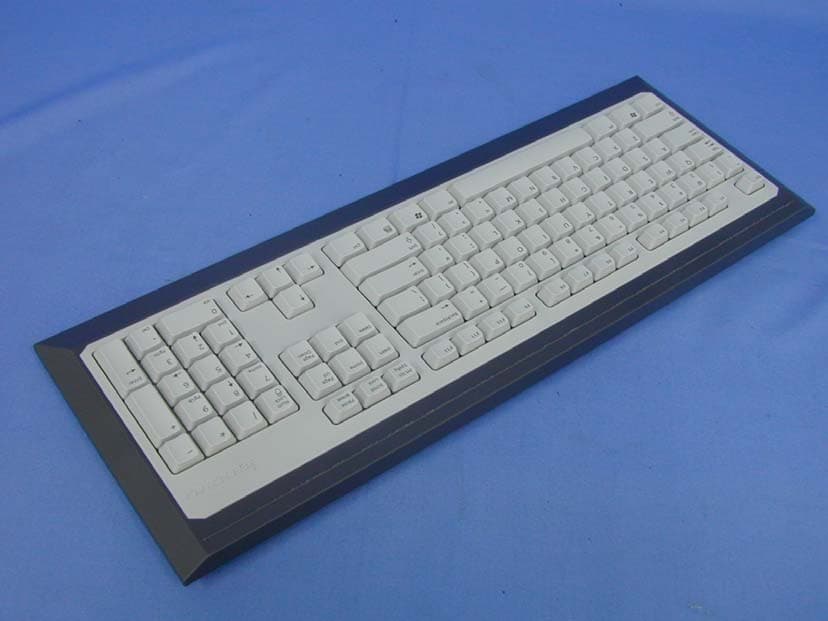
Click to zoom
Application Details
- Equipment Class
- DXX - Part 15 Low Power Communication Device Transmitter
- Date of Grant
- Sep 17, 2003
- Application Purpose
- Original Equipment
- Date of Application
- Sep 17, 2003
- Equipment Note
- Wireless Keyboard
- Frequency Range
- 27.14500000 - 27.14500000
- Company
- Logitech Far East Ltd
- Country
- Taiwan
Documents & Files
Document Text
Text extracted from the exhibit documents filed with the FCC. Open a document above to read the original.
Users Manual
Installation Premium Desktop Optical Logitech ® ii 623251-0914.A FCC Compliance and Advisory Statement. This hardware device complies with Part 15 of the FCC Rules. Operation is subject to the following two conditions: 1) this device may not cause harmful interference, and 2) this device must accept any interference received, including interference that may cause undesired operation. This equipment has been tested and found to comply with the limits for a Class B digital device, pursuant to Part 15 of the FCC Rules. These limits are designed to provide reasonable protection against harmful interference in a residential installation. This equipment generates, uses, and can radiate radio frequency energy and, if not installed or used in accordance with the instructions, may cause harmful interference to radio communications. However, there is no guarantee that interference will not occur in a particular installation. If this equipment does cause harmful interference to radio or television reception, which can be determined by turning the equipment off and on, the user is encouraged to try to correct the interference by one or more of the following measures: 1) reorient or relocate the receiving antenna; 2) increase the separation between the equipment and the receiver; 3) connect the equipment to an outlet on a circuit different from that to which the receiver is connected; 4) consult the dealer or an experienced radio/TV technician for help. Any changes or modifications not expressly approved by the party responsible for compliance could void the user's authority to operate the equipment. Where shielded interface cables have been provided with the product or specified additional components or accessories elsewhere defined to be used with the installation of the product, they must be used in order to ensure compliance with FCC regulations. Canadian DOC Statement. This digital device does not exceed the Class B limits for radio noise emissions from digital apparatus specified in the interference-causing equipment standard entitled “Digital Apparatus,” ICES-003 of the Department of Communications. This device complies with RSS-210 of Industry and Science Canada. Operation is subject to the following two conditions: 1) this device may not cause interference, and 2) this device must accept any interference, including interference that may cause undesired operation of the device. English 1 Important Ergonomic Information Long periods of repetitive motions using an improperly set-up workspace, incorrect body position, and poor work habits may be associated with physical discomfort and injury to nerves, tendons, and muscles. If you feel pain, numbness, weakness, swelling burning, cramping, or stiffness in these areas, see a qualified health professional. For more information, please read the Comfort Guidelines found in the help system located on the Logitech ® software CD and on the Logitech web site at http://www.logitech.com/comfort . Connect the Palm Rest to the Keyboard Line up the tabs on the palm rest with the slots on the keyboard, which are located in front and underneath. Then snap both units together. 1 2 2 33 2 English Connect the Keyboard 1. Turn off your computer, and then remove the existing keyboard and mouse. 2. Plug the green PS/2 connector into the PS/2 mouse port on the computer. Plug the purple PS/2 connector into the PS/2 keyboard port on your computer. 3. Restart your computer. Set Up and Activate the Mouse 1. Open the battery compartment on the bottom of the mouse. 2. Insert the batteries inside the battery compartment. Refer to the battery diagram inside the compartment. Replace the battery compartment door when finished. 3. Make sure the keyboard’s PS/2 cable is plugged into the computer’s PS/2 keyboard port. 4. Establish communications: a) Press the red “Connect” button on the bottom of the keyboard; b) Then press the red “Connect” button on the bottom of the mouse. 5. The mouse is active now. For more information about mouse buttons, refer to the online help system located on your hard disk. 44 5 English 3 Install the Software 1. Insert the software CD into your CD-ROM drive, and then follow the on-screen instructions to install the software. 2. If the setup screen does not appear when you insert the CD, you will need to launch the setup program manually. Click the “Start” button and choose “Run.” Type [drive]: setup and press Enter. Note: replace [drive] with the letter of your CD-ROM where you inserted the software CD (e.g., d: setup). Using the Logitech Productivity Keys The Hot-keys, located at the top of the keyboard, give you instant one-touch access to frequently used programs and commands: Search, Files, E-mail, WWW, Mute, Volume -, and Volume +. For more information about these keys, refer to the online help system located on your hard drive. Keyboard Lights The four lights (LEDs) located on the top right of the keyboard tell you whether the following functions are on or off: Num Lock, Caps Lock, and Scroll Lock. If a light is on, the corresponding function is on. If the light is off, the function is off. Note that the right LED is the cordless indicator. Customizing the Hot-keys The software on the CD (provided with the keyboard) allows you to customize the Logitech ® Hot-keys to meet your specific requirements. Insert the software CD into the CD-ROM drive, and then follow the on-screen instructions to customize the Hot-keys. Installation of the included software is required for all the features to operate properly. 6 77 88 99 4 English Troubleshooting My keyboard does not work! •Check the keyboard cable connection. Make sure that the keyboard cable has been plugged into the computer’s keyboard PS/2 port and NOT the mouse PS/2 port. •Check the help system on your hard drive for more information. The Hot-keys or Feature keys do not work! •Make sure to install the software located on the CD, and make sure the software is running. •Be sure to un-install any previ…
Text truncated - open the document above for the full version.
External Photos
Report No.: 039H017FI Page : 1 of 5 Version:1.0 Attachment 2 : EUT Detailed Photographs (1) EUT Photo (2) EUT Photo
ID Label/Location Info
FCC ID.: JNZ221729 #2 Creation Rd., 4, Science-Based Ind. Park, Hsinchu, Taiwan, R.O.C. Logitech http://www.Logitech.com.tw TEL +886-3-577 8241 FAX +886-3-579 2393 ID & DoC Label The FCC ID and DoC Label will be placed on the equipment as shown in the photograph below. Wireless Keyboard Legend Model No.: LXH-LKY-RK51 TESTED TO COMPLY WITH FCC STANDARDS FOR HOME OR OFFICE USE S/N: Made in Taiwan Wireless Keyboard Model No.: LXH-LKY-RK51 F F C C C C I I D D : : J J N N Z Z 2 2 2 2 1 1 7 7 2 2 9 9 This device complies with Part 15 of the FCC Rules. Operation is subject to the following two conditions: (1) this device may not cause harmful interference and (2) this device must accept any interference received, including interference that may cause undesired operation. S/N: Made in Taiwan
ID Label/Location Info
FCC ID.: JNZ221729 #2 Creation Rd., 4, Science-Based Ind. Park, Hsinchu, Taiwan, R.O.C. Logitech http://www.Logitech.com.tw TEL +886-3-577 8241 FAX +886-3-579 2393 ID & DoC Label The FCC ID and DoC Label will be placed on the equipment as shown in the photograph below. Wireless Keyboard Legend Model No.: LXH-LKY-RK51 TESTED TO COMPLY WITH FCC STANDARDS FOR HOME OR OFFICE USE S/N: Made in Taiwan Wireless Keyboard Model No.: LXH-LKY-RK51 F F C C C C I I D D : : J J N N Z Z 2 2 2 2 1 1 7 7 2 2 9 9 This device complies with Part 15 of the FCC Rules. Operation is subject to the following two conditions: (1) this device may not cause harmful interference and (2) this device must accept any interference received, including interference that may cause undesired operation. S/N: Made in Taiwan
Internal Photos
Report No.: 039H017FI Page : 2 of 5 Version:1.0 (3) EUT Photo (4) EUT Photo Report No.: 039H017FI Page : 3 of 5 Version:1.0 (5) EUT Photo (6) EUT Photo Report No.: 039H017FI Page : 4 of 5 Version:1.0 (7) EUT Photo Report No.: 039H017FI Page : 5 of 5 Version:1.0 (8) EUT Photo
Operational Description
Report No. 039H017FI Page: 5 of 24 Version:1.0 1.2. Operation Description The EUT is a 27.145MHz Wireless Keyboard intends to use in household and office PC system. The device adapts FSK modulation. The antenna Soldered on PCB Provides diversity function to improve the transmitting function.
Test Report
Report No. 039H017FI Page: 1 of 24 Version:1.0 Test Report Product Name: Wireless Keyboard Model No.: LXH-LKY-RK51 FCC ID.: JNZ221729 Applicant : Logitech Far East Ltd. Address : #2 Creation Rd., 4, Science-Based Ind. Park, Hsinchu, Taiwan, R.O.C. Date of Receipt : Sep 02, 2003 Date of Test : Sep 04, 2003 Report No. : 039H017FI The Test Results relate only to the samples tested. The test report shall not be reproduced except in full without the written approval of QuieTek Corporation. This report must not be used to claim product endorsement by NVLAP any agency of the U.S. Government Report No. 039H017FI Page: 2 of 24 Version:1.0 Test Report Certification Test Date : Sep 04, 2003 Report No. : 039H017FI Product Name : Wireless Keyboard Applicant : Logitech Far East Ltd. Address : #2 Creation Rd., 4, Science-Based Ind. Park, Hsinchu, Taiwan, R.O.C. Manufacturer : Logitech Far East Ltd. Model No. : LXH-LKY-RK51 FCC ID. : JNZ221729 Rated Voltage : DC 3V(Power by Battery) Trade Name : Legend Measurement Standard : FCC Part 15 Subpart C Paragraph 15.227 Measurement Procedure : ANSI C63.4: 1992 Test Result : Complied The Test Results relate only to the samples tested. The test report shall not be reproduced except in full without the written approval of QuieTek Corporation. This report must not be used to claim product endorsement by NVLAP any agency of the U.S. Government Documented By : ( Carol Tsai ) Tested By : ( Ken Hsu ) Approved By : ( Kevin Wang ) Accredited by NIST (NVLAP) NVLAP Lab Code: 200347-0 Report No. 039H017FI Page: 3 of 24 Version:1.0 TABLE OF CONTENTS Description Page 1. GENERAL INFORMATION..............................................................................................................4 1.1. EUT Description ....................................................................................................................................4 1.2. Operation Description ............................................................................................................................5 1.3. Tested System Details ............................................................................................................................6 1.4. Configuration of tested System ..............................................................................................................7 1.5. EUT Exercise Software..........................................................................................................................7 1.6. Test Facility ............................................................................................................................................8 2. Conducted Emission ............................................................................................................................9 2.1. Test Equipment ......................................................................................................................................9 2.2. Test Setup ...............................................................................................................................................9 2.3. Limits .....................................................................................................................................................9 2.4. Test Procedure ......................................................................................................................................10 2.5. Test Data of Conducted Emission ........................................................................................................11 3. Radiated Emission.............................................................................................................................. 11 3.1. Test Equipment ....................................................................................................................................13 3.2. Test Setup .............................................................................................................................................13 3.3. Limits ...................................................................................................................................................14 3.4. Test Procedure ......................................................................................................................................15 3.5. Test Data of Radiated Emission ...........................................................................................................16 4. Band Edge ...........................................................................................................................................18 4.1. Test Equipment ....................................................................................................................................18 4.2. Test Setup .............................................................................................................................................18 4.3. Limit.....................................................................................................................................................19 4.4. Test Procedure ......................................................................................................................................19 4.5. Test Result of Band Edge .....................................................................................................................20 5. EMI Reduction Method During Compliance Testing .....................................................................22 Attachment 1: EUT Test Photographs Attachment 2: EUT Detailed Photographs Report No. 039H017FI Page: 4 of 24 Version:1.0 1. GENERAL INFORMATION 1.1. EUT Description Product Name : Wireless Keyboard Trade Name : Legend FCC ID. : JNZ221729 Model No. : LXH-LKY-RK51 EUT Voltage : DC 3V(Power by Battery) Frequency Range : 27.145MHz Type of Modulation : FSK Antenna Type : Soldered on PCB Channel Number : 1 Channel Control…
Text truncated - open the document above for the full version.
Test Setup Photos
Report No.: 039H017FI Page : 1 of 2 Version:1.0 Attachment 1: EUT Test Setup Photographs Front View of Conducted Test Back View of Conducted Test Report No.: 039H017FI Page : 2 of 2 Version:1.0 Front View of Radiated Test Back View of Radiated Test
Contact Information
Applicant
Rick Lien(Head of Product Compliance)
Test Firm
DEKRA Testing and Certification Co., Ltd.Sky Hsu
Technical Specifications
| # | Rule Parts | Frequency Range | Power Output |
|---|---|---|---|
| 1 | 15C | 27.145 MHz - 27.145 MHz | - |
Other Applications from Logitech Far East Ltd
JNZYR0126
Jul 30, 2026Wireless Keyboard
Equipment Class
DTS - Digital Transmission SystemJNZYR0116
Jul 30, 2026Wireless Keyboard
Equipment Class
DTS - Digital Transmission SystemJNZYR0115
Jul 30, 2026Wireless Keyboard
Equipment Class
DTS - Digital Transmission SystemJNZMR0143
Jul 21, 2026Wireless Mouse
Equipment Class
DTS - Digital Transmission SystemJNZMR0136
Jul 09, 2026Wireless Mouse
Equipment Class
DTS - Digital Transmission System