JNZB00036Earphone
Logitech Far East Ltd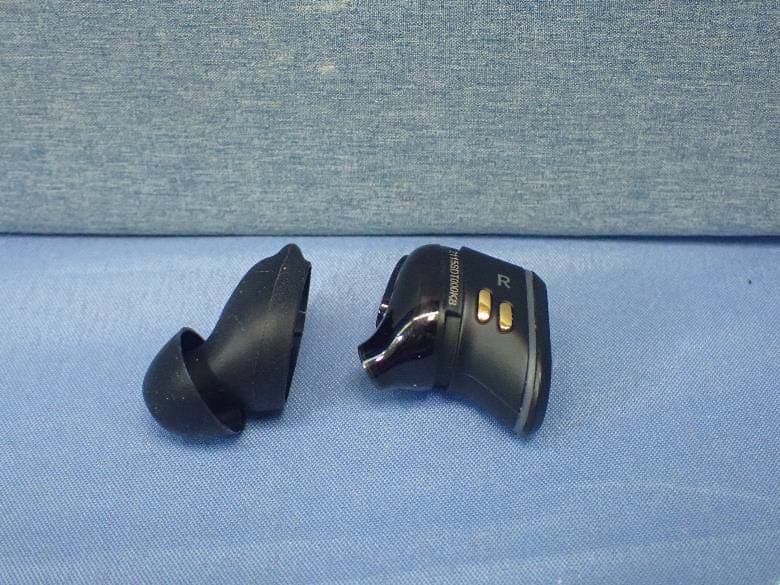
Click to zoom
Application Details
- Equipment Class
- DSS - Part 15 Spread Spectrum Transmitter
- Date of Grant
- Aug 09, 2021
- Application Purpose
- Original Equipment
- Date of Application
- Aug 09, 2021
- Equipment Note
- Earphone
- Frequency Range
- 2402.00000000 - 2480.00000000
- Company
- Logitech Far East Ltd
- Country
- Taiwan
Documents & Files
Document Text
Text extracted from the exhibit documents filed with the FCC. Open a document above to read the original.
Users Manual
English Read Manual Before Product Use. Warning! Exposure to noise above 85 decibels for long periods may cause hearing damage. Protect your hearing by establishing safe volumes. Establish safe listening volumes. −Start your audio playing device with the volume control at its lowest setting. −Slowly increase the volume until you can hear it comfortably and without distortion. −Avoid using the earphones in noisy environments where you may want to turn up the volume. −Turn down the volume if you cannot hear people speaking near you. Listen safely. To use these earphones safely, avoid listening at high sound levels. Follow the guidelines established by the U.S. Occupational Safety Health Administration on maximum time exposure to sound pressure levels before hearing damage occurs: Sound pressure level dB(A)Permissible noise exposure duration per day 908 hours 954 hours 1002 hours 1051 hour 11030 minutes 115Hearing damage will occur. Protect your hearing during use. − If using earphones with an unfamiliar or unstable sound system (airplane, public access ports, etc.) keep volume low to account for possible “break-in” bursts of loud sounds. −Remove earphones if they cause any ear discomfort or you have difficulty inserting the ear cushions. −If sharing earphones, remove ear cushions and clean them with antiseptic wipes before and after use. Hearing damage can be gradual and cumulative. Your ears may adapt over time to a higher volume of sound, which could result in damage to your hearing. Sometimes, no obvious warning signs present for hearing damage. However ringing or buzzing in the ears, difficulty understanding speech, a sensation of pressure or fullness in your ears, or muffling of sounds can indicate hearing damage. If you experience any of these symptoms, STOP using these earphones. BATTERY WARNING!: Improperly replaced batteries may present a risk of leak or explosion and personal injury. Risk of fire or explosion if the battery is replaced by an incorrect type. Ensure batteries are installed correctly by following the instructions provided. Mistreated rechargeable batteries may present a risk of fire or chemical burn. Do not disassemble or expose to conducting materials, moisture, liquid, or heat above 54° C (130° F). A battery subjected to extremely low air pressure may result in an explosion or the leakage of flammable liquid or gas. Do not use or charge the battery if it appears to be leaking, discolored, deformed, or in any way abnormal. Do not leave your battery discharged or unused for extended periods. Do not short circuit. Your device may contain an internal, rechargeable battery that is not replaceable. Battery life varies with usage. Non-operational batteries should be discarded according to local laws. If no laws or regulations govern, dispose of your device in a waste bin for electronics. Keep batteries away from children. This product is intended to be supplied by a Listed/Certified power supply, rated 5 Vdc, 0.5 A minimum, Tma (maximum ambient temperature) 45 degree C and altitude 5000 m. If needed, please contact the Manufacturer for further information. Use Guidelines: Safe & Proper Use of Your Product −WARNING! The product contains small, detachable parts, which may cause choking, personal injury, or death, especially in children. Please exercise care in the use and handling of small parts, and keep them away from children under 4 years of age. −Do not use your earphones in any environment where a failure to hear surrounding sounds may be dangerous. −Do not use your earphones while driving or operating machinery. −Do not modify the product. Do not disassemble or attempt to service this product. −Use this product only with listed ITE computers and accessories. −Connect power supply to a properly wired and grounded electrical outlet. −This is not a Children's Product and is not intended for use by children under 14 years old. −This product is safe under normal and reasonably foreseeable operating conditions. If product is operating improperly, call Jaybird support. Product must be returned to Jaybird for any service or repair. −Keep magnet away from devices and objects that could be damaged or impacted by strong magnetic fields. Magnet may interfere with certain medical devices. −Refer to product Quick Start Guide for use instructions. See the product support page on the Logitech website www.logitech.com/support for additional information. Logitech Compliance. The product complies with all applicable requirements for Restriction of Hazardous Substances (RoHS) and Waste Electronic and Electrical Equipment (WEEE). For Product Safety, EMC, RF, Energy, RoHS and WEEE information, go to www.logitech.com/compliance. Maintenance is not required for product compliance. Batteries, electronic and electrical equipment should not be disposed of with household waste. Wherever possible, they should be segregated and brought to an appropriate collection point to enable recycling and avoid potential impacts on the environment and human health. For more information, contact your local authorities or place of purchase, or visit www.logitech.com/recycling. Battery removal for recycling FCC statement This device complies with Part 15 of the FCC Rules. Operation is subject to the following two conditions: 1) this device may not cause harmful interference, and 2) this device must accept any interference received, including interference that may cause undesired operation. This equipment has been tested and found to comply with the limits for a Class B digital device, pursuant to part 15 of the FCC Rules. These limits are designed to provide reasonable protection against harmful interference in a residential installation. This equipment generates, uses and can radiate radio frequency energy. And, if not installed and used in accordance with the instructions, may cause harmful interference to radio communications. However, there is no guarantee that interference will not occur in a particular i…
Text truncated - open the document above for the full version.
Users Manual
VISTA PRO QUICK START GUIDE GUIDE DE DÉMARRAGE RAPIDE CONTENTS English 3 Download the Jaybird App for guided setup. For more information, visit jaybirdsport.com/support/vista-pro Français 9 Téléchargez l’application Jaybird pour une installation guidée. Pour plus d’informations, rendez-vous à la page: jaybirdsport.com/support/vista-pro Español 15 Descarga la aplicación Jaybird para acceder a una configuración guiada. Para obtener más información, visita jaybirdsport.com/support/vista-pro Português 21 Faça download do aplicativo Jaybird para realizar uma configuração orientada. Para obter mais informações, visite jaybirdsport.com/support/vista-pro Done Done 1 Take the case out of the box & open it 1 Download & Open Jaybird App 2 Go to BT settings / select Vista Pro 2 Follow on screen instructions Self App guided START Custom Sound Find My Buds Customization Support & Assisted Setup Cancel Select an accessory VISTA PRO Jaybird Vista Pro Tap to pair with this device QUICK START For an assisted fit setup, please download the Jaybird App or visit www.jaybirdsport.com/support/vista-pro Start with the pre-installed size 2 on the earbud. – If the earbud does not feel secure enough please try size 3. – If you feel some discomfort or pressure, please try size 1. It is not uncommon to use a different size in each ear. FIT Orientation Size PLAYING MUSICCALLS SINGLE PRESS Play / Pause Customizable Accept / Hang Up Call DOUBLE PRESS Next Song Previous Song Customizable Reject Call PRESS & HOLD Volume + (R) Volume – (L) Customizable Volume + (R) Volume – (L) DOUBLE TAP SurroundSense Switch Customizable Download the Jaybird App to customize your button controls. CONTROLS FEATURELEFT BUDCASERIGHT BUD OPEN CASE Charging Pulsing WhitePulsing WhitePulsing White Charged Solid WhiteSolid WhiteSolid White Battery Below 20% Solid Red PRESS & HOLD Pairing Mode Off Blinking White Off DOUBLE PRESS Relay Case Switch Cycling White SINGLE PRESS Earbud LED Beacon On/Off Left Bud LED Right Bud LED Case LED CASE CONTROLS Your Jaybird headphones feature an IP68 waterproof rating. Jaybird headphones are designed to handle rain, mud, dust and outdoor adventures. Jaybird headphones are not designed for swimming, showering or exposure to pool or ocean water. In case of exposure to salted or chlorinated water, rinse the headphones gently with fresh water and air dry before use. The charging case is IP54 and water resistant. Please ensure your headphones are completely dry before putting them inside the case. Please see jaybirdsport.com for proper care and maintenance instructions. WATERPROOF CARE & MAINTENANCE We want to make sure you get the best experience possible. DOWNLOAD The Jaybird app VISIT US ONLINE www.jaybirdsport.com/vista-pro ©2021 Logitech. Logitech, Jaybird and the Jaybird logo are trademarks or registered trademarks of Logitech Europe S.A. and/or its affiliates in the U.S. and other countries. SUPPORT Terminé Terminé 1 Sortez l'étui de la boîte et ouvrez-le 1 Téléchargez et ouvrez l'application Jaybird 2 Accédez aux paramètres BT / Sélectionnez Vista Pro 2 Suivez les instructions à l'écran Hors application Guidé par application START Custom Sound Find My Buds Customization Support & Assisted Setup Cancel Select an accessory VISTA PRO Jaybird Vista Pro Tap to pair with this device DÉMARRAGE RAPIDE Pour bénéficier d'une configuration assistée, veuillez télécharger l'application Jaybird ou rendez-vous sur www. Commencez avec la taille 2 pré- installée sur l'écouteur. - Si l'écouteur ne semble pas correctement maintenu, essayez la taille 3. - Si vous ressentez une sorte de gêne ou de pression, essayez la taille 1. Il n'est pas rare d'utiliser une taille différente pour chaque oreille. MAINTIEN Orientation Taille LIRE DE LA MUSIQUEAPPELS SIMPLE PRESSION Lecture/Pause Personnalisable Accepter/Mettre fin à un appel DOUBLE PRESSION Morceau suivant Morceau précédent Personnalisable Rejeter un appel APPUYER ET MAINTENIR Volume + (R) Volume – (L) Personnalisable Volume + (R) Volume – (L) APPUYER DEUX FOIS Commutateur Sur- roundSense Personnalisable Téléchargez l'application Jaybird pour per- sonnaliser vos commandes de boutons. COMMANDES CARACTÉRISTIQUES ÉCOUTEUR GAUCHE ÉTUI ÉCOUTEUR DROIT OUVERTURE DU BOÎTIER Chargement Blanc clignotantBlanc clignotantBlanc clignotant Chargé Blanc en continuBlanc en continuBlanc en continu Batterie inférieure à 20% Rouge en continu APPUYER ET MAINTENIR Mode de couplage Off Blanc clignotant Off DOUBLE PRESSION Commutateur de l’étui relais Variation de blanc SIMPLE PRESSION Témoin lumineux de l’écouteur Signal On/Off Écouteur gauche Témoin lumineux Écouteur droit Témoin lumineux Témoin lumineux de l’étui COMMANDES DE L'ÉTUI Vos écouteurs Jaybird possèdent un indice d'étanchéité IP68. Les écouteurs Jaybird sont conçus pour supporter la pluie, la boue, la poussière et les aventures en extérieur. Les écouteurs Jaybird ne sont pas conçus pour la natation, la douche ou l'exposition à l'eau des piscines ou des océans. En cas d'exposition à de l'eau salée ou chlorée, rincez doucement les écouteurs avec de l'eau douce et laissez-les sécher à l'air libre avant de les utiliser. L'étui de charge est IP54 et résistant à l'eau. Veuillez vous assurer que vos écouteurs sont entièrement secs avant de les mettre dans l'étui. Consultez jaybirdsport.com pour y trouver les instructions d'entretien et de maintenance. ÉTANCHE ENTRETIEN ET MAINTENANCE Nous voulons nous assurer que vous bénéficiez de la meilleure expérience possible. TÉLÉCHARGER L’application Jaybird REJOIGNEZ-NOUS EN LIGNE www.jaybirdsport.com/vista-pro ©2021 Logitech. Logitech, Jaybird et le logo Jaybird sont des marques commerciales ou déposées de Logitech Europe S.A. et/ou de ses sociétés affiliées aux États-Unis et dans d'autres pays. ASSISTANCE Listo Listo 1 Extrae la funda de la caja y ábrela 1 Descarga y abre la aplicación Jaybird 2 En los ajustes de BT, selecciona Vista Pro 2 Sigue las instrucciones que aparezcan en pantalla Operación i…
Text truncated - open the document above for the full version.
Attestation Statements
FCC ID: JNZB00036 Date:07/22/2021 According to “784748 D01 Labelling Part 15 &18 Guidelines v08” If the device is unquestionably too small for the FCC ID to be readable (smaller than 4- 6 points), the FCC ID may be placed in the user manual. However, it must be determined that the device itself is too small – the label area allocated to the FCC ID may not be reduced because of over crowded identification of other product and regulatory information. Justification for placing the FCC ID in the manual must be submitted with the initial application for certification for review and approval. - The product is a wireless Earphone, the product dimension is too small and the mechanical is the rounded/ radius design. The product characteristics do not permit direct marking of the device. - Logitech confirms FCC ID would be placed in the flyer , and users can see compliance information when they choose products on the retail store and open the product pack- age. - The above has been accepted via a KDB inquiry which may be found in the operational description exhibit. Sincerely yours, ----------------------------------------------- Paul Zahra / Regulatory Compliance Manager LOGITECH FAR EAST LTD. Tel: +1-510-713-5436 E-mail: [email protected]
Cover Letter(s)
Federal Communications Commission 7435 Oakland Mills Road Columbia MD 21046 Subject: Request for Confidentiality FCC ID: JNZB00036 To Whom It May Concern: Pursuant to the provisions of Sections 0.457 and 0.459 of the Commission’s rules (47 CFR §§ 0.457, 0.459), we are requesting the Commission to withhold the following attachments as confidential document from public disclosure indefinitely. Schematic Diagram Block Diagram Theory of Operation Above mentioned document contains detailed system and equipment description are considered as proprietary information in operation of the equipment. The public disclosure of above documents might be harmful to our company and would give competitor an unfair advantage in the market. In additional to above mentioned documents, pursuant to Public Notice DA 04-1705 of the Commission’s policy, in order to comply with the marketing regulations in 47 CFR §2.803 and the importation rules in 47 CFR §2.1204, while ensuring that business sensitive information remains confidential until the actual marketing of newly authorized devices. We are requesting the commission to grant short-term confidentiality request on the following attachments until 180 days after the Grant of Equipment Authorization. External Photos Internal Photos User Manual Test Setup photos It is our understanding that all measurement test reports, FCC ID label format and correspondent during certification review process cannot be granted as confidential documents and those information will be available for public review once the grant of equipment authorization is issued. Best Regards Paul Zahra / Regulatory Compliance Manager LOGITECH FAR EAST LTD. Tel: +1-510-713-5436 E-mail: [email protected] 08/06/2021
External Photos
Reference No.: BDKG-WTW-P21060157-1 Page 1/12 CONSTRUCTION PHOTOS OF EUT Left Reference No.: BDKG-WTW-P21060157-1 Page 2/12 Reference No.: BDKG-WTW-P21060157-1 Page 3/12 Reference No.: BDKG-WTW-P21060157-1 Page 4/12 Reference No.: BDKG-WTW-P21060157-1 Page 5/12 Right Reference No.: BDKG-WTW-P21060157-1 Page 6/12 Reference No.: BDKG-WTW-P21060157-1 Page 7/12 Reference No.: BDKG-WTW-P21060157-1 Page 8/12 Reference No.: BDKG-WTW-P21060157-1 Page 9/12 Charger case (option) Reference No.: BDKG-WTW-P21060157-1 Page 10/12 Reference No.: BDKG-WTW-P21060157-1 Page 11/12 Reference No.: BDKG-WTW-P21060157-1 Page 12/12 Y cable (option)
ID Label/Location Info
Excerpt from Flyer (Appendix Card) :
Internal Photos
Reference No.: BDKG-WTW-P21060157-2 Page 1/10 CONSTRUCTION PHOTOS OF EUT Left Reference No.: BDKG-WTW-P21060157-2 Page 2/10 Reference No.: BDKG-WTW-P21060157-2 Page 3/10 Reference No.: BDKG-WTW-P21060157-2 Page 4/10 Antenna Reference No.: BDKG-WTW-P21060157-2 Page 5/10 Reference No.: BDKG-WTW-P21060157-2 Page 6/10 Right Reference No.: BDKG-WTW-P21060157-2 Page 7/10 Reference No.: BDKG-WTW-P21060157-2 Page 8/10 Reference No.: BDKG-WTW-P21060157-2 Page 9/10 Antenna Reference No.: BDKG-WTW-P21060157-2 Page 10/10
RF Exposure Info
SAR Test Report Report Format Version 5.0.0 Page No. : 1 of 22 Report No. : SFBDKG-WTW-P21060157 Issued Date : Jul. 28, 2021 SAR Test Report Report No. : SFBDKG-WTW-P21060157 Applicant : LOGITECH FAR EAST LTD. Address : 7700 Gateway Boulevard Newark California United States Product : Earphone FCC ID : JNZB00036 Brand : Jaybird, Logitech Model No. : B00036 Standards : FCC 47 CFR Part 2 (2.1093), IEEE C95.1:1992, IEEE Std 1528:2013 KDB 865664 D01 v01r04, KDB 865664 D02 v01r02, KDB 447498 D01 v06 Sample Received Date : Jun. 04, 2021 Date of Testing : Jul. 20, 2021 ~ Jul. 21, 2021 Lab Address : No. 47-2, 14th Ling, Chia Pau Vil., Lin Kou Dist., New Taipei City, Taiwan Test Location : No. 19, Hwa Ya 2nd Rd., Wen Hwa Vil., Kwei Shan Dist., Taoyuan City, Taiwan CERTIFICATION: The above equipment have been tested by Bureau Veritas Consumer Products Services (H.K.) Ltd., Taoyuan Branch–Lin Kou Laboratories, and found compliance with the requirement of the above standards. The test record, data evaluation & Equipment Under Test (EUT) configurations represented herein are true and accurate accounts of the measurements of the sample’s SAR characteristics under the conditions specified in this report. It should not be reproduced except in full, without the written approval of our laboratory. The client should not use it to claim product certification, approval, or endorsement by TAF or any government agencies. Prepared By : Gina Liu / Specialist Approved By : Gordon Lin / Manager FCC Accredited No.: TW0003 This report is for your exclusive use. Any copying or replication of this report to or for any other person or entity, or use of our name or trademark, is permitted only with our prior written permission. This report sets forth our findings solely with respect to the test samples identified herein. The results set forth in this report are not indicative or representative of the quality or characteristics of the lot from which a test sample was taken or any similar or identical product unless specifically and expressly noted. Our report includes all of the tests requested by you and the results thereof based upon the information that you provided to us. You have 60 days from date of issuance of this report to notify us of any material error or omission caused by our negligence, provided, however, that such notice shall be in writing and shall specifically address the issue you wish to raise. A failure to raise such issue within the prescribed time shall constitute your unqualified acceptance of the completeness of this report, the tests conducted and the correctness of the report contents. Unless specific mention, the uncertainty of measurement has been explicitly taken into account to declare the compliance or non-compliance to the specification. SAR Test Report Report Format Version 5.0.0 Page No. : 2 of 22 Report No. : SFBDKG-WTW-P21060157 Issued Date : Jul. 28, 2021 Table of Contents Release Control Record ............................................................................................................................................................... 3 1. Summary of Maximum SAR Value ....................................................................................................................................... 4 2. Description of Equipment Under Test ................................................................................................................................. 5 3. SAR Measurement System ................................................................................................................................................... 6 3.1 Definition of Specific Absorption Rate (SAR) ............................................................................................................... 6 3.2 SPEAG DASY6 System ............................................................................................................................................... 6 3.2.1 Robot.................................................................................................................................................................. 7 3.2.2 Probes ................................................................................................................................................................ 8 3.2.3 Data Acquisition Electronics (DAE) .................................................................................................................... 8 3.2.4 Phantoms ........................................................................................................................................................... 8 3.2.5 Device Holder ..................................................................................................................................................... 9 3.2.6 System Validation Dipoles ................................................................................................................................ 10 3.2.7 Power Source ................................................................................................................................................... 10 3.2.8 Tissue Simulating Liquids ................................................................................................................................. 11 3.3 SAR System Verification ............................................................................................................................................ 13 3.4 SAR Measurement Procedure ................................................................................................................................... 14 3.4.1 Area Scan and Zoom Scan Procedure ............................................................................................................. 14 3.4.2 Volume Scan Procedure................................................................................................................................... 15 3.4.3 Power Drift Monitoring …
Text truncated - open the document above for the full version.
RF Exposure Info
Appendix A. SAR Plots of System Verification The plots for system verification are shown as follows. Report No.: SFBDKG-WTW-P21060157 Test Laboratory: Bureau Veritas ADT SAR/HAC Testing Lab Date: 2021/07/20 S01 System Check_H2450_210720 DUT: Dipole 2450 MHz; Type: D2450V2; SN: 835 Communication System: UID 0, CW; Frequency: 2450 MHz;Duty Cycle: 1:1 Medium: H19T27N1_0720 Medium parameters used (interpolated): f = 2450 MHz; σ = 1.862 S/m; ε r = 39.176; ρ = 1000 kg/m 3 Ambient Temperature:23.7 °C; Liquid Temperature:23.2 °C DASY5 Configuration: - Probe: EX3DV4 - SN7554; ConvF(7.41, 7.41, 7.41) @ 2450 MHz; Calibrated: 2020/09/28 - Sensor-Surface: 1.4mm (Mechanical Surface Detection) - Electronics: DAE4 Sn915; Calibrated: 2021/06/02 - Phantom: SAM Phantom_1982; Type: QD 000 P41 Ax; - Measurement SW: DASY52, Version 52.10 (4); SEMCAD X Version 14.6.14 (7483) Pin=50mW/Area Scan (81x81x1): Interpolated grid: dx=1.200 mm, dy=1.200 mm Maximum value of SAR (interpolated) = 4.50 W/kg Pin=50mW/Zoom Scan (7x7x7)/Cube 0: Measurement grid: dx=5mm, dy=5mm, dz=5mm Reference Value = 49.73 V/m; Power Drift = 0.01 dB Peak SAR (extrapolated) = 5.58 W/kg SAR(1 g) = 2.67 W/kg; SAR(10 g) = 1.26 W/kg (SAR corrected for target medium) Maximum value of SAR (measured) = 4.53 W/kg Report No.: SFBDKG-WTW-P21060157 Test Laboratory: Bureau Veritas ADT SAR/HAC Testing Lab Date: 2021/07/21 S02 System Check_H2450_210721 DUT: Dipole 2450 MHz; Type: D2450V2; SN: 835 Communication System: UID 0, CW; Frequency: 2450 MHz;Duty Cycle: 1:1 Medium: H19T27N1_0721 Medium parameters used (interpolated): f = 2450 MHz; σ = 1.882 S/m; ε r = 38.359; ρ = 1000 kg/m 3 Ambient Temperature:23.6 °C; Liquid Temperature:23.2 °C DASY5 Configuration: - Probe: EX3DV4 - SN7555; ConvF(7.59, 7.59, 7.59) @ 2450 MHz; Calibrated: 2020/09/28 - Sensor-Surface: 1.4mm (Mechanical Surface Detection) - Electronics: DAE4 Sn1589; Calibrated: 2020/09/15 - Phantom: Twin-SAM V8.0_1988; Type: QD 000 P41 AA; - Measurement SW: DASY52, Version 52.10 (4); SEMCAD X Version 14.6.14 (7483) Pin=50mW/Area Scan (81x81x1): Interpolated grid: dx=1.200 mm, dy=1.200 mm Maximum value of SAR (interpolated) = 5.50 W/kg Pin=50mW/Zoom Scan (7x7x7)/Cube 0: Measurement grid: dx=5mm, dy=5mm, dz=5mm Reference Value = 54.80 V/m; Power Drift = 0.01 dB Peak SAR (extrapolated) = 6.82 W/kg SAR(1 g) = 2.69 W/kg; SAR(10 g) = 1.24 W/kg (SAR corrected for target medium) Maximum value of SAR (measured) = 5.55 W/kg Report No.: SFBDKG-WTW-P21060157
RF Exposure Info
Appendix B. SAR Plots of SAR Measurement The SAR plots for highest measured SAR in each exposure configuration, wireless mode and frequency band combination are shown as follows. Report No.: SFBDKG-WTW-P21060157 Date: 2021/07/20 Test Laboratory: Bureau Veritas ADT SAR/HAC Testing Lab P01 BT_BR_EDR_Right Side_0mm_Ch0_Left Earbud DUT: P21060157 Communication System: UID 10032 - CAA, IEEE 802.15.1 Bluetooth (GFSK, DH5); Frequency: 2402 MHz;Duty Cycle: 1:1.31 Medium: H19T27N1_0720 Medium parameters used (interpolated): f = 2402 MHz; σ = 1.817 S/m; ε r = 39.336; ρ = 1000 kg/m 3 Ambient Temperature:23.7 °C; Liquid Temperature:23.2 °C DASY5 Configuration: - Probe: EX3DV4 - SN7554; ConvF(7.41, 7.41, 7.41) @ 2402 MHz; Calibrated: 2020/09/28 - Sensor-Surface: 1.4mm (Mechanical Surface Detection) - Electronics: DAE4 Sn915; Calibrated: 2021/06/02 - Phantom: SAM Phantom_1982; Type: QD 000 P41 Ax; - Measurement SW: DASY52, Version 52.10 (4); SEMCAD X Version 14.6.14 (7483) Area Scan (51x51x1): Interpolated grid: dx=1.200 mm, dy=1.200 mm Maximum value of SAR (interpolated) = 0.248 W/kg Zoom Scan (7x7x7)/Cube 0: Measurement grid: dx=5mm, dy=5mm, dz=5mm Reference Value = 10.61 V/m; Power Drift = 0.10 dB Peak SAR (extrapolated) = 0.366 W/kg SAR(1 g) = 0.117 W/kg; SAR(10 g) = 0.046 W/kg (SAR corrected for target medium) Maximum value of SAR (measured) = 0.256 W/kg Report No.: SFBDKG-WTW-P21060157 Date: 2021/07/21 Test Laboratory: Bureau Veritas ADT SAR/HAC Testing Lab P02 BT_BR_EDR_Left Side_0mm_Ch0_Right Earbud DUT: P21060157 Communication System: UID 10032 - CAA, IEEE 802.15.1 Bluetooth (GFSK, DH5); Frequency: 2402 MHz;Duty Cycle: 1:1.31 Medium: H19T27N1_0721 Medium parameters used (interpolated): f = 2402 MHz; σ = 1.835 S/m; ε r = 38.521; ρ = 1000 kg/m 3 Ambient Temperature:23.6 °C; Liquid Temperature:23.2 °C DASY5 Configuration: - Probe: EX3DV4 - SN7555; ConvF(7.59, 7.59, 7.59) @ 2402 MHz; Calibrated: 2020/09/28 - Sensor-Surface: 1.4mm (Mechanical Surface Detection) - Electronics: DAE4 Sn1589; Calibrated: 2020/09/15 - Phantom: Twin-SAM V8.0_1988; Type: QD 000 P41 AA; - Measurement SW: DASY52, Version 52.10 (4); SEMCAD X Version 14.6.14 (7483) Area Scan (51x51x1): Interpolated grid: dx=1.200 mm, dy=1.200 mm Maximum value of SAR (interpolated) = 0.200 W/kg Zoom Scan (7x7x7)/Cube 0: Measurement grid: dx=5mm, dy=5mm, dz=5mm Reference Value = 10.63 V/m; Power Drift = 0.03 dB Peak SAR (extrapolated) = 0.406 W/kg SAR(1 g) = 0.106 W/kg; SAR(10 g) = 0.043 W/kg (SAR corrected for target medium) Smallest distance from peaks to all points 3 dB below = 6 mm Ratio of SAR at M2 to SAR at M1 = 42% Maximum value of SAR (measured) = 0.244 W/kg Report No.: SFBDKG-WTW-P21060157
RF Exposure Info
Appendix C. Calibration Certificate for Probe and Dipole The SPEAG calibration certificates are shown as follows. Report No.: SFBDKG-WTW-P21060157 Report No.: SFBDKG-WTW-P21060157 Report No.: SFBDKG-WTW-P21060157 Report No.: SFBDKG-WTW-P21060157 Report No.: SFBDKG-WTW-P21060157 Report No.: SFBDKG-WTW-P21060157 Report No.: SFBDKG-WTW-P21060157 Report No.: SFBDKG-WTW-P21060157 Report No.: SFBDKG-WTW-P21060157 Report No.: SFBDKG-WTW-P21060157 Report No.: SFBDKG-WTW-P21060157 Report No.: SFBDKG-WTW-P21060157 Report No.: SFBDKG-WTW-P21060157 Report No.: SFBDKG-WTW-P21060157 Report No.: SFBDKG-WTW-P21060157 Report No.: SFBDKG-WTW-P21060157 Report No.: SFBDKG-WTW-P21060157 Report No.: SFBDKG-WTW-P21060157 Report No.: SFBDKG-WTW-P21060157 Report No.: SFBDKG-WTW-P21060157 Report No.: SFBDKG-WTW-P21060157 Report No.: SFBDKG-WTW-P21060157 Report No.: SFBDKG-WTW-P21060157 Report No.: SFBDKG-WTW-P21060157 Report No.: SFBDKG-WTW-P21060157 Report No.: SFBDKG-WTW-P21060157 Report No.: SFBDKG-WTW-P21060157 Report No.: SFBDKG-WTW-P21060157 Report No.: SFBDKG-WTW-P21060157 Report No.: SFBDKG-WTW-P21060157 Report No.: SFBDKG-WTW-P21060157 Report No.: SFBDKG-WTW-P21060157 Report No.: SFBDKG-WTW-P21060157 Report No.: SFBDKG-WTW-P21060157 Report No.: SFBDKG-WTW-P21060157 Report No.: SFBDKG-WTW-P21060157 Report No.: SFBDKG-WTW-P21060157 Report No.: SFBDKG-WTW-P21060157 Report No.: SFBDKG-WTW-P21060157 Report No.: SFBDKG-WTW-P21060157 Report No.: SFBDKG-WTW-P21060157 Report No.: SFBDKG-WTW-P21060157 Report No.: SFBDKG-WTW-P21060157 Report No.: SFBDKG-WTW-P21060157 Report No.: SFBDKG-WTW-P21060157 Report No.: SFBDKG-WTW-P21060157 Report No.: SFBDKG-WTW-P21060157 Report No.: SFBDKG-WTW-P21060157 Report No.: SFBDKG-WTW-P21060157 Report No.: SFBDKG-WTW-P21060157
RF Exposure Info
Appendix E. Tissue & System Verification The measuring results for tissue simulating liquid and system check are shown as below. Note: 1. For Section 4.3, the dielectric properties of the tissue simulating liquid have been measured within 24 hours before the SAR testing and within ±10 % of the target values. Liquid temperature during the SAR testing has kept within ±2 .°C 2. For Section 4.4, The SAR measurement system was validated according to procedures in KDB 865664 D01. The validation status in tabulated summary is as below. 3. For Section 4.5, Comparing to the reference SAR value provided by SPEAG in dipole calibration certificate, the deviation of system check results is within its specification of 10 %. The result indicates the system check can meet the variation criterion and the plots please refer to Appendix A of this report. Report No.: SFBDKG-WTW-P21060157 Plot No.Date Frequen…
Text truncated - open the document above for the full version.
Contact Information
Applicant
Rick Lien(Head of Product Compliance)
Test Firm
Bureau Veritas CPS(H.K.) Ltd., Taoyuan Branch HsinKen Liu
Technical Specifications
| # | Rule Parts | Frequency Range | Power Output |
|---|---|---|---|
| 1 | 15C | 2.40 GHz - 2.48 GHz | 19.00 mW |
Other Applications from Logitech Far East Ltd
JNZYR0126
Jul 30, 2026Wireless Keyboard
Equipment Class
DTS - Digital Transmission SystemJNZYR0116
Jul 30, 2026Wireless Keyboard
Equipment Class
DTS - Digital Transmission SystemJNZYR0115
Jul 30, 2026Wireless Keyboard
Equipment Class
DTS - Digital Transmission SystemJNZMR0143
Jul 21, 2026Wireless Mouse
Equipment Class
DTS - Digital Transmission SystemJNZMR0136
Jul 09, 2026Wireless Mouse
Equipment Class
DTS - Digital Transmission System