JNZNR0007Remote controller
Logitech Far East Ltd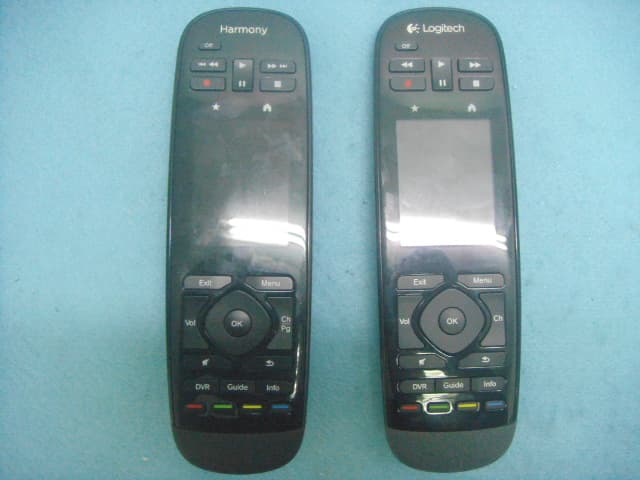
Click to zoom
Application Details
- Equipment Class
- DTS - Digital Transmission System
- Date of Grant
- Mar 20, 2013
- Application Purpose
- Original Equipment
- Date of Application
- Mar 20, 2013
- Equipment Note
- Remote controller
- Frequency Range
- 2405.00000000 - 2474.00000000
- Company
- Logitech Far East Ltd
- Country
- Taiwan
Documents & Files
Document Text
Text extracted from the exhibit documents filed with the FCC. Open a document above to read the original.
Users Manual
Logitech® Harmony Touch Setup Guide Guide d’installation COVER FPO Logitech Harmony TouchLogitech Harmony Touch English 32 English English 3 Français 21 Español 39 Português 57 www.logitech.com/support 75 Package contents 1. Remote 2. Charging cradle 3. AC Adapter 4. USB cable 12 3 4 Logitech Harmony TouchLogitech Harmony Touch English 54 English 1 2 3 4 6 5 7 8 9 13 12 14 15 17 16 10 11 Know your product 1. Off button Power off your entire system. 2. Video controls Perform standard AV functions. 3. Favorites Display the Favorites screen. 4. LCD touch screen View, launch, and edit activities and favorites, use the on-screen number pad, change settings, and get help. 5. Directional navigation Press a pad corner for desired direction within a list or menu. 6. Exit Leave a listing or menu. 7. OK Press to select an option. 8. Volume control Press the top to increase volume and the bottom to lower it. 9. Mute 10. Satellite/Cable controls DVR opens a record/play menu. Guide opens satellite/cable program listings. Info provides program information. 11. Color-coded navigation buttons Perform cable, satellite, or Blu-ray functions. 12. Home Display the Home screen. 13. Menu Display a menu. 14. Channel control Press the top for channel up and the bottom for channel down. 15. Previous Press for previous channel. 16. IR window Transfer device control commands (IR learning) from another remote. 17. Micro-USB port Connect the Harmony remote to a PC to access My Harmony and receive power while updating. Logitech Harmony TouchLogitech Harmony Touch English 76 English Set up your product To set up your new Harmony remote, you will need to do the following: 1. Gather the manufacturer name and model number of your devices. 2. Note how your home entertainment system devices are wired and connected together. 3. Fill in your home entertainment system information using the blank form. Do I really need all my model numbers? Yes. The setup process will ask for all your model numbers so the remote can know how to control your devices. It’s better to gather them all at once rather than needing to go back and forth from your computer to your devices. Where do I find my model numbers? Most devices have them somewhere on the back or bottom, sometimes on a label. Be sure to write the number down accurately because entering an incorrect or incomplete number may cause you trouble. What is an input? Your TV can display video from multiple home entertainment devices– a cable/satellite box, a DVD player, a game console, etc. You select a different input to watch each of these devices. The input also matches the connector on the back of your TV. Your Harmony remote will need to understand what device is connected to what input to best control your system. (Some TVs use the term “source” instead of “input.”) If you’re using an audio video receiver, it also has inputs—for video and sound. Understanding these connections will be important to complete setup. Is your sound system switching both video and sound for your setup, or just sound? The Harmony software setup will ask you questions about this. Note: Some older audio receivers have only inputs for sound, not video. How do I gather my system information? Use the forms on the following pages to record the information about your home entertainment system. Note: If you have more than 6 devices, we have an expanded form online you can use. Go to www.logitech.com/support/ harmonytouch Logitech Harmony TouchLogitech Harmony Touch English 98 English If your home entertainment system uses only a TV for sound, use this form. TV Manufacturer _______________________________________________ Model # ________________________________________ What’s connected? Input __________________________________________ Input __________________________________________ Input __________________________________________ Input __________________________________________ Cable/Satellite Box Manufacturer _______________________________________________ Model # ________________________________________ DVD/BluRay Player Manufacturer _______________________________________________ Model # ________________________________________ Other Device Manufacturer _______________________________________________ Model # ________________________________________ Other Device Manufacturer _______________________________________________ Model # ________________________________________ If your home entertainment system uses a TV and an AV receiver, use this form. TV Manufacturer _______________________________________________ Model # ________________________________________ What’s connected? Input __________________________________________ Input __________________________________________ Input __________________________________________ Input __________________________________________ AV Receiver Manufacturer _______________________________________________ Model # ________________________________________ What’s connected? Input __________________________________________ Input __________________________________________ Input __________________________________________ Input __________________________________________ Cable/Satellite Box Manufacturer _______________________________________________ Model # ________________________________________ DVD/BluRay Player Manufacturer _______________________________________________ Model # ________________________________________ Other Device Manufacturer _______________________________________________ Model # ________________________________________ Logitech Harmony TouchLogitech Harmony Touch English 1110 English Check your work Before you proceed, make sure you have correctly recorded all your inputs. To check your work: 1. Turn on all your entertainment devices. 2. Using your original TV remote, cycle through your TV’s inputs. Most TV remotes have an input or source button. • Note: If you are using a AV receiver, use your receiver’s remote to cycle through the video inputs. 3. Press the …
Text truncated - open the document above for the full version.
Users Manual
Logitech® Important Information Safety, Compliance and Warranty Logitech® Informations importantes Sécurité, conformité et garantie English Care and Maintenance. Do not open the remote. There are no user-serviceable parts inside. Do not allow moisture to enter the unit. Moisture will corrode the inner electronics. To clean the LCD screen, wipe gently with a dry cloth. Any changes or modifications not expressly approved by Logitech ® Inc. void the user’s authority to operate the equipment and could void the warranty. End-of-life Battery Disposal Instructions. This device contains an internal, lithium-ion rechargeable battery that is non-replaceable. Battery life is dependent upon usage. Heavy daily use will result in shorter battery life. Casual use will extend battery life. If you suspect that the battery may be dead, try charging it. If the battery does not recharge, please contact Logitech® Harmony® Customer Support for repair or replacement information. Consult local laws and regulations for proper battery disposal in your area. If there are no local regulations concerning battery disposal, please dispose of the dead battery in a waste bin for electronic devices. Keep all batteries out of the reach of children. CAUTION: The battery used in this device may present a risk of fire or chemical burn if mistreated. Do not disassemble, expose to heat above 54° C (130° F), incinerate, or immerse in water or liquid of any kind. Do not use or charge the battery if it appears to be leaking, discolored, deformed, or in any way abnormal. Do not leave your battery discharged or unused for extended periods of time. When the battery is misused, it may explode or leak, causing burns and persona injury. If the battery leaks, use normal precaution and discard it immediately following the laws and regulations governing battery disposal in your area. Remember that a leaking battery can cause skin burns or other personal injury. Keep this and all batteries out of the reach of children. Risk of explosion if battery is replaced with an incorrect battery type. Power Supply Warning. The power supply for this product is for indoor use only. Use the power supply that comes with your product; do not use any other power supply. Do not use a damaged power supply or attempt to repair one that is damaged. Do not immerse the power supply in water or subject it to physical abuse. Inspect the power supply regularly for damage to its cable, plug, and body. FCC Compliance and Advisory Statement. This equipment has been tested and found to comply with the limits for a Class B digital devices, pursuant to Part 15 of the FCC Rules. These limits are designed to provide reasonable protection against harmful interference in a residential installation. This equipment generates, uses, and can radiate radio frequency energy and, if not installed and used in accordance with the instruction manual, may cause harmful interference to radio communications. However, there is no guarantee that interference will not occur in a particular installation. If this equipment does cause harmful interference to radio or television reception, which can be determined by turning the equipment off and on, the user is encouraged to try to correct the interference by one of more of the following measures: • Reorient or relocate the receiving antenna • Increase the separation between the equipment and receiver • Connect the equipment into an outlet on a circuit different from that to which the receiver is connected. Consult the dealer or an experienced radio/TV technician for help. Warning: Changes or modifications not expressly approved by Logitech could void the user’s authority to operate the equipment. Where shielded interface cables have been provided with the product or specified additional components or accessories elsewhere defined to be used with the installation of the product, they must be used in order to ensure compliance with FCC regulations. This device complies with Part 15 of the FCC Rules. Operation is subject to the following two conditions: (1) this device may not cause harmful interference and (2) this device must accept any interference received, including interference that may cause undesired operation. Canadian DOC: This digital device does not exceed the Class B limits for radio noise emissions from digital apparatus specified in the interference- causing equipment standard entitled “Digital Apparatus,” ICES-003 of the Department of Communications. RF Compliance and Advisory Statement: This device complies with RSS-210 of Industry Canada. Operation is subject to the following two conditions: 1) this device may not cause harmful interference, and 2) this device must accept any interference, including interference that may cause undesired operation of the device. Logitech Compliance. Your product is FCC compliant. For more information, refer to the software help system or online at www.logitech. com/compliance. Logitech hardware product limited warranty Logitech warrants to the original purchaser that your Logitech hardware product shall be free from defects in material and workmanship for the period of time, identified on your product package and/or contained in the user documentation, from the date of purchase. You may also find this information by selecting your product in the Online Support section of our website at www.logitech.com/support. Except where prohibited by applicable law, this warranty is nontransferable and is limited to the original purchaser. This warranty gives you specific legal rights, and you may also have other rights that vary under local laws. Logitech’s entire liability and your exclusive remedy for any breach of warranty shall be, at Logitech’s option, (1) to repair or replace the hardware, or (2) to refund the price paid, provided that the hardware is returned to the point of purchase or such other place as Logitech may direct with a copy of the sales receipt or dated itemized receipt. Shipping and han…
Text truncated - open the document above for the full version.
Cover Letter(s)
LOGITECH FAR EAST LTD. #2 Creation Rd. 4, Science-Based Ind. Park Hsinchu Taiwan, R.O.C. Tel: +886-3-5778241 / Fax: +886-3-6122394 Power of Attorney Date: 2013/3/4 Dear Sir, I hereby have entrusted the following person to be a proxy regarding application for Type Certification. Sporton International Inc. Address : No.8, Lane 724, Bo-ai St., Jhubei City, HsinChu County 302, Taiwan, R.O.C. Name : Leo Huang Job Title : Manager e-mail : [email protected] I am therefore responsible for the contents of the application. Brand name and model type of the specified radio equipment: Logitech, Harmony / N-R0007 FCC ID: JNZNR0007 Product name: Remote controller FCC Grantee contact person information. Applicant’s company name : LOGITECH FAR EAST LTD. Applicant’s company address : #2 Creation Rd. 4, Science-Based Ind. Park Hsinchu Taiwan, R.O.C. Signature : Job Title and Dept. : T.C.Chang / Sr. Manager AP Region E-Mail : [email protected] Tel. : +886-3-5778241
External Photos
Report No.: 271316-02 SPORTON International Inc. PAGE NUMBER : A1 OF A11 TEL : 886-2-2696-2468 ISSUED DATE : Mar. 20, 2013 FAX : 886-2-2696-2255 APPENDIX A. Photographs of EUT Report No.: 271316-02 SPORTON International Inc. PAGE NUMBER : A2 OF A11 TEL : 886-2-2696-2468 ISSUED DATE : Mar. 20, 2013 FAX : 886-2-2696-2255 Report No.: 271316-02 SPORTON International Inc. PAGE NUMBER : A3 OF A11 TEL : 886-2-2696-2468 ISSUED DATE : Mar. 20, 2013 FAX : 886-2-2696-2255 Report No.: 271316-02 SPORTON International Inc. PAGE NUMBER : A4 OF A11 TEL : 886-2-2696-2468 ISSUED DATE : Mar. 20, 2013 FAX : 886-2-2696-2255 Charging cradle*1 Report No.: 271316-02 SPORTON International Inc. PAGE NUMBER : A5 OF A11 TEL : 886-2-2696-2468 ISSUED DATE : Mar. 20, 2013 FAX : 886-2-2696-2255 Power Adapter 1 Model No. AD631MC P/N No. 534-000542 (Power cable with core) Report No.: 271316-02 SPORTON International Inc. PAGE NUMBER : A6 OF A11 TEL : 886-2-2696-2468 ISSUED DATE : Mar. 20, 2013 FAX : 886-2-2696-2255 Report No.: 271316-02 SPORTON International Inc. PAGE NUMBER : A7 OF A11 TEL : 886-2-2696-2468 ISSUED DATE : Mar. 20, 2013 FAX : 886-2-2696-2255 Power Adapter 2 Model No. AD631MC P/N No. 534-000542 (Power cable without core) FCC Plug*1 Report No.: 271316-02 SPORTON International Inc. PAGE NUMBER : A8 OF A11 TEL : 886-2-2696-2468 ISSUED DATE : Mar. 20, 2013 FAX : 886-2-2696-2255 Report No.: 271316-02 SPORTON International Inc. PAGE NUMBER : A9 OF A11 TEL : 886-2-2696-2468 ISSUED DATE : Mar. 20, 2013 FAX : 886-2-2696-2255 Power Adapter 3 Model No. KSAS0060510100VUD P/N No. 534-000455 (Power cable without core) FCC Plug*1 Report No.: 271316-02 SPORTON International Inc. PAGE NUMBER : A10 OF A11 TEL : 886-2-2696-2468 ISSUED DATE : Mar. 20, 2013 FAX : 886-2-2696-2255 Report No.: 271316-02 SPORTON International Inc. PAGE NUMBER : A11 OF A11 TEL : 886-2-2696-2468 ISSUED DATE : Mar. 20, 2013 FAX : 886-2-2696-2255 USB Cable (Non-Shielded, 0.55m)
ID Label/Location Info
FCC ID: JNZNR0007
Internal Photos
Report No.: 271316-02 SPORTON International Inc. PAGE NUMBER : A1 OF A9 TEL : 886-2-2696-2468 ISSUED DATE : Mar. 12, 2013 FAX : 886-2-2696-2255 APPENDIX A. Photographs of EUT Report No.: 271316-02 SPORTON International Inc. PAGE NUMBER : A2 OF A9 TEL : 886-2-2696-2468 ISSUED DATE : Mar. 12, 2013 FAX : 886-2-2696-2255 Report No.: 271316-02 SPORTON International Inc. PAGE NUMBER : A3 OF A9 TEL : 886-2-2696-2468 ISSUED DATE : Mar. 12, 2013 FAX : 886-2-2696-2255 Report No.: 271316-02 SPORTON International Inc. PAGE NUMBER : A4 OF A9 TEL : 886-2-2696-2468 ISSUED DATE : Mar. 12, 2013 FAX : 886-2-2696-2255 Report No.: 271316-02 SPORTON International Inc. PAGE NUMBER : A5 OF A9 TEL : 886-2-2696-2468 ISSUED DATE : Mar. 12, 2013 FAX : 886-2-2696-2255 Report No.: 271316-02 SPORTON International Inc. PAGE NUMBER : A6 OF A9 TEL : 886-2-2696-2468 ISSUED DATE : Mar. 12, 2013 FAX : 886-2-2696-2255 Report No.: 271316-02 SPORTON International Inc. PAGE NUMBER : A7 OF A9 TEL : 886-2-2696-2468 ISSUED DATE : Mar. 12, 2013 FAX : 886-2-2696-2255 Charging cradle*1 Report No.: 271316-02 SPORTON International Inc. PAGE NUMBER : A8 OF A9 TEL : 886-2-2696-2468 ISSUED DATE : Mar. 12, 2013 FAX : 886-2-2696-2255 Report No.: 271316-02 SPORTON International Inc. PAGE NUMBER : A9 OF A9 TEL : 886-2-2696-2468 ISSUED DATE : Mar. 12, 2013 FAX : 886-2-2696-2255
RF Exposure Info
Report No.: FR271316-02 FCC ID: JNZNR0007 Page No. : C1 of C2 Appendix C. RF Exposure Report Report No.: FR271316-02 FCC ID: JNZNR0007 Page No. : C2 of C2 1. RF Exposure Report 1.1. Applicable Standard In accordance with 47 CFR FCC Part 2 Subpart J, section 2.1093 this device has been defined as a portable device which is defined as a transmitting device designed to be used so that the radiating structure(s) of the device is/are within 20 centimeters of the body of the user. Portable devices must be evaluated using the specific FCC test procedures, and the SAR measurement techniques of OET Bulletin 65 Supplement C 01-01 and IEEE Std 1528-2003. When routine evaluation is required for SAR and the output power is ≤ 10 mW, the test reduction and test exclusion procedures given herein, or in KDB447498 D01 v05, are applicable. 1.2. SAR evaluation Max Conducted Power: 6.05 dBm Antenna Gain (dBi) Average Power (dBm) EIRP Power (dBm) Test Result 3.31 6.05 9.36 Complies Note: E.I.R.P. power (9.36dBm) = Average power (6.05dBm) + Antenna gain (3.31dBi) ≦ SAR exempt threshold (10 mW), therefore SAR evaluation is not required.
Test Report
SPORTON International Inc. No. 52, Hwa Ya 1st Rd., Kwei-Shan Hsiang, TaoYuan Hsien, Taiwan, R.O.C. Ph: 886-3-327-3456 / FAX: 886-3-327-0973 / www.sporton.com.tw Report Format Version: 02 FCC RADIO TEST REPORT Applicant’s company LOGITECH FAR EAST LTD. Applicant Address #2 Creation Rd. 4, Science-Based Ind. Park Hsinchu Taiwan, R.O.C. FCC ID JNZNR0007 Manufacturer’s company LOGITECH FAR EAST LTD. Manufacturer Address #2 Creation Rd. 4, Science-Based Ind. Park Hsinchu Taiwan, R.O.C. Product Name Remote controller Brand Name Logitech, Harmony Model Name N-R0007 Test Rule 47 CFR FCC Part 15 Subpart C § 15.247 Test Freq. Range 2405 ~ 2474MHz Received Date Jun. 28, 2012 Final Test Date Mar. 07, 2013 Submission Type Original Equipment Statement The test result in this report refers exclusively to the presented test model / sample. Without written approval of SPORTON International Inc., the test report shall not be reproduced except in full. The measurements and test results shown in this test report were made in accordance with the procedures and found in compliance with the limit given in ANSI C63.10-2009 and 47 CFR FCC Part 15 Subpart C, KDB 558074 D01 v02 and KDB 662911 D01 v01r02. The test equipment used to perform the test is calibrated and traceable to NML/ROC. Report No.: FR271316-02 Report Format Version: 02 Page No. : i of ii FCC ID: JNZNR0007 Issued Date : Mar. 20, 2013 Table of Contents 1. CERTIFICATE OF COMPLIANCE ......................................................................................................................... 1 2. SUMMARY OF THE TEST RESULT .......................................................................................................................... 2 3. GENERAL INFORMATION .................................................................................................................................. 3 3.1. Product Details....................................................................................................................................................................................3 3.2. Accessories .........................................................................................................................................................................................3 3.3. Table for Filed Antenna.......................................................................................................................................................................4 3.4. Table for Carrier Frequencies .............................................................................................................................................................4 3.5. Table for Test Modes ...........................................................................................................................................................................5 3.6. Table for Testing Locations..................................................................................................................................................................6 3.7. Table for Supporting Units ...................................................................................................................................................................6 3.8. Table for Parameters of Test Software Setting .....................................................................................................................................6 3.9. Test Configurations .............................................................................................................................................................................7 4. TEST RESULT ................................................................................................................................................... 10 4.1. AC Power Line Conducted Emissions Measurement.........................................................................................................................10 4.2. Peak Output Power Measurement ....................................................................................................................................................14 4.3. Average Output Power Measurement ..............................................................................................................................................16 4.4. Power Spectral Density Measurement ..............................................................................................................................................18 4.5. 6dB Spectrum Bandwidth Measurement ..........................................................................................................................................21 4.6. Radiated Emissions Measurement ....................................................................................................................................................23 4.7. Band Edge Emissions Measurement .................................................................................................................................................32 4.8. Antenna Requirements .....................................................................................................................................................................35 5. LIST OF MEASURING EQUIPMENTS ................................................................................................................... 36 6. TEST LOCATION.............................................................................................................................................. 38 APPENDIX A. PHOTOGRAPHS OF EUT.........................................................................................................A1 ~ A18 APPENDIX B. TEST PHOTOS.......................................................................................................................... B1 ~ B6 APPENDIX C. RF EXPOSURE REPORT ................................................................…
Text truncated - open the document above for the full version.
Test Setup Photos
Report No.: FR271316-02 FCC ID: JNZNR0007 Page No. : B1 of B6 Appendix B. Test Photos Report No.: FR271316-02 FCC ID: JNZNR0007 Page No. : B2 of B6 1. Photographs of Conducted Emissions Test Configuration Test Mode: Mode 2. FRONT VIEW REAR VIEW Report No.: FR271316-02 FCC ID: JNZNR0007 Page No. : B3 of B6 2. Photographs of Radiated Emissions Test Configuration Test Configuration: 9 kHz ~ 30 MHz FRONT VIEW REAR VIEW Report No.: FR271316-02 FCC ID: JNZNR0007 Page No. : B4 of B6 Test Configuration: 30MHz~1GHz / Test Mode: Mode 1. FRONT VIEW REAR VIEW Report No.: FR271316-02 FCC ID: JNZNR0007 Page No. : B5 of B6 SIDE VIEW Report No.: FR271316-02 FCC ID: JNZNR0007 Page No. : B6 of B6 Test Configuration: Above 1 GHz / Test Mode: Mode 2. FRONT VIEW REAR VIEW
Contact Information
Applicant
Rick Lien(Head of Product Compliance)
Test Firm
Sporton International Inc.Alex Chen
Technical Specifications
| # | Rule Parts | Frequency Range | Power Output |
|---|---|---|---|
| 1 | 15C | 2.40 GHz - 2.47 GHz | 4.60 mW |
Other Applications from Logitech Far East Ltd
JNZYR0126
Jul 30, 2026Wireless Keyboard
Equipment Class
DTS - Digital Transmission SystemJNZYR0116
Jul 30, 2026Wireless Keyboard
Equipment Class
DTS - Digital Transmission SystemJNZYR0115
Jul 30, 2026Wireless Keyboard
Equipment Class
DTS - Digital Transmission SystemJNZMR0143
Jul 21, 2026Wireless Mouse
Equipment Class
DTS - Digital Transmission SystemJNZMR0136
Jul 09, 2026Wireless Mouse
Equipment Class
DTS - Digital Transmission System