JNZOR0004RF Transceiver
Logitech Far East Ltd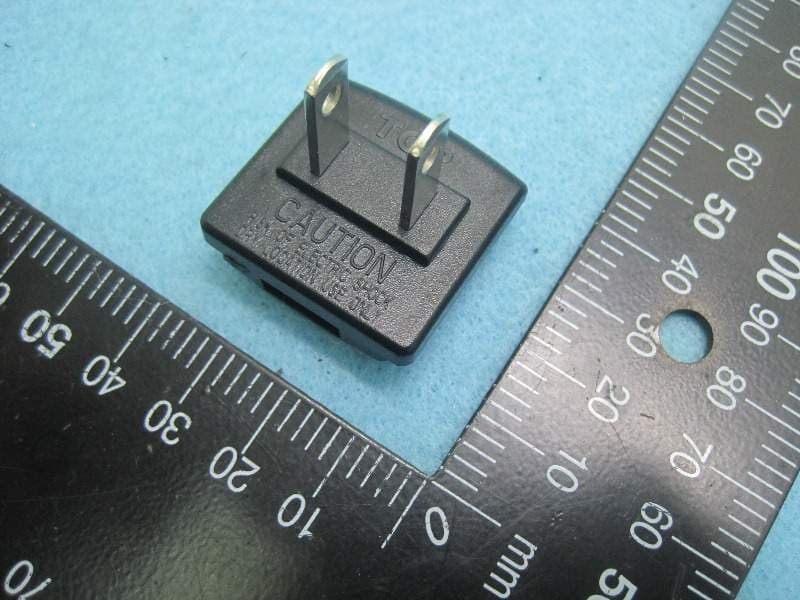
Click to zoom
Application Details
- Equipment Class
- DTS - Digital Transmission System
- Date of Grant
- Apr 02, 2013
- Application Purpose
- Original Equipment
- Date of Application
- Apr 02, 2013
- Equipment Note
- RF Transceiver
- Frequency Range
- 2402.00000000 - 2480.00000000
- Company
- Logitech Far East Ltd
- Country
- Taiwan
Documents & Files
Document Text
Text extracted from the exhibit documents filed with the FCC. Open a document above to read the original.
Users Manual
© 2013 Logitech. All rights reserved. Logitech, the Logitech logo, and other Logitech marks are owned by Logitech and may be registered. All other trademarks are the property of their respective owners. Logitech assumes no responsibility for any errors that may appear in this manual. Information contained herein is subject to change without notice. © 2013 Logitech. Tous droits réservés. Logitech, le logo Logitech et les autres marques Logitech sont la propriété exclusive de Logitech et sont susceptibles d’être des marques déposées. Toutes les autres marques sont la propriété exclusive de leurs détenteurs respectifs. Logitech décline toute responsabilité en cas d’erreurs dans ce manuel. Les informations énoncées dans le présent document peuvent faire l’objet de modifications sans avis préalable. 620-004882.002 www.logitech.com English Care and Maintenance. Do not open the remote. There are no user-serviceable parts inside. Do not allow moisture to enter the unit. Moisture will corrode the inner electronics. Any changes or modifications not expressly approved by Logitech® Inc. void the user’s authority to operate the equipment and could void the warranty. Power Supply Warning. The power supply for this product is for indoor use only. Use the power supply that comes with your product; do not use any other power supply. Do not use a damaged power supply or attempt to repair one that is damaged. Do not immerse the power supply in water or subject it to physical abuse. Inspect the power supply regularly for damage to its cable, plug, and body. FCC Compliance and Advisory Statement. This device complies with Part 15 of the FCC Rules. Operation is subject to the following two conditions: (1) this device may not cause harmful interference and (2) this device must accept any interference received, including interference that may cause undesired operation. This equipment has been tested and found to comply with the limits for a Class B digital devices, pursuant to Part 15 of the FCC Rules. These limits are designed to provide reasonable protection against harmful interference in a residential installation. This equipment generates, uses, and can radiate radio frequency energy and, if not installed and used in accordance with the instruction manual, may cause harmful interference to radio communications. However, there is no guarantee that interference will not occur in a particular installation. If this equipment does cause harmful interference to radio or television reception, which can be determined by turning the equipment off and on, the user is encouraged to try to correct the interference by one of more of the following measures: • Reorient or relocate the receiving antenna • Increase the separation between the equipment and receiver • Connect the equipment into an outlet on a circuit different from that to which the receiver is connected. Consult the dealer or an experienced radio/TV technician for help. This equipment is classified as a Mobile device and is compliant to FCC CFR part 2.1091. This equipment complies with FCC radiation exposure limits set forth for an uncontrolled environment. This equipment should be installed and operated with minimum distance of 20 cm between the radiator and your body. This device must not be co-located or operating in conjunction with any other antenna or transmitter. For product available in the USA/Canada market, only channel 1~11 can be operated. Selection of other channels is not possible. Warning: Changes or modifications not expressly approved by Logitech could void the user’s authority to operate the equipment. Where shielded interface cables have been provided with the product or specified additional components or accessories elsewhere defined to be used with the installation of the product, they must be used in order to ensure compliance with FCC regulations. Canadian DOC: This digital device does not exceed the Class B limits for radio noise emissions from digital apparatus specified in the interference-causing equipment standard entitled “Digital Apparatus,” ICES-003 of the Department of Communications. ICES-3(B)/NMB-3(B) RF Compliance and Advisory Statement: This device complies with Industry Canada licence-exempt RSS standard 210. Operation is subject to the following two conditions: 1) this device may not cause harmful interference, and 2) this device must accept any interference, including interference that may cause undesired operation of the device. To comply with RSS 102 RF exposure compliance requirements, for mobile configurations, a separation distance of at least 20 cm must be maintained between the antenna of this device and all persons. This device must not be co-located or operating in conjunction with any other antenna or transmitter. For product available in the USA/ Canada market, only channel 1~11 can be operated. Selection of other channels is not possible. Logitech Compliance. Your product is FCC compliant. For more information, refer to the software help system or online at www. logitech.com/compliance. Logitech hardware product limited warranty Logitech warrants to the original purchaser that your Logitech hardware product shall be free from defects in material and workmanship for the period of time, identified on your product package and/or contained in the user documentation, from the date of purchase. You may also find this information by selecting your product in the Online Support section of our website at www. logitech.com/support. Except where prohibited by applicable law, this warranty is nontransferable and is limited to the original purchaser. This warranty gives you specific legal rights, and you may also have other rights that vary under local laws. Logitech’s entire liability and your exclusive remedy for any breach of warranty shall be, at Logitech’s option, (1) to repair or replace the hardware, or (2) to refund the price paid, provided that the hardware is returned to the point of purchase or such other pla…
Text truncated - open the document above for the full version.
Users Manual
Harmony® Smart Control Setup Guide Installationshandbuch Guide d’installation Installatiegids © 2013 Logitech. All rights reserved. Logitech, the Logitech logo, and other Logitech marks are owned by Logitech and may be registered. All other trademarks are the property of their respective owners. Logitech assumes no responsibility for any errors that may appear in this manual. Information contained herein is subject to change without notice. 620-004055.002 www.logitech.com BC 1234 Setup on your Phone • Visit the Apple App Store or Google Play store. • Search for and install the “Harmony” app. • Launch the app when ready. • Follow the instructions provided by the Harmony app to setup your Harmony remote. • The app will detect if your phone is compatible and guide you through the process. Setup on your Computer • If setup isn’t supported on your phone, go to www.myharmony.com on your computer to begin setup. • Follow the instructions to set up your remote. You will be prompted to connect the Harmony Hub using the USB cable provided. • When setup is complete, disconnect your Harmony Hub from your computer. Plug in your Harmony Hub and mini blaster Connect your Harmony Hub to a power outlet and place it inside your entertainment system cabinet. Connect the mini blaster to a port on the rear of the Harmony Hub. Place the mini blaster on top of your entertainment system to control your TV and other devices that are not inside your entertainment system cabinet. Remote 1. Off: Powers off your entire system. 2. Activity Buttons: Start your activities like Play Music, Watch TV, and Watch Movie. 3. Press once to fast forward or rewind. Press and hold to skip forward or back. 4. Press once for channel up/down. Press and hold to page up/down. 5. Battery compartment—battery preinstalled Einrichten auf Ihrem Telefon • Besuchen Sie den Apple App Store oder den Google Play Store. • Suchen und installieren Sie die Harmony-App. • Starten Sie dann die App. • Folgen Sie den Anweisungen der Harmony-App, um Ihre Harmony- Fernbedienung einzurichten. • Die App erkennt, ob Ihr Telefon kompatibel ist, und führt Sie durch den Vorgang. Einrichten auf Ihrem Computer • Wenn die Einrichtung auf Ihrem Telefon nicht unterstützt wird, können Sie sie unter www.myharmony.com auch über Ihren Computer durchführen. • Folgen Sie den Anweisungen, um Ihre Fernbedienung einzurichten. Sie werden aufgefordert, den Harmony Hub mithilfe des mitgelieferten USB-Kabels anzuschließen. • Wenn die Einrichtung abgeschlossen ist, trennen Sie den Harmony Hub von Ihrem Computer. Anschließen von Harmony Hub und Mini-Sender Schließen Sie den Harmony Hub an eine Steckdose an und stellen Sie ihn in das Sideboard zu Ihrem Entertainment-System. Schließen Sie den Mini-Sender an einen der Anschlüsse auf der Rückseite des Harmony Hub an. Stellen Sie den Mini-Sender dann oben auf das Sideboard, um Ihren Fernseher und andere Geräte zu steuern, die sich nicht zusammen mit Ihrem Entertainment-System im Sideboard befinden. Fernbedienung 1. Ausgeschaltet: Schaltet Ihr gesamtes System aus. 2. Aktionstasten: Starten Sie Aktionen wie „Musikhören“, „Fernsehen“ oder „Film wiedergeben“. 3. Drücken Sie die Taste einmal, um vor- oder zurückzuspulen. Halten Sie die Taste gedrückt, um vor- oder zurückzuspringen. 4. Drücken Sie einmal, um zum vorherigen oder nächsten Sender zu wechseln. Halten Sie die Taste gedrückt, um den Bildlauf nach oben oder unten zu bewegen. 5. Batteriefach – Batterie ist bereits eingesetzt. Configuration sur votre téléphone • Rendez-vous sur l'App Store d'Apple ou dans la boutique Google Play. • Recherchez et installez l'application Harmony. • Lancez ensuite l'application. • Suivez les instructions fournies par l'application Harmony pour configurer votre télécommande Harmony. • L'application détecte si votre téléphone est compatible et vous guide tout au long du processus. Configuration sur votre ordinateur • Si la configuration n'est pas prise en charge sur votre téléphone, accédez au site www.myharmony.com à partir de votre ordinateur afin de commencer la configuration. • Suivez les instructions pour configurer votre télécommande. Vous serez invité à connecter votre hub Harmony à l'aide du câble USB fourni. • Une fois la configuration terminée, déconnectez votre hub Harmony de votre ordinateur. Branchement de votre hub Harmony et du mini-relais Branchez votre hub Harmony à une prise de courant et placez-le dans le meuble réservé à votre système multimédia. Connectez le mini-relais au port situé à l'arrière du hub Harmony. Placez le mini-relais au-dessus de votre système multimédia pour contrôler votre téléviseur et d'autres dispositifs qui ne sont pas dans le meuble de votre système multimédia. Télécommande 1. Off (Arrêt): met hors tension l'ensemble de votre système. 2. Boutons d’activité: démarrez vos activités, comme lire de la musique, regarder la télévision ou regarder un film. 3. Appuyez sur le bouton pour effectuer une avance rapide ou un retour rapide. Maintenez le bouton appuyé pour passer à la piste suivante ou précédente. 4. Appuyez sur le bouton pour passer à la chaîne suivante/précédente. Maintenez le bouton appuyé pour passer à la page suivante/précédente. 5. Compartiment de la batterie - batterie préinstallée Set-up op uw telefoon • Ga naar de Apple App Store of Google Play-winkel. • Zoek en installeer de Harmony-app. • Start de app wanneer u klaar bent. • Volg de instructies van de Harmony-app om uw Harmony-afstandsbediening in te stellen. • De app detecteert of uw telefoon compatibel is en leidt u door het proces. Set-up op uw computer • Als de set-up niet wordt ondersteund op uw telefoon, gaat u naar www.myharmony.com op uw computer om de set-up te starten. • Volg de instructies om uw afstandsbediening in te stellen. U wordt gevraagd de Harmony Hub via de meegeleverde USB-kabel aan te sluiten. • Wanneer de set-up is voltooid, ontkoppelt u de Harmony Hub van uw computer. Uw Harmony Hub en miniblaster aansluiten Sluit uw Harmony…
Text truncated - open the document above for the full version.
External Photos
Report No.:271312 SPORTON International Inc. PAGE NUMBER : 1 OF 11 TEL : 886-2-2696-2468 ISSUED DATE : Jan. 30, 2013 FAX : 886-2-2696-2255 APPENDIX A. Photographs of EUT Report No.:271312 SPORTON International Inc. PAGE NUMBER : 2 OF 11 TEL : 886-2-2696-2468 ISSUED DATE : Jan. 30, 2013 FAX : 886-2-2696-2255 Report No.:271312 SPORTON International Inc. PAGE NUMBER : 3 OF 11 TEL : 886-2-2696-2468 ISSUED DATE : Jan. 30, 2013 FAX : 886-2-2696-2255 Adapter 1 Brand: Logitech Model No.: AD631MC Report No.:271312 SPORTON International Inc. PAGE NUMBER : 4 OF 11 TEL : 886-2-2696-2468 ISSUED DATE : Jan. 30, 2013 FAX : 886-2-2696-2255 Report No.:271312 SPORTON International Inc. PAGE NUMBER : 5 OF 11 TEL : 886-2-2696-2468 ISSUED DATE : Jan. 30, 2013 FAX : 886-2-2696-2255 Report No.:271312 SPORTON International Inc. PAGE NUMBER : 6 OF 11 TEL : 886-2-2696-2468 ISSUED DATE : Jan. 30, 2013 FAX : 886-2-2696-2255 Adapter 2 Brand: Logitech Model No.: KSAS0060510100D5D Report No.:271312 SPORTON International Inc. PAGE NUMBER : 7 OF 11 TEL : 886-2-2696-2468 ISSUED DATE : Jan. 30, 2013 FAX : 886-2-2696-2255 Report No.:271312 SPORTON International Inc. PAGE NUMBER : 8 OF 11 TEL : 886-2-2696-2468 ISSUED DATE : Jan. 30, 2013 FAX : 886-2-2696-2255 Report No.:271312 SPORTON International Inc. PAGE NUMBER : 9 OF 11 TEL : 886-2-2696-2468 ISSUED DATE : Jan. 30, 2013 FAX : 886-2-2696-2255 Report No.:271312 SPORTON International Inc. PAGE NUMBER : 10 OF 11 TEL : 886-2-2696-2468 ISSUED DATE : Jan. 30, 2013 FAX : 886-2-2696-2255 Report No.:271312 SPORTON International Inc. PAGE NUMBER : 11 OF 11 TEL : 886-2-2696-2468 ISSUED DATE : Jan. 30, 2013 FAX : 886-2-2696-2255
ID Label/Location Info
Label Size: 7.8 cm x 3 cm FCC ID:JNZOR0004
Internal Photos
Report No.:271312 SPORTON International Inc. PAGE NUMBER : 1 OF 6 TEL : 886-2-2696-2468 ISSUED DATE : Jan. 30, 2013 FAX : 886-2-2696-2255 APPENDIX A. Photographs of EUT Report No.:271312 SPORTON International Inc. PAGE NUMBER : 2 OF 6 TEL : 886-2-2696-2468 ISSUED DATE : Jan. 30, 2013 FAX : 886-2-2696-2255 Report No.:271312 SPORTON International Inc. PAGE NUMBER : 3 OF 6 TEL : 886-2-2696-2468 ISSUED DATE : Jan. 30, 2013 FAX : 886-2-2696-2255 Report No.:271312 SPORTON International Inc. PAGE NUMBER : 4 OF 6 TEL : 886-2-2696-2468 ISSUED DATE : Jan. 30, 2013 FAX : 886-2-2696-2255 Report No.:271312 SPORTON International Inc. PAGE NUMBER : 5 OF 6 TEL : 886-2-2696-2468 ISSUED DATE : Jan. 30, 2013 FAX : 886-2-2696-2255 Report No.:271312 SPORTON International Inc. PAGE NUMBER : 6 OF 6 TEL : 886-2-2696-2468 ISSUED DATE : Jan. 30, 2013 FAX : 886-2-2696-2255
RF Exposure Info
Report No.: FR271312 FCC ID: JNZOR0004 Page No. : C1 of C3 Appendix C. Maximum Permissible Exposure Report No.: FR271312 FCC ID: JNZOR0004 Page No. : C2 of C3 1. Maximum Permissible Exposure 1.1. Applicable Standard Systems operating under the provisions of this section shall be operated in a manner that ensures that the public is not exposed to radio frequency energy levels in excess limit for maximum permissible exposure. In accordance with 47 CFR FCC Part 2 Subpart J, section 2.1091 this device has been defined as a mobile device whereby a distance of 0.2 m normally can be maintained between the user and the device. (A) Limits for Occupational / Controlled Exposure Frequency Range (MHz) Electric Field Strength (E) (V/m) Magnetic Field Strength (H) (A/m) Power Density (S) (mW/ cm²) Averaging Time |E|²,|H|² or S (minutes) 0.3-3.0 614 1.63 (100)* 6 3.0-30 1842 / f 4.89 / f (900 / f)* 6 30-300 61.4 0.163 1.0 6 300-1500 F/300 6 1500-100,000 5 6 (B) Limits for General Population / Uncontrolled Exposure Frequency Range (MHz) Electric Field Strength (E) (V/m) Magnetic Field Strength (H) (A/m) Power Density (S) (mW/ cm²) Averaging Time |E|²,|H|² or S (minutes) 0.3-1.34 614 1.63 (100)* 30 1.34-30 824/f 2.19/f (180/f)* 30 30-300 27.5 0.073 0.2 30 300-1500 F/1500 30 1500-100,000 1.0 30 Note: f = frequency in MHz ; *Plane-wave equivalent power density 1.2. MPE Calculation Method E (V/m) = d GP30 Power Density: Pd (W/m²) = 377 2 E E = Electric field (V/m) P = Average RF output power (W) G = EUT Antenna numeric gain (numeric) d = Separation distance between radiator and human body (m) The formula can be changed to Pd = 2 377 30 d GP From the EUT RF output power, the minimum mobile separation distance, d=0.2m, as well as the gain of the used antenna, the RF power density can be obtained. Report No.: FR271312 FCC ID: JNZOR0004 Page No. : C3 of C3 1.3. Calculated Result and Limit For 2.4GHz Band: Antenna Type : PCB Max Conducted Power for Bluetooth: 5.99 dBm Antenna Gain (dBi) Antenna Gain (numeric) Average Output Power (dBm) Average Output Power (mW) Power Density (S) (mW/cm²) Limit of Power Density (S) (mW/cm²) Test Result 2.50 1.7783 5.9900 3.9719 0.001406 1 Complies
Test Report
SPORTON International Inc. No. 52, Hwa Ya 1st Rd., Kwei-Shan Hsiang, TaoYuan Hsien, Taiwan, R.O.C. Ph: 886-3-327-3456 / FAX: 886-3-327-0973 / www.sporton.com.tw Report Format Version: 02 FCC RADIO TEST REPORT Applicant’s company LOGITECH FAR EAST LTD. Applicant Address #2 Creation Rd. 4, Science-Based Ind. Park Hsinchu Taiwan, R.O.C. FCC ID JNZOR0004 Manufacturer’s company LOGITECH FAR EAST LTD. Manufacturer Address #2 Creation Rd. 4, Science-Based Ind. Park Hsinchu Taiwan, R.O.C. Product Name RF Transceiver Brand Name Logitech Model Name O-R0004 Test Rule 47 CFR FCC Part 15 Subpart C § 15.247 Test Freq. Range 2400 ~ 2483.5MHz Received Date Jul. 13, 2012 Final Test Date Dec. 14, 2012 Submission Type Original Equipment Statement Test result included is only for the Bluetooth part of the product. The test result in this report refers exclusively to the presented test model / sample. Without written approval of SPORTON International Inc., the test report shall not be reproduced except in full. The measurements and test results shown in this test report were made in accordance with the procedures and found in compliance with the limit given in ANSI C63.10-2009 and 47 CFR FCC Part 15 Subpart C. The test equipment used to perform the test is calibrated and traceable to NML/ROC. Report No.: FR271312AD Report Format Version: 02 Page No. : i of ii FCC ID: JNZOR0004 Issued Date : Feb. 26, 2013 Table of Contents 1. Certificate of Compliance ................................................................................................................................. 1 2. Summary of the Test Result................................................................................................................................. 2 3. GENERAL INFORMATION ..................................................................................................................................... 3 3.1. Product Details....................................................................................................................................................................................3 3.2. Accessories.........................................................................................................................................................................................3 3.3. Table for Filed Antenna.......................................................................................................................................................................4 3.4. Table for Carrier Frequencies...............................................................................................................................................................4 3.5. Table for Test Modes............................................................................................................................................................................5 3.6. Table for Testing Locations...................................................................................................................................................................5 3.7. Table for Supporting Units....................................................................................................................................................................5 3.8. Table for Parameters of Test Software Setting.......................................................................................................................................6 3.9. Test Configurations..............................................................................................................................................................................7 4. TEST RESULT ....................................................................................................................................................... 10 4.1. AC Power Line Conducted Emissions Measurement..........................................................................................................................10 4.2. Maximum Conducted Output Power Measurement.........................................................................................................................14 4.3. Power Spectral Density Measurement...............................................................................................................................................16 4.4. 6dB Spectrum Bandwidth Measurement...........................................................................................................................................21 4.5. Radiated Emissions Measurement.....................................................................................................................................................25 4.6. Band Edge Emissions Measurement..................................................................................................................................................34 4.7. Antenna Requirements......................................................................................................................................................................38 5. List of Measuring Equipments ........................................................................................................................... 39 6. Test Location.................................................................................................................................................... 42 APPENDIX A. Photographs of EUT................................................................................................................ A1 ~ A17 APPENDIX B. TEST PHOTOS ............................................................................................................................. B1 ~ B5 Report No.: FR271312AD Report Format Version: 02 Page No. : ii of ii FCC ID: JNZOR0004 Issued Date : Feb. 26, 2013 History of This Test Report REPORT NO. VERSION DESCRIPTION ISSUED DATE FR271312AD Rev. 01 Initial issue of report Jan…
Text truncated - open the document above for the full version.
Test Report
SPORTON International Inc. No. 52, Hwa Ya 1st Rd., Kwei-Shan Hsiang, TaoYuan Hsien, Taiwan, R.O.C. Ph: 886-3-327-3456 / FAX: 886-3-327-0973 / www.sporton.com.tw Report Format Version: 02 FCC RADIO TEST REPORT Applicant’s company LOGITECH FAR EAST LTD. Applicant Address #2 Creation Rd. 4, Science-Based Ind. Park Hsinchu Taiwan, R.O.C. FCC ID JNZOR0004 Manufacturer’s company LOGITECH FAR EAST LTD. Manufacturer Address #2 Creation Rd. 4, Science-Based Ind. Park Hsinchu Taiwan, R.O.C. Product Name RF Transceiver Brand Name Logitech Model Name O-R0004 Test Rule Part(s) 47 CFR FCC Part 15 Subpart C § 15.249 Test Freq. Range 2400 ~ 2483.5MHz Received Date Jul. 13, 2012 Final Test Date Dec. 14, 2012 Submission Type Original Equipment Statement The test result in this report refers exclusively to the presented test model / sample. Without written approval of SPORTON International Inc., the test report shall not be reproduced except in full. The measurements and test results shown in this test report were made in accordance with the procedures and found in compliance with the limit given in ANSI C63.10-2009 and 47 CFR FCC Part 15 Subpart C. The test equipment used to perform the test is calibrated and traceable to NML/ROC. Report No.: FR271312AA Report Format Version: 02 Page No. : i of ii FCC ID: JNZOR0004 Issued Date :Feb. 26, 2013 Table of Contents 1. CERTIFICATE OF COMPLIANCE ........................................................................................................................... 1 2. SUMMARY OF THE TEST RESULT ............................................................................................................................ 2 3. GENERAL INFORMATION..................................................................................................................................... 3 3.1. Product Details ........................................................................................................................................................................................... 3 3.2. Accessories ................................................................................................................................................................................................. 5 3.3. Table for Filed Antenna ............................................................................................................................................................................. 5 3.4. Table for Carrier Frequencies ................................................................................................................................................................... 6 3.5. Table for Test Modes .................................................................................................................................................................................. 6 3.6. Table for Testing Locations........................................................................................................................................................................ 7 3.7. Table for Supporting Units ......................................................................................................................................................................... 7 3.8. Test Configurations..................................................................................................................................................................................... 8 4. TEST RESULT......................................................................................................................................................... 11 4.1. AC Power Line Conducted Emissions Measurement ......................................................................................................................... 11 4.2. Field Strength of Fundamental Emissions Measurement.................................................................................................................... 15 4.3. 20dB Spectrum Bandwidth Measurement ........................................................................................................................................... 21 4.4. Radiated Emissions Measurement......................................................................................................................................................... 30 4.5. Band Edge Emissions Measurement...................................................................................................................................................... 48 4.6. Antenna Requirements ........................................................................................................................................................................... 53 5. LIST OF MEASURING EQUIPMENTS .................................................................................................................... 54 6. TEST LOCATION.................................................................................................................................................. 57 APPENDIX A. PHOTOGRAPHS OF EUT ........................................................................................................ A1 ~ A17 APPENDIX B. TEST PHOTOS ............................................................................................................................ B1 ~ B6 Report No.: FR271312AA Report Format Version: 02 Page No. : ii of ii FCC ID: JNZOR0004 Issued Date :Feb. 26, 2013 History of This Test Report REPORT NO. VERSION DESCRIPTION ISSUED DATE FR271312AA Rev. 01 Initial issue of report Jan. 04, 2013 FR271312AA Rev. 02 Modified the product name to “RF Transceiver” from “Harmony Hub”. Feb. 26, 2013 47 CFR FCC Part 15 Subpart C 15.205(a) 15.209(a) Further, this requirement does not apply to intentional radiators that must be professionally installed. Report No.: FR271312AA Report Format Version: 02 Page No. : 2 of 57 FCC ID: JNZOR0004 Issued Date : Feb. 26, …
Text truncated - open the document above for the full version.
Test Report
SPORTON International Inc. No. 52, Hwa Ya 1st Rd., Kwei-Shan Hsiang, TaoYuan Hsien, Taiwan, R.O.C. Ph: 886-3-327-3456 / FAX: 886-3-327-0973 / www.sporton.com.tw Report Format Version: 02 FCC RADIO TEST REPORT Applicant’s company LOGITECH FAR EAST LTD. Applicant Address #2 Creation Rd. 4, Science-Based Ind. Park Hsinchu Taiwan, R.O.C. FCC ID JNZOR0004 Manufacturer’s company LOGITECH FAR EAST LTD. Manufacturer Address #2 Creation Rd. 4, Science-Based Ind. Park Hsinchu Taiwan, R.O.C. Product Name RF Transceiver Brand Name Logitech Model Name O-R0004 Test Rule 47 CFR FCC Part 15 Subpart C § 15.247 Test Freq. Range 2400 ~ 2483.5MHz Received Date Jul. 13, 2012 Final Test Date Dec. 17, 2012 Submission Type Original Equipment Statement Test result included is only for the Bluetooth part of the product. The test result in this report refers exclusively to the presented test model / sample. Without written approval of SPORTON International Inc., the test report shall not be reproduced except in full. The measurements and test results shown in this test report were made in accordance with the procedures and found in compliance with the limit given in ANSI C63.10-2009 and 47 CFR FCC Part 15 Subpart C. The test equipment used to per…
Text truncated - open the document above for the full version.
Contact Information
Applicant
Rick Lien(Head of Product Compliance)
Test Firm
SPORTON International Inc.Leo Huang
Technical Specifications
| # | Rule Parts | Frequency Range | Power Output |
|---|---|---|---|
| 1 | 15C | 2.40 GHz - 2.48 GHz | 2.66 mW |
Other Applications from Logitech Far East Ltd
JNZYR0126
Jul 30, 2026Wireless Keyboard
Equipment Class
DTS - Digital Transmission SystemJNZYR0116
Jul 30, 2026Wireless Keyboard
Equipment Class
DTS - Digital Transmission SystemJNZYR0115
Jul 30, 2026Wireless Keyboard
Equipment Class
DTS - Digital Transmission SystemJNZMR0143
Jul 21, 2026Wireless Mouse
Equipment Class
DTS - Digital Transmission SystemJNZMR0136
Jul 09, 2026Wireless Mouse
Equipment Class
DTS - Digital Transmission System