JNZSR0190Gaming Speakers
Logitech Far East Ltd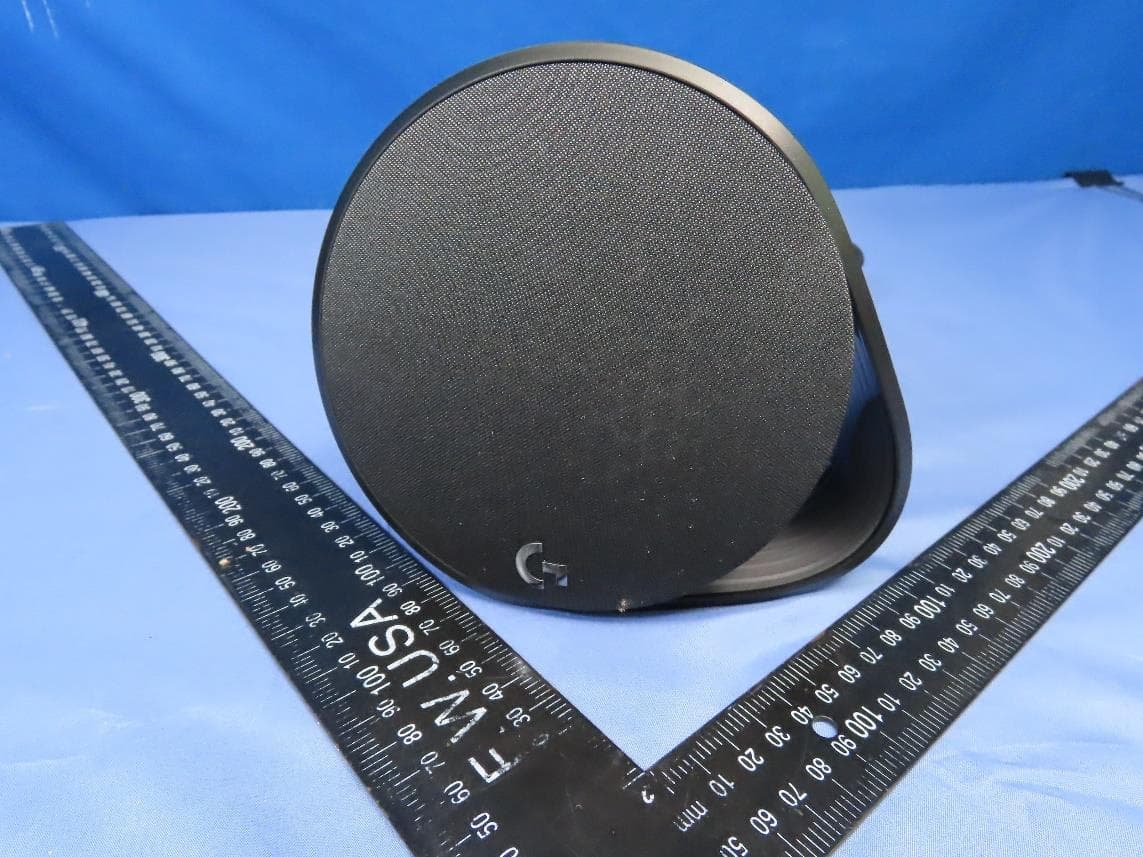
Click to zoom
Application Details
- Equipment Class
- DSS - Part 15 Spread Spectrum Transmitter
- Date of Grant
- Jul 30, 2023
- Application Purpose
- Original Equipment
- Date of Application
- Jul 30, 2023
- Equipment Note
- Gaming Speakers
- Frequency Range
- 2402.00000000 - 2480.00000000
- Company
- Logitech Far East Ltd
- Country
- Taiwan
Documents & Files
Document Text
Text extracted from the exhibit documents filed with the FCC. Open a document above to read the original.
Users Manual
English Read Manual Before Product Use. WARNING! FIRE & ELECTRIC SHOCK HAZARD: RISK OF FIRE OR ELECTRIC SHOCK WHICH MAY RESULT IN PERSONAL INJURY OR DEATH. Use as instructed. Safe Usage Guidelines for Products –Install in accordance with the manufacturer’s instructions. –Maintain a minimum distance of at least 6 inches (15 cm) around apparatus for sufficient ventilation. –Do not block any ventilation openings. –Ventilation should not be impeded by covering the ventilation openings with items, such as newspapers, table clothes, curtains, etc. –Do not push objects into apparatus vents or slots. –Place apparatus in a stable location. –No naked (open) flame sources, such as lighted candles, should be placed on or near the apparatus. –Do not install near any heat sources such as radiators, heat registers, stoves, or other apparatus (including amplifiers) that produce heat. –Do not defeat the safety purpose of the polarized plug. A polarized plug has two blades with one wider than the other. The wide blade is provided for your safety. If the provided plug does not fit into your outlet, consult an electrician for replacement of the obsolete outlet. –Protect the power cord from being walked on or pinched particularly at plugs, convenience receptacles, and the point where they exit from the apparatus. –Only use attachments/accessories specified by the manufacturer. –Use the product with listed/certified ITE computers and accessories. –Connect power supply or power cord to a properly wired and grounded electrical outlet. –Unplug this apparatus during lightning storms or when unused for long periods of time. –Refer all servicing to qualified service personnel. Servicing is required when the apparatus has been damaged in any way, such as power-supply cord or plug is damaged, liquid has been spilled or objects have fallen into the apparatus, the apparatus has been exposed to rain or moisture, does not operate normally, or has been dropped. –The apparatus shall be disconnected from the mains by unplugging the power cord of the apparatus from the AC mains receptacle. –The socket-outlet shall be installed near the equipment and shall be easily accessible. –Do not use this apparatus near water. Do not expose this apparatus to rain or moisture. –This is not a Children’s Product and is not intended for use by children under 14 years old. POWER SUPPLY WARNING! The power supply is for indoor use only. Only use the power supply included with your product. Do not attempt to repair or use a damaged power supply. Do not immerse the power supply in water or subject it to physical abuse. Inspect the power supply regularly for cable, plug, and casing damage. BATTERY WARNING!: Improperly replaced batteries may present a risk of leak or explosion and personal injury. Risk of fire or explosion if the battery is replaced by an incorrect type. Ensure batteries are installed correctly by following the instructions provided. Mistreated rechargeable batteries may present a risk of fire or chemical burn. Do not disassemble or expose to conducting materials, moisture, liquid, or heat above 54° C (130° F). A battery subjected to extremely low air pressure may result in an explosion or the leakage of flammable liquid or gas. Do not use or charge the battery if it appears to be leaking, discolored, deformed, or in any way abnormal. Do not leave your battery discharged or unused for extended periods. Do not short circuit. Your device may contain an internal, rechargeable battery that is not replaceable. Battery life varies with usage. Non-operational batteries should be discarded according to local laws. If no laws or regulations govern, dispose of your device in a waste bin for electronics. Keep batteries away from children. Warning! Exposure to noise above 85 decibels for long periods may cause hearing damage. Protect your hearing by establishing safe volumes. Logitech Compliance: The product complies with all applicable requirements for Restriction of Hazardous Substances (RoHS) and Waste Electronic and Electrical Equipment (WEEE). For Product Safety, EMC, RF, Energy, RoHS and WEEE information, go to www.logitech.com/compliance. Maintenance is not required for product compliance. Packaging, batteries, electronic and electrical equipment and their accessories should not be disposed of with household waste. Wherever possible, they should be segregated and brought to an appropriate collection point to enable recycling and avoid potential impacts on the environment and human health. For more information, contact your local authorities or place of purchase, or visit www.logitech.com/recycling. FCC statement This device complies with Part 15 of the FCC Rules. Operation is subject to the following two conditions: 1) this device may not cause harmful interference, and 2) this device must accept any interference received, including interference that may cause undesired operation. This equipment has been tested and found to comply with the limits for a Class B digital device, pursuant to part 15 of the FCC Rules. These limits are designed to provide reasonable protection against harmful interference in a residential installation. This equipment generates , uses and can radiate radio frequency energy. And, if not installed and used in accordance with the instructions, may cause harmful interference to radio communications. However, there is no guarantee that interference will not occur in a particular installation. If this equipment does cause harmful interference to radio or television reception, which can be determined by turning the equipment off and on, the user is encouraged to try to correct the interference by one or more of the following measures: –Reorient or relocate the receiving antenna. –Increase the separation between the equipment and receiver. –Connect the equipment into an outlet on a circuit different from that to which the receiver is connected. –Consult the dealer or an experienced radio/TV technician for help. Warni…
Text truncated - open the document above for the full version.
Users Manual
G560 Setup Guide | Guide d’installation 2 English 3 Français 9 Español 15 Português 21 English 3 G560 Setup Guide | Setup Guide WHAT’S IN THE BOX 1. Two satellite speakers 2. One subwoofer with power cable 3. USB cable 4. User documentation 4 English 1. Volume Adjust volume up and down with volume key 2. G-key Press G-key to dim the brightness of the LED lights from 100% to zero Customize G-key through LGS 1 2 3. Bluetooth Hold Bluetooth button down for 3 seconds to pair with your Bluetooth enabled device 4. Power Turn speakers on and off 5. Headphone jack Use headphone jack on back of right satellite to connect wired headphones to G560 3 4 5 CONTROLS English 5 1. Connect left and right satellites to subwoofer 2. Plug power cord in to AC power outlet SETUP 1 2 6 English 1. Connect to PC/laptop with the USB connection to take advantage of full lighting and sound experience with LGS Software 2. Go to www logitechG com/ support/G560 to download the latest LGS software www.logitechG.com /support/g560 USB CONNECTION English 7 For wireless streaming, use the Bluetooth connection 1. Press and hold Bluetooth button located on the back of the right speaker for 3 seconds 2. Under Bluetooth settings on your device select G560 Gaming Speaker BLUETOOTH ® CONNECTION 8 English 1. For the 3 5mm connection use the port labeled AUX on the back of the subwoofer (3 5mm cable not included) 3.5MM CONNECTION 3.5mm cable not included Français 9 G560 Setup Guide | Setup Guide CONTENU DU COFFRET 1. Deux haut-parleurs satellites 2. Un caisson de basses avec câble d'alimentation 3. Câble USB 4. Documentation utilisateur 10 Français 1. Volume La touche de volume permet d'augmenter et de baisser le volume 2. Touche G Appuyez sur la touche G pour atténuer la luminosité des témoins lumineux (LED) de 100 % à zéro Personnalisez la touche G via l'Assistant pour jeux vidéo Logitech 1 2 3. Bluetooth Maintenez le bouton Bluetooth enfoncé pendant 3 secondes pour effectuer le couplage avec votre dispositif compatible Bluetooth 4. Marche/Arrêt Utilisez ce bouton pour mettre sous/hors tension les haut- parleurs 5. Prise casque Utilisez la prise casque située à l'arrière du haut- parleur satellite droit pour connecter un casque filaire au dispositif G560 3 4 5 COMMANDES Français 11 1. Connectez les haut-parleurs satellites gauche et droit au caisson de basses 2. Branchez le cordon d'alimentation à la prise secteur INSTALLATION 1 2 12 Français 1. Connectez-vous à un PC/ ordinateur portable via USB pour profiter d'une expérience son et lumière totale avec l'Assistant pour jeux vidéo Logitech 2. Accédez à www logitechG com/ support/G560 pour télécharger la dernière version de l'Assistant pour jeux vidéo Logitech www.logitechG.com /support/g560 CONNEXION USB Français 13 Pour la diffusion sans fil, utilisez la connexion Bluetooth 1. Maintenez appuyé le bouton Bluetooth situé à l'arrière du haut-parleur droit pendant 3 secondes 2. Sélectionnez G560 Gaming Speaker sur votre dispositif, sous Paramètres Bluetooth CONNEXION BLUETOOTH ® 14 Français 1. Pour la connexion 3,5 mm, utilisez le port AUX situé à l'arrière du caisson de basses (câble 3,5 mm non inclus) CONNEXION 3,5 MM Câble 3,5 mm non fourni Español 15 G560 Setup Guide | Setup Guide CONTENIDO DE LA CAJA 1. Dos altavoces satélite 2. Un subwoofer con cable de alimentación 3. Cable USB 4. Documentación del usuario 16 Español 1. Volumen Sube o baja el volumen con la tecla de volumen 2. Tecla G Pulsa la tecla G para atenuar el brillo de las luces LED de 100% a cero Personaliza la tecla G a través de LGS 1 2 3. Bluetooth Mantén presionado el botón de Bluetooth durante tres segundos para emparejar con tu dispositivo preparado para Bluetooth 4. Encendido Enciende y apaga los altavoces 5. Toma de auriculares Usa la toma de auriculares en la parte posterior del altavoz satélite derecho para conectar auriculares con cable a G560 3 4 5 CONTROLES Español 17 1. Conecta los altavoces satélite izquierdo y derecho al subwoofer 2. Enchufa el cable de alimentación a la toma de corriente de CA CONFIGURACIÓN 1 2 18 Español 1. Conecta a la PC/laptop con la conexión USB para aprovechar la experiencia completa de iluminación y sonido con el software LGS 2. Ve a www logitechG com/support/ G560 para descargar el software LGS más reciente www.logitechG.com /support/g560 CONEXIÓN USB Español 19 Para streaming inalámbrico, usa la conexión Bluetooth 1. Mantén presionado el botón de Bluetooth ubicado en la parte posterior del altavoz derecho durante tres segundos 2. En los ajustes de Bluetooth, en el dispositivo, selecciona G560 Gaming Speaker CONEXIÓN BLUETOOTH ® 20 Español 1. Para la conexión de 3,5 mm, usa el puerto con la etiqueta AUX en la parte posterior del subwoofer (cable de 3,5 mm no incluido) CONEXIÓN DE 3,5 MM Cable de 3,5 mm no incluido Português 21 G560 Setup Guide | Setup Guide CONTEÚDO DA CAIXA 1. Dois alto-falantes satélites 2. Um subwoofer com cabo de alimentação 3. Cabo USB 4. Documentação do usuário 22 Português 1. Volume Botões de ajuste para aumentar e diminuir o volume 2. Tecla G Pressione a tecla G para diminuir o brilho das luzes LED de 100% para zero Personalize a tecla G através do LGS 1 2 3. Bluetooth Mantenha pressionado o botão Bluetooth por 3 segundos para emparelhar com o dispositivo habilitado para Bluetooth 4. Energia Ligue e desligue alto-falantes 5. Entrada para fones de ouvido Use a entrada para fones de ouvido na parte de trás do satélite direito para conectar fones de ouvido com fio ao G560 3 4 5 CONTROLES Português 23 1. Conecte os satélites esquerdo e direito a o su bwo o fe r 2. Conecte o cabo de alimentação à saída de energia CA INSTALAÇÃO 1 2 24 Português 1. Conecte-se ao PC/laptop com a conexão USB para aproveitar a iluminação completa e a experiência de som com o software LGS 2. Vá para www logitechG com/ support/G560 para fazer o download do software LGS mais recente www.logitechG.com /support/g560 CONEXÃO USB Português 25 Para transmissão sem fio, use a conexão Bl…
Text truncated - open the document above for the full version.
Attestation Statements
LOGITECH FAR EAST LTD. 3930 North First Street, San Jose, California 95134 Date: 2023-07-13 FCC ID: JNZSR0190 To the attention of Federal Communications Commission Authorization and Evaluation Division Attestation Statements Attestation Statements Part 2.911(d)(5)(i) Filing LOGITECH FAR EAST LTD. certifies that the equipment for which authorization is sought is not “covered” equipment prohibited from receiving an equipment authorization pursuant to section 2.903 of the FCC rules. Attestation Statements Part 2.911(d)(5)(ii) Filing LOGITECH FAR EAST LTD. certifies that, as of the date of the filing of the application, the applicant is not identified on the Covered List as an entity producing “covered” equipment. Sincerely yours, ----------------------------------------------- Paul Zahra / Senior Manager, Compliance Engineering LOGITECH FAR EAST LTD. Tel: +1-510-713-5436 E- mail: [email protected]
Attestation Statements
Date: 7/ 13/2023 Federal Communications Commissions Authorization and Evaluation Division 7435 Oakland Mills Road Columbia, MD 21046 RE: CFR 47 §2.911 (d)(7) FCC US Agent Letter of Attestation FCC ID: JNZSR0190 To whom it may concern: FCC US Agent Agent Company Name: Logitech, Inc. FCC FRN: 0005921077 Agent Contact Name: Paul Zahra Agent US Address: 3930 North First Street, San Jose, California 95134 Agent Email Address: [email protected] This letter is to confirm that we have accepted the responsibility to act as US Agent on behalf of Logitech Far East, Ltd. (“the applicant”) for the above referenced FCC ID. We are aware of the requirements and responsibilities of the applicant’s agent for service of process as outlined in the FCC section 2.911(d)(7) and Report and Order FCC 22-84 paragraph 63. Sincerely, Paul Zahra Senior Manager, Compliance Engineering Logitech, Inc.
Attestation Statements
Data: 7/ 13/2023 Federal Communications Commissions Authorization and Evaluation Division 7435 Oakland Mills Road Columbia, MD 21046 RE: CFR 47 §2.911 (d)(7) Agent Designation Attestation FCC ID: JNZSR0190 Logitech Far East, Ltd., (“the applicant”) as required by section 2.911(d)(7), designates the following agent, located in the United States, for purposes of acting as the applicant’s agent for service of process. The applicant acknowledges that they will maintain an agent for no less than one year after the grantee has terminated all marketing and importation or the conclusion of any Commission-related proceeding involving the equipment. The applicant further acknowledges their responsibility under CFR 47 §2.929(c) to inform the FCC whenever the agent information changes. U.S. Agent Information: Contact Person: Paul Zahra Company Name: Logitech, Inc. Company Address: 3930 North First Street, San Jose, California 95134 Email: [email protected] Sincerely yours, Name: Rick Lien Job Title: Head of Product Compliance Company Name: Logitech Far East, Ltd. Mail address: [email protected] Tel: 886-3-612-2189
Attestation Statements
Date: 02/05/2024 FCC ID: JNZSR0190 To the attention of Federal Communications Commission Authorization and Evaluation Division Attestation Statements Attestation Statements Part 2.911(d)(5)(i) Filing LOGITECH FAR EAST LTD. (“the applicant”) certifies that the equipment for which authorization is sought is not “covered” equipment prohibited from receiving an equipment authorization pursuant to section 2.903 of the FCC rules. Attestation Statements Part 2.911(d)(5)(ii) Filing LOGITECH FAR EAST LTD. (“the applicant”) certifies that, as of the date of the filing of the application, the applicant is not identified on the Covered List as an entity producing “covered” equipment. Sincerely yours, ----------------------------------------------- David W Crawford / Senior Manager, Compliance Engineering LOGITECH FAR EAST LTD. Tel: +1-360-817-1253 E-mail: [email protected]
Attestation Statements
Date: 02/05/2024 Federal Communications Commissions Authorization and Evaluation Division 7435 Oakland Mills Road Columbia, MD 21046 RE: CFR 47 §2.911 (d)(7) FCC US Agent Letter of Attestation FCC ID: JNZSR0190 Applicant (Grantee) FRN: 0007134034 To whom it may concern: FCC US Agent Agent Company Name: Logitech, Inc. Agent FRN: 0005921077 Agent Contact Name: David W Crawford Agent US Address: 4700 NW Camas Meadows Drive, Camas, WA 98607 Agent Email Address: [email protected] This letter is to confirm that we have accepted the responsibility to act as US Agent on behalf of Logitech Far East, Ltd. (“the applicant”) for the above referenced FCC ID. We are aware of the requirements and responsibilities of the applicant’s agent for service of process as outlined in the FCC section 2.911(d)(7) and Report and Order FCC 22-84 paragraph 63. This letter supersedes the previous version for purposes of updating the U.S. Agent contact information due to changes in responsibilities. Sincerely, ______ David W Crawford Senior Manager, Compliance Engineering Logitech, Inc.
Attestation Statements
Date: 02/05/2024 Federal Communications Commissions Authorization and Evaluation Division 7435 Oakland Mills Road Columbia, MD 21046 RE: CFR 47 §2.911 (d)(7) Agent Designation Attestation FCC ID: JNZSR0190 Applicant (Grantee) FRN: 0007134034 Logitech Far East, Ltd., (“the applicant”) as required by section 2.911(d)(7), designates the following agent, located in the United States, for purposes of acting as the applicant’s agent for service of process. The applicant acknowledges that they will maintain an agent for no less than one year after the grantee has terminated all marketing and importation or the conclusion of any Commission-related proceeding involving the equipment. The applicant further acknowledges their responsibility under CFR 47 §2.929(c) to inform the FCC whenever the agent information changes. This letter supersedes the previous version for purposes of updating the U.S. Agent contact information due to changes in responsibilities. U.S. Agent Information: Contact Person: David W Crawford Company Name: Logitech, Inc. Company FRN: 0005921077 Company Address: 4700 NW Camas Meadows Drive, Camas, WA 98607 Email: [email protected] Sincerely yours, ________ Name: Rick Lien Job Title: Head of Product Compliance Company Name: Logitech Far East, Ltd. Email: [email protected] Tel: +886-3-5778241 #2189
Cover Letter(s)
LOGITECH FAR EAST LTD. 3930 North First Street, San Jose, California 95134 Federal Communications Commission 7435 Oakland Mills Road Columbia MD 21046 Subject: Request for Confidentiality FCC ID: JNZSR0190 To Whom It May Concern: Pursuant to the provisions of Sections 0.457 and 0.459 of the Commission’s rules (47 CFR §§ 0.457, 0.459), we are requesting the Commission to withhold the following attachments as confidential document from public disclosure indefinitely. Schematic Diagram Block Diagram Theory of Operation Above mentioned document contains detailed system and equipment description are considered as proprietary information in operation of the equipment. The public disclosure of above documents might be harmful to our company and would give competitor an unfair advantage in the market. In additional to above mentioned documents, pursuant to Public Notice DA 04-1705 of the Commission’s policy, in order to comply with the marketing regulations in 47 CFR §2.803 and the importation rules in 47 CFR §2.1204, while ensuring that business sensitive information remains confidential until the actual marketing of newly authorized devices. We are requesting the commission to grant short-term confidentiality request on the following attachments until 180 days after the Grant of Equipment Authorization. External Photos Internal Photos User Manual Test Setup photos It is our understanding that all measurement test reports, FCC ID label format and correspondent during certification review process cannot be granted as confidential documents and those information will be available for public review once the grant of equipment authorization is issued. Best Regards Paul Zahra / Senior Manager, Compliance Engineering LOGITECH FAR EAST LTD. Tel: +1-510-713-5 436 E- mail: [email protected] 07/13/2023
Cover Letter(s)
LOGITECH FAR EAST LTD. 3930 North First Street, San Jose, California 95134 Date: 2023-07-13 FCC ID: JNZSR0190 AUTHORIZATION LETTER To Whom It May Concern: LOGITECH FAR EAST LTD. hereby authorizes Debby Lin / Senior Specialist of Bureau Veritas Consumer Products Services (H.K.) Ltd., Taoyuan Branch (“BV CPS Taoyuan”), to act on its behalf in all matters relating to the Federal Communication Commission (“FCC”) application for equipment authorization in connection with the FCC ID listed above, including signing of all documents relating to these matters. Any and all acts carried out by Debby Lin / Senior Specialist of BV CPS Taoyuan on LOGITECH FAR EAST LTD.’s behalf, within the scope of the powers granted herein, shall have the same effect as acts of its own. If you have any questions regarding the authorization, please don’t hesitate to contact us. Sincerely yours, ----------------------------------------------- Paul Zahra / Senior Manager, Compliance Engineering LOGITECH FAR EAST LTD. Tel: +1-510-713-5436 E- mail: [email protected]
Cover Letter(s)
LOGITECH FAR EAST LTD. #2 Creation Rd. 4, Science-Based Ind. Park Hsinchu Taiwan, R.O.C. Date: 2024-02-16 A U T H O R I Z A T I O N L E T T E R To whom it may concern: I, the undersigned Rick Lien of LOGITECH FAR EAST LTD. hereby authorize David W Crawford of Logitech, Inc. to act on my behalf in all matters relating to all processes required in FCC and any communication needed with the national authority. Any and all acts carried out by David W Crawford on my behalf shall have the same effects as acts of our own. If you have any questions regarding the authorization, please don’t hesitate to contact us. Thank you! Sincerely yours, ----------------------------------- Rick Lien / Head of Product Compliance Tel: +886-3-5778241 #2189 Fax: +886-3-5792394 Email: [email protected]
External Photos
Reference No.: BDKG-WTW-P23030317 Page 1/8 CONSTRUCTION PHOTOS OF EUT Reference No.: BDKG-WTW-P23030317 Page 2/8 Reference No.: BDKG-WTW-P23030317 Page 3/8 Reference No.: BDKG-WTW-P23030317 Page 4/8 Reference No.: BDKG-WTW-P23030317 Page 5/8 Reference No.: BDKG-WTW-P23030317 Page 6/8 Reference No.: BDKG-WTW-P23030317 Page 7/8 Reference No.: BDKG-WTW-P23030317 Page 8/8
ID Label/Location Info
LABEL & Label LOCATION The label will be permanently affixed at a conspicuous location on the device. Back of the EUT Label here FCC ID: JNZSR0190 IC: 4418A-SR0190
RF Exposure Info
Report No.: MFBDKG-WTW-P23030317 Page No. 1 / 9 Report Format Version: 7.1.0 Reference No.: BDKG-WTW-P23030317 RF EXPOSURE REPORT CERTIFICATE OF CONFORMITY FCC Rule Part: FCC Part 2 (Section 2.1091) Report No.: MFBDKG-WTW-P23030317 FCC ID: JNZSR1090 Product: Gaming Speakers Brand: Logitech G, logitech G, G Model No.: SR0190 Received Date: 2023/3/9 Test Date: 2023/4/9 Issued Date: 2023/4/20 Applicant: Logitech Far East Ltd. Address: 3930 North First Street, San Jose, California 95134 Issued By: Bureau Veritas Consumer Products Services (H.K.) Ltd., Taoyuan Branch Hsin Chu Laboratory Lab Address: E-2, No.1, Li Hsin 1st Road, Hsinchu Science Park, Hsinchu City 300, Taiwan Test Location: E-2, No.1, Li Hsin 1st Road, Hsinchu Science Park, Hsinchu City 300, Taiwan FCC Registration / Designation Number: 723255 / TW2022 Approved by: , Date: 2023/4/20 May Chen / Manager This test report consists of 9 pages in total. It may be duplicated completely for legal use with the approval of the applicant. It should not be reproduced except in full, without the written approval of our laboratory. The test results in the report only apply to the tested sample. The test results in this report are traceable to the national or international standards. Prepared by : Claire Kuan / Specialist This report is governed by, and incorporates by reference, the Conditions of Testing as posted at the date of issuance of this report at http://www.bureauveritas.com/home/about-us/our- business/cps/about-us/terms-conditions/ and is intended for your exclusive use. Any copying or replication of this report to or for any other person or entity, or use of our name or trademark, is permitted only with our prior written permission. This report sets forth our findings solely with respect to the test samples identified herein. The results set forth in this report are not indicative or representative of the quality or characteristics of the lot from which a test sample was taken or any similar or identical product unless specifically and expressly noted. Our report includes all of the tests requested by you and the results thereof based upon the information that you provided to us. Measurement uncertainty is only provided upon request for accredited tests. Statements of conformity are based on simple acceptance criteria without taking measurement uncertainty into account, unless otherwise requested in writing. You have 60 days from date of issuance of this report to notify us of any material error or omission caused by our negligence or if you require measurement uncertainty; provided, however, that such notice shall be in writing and shall specifically address the issue you wish to raise. A failure to raise such issue within the prescribed time shall constitute your unqualified acceptance of the completeness of this report, the tests conducted and the correctness of the report contents. Report No.: MFBDKG-WTW-P23030317 Page No. 2 / 9 Report Format Version: 7.1.0 Reference No.: BDKG-WTW-P23030317 Table of Contents Release Control Record ....................................................................................................................................................... 3 1 Certificate .................................................................................................................................................................... 4 2 Applicable RF Exposure Limit .................................................................................................................................. 5 3 Test Results ................................................................................................................................................................ 7 3.1 RF Exposure ............................................................................................................................................................. 7 4 Conclusion .................................................................................................................................................................. 8 5 Information of the Testing Laboratories .................................................................................................................. 9 Report No.: MFBDKG-WTW-P23030317 Page No. 3 / 9 Report Format Version: 7.1.0 Reference No.: BDKG-WTW-P23030317 Release Control Record Issue No. Description Date Issued MFBDKG-WTW-P23030317 Original release. 2023/4/20 Report No.: MFBDKG-WTW-P23030317 Page No. 4 / 9 Report Format Version: 7.1.0 Reference No.: BDKG-WTW-P23030317 1 Certificate Product: Gaming Speakers Brand: Logitech G, logitech G, G Test Model: SR0190 Sample Status: Engineering sample Applicant: Logitech Far East Ltd. Test Date: 2023/4/9 FCC Rule Part: FCC Part 2 (Section 2.1091) Standard: KDB 447498 D04 Interim General RF Exposure Guidance v01 The above equipment has been tested by Bureau Veritas Consumer Products Services (H.K.) Ltd., Taoyuan Branch, and found compliance with the requirement of the above standards. The test record, data evaluation & Equipment Under Test (EUT) configurations represented herein are true and accurate accounts of the measurements of the sample’s RF characteristics under the conditions specified in this report. Report No.: MFBDKG-WTW-P23030317 Page No. 5 / 9 Report Format Version: 7.1.0 Reference No.: BDKG-WTW-P23030317 2 Applicable RF Exposure Limit § 1.1310 Radiofrequency radiation exposure limits. (a) Specific absorption rate (SAR) shall be used to evaluate the environmental impact of human exposure to radiofrequency (RF) radiation as specified in § 1.1307(b) of this part within the frequency range of 100 kHz to 6 GHz (inclusive). (b) The SAR limits for occupational/controlled exposure are 0.4 W/kg, as averaged over the whole body, and a peak spatialaverage SAR of 8 W/kg, averaged over any 1 gram of tissue (defined as a tissue volume in the shape of a cube). Exceptions are the parts of the human body treated as extremities, such as hand…
Text truncated - open the document above for the full version.
Test Report
Approval sheet Page 1 of 11 RFFPA380640IMAB301_V02 Aug.2017 FPC DIPOLE ANTENNA 2.4 GHz Working Frequency Halogens Free Product P/N: RFFPA380640IMAB301 *Contents in this sheet are subject to change without prior notice. Approval sheet Page 2 of 11 RFFPA380640IMAB301_V02 Aug.2017 Version Date Description Author V01 2017 Jul. New Release SHLEE V02 2017 Aug. add fireproof foam SHLEE Approval sheet Page 3 of 11 RFFPA380640IMAB301_V02 Aug.2017 ELECTRICAL CHARACTERISTICS Item Specification Working Frequency Range 2.4 ~ 2.5GHz (Note-1) Impedance 50 Ohm Nominal VSWR 2.0 (Max) Radiation Omni-directional Gain(peak) 2.73 dBi Polarization Linear Vertical Admitted Power 1W *Note 1. Central Frequency should be defined after customers’ application approval. MATERIAL TABLE Items Description Reflector FPC, 黑漆 Double Tape 3M 467 Cable Coaxial Cable Ø1.13 (Black) Connector IPEX Compatible (Gold) Sponge(F-2G)+Double Tape(單面背膠) L360*W15*T3mm ORDERING RULE RF FPA 3806 40 I M A B 3 01 Type Code Product Code PCB Dimension (Unit: mm) Cable Length (unit: cm) Connector Brand Type of ConnectorApplication Project status Wire Diameter Project Walsin RF Device PCB Antenna Per 2 digits o f length, width e.g.: 3806 Length 38mm, Width 6.2mm 2 digits for cable length e.g.: 40 Cable Length: 4 cm A: N C:MCX D:IPEX III E: IPEX IV F: IPEX A13 H: Hirose I: IPEX M: MMCX S: SMA T: TNC U:MURATA N: None A: Reverse Female B: Reverse Male F: Female M: Male N: None 0: 0GHz 3: 3GHz 6: 6GHz A: 2.4GHz ISM band B: GSM 900/1800 dual band G: GPS band L: 2.4/5.2/5.8 GHz tri-band N: NFC T: LTE band W: WCDMA band B: MP T:During Test X: Pile …
Text truncated - open the document above for the full version.
Contact Information
Applicant
Rick Lien(Head of Product Compliance)
Test Firm
Bureau Veritas CPS(H.K.) Ltd., Taoyuan Branch HsinKen Liu
Technical Specifications
| # | Rule Parts | Frequency Range | Power Output |
|---|---|---|---|
| 1 | 15C | 2.40 GHz - 2.48 GHz | 1.00 mW |
Other Applications from Logitech Far East Ltd
JNZYR0126
Jul 30, 2026Wireless Keyboard
Equipment Class
DTS - Digital Transmission SystemJNZYR0116
Jul 30, 2026Wireless Keyboard
Equipment Class
DTS - Digital Transmission SystemJNZYR0115
Jul 30, 2026Wireless Keyboard
Equipment Class
DTS - Digital Transmission SystemJNZMR0143
Jul 21, 2026Wireless Mouse
Equipment Class
DTS - Digital Transmission SystemJNZMR0136
Jul 09, 2026Wireless Mouse
Equipment Class
DTS - Digital Transmission System