JNZVGPWKB112.4GHz Cordless keyboard
Logitech Far East Ltd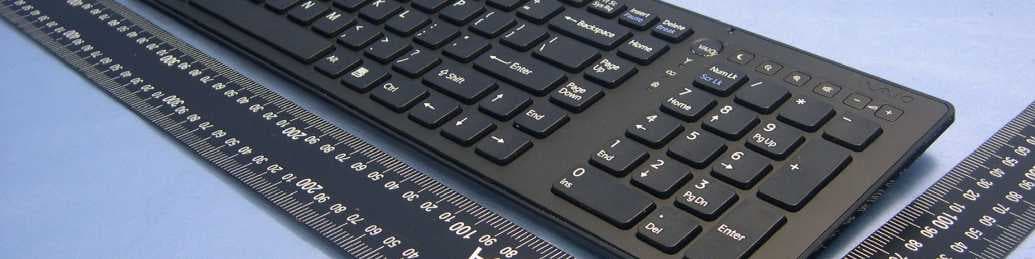
Click to zoom
Application Details
- Equipment Class
- DXX - Part 15 Low Power Communication Device Transmitter
- Date of Grant
- Feb 28, 2010
- Application Purpose
- Original Equipment
- Date of Application
- Feb 28, 2010
- Equipment Note
- 2.4GHz Cordless keyboard
- Frequency Range
- 2405.00000000 - 2474.00000000
- Company
- Logitech Far East Ltd
- Country
- Taiwan
Documents & Files
Document Text
Text extracted from the exhibit documents filed with the FCC. Open a document above to read the original.
Users Manual
32 nN Using Your VAIO Computer > Using the Keyboard Using the Keyboard (VGP-WKB11) A wireless keyboard is supplied with your computer. The wireless keyboard uses a standard key arrangement with additional keys that perform specific functions. Using the Wireless Keyboard One AA alkaline battery is supplied with your wireless keyboard. Before attempting to use the wireless keyboard, remove the battery compartment cover (1) from the bottom of the wireless keyboard and install the supplied AA battery (2) into the battery compartment. ✍ If the wireless keyboard does not operate properly, the battery may need to be replaced. If you do not intend to use the wireless keyboard for an extended period of time, remove the battery to avoid possible damage from battery leakage. If the wireless keyboard is left unused for 20 minutes or longer, your computer enters Sleep mode. To bring it back into Normal mode, press any key on the wireless keyboard. 33 nN Using Your VAIO Computer > Using the Keyboard ! To maintain good communication, operate the wireless keyboard within the distance limitations of keyboard: approximately 32.8 feet (10 m) from your computer. You cannot use the wireless keyboard in conjunction with the HDMI/VIDEO input function (page 60). Avoid using any wireless devices that exchange radio signals on the 2.4 GHz band near your wireless keyboard. These devices may create radio interference, causing the keyboard to stop working properly. Do not place metal furniture or objects near your computer or wireless keyboard, as this may create radio interference, causing the keyboard to stop working properly. Be sure to use an alkaline battery. Using an incompatible battery can damage the wireless keyboard. 34 nN Using Your VAIO Computer > Using the Keyboard ✍ Illustrated above is the English keyboard as an example. AFunction keys Perform certain tasks. The task associated with each function key varies among software applications except the following combinations with the Fn key to change the LCD brightness of your computer screen. Fn+F5: Decrease lighting intensity of the LCD screen. Fn+F6: Increase lighting intensity of the LCD screen. ! While using the HDMI/VIDEO input function, you cannot use the function keys on the wireless keyboard to change the LCD brightness. To change the brightness while using the HDMI/VIDEO input function, see Using the HDMI/ VIDEO Input Control Buttons (page 62) for the procedure. BNum Lk/Scr Lk key Activates/deactivates Num Lk mode. To activate/deactivate Scr Lk mode, use this key in conjunction with the Fn key. When Num Lk or Scr Lk mode is activated or deactivated, the (Num lock) or (Scroll lock) icon appears on the taskbar along with a pop-up message to indicate a mode change. ✍ You can keep the Num lock and/or Scroll lock icon on the taskbar. To do so, right- click the f icon on the taskbar, click Customize notification icons, and then select Show icon and notifications for your desired icon. CVAIO button Launches the Media Gallery. DPower switch Slide the switch to turn the wireless keyboard on and off. ESleep button Provides a lower level of power consumption. For details on power management, see Using the Power Saving Mode (page 27). 35 nN Using Your VAIO Computer > Using the Keyboard FZoom buttons Change the size of an image or a document displayed on some software. Press to make the view look smaller and further away (zoom out). Press to make the view look bigger and closer (zoom in). See the help file included with the VAIO Control Center for more information. GMuting button * Turns the volume on and off. HVolume control buttons * Increase (+) or decrease (-) the volume. ICaps Lock key Activates/deactivates Caps Lock mode where letters are all typed in upper case. JWindows key Displays the Start menu. KE key Ejects the optical disc drive tray when used in conjunction with the Fn key. LApplications key Displays a context-sensitive shortcut menu (if any). MDirectional arrow keys Move the pointer on the computer screen. NIndicator lights (Battery): Stays off while the AA battery for the wireless keyboard is sufficient and blinks when the battery is running out of power. (Caps lock): Turns on when Caps Lock mode is activated. (Connect): Stays off while the wireless keyboard is properly connected with your computer; and blinks for about 10 minutes when the connection is cut off, for example, when the computer is turned off or enters Sleep mode. ONumeric keypad Use the numeric keypad to type numbers or to perform basic math calculations. *Disabled while you are using the HDMI/VIDEO input function. 36 nN Using Your VAIO Computer > Using the Keyboard AKeyboard feet Flip open to put the wireless keyboard in a more 'ergonomic' position. BBattery compartment (page 32) Storage compartment for the AA battery. Federal Communication Commission Interference Statement This equipment has been tested and f ound to comply with the limits for a Class B digital device, pursuant to Part 15 of the FCC Rules. These limits are designed to provide reasonable protection against harmf ul interference in a residential installation. This eq uipment generates, uses and can radiate r adio frequency energy and, if not in stalled and used in accordance with the instructions, may cause harmful interference to radio communications. However, there is no guarantee that inte rference will not occur in a particular installation. If this equipment does cause harmful interferenc e to radio or television reception, which can be determined by turning the equipme nt off and on, the user is encouraged to try to correct the interference by one of the following measures: - Reorient or relocate the receiving antenna. - Increase the separation between the equipment and receiver. - Connect the equipment into an outlet on a circuit different from that to which the receiver is connected. - Consult the dealer or an experienc ed radio/TV technician for help. FCC Caution: Any changes or modifications not express…
Text truncated - open the document above for the full version.
External Photos
Page 1 CONSTRUCTION PHOTOS OF EUT
ID Label/Location Info
(Fig.1) FCC ID: JNZVGPWKB11 FCC LABEL LOCATION The label will be permanently affixed at a conspicuous location on the device. FCC ID
Internal Photos
Page 2 Page 3 Page 4 Page 5 Page 6
Test Report
Report No.: RF990205H04 1 Report Format Version 3.0.1 FCC TEST REPORT REPORT NO.: RF990205H04 MODEL NO.: VGP-WKB11 RECEIVED: Feb. 05, 2010 TESTED: Feb. 06 to 10, 2010 ISSUED: Feb. 11, 2010 APPLICANT: LOGITECH FAR EAST LTD. ADDRESS: #2 Creation Rd. 4, Science-Based Ind. Park Hsinchu Taiwan, R.O.C. ISSUED BY: Bureau Veritas Consumer Products Services (H.K.) Ltd., Taoyuan Branch TEST LOCATION: No. 81-1, Lu Liao Keng, 9th Ling,Wu Lung Tsuen, Chiung Lin Hsiang, Hsin Chu Hsien 307, Taiwan This test report consists of 24 pages in total. It may be duplicated completely for legal use with the approval of the applicant. It should not be reproduced, except in full, without the written approval of our laboratory. The client should not use it to claim product endorsement by TAF or any government agencies. The test results in the report only apply to the tested sample. Report No.: RF990205H04 2 Report Format Version 3.0.1 Table of Contents 1 CERTIFICATION.............................................................................................3 2 SUMMARY OF TEST RESULTS.....................................................................4 2.1 MEASUREMENT UNCERTAINTY......................................................................4 3 GENERAL INFORMATION.............................................................................5 3.1 GENERAL DESCRIPTION OF EUT................................................................5 3.2 DESCRIPTION OF TEST MODES..................................................................6 3.3 GENERAL DESCRIPTION OF APPLIED STANDARDS.................................6 3.4 DESCRIPTION OF SUPPORT UNITS............................................................7 3.5 CONFIGURATION OF SYSTEM UNDER TEST.............................................7 4 TEST PROCEDURES AND RESULTS...........................................................8 4.1 RADIATED EMISSION MEASUREMENT.......................................................8 4.1.1 LIMITS OF RADIATED EMISSION MEASUREMENT.....................................8 4.1.2 TEST INSTRUMENTS....................................................................................9 4.1.3 TEST PROCEDURES....................................................................................11 4.1.4 DEVIATION FROM TEST STANDARD..........................................................11 4.1.5 TEST SETUP................................................................................................12 4.1.6 EUT OPERATING CONDITIONS..................................................................12 4.1.7 TEST RESULTS............................................................................................13 4.2 CONDUCTED - OUT BAND MEASUREMENT.............................................20 4.2.1 LIMITS OF CONDUCTED - OUT BAND MEASUREMENT..........................20 4.2.2 TEST INSTRUMENTS..................................................................................20 4.2.3 TEST PROCEDURE.....................................................................................20 4.2.4 DEVIATION FROM TEST STANDARD.........................................................20 4.2.5 EUT OPERATING CONDITION....................................................................20 4.2.6 TEST RESULTS............................................................................................21 5 INFORMATION ON THE TESTING LABORATORIES..................................23 6 APPENDIX A - MODIFICATIONS RECORDERS FOR ENGINEERING CHANGES TO THE EUT BY THE LAB..........................................................24 Report No.: RF990205H04 3 Report Format Version 3.0.1 1 CERTIFICATION PRODUCT : 2.4GHz Cordless keyboard BRAND NAME : SONY MODEL NO. : VGP-WKB11 TESTED : Feb. 06 to 10, 2010 TEST SAMPLE : ENGINEERING SAMPLE APPLICANT : LOGITECH FAR EAST LTD. STANDARDS : 47 CFR Part 15, Subpart C (Section 15.249), ANSI C63.4-2003 The above equipment (Model: VGP-WKB11) has been tested by Bureau Veritas Consumer Products Services (H.K.) Ltd., Taoyuan Branch, and found compliance with the requirement of the above standards. The test record, data evaluation & Equipment Under Test (EUT) configurations represented herein are true and accurate accounts of the measurements of the sample’s EMC characteristics under the conditions specified in this report. PREPARED BY : , DATE: Feb. 11, 2010 ( Sunny Wen, Specialist ) TECHNICAL ACCEPTANCE : , DATE: Feb. 11, 2010 ( Hank Chung, Deputy Manager ) APPROVED BY : , DATE: Feb. 11, 2010 ( May Chen, Deputy Manager ) Report No.: RF990205H04 4 Report Format Version 3.0.1 2 SUMMARY OF TEST RESULTS The EUT has been tested according to the following specifications: APPLIED STANDARD: 47 CFR Part 15, Subpart C Standard Paragraph Test Type Result Remark 15.207 Conducted Emission Test NA Not Applicable 15.249 Radiated Emission Test PASS Minimum passing margin is -10.0dB at 480.00MHz 15.249 Conducted - Out Band Measurement PASS Meet the requirement of limit 2.1 MEASUREMENT UNCERTAINTY Where relevant, the following measurement uncertainty levels have been estimated for tests performed on the EUT as specified in CISPR 16-4-2: This uncertainty represents an expanded uncertainty expressed at approximately the 95% confidence level using a coverage factor of k=2. Measurement Value Radiated emissions (30MHz-1GHz) – site A 3.69 dB Radiated emissions (1GHz-18GHz) – site C 2.49 dB Radiated emissions (18GHz-40GHz) – site C 2.70 dB Report No.: RF990205H04 5 Report Format Version 3.0.1 3 GENERAL INFORMATION 3.1 GENERAL DESCRIPTION OF EUT PRODUCT 2.4GHz Cordless keyboard MODEL NO. VGP-WKB11 FCC ID JNZVGPWKB11 POWER SUPPLY DC 1.5V from batteries MODULATION TYPE GFSK CARRIER FREQUENCY OF EACH CHANNEL 2405MHz ~ 2474MHz NUMBER OF CHANNEL 12 ANTENNA TYPE PCB printed antenna, meander quarter wave with -1.17dBi antenna gain DATA CABLE NA I/O PORTS NA ASSOCIATED DEVICES NA NOTE: 1. The above EUT information was declared by the manufacturer and for more detailed feature desc…
Text truncated - open the document above for the full version.
Test Setup Photos
1 PHOTOGRAPHS OF THE TEST CONFIGURATION RADIATED EMISSION TEST
Contact Information
Applicant
Rick Lien(Head of Product Compliance)
Technical Contact
Bureau Veritas CPS (H.K.) Ltd. Taoyuan BranchGary Chang
[email protected]886-3-3183232
No. 19, Hwa Ya 2nd Rd., Kwei Shan Hsiang · Taoyuan Hsien · Taiwan
Non-Technical Contact
Bureau Veritas CPS (H.K.) Ltd. Taoyuan BranchZoe Chang
[email protected]886-3-3183232
Test Firm
Bureau Veritas CPS (H.K.) Ltd. Taoyuan BranchRichard Chen
Technical Specifications
| # | Rule Parts | Frequency Range | Power Output |
|---|---|---|---|
| 1 | 15C | 2.40 GHz - 2.47 GHz | - |
Other Applications from Logitech Far East Ltd
JNZYR0126
Jul 30, 2026Wireless Keyboard
Equipment Class
DTS - Digital Transmission SystemJNZYR0116
Jul 30, 2026Wireless Keyboard
Equipment Class
DTS - Digital Transmission SystemJNZYR0115
Jul 30, 2026Wireless Keyboard
Equipment Class
DTS - Digital Transmission SystemJNZMR0143
Jul 21, 2026Wireless Mouse
Equipment Class
DTS - Digital Transmission SystemJNZMR0136
Jul 09, 2026Wireless Mouse
Equipment Class
DTS - Digital Transmission System