JNZYR00142.4GHz Cordless Keyboard
Logitech Far East Ltd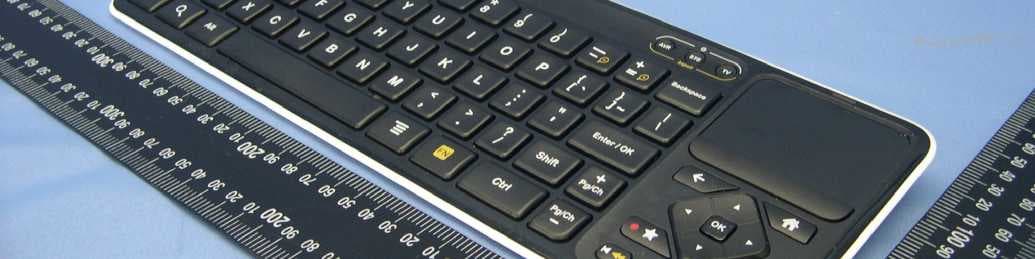
Click to zoom
Application Details
- Equipment Class
- DXX - Part 15 Low Power Communication Device Transmitter
- Date of Grant
- Jul 22, 2010
- Application Purpose
- Original Equipment
- Date of Application
- Jul 22, 2010
- Equipment Note
- 2.4GHz Cordless Keyboard
- Frequency Range
- 2405.00000000 - 2474.00000000
- Company
- Logitech Far East Ltd
- Country
- Taiwan
Documents & Files
Document Text
Text extracted from the exhibit documents filed with the FCC. Open a document above to read the original.
Users Manual
You’re minutes away from a whole new way of watching TV. Of controlling TV. Of thinking about what TV can be. Setup Guide 3 Logitech Revue™ You’re minutes away from a whole new way of watching TV. Of controlling TV. Of thinking about what TV can be. Setup Guide Unpack the box IR mini blaster Power supply Power cord HDMI cable Logitech® Keyboard Controller Logitech Revue™ From HD video calling on your couch to house-of-the-future touch screen remotes. Logitech Smart TV accessories make communication more personal, information more accessible and entertainment more fun. www.logitech.com/SmartTV/accessories Enjoy. 4 Logitech Revue™ 5 Logitech Revue™ Pair/Reset button1. Use to pair the Keyboard Controller or other Logitech Unifying devices or to reset Revue to factory default settings. HDMI IN2. Use to connect from the HDMI output on your cable, satellite, or ATSC set-top box (STB). IR Blaster ports3. Use to connect the infrared mini blaster. USB ports4. Use to connect supported peripherals, such as Logitech® TV Cam. Ethernet port5. Use for wired Internet connection. (Ethernet cable not provided) HDMI OUT6. Use to connect to the HDMI input on your TV or AV receiver. (HDMI cable provided) SPDIF7. Use to connect a non-HDMI AV receiver. Power8. Plug in the included power supply, which is connected to a 120VAC wall outlet or power strip. TM * Revue has a built in Logitech Unifying receiver which allows you to add other Logitech Unifying products. Revue at a glance 12345678 6 Logitech Revue™ 7 Logitech Revue™ Keyboard Controller at a glance Mouse1. Functions as a left mouse click TV2. Switches to live TV Guide3. Presents the program guide on your Set-top box (STB) DVR4. Presents a list of recordings on your STB Menu5. Displays STB on-screen menu/guide when used with the FN key Zoom Out6. Zooms out when used with the FN key Zoom In7. Zooms in when used with the FN key On8. Turns devices on and off when pressed Input Switches TV input when used with the FN key Touchpad9. Navigates the cursor Click Button10. Functions as a left mouse click Back11. Returns to previous screen Home12. Returns to Google TV home screen Directional Keys13. Navigates Up, Down, Left, and Right OK Selects options Picture-in-picture14. Activates and toggles picture-in-picture modes Favorite15. Saves favorite locations Record Records, when used with the FN key. (This feature may not be available for all devices.) Playback16. Controls video playback—Rewind, Play, Fast Forward Ch/Pg Up17. Scrolls up through channels or up through web pages when used with the FN key Ch/Pg Down Scrolls down through channels or down through web pages when used with the FN key Menu18. Displays Google TV menu options FN19. Enables yellow-highlighted key commands Search20. Launches the Google TV search and navigation bar OFFON 137 8 11 2019181716 5296 14 12 15 13 4 10 8 Logitech Revue™ 9 Logitech Revue™ INFOMSGSA/BREMOTECHANNEL MENU POWER AUDIO IN RL VID IN INFOMSGSA/BREMOTECHANNEL MENU POWER AUDIO IN RL VID IN Connect the cables Setup with TV and set-top box (STB)Setup with TV, STB, and Audio-video receiver (AVR) 1 Tip: Write down the make and model numbers of your TV, STB and AVR, and note the input port Revue uses for each one. You’ll need this information for setup. 1 If your AVR has no HDMI ports, use the SPDIF port to connect your AVR to Revue. Do not connect the AVR to the TV. 2 Revue works with either wired or wireless Internet. When using Wi-Fi, the Ethernet cable is not required. Ethernet (optional) 2 Ethernet (optional) 2 Power sourcePower source HDMI InHDMI InHDMI OutHDMI Out AVR TVTV Internet modem Internet modem STBSTB 1 10 Logitech Revue™ 11 Logitech Revue™ Set up Revue with Google TV 23 Power everything on Your new Keyboard Controller cannot control your devices until you complete the on-screen setup. To begin, turn on all devices using your current method of control.1. Switch the power slider on the Keyboard Controller to ON.2. You are now ready to begin the Revue and Google TV setup. OFFON Follow the on-screen instructions to complete the Google TV setup. Screen Calibration1. Use the Directional Keys to optimize your TV display size. Network2. Set up your Internet connection. Location3. Enter your ZIP code. Account4. Log into your google.com account or create a new account. TV Source5. Pair your TV source by selecting your broadcast TV provider. Connected Devices6. Add your TV. Add your AV receiver if you have one. Note: Your Keyboard Controller will not control your devices until they are added. TV AVR Revue STB 12 Logitech Revue™ 13 Logitech Revue™ Your Revue receives RF (radio frequency) signals from the Keyboard Controller and then flashes IR (infrared) commands to your other devices. This allows you to control your TV, STB and AVR from your Keyboard Controller. If some of your devices are non-responsive, they are probably not receiving the IR signal from Revue. You can extend the IR signal range with the IR mini blaster. Plug the mini blaster into the IR Blaster port on the back of the box and then position it near the non-responsive device. Mini blaster TV Cam Logitech TV Cam sold separately Set up IR mini blaster if neededUsing supported devices After you have completed the Google TV setup, you can add other supported Logitech devices. For example, if you have a Logitech TV Cam, simply plug it into a USB connector on the back of Revue and follow the on-screen prompts and the product guide to set up. 4 Tip: Each entertainment system is different, so you may need to get creative when placing your Mini Blaster. IR signals cannot pass through surfaces, but they can bounce off surfaces to reach their target. 14 Logitech Revue™ 15 Logitech Revue™ Help with setup Problem: My TV has no picture or sound during setup. Solution: Check the following: Are you getting power? Ensure that Revue is plugged in and receiving power.• Are the cables connected? Ensure that all of the cables are securely connected between your • Revue, TV and AV Rec…
Text truncated - open the document above for the full version.
External Photos
Page 1 CONSTRUCTION PHOTOS OF EUT
ID Label/Location Info
Client : LogitechRevision : 06 Date : 17 April 10Initials: MH To be approved REN Underside Graphics Note: Center along centerline as shown Scale 3:1 FCC ID: JNZYR0014 IC: 4418A - YR0014 K700 FCC ID: JNZYR0014 IC: 4418A - YR0014 K700 DF80G PDM 640-002619 001 01 FEB 03 '10 PRELIMINARY NKNSSUDO 02 FEB 04 '10 CHANGE NKNSSUDO 03 FEB 05 '10 CHANGE NKNSSUDO 04 APR 21 '10 CHANGE NKNSSUDO 1/1 04142171-001 FEB/03/2010 T.NKNSM.HRUCK.SUDO A/W, LABEL KB ID, LTRN
ID Label/Location Info
(Fig.1) FCC ID: JNZYR0014 FCC LABEL LOCATION The label will be permanently affixed at a conspicuous location on the device.
Internal Photos
Page 2 Page 3 Page 4 Page 5 Page 6 Page 7 Page 8 Page 9
Test Report
Report No.: RF990518E01 1 Report Format Version 3.0.1 FCC TEST REPORT REPORT NO.: RF990518E01 MODEL NO.: Y-R0014 RECEIVED: May 18, 2010 TESTED: May 20, 2010 ISSUED: May 25, 2010 APPLICANT: LOGITECH FAR EAST LTD. ADDRESS: #2 Creation Rd. 4, Science-Based Ind. Park Hsinchu Taiwan, R.O.C. ISSUED BY: Bureau Veritas Consumer Products Services (H.K.) Ltd., Taoyuan Branch Hsin Chu Laboratory LAB LOCATION (1): No. 81-1, Lu Liao Keng, 9th Ling,Wu Lung Tsuen, Chiung Lin Hsiang, Hsin Chu Hsien 307, Taiwan LAB LOCATION (2): No. 49, Ln. 206, Wende Rd., Shangshan Tsuen, Chiung Lin Hsiang, Hsin Chu Hsien 307, Taiwan This test report consists of 23 pages in total. It may be duplicated completely for legal use with the approval of the applicant. It should not be reproduced, except in full, without the written approval of our laboratory. The client should not use it to claim product certification, approval, or endorsement by any government agencies. The test results in the report only apply to the tested sample. Report No.: RF990518E01 2 Report Format Version 3.0.1 Table of Contents 1 CERTIFICATION.............................................................................................3 2 SUMMARY OF TEST RESULTS.....................................................................4 2.1 MEASUREMENT UNCERTAINTY..................................................................4 3 GENERAL INFORMATION.............................................................................5 3.1 GENERAL DESCRIPTION OF EUT................................................................5 3.2 DESCRIPTION OF TEST MODES..................................................................6 3.3 GENERAL DESCRIPTION OF APPLIED STANDARDS.................................6 3.4 DESCRIPTION OF SUPPORT UNITS............................................................7 3.5 CONFIGURATION OF SYSTEM UNDER TEST.............................................7 4 TEST PROCEDURES AND RESULTS...........................................................8 4.1 RADIATED EMISSION MEASUREMENT.......................................................8 4.1.1 LIMITS OF RADIATED EMISSION MEASUREMENT.....................................8 4.1.2 TEST INSTRUMENTS....................................................................................9 4.1.3 TEST PROCEDURES...................................................................................10 4.1.4 DEVIATION FROM TEST STANDARD.........................................................10 4.1.5 TEST SETUP.................................................................................................11 4.1.6 EUT OPERATING CONDITIONS...................................................................11 4.1.7 TEST RESULTS............................................................................................12 4.2 CONDUCTED - OUT BAND MEASUREMENT.............................................19 4.2.1 LIMITS OF CONDUCTED - OUT BAND MEASUREMENT..........................19 4.2.2 TEST INSTRUMENTS..................................................................................19 4.2.3 TEST PROCEDURE.....................................................................................19 4.2.4 DEVIATION FROM TEST STANDARD.........................................................19 4.2.5 EUT OPERATING CONDITION....................................................................19 4.2.6 TEST RESULTS............................................................................................20 5 INFORMATION ON THE TESTING LABORATORIES..................................22 6 APPENDIX A - MODIFICATIONS RECORDERS FOR ENGINEERING CHANGES TO THE EUT BY THE LAB..........................................................23 Report No.: RF990518E01 3 Report Format Version 3.0.1 1 CERTIFICATION PRODUCT : 2.4GHz Cordless Keyboard BRAND NAME : Logitech MODEL NO. : Y-R0014 TESTED : May 20, 2010 TEST SAMPLE : ENGINEERING SAMPLE APPLICANT : LOGITECH FAR EAST LTD. STANDARDS : 47 CFR Part 15, Subpart C (Section 15.249) ANSI C63.4-2003 The above equipment (Model: Y-R0014) has been tested by Bureau Veritas Consumer Products Services (H.K.) Ltd., Taoyuan Branch, and found compliance with the requirement of the above standards. The test record, data evaluation & Equipment Under Test (EUT) configurations represented herein are true and accurate accounts of the measurements of the sample’s EMC characteristics under the conditions specified in this report. PREPARED BY : , DATE: May 25, 2010 ( Sunny Wen, Specialist ) TECHNICAL ACCEPTANCE : , DATE: May 25, 2010 ( Hank Chung, Deputy Manager ) APPROVED BY : , DATE: May 25, 2010 ( May Chen, Deputy Manager ) Report No.: RF990518E01 4 Report Format Version 3.0.1 2 SUMMARY OF TEST RESULTS The EUT has been tested according to the following specifications: APPLIED STANDARD: 47 CFR Part 15, Subpart C Standard Paragraph Test Type Result Remark 15.207 Conducted Emission Test NA Not Applicable 15.249 Radiated Emission Test PASS Minimum passing margin is -5.7dB at 2400.00MHz 15.249 Conducted - Out Band Measurement PASS Meet the requirement of limit 2.1 MEASUREMENT UNCERTAINTY Where relevant, the following measurement uncertainty levels have been estimated for tests performed on the EUT as specified in CISPR 16-4-2: This uncertainty represents an expanded uncertainty expressed at approximately the 95% confidence level using a coverage factor of k=2. Measurement Value Radiated emissions (30MHz-1GHz) 3.76 dB Radiated emissions (1GHz-18GHz) 2.19 dB Radiated emissions (18GHz-40GHz) 2.56 dB Report No.: RF990518E01 5 Report Format Version 3.0.1 3 GENERAL INFORMATION 3.1 GENERAL DESCRIPTION OF EUT PRODUCT 2.4GHz Cordless Keyboard MODEL NO. Y-R0014 FCC ID JNZYR0014 POWER SUPPLY DC 1.6V from battery MODULATION TYPE GFSK CARRIER FREQUENCY OF EACH CHANNEL 2405MHz ~ 2474MHz NUMBER OF CHANNEL 12 ANTENNA TYPE PCB printed antenna with 2.37dBi antenna gain DATA CABLE NA I/O PORTS NA ASSOCIATED DEVICES NA NOTE: 1. The above EUT informat…
Text truncated - open the document above for the full version.
Test Setup Photos
1 PHOTOGRAPHS OF THE TEST CONFIGURATION RADIATED EMISSION TEST
Contact Information
Applicant
Rick Lien(Head of Product Compliance)
Technical Contact
Bureau Veritas CPS (H.K.) Ltd. Taoyuan BranchHank Chung
[email protected]886-3-593-5343
81-1, Lu Laio Keng, 9th Ling, Wu Lung Tsuen, Chiun · Hsinchu Hsien · Taiwan
Non-Technical Contact
Bureau Veritas CPS (H.K.) Ltd. Taoyuan BranchWendy Liao
[email protected]886-3-3183232
Test Firm
Bureau Veritas CPS (H.K.) Ltd. Taoyuan BranchRichard Chen
Technical Specifications
| # | Rule Parts | Frequency Range | Power Output |
|---|---|---|---|
| 1 | 15C | 2.40 GHz - 2.47 GHz | - |
Other Applications from Logitech Far East Ltd
JNZYR0126
Jul 30, 2026Wireless Keyboard
Equipment Class
DTS - Digital Transmission SystemJNZYR0116
Jul 30, 2026Wireless Keyboard
Equipment Class
DTS - Digital Transmission SystemJNZYR0115
Jul 30, 2026Wireless Keyboard
Equipment Class
DTS - Digital Transmission SystemJNZMR0143
Jul 21, 2026Wireless Mouse
Equipment Class
DTS - Digital Transmission SystemJNZMR0136
Jul 09, 2026Wireless Mouse
Equipment Class
DTS - Digital Transmission System