JNZYR00152.4GHz Cordless Keyboard
Logitech Far East Ltd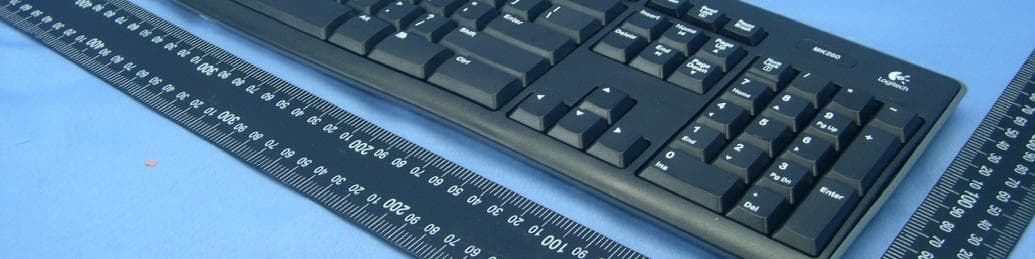
Click to zoom
Application Details
- Equipment Class
- DXX - Part 15 Low Power Communication Device Transmitter
- Date of Grant
- May 12, 2010
- Application Purpose
- Original Equipment
- Date of Application
- May 12, 2010
- Equipment Note
- 2.4GHz Cordless Keyboard
- Frequency Range
- 2405.00000000 - 2474.00000000
- Company
- Logitech Far East Ltd
- Country
- Taiwan
Documents & Files
Document Text
Text extracted from the exhibit documents filed with the FCC. Open a document above to read the original.
Users Manual
DIE LINES SPOT COLORS PROCESS COLORS COL OR SPECIFIC ATIONS BRAND / L AUNCH: Logitech 2009 PROJECT TITLE: Sanya DETAILS: AMR / GSW Guide K525507595 SPECIFICATIONS / NOTES: Final files Job is grey scale MODIFICATION DATE: March 23, 2010 THIS PRINT SIZE / SCALE: 100% of original Designer: Gregory Gomez Location: Fremont, CA, USA DIE LINE COLOR (NO PRINT) DIELINE NAME: n/a DIELINE RECEIVED: n/a Getting started with Logitech ® Wireless Combo MK260 1 2 4 5 6 7 8 English Features 1. Play track 2. Mute volume 3. Decrease volume 4. Increase volume 5. Navigate to Internet home 6. Launch email application 7. Place PC in standby mode 8. Launch calculator Español Features 1. Play track 2. Mute volume 3. Decrease volume 4. Increase volume 5. Navigate to Internet home 6. Launch email application 7. Place PC in standby mode 8. Launch calculator Français Features 1. Play track 2. Mute volume 3. Decrease volume 4. Increase volume 5. Navigate to Internet home 6. Launch email application 7. Place PC in standby mode 8. Launch calculator Português Features 1. Play track 2. Mute volume 3. Decrease volume 4. Increase volume 5. Navigate to Internet home 6. Launch email application 7. Place PC in standby mode 8. Launch calculator English Help with setup • Check the battery installation in the keyboard and mouse, or replace the batteries. • Plug the receiver into a different USB port. Remove any metal object between the receiver and the keyboard/mouse that may interfere with reception. • Try moving the keyboard/mouse closer to the receiver. • If the receiver is plugged into a USB hub, try plugging it directly into your computer. • Restart the computer. • If these suggestions don’t work, download the Reconnection Utility from http://www.logitech.com/connect_utility. Español Help with setup • Check the battery installation in the keyboard and mouse, or replace the batteries. • Plug the receiver into a different USB port. Remove any metal object between the receiver and the keyboard/mouse that may interfere with reception. • Try moving the keyboard/mouse closer to the receiver. • If the receiver is plugged into a USB hub, try plugging it directly into your computer. • Restart the computer. • If these suggestions don’t work, download the Reconnection Utility from http://www.logitech.com/connect_utility. Français Help with setup • Check the battery installation in the keyboard and mouse, or replace the batteries. • Plug the receiver into a different USB port. Remove any metal object between the receiver and the keyboard/mouse that may interfere with reception. • Try moving the keyboard/mouse closer to the receiver. • If the receiver is plugged into a USB hub, try plugging it directly into your computer. • Restart the computer. • If these suggestions don’t work, download the Reconnection Utility from http://www.logitech.com/connect_utility. Português Help with setup • Check the battery installation in the keyboard and mouse, or replace the batteries. • Plug the receiver into a different USB port. Remove any metal object between the receiver and the keyboard/mouse that may interfere with reception. • Try moving the keyboard/mouse closer to the receiver. • If the receiver is plugged into a USB hub, try plugging it directly into your computer. • Restart the computer. • If these suggestions don’t work, download the Reconnection Utility from http://www.logitech.com/connect_utility. © 2010 Logitech. All rights reserved. Logitech, the Logitech logo, and other Logitech marks are owned by Logitech and may be registered. All other trademarks are the property of their respective owners. Logitech assumes no responsibility for any errors that may appear in this manual. Information contained herein is subject to change without notice. 620-002798.002 Getting started with Logitech ® Wireless Combo MK260 3 4 English Replacing keyboard batteries: 1. Open battery compartment on keyboard bottom. 2. Remove old batteries. 3. Wait 15 seconds before inserting the new batteries to allow the keyboard to reset. 4. Follow diagram in battery compartment to insert two new AAA batteries in keyboard. Close battery compartment. Replacing mouse battery: 1. Press on battery compartment door and slide down to open. 2. Remove old battery. 3. Follow diagram in battery compartment to insert one new AA battery. Close battery compartment. Español Replacing keyboard batteries: 1. Open battery compartment on keyboard bottom. 2. Remove old batteries. 3. Wait 15 seconds before inserting the new batteries to allow the keyboard to reset. 4. Follow diagram in battery compartment to insert two new AAA batteries in keyboard. Close battery compartment. Replacing mouse battery: 1. Press on battery compartment door and slide down to open. 2. Remove old battery. 3. Follow diagram in battery compartment to insert one new AA battery. Close battery compartment. Français Replacing keyboard batteries: 1. Open battery compartment on keyboard bottom. 2. Remove old batteries. 3. Wait 15 seconds before inserting the new batteries to allow the keyboard to reset. 4. Follow diagram in battery compartment to insert two new AAA batteries in keyboard. Close battery compartment. Replacing mouse battery: 1. Press on battery compartment door and slide down to open. 2. Remove old battery. 3. Follow diagram in battery compartment to insert one new AA battery. Close battery compartment. Português Replacing keyboard batteries: 1. Open battery compartment on keyboard bottom. 2. Remove old batteries. 3. Wait 15 seconds before inserting the new batteries to allow the keyboard to reset. 4. Follow diagram in battery compartment to insert two new AAA batteries in keyboard. Close battery compartment. Replacing mouse battery: 1. Press on battery compartment door and slide down to open. 2. Remove old battery. 3. Follow diagram in battery compartment to insert one new AA battery. Close battery compartment. 5 1800 88 0719 1800 025 544 800 447 361 AAA AAA 1 2 Get ting started with Logi tech ® Wi reless Co…
Text truncated - open the document above for the full version.
Cover Letter(s)
Kvm!41-3121! Kvmz!41-3121!
External Photos
Page 1 CONSTRUCTION PHOTOS OF EUT Model No.: Y-R0015 Page 2
ID Label/Location Info
003 +0-0.5mm Sanya FCC 80.5 4 0 . 5 CCXXxxYYyyyZzW Approval No.: CMIIT ID: Xxxxx/POSTEL/2010 2100 17 6.5 FCC ID: JNZYR0015 IC: 4418A-YR0015 AP/AMR/EMEA/JP Y-R0015 DZL-Y-R0015 R XXXXXXXXXX
ID Label/Location Info
(Fig.1) FCC ID: JNZYR0015 FCC LABEL LOCATION The label will be permanently affixed at a conspicuous location on the device.
Internal Photos
Page 3 Model No.: Y-R0015 Page 4 Page 5 Page 6 Page 7
Test Report
Report No.: RF990420E02 1 Report Format Version 3.0.1 FCC TEST REPORT REPORT NO.: RF990420E02 MODEL NO.: Y-R0015 RECEIVED: Apr. 20, 2010 TESTED: May 04, 2010 ISSUED: May 07, 2010 APPLICANT: LOGITECH FAR EAST LTD. ADDRESS: #2 Creation Rd. 4, Science-Based Ind. Park Hsinchu Taiwan, R.O.C. ISSUED BY: Bureau Veritas Consumer Products Services (H.K.) Ltd., Taoyuan Branch TEST LOCATION: No. 81-1, Lu Liao Keng, 9th Ling,Wu Lung Tsuen, Chiung Lin Hsiang, Hsin Chu Hsien 307, Taiwan This test report consists of 23 pages in total. It may be duplicated completely for legal use with the approval of the applicant. It should not be reproduced, except in full, without the written approval of our laboratory. The client should not use it to claim product endorsement by TAF or any government agencies. The test results in the report only apply to the tested sample. Report No.: RF990420E02 2 Report Format Version 3.0.1 Table of Contents 1 CERTIFICATION.............................................................................................3 2 SUMMARY OF TEST RESULTS.....................................................................4 2.1 MEASUREMENT UNCERTAINTY......................................................................4 3 GENERAL INFORMATION.............................................................................5 3.1 GENERAL DESCRIPTION OF EUT................................................................5 3.2 DESCRIPTION OF TEST MODES..................................................................6 3.3 GENERAL DESCRIPTION OF APPLIED STANDARDS.................................6 3.4 DESCRIPTION OF SUPPORT UNITS............................................................7 3.5 CONFIGURATION OF SYSTEM UNDER TEST.............................................7 4 TEST PROCEDURES AND RESULTS...........................................................8 4.1 RADIATED EMISSION MEASUREMENT.......................................................8 4.1.1 LIMITS OF RADIATED EMISSION MEASUREMENT.....................................8 4.1.2 TEST INSTRUMENTS....................................................................................9 4.1.3 TEST PROCEDURES...................................................................................10 4.1.4 DEVIATION FROM TEST STANDARD.........................................................10 4.1.5 TEST SETUP.................................................................................................11 4.1.6 EUT OPERATING CONDITIONS...................................................................11 4.1.7 TEST RESULTS............................................................................................12 4.2 CONDUCTED - OUT BAND MEASUREMENT.............................................19 4.2.1 LIMITS OF CONDUCTED - OUT BAND MEASUREMENT..........................19 4.2.2 TEST INSTRUMENTS..................................................................................19 4.2.3 TEST PROCEDURE.....................................................................................19 4.2.4 DEVIATION FROM TEST STANDARD.........................................................19 4.2.5 EUT OPERATING CONDITION....................................................................19 4.2.6 TEST RESULTS............................................................................................20 5 INFORMATION ON THE TESTING LABORATORIES..................................22 6 APPENDIX A - MODIFICATIONS RECORDERS FOR ENGINEERING CHANGES TO THE EUT BY THE LAB..........................................................23 Report No.: RF990420E02 3 Report Format Version 3.0.1 1 CERTIFICATION PRODUCT : 2.4GHz Cordless keyboard BRAND NAME : Logitech MODEL NO. : Y-R0015 TESTED : May 04, 2010 TEST SAMPLE : ENGINEERING SAMPLE APPLICANT : LOGITECH FAR EAST LTD. STANDARDS : 47 CFR Part 15, Subpart C (Section 15.249) ANSI C63.4-2003 The above equipment (Model: Y-R0015) has been tested by Bureau Veritas Consumer Products Services (H.K.) Ltd., Taoyuan Branch, and found compliance with the requirement of the above standards. The test record, data evaluation & Equipment Under Test (EUT) configurations represented herein are true and accurate accounts of the measurements of the sample’s EMC characteristics under the conditions specified in this report. PREPARED BY : , DATE: May 07, 2010 ( Claire Kuan, Specialist ) TECHNICAL ACCEPTANCE : , DATE: May 07, 2010 ( Hank Chung, Deputy Manager ) APPROVED BY : , DATE: May 07, 2010 ( May Chen, Deputy Manager ) Report No.: RF990420E02 4 Report Format Version 3.0.1 2 SUMMARY OF TEST RESULTS The EUT has been tested according to the following specifications: APPLIED STANDARD: 47 CFR Part 15, Subpart C Standard Paragraph Test Type Result Remark 15.207 Conducted Emission Test NA Not Applicable 15.249 Radiated Emission Test PASS Minimum passing margin is -11.1dB at 176.00MHz 15.249 Conducted - Out Band Measurement PASS Meet the requirement of limit 2.1 MEASUREMENT UNCERTAINTY Where relevant, the following measurement uncertainty levels have been estimated for tests performed on the EUT as specified in CISPR 16-4-2: This uncertainty represents an expanded uncertainty expressed at approximately the 95% confidence level using a coverage factor of k=2. Measurement Value Radiated emissions (30MHz-1GHz) 3.94 dB Radiated emissions (1GHz-18GHz) 2.49 dB Radiated emissions (18GHz-40GHz) 2.70 dB Report No.: RF990420E02 5 Report Format Version 3.0.1 3 GENERAL INFORMATION 3.1 GENERAL DESCRIPTION OF EUT PRODUCT 2.4GHz Cordless keyboard MODEL NO. Y-R0015 FCC ID JNZYR0015 POWER SUPPLY DC 3V from batteries MODULATION TYPE GFSK CARRIER FREQUENCY OF EACH CHANNEL 2405MHz ~ 2474MHz NUMBER OF CHANNEL 12 ANTENNA TYPE PCB printed antenna with 1.27dBi antenna gain DATA CABLE NA I/O PORTS NA ASSOCIATED DEVICES NA NOTE: 1. The above EUT information was declared by the manufacturer and for more detailed feature descriptions, please refer to the manufacturer's specifications or User's Manua…
Text truncated - open the document above for the full version.
Test Setup Photos
1 PHOTOGRAPHS OF THE TEST CONFIGURATION RADIATED EMISSION TEST
Contact Information
Applicant
Rick Lien(Head of Product Compliance)
Technical Contact
Bureau Veritas CPS (H.K.) Ltd. Taoyuan BranchHank Chung
[email protected]886-3-593-5343
81-1, Lu Laio Keng, 9th Ling, Wu Lung Tsuen, Chiun · Hsinchu Hsien · Taiwan
Non-Technical Contact
Bureau Veritas CPS (H.K.) Ltd. Taoyuan BranchWendy Liao
[email protected]886-3-3183232
Test Firm
Bureau Veritas CPS (H.K.) Ltd. Taoyuan BranchRichard Chen
Technical Specifications
| # | Rule Parts | Frequency Range | Power Output |
|---|---|---|---|
| 1 | 15C | 2.40 GHz - 2.47 GHz | - |
Other Applications from Logitech Far East Ltd
JNZYR0126
Jul 30, 2026Wireless Keyboard
Equipment Class
DTS - Digital Transmission SystemJNZYR0116
Jul 30, 2026Wireless Keyboard
Equipment Class
DTS - Digital Transmission SystemJNZYR0115
Jul 30, 2026Wireless Keyboard
Equipment Class
DTS - Digital Transmission SystemJNZMR0143
Jul 21, 2026Wireless Mouse
Equipment Class
DTS - Digital Transmission SystemJNZMR0136
Jul 09, 2026Wireless Mouse
Equipment Class
DTS - Digital Transmission System