JNZYR00472.4GHz Cordless Keyboard
Logitech Far East Ltd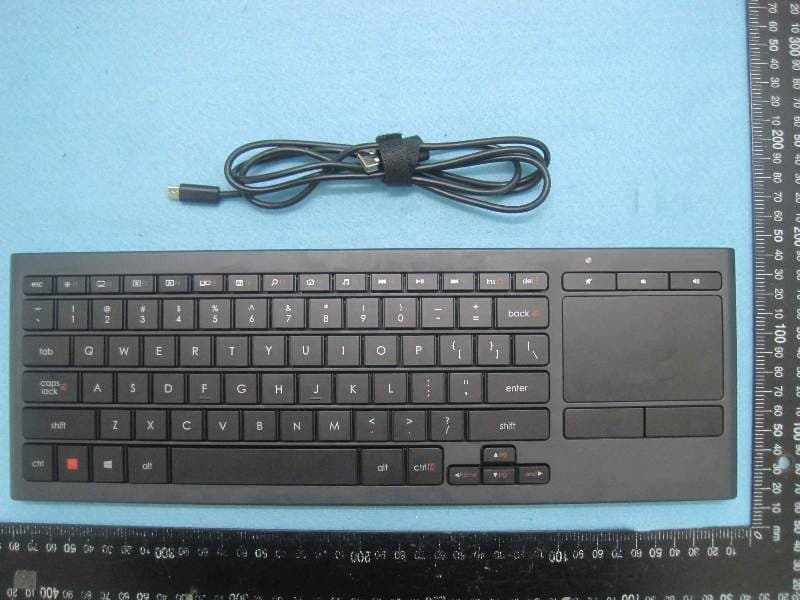
Click to zoom
Application Details
- Equipment Class
- DXX - Part 15 Low Power Communication Device Transmitter
- Date of Grant
- Jan 27, 2014
- Application Purpose
- Original Equipment
- Date of Application
- Jan 27, 2014
- Equipment Note
- 2.4GHz Cordless Keyboard
- Frequency Range
- 2405.00000000 - 2474.00000000
- Company
- Logitech Far East Ltd
- Country
- Taiwan
Documents & Files
Document Text
Text extracted from the exhibit documents filed with the FCC. Open a document above to read the original.
Users Manual
Logitech® Illuminated Living-Room Keyboard K830 Setup Guide Guide d’installation Logitech Illuminated Living-Room Keyboard K830 2 English 3Français 11 www.logitech.com/support 19 Logitech Illuminated Living-Room Keyboard K830 English 3 Know your product 7 11 8 9 1 12 13 23 4 56 10 Logitech® Illuminated Living-Room Keyboard K830 Setup Guide Guide d’installation 1. Left mouse click 2. Micro-USB charging port 3. On/off power switch 4. Function keys 5. Automatic light sensor 6. Battery indicator 7. Hot keys 8. Touchpad 9. Mouse click buttons 10. Product documentation 11. Unifying receiver 12. USB extender cable 13. Micro-USB charging cable Logitech Illuminated Living-Room Keyboard K830 4 English Setting up your keyboard 1. Plug in the Unifying receiver into your laptop or desktop computer. You can use the USB extender cable provided to position the Unifying receiver away from metallic objects or devices that may cause interference. USB Note: Yo u can also use your keyboard to control a TV. Refer to the documentation supplied by your TV manufacturer for compatibility information and further connection details. 2. Turn on your keyboard. Software for your keyboard Download and install the Logitech software for your keyboard to: • Customize the function keys. • Adjust your touchpad experience. You can modify the pointer speed, adjust scrolling, and disable touchpad tap. • Connect additional devices to your Unifying receiver. • View videos explaining gestures and providing information about your keyboard’s behavior. • Reverse the requirement to press the Fn key when using function keys. Go to www.logitech.com/support/k830. Logitech Illuminated Living-Room Keyboard K830 English 5 Using your keyboard Keyboard backlighting When you start using your keyboard, the automatic light sensor detects the light level in the room and adjusts the keyboard backlight intensity accordingly. There are three intensity levels: • In bright light: no keyboard illumination. • In poor light: full intensity backlight. • In the dark: half intensity backlight. You can manually override the automatic backlighting setting. Press the key to cycle between the three intensity levels. Please note: • When your battery charge level is low, backlighting turns off automatically to conserve battery power. • Automatic backlight control is restored automatically if the keyboard is idle for 30 minutes or more, or after turning the keyboard off and back on. Touchpad gestures 1 2 3 4 To point, scroll and click: 1. Point and slide one finger anywhere on the touchpad to move the screen pointer. 2. Scroll with two fingers, up or down. 3. Press for left mouse click.* 4. Press for right mouse click. *You can also tap the touchpad surface to perform a click. Note: To disable gestures and touchpad tap, press the Fn key plus the left mouse click button. To re-enable gestures and touchpad tap, press the Fn key plus the left mouse click button again. Logitech Illuminated Living-Room Keyboard K830 6 English Recharging your keyboard Your keyboard is rechargeable. There are no batteries to be replaced. A three-hour charge provides up to 10 days of use when you type about two hours a day with backlight on, or about one year without backlight. Note: The use you get between charges may vary depending on your usage pattern. When you turn on the keyboard the battery indicator shows the charge level. IndicatorExplanation Blinking greenThe battery is charging. Solid greenThe battery has adequate charge, or charging is complete. Blinking redBattery power is low. Recharge the battery. To charge the battery, connect the keyboard to a computer using the Micro-USB charging cable supplied. The battery indicator blinks green while charging takes place. Charge until the indicator light stops blinking. You can use the keyboard while it charges. Note: If the battery power is low (indicator blinking red), the keyboard backlight is disabled. USB Logitech Illuminated Living-Room Keyboard K830 English 7 Function keys Adjust backlight intensity Minimize window Maximize window Close window Switch screen For example, show laptop display on TV screen Show desktop Windows search Launch Web browser Launch media player Previous track Play/pause track Next track Fn + ins: Switch applications Fn + del: Sleep mode Fn + backspace: Print screen Fn + caps lock: Scroll lock Fn + : Page up Fn + : Page down Fn + : Home Fn + : End Note: • For keys F1 to F12: • Press just the key to select the feature: ‘Adjust backlight intensity’, ‘Minimize window’... • Press both Fn and the key to select the function key: F1, F2... • For all other function keys, press both Fn and the key to select the feature. • You can use the Logitech software to reverse the requirement to press the Fn key. Hot keys Mute Volume down Volume up Logitech Illuminated Living-Room Keyboard K830 8 English The Logitech® Unifying receiver Plug it. Forget it. Add to it. Your new Logitech product ships with a Unifying receiver. Did you know you can add a compatible Logitech wireless device that uses the same receiver as your current Logitech Unifying product? Are you Unifying-ready? If you have a Logitech wireless device that’s Unifying-ready, you can pair it with additional Unifying devices. Just look for the orange Unifying logo on the new device or its packaging. Build your ideal combo. Add something. Replace something. It’s easy, and you’ll use only one USB port for up to six devices. Getting started is easy If you’re ready to pair your device(s) via Unifying, here’s what you need to do: 1. Make sure your Unifying receiver is plugged in. 2. If you haven’t already, download and install the Logitech software for your keyboard (see “Software for your keyboard”). 3. Start the software and follow the on-screen instructions to pair the new wireless device with your existing Unifying receiver. Logitech Illuminated Living-Room Keyboard K830 English 9 Visit Product Central There’s more information and support online for your product. …
Text truncated - open the document above for the full version.
Users Manual
English Important ergonomic information. Long periods of repetitive motion using an improperly set-up workspace, incorrect body position, and poor work habits may be associated with physical discomfort and injury to nerves, tendons, and muscles. If you feel pain, numbness, weakness, swelling, burning, cramping, or stiffness in your hands, wrists, arms, shoulders, neck, or back, see a qualified health professional. For more information, please read the Comfort Guidelines located on the Logitech® web site at http://www.logitech.com/comfort, or on the Logitech® Software CD. Do not immerse product in any liquid or expose it to heat or moisture. There are no serviceable parts. W ARNING! Logitech gaming products should be used under the supervision of an adult. W ARNING! CHOKING HAZARD: Logitech steering wheels have small parts and are not for children under 3 years. Battery warning! Risk of explosion or personal injury if batteries are replaced by incorrect type, mutilated, or exposed to conducting materials, liquid, fire, or heat (above 54° C or 130° F). Do not use or recharge damaged rechargeable batteries. Do not mix battery types. Dispose of spent or damaged batteries according to manufacturer instructions and local laws. Power supply warning! Caution electric shock/fire hazard! For indoor use only. Do not expose to moisture, liquid, or heat. Do not use any other power supply with your Logitech pr oduct. Device paring limitations. Some Unifying devices may be limited in the number of times they can be paired (connected) to a Unifying receiver. Although the number of parings possible may vary, the minimum number of available pairings is 45. Accessory statement. Your product is safety approved. Use only with listed ITE computers. Operating temperature. Maximum 40°C (104° F). FCC—United States This hardware device complies with Part 15 of the FCC Rules. Operation is subject to the f ollowing two conditions: 1) this device may not cause harmful interference, and 2) this device must accept any interference received, including interference that ma y cause undesired operation. Compliance Information Statements: This equipmen t has been tested and found to comply with the limits for a Class B digital de vice, pursuant to part 15 of the FCC Rules. These limits are designed to provide reasonable protection against harmful interference in a residential installation. This equipment generates, uses and can radiate radio frequency energy and, if not installed and used in accordance with the instructions, may cause harmful interference to radio communications. However, there is no guarantee that interference will not occur in a particular installation. If this equipment does cause harmful interference to radio or television reception, which can be determined by turning the equipment off and on, the user is encouraged to try to correct the interference by one or more of the following measures: 1) Reorient or relocate the receiving antenna. 2) Increase the separation between the equipment and receiver. 3) Connect the equipment into an outlet on a circuit different from that to which the receiver is connected. 4) C onsult the dealer or an e xperienced radio/ TV technician for help. Modifications to this product not authorized by Logitech could void your righ t to use or operate this product by the FCC. Where shielded interface cables or accessories have been provided with the product or specified additional components or accessories elsewhere defined to be used with the installation of the pr oduct, they mus t be used in order to ensure compliance with FCC regulations. Canada (IC) Statements: This device complies with Industry Canada licence-exempt RSS standard(s). Operation is subject to the following two conditions: (1) this device may not cause interference, and (2) this device must accept any interference, including in terference that may cause undesired operation of the device. Corded products: This Class B digital apparatus complies with Canadian ICES-003. Cordless (Radio Transmitter) products: Section A. RSS-310 (27 MHz transmitters and receivers): This Category II radio communication device complies with Industry Canada Standard RSS-310. Section B. RSS-210 (2.4 GHz transmitters or transceivers): This Category I radio communication device complies with RSS-210 of Indus try C anada. Logitech compliance For additional compliance information, go to http://www.logitech.com/compliance. Logitech hardware product limited warranty Logitech warrants to the original purchaser that your Logitech hardware product shall be free from defects in material and workmanship for the period of time , identified on your product package and/or contained in the user documentation, from the date of purchase. You may also find this information by selecting your product in the Online Support section of our website at www.logitech.com/support. Except wher e prohibited by applicable law, this warranty is nontransferable and is limited to the original pur chaser. This warranty gives you specific legal rights, and y ou may also have other rights that vary under local laws. Logitech’s entire liability and your exclusive remedy for any breach of warranty shall be, at Logitech’s option, (1) to repair or replace the hardware, or (2) to refund the price paid, provided that the hardware is r eturned to the point of purchase or such other place as Logitech may dir ect with a copy of the sales receipt or dated itemized receipt. Shipping and handling charges may apply, except where prohibited by applicable law. Logitech may, at its option, use new or refurbished or used parts in good w orking condition to repair or replace any hardware pr oduct. Any replacement hardware product will be warranted for the remainder of the original warranty period or thirty (30) days, whichever is longer or for any additional period of time that may be applicable in your jurisdiction. This warranty does not cover problems or damage resulting from (1) acciden…
Text truncated - open the document above for the full version.
External Photos
Report No.: 3D1752 SPORTON International Inc. PAGE NUMBER : A1 OF A3 TEL : 886-3-327-3456 FAX : 886-3-327-0973 APPENDIX A. Photographs of EUT Report No.: 3D1752 SPORTON International Inc. PAGE NUMBER : A2 OF A3 TEL : 886-3-327-3456 FAX : 886-3-327-0973 Report No.: 3D1752 SPORTON International Inc. PAGE NUMBER : A3 OF A3 TEL : 886-3-327-3456 FAX : 886-3-327-0973 USB Cable
ID Label/Location Info
Label size: 140mm X 30mm FCC ID: JNZYR0047
Internal Photos
Report No.: 3D1752 SPORTON International Inc. PAGE NUMBER : A1 OF A7 TEL : 886-3-327-3456 FAX : 886-3-327-0973 APPENDIX A. Photographs of EUT Report No.: 3D1752 SPORTON International Inc. PAGE NUMBER : A2 OF A7 TEL : 886-3-327-3456 FAX : 886-3-327-0973 Report No.: 3D1752 SPORTON International Inc. PAGE NUMBER : A3 OF A7 TEL : 886-3-327-3456 FAX : 886-3-327-0973 Report No.: 3D1752 SPORTON International Inc. PAGE NUMBER : A4 OF A7 TEL : 886-3-327-3456 FAX : 886-3-327-0973 Report No.: 3D1752 SPORTON International Inc. PAGE NUMBER : A5 OF A7 TEL : 886-3-327-3456 FAX : 886-3-327-0973 Report No.: 3D1752 SPORTON International Inc. PAGE NUMBER : A6 OF A7 TEL : 886-3-327-3456 FAX : 886-3-327-0973 Report No.: 3D1752 SPORTON International Inc. PAGE NUMBER : A7 OF A7 TEL : 886-3-327-3456 FAX : 886-3-327-0973
Test Report
SPORTON International Inc. No. 52, Hwa Ya 1st Rd., Hwa Ya Technology Park, Kwei-Shan Hsiang, Tao Yuan Hsien, Taiwan, R.O.C. Ph: 886-3-327-3456 / FAX: 886-3-327-0973 / www.sporton.com.tw Report Format Version: 01 FCC RADIO TEST REPORT Applicant’s company LOGITECH FAR EAST LTD. Applicant Address No. 2, Creation Road IV Science-Based Industrial Park Hsin-Chu, Taiwan FCC ID JNZYR0047 Manufacturer’s company LOGITECH FAR EAST LTD. Manufacturer Address No. 2, Creation Road IV Science-Based Industrial Park Hsin-Chu, Taiwan Product Name 2.4GHz Cordless Keyboard Brand Name Logitech Model Name Y-R0047 Test Rule Part(s) 47 CFR FCC Part 15 Subpart C § 15.249 Test Freq. Range 2400 ~ 2483.5MHz Received Date Dec. 17, 2013 Final Test Date Dec. 25, 2013 Submission Type Original Equipment Statement The test result in this report refers exclusively to the presented test model / sample. Without written approval of SPORTON International Inc., the test report shall not be reproduced except in full. The measurements and test results shown in this test report were made in accordance with the procedures and found in compliance with the limit given in ANSI C63.10-2009 and 47 CFR FCC Part 15 Subpart C. The test equipment used to perform the test is calibrated and traceable to NML/ROC. Report No.: FR3D1752 Report Format Version: 01 Page No. : i of ii FCC ID: JNZYR0047 Issued Date : Jan. 07, 2014 Table of Contents 1. CERTIFICATE OF COMPLIANCE ......................................................................................................................... 1 2. SUMMARY OF THE TEST RESULT .......................................................................................................................... 2 3. GENERAL INFORMATION .................................................................................................................................. 3 3.1. Product Details....................................................................................................................................................................................3 3.2. Accessories .........................................................................................................................................................................................3 3.3. Table for Filed Antenna.......................................................................................................................................................................4 3.4. Table for Carrier Frequencies .............................................................................................................................................................4 3.5. Table for Test Modes ...........................................................................................................................................................................5 3.6. Table for Testing Locations..................................................................................................................................................................6 3.7. Table for Supporting Units ...................................................................................................................................................................6 3.8. Test Configurations .............................................................................................................................................................................7 4. TEST RESULT ................................................................................................................................................... 10 4.1. AC Power Line Conducted Emissions Measurement.........................................................................................................................10 4.2. Field Strength of Fundamental Emissions Measurement ...................................................................................................................15 4.3. 20dB Spectrum Bandwidth Measurement ........................................................................................................................................18 4.4. Radiated Emissions Measurement ....................................................................................................................................................21 4.5. Band Edge Emissions Measurement .................................................................................................................................................31 4.6. Antenna Requirements .....................................................................................................................................................................33 5. LIST OF MEASURING EQUIPMENTS ................................................................................................................... 34 6. MEASUREMENT UNCERTAINTY.......................................................................................................................... 36 APPENDIX A. PHOTOGRAPHS OF EUT.........................................................................................................A1 ~ A10 APPENDIX B. TEST PHOTOS.......................................................................................................................... B1 ~ B5 Report No.: FR3D1752 Report Format Version: 01 Page No. : ii of ii FCC ID: JNZYR0047 Issued Date : Jan. 07, 2014 History of This Test Report REPORT NO. VERSION DESCRIPTION ISSUED DATE FR3D1752 Rev. 01 Initial issue of report Jan. 07, 2014 47 CFR FCC Part 15 Subpart C 15.205(a) 15.209(a) Further, this requirement does not apply to intentional radiators that must be professionally installed. Report No.: FR3D1752 Report Format Version: 01 Page No. : 2 of 38 FCC ID: JNZYR0047 Issued Date : Jan. 07, 2014 2. SUMMARY OF THE TEST RESULT Applied Standard: 47 CFR FCC Part 15 Subpart C Part Rule Section Description of Test Result Under Limit 4.1 15.207 AC Power Line Conducted Emi…
Text truncated - open the document above for the full version.
Test Setup Photos
Report No.: FR3D1752 FCC ID: JNZYR0047 Page No. : B1 of B5 Appendix B. Test Photos Report No.: FR3D1752 FCC ID: JNZYR0047 Page No. : B2 of B5 1. Photographs of Conducted Emissions Test Configuration Test Mode: Mode 1 FRONT VIEW REAR VIEW Report No.: FR3D1752 FCC ID: JNZYR0047 Page No. : B3 of B5 2. Photographs of Radiated Emissions Test Configuration Test Configuration: 9kHz ~30MHz Test Mode: Mode 1 FRONT VIEW REAR VIEW Report No.: FR3D1752 FCC ID: JNZYR0047 Page No. : B4 of B5 Test Configuration: 30MHz~1GHz Test Mode: Mode 1 FRONT VIEW REAR VIEW Report No.: FR3D1752 FCC ID: JNZYR0047 Page No. : B5 of B5 Test Configuration: Above 1GHz Test Mode: Mode 1 FRONT VIEW REAR VIEW
Contact Information
Applicant
Rick Lien(Head of Product Compliance)
Test Firm
SPORTON International Inc.Leo Huang
Technical Specifications
| # | Rule Parts | Frequency Range | Power Output |
|---|---|---|---|
| 1 | 15C | 2.40 GHz - 2.47 GHz | - |
Other Applications from Logitech Far East Ltd
JNZYR0126
Jul 30, 2026Wireless Keyboard
Equipment Class
DTS - Digital Transmission SystemJNZYR0116
Jul 30, 2026Wireless Keyboard
Equipment Class
DTS - Digital Transmission SystemJNZYR0115
Jul 30, 2026Wireless Keyboard
Equipment Class
DTS - Digital Transmission SystemJNZMR0143
Jul 21, 2026Wireless Mouse
Equipment Class
DTS - Digital Transmission SystemJNZMR0136
Jul 09, 2026Wireless Mouse
Equipment Class
DTS - Digital Transmission System