JNZYRBA78Cordless Keyboard
Logitech Far East Ltd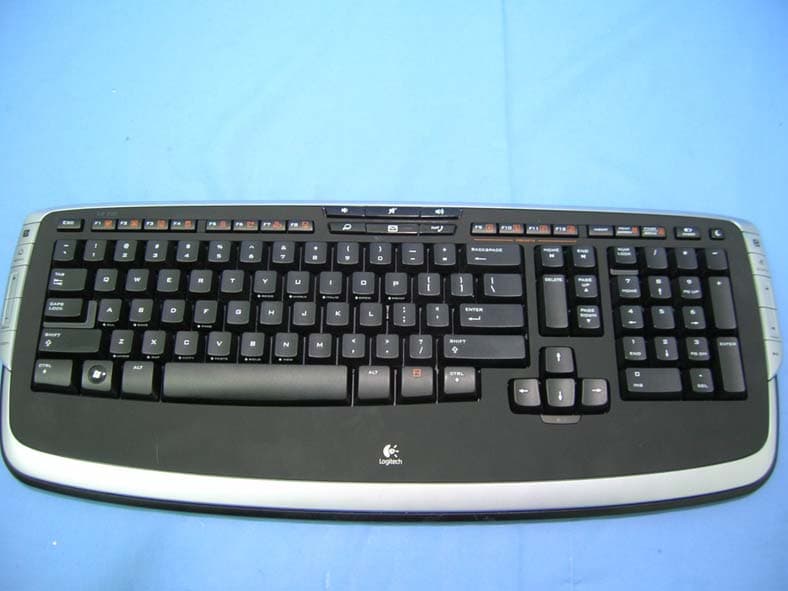
Click to zoom
Application Details
- Equipment Class
- DXX - Part 15 Low Power Communication Device Transmitter
- Date of Grant
- May 29, 2007
- Application Purpose
- Original Equipment
- Date of Application
- May 29, 2007
- Equipment Note
- Cordless Keyboard
- Frequency Range
- 27.09500000 - 27.14500000
- Company
- Logitech Far East Ltd
- Country
- Taiwan
Documents & Files
Document Text
Text extracted from the exhibit documents filed with the FCC. Open a document above to read the original.
Users Manual
© 2006 Logitech. All rights reserved. Logitech, the Logitech logo, and other Logitech marks are owned by Logitech and may be registered. All other trademarks are the property of their respective owners. Logitech assumes no responsibility for any errors that may appear in this manual. Information contained herein is subject to change without notice. © 2006 Logitech. Tous droits réservés. Logitech, le logo Logitech et les autres marques Logitech sont la propriété exclusive de Logitech et sont susceptibles d’être des marques déposées. Toutes les autres marques sont la propriété exclusive de leurs détenteurs respectifs. Logitech décline toute responsabilité en cas d'erreurs dans ce manuel. Les informations énoncées dans le présent document peuvent faire l’objet de modifications sans avis préalable. 624326-0403.A English Important Ergonomic Information. Read the Comfort Guidelines in the software help system or at http://www.logitech.com/comfort. Warning! Read the battery warning in the software help system. Warranty. Your product comes with a limited warranty. Refer to the software help system for more information. Compliance and Safety. Your product has been UL tested and is FCC and CE compliant. Refer to the software help system or visit Logitech online at http://www.logitech.com. Español Información sanitaria importante: Para más información, consulte las Recomendaciones para evitar el cansancio en la página Web de Logitech, http://www.logitech.com/comfort, o en el CD del software Logitech ® . ¡Advertencia! Lea la advertencia sobre las pilas en el sistema de ayuda del software. Garantía. Este producto tiene una garantía limitada. Para más información, consulte el sistema de ayuda del software. Seguridad y cumplimiento de normativas. El producto ha pasado las pruebas UL y cumple con las normativas FCC y CE. Consulte el sistema de ayuda del software o visite la página Web de Logitech http://www.logitech.com. Français Informations importantes relatives au confort: Pour plus d’informations, veuillez consulter le guide Logitech et votre confort sur le site Web de Logitech ® à l’adresse suivante: http://www.logitech.com/comfort, ou sur le logiciel Logitech ® . Attention! Veuillez lire l'avertissement relatif aux piles dans l'Aide du logiciel. Garantie. Votre produit est livré avec une garantie limitée. Pour plus d'informations, consultez l'Aide du logiciel. Confort et sécurité. Ce produit répond à la norme UL et est conforme aux normes CE et FCC. Consultez l'Aide du logiciel ou accédez au site Web suivant: http://www.logitech.com. Português Informações importantes sobre ergonomia: Para obter mais informações, leia as orientações de conforto no web site da Logitech ® , em http://www.logitech.com/comfort ou no CD do software da Logitech ® . Atenção! Leia o aviso sobre pilhas no sistema de ajuda do software. Garantia: o produto tem uma garantia limitada. Consulte o sistema de ajuda do software para obter mais informações. Compatibilidade e segurança. Este produto foi submetido ao teste UL e está em conformidade com FCC e CE. Consulte o sistema de ajuda do software ou visite a Logitech online em http://www.logitech.com. www.logitech.com/comfort www.logitech.com/comfort www.logitech.com/support WWW Czech Republic+420 239 000 335 English: +41-(0)21 863 54 01 +36-177-74 853 Poland+48-22-854 11 51 Russia +7(095)-641 3460 South Africa Dutch: n.a.; English: n.a. Japan +81-(3)3543 21 22 Asia Pacific Headquarters Hsinchu, Taiwan +886-(2)746-6601; x2206 Australia +61-(02)9804-69 68; BBS +61(02)9972 35 61 Corp. Hq. Fremont, USA and Canada +1-510-795 81 00 European., Mid. East., & African Hq. Romanel/ Morges, Switzerland English: +41-(0)21-863 5401 Fax: +41-(0)21-863 5402 English Solving Setup Problems. 1. Check cable connection. 2. Place receiver in USB stand away from electrical devices; avoid metallic surfaces. 3. Check battery installation. 4. Turn ON mouse by pressing Power button for 2 seconds. Mouse is ON when LED is ON. 5. Establish connection: 1) Press red Connect button under the receiver, and then 2) QUICKLY press red Connect button under device. Español Resolución de problemas de instalación. 1. Compruebe las conexiones de los cables. 2. Coloque el receptor en la base USB, alejado de dispositivos eléctricos y superficies metálicas. 3. Compruebe la colocación de las pilas. 4. Pulse el botón de encendido del ratón durante 2 segundos para encenderlo. Si el ratón está ENCENDIDO el diodo está ILUMINADO. 5. Establezca la conexión: 1) Pulse el botón Connect rojo situado en la parte inferior del receptor y luego 2) pulse BREVEMENTE el botón Connect rojo en la parte inferior del dispositivo. Français Résolution des problèmes d'installation. 1. Vérifiez la connexion des câbles. 2. Eloignez le récepteur dans son support USB des autres appareils électriques et évitez les surfaces métalliques. 3. Vérifiez que les piles sont bien installées. 4. Mettez la souris sous tension en appuyant sur le bouton d'alimentation pendant deux secondes. La souris est sous tension si le témoin lumineux est allumé. 5. Etablissez la connexion: 1) Appuyez sur le bouton rouge Connect situé sous le récepteur, puis 2) appuyez immédiatement après sur le bouton Connect situé sous le dispositif. Português Resolver problemas de configuração. 1. Verifique a ligação do cabo. 2. Coloque o receptor no suporte de USB longe de aparelhos eléctricos e evite superfícies metálicas. 3. Verifique a instalação das pilhas. 4. Ligue o rato, premindo o botão de Alimentação durante dois segundos. O rato está LIGADO quando o LED está LIGADO. 5. Estabelecer ligação: 1) Prima o botão vermelho Connect (Ligar) sob o receptor e, em seguida, 2) prima RAPIDAMENTE o botão vermelho Connect (Ligar) sob o dispositivo. English 1. Favorite picture application. 2. Rotate picture right (combine with Ctrl key to rotate left). 3. Zoom In/Out and 100%. 4. Favorite Media application. 5. Music shuffle. 6. Media transport buttons. 7. Volume and Mute. 8. Open Internet Search, E…
Text truncated - open the document above for the full version.
External Photos
Report No: 075H030-RFUSP03V01 Page: 26 of 34 Version:1.0 Attachement ¾ EUT Photograph (1) EUT Photo (2) EUT Photo
ID Label/Location Info
FCC ID.: JNZYRBA78 FCC ID Label The FCC ID Label will be placed on the equipment as shown in the photograph below. Cordless Keyboard Model No.: Y-RBA78 F F C C C C I I D D : : JNZYRBA78 This device complies with Part 15 of the FCC Rules. Operation is subject to the following two conditions: (1) this device may not cause harmful interference and (2) this device must accept any interference received, including interference that may cause undesired operation. S/N: Made in Taiwan Trade name: Logitech Model number.: Y-RBA78
Internal Photos
Report No: 075H030-RFUSP03V01 Page: 27 of 34 Version:1.0 (3) EUT Photo (4) EUT Photo Report No: 075H030-RFUSP03V01 Page: 28 of 34 Version:1.0 (5) EUT Photo (6) EUT Photo Report No: 075H030-RFUSP03V01 Page: 29 of 34 Version:1.0 (7) EUT Photo (8) EUT Photo Report No: 075H030-RFUSP03V01 Page: 30 of 34 Version:1.0 (9) EUT Photo (10) EUT Photo Report No: 075H030-RFUSP03V01 Page: 31 of 34 Version:1.0 (11) EUT Photo (12) EUT Photo Report No: 075H030-RFUSP03V01 Page: 32 of 34 Version:1.0 (13) EUT Photo Report No: 075H030-RFUSP03V01 Page: 33 of 34 Version:1.0 (14) EUT Photo Report No: 075H030-RFUSP03V01 Page: 34 of 34 Version:1.0 (15) EUT Photo
Test Report
1 File# : 075H030 - Page: 9 Engineer : Site : Site1 Time : 2007/05/21 - 00:19 Limit : FCC_CLASS_B_03M_QP Margin : 6 EUT : Cordless Keyboard Probe : FCC_RF_30-1G(200605) - HORIZONTAL Power : DC 3V Note : 27.145 MHz Frequency (MHz) Correct Factor (dB) Reading Level (dBuV) Measure Level (dBuV/m) Margin (dB) Limit (dBuV/m) Detector Type Ant Pos (cm) Table Pos (deg) 1 53.327 -12.171 35.75823.587-16.41340.000 QUASIPEAK 0.0000.000 2 134.970 -13.474 46.66133.187-10.31343.500 QUASIPEAK 0.0000.000 3 216.613 -13.239 48.12734.888-11.11246.000 QUASIPEAK 0.0000.000 4 434.329 2.532 38.56041.092-4.90846.000 QUASIPEAK 0.0000.000 5 570.401 4.619 31.29035.909-10.09146.000 QUASIPEAK 0.0000.000 6 788.116 3.937 32.60236.539-9.46146.000 QUASIPEAK 0.0000.000 7 * 869.760 5.211 35.98941.200-4.80046.000 QUASIPEAK 0.0000.000 Note: 1. All Readings below 1GHz are Quasi-QUASIPEAK, above are performed with QUASIPEAK and/or average measurements as necessary. 2. " * ", means this data is the worst emission level. 3. Measurement Level = Reading Level + Correct Factor 2 File# : 075H030 - Page: 10 Engineer : Site : Site1 Time : 2007/05/21 - 00:23 Limit : FCC_CLASS_B_03M_QP Margin : 6 EUT : Cordless Keyboard Probe : FCC_RF_30-1G(200605) - VERTICAL Power : DC 3V Note : 27.145 MHz Frequency (MHz) Correct Factor (dB) Reading Level (dBuV) Measure Level (dBuV/m) Margin (dB) Limit (dBuV/m) Detector Type Ant Pos (cm) Table Pos (deg) 1 53.327 -7.186 25.98018.794-21.20640.000 QUASIPEAK 0.0000.000 2 134.970 -8.045 37.34029.295-14.20543.500 QUASIPEAK 0.0000.000 3 216.613 -6.152 31.55925.407-20.59346.000 QUASIPEAK 0.0000.000 4 407.114 -0.335 30.64530.311-15.68946.000 QUASIPEAK 0.0000.000 5 706.473 1.144 29.07530.218-15.78246.000 QUASIPEAK 0.0000.000 6 815.331 4.595 28.78233.376-12.62446.000 QUASIPEAK 0.0000.000 7 * 869.760 3.929 29.74233.671-12.32946.000 QUASIPEAK 0.0000.000 Note: 1. All Readings below 1GHz are Quasi-QUASIPEAK, above are performed with QUASIPEAK and/or average measurements as necessary. 2. " * ", means this data is the worst emission level. 3. Measurement Level = Reading Level + Correct Factor
Test Report
Report No: 075H030-RFUSP03V01 Page: 1 of 34 Version:1.0 Test Report Product Name:Cordless Keyboard Model No. :Y-RBA78 FCC ID. :JNZYRBA78 Applicant : Logitech Far East Ltd. Address : #2 Creation Rd., 4, Science-Based Ind. Park, Hsinchu, Taiwan, R.O.C. Date of Receipt:2007/05/14 Issued Date :2007/05/23 Report No. :075H030-RFUSP03V01 The test results relate only to the samples tested. The test report shall not be reproduced except in full without the written approval of QuieTek Corporation. Report No: 075H030-RFUSP03V01 Page: 2 of 34 Version:1.0 Test Report Certification Issued Date : 2007/05/23 Report No. : 075H030-RFUSP03V01 Product Name : Cordless Keyboard Applicant : Logitech Far East Ltd. Address : #2 Creation Rd., 4, Science-Based Ind. Park, Hsinchu, Taiwan, R.O.C. Manufacturer : Logitech Far East Ltd. Model No. : Y-RBA78 FCC ID. : JNZYRBA78 Rated Voltage : DC 3V (Power by Battery) EUT Voltage : DC 3V (Power by Battery) Trade Name : Logitech Applicable Standard : FCC CFR Title 47 Part 15 Subpart C Section 15.227: 2006 Test Result : Complied The test results relate only to the samples tested. The test report shall not be reproduced except in full without the written approval of QuieTek Corporation. Documented By : ( Demi Chang ) Tested By : ( Halu Chung ) Approved By : ( Roy Wang ) Report No: 075H030-RFUSP03V01 Page: 3 of 34 Version:1.0 TABLE OF CONTENTS Description Page x 1. General Information.................................................................................................................4 1.1. EUT Description..........................................................................................................................4 1.2. Operational Description.............................................................................................................5 1.3. Test Mode....................................................................................................................................6 1.4. Tested System Details................................................................................................................7 1.5. Configuration of tested System................................................................................................7 1.6. EUT Exercise Software..............................................................................................................7 1.7. Test Facility..................................................................................................................................8 2. Conducted Emission...............................................................................................................9 2.1. Test Equipment...........................................................................................................................9 2.2. Test Setup....................................................................................................................................9 2.3. Limits...........................................................................................................................................10 2.4. Test Procedure..........................................................................................................................10 2.5. Test Specification......................................................................................................................10 2.6. Uncertainty.................................................................................................................................10 2.7. Test Result.................................................................................................................................11 3. Radiated Emission.................................................................................................................12 3.1. Test Equipment.........................................................................................................................12 3.2. Test Setup..................................................................................................................................13 3.3. Limits...........................................................................................................................................14 3.4. Test Procedure..........................................................................................................................15 3.5. Test Specification......................................................................................................................15 3.6. Uncertainty.................................................................................................................................15 3.7. Test Result.................................................................................................................................16 3.8. Test Photo..................................................................................................................................22 4. Occupied Bandwidth.............................................................................................................23 4.1. Test Equipment.........................................................................................................................23 4.2. Test Setup..................................................................................................................................23 4.3. Limits...........................................................................................................................................23 4.4. Test Specification......................................................................................................................23 4.5. Uncertainty.................................................................................................................................23 4.6. Test Result................................................................................................................…
Text truncated - open the document above for the full version.
Test Setup Photos
Report No: 075H030-RFUSP03V01 Page: 22 of 34 Version:1.0 3.8. Test Photo Test Mode : Mode 1: Transmitter Description: Front View of Radiated Emission Test Setup Test Mode : Mode 1: Transmitter Description: Back View of Radiated Emission Test Setup
Contact Information
Applicant
Rick Lien(Head of Product Compliance)
Technical Contact
QuieTek CorporationNatasha Tai
[email protected]+886 2 8792 6808
2F, No. 345, Xinhu 2nd Rd · Taipei · Taiwan
Test Firm
QuieTek CorporationKevin (Yu-Lung) Chen
Technical Specifications
| # | Rule Parts | Frequency Range | Power Output |
|---|---|---|---|
| 1 | 15C | 27.095 MHz - 27.145 MHz | - |
Other Applications from Logitech Far East Ltd
JNZYR0126
Jul 30, 2026Wireless Keyboard
Equipment Class
DTS - Digital Transmission SystemJNZYR0116
Jul 30, 2026Wireless Keyboard
Equipment Class
DTS - Digital Transmission SystemJNZYR0115
Jul 30, 2026Wireless Keyboard
Equipment Class
DTS - Digital Transmission SystemJNZMR0143
Jul 21, 2026Wireless Mouse
Equipment Class
DTS - Digital Transmission SystemJNZMR0136
Jul 09, 2026Wireless Mouse
Equipment Class
DTS - Digital Transmission System