JNZYRBH94Cordless Keyboard
Logitech Far East Ltd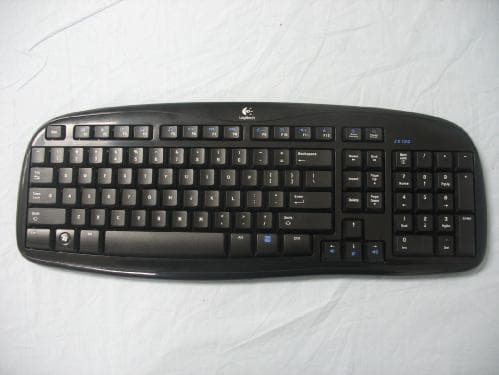
Click to zoom
Application Details
- Equipment Class
- DXX - Part 15 Low Power Communication Device Transmitter
- Date of Grant
- Dec 31, 2007
- Application Purpose
- Original Equipment
- Date of Application
- Dec 30, 2007
- Equipment Note
- Cordless Keyboard
- Frequency Range
- 27.09500000 - 27.14500000
- Company
- Logitech Far East Ltd
- Country
- Taiwan
Documents & Files
Document Text
Text extracted from the exhibit documents filed with the FCC. Open a document above to read the original.
Users Manual
English Thank you for purchasing the Logitech ® Cordless Desktop ® EX 100. Please read this quick start guide to get up and running quickly. Should you have any questions, refer to the support section of this document for our contact information. Español Gracias por adquirir Logitech ® Cordless Desktop ® EX 100. Esta guía de inicio rápido le servirá para empezar a utilizar el producto cuanto antes. Si desea realizar alguna consulta, utilice la información de contacto suministrada en la sección de asistencia. Français Vous venez d'acheter une solution Logitech ® Cordless Desktop ® EX 100 et nous vous en félicitons. Veuillez lire ce guide de démarrage rapide pour commencer à l'utiliser rapidement. Pour toute question, reportez-vous à la section d'assistance de ce document pour savoir comment nous contacter. Português Obrigado por ter adquirido o Logitech ® Cordless Desktop ® EX 100. Leia este guia de iniciação rápida para começar a trabalhar rapidamente. Caso tenha dúvidas, consulte a secção de suporte deste documento para obter as informações de contacto. 1 1 2 5346 Logitech ® www.logitech.com English 1. Keyboard 2. Mouse (Class 1 LED) 3. USB receiver 4. Two AAA and two AA alkaline batteries 5. Software 6. Quick start guide Español 1. Teclado 2. Ratón (LED de clase 1) 3. Receptor USB 4. Dos pilas AAA y dos pilas AA alcalinas 5. Software 6. Guía de inicio rápido Français 1. Clavier 2. Souris (témoin lumineux de classe 1) 3. Récepteur USB 4. Deux piles alcalines AA et deux piles alcalines AAA 5. Logiciel 6. Guide de démarrage rapide Português 1. Teclado 2. Rato (LED Classe 1) 3. Receptor USB 4. Duas pilhas alcalinas AAA e AA. 5. Software 6. Guia de iniciação rápida 620-000794.002 4 © 2008 Logitech. All rights reserved. Logitech, the Logitech logo, and other Logitech marks are owned by Logitech and may be registered. All other trademarks are the property of their respective owners. Logitech assumes no responsibility for any errors that may appear in this manual. Information contained herein is subject to change without notice. © 2008 Logitech. Tous droits réservés. Logitech, le logo Logitech et les autres marques Logitech sont la propriété exclusive de Logitech et sont susceptibles d’être des marques déposées. Toutes les autres marques sont la propriété exclusive de leurs détenteurs respectifs. Logitech décline toute responsabilité en cas d'erreurs dans ce manuel. Les informations énoncées dans le présent document peuvent faire l’objet de modifications sans avis préalable. Quick start guide Package contents / Esta caja contiene / Contenu / Conteúdo da embalagem English 1. Turn on computer. 2. Plug the receiver's USB cable into the computer's USB port. Español 1. Encienda el ordenador. 2. Conecte el cable USB del receptor al puerto USB del ordenador. Français 1. Mettez l'ordinateur sous tension. 2. Branchez le câble USB du récepteur sur le port USB de l'ordinateur. Português 1. Ligue o computador. 2. Ligue o cabo USB do receptor à porta USB do computador. 5 English Establish a connection separately for each device: 1. FIRST, press the Connect button on the receiver. 2. SECOND, press the Connect button under the device. Español Establezca una conexión para cada dispositivo por separado: 1. PRIMERO, pulse el botón Connect del receptor. 2. A CONTINUACIÓN, pulse el botón Connect en la parte inferior del dispositivo. Français Etablissez la connexion séparément pour chaque dispositif: 1. PREMIEREMENT, appuyez sur le bouton de connexion du récepteur. 2. DEUXIEMEMENT, appuyez sur le bouton de connexion situé sous le dispositif. Português Estabeleça uma ligação para cada dispositivo separadamente: 1. PRIMEIRO prima o botão Connect no receptor. 2. EM SEGUIDA prima o botão Connect na parte inferior do dispositivo. Quick start guide Logitech Cordless Desktop ® EX 100 Installing the software / Instalación del software Installation du logiciel / Instalar o software 3 English 1. Slide cover off mouse battery compartment. 2. Insert two AA alkaline batteries in mouse and replace cover. 3. Remove battery compartment door on keyboard bottom. 4. Insert two AAA alkaline batteries in keyboard and repace cover. Español 1. Deslice la tapa del compartimento de pilas del ratón. 2. Coloque dos pilas alcalinas AA en el ratón y vuelva a colocar la tapa. 3. Abra la tapa del compartimento de pilas situada en la parte inferior del teclado. 4. Coloque dos pilas alcalinas AAA y vuelva a colocar la tapa. Français 1. Faites glisser le couvercle du compartiment des piles de la souris pour l'ouvrir. 2. Insérez deux piles alcalines AA dans la souris et replacez le couvercle. 3. Retirez le couvercle du comparti- ment des piles situé sous le clavier. 4. Insérez deux piles alcalines AAA dans le compartiment du clavier et replacez le couvercle. Português 1. Deslize a tampa do compartimento das pilhas do rato. 2. Introduza as duas pilhas alcalinas AA no rato e volte a colocar a tampa. 3. Remova a porta do compartimento das pilhas na parte inferior do teclado. 4. Introduza as duas pilhas alcalinas AAA no teclado e volte a colocar a porta. Thank you! Merci! Gracias! Obrigado! Installing the batteries / Colocación de las pilas / Installation des piles / Instalar as pilhas Making a connection / Conexión / Etablissement de la connexion / Estabelecer uma ligação Connecting to your computer / Conexión al ordenador Connexion à l'ordinateur / Ligar ao computador 2 USB Logitech ® Cordless Desktop ® EX 100 ON 1 USB 2 ON 1 2 1 2 Connect Mouse Connect Keyboard 1 2 1 English To enjoy all the features of your new desktop, please install the software now. Español Para disponer de todas las funciones del producto, debe instalar el software. Français Pour profiter de toutes les fonction- nalités de votre nouvelle solution de bureau, veuillez installer le logiciel maintenant. Português Para desfrutar de todas as funções do nosso novo desktop, instale agora o software. 3 4 2 ? English 1. Check cable connection. 2. Place receiver 8 inches or 20 cm away fro…
Text truncated - open the document above for the full version.
External Photos
Report No: 07BS005-RF-US-P03V01 Page: 33 of 35 6. Attachment ÿ EUT Photograph (1) EUT Photo (2) EUT Photo
ID Label/Location Info
FCC ID.: JNZYRBH94 FCC ID Label The FCC ID Label will be placed on the equipment as shown in the photograph below. Cordless Keyboard Model No.: Y-RBH94 FCC ID : JNZYRBH94 This device complies with Part 15 of the FCC Rules. Operation is subject to the following two conditions: (1) this device may not cause harmful interference and (2) this device must accept any interference received, including interference that may cause undesired operation. S/N: Made in Taiwan Trade name: Logitech Model number.: Y-RBH94
Internal Photos
Report No: 07BS005-RF-US-P03V01 Page: 34 of 35 (3) EUT Photo (4) EUT Photo Report No: 07BS005-RF-US-P03V01 Page: 35 of 35 (5) EUT Photo (6) EUT Photo
Test Report
Test Report Product Name : Cordless Keyboard Model No. : Y-RBH94 FCC ID : JNZYRBH94 Applicant : Logitech Far East Ltd. Address : #2 Creation Rd.4,Science-Based Ind.Park Hsinchu Taiwan,R.O.C. Date of Receipt : 2007/10/24 Issued Date : 2007/11/01 Report No. : 07BS005-RF-US-P03V01 The test results relate only to the samples tested. The test results shown in the test report are traceable to the national/international standard through the calibration of the equipment and evaluated measurement uncertainty herein. This report must not be used to claim product endorsement by CNLA, NVLAP, NIST or any agency of the Government. The test report shall not be reproduced except in full without the written approval of QuieTek Corporation. Report No: 07BS005-RF-US-P03V01 Page: 2 of 35 Test Report Certification Issued Date : 2007/11/01 Report No. : 07BS005-RF-US-P03V01 Product Name : Cordless Keyboard Applicant : Logitech Far East Ltd. Address : #2 Creation Rd.4,Science-Based Ind.Park Hsinchu Taiwan,R.O.C. Manufacturer : (1) Logitech Far East Ltd. (2) Logitech Technology (Suzhou) Co., Ltd. Model No. : Y-RBH94 FCC ID : JNZYRBH94 Rated Voltage : AC 120V/ 60Hz EUT Voltage : DC 3V (Power by Battery) Trade Name : Logitech Applicable Standard : FCC CFR Title 47 Part 15 Subpart C: 2007 ANSI C63.4: 2003 Test Result : Complied Performed Location : SuZhou EMC laboratory No.99 Hongye Rd., Suzhou Industrial Park Loufeng Hi-Tech Development Zone., SuZhou, China TEL: +86-512-6251-5088 / FAX: +86-512-6251-5098 FCC Registration Number: 800392 Documented By : ( Any Liu ) Reviewed By : ( Dream Cao ) Approved By : ( Murphy Wang ) Report No: 07BS005-RF-US-P03V01 Page: 3 of 35 Laboratory Information We , QuieTek Corporation, are an independent EMC and safety consultancy that was established the whole facility in our laboratories. The test facility has been accredited by the following accreditation Bodies in compliance with ISO 17025, EN 45001 and Guide 25: The related certificate for our laboratories about the test site and management system can be downloaded from QuieTek Corporation’s Web Site : http://tw.quietek.com/modules/myalbum/ The address and introduction of QuieTek Corporation’s laboratories can be founded in our Web site : http://www.quietek.com/ If you have any comments, Please don’t hesitate to contact us. Our contact information is as below: HsinChu Testing Laboratory : No.75-2, 3rd Lin, Wangye Keng, Yonghxing Tsuen, Qionglin Shiang, Hsinchu County 307, Taiwan, R.O.C. TEL:+886-3-592-8858 / FAX:+886-3-592-8859 E-Mail : [email protected] LinKou Testing Laboratory : No. 5-22, Ruei-Shu Valley, Ruei-Ping Tsuen, Lin-Kou Shiang, Taipei, Taiwan, R.O.C. TEL : 886-2-8601-3788 / FAX : 886-2-8601-3789 E-Mail : [email protected] Suzhou Testing Laboratory : No.99 Hongye Rd., Suzhou Industrial Park Loufeng Hi-Tech Development Zone., SuZhou, China TEL : +86-512-6251-5088 / FAX : 86-512-6251-5098 E-Mail : [email protected] Taiwan R.O.C. : BSMI, DGT, CNLA Germany : TUV Rheinland Norway : Nemko, DNV USA : FCC, NVLAP Japan : VCCI 0914 1313 1596 Report No: 07BS005-RF-US-P03V01 Page: 4 of 35 TABLE OF CONTENTS Description Page 1. General Information...............................................................................................................5 1.1. EUT Description.....................................................................................................................5 1.2. Operational Description..........................................................................................................6 1.3. Mode of Operation.................................................................................................................7 1.4. Tested System Details............................................................................................................8 1.5. Configuration of Tested System..............................................................................................9 1.6. EUT Exercise Software..........................................................................................................9 2. Technical Test......................................................................................................................10 2.1. Summary of Test Result.......................................................................................................10 2.2. Test Environment.................................................................................................................11 3. Conducted Emission............................................................................................................12 3.1. Test Equipment....................................................................................................................12 3.2. Test Setup............................................................................................................................12 3.3. Limit .............................................................................................................................13 3.4. Test Procedure.....................................................................................................................13 3.5. Uncertainty...........................................................................................................................13 3.6. Test Result...........................................................................................................................13 4. Radiated Emission...............................................................................................................14 4.1. Test Equipment....................................................................................................................14 4.2. Test Setup............................................................................................................................14 4.3. Limit .......................................................................................................…
Text truncated - open the document above for the full version.
Test Setup Photos
Report No: 07BS005-RF-US-P03V01 Page: 26 of 35 4.7. Test Photograph Test Mode: Mode 1: Continuance transmission on channel 1 (27.095MHz) Description: Radiated Test for Fundamental Emission Test Mode: Mode 2: Continuance transmission on channel 2 (27.145MHz) Description: Radiated Test Fundamental Test Report No: 07BS005-RF-US-P03V01 Page: 27 of 35 Test Mode: Mode 1: Continuance transmission on channel 1 (27.095MHz) Description: Front View of Radiated Test for Unwanted Emission Test Mode: Mode 1: Continuance transmission on channel 1 (27.095MHz) Description: Back View of Radiated Test for Unwanted Emission Report No: 07BS005-RF-US-P03V01 Page: 28 of 35 Test Mode: Mode 2: Continuance transmission on channel 2 (27.145MHz) Description: Front View of Radiated Test for Unwanted Emission Test Mode: Mode 2: Continuance transmission on channel 2 (27.145MHz) Description: Back View of Radiated Test for Unwanted Emission
Contact Information
Applicant
Rick Lien(Head of Product Compliance)
Technical Contact
Quietek CorporationNatasha Tai
[email protected]886-2-8792-6808
2F, No.345, Xinhu 2nd Rd., Neihu District, · Taipei · Taiwan
Test Firm
DEKRA Testing and Certification Co., Ltd.Sky Hsu
Technical Specifications
| # | Rule Parts | Frequency Range | Power Output |
|---|---|---|---|
| 1 | 15C | 27.095 MHz - 27.145 MHz | - |
Other Applications from Logitech Far East Ltd
JNZYR0126
Jul 30, 2026Wireless Keyboard
Equipment Class
DTS - Digital Transmission SystemJNZYR0116
Jul 30, 2026Wireless Keyboard
Equipment Class
DTS - Digital Transmission SystemJNZYR0115
Jul 30, 2026Wireless Keyboard
Equipment Class
DTS - Digital Transmission SystemJNZMR0143
Jul 21, 2026Wireless Mouse
Equipment Class
DTS - Digital Transmission SystemJNZMR0136
Jul 09, 2026Wireless Mouse
Equipment Class
DTS - Digital Transmission System