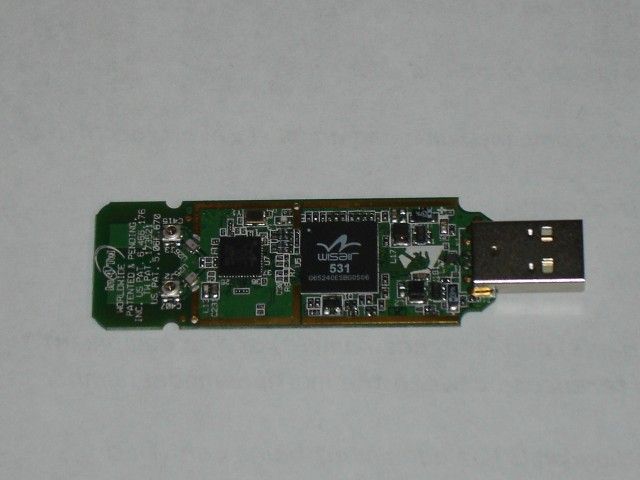
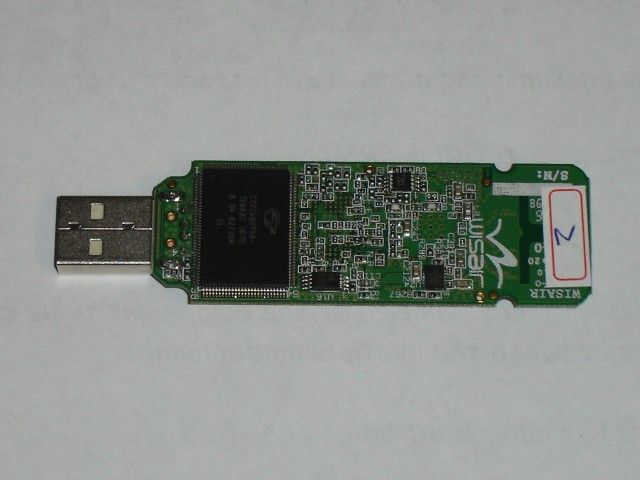
K7SF5U301DNGLCableFree USB Dongle
Belkin International, Inc.
Click to zoom
Application Details
- Equipment Class
- UWB - Ultra Wideband Transmitter
- Date of Grant
- Dec 18, 2006
- Application Purpose
- Original Equipment
- Date of Application
- Nov 20, 2006
- Equipment Note
- CableFree USB Dongle
- Frequency Range
- 3100.00000000 - 4800.00000000
- Company
- Belkin International, Inc.
- Country
- United States
Documents & Files
Document Text
Text extracted from the exhibit documents filed with the FCC. Open a document above to read the original.
Users Manual
Belkin Tech Support US: 310-898-1100, ext. 2263 800-223-5546, ext. 2263 Europe: 00 800 223 55 460 Australia: 1800 235 546 New Zealand: 0800 235 546 Singapore: 800 616 1790 Belkin Corporation 501 West Walnut Street Los Angeles, CA 90220, USA 310-898-1100 310-898-1111 fax Belkin Ltd. Express Business Park, Shipton Way Rushden, NN10 6GL, United Kingdom +44 (0) 1933 35 2000 +44 (0) 1933 31 2000 fax © 2006 Belkin Corporation. All rights reserved. All trade names are registered trademarks of respective manufacturers listed. Windows and Microsoft are either registered trademarks or trademarks of Microsoft Corporation in the United States and/or other countries.P75325 Belkin B.V. Boeing Avenue 333 1119 PH Schiphol-Rijk, The Netherlands +31 (0) 20 654 7300 +31 (0) 20 654 7349 fax Belkin Ltd. 4 Pioneer Avenue Tuggerah Business Park Tuggerah, NSW 2259, Australia +61 (0) 2 4372 8600 +61 (0) 2 4372 8603 fax Cable-Free USB Hub Cable-Free USB Hub User Manual F5U301 Cable-Free USB Hub Cable-Free USB Hub 1. Introduction ....................................................................1 Features ........................................................................ 3 System Requirements ................................................... 3 Package Includes .......................................................... 3 Technical Specifications ................................................4 2. Installation ......................................................................6 3. Operation ...................................................................... 16 4. Troubleshooting ............................................................ 24 5. Technical Specifications ................................................ 30 6. Information ................................................................... 32 Table of Contents 1 Introduction 1 2 3 4 5 6 Belkin unleashes USB. Congratulations and thank you for purchasing the Belkin Cable-Free USB Hub. This revolutionary product lets you connect all your USB devices to your computer—wirelessly. Now you can print, play music, scan, download photos, and burn CDs from anywhere in the room, from up to 30 feet away, without the hassle of connecting cables. The Hub is easy to use and gives you the freedom to roam—and stay connected. Please review this User Manual carefully so that you are sure to get the most from your Cable-Free USB Hub. 1 2 Introduction 1 2 3 4 5 6 2 Figure 1: USB Dongle Figure 2: Wireless Hub 2 Figure 1: USB Dongle 33 Introduction 1 2 3 4 5 6 Features • Wireless connectivity through USB for printers, cameras, scanners, and other devices to your computer, from up to 30 ft. away • Reduced cable clutter • Data-transfer speeds of up to 480Mbps for USB 2.0 devices • Ports for linking up to 4 high- or low-speed devices with your computer • Belkin Lifetime Warranty System Requirements For PC Users • Pentium ® processor-based computer with Hi-Speed USB 2.0 port available • Windows ® XP with Service Pack 2 Package Includes • Cable-Free USB Hub • Cable-Free USB Dongle • Power Adapter • Installation CD • User Manual 3 4 Introduction 1 2 3 4 5 6 4 Technical Specifications Upstream Ports: 1 Downstream Ports: 4 Per-Port Voltage: 5V Per-Port Current: 500mA Power Mode: Self Operating Temperature: 41° to 104° F (5° to 40° C) Storage Temperature: -4° to 140° F (-20° to 60° C) Power Supply: Output: 5V, 2.6mA Plug Size: 3.5mm Plug Polarity: Center-pin positive Main-Power-LED Color Definitions Red: Constant on when 5V DC is applied Port-Status-LED Color Definitions Green: Blinks slowly when registering wireless hub Blinks rapidly to indicate Rx/Tx traffic 4 55 Introduction 1 2 3 4 5 6 Certifications FCC Humidity 5% to 95% non-condensing Chipset Wisair Ports 4 USB A Indicator-Light Status Individual-status LED for each downstream port Power LED Power Supply 5V Operating Range Up to 30 ft. 5 6 1 2 3 4 5 6 Installation 6 The following diagram illustrates the basic steps in connecting and getting started with the dongle. Note: Do not attach the USB dongle before the host drivers are installed. Step 1 Install software and drivers from the included CD-ROM. Step 2 Connect the USB Dongle to the PC and approve the multiple-driver installation. Step 3 Connect the included power adapter to the Cable-Free USB Hub. Step 4 Open the Wireless Hub utility from the system tray and register the product ID number found on the bottom of the Hub. Then, approve the final driver installation on the PC. Step 5 Connect USB peripherals to the Cable-Free USB Hub. 6 77 Installation 1 2 3 4 5 6 After you install the software and drivers, connect the dongle to a free USB 2.0 port on your computer. This powers the Hub, and the Windows Hardware Installation Wizard automatically registers the corresponding driver. Note: If a previous installation of USB drivers already exists in your PC, uninstall the previous version using the uninstall utility (select “Start > Programs > Belkin >”). Install the USB Drivers and GUI Ensure that your PC system hardware and software are both operational. 1. Ensure that the Hub is switched off and the dongle is unplugged from the PC. 2. Run the “Setup_ver_07_10.exe” Belkin Setup Launcher program; follow the on-screen instructions—proceed by clicking “Next” to install the software to the default location. 3. When the Device Driver Installation Wizard appears, click “Next” to install the device drivers and click “Continue Anyway” when prompted (four instances). This will install the required Windows Driver Packages. 4. Click “Finish”. 5. Click “Finish” again to exit the Wizard. 7 8 1 2 3 4 5 6 Installation 8 Connect the Hardware 1. Place the Hub no more than three feet from the dongle. 2. Power OFF the Hub and disconnect it from all USB devices (e.g., cameras, hard drives, scanners). 3. Connect the external antenna and the power supply to the Hub. 4. Ensure that the dongle and Hub are facing each other. 5. Connect the dongle to the PC’s high-speed USB port. The system …
Text truncated - open the document above for the full version.
Cover Letter(s)
September 19 th , 2005 Chief, Authorizations Branch Federal Communications Commission 7435 Oakland Mills Road Columbia, MD 21046 Re: Belkin Certification Application FCC ID: K7SF5U301DNGL K7SF5U301HUB To whom it May Concern Please be advised that the following exhibits are to be held confidential on behalf of Belkin Corporation: Schematics Block diagrams Bill of materials Internal photos of the unit submitted for tests This application contains technical information that Belkin considers to be trade secrets and proprietary. If made public, the information might be used to the disadvantage of the applicant in the marketplace. Thank you for your attention Sincerely, Mark Freeman Senior Product Manager Belkin Corporation
Cover Letter(s)
September 19 th , 2006 Chief Authorizations Branch Federal Communications Commission 7435 Oakland Mills Road Columbia, MD 21406 To whom it May Concern: Please be advised that Belkin Corporation authorizes TDK RF Solutions to act on our behalf, until otherwise notified, for applications submitted to the Federal Communications Commission (FCC) regarding Ultra-Wideband (UWB) products. We certify that we are not subject to denial of federal benefits, that includes FCC benefits, pursuant to Section 5301 of the Anti-Drug abuse act of 1988, U.S.C. 862. Further, no party, as defined in 47 CFR 1.2002(b), to the application is subject to denial of federal benefits that includes FCC benefits. Sincerely, Mark Freeman Senior Product Manager Belkin Corporation
Test Report
All services undertaken are subject to the following general policy. Reports are submitted for exclusive use of the client to whom they are addressed. Their significance is subject to the adequacy and representative character of the samples and to the comprehensiveness of the tests, examinations or surveys made. This report shall not be reproduced except in full, without written consent of TDK RF Systems Inc. This report must not be used to claim product endorsement by A2LA, NVLAP nor any other agency of the US Government. Compliance report of F5U301-DNGL Customer: Belkin Corporation Date: September 15, 2006 TDK Report: BE091106 Test performed by: TDK R&D Corporation 1101 Cypress Creek Rd Cedar Park, TX 78613 Technician Checked by Radiated 30 MHz to 40 GHz A. Medina K. Yata Conducted 150 KHz to 30 MHz K. Yata K. Yata Report P. Carson R. Sutton This document contains confidential information and cannot be disclosed outside of Wisair or any affiliated company in whole or in part without the express written permission of TDK RF Systems Inc. Belkin Test report 2 1. Executive Summary An EMC evaluation to determine compliance of the F5U301-DNGL with requirements of FCC 47 CFR Part 15, Subpart F Section 15.519 was conducted. All references are to the most current version of the Code of Federal Regulations 47 that is currently in effect. In accordance with §2.1033, the following data is presented in support of the Certification of the F5U301-DNGL. The client should retain a copy of this document on file for at least 5 years after the manufacturing of the product has been discontinued. Test Description FCC 47 CFR Section Compliance Operational Limitations 15.519 (a) The client has been notified of these limitations. In normal operating mode the transmitter will only send data when associated with a receiver. See section 5 for detail UWB Bandwidth 15.503, 15.519 (b) Yes Radiated Emissions 15.519 (c), 15.209 (a) Yes Radiated Emissions in GPS Bands 15.519 (d) Yes Peak Emissions within a 50 MHz Bandwidth 15.519 (e) Yes 3 2. Task Description 2.1. Scope Reference FCC ET Docket No. 98-153, FCC 02-48 First R&O; FCC 47 CFR, Part 15, Subpart A; FCC 47 CFR, Part 15, Subpart B; FCC 47 CFR, Part 15, Subpart C; FCC 47 CFR, Part 15, Subpart F FCC ET Docket No. 04-352, Petition for Waiver of the Part 15 UWB Regulations Filed by MBOA-SIG (Adopted: March 10, 2005) Title Revision of Part 15 of the Commission’s Rules Regarding Ultra-Wideband Transmissions Systems; Code of Federal Regulations, Part 15 Subpart A: General Code of Federal Regulations, Part 15 Subpart B: Unintentional Radiators Code of Federal Regulations, Part 15 Subpart C: Intentional Radiators Code of Federal Regulations, Part 15 Subpart F: Ultra-Wideband Operation Purpose of Test To gain FCC Certification Authorization for technical requirements for Indoor UWB Systems operating between 3.1 GHz and 10.6 GHz. Test Procedures The tests were conducted in accordance with the following documents: FCC ET Docket 98-153, FCC 02-48 First R&O ANSI C63.4: 2001: Methods of Measurement of Radio-Noise Emissions from Low-Voltage Electrical and Electronic Equipment in the Range of 9 kHz to 40 GHz FCC Code of Federal Regulations 47, Part 15 Subpart A: General FCC ET Docket No. 04-352, Petition for Waiver of the Part 15 UWB Regulations Filed by MBOA-SIG (Adopted: March 10, 2005) General Procedures FCC Code of Federal Regulations 47, Part 2 Frequency Allocations and Radio Treaty Matter: General Rules and Regulations Classification of EUT Hand-Held Ultra-Wideband System 4 2.2. Related Submittal(s)/Grant(s) None 2.3. Test Plan Reference Publication Year Title FCC 47 CFR, Part 15, Subpart A 10/2004 Code of Federal Regulations, Part 15 Subpart A: General FCC 47 CFR, Part 15, Subpart B 10/2004 Code of Federal Regulations, Part 15 Subpart B: Unintentional Radiators FCC 47 CFR, Part 15, Subpart C 10/2004 Code of Federal Regulations, Part 15 Subpart C: Intentional Radiators FCC 47 CFR, Part 15, Subpart F 10/2004 Code of Federal Regulations, Part 15 Subpart F: Ultra-Wideband Operation FCC ET Docket 98- 153, FCC 02-48 First R&O 04/2002 Revision of Part 15 of the Commission’s Rules Regarding Ultra- Wideband Transmissions Systems: First Report & Order ANSI C63.4 01/2001 Methods of Measurement of Radio- Noise Emissions from Low-Voltage Electrical and Electronic Equipment in the Range of 9 kHz to 40 GHz FCC ET Docket No. 04- 352 3/2005 Petition for Waiver of the Part 15 UWB Regulations Filed by MBOA-SIG 2.4. Client Information APPLICANT Name: Belkin Corporation Address: 501 West Walnut St, Compton, CA 90220 Contact Person: Mark Matejka MANUFACTURER Name: Belkin Corporation Address: 501 West Walnut St, Compton, CA 90220 Contact Person: Mark Matejka 5 2.5. Equipment Under Test (EUT) The following information (with the exception of the date information) has been supplied by the applicant. The test results in this report pertain only to the item tested. General Brand Name Belkin Product Name Cable Free USB 2.0 Dongle Model Name or Number F5U301-DNGL Serial Number Type of Equipment UWB Radio Transmitter Input Power Supply Type PC USB 2.0 Port Classification Hand-Held Ultra-Wideband System Technical Power Supply Requirements Powered through USB port of host PC RF Output Rating -42 dBm EIRP @ 3 meters Operating Frequency Range 3100 MHz to 4800 MHz RF Output Impedance 50 Ω Channel Spacing N/A Pulse Width N/A Pulse Repetition Frequency N/A 10 dB Bandwidth >500 MHz Modulation/Constellation Multiband OFDM Oscillators’ Frequencies 24MHz 25MHz, 50MHz, 66MHz, 132MHz, 528MHz EUT Ports USB Antenna Connector Type Internal Antenna Description Omni directional linear polarized planar Logistics EUT Receive Date July 31,, 2006 EUT Receive Condition Good Test Start Date August 16,, 2006 Test Completion Date September 7, 2006 6 2.5.1. Support Equipment Description Manufacturer Model No. Serial No. FCC ID AC Power Adapter Dell HP-OQ065B83 CN-ON2765-47890- 54E-2669 No ID Laptop PC Dell Lattitude D610 CN-OC47…
Text truncated - open the document above for the full version.
Contact Information
Applicant
Jay TU(Manager, Regulatory Compliance)
Technical Contact
TDK RF SolutionsArmando Medina
[email protected]5122589478
1101 Cypress creek rd · cedar park, Texas · United States
Non-Technical Contact
TDK RF SolutionsPat Carson
[email protected]2093511584
Test Firm
TDK RF Solutions, Inc.Robert Sutton
Technical Specifications
| # | Rule Parts | Frequency Range | Power Output |
|---|---|---|---|
| 1 | 15F | 3.10 GHz - 4.80 GHz | - |
Other Applications from Belkin International, Inc.
K7S-CAB029
Aug 11, 2026SureFind Loop Cable Tag
Equipment Class
DTS - Digital Transmission SystemK7SBPD024
Aug 10, 2026UltraCharge Pro Slim Magnetic Power Bank 5K with BoostSolid Cell
Equipment Class
DCD - Part 15 Low Power Transmitter Below 1705 kHzK7SMMA016
Jul 22, 2026SureFind Wallet Stand
Equipment Class
DTS - Digital Transmission SystemK7SMMA015
Jul 10, 2026SureFind
Equipment Class
DTS - Digital Transmission SystemK7SAUC018
Jun 17, 2026SoundForm Dot ANC Earbuds, SoundForm Dot Earbuds
Equipment Class
DTS - Digital Transmission System