K7SF8E849KYBDBelkin Wireless Keyboard and Optical Mouse
Belkin International, Inc.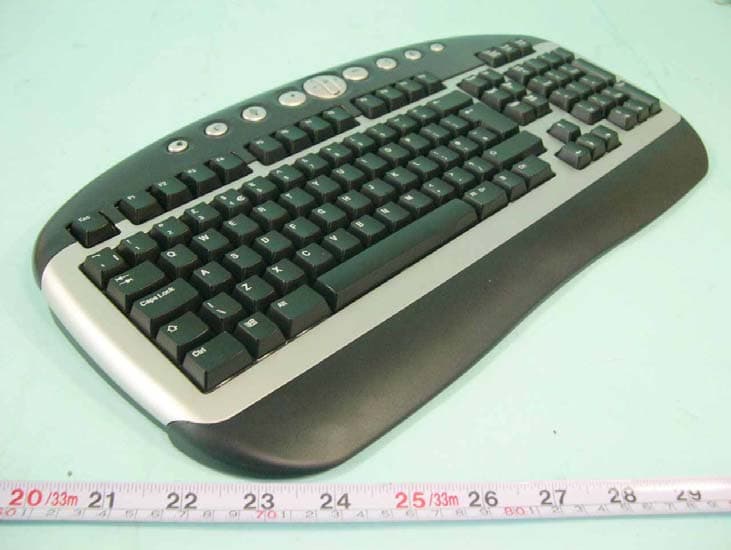
Click to zoom
Application Details
- Equipment Class
- DXX - Part 15 Low Power Communication Device Transmitter
- Date of Grant
- Jul 17, 2005
- Application Purpose
- Original Equipment
- Date of Application
- Jul 17, 2005
- Equipment Note
- Belkin Wireless Keyboard and Optical Mouse
- Frequency Range
- 27.04500000 - 27.04500000
- Company
- Belkin International, Inc.
- Country
- United States
Documents & Files
Document Text
Text extracted from the exhibit documents filed with the FCC. Open a document above to read the original.
Users Manual
EN ___ FR ___ DE ___ NL DE ___ NL Wireless Keyboard and Optical Mouse Enjoy the freedom of wireless optical precision F8E849-BNDL User Manual 1 17 33 49 EN ___ FR ___ DE ___ NL P74775ea Wireless Keyboard and Optical Mouse © 2005 Belkin Corporation. All rights reserved. All trade names are registered trademarks of respective manufacturers listed. Belkin Ltd. Express Business Park , Shipton Way Rushden, NN10 6GL, United Kingdom T: +44 (0) 1933 35 2000 F: +44 (0) 1933 31 2000 Belkin B.V. Starparc Building , Boeing Avenue 333 1119 PH Schiphol-Rijk, The Netherlands T: +31 (0) 20 654 7300 F: +31 (0) 20 654 7349 Belkin GmbH Hanebergstraße 2 80637 Munich, Germany T: +49 (0) 89 143405 0 F: +49 (0) 89 143405 100 Belkin SAS 5 Rue du Petit Robinson, 3ème étage 78350 Jouy en Josas, France T: +33 (0) 1 34 58 14 00 F: +33 (0) 1 39 46 62 89 Belkin Tech Support Europe: 00 800 223 55 460 Wireless Keyboard and Optical Mouse F8E849-BNDL EN ___ FR ___ DE ___ NL User Manual Enjoy Wireless Freedom 1 ___ 2 ___ 3 ___ 4 ___ 5 ___ 6 ___ 7 1. Introduction . . . . . . . . . . . . . . . . . . . . . . . . . . . .4 Compatible Equipment . . . . . . . . . . . . . . . . . . . . 5 Operating Systems . . . . . . . . . . . . . . . . . . . . . . .5 Package Contents. . . . . . . . . . . . . . . . . . . . . . . . 5 2. Quick Installation Guide . . . . . . . . . . . . . . . . . . . . 6 3. Software Installation for Windows 98, Me, 2000, and XP . . . . . . . . . . . . . . . 7 4. USB Standard Keyboard Hot Key Functions . . . . 8 5. Troubleshooting. . . . . . . . . . . . . . . . . . . . . . . . . . .9 6. Uninstallation process for Windows 98, Me, 2000, and XP . . . . . . . . . . . . . .11 7. Information. . . . . . . . . . . . . . . . . . . . . . . . . . . . . .12 Table of Contents 1 ___ 2 ___ 3 ___ 4 ___ 5 ___ 6 ___ 7 3 1 ___ 2 ___ 3 ___ 4 ___ 5 ___ 6 ___ 7 4 Congratulations and thank you for purchasing the Wireless Keyboard and Optical Mouse from Belkin. We appreciate your business and are sure you will enjoy years of reliable use with these high- quality, input devices. Please review this entire User Manual so you can be sure to get the most reliable performance from your new equipment. Introduction 1 1 ___ 2 ___ 3 ___ 4 ___ 5 ___ 6 ___ 7 5 1 Compatible Equipment Works with all PCs that are compatible with IBM® and equipped with USB interface NOTE: Use of these products on a desk made of iron, or other metal, will negatively impact the operation of your Wireless Keyboard and Mouse. Operating Systems Windows® XP, Me, 2000, 98 SE Package Contents Wireless Keyboard Wireless Optical Mouse Receiver 2 AAA batteries 2 AA batteries Driver CD User Manual Please read the instructions for installing, operating, and using the wireless desktop. Introduction 1 ___ 2 ___ 3 ___ 4 ___ 5 ___ 6 ___ 7 6 1. Be sure that your computer is turned on. If you are running Windows 98SE, Me, or 2000, you will need to keep your old keyboard and mouse connected for installation. 2. Connect only the receiver to your computer through the USB port. Note: When connecting the USB cable to your computer, Windows will start a New Hardware Wizard. In Windows XP, it will complete the Wizard automatically. In Windows 98, Me, and possibly 2000, you will need to follow through the New Hardware Wizard with your old keyboard and mouse. 3. Install the batteries into your Keyboard and Mouse. Please make sure you follow the indication on the inside compartment for correct positioning of the batteries. 4. Press the silver connection button on top of the receiver. 5. Press the connect button on the mouse that is located on the bottom and hold for several seconds. Your mouse is now operational. 6. Press the silver connection button on top of the receiver. 7. Press the reset button on the keyboard (located on the bottom of the keyboard) and hold for several seconds. Your keyboard is now operational. 2 Quick Installation Guide 1 ___ 2 ___ 3 ___ 4 ___ 5 ___ 6 ___ 7 7 Note: The Keyboard and Mouse should now be functioning. If they are not, repeat the setup instructions and refer to the “Troubleshooting” section for help. When the Mouse and Keyboard are operational, the software can be installed. Warning: It is recommended that you uninstall any previously installed keyboard and mouse software prior to installing your new Belkin software. 1. Be sure your computer is powered on. 2. Insert the CD into your computer’s CD-ROM drive. 3. If you have not previously installed Keyboard and Mouse software, click “OK” and the installation will begin. Follow the on-screen instructions. 4. Upon completion of installation, you will be prompted to restart your computer. You must restart at this time in order for the software to function. 3 Software Installation For Windows 98SE, ME, 2000, and XP + - 1 ___ 2 ___ 3 ___ 4 ___ 5 ___ 6 ___ 7 8 4 USB Standard Keyboard Hot Key Functions WWW - Open your system's default Internet Browser Mail - Open your system's default E-mail application My Documents - Launches Microsoft My Documents Stop - Stops the playback of your audio and video applications Volume Down - Decrease the volume Volume Mute - Press once to mute the volume, and press again to remain playing Volume Up - Increase the volume Play/Pause - Starts and pauses the playback of your audio and video applications My Music - Launches Microsoft My Music (Note: This function does not work in Windows 98 or 2000.) My Pictures - Launches Microsoft My Pictures Sleep - Puts your computer in standby mode 1 ___ 2 ___ 3 ___ 4 ___ 5 ___ 6 ___ 7 9 The Keyboard and/or Mouse is/are not detected or do not work after installation. • Make sure the receiver cable is plugged into the computer’s USB port. • For optimal performance, place the receiver at least eight inches (20cm) away from the computer monitor, the computer, any external storage devices, or other electrical devices. • Make sure you have properly installed the batteries. Test the batteries to make sure they are not dead (you can do this by installing them into …
Text truncated - open the document above for the full version.
External Photos
SPORTON International Inc. PAGE NUMBER : A1 OF A1 TEL : 886-2-2696-2468 ISSUED DATE : May 09, 2005 FAX : 886-2-2696-2255 APPENDIX A. Photographs of EUT
ID Label/Location Info
Label Location
Internal Photos
SPORTON International Inc. PAGE NUMBER : A1 OF A3 TEL : 886-2-2696-2468 ISSUED DATE : May 09, 2005 FAX : 886-2-2696-2255 SPORTON International Inc. PAGE NUMBER : A2 OF A3 TEL : 886-2-2696-2468 ISSUED DATE : May 09, 2005 FAX : 886-2-2696-2255 SPORTON International Inc. PAGE NUMBER : A3 OF A3 TEL : 886-2-2696-2468 ISSUED DATE : May 09, 2005 FAX : 886-2-2696-2255
Test Report
FCC ID: K7SF8E849KYBD Issued on May 12, 2005 Report No.: FR541316 SPORTON International Inc. TEL : 886-2-2696-2468 FAX : 886-2-2696-2255 FCC TEST REPORT CATEGORY : Portable PRODUCT NAME : Belkin Wireless Keyboard and Optical Mouse FCC ID. : K7SF8E849KYBD FILING TYPE : Certification BRANDNAME : BELKIN MODEL NAME : F8E849-BNDL APPLICANT : Paten Wireless Technology Inc. 8F, No. 407, Zui Kuang RD, NeiHu District, Taipei 114, Taiwan, R.O.C. MANUFACTURER : Paten Wireless (Dongguan) Technology Co., Ltd. Da-Ning Industrial Zone, Humen, Dongguan, Guangdong, China ISSUED BY : SPORTON INTERNATIONAL INC. 6F, No. 106, Sec. 1, Hsin Tai Wu Rd., His Chih, Taipei Hsien, Taiwan, R.O.C. Statements: The test result in this report refers exclusively to the presented test model / sample. Without written approval of SPORTON International Inc., the test report shall not be reproduced except in full. Certificate or Test Report could not be used by the applicant to claim the product endorsement by CNLA, NVLAP or any agency of U.S. government. The test equipment used to perform the test are calibrated and traceable to NML/ROC or NIST/USA. 1190 ILAC MRA FCC ID: K7SF8E849KYBD Issued on May 12, 2005 Report No.: FR541316 SPORTON International Inc. Page No. : i TEL : 886-2-2696-2468 Issued Date : May 12, 2005 FAX : 886-2-2696-2255: Table of Contents History of this test report....................................................................................................................................ii CERTIFICATE OF COMPLIANCE.......................................................................................................................iii 1. General Description of Equipment under Test.............................................................................................1 1.1. Applicant ......................................................................................................................................................................................... 1 1.2. Manufacturer ................................................................................................................................................................................... 1 1.3. Basic Description of Equipment under Test.................................................................................................................................... 1 1.4. Features of Equipment under Test ................................................................................................................................................. 1 2. Test Configuration of the Equipment under Test.........................................................................................2 2.1. Connection Diagram of Test System .............................................................................................................................................. 2 2.2. The Test Mode Description............................................................................................................................................................. 2 2.3. Description of Test Supporting Units .............................................................................................................................................. 2 3. General Information of Test............................................................................................................................3 3.1. Test Facility ..................................................................................................................................................................................... 3 3.2. Test Conditions ............................................................................................................................................................................... 3 3.3. Standards for Methods of Measurement......................................................................................................................................... 3 3.4. DoC Statement ............................................................................................................................................................................... 3 3.5. Frequency Range Investigated ....................................................................................................................................................... 3 3.6. Test Distance .................................................................................................................................................................................. 3 3.7. Test Software .................................................................................................................................................................................. 3 4. List of Measurements......................................................................................................................................4 4.1. Summary of the Test Results.......................................................................................................................................................... 4 5. Test Result .......................................................................................................................................................5 5.1. Test of Maximum Carrier Field Strength ......................................................................................................................................... 5 5.2. Test of AC Power Line Conducted Emission .................................................................................................................................. 7 5.3. Test of Spurious Radiated Emission............................................................................................................................................. 10 5.4. Antenna Requirements .............................................................................................................................…
Text truncated - open the document above for the full version.
Test Setup Photos
FRONT VIEW REAR VIEW
Contact Information
Applicant
Jay TU(Manager, Regulatory Compliance)
Technical Contact
Sporton International Inc.Wayne Hsu
[email protected]886-3-327-3456
No. 52, Hwa Ya 1st Rd., Kwei-Shan Hsiang, · TaoYuan HSien · Taiwan
Test Firm
Sporton International Inc.Kathy Lin
Technical Specifications
| # | Rule Parts | Frequency Range | Power Output |
|---|---|---|---|
| 1 | 15C | 27.045 MHz - 27.045 MHz | - |
Other Applications from Belkin International, Inc.
K7S-CAB029
Aug 11, 2026SureFind Loop Cable Tag
Equipment Class
DTS - Digital Transmission SystemK7SBPD024
Aug 10, 2026UltraCharge Pro Slim Magnetic Power Bank 5K with BoostSolid Cell
Equipment Class
DCD - Part 15 Low Power Transmitter Below 1705 kHzK7SMMA016
Jul 22, 2026SureFind Wallet Stand
Equipment Class
DTS - Digital Transmission SystemK7SMMA015
Jul 10, 2026SureFind
Equipment Class
DTS - Digital Transmission SystemK7SAUC018
Jun 17, 2026SoundForm Dot ANC Earbuds, SoundForm Dot Earbuds
Equipment Class
DTS - Digital Transmission System