K7SF8T040BLUETOOTH WIRELESS KEYBOARD
Belkin International, Inc.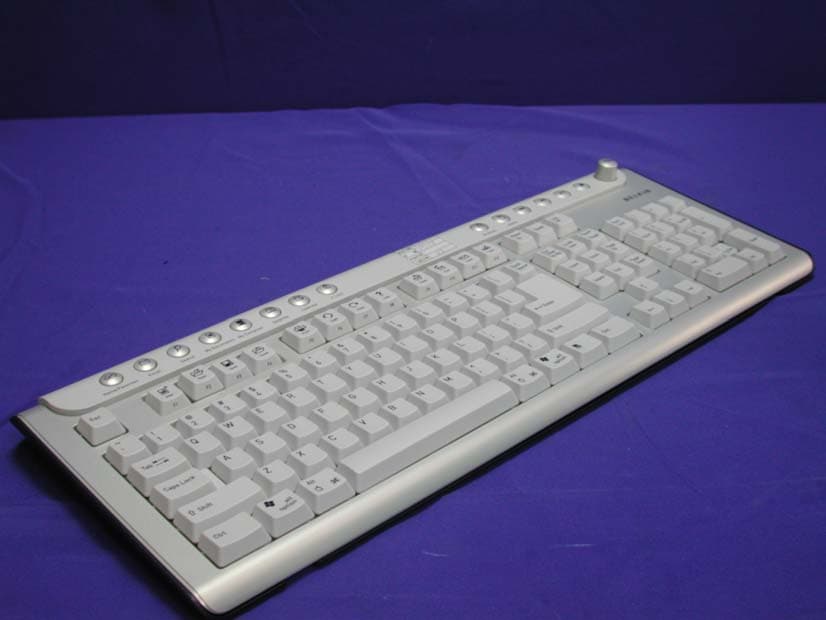
Click to zoom
Application Details
- Equipment Class
- DSS - Part 15 Spread Spectrum Transmitter
- Date of Grant
- Sep 01, 2004
- Application Purpose
- Original Equipment
- Date of Application
- Sep 01, 2004
- Equipment Note
- BLUETOOTH WIRELESS KEYBOARD
- Frequency Range
- 2402.00000000 - 2480.00000000
- Company
- Belkin International, Inc.
- Country
- United States
Documents & Files
Document Text
Text extracted from the exhibit documents filed with the FCC. Open a document above to read the original.
Users Manual
Belkin Bluetooth Wireless Keyboard Quick Setup Guide 1.Important Health Information Certain repetitive strain injuries, including pain, numbness and weakness to hands, wrist, arms, neck and/or back have been identified by some experts as being associated with the prolonged use of keyboards. If you are experiencing injury symptoms, consult a medical professional. A person’s susceptibility to these injuries may be affected by many factors including body posture, repetitive physical activities and their general physical health. FCC Warning This equipment has been tested and found to comply with the limits for a Class B digital device, pursuant to part 15 of the FCC Rules. These limits are designed to provide reasonable protection against harmful interference in a residential installation. This equipment generates, uses, and can radiate radio frequency energy and, if not installed and used in accordance with the instructions, may cause harmful interference to radio communications. However, there is no guarantee that interference will not occur in a particular installation. If this equipment does cause harmful interference to radio or television reception, which can be determined by turning the equipment off and on, the user is encouraged to try to correct the interference by one or more of the following measures: -Reorient or relocate the receiving antenna. -Increase the separation between the equipment and receiver. -Connect the equipment into an outlet on a circuit different from that to which the receiver is connected. -Consult the dealer or an experienced radio/TV technician for help. This device complies with Part 15 of the FCC Rules. Operation is subject to the following two conditions: (1) This device may not cause harmful interference and (2) this device must accept any interference received, including interference that may cause undesired operation. The user manual or instruction manual for an intentional or unintentional radiator shall caution the user that changes or modifications not expressly approved by the party responsible for compliance could void the user’s authority to operate the equipment. 2.Package Contents Belkin bluetooth wireless keyboard Belkin USB Dongle/receiver 2 AA alkaline batteries CD Software with driver Quick Setup Guide 3.System Requirements: − IBM® compatible system. − Microsoft Windows® 98, 2000, Me, XP. − Available USB port or PS/2 keyboard & mouse port. − CD-ROM or DVD-ROM drive. − At least 32MB of RAM and 20MB of available hard-drive space. To use Internet & Email hotkeys, the system needs to have: − Internet access. − Microsoft Internet Explorer 4.0 or higher, Netscape (Navigator 4.0 or higher, or American Online 5.0 or higher). To use Media Console functions, the system needs to have − A sound card and speakers. 4.Hardware Installation − Turn off your computer − Load Batteries Step 1. Load the AA batteries (included) in the bluetooth wireless keyboard. Step 2. Follow the polarity indicators to load the batteries. − Connecting the receiver For USB Interface Step 1. Connect the USB connector on receiver cable to your computer or to the Hub connected to your computer. Step 2. Restart the computer. Step 3. System will automatically detect for new hardware. Step 4. Follow system’s setup instruction. − Software Installation (for hotkey functions) Step 1. Insert driver CD into CD-ROM or DVD drive. Step 2. The installation program should run automatically. If not, double click “setup.exe” Step 3. The onscreen setup will guide you through rest of the installation process. Step 4. After the software installation is completed, you will be prompted to restart your computer. Congratulations! Your Belkin Bluetooth wireless keyboard is now ready to use. 6.Keyboard Hotkeys Definition Internet Hotkeys Function Function Description Launches the home page for the default web browser, can be programmed for another function. Open "My Favorites" folder, can be programmed for another function. Launches the default online search engine website, can be programmed for another function. "Previous Page", this key can be programmed for another function. "Next Page", this key can be programmed for another function. Web Stop. Puts the browse into stand mode. Refresh. Puts the browser into renew page mode. Launches the default email program, can be programmed for another function. Media Hotkeys Function Function Description Calculator. Open Windows application. Media. Open Windows Multimedia application. Backward. Forward. Play/Pause. Volume up. Mute key. 7.Trouble Shooting Keyboard does not work: − Please make sure the receiver’s connectors are plugged correctly into your computer. Before you plug the PS/2 connector on receiver cable into PS/2 port, please do make sure your PC is Power Off. − Please make sure the batteries are loaded correctly in both the keyboard and mouse. − Please check battery life − Please press the connect button on top of the receiver, then press the button on the bottom of the keyboard within 10 seconds. Press the connect button on top of the receiver, then use a sharp point (e.g. the point head of your pen) object to press the connect button on the bottom of the mouse within 10 seconds. − Reload batteries and repeat wireless connect again. − When you find your keyboard is experiencing interferences by other wireless input devices, please reset the keyboard again. − Place the receiver at least 8 inches (20 cm) away from any electronic devices (ex. computer, monitor, etc.) to avoid interference. − Do not place receiver on metal surface. − After installing the driver, Num/Caps/Scroll Lock function indicators will be showed on the screen. − Please refer to the online user manual for more details. Belkin software does not work: − Make sure the keyboard is connected and synchronized correctly. − Make sure the software is installed correctly. − Uninstall and re-install the software. − Please refer to the online user manual for more details. 8.Online Keyboard Us…
Text truncated - open the document above for the full version.
Cover Letter(s)
Belkin Corporation FCC 10: K7SF8TO40 Federal Communications Commission Authorization and Evaluation Division Confidentiality Request Pursuant to Sections 0.457 and 0.459 of the Commission's Rules, the Applicant hereby requests confidential treatment of information accompanying this Application as outlined below: Schematics Block Diagram The above materials contain trade secrets and proprietary information not customarily released to the public. The public disclosure of these matters might be harmful to the Applicant and provide unjustified benefits to its competitors. The Applicant understands that pursuant to Rule 0.457, disclosure of this Application and all accompanying documentation will not be made before the date the Grant for this application. Sincerely yours, Signature:~.J-J \.rw\~ Printed Name: Mr. Michael J. Maher Title: Engineering Service Manager Belkin Corporation Date: 8/31/2004 Corporate Offices. 501 West Walnut Street. Compton, CA .90220-5221 .T: 310.898.1100 .F: 310.898.1111 .belkin.com
External Photos
Report No.: 048018FI Page : 1 of 4 Version:1.0 Attachment 2 : EUT Detailed Photographs (1) EUT Photo (2) EUT Photo
ID Label/Location Info
Belkin Corporation FCC ID.: K7SF8T040 501 W. Walnut, Compton California 90220 Tel : +886 3 329-4141#3348 FCC ID AND DoC Label The FCC ID and DoC Label will be placed on the equipment as shown in the photograph below. Bluetooth Wireless Keyboard Belkin Model No.: KM450, F8T040 TESTED TO COMPLY WITH FCC STANDARDS FOR HOME OR OFFICE USE S/N: Made in Taiwan Bluetooth Wireless Keyboard Model No.: KM450, F8T040 F F C C C C I I D D : : K K 7 7 S S F F 8 8 T T 0 0 4 4 0 0 This device complies with Part 15 of the FCC Rules. Operation is subject to the following two conditions: (1) this device may not cause harmful interference and (2) this device must accept any interference received, including interference that may cause undesired operation. S/N: Made in Taiwan
ID Label/Location Info
Belkin Corporation FCC ID.: K7SF8T040 501 W. Walnut, Compton California 90220 Tel : +886 3 329-4141#3348 FCC ID AND DoC Label The FCC ID and DoC Label will be placed on the equipment as shown in the photograph below. Bluetooth Wireless Keyboard Belkin Model No.: KM450, F8T040 TESTED TO COMPLY WITH FCC STANDARDS FOR HOME OR OFFICE USE S/N: Made in Taiwan Bluetooth Wireless Keyboard Model No.: KM450, F8T040 F F C C C C I I D D : : K K 7 7 S S F F 8 8 T T 0 0 4 4 0 0 This device complies with Part 15 of the FCC Rules. Operation is subject to the following two conditions: (1) this device may not cause harmful interference and (2) this device must accept any interference received, including interference that may cause undesired operation. S/N: Made in Taiwan
Internal Photos
Report No.: 048018FI Page : 2 of 4 Version:1.0 (3) EUT Photo (4) EUT Photo Report No.: 048018FI Page : 3 of 4 Version:1.0 (5) EUT Photo (6) EUT Photo Report No.: 048018FI Page : 4 of 4 Version:1.0 (7) EUT Photo
Operational Description
Report No. 048L018FI Page: 5 of 35 Version:1.0 1.2. Operational Description The EUT is an Bluetooth Wireless Keyboard with 79 channels. This device provides wireless technology that revolutionizes personal connectivity. It is the solution for the seamless integration of Bluetooth technology into personal computer enabling short-range wireless connections between desktop/laptop computers or PDA, Bluetooth-enabled peripherals, portable handheld devices.
Test Report
Report No. 048L018FI Page: 1 of 35 Version:1.0 Test Report Product Name : Bluetooth Wireless Keyboard Model No. : KM450, F8T040 FCC ID. : K7SF8T040 Applicant : Belkin Corporation Address : 501 W. Walnut, Compton California 90220 Date of Receipt : Jul. 27 ,2004 Issued Date : Aug. 04,2004 Report No. : 048L018FI The Test Results relate only to the samples tested. The test report shall not be reproduced except in full without the written approval of QuieTek Corporation. This report must not be used to claim product endorsement by NVLAP any agency of the U.S. Government Report No. 048L018FI Page: 2 of 35 Version:1.0 Test Report Certification Issued Date : Aug. 04,2004 Report No. : 048L018FI Product Name : Bluetooth Wireless Keyboard Applicant : Belkin Corporation Address : 501 W. Walnut, Compton California 90220 Manufacturer : Darfon Electronics Corp Model No. : KM450, F8T040 FCC ID. : K7SF8T040 Rated Voltage : DC 3.3V (Power by battery) Trade Name : Belkin Measurement Standard : FCC CFR Title 47 Part 15 Subpart C: 2003 Measurement Procedure : ANSI C63.4: 2001 Test Result : Complied The Test Results relate only to the samples tested. The test report shall not be reproduced except in full without the written approval of QuieTek Corporation. This report must not be used to claim product endorsement by NVLAP any agency of the U.S. Government Documented By : ( Rita Huang ) Tested By : ( Tom Hsieh ) Approved By : ( Gene Chang ) Accredited by NIST (NVLAP) NVLAP Lab Code: 200533-0 Report No. 048L018FI Page: 3 of 35 Version:1.0 TABLE OF CONTENTS Description Page 1. GENERAL INFORMATION ...............................................................................................................4 1.1. EUT Description......................................................................................................................................4 1.2. Operational Description...........................................................................................................................5 1.3. Tested System Details..............................................................................................................................6 1.4. Configuration of Tested System ..............................................................................................................6 1.5. EUT Exercise Software ...........................................................................................................................6 1.6. Test Facility .............................................................................................................................................7 2. CONDUCTED EMISSION ..................................................................................................................8 2.1. Test Equipment ........................................................................................................................................8 2.2. Test Setup ................................................................................................................................................8 2.3. Limits.......................................................................................................................................................8 2.4. Test Procedure .........................................................................................................................................9 2.5. Uncertainty ..............................................................................................................................................9 2.6. Test Result of Conducted Emission .......................................................................................................10 3. PEAK POWER OUTPUT .................................................................................................................. 11 3.1. Test Equipment ......................................................................................................................................11 3.2. Test Setup ..............................................................................................................................................11 3.3. Limit .....................................................................................................................................................11 3.4. Uncertainty ............................................................................................................................................11 3.5. Test Result of Peak Power Output .........................................................................................................12 4. RADIATED EMISSION .....................................................................................................................13 4.1. Test Equipment ......................................................................................................................................13 4.2. Test Setup ..............................................................................................................................................13 4.3. Limits.....................................................................................................................................................14 4.4. Test Procedure .......................................................................................................................................14 4.5. Uncertainty ............................................................................................................................................14 4.6. Test Result of Radiated Emission ..........................................................................................................15 5. BAND EDGE .......................................................................................................................................21 5.1. Test Equipment ............................................................................................…
Text truncated - open the document above for the full version.
Test Setup Photos
Report No.: 048L018FI Page : 1 of 2 Version:1.0 Attachment 1: EUT Test Setup Photographs Front View of Radiated Test Back View of Radiated Test Report No.: 048L018FI Page : 2 of 2 Version:1.0 Front View of Radiated Test (Horn) Back View of Radiated Test (Horn)
Contact Information
Applicant
Jay TU(Manager, Regulatory Compliance)
Test Firm
DEKRA Testing and Certification Co., Ltd.Sky Hsu
Technical Specifications
| # | Rule Parts | Frequency Range | Power Output |
|---|---|---|---|
| 1 | 15C | 2.40 GHz - 2.48 GHz | 376.00 µW |
Other Applications from Belkin International, Inc.
K7S-CAB029
Aug 11, 2026SureFind Loop Cable Tag
Equipment Class
DTS - Digital Transmission SystemK7SBPD024
Aug 10, 2026UltraCharge Pro Slim Magnetic Power Bank 5K with BoostSolid Cell
Equipment Class
DCD - Part 15 Low Power Transmitter Below 1705 kHzK7SMMA016
Jul 22, 2026SureFind Wallet Stand
Equipment Class
DTS - Digital Transmission SystemK7SMMA015
Jul 10, 2026SureFind
Equipment Class
DTS - Digital Transmission SystemK7SAUC018
Jun 17, 2026SoundForm Dot ANC Earbuds, SoundForm Dot Earbuds
Equipment Class
DTS - Digital Transmission System