K7SF8Z075YFFM Transmitter
Belkin International, Inc.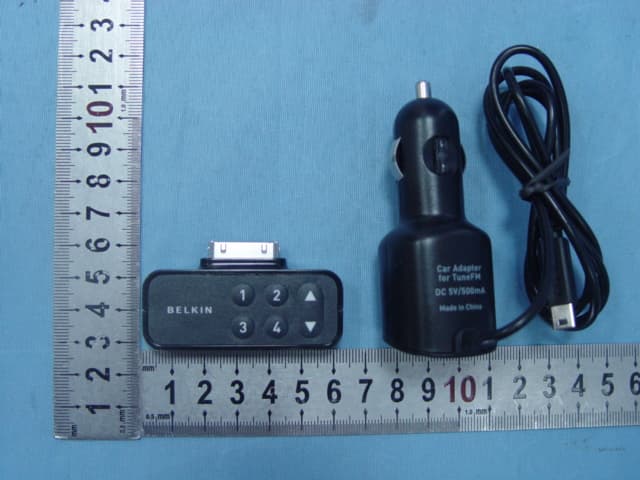
Click to zoom
Application Details
- Equipment Class
- DXX - Part 15 Low Power Communication Device Transmitter
- Date of Grant
- Jul 01, 2007
- Application Purpose
- Original Equipment
- Date of Application
- Jul 01, 2007
- Equipment Note
- FM Transmitter
- Frequency Range
- 88.10000000 - 107.90000000
- Company
- Belkin International, Inc.
- Country
- United States
Documents & Files
Document Text
Text extracted from the exhibit documents filed with the FCC. Open a document above to read the original.
Users Manual
Introduction Congratulations and thank you for purchasing the innovative TuneFM from Belkin. This product is designed to play your iPod through your car, home or portable stereo. Please review this User Manual carefully so that you can be sure to get the most from your iPod, virtually anywhere you go. Package Include: ● Plastic Spacer (for use only when your iPod is not in case) ● TuneFM for iPod ● Auto Power Cord Car Setup Instructions 1. Turn down your car stereo’s volume. 2. Connect the Belkin TuneFm to your iPod (at the bottom of the iPod) 3. Connect the included Auto Power Cord to your cigarette-lighter outlet in your car and the bottom of your TuneFM for optional powering and charging in the car. Using the TuneFM Transmitter The TuneFM transmitter function automatically turns on when the iPod is connected. It automatically turns off when the iPod is removed. 1. Tune your stereo frequency to a channel with a weak broadcast signal. The ideal channel is one that is not broadcasting a radio program, or is doing so weakly. 2. Insert the TuneFM to your iPod. The iPod backlight will turn on and the current transmitter frequency will be displayed on the iPod screen. 3. Press the ▲ or ▼ button on the TuneFM to select the transmission frequency chosen in step 1. The frequency will be visible on the iPod’s screen. Pressing and holding either button will provide faster tuning. 4. After displaying the current frequency for five seconds, the iPod screen willreturn to the iPod main menu. This happens whenever you make changes to the TuneFM’s settings. All settings-including transmission frequency, volume-control setting, and stereo/mono-control settings-are permanently stored in memory at this time. Note: iPod playback will pause momentarily when entering and exiting the TuneFM control menu. Playback will quickly resume. 5. Adjust the volume of your FM radio to the desired listening level. Note: We recommend that you remove the TuneFM from the iPod when not in use. Storing and Using Presets 1. To store a preset, select the desired frequency using ▲ or ▼ button. Press and hold the desired preset button (1,2,3,or 4) for two seconds. An audible beep sounds in the transmitted audio when the new frequency is programmed﹡. The iPod display reflects the change when the memory button is released by showing which memory button was pressed followed by the frequency saved in that memory position. ﹡Do NOT remove the TuneFM from the iPod until it returns to the Main Menu screen or new settings may not be saved. 2. To transmit over one of your preset frequencies, momentarily press “1”, “2”, “3”, or “4”.This will instantly tune the FM transmitter to the frequency stored in that preset. Troubleshooting Issue – The audio is distorted. Solution Tune your car stereo and the TuneFM to a different frequency. Issue – I am unable to get clear FM reception. Solution1 Tune your car stereo and the TuneFM to a different frequency. Solution2 In some instances, lowering the car antenna (available in some cars) improves the clarity of the TuneFM’s signal. Solution3 Change the stereo/mono setting to mono mode. This may improve signal reception, but the audio will be monaural instead of stereo. Solution4 If used indoors, attach or reposition the antenna on the stereo receiver. Issue – iPod playback stays paused after I’ve changed a setting on the TuneFM. Solution Simply press the “Play/pause” button on your iPod to resume playback. Issue – The TuneFM does not appear to be saving my settings. Solution Be sure NOT to remove the iPod from the cradle or remove power to the TuneFM while adjusting the TuneFM settings. Your settings are stored in memory when the iPod screen returns to the iPod Main Menu. Issue – When I attach a USB cable from my computer to the TuneFM, my computer does not recognize that the iPod is attached. Solution The USB connector on the TuneFM can only be used to charge the iPod. Issue – My iPod does not seem to be charging. Solution 1 Make sure that TuneFM is correctly connected to your car’s power outlet with the included Auto Power Cord. Solution2 Ensure that your car’s power outlet is receiving power. Some cars are designed so that power is not provided to the power outlet unless the car is in ignition mode or the engine is started. If none of these solutions solves the problem, the fuse in the Auto Power Cord might be burned out and need to be replaced. Issue – After a playlist finishes, the display freezes on the “OK to Disconnect” screen. Solution1 If the TuneFM is not removed, simply press a button on the TuneFM and normal operation will resume. Solution2 If the TuneFM is accidentally removed, reattach the TuneFM to return the iPod to normal operation. If the iPod does not return to normal operation, manual reset of your iPod may be required. To manually reset your iPod, simultaneously press and hold the “Menu” and “Select” buttons on your iPod screen resets. Warning DO NOT INSERT ANY OBJECTS OTHER THAN THE CIGARETTE-LIGHTER ADAPTER INTO THE POWER OUTLET OF THE CAR WITHOUT DISCONNECTING THE BATTERY OF THE CAR FIRST. FAILURE TO OBSERVE THIS SAFETY WARNING CAN RESULT IN POSSIBLE INJURY OR PROPERTY DAMAGE. Belkin does not assume any responsibility for personal injury or property damage incurred due to hazardous driving as a result of interaction with the TuneFM, the iPod, or the power outlet of the car. Information FCC Statement 1. This device complies with Part 15 of the FCC Rules. Operation is subject to the following two conditions: (1) This device may not cause harmful interference, and (2) This device must accept any interference received, including interference that may cause undesired operation. 2. Changes or modifications not expressly approved by the party responsible for compliance could void the user’s authority to operate the equipment. Belkin Corporation Limited 1-year Product Warranty Belkin Corporation warrants this product against defects in materials and workmanship for one year. If a defect…
Text truncated - open the document above for the full version.
Block Diagram
BK02_075.sch-1 - Tue Apr 10 18:17:18 2007
Cover Letter(s)
1) How does this device operate? The FM transmitter is a FM stereo transmitting configuration, which radiates FM wave on the air by modulating the any required signal to the carrier signal. The transmission frequency is set from 88.1 to 107.9MHz. Car Setup Instructions 1. Turn down your car stereo’s volume. 2. Connect the FM transmitter to your iPod (at the bottom of the iPod) 3. Connect the included Auto Power Cord to your cigarette-lighter outlet in your car and the bottom of your FM transmitter for optional powering and charging in the car. Using the FM Transmitter The FM transmitter function automatically turns on when the iPod is connected. It automatically turns off when the iPod is removed. 1. Tune your stereo frequency to a channel with a weak broadcast signal. The ideal channel is one that is not broadcasting a radio program, or is doing so weakly. 2. Insert the FM transmitter to your iPod. The iPod backlight will turn on and the current transmitter frequency will be displayed on the iPod screen. 3. Press the ▲ or ▼ button on the FM transmitter to select the transmission frequency chosen in step 1. The frequency will be visible on the iPod’s screen. Pressing and holding either button will provide faster tuning. 4. After displaying the current frequency for five seconds, the iPod screen will return to the iPod main menu. This happens whenever you make changes to the FM transmitter’s settings. Note: iPod playback will pause momentarily when entering and exiting the FM transmitter control menu. Playback will quickly resume. 5. Adjust the volume of your FM radio to the desired listening level. Note: We recommend that you remove the FM transmitter from the iPod when not in use. 6. To store a preset, select the desired frequency using ▲ or ▼ button. Press and hold the desired preset button (1,2,3,or 4) for two seconds. An audible beep sounds in the transmitted audio when the new frequency is programmed . The iPod display reflects the change when the memory button is released by showing which memory button was pressed followed by the frequency saved in that memory position. Do NOT remove the FM transmitter from the iPod until it returns to the Main Menu screen or new settings may not be saved. 7. To transmit over one of your preset frequencies, momentarily press “1”, “2”, “3”, or “4”.This will instantly tune the FM transmitter to the frequency stored in that preset. 2) Provide information on the device and its antenna. The transmitter has three parts: ● Plastic Spacer (for use only when your iPod is not in case) ● Frequency Selector ● Memory Stations 1-4 The transmitter utilizes a wire as dipole antenna. Antenna 3) How is it installed? 1. Connect the FM transmitter to iPod (at the bottom of the iPod) 2. Connect the included Auto Power Cord to cigarette-lighter outlet in car and the bottom of FM transmitter for optional powering and charging in the car. 4) What test procedure was used? ANSI C63.4, the test was performed in a semi-anechoic chamber. 5) If tested in a car, how was it configured/tested? Not tested in a car, it was tested in a semi-anechoic chamber. The EUT has been additionally tested / verified and does work in a typical car. 6) Was the tuning range properly verified? The test lab should indicate in the report that the tuning controls were manually adjusted to verify maximum tuning range. The FM transmitter is a FM stereo transmitting configuration, which radiates FM wave on the air by modulating the any required signal to the carrier signal. The transmission frequency is set from 88.1 to 107.9MHz, frequency interval is 0.1MHz. We selected the low (88.1MHz) mid (98.1MHz) and High (107.9MHz) working frequency to measure the frequency. Press the frequency selector to select the transmission frequency . We have indicated the testing in the test report, see clause 6. 7) Was the bandwidth properly tested with maximum audio input? The test was performed with the maximum audio input. And play typical audio signal (music song). We have indicated the operating condition in the test report, see clause 5.3.
ID Label/Location Info
ID label & location info. ID label location TuneFM F8Z075 FCC ID: K7SF8Z075YF Made in China
Operational Description
PRODUCT illustrate 1. System introduce F8Z075 TuneFM transmitter is designed to play the iPod through your car, home, or portable stereo. The TuneFM transmitter function automatically turns on when the iPod is connected. It automatically turns off when the iPod is removed. 2. Structure 2.1 structure introduce The system is consist of MCU(CY8C21434-24LFXI),audio processing unit(TLV274CP + SN74CB3Q3253PW) and FM unit(BH1418FV). 2.2 Description When the iPod is connected, MCU(CY8C21434-24LFXI)communicates with iPod, turns on FM unit, & displays FM frequency on iPod. Audio signal from iPod was processed and controlled via audio processing unit(TLV274CP + SN74CB3Q3253PW), then was sent to FM unit(BH1418FV). FM unit BH1418FV is a low power stereo FM transmitter, modulate Audio signal (sent from audio processing unit) to RF oscillator, then send to space by one antenna. 2.3 Power F8Z075 TuneFM transmitter could get power supply by Auto Power Cord from your car instead of from iPod.
Test Report
Page 1 of 30 FCC ID: K7SF8Z075YF ACCURATE TECHNOLOGY CO. LTD REPORT NO. ATE20071433 FCC CERTIFICATION On Behalf of Belkin International Inc. FM Transmitter Model No.: F8Z075 FCC ID: K7SF8Z075YF Prepared for : Belkin International Inc. Address : 501 West Walnut Street, Compton, California, United States Prepared by : Accurate Technology Co., Ltd. Address : F1, Bldg. A, Changyuan New Material Port, Keyuan Rd. Science & Industry Park, Nanshan, Shenzhen, Guangdong P.R. China Tel: (0755) 26503290 Fax: (0755) 26503396 Report Number : ATE20071433 Date of Test : June 11, 2007 Date of Report : June 15, 2007 Page 2 of 30 FCC ID: K7SF8Z075YF ACCURATE TECHNOLOGY CO. LTD REPORT NO. ATE20071433 TABLE OF CONTENTS Description Page Test Report Certification 1. GENERAL INFORMATION .......................................................................................................... 4 1.1. Description of Device (EUT)....................................................................................................................4 1.2. Description of Test Facility ......................................................................................................................4 1.3. Measurement Uncertainty.........................................................................................................................4 2. MEASURING DEVICE AND TEST EQUIPMENT ..................................................................... 5 3. RADIATED EMISSION FOR FCC PART 15 SECTION 15.239(C)........................................... 6 3.1. Block Diagram of Test Setup....................................................................................................................6 3.2. The Emission Limit for section 15.239(c) ................................................................................................6 3.3. Configuration of EUT on Measurement ...................................................................................................7 3.4. Operating Condition of EUT ....................................................................................................................7 3.5. Test Procedure ..........................................................................................................................................7 3.6. The Field Strength of Radiation Emission Measurement Results ............................................................9 4. FUNDAMENTAL RADIATED EMISSION FOR FCC PART 15 SECTION 15.239(B) ........ 12 4.1. Block Diagram of Test Setup..................................................................................................................12 4.2. The Emission Limit For Section 15.239(b) ............................................................................................12 4.3. EUT Configuration on Measurement .....................................................................................................13 4.4. Operating Condition of EUT ..................................................................................................................13 4.5. Test Procedure ........................................................................................................................................13 4.6. The Emission Measurement Result ........................................................................................................14 5. OCCUPIED BANDWIDTH FOR FCC PART 15 SECTION 15.239(A) ................................... 17 5.1. The Requirement For Section 15.239(a).................................................................................................17 5.2. EUT Configuration on Measurement .....................................................................................................17 5.3. Operating Condition of EUT ..................................................................................................................17 5.4. Test Procedure ........................................................................................................................................17 5.5. Test Result ..............................................................................................................................................18 6. TUNING RANGE ........................................................................................................................... 19 6.1. The Requirement For Section 15.239 .....................................................................................................19 6.2. EUT Configuration on Measurement .....................................................................................................19 6.3. Operating Condition of EUT ..................................................................................................................19 6.4. Test Procedure ........................................................................................................................................19 6.5. Test Result ..............................................................................................................................................20 APPENDIX I ( TEST CURVES) (9 pages) Page 3 of 30 FCC ID: K7SF8Z075YF ACCURATE TECHNOLOGY CO. LTD REPORT NO. ATE20071433 Test Report Certification Applicant : Belkin International Inc. Manufacturer : Yifang Digital Technologies Co., Ltd. EUT Description : FM Transmitter (A) MODEL NO.: F8Z075 (B) SERIAL NO.: N/A (C) POWER SUPPLY: DC 12V Measurement Procedure Used: FCC Rules and Regulations Part 15 Subpart C Section 15.239: 2006& ANSI 63.4: 2003 The device described above is tested by ACCURATE TECHNOLOGY CO. LTD to determine the maximum emission levels emanating from the device. The maximum emission levels are compared to the FCC Part 15 Subpart C Section15.239 limits. The measurement results are contained in this test report and ACCURATE TECHNOLOGY CO. LTD is assumed full responsibility for the accuracy and completeness of these measurements. Also, this re…
Text truncated - open the document above for the full version.
Contact Information
Applicant
Jay TU(Manager, Regulatory Compliance)
Test Firm
Accurate Technology Co., Ltd.Sean Liu
Technical Specifications
| # | Rule Parts | Frequency Range | Power Output |
|---|---|---|---|
| 1 | 15C | 88.1 MHz - 107.9 MHz | - |
Other Applications from Belkin International, Inc.
K7S-CAB029
Aug 11, 2026SureFind Loop Cable Tag
Equipment Class
DTS - Digital Transmission SystemK7SBPD024
Aug 10, 2026UltraCharge Pro Slim Magnetic Power Bank 5K with BoostSolid Cell
Equipment Class
DCD - Part 15 Low Power Transmitter Below 1705 kHzK7SMMA016
Jul 22, 2026SureFind Wallet Stand
Equipment Class
DTS - Digital Transmission SystemK7SMMA015
Jul 10, 2026SureFind
Equipment Class
DTS - Digital Transmission SystemK7SAUC018
Jun 17, 2026SoundForm Dot ANC Earbuds, SoundForm Dot Earbuds
Equipment Class
DTS - Digital Transmission System