KA2AP1160LA1Wireless N150 Cloud Router
D-Link Corporation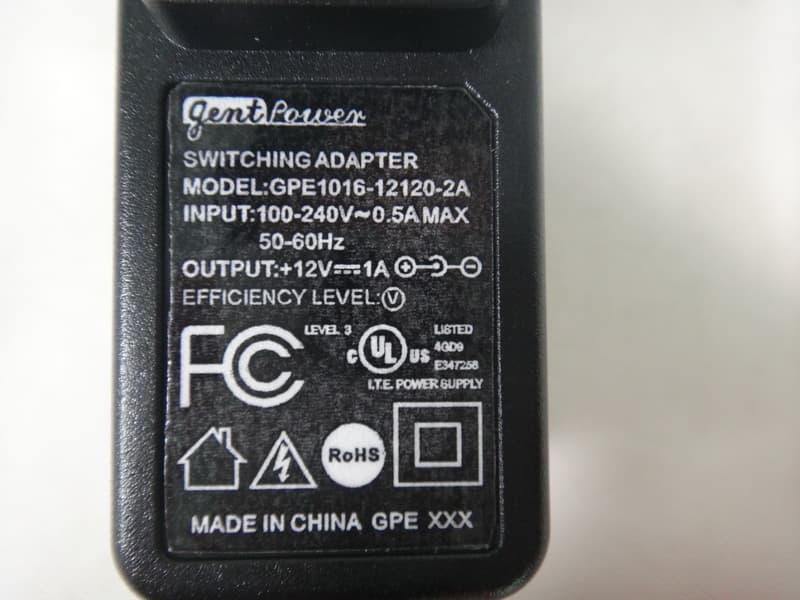
Click to zoom
Application Details
- Equipment Class
- DTS - Digital Transmission System
- Date of Grant
- Nov 29, 2012
- Application Purpose
- Original Equipment
- Date of Application
- Nov 29, 2012
- Equipment Note
- Wireless N150 Cloud Router
- Frequency Range
- 2422.00000000 - 2452.00000000
- Company
- D-Link Corporation
- Country
- United States
Documents & Files
Document Text
Text extracted from the exhibit documents filed with the FCC. Open a document above to read the original.
Users Manual
2D-Link DAP-1160L User Manual Table of Contents Package Contents .........................................................................4 System Requirements .................................................................5 Introduction ...................................................................................6 Features ............................................................................................8 Hardware Overview .....................................................................9 Connections ...........................................................................9 LEDs .........................................................................................10 Installation........................................................................11 Access Point Mode .............................................................12 Wireless Installation Considerations ....................................13 Quick Setup Wizard ....................................................................14 Configuration....................................................................17 Web-based Configuration Utility ..........................................17 Wireless Setup Wizard ...............................................................18 Access Point Mode .............................................................19 Manual Configuration ...............................................................23 Wireless Setup ......................................................................23 Access Point Mode ........................................................24 Mydlink Settings ............................................................26 Advanced ......................................................................................27 Access Control .....................................................................27 Advanced Wireless .............................................................28 Wi-Fi Protected Setup .......................................................29 Maintenance ................................................................................30 Admin .....................................................................................30 System ....................................................................................31 Language Pack .....................................................................32 Firmware ................................................................................32 Time .........................................................................................33 System Check .......................................................................34 Schedules ..............................................................................35 Status ..............................................................................................36 Device Info ............................................................................36 Logs .........................................................................................37 Statistics .................................................................................38 Wireless ..................................................................................39 IPv6 ..........................................................................................40 Help .................................................................................................41 Wireless.Security..............................................................42 What is WEP? ................................................................................43 Configure WEP .............................................................................44 What is WPA? ................................................................................45 Configure WPA/WPA2 Personal .............................................46 Configure WPA/WPA2 Enterprise ..........................................47 Connect.to.a.Wireless.Network........................................48 Using Windows ® XP ....................................................................48 Configure WPA-PSK ....................................................................49 Using Windows Vista ® ...............................................................51 Configure WPA-PSK ....................................................................53 Using Windows ® 7 .......................................................................54 Configure WPS .....................................................................57 Table of Contents 3D-Link DAP-1160L User Manual Table of Contents Troubleshooting...............................................................61 Wireless.Basics..................................................................65 What is Wireless? .........................................................................66 Tips ...................................................................................................68 Wireless Modes ............................................................................69 Networking.Basics............................................................70 Check your IP address ...............................................................70 Statically Assign an IP address ...............................................71 Technical.Specifications...................................................72 Contacting.Technical.Support.........................................73 Warranty............................................................................74 Registration......................................................................82 4D-Link DAP-1160L User Manual Section 1 - Product Overview Note:.Using a power supply with a different voltage rating than the one included with the DAP-1160L will cause damage and void the warranty for this product. Package Contents DAP-1160L Wireless N150 Cloud Access Point Ethernet Cable Quick Installatio…
Text truncated - open the document above for the full version.
Users Manual
41D-Link DAP-1160L User Manual Section 3 - Configuration Help 42D-Link DAP-1160L User Manual Section 4 - Security Wireless Security This section will show you the different levels of security you can use to protect your data from intruders. The DAP-1160L offers the following types of security: • WEP (Wired Equivalent Privacy) • WPA-Personal (Wi-Fi Protected Access) • WPA-Enterprise (Wi-Fi Protected Access) 43D-Link DAP-1160L User Manual Section 4 - Security What is WEP? WEP, or Wired Equivalent Privacy, is a Wi-Fi security protocol that encrypts transmitted data. WEP is an older protocol that is not believed to be as effective anymore. WEP uses a passphrase or key to authenticate your wireless connection. For 64-Bit WEP, the key is an alpha-numeric password that is 10 hex digits or an ASCII password consisting of 5 text characters. The hex digits are either numbers from 0 to 9 or letters from A to F. For 128-Bit WEP, the key is an alpha-numeric password that is 26 hex digits or an ASCII password with 13 text characters. 44D-Link DAP-1160L User Manual Section 4 - Security Configure WEP It is recommended to enable encryption on your wireless access point before your wireless network adapters. Please establish wireless connectivity before enabling encryption. Your wireless signal may degrade when enabling encryption due to the added overhead. 1. Log into the web-based configuration by opening a web browser and entering the IP address of the access point (dlinkap. local). Click on Setup and then click Wireless.Setup on the left side. 2. Next to Security Mode, select WEP. Note: Choosing WEP means the device will only operate in Legacy wireless mode (802.11B/G) and will not provide 802.11N performance. 3. Next to WEP Encryption, select 64Bit(10.hex.digits),.64Bit(5. ASCII.characters), 128Bit(26.hex.digits).or 128Bit(13.ASCII. characters). 4. Next to WEP Key 1, enter a set of digits or letters from A to F, or a string of text. 5. Next to Authentication, select Both or Shared.Key. 6. Click Save.Settings at the top of the window to save your settings. If you are configuring the access point with a wireless adapter, you will lose connectivity until you enable WPA-PSK on your adapter and enter the same passphrase as you did on the access point. 45D-Link DAP-1160L User Manual Section 4 - Security What is WPA? WPA, or Wi-Fi Protected Access, is a Wi-Fi standard that was designed to improve the security features of WEP (Wired Equivalent Privacy). The 2 major improvements over WEP: • Improved data encryption through the Temporal Key Integrity Protocol (TKIP). TKIP scrambles the keys using a hashing algorithm and, by adding an integrity-checking feature, ensures that the keys haven’t been tampered with. WPA2 is based on 802.11i and uses Advanced Encryption Standard (AES) instead of TKIP. • User authentication, which is generally missing in WEP, through the extensible authentication protocol (EAP). WEP regulates access to a wireless network based on a computer’s hardware-specific MAC address, which is relatively simple to be sniffed out and stolen. EAP is built on a more secure public-key encryption system to ensure that only authorized network users can access the network. WPA-PSK/WPA2-PSK uses a passphrase or key to authenticate your wireless connection. The key is an alpha-numeric password between 8 and 63 characters long. The password can include symbols (!?*&_) and spaces. This key must be the exact same key entered on your wireless bridge or access point. WPA/WPA2 incorporates user authentication through the Extensible Authentication Protocol (EAP). EAP is built on a more secure public key encryption system to ensure that only authorized network users can access the network. 46D-Link DAP-1160L User Manual Section 4 - Security Configure WPA/WPA2 Personal It is recommended to enable encryption on your wireless access point before your wireless network adapters. Please establish wireless connectivity before enabling encryption. Your wireless signal may degrade when enabling encryption due to the added overhead. 1. Log into the web-based configuration by opening a web browser and entering the IP address of the access point (dlinkap.local). Click on Setup and then click Wireless.Setup on the left side. 2. Next to Security Mode, select WPA-Personal. 3. Next to WPA Mode, select Auto(WPA.or.WPA2),.WPA2.only,.or WPA.only. 4. Next to Cipher Type, select TKIP, AES, or TKIP.and.AES. 5. Next to Pre-Shared Key, enter a key. The key is entered as a passphrase in ASCII format at both ends of the wireless connection. The passphrase must be between 8-63 characters. 6. Click Save.Settings at the top of the window to save your settings. If you are configuring the access point with a wireless adapter, you will lose connectivity until you enable WPA-PSK on your adapter and enter the same passphrase as you did on the access point. 47D-Link DAP-1160L User Manual Section 4 - Security It is recommended to enable encryption on your wireless access point before your wireless network adapters. Please establish wireless connectivity before enabling encryption. Your wireless signal may degrade when enabling encryption due to the added overhead. 1. Log into the web-based configuration by opening a web browser and entering the IP address of the access point (dlinkap.local). Click on Setup and then click Wireless.Setup on the left side. 2. Next to Security Mode, select WPA-Enterprise. 3. Next to WPA Mode, select Auto(WPA.or.WPA2),.WPA2.only,.or WPA. only. 4. Next to Cipher Mode, select TKIP, AES, or Auto. 5. Next to RADIUS Server IP Address, enter the IP Address of your RADIUS server. 6. Next to RADIUS Server Port, enter the port you are using with your RADIUS server. 1812 is the default port. 7. Next to RADIUS Server Shared Secret, enter the security key. 8. Click Advanced to enter settings for a secondary RADIUS Server. 9. Click Save.Settings to save your settings. Configure WPA/WPA2 Enterprise 48D-Link DAP-1160L User Manual Sect…
Text truncated - open the document above for the full version.
External Photos
Neutron Engineering Inc. Report No.: NEI-FCCP-1-1208C219 Page 132 of 135 9. EUT PHOTO Neutron Engineering Inc. Report No.: NEI-FCCP-1-1208C219 Page 132 of 135 9. EUT PHOTO Neutron Engineering Inc. Report No.: NEI-FCCP-1-1208C219 Page 133 of 135 Adapter: D-Link / AMS9-1201000FU2 Neutron Engineering Inc. Report No.: NEI-FCCP-1-1208C219 Page 133 of 135 Adapter: D-Link / AMS9-1201000FU2 Neutron Engineering Inc. Report No.: NEI-FCCP-1-1208C219 Page 134 of 135 Adapter: D-Link / CAP012121US Neutron Engineering Inc. Report No.: NEI-FCCP-1-1208C219 Page 134 of 135 Adapter: D-Link / CAP012121US Neutron Engineering Inc. Report No.: NEI-FCCP-1-1208C219 Page 135 of 135 Adapter: gent Power / GPE1016-12120-2A Neutron Engineering Inc. Report No.: NEI-FCCP-1-1208C219 Page 135 of 135 Adapter: gent Power / GPE1016-12120-2A
ID Label/Location Info
Hoho(ID1330) ID:1168 Ruby Lu Ruby Lu 2012/9/10 9700000159DLG DAP-1160L Device Label 2012/9/10 2012/9/10 FCC ID: KA2AP1160LA1 Model:DAP-1160LA1 IC: 4216A-AP1160LA1 LED Indicators Power: Solid Green(Connected) WLAN: Solid Green(Connected) Default AP settings: http://dlinkap or http://dlinkap.local. Username= "Admin" Password= ""(leave the field blank) Made In China Neutron Engineering Inc. Report No.: NEI-FCCP-1-1208C219 Page 132 of 135 9. EUT PHOTO
Internal Photos
Neutron Engineering Inc. Project No.: 1208C219 Page 2 of 5 Neutron Engineering Inc. Project No.: 1208C219 Page 2 of 5 Neutron Engineering Inc. Project No.: 1208C219 Page 3 of 5 Neutron Engineering Inc. Project No.: 1208C219 Page 3 of 5 Neutron Engineering Inc. Project No.: 1208C219 Page 4 of 5 Neutron Engineering Inc. Project No.: 1208C219 Page 4 of 5 Neutron Engineering Inc. Project No.: 1208C219 Page 5 of 5 Neutron Engineering Inc. Project No.: 1208C219 Page 5 of 5
Test Report
Neutron Engineering Inc. Report No.: NEI-FCCP-1-1208C219 Page 1 of 136 FCC Radio Test Report FCC ID: KA2AP1160LA1 This report concerns (check one) : Original Grant Class I Change Issued Date : Sep. 17, 2012 Project No. : 1208C219 Equipment : Wireless N 150 Cloud Access Point Model Name : DAP-1160L Applicant : D-LINK CORPORATION Address : No.289, Sinhu 3rd Rd., Neihu District, Taipei City 114, Taiwan, R.O.C. Tested by: Neutron Engineering Inc. EMC Laboratory Date of Receipt: Aug. 24, 2012 Date of Test: Aug. 24, 2012 ~ Sep. 16, 2012 Testing Engineer : (David Mao) Technical Manager : (Leo Hung) Authorized Signatory : (Steven Lu) Neutron Engineering Inc. No.3,Jinshagang 1st Road, ShiXia, Dalang Town, Dong Guan, China. TEL : (0769) 8318-3000 FAX : (0769) 8319-6000 Neutron Engineering Inc. Report No.: NEI-FCCP-1-1208C219 Page 2 of 136 Declaration Neutron represents to the client that testing is done in accordance with standard procedures as applicable and that test instruments used has been calibrated with the standards traceable to National Measurement Laboratory (NML) of R.O.C, or National Institute of Standards and Technology (NIST) of U.S.A. Neutron's reports apply only to the specific samples tested under conditions. It is manufacture’s responsibility to ensure that additional production units of this model are manufactured with the identical electrical and mechanical components. Neutronshall have no liability for any declarations, inferences o r generalizations drawn by the client or others from Neutron issued reports. Neutron’s reports must not be used by the client to claim product endorsement by the authorities or any agency of the Government. This report is the confidential property of the client. As a mutual protection to the clients, the public and Neutron-self, extracts from the test report shall not be reproduced except in full with Neutron’s authorized written approval. Neutron’s laboratory quality assurance procedures are in compliance with the ISO Guide 17025 requirements, and accredited by the conformity assessment authorities listed in this test report. Limitation For the use of the authority's logo is limited unless the Test Standard(s)/Scope(s)/Item(s) mentioned in this test report is (are) included in the conformity assessment authorities acceptance respective. Neutron Engineering Inc. Report No.: NEI-FCCP-1-1208C219 Page 3 of 136 Table of Contents Page 1 . CERTIFICATION 5 2 . SUMMARY OF TEST RESULTS 6 2.1 TEST FACILITY 7 2.2 MEASUREMENT UNCERTAINTY 7 3 . GENERAL INFORMATION 8 3.1 GENERAL DESCRIPTION OF EUT 8 3.2 DESCRIPTION OF TEST MODES 10 3.3 TABLE OF PARAMETERS OF TEXT SOFTWARE SETTING 11 3.4 BLOCK DIGRAM SHOWING THE CONFIGURATION OF SYSTEM TESTED 12 3.5 DESCRIPTION OF SUPPORT UNITS 13 4 . EMC EMISSION TEST 14 4.1 CONDUCTED EMISSION MEASUREMENT 14 4.1.1 POWER LINE CONDUCTED EMISSION LIMITS 14 4.1.2 MEASUREMENT INSTRUMENTS LIST AND SETTING 14 4.1.3 TEST PROCEDURE 15 4.1.4 DEVIATION FROM TEST STANDARD 15 4.1.5 TEST SETUP 15 4.1.6 EUT OPERATING CONDITIONS 15 4.1.7 TEST RESULTS 16 4.1.8. EUT TEST PHOTO 22 4.2 RADIATED EMISSION MEASUREMENT 23 4.2.1 RADIATED EMISSION LIMITS 23 4.2.2 MEASUREMENT INSTRUMENTS LIST ANS SETTING 24 4.2.3 TEST PROCEDURE 25 4.2.4 DEVIATION FROM TEST STANDARD 25 4.2.5 TEST SETUP 26 4.2.6 EUT OPERATING CONDITIONS 27 4.2.7 TEST RESULTS (BELOW 30MHZ) 28 4.2.8 TEST RESULTS (BETWEEN 30 – 1000 MHZ) 29 4.2.9 TEST RESULTS (ABOVE 1000 MHZ) 35 4.2.10. EUT TEST PHOTO 83 5 . BANDWIDTH TEST 86 5.1 APPLIED PROCEDURES / LIMIT 86 5.1.1 MEASUREMENT INSTRUMENTS LIST 86 5.1.2 TEST PROCEDURE 86 5.1.3 DEVIATION FROM STANDARD 86 5.1.4 TEST SETUP 86 5.1.5 EUT OPERATION CONDITIONS 86 Neutron Engineering Inc. Report No.: NEI-FCCP-1-1208C219 Page 4 of 136 Table of Contents Page 5.1.6 TEST RESULTS 87 5.1.7. EUT TEST PHOTO 96 6 . MAXIMUM OUTPUT POWER TEST 97 6.1 APPLIED PROCEDURES / LIMIT 97 6.1.1 MEASUREMENT INSTRUMENTS LIST 97 6.1.2 TEST PROCEDURE 97 6.1.3 DEVIATION FROM STANDARD 97 6.1.4 TEST SETUP 97 6.1.5 EUT OPERATION CONDITIONS 97 6.1.6 TEST RESULTS 98 6.1.7. EUT TEST PHOTO 100 7 . ANTENNA CONDUCTED SPURIOUS EMISSION 101 7.1 APPLIED PROCEDURES / LIMIT 101 7.1.1 MEASUREMENT INSTRUMENTS LIST 101 7.1.2 TEST PROCEDURE 101 7.1.3 DEVIATION FROM STANDARD 101 7.1.4 TEST SETUP 101 7.1.5 EUT OPERATION CONDITIONS 101 7.1.6 TEST RESULTS 102 7.1.7. EUT TEST PHOTO 122 8 . POWER SPECTRAL DENSITY TEST 123 8.1 APPLIED PROCEDURES / LIMIT 123 8.1.1 MEASUREMENT INSTRUMENTS LIST 123 8.1.2 TEST PROCEDURE 123 8.1.3 DEVIATION FROM STANDARD 123 8.1.4 TEST SETUP 123 8.1.5 EUT OPERATION CONDITIONS 123 8.1.6 TEST RESULTS 124 8.1.7. EUT TEST PHOTO 132 9 . EUT PHOTO 133 Neutron Engineering Inc. Report No.: NEI-FCCP-1-1208C219 Page 5 of 136 1. CERTIFICATION Equipment : Wireless N 150 Cloud Access Point Brand Name : D-Link Model Name : DAP-1160L Applicant : D-LINK CORPORATION Factory : Alpha Networks Inc. Address : Building D15, No.168, Guangfu Road, Chengfei Avenue, Industrial Centralization Development Zone (East Zone), QingYang Dist., Chengdu, 610092, China Date of Test : Aug. 24, 2012 ~ Sep. 16, 2012 Test Item : ENGINEERING SAMPLE Standards : FCC Part15, Subpart C(15.247) / ANSI C63.4-2009 The above equipment has been tested and found compliance with the requirement of the relative standards by Neutron Engineering Inc. EMC Laboratory. The test data, data evaluation, and equipment configuration contained in our test report (Ref No. NEI-FCCP-1-1208C219) were obtained utilizing the test procedures, test instruments, test sites that has been accredited by the Authority of NVLAP and TAF according to the ISO-17025 quality assessment standard and technical standard(s). Neutron Engineering Inc. Report No.: NEI-FCCP-1-1208C219 Page 6 of 136 2. SUMMARY OF TEST RESULTS Test procedures according to the technical standards: FCC Part15 (15.247) , Subpart C Standard Section Test Item Judgment Remark 15.207 Conducted Emission PASS 15.247(d) Antenna conducted Spurious EmissionPASS 15.247(a)(2) 6dB Bandwidth PASS 1…
Text truncated - open the document above for the full version.
Test Setup Photos
Neutron Engineering Inc. Report No.: NEI-FCCP-1-1208C219 Page 22 of 135 4.1.8. EUT TEST PHOTO Conducted Measurement Photos Neutron Engineering Inc. Report No.: NEI-FCCP-1-1208C219 Page 22 of 135 4.1.8. EUT TEST PHOTO Conducted Measurement Photos Neutron Engineering Inc. Report No.: NEI-FCCP-1-1208C219 Page 83 of 135 4.2.10. EUT TEST PHOTO Radiated Measurement Photos 9K~ 30MHz Neutron Engineering Inc. Report No.: NEI-FCCP-1-1208C219 Page 83 of 135 4.2.10. EUT TEST PHOTO Radiated Measurement Photos 9K~ 30MHz Neutron Engineering Inc. Report No.: NEI-FCCP-1-1208C219 Page 84 of 135 Radiated Measurement Photos 30MHz~1000MHz Neutron Engineering Inc. Report No.: NEI-FCCP-1-1208C219 Page 84 of 135 Radiated Measurement Photos 30MHz~1000MHz Neutron Engineering Inc. Report No.: NEI-FCCP-1-1208C219 Page 85 of 135 Radiated Measurement Photos Above 1000MHz Neutron Engineering Inc. Report No.: NEI-FCCP-1-1208C219 Page 85 of 135 Radiated Measurement Photos Above 1000MHz
Contact Information
Applicant
Brett Adair(General Counsel)
Test Firm
BTL Inc.Daisy Dai
Technical Specifications
| # | Rule Parts | Frequency Range | Power Output |
|---|---|---|---|
| 2 | 15C | 2.42 GHz - 2.45 GHz | 224.00 mW |
Other Applications from D-Link Corporation

KA2CS6012A1
Jul 07, 20262K Fixed Indoor Cloud Camera, 2K Fixed Indoor Wi-Fi Camera
Equipment Class
DTS - Digital Transmission SystemKA2AE65UA1
Mar 02, 2026Wi-Fi 7 BE6500 USB 3.0 Dongle
Equipment Class
NII - Unlicensed National Information Infrastructure TXKA2APE9560A1
Nov 17, 2025BE9500 Celling mount Access Point
Equipment Class
6ID - 15E 6 GHz Low Power Indoor Access PointKA2AX9UA1
Dec 04, 2024AX900 Wi-Fi 6 USB Adapter, Wi-Fi 6 AX900 USB 2.0 Dongle
Equipment Class
DSS - Part 15 Spread Spectrum TransmitterKA2AC13UA1
Dec 04, 2024AC1300 Wi-Fi 5 USB Adapter, Wi-Fi 5 AC1300 USB 2.0 Dongle
Equipment Class
DTS - Digital Transmission System