KA2DBT320A1Bluetooth USB Printer Adapter
D-Link Corporation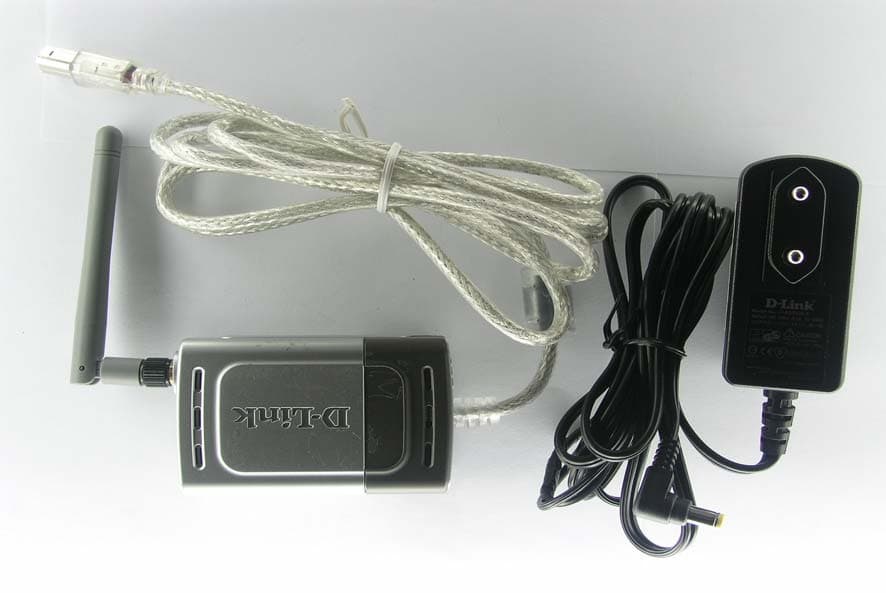
Click to zoom
Application Details
- Equipment Class
- DSS - Part 15 Spread Spectrum Transmitter
- Date of Grant
- Apr 01, 2004
- Application Purpose
- Original Equipment
- Date of Application
- Apr 01, 2004
- Equipment Note
- Bluetooth USB Printer Adapter
- Frequency Range
- 2402.00000000 - 2480.00000000
- Company
- D-Link Corporation
- Country
- United States
Documents & Files
Document Text
Text extracted from the exhibit documents filed with the FCC. Open a document above to read the original.
Users Manual
PersonalAir ™ Bluetooth USB Printer Adapter DBT-320 This product works with Bluetooth enabled PC with the following operating systems: Windows 98SE, Me, 2000, and XP. Before You Begin You must have at least the following: •Bluetooth Enabled PC Supporting HCRP and SPP Bluetooth Profiles for Printing, Bluetooth Enabled Mobile Phone, or Bluetooth enabled PDA. •USB Printer* with One Available Type B USB Port. (*PCL3 Printer is required for Printing from Cell Phone or PDA) DBT-320 Bluetooth USB Printer Adapter Wall Mount Cradle ©2004 D-Link Systems, Inc. All rights reserved. Trademarks or registered trademarks are the property of their respective holders. Software and specifications subject to change without notice. DBT-320. 03052004 Check Your Package Contents These are the items included with your purchase: If any of the below items are missing, please contact your reseller. Using a power supply with a different voltage rating will damage this product and void the warranty. AC Power Adapter 2 Installing the DBT-320 Plug the DBT-320 Type B USB connector into the Type B USB port located on the back of your printer. Using the included power adapter, connect the yellow coded plug to the yellow power connector port on the DBT-320 and the other end of the power connector to an available power strip or outlet. The DBT-320 Bluetooth USB Printer Adapter set up is now complete! You will now be able to enjoy wireless printing from your cell phone, PDA, laptop, or computer with the DBT-320 Bluetooth USB Printer Adapter. 3 DBT-320 LED Indicators Power Indicator Bluetooth Link Indicator The DBT-320 features two LED indicators, the Ready LED and the BT LED. • The Ready LED indicator will light solid green when the DBT-320 is powered on with the external power adapter. When the printer is powered on, a blinking green Ready LED indicates a successful printer connection. • The BT Indicator will blink green when a file is being sent to the printer from a laptop, computer, PDA, or cell phone. Printing from your Laptop/PC using the DBT-320 Your Bluetooth enabled laptop or computer will have Bluetooth software that will enable you to connect to the DBT-320 printer adapter. The instructions on the following page are based on a D-Link DBT-120 USB Bluetooth adapter used with a PC running Windows XP with Widcomm Bluetooth Software v1.4.2.10. Depending on the Bluetooth setup on your system, the installation procedure may vary slightly. 4 Click Search for devices in range If detected, the D-Link DBT- 320 printer icon will be displayed. If the DBT-320 is not detected, press F5 on your keyboard or right click on the mouse and select refresh to search again. Double Click to install printer drivers Double-click the Bluetooth icon on your desktop or in the systray to access My Bluetooth Places My Bluetooth Places is also accessible from the Start Menu: Go to Start > Programs > My Bluetooth Places Printing from your Laptop/PC using the DBT-320 (continued) *Note: If the printer is being used by another Bluetooth user, you will not be able to detect the DBT-320. 5 Click Have Disk Select the Manufacturer of your printer and your printer model. Click Browse Click Browse to search for your printer drivers. Printing from your Laptop/PC using the DBT-320 (continued) Highlight the printer you are using in the Printers list. Click OK Click OK 6 Printing from your Mobile Phone To print from your mobile phone, be sure that you have at least the following: •Bluetooth enabled mobile phone supporting the Bluetooth Object Push Profile. This enables the printing of business cards from your mobile phone. •PCL3 printer The Bluetooth printing procedure will vary depending on the manufacturer of your mobile phone. Please check your mobile phone manual or with your manufacturer for specific directions on how to print. Click Print Test Page The printer properties window will be displayed once your printer is installed. You can click on Print Test Page to test your connection to the DBT-320. Printing from your Laptop/PC using the DBT-320 (continued) 7 To print from your PDA, be sure that you have at least the following: •Bluetooth enabled PDA •Bluetooth Software supporting the Object Push Profile •Printing software (i.e. PrintPocket CE for PDAs running Pocket PC 2002 or 2000, BTPrint for Palms running Palm OS 4.x or OS 5.x, iPAQs running Pocket PC 2003) •PCL3 printer The Bluetooth printing procedure will vary depending on the manufacturer of your PDA and software that you are using. Please check your PDA manual or with your manufacturer for specific directions on how to print. Printing from your PDA Troubleshooting Tips If you are having trouble printing with the DBT-320 check the following: •Make sure your printer is turned on and the Ready LED on the DBT- 320 is green. If the Ready LED is not green, check your USB connection to the printer. •Make sure the Bluetooth icon on the screen of your laptop, computer, mobile phone, or PDA is white. This means that the Bluetooth application is ready. If the Bluetooth icon is not white, try rebooting your Bluetooth mobile device and/or reinstalling your Bluetooth software. Check that your Bluetooth software supports the HCRP, and SPP Bluetooth profiles for printing. •If the Bluetooth icon is red, the DBT-320 is not properly connected. Check the DBT-320 connection to your printer and your printer connection. •When printing, the Bluetooth icon will blink Green. If the Bluetooth LED is not flashing on, check your DBT-320 connection to the printer. Your printer may also not be configured correctly. Check your printer configuration. 8 Technical SupportTechnical Support Technical SupportTechnical Support Technical Support You can find software updates and user documentation on the D-Link website. D-Link provides free technical support for customers within the United States and within Canada for the duration of the warranty period on this product. U.S. and Canadian customers can contact D-Link Technical Support …
Text truncated - open the document above for the full version.
External Photos
REPORT NO: ER/2004/20022 ID: KA2DBT320A1 DATE: Feb. 27, 2004 The results shown in this test report refer only to the sample(s) tested unless otherwise stated. This test report cannot be reproduced, except in full, without prior written permission of the Company. SGS Taiwan Ltd. No. 134, Wu Kung Rd., Wuku Industrial Zone, Taipei Country, Taiwan. / 台北縣五股工業區五工路136之1號 台灣檢驗科技股份有限公司 t (886-2) 2299-3939 f (886-2) 2298-2698 www.sgs.com.tw 0513 ILAC MRA APPENDIX 2 EXTERNAL PHOTOGRPHS OF EUT REPORT NO: ER/2004/20022 ID: KA2DBT320A1 DATE: Feb. 27, 2004 The results shown in this test report refer only to the sample(s) tested unless otherwise stated. This test report cannot be reproduced, except in full, without prior written permission of the Company. SGS Taiwan Ltd. No. 134, Wu Kung Rd., Wuku Industrial Zone, Taipei Country, Taiwan. / 台北縣五股工業區五工路136之1號 台灣檢驗科技股份有限公司 t (886-2) 2299-3939 f (886-2) 2298-2698 www.sgs.com.tw 0513 ILAC MRA All of EUT Front View of EUT REPORT NO: ER/2004/20022 ID: KA2DBT320A1 DATE: Feb. 27, 2004 The results shown in this test report refer only to the sample(s) tested unless otherwise stated. This test report cannot be reproduced, except in full, without prior written permission of the Company. SGS Taiwan Ltd. No. 134, Wu Kung Rd., Wuku Industrial Zone, Taipei Country, Taiwan. / 台北縣五股工業區五工路136之1號 台灣檢驗科技股份有限公司 t (886-2) 2299-3939 f (886-2) 2298-2698 www.sgs.com.tw 0513 ILAC MRA Back View of EUT Right View of EUT REPORT NO: ER/2004/20022 ID: KA2DBT320A1 DATE: Feb. 27, 2004 The results shown in this test report refer only to the sample(s) tested unless otherwise stated. This test report cannot be reproduced, except in full, without prior written permission of the Company. SGS Taiwan Ltd. No. 134, Wu Kung Rd., Wuku Industrial Zone, Taipei Country, Taiwan. / 台北縣五股工業區五工路136之1號 台灣檢驗科技股份有限公司 t (886-2) 2299-3939 f (886-2) 2298-2698 www.sgs.com.tw 0513 ILAC MRA Left View of EUT
ID Label/Location Info
FCC ID LABEL FORMAT AND LOCATION Applicant: D-Link Corp. FCC ID: KA2DBT320A1 FCC ID: KA2DBT320A1 This device complies with part 15 of the FCC Rules. Operation is subject to the following two conditions: (1) This device may not cause harmful interference, and (2) this device must accept any interference received, including interference that may cause undesired operation. FCC ID LABEL AREA
Internal Photos
REPORT NO: ER/2004/20022 ID: KA2DBT320A1 DATE: Feb. 27, 2004 The results shown in this test report refer only to the sample(s) tested unless otherwise stated. This test report cannot be reproduced, except in full, without prior written permission of the Company. SGS Taiwan Ltd. No. 134, Wu Kung Rd., Wuku Industrial Zone, Taipei Country, Taiwan. / 台北縣五股工業區五工路136之1號 台灣檢驗科技股份有限公司 t (886-2) 2299-3939 f (886-2) 2298-2698 www.sgs.com.tw 0513 ILAC MRA APPENDIX 3 INTERNAL PHOTOGRPHS OF EUT REPORT NO: ER/2004/20022 ID: KA2DBT320A1 DATE: Feb. 27, 2004 The results shown in this test report refer only to the sample(s) tested unless otherwise stated. This test report cannot be reproduced, except in full, without prior written permission of the Company. SGS Taiwan Ltd. No. 134, Wu Kung Rd., Wuku Industrial Zone, Taipei Country, Taiwan. / 台北縣五股工業區五工路136之1號 台灣檢驗科技股份有限公司 t (886-2) 2299-3939 f (886-2) 2298-2698 www.sgs.com.tw 0513 ILAC MRA Open view of EUT Internal of EUT - 1 REPORT NO: ER/2004/20022 ID: KA2DBT320A1 DATE: Feb. 27, 2004 The results shown in this test report refer only to the sample(s) tested unless otherwise stated. This test report cannot be reproduced, except in full, without prior written permission of the Company. SGS Taiwan Ltd. No. 134, Wu Kung Rd., Wuku Industrial Zone, Taipei Country, Taiwan. / 台北縣五股工業區五工路136之1號 台灣檢驗科技股份有限公司 t (886-2) 2299-3939 f (886-2) 2298-2698 www.sgs.com.tw 0513 ILAC MRA Internal of EUT - 2
Test Report
REPORT NO: ER/2004/20022 ID: KA2DBT320A1 DATE: Feb. 27, 2004 Page: 1 of 52 The results shown in this test report refer only to the sample(s) tested unless otherwise stated. This test report cannot be reproduced, except in full, without prior written permission of the Company. SGS Taiwan Ltd. No. 134, Wu Kung Rd., Wuku Industrial Zone, Taipei Country, Taiwan. / 台北縣五股工業區五工路136之1號 台灣檢驗科技股份有限公司 t (886-2) 2299-3939 f (886-2) 2298-2698 www.sgs.com.tw 0513 ILAC MRA ELECTROMAGNETIC EMISSIONS COMPLIANCE REPORT INTENTIONAL RADIATOR CERTIFICATION TO FCC PART 15 SUBPART C REQUIREMENT OF Product name: Bluetooth USB Printer Adapter Brand Name: D-Link Model Name: DBT-320 FCC ID: KA2DBT320A1 REPORT NO: ER/2004/20022 ISSUE DATE: Feb. 27, 2004 FCC Rule Part: §15.247 Prepared for D-Link Corp. 2F, No. 233-2, Pao-Chiao Rd., Hsin-Tien, Taipei, Taiwan, R.O.C. Prepared by SGS Taiwan Ltd. No. 134, Wu Kung Rd., Wuku Industrial Zone, Taipei County, Taiwan. Note: This report shall not be reproduced except in full, without the written approval of SGS Taiwan Ltd. This document may be altered or revised by SGS Taiwan Ltd. personnel only, and shall be noted in the revision section of the document. REPORT NO: ER/2004/20022 ID: KA2DBT320A1 DATE: Feb. 27, 2004 Page: 2 The results shown in this test report refer only to the sample(s) tested unless otherwise stated. This test report cannot be reproduced, except in full, without prior written permission of the Company. SGS Taiwan Ltd. No. 134, Wu Kung Rd., Wuku Industrial Zone, Taipei Country, Taiwan. / 台北縣五股工業區五工路136之1號 台灣檢驗科技股份有限公司 t (886-2) 2299-3939 f (886-2) 2298-2698 www.sgs.com.tw 0513 ILAC MRA VERIFICATION OF COMPLIANCE Applicant: D-Link Corp. 2F, No. 233-2, Pao-Chiao Rd., Hsin-Tien, Taipei, Taiwan, R.O.C. Equipment Under Test: Bluetooth USB Printer Adapter BRAND NAME: D-Link FCC ID Number: KA2DBT320A1 MODEL No.: DBT-320 Model Difference: N/A File Number: ER/2004/20022 Date of test: Feb. 20, 2004 ~ Feb. 25, 2004 EUT Receive: Feb. 12, 2004 We hereby certify that: The above equipment was tested by SGS Taiwan Ltd. The test data, data evaluation, test proce- dures, and equipment configurations shown in this report were made in accordance with the procedures given in ANSI C63.4 (1992) and the energy emitted by the sample EUT tested as described in this report is in compliance with conducted and radiated emission limits of FCC Rules Part 15.247 The test results of this report relate only to the tested sample identified in this report. Test By: Date Feb. 27 2004 Alex Hsieh Approved By Date Feb. 27 2004 Vincent Su REPORT NO: ER/2004/20022 ID: KA2DBT320A1 DATE: Feb. 27, 2004 Page: 3 The results shown in this test report refer only to the sample(s) tested unless otherwise stated. This test report cannot be reproduced, except in full, without prior written permission of the Company. SGS Taiwan Ltd. No. 134, Wu Kung Rd., Wuku Industrial Zone, Taipei Country, Taiwan. / 台北縣五股工業區五工路136之1號 台灣檢驗科技股份有限公司 t (886-2) 2299-3939 f (886-2) 2298-2698 www.sgs.com.tw 0513 ILAC MRA Table of Contents 1. GENERAL INFORMATION .........................................................................................................6 1.1 Product Description ............................................................................................................................6 1.2 Related Submittal(s) / Grant (s) ..........................................................................................................6 1.3 Test Methodology ...............................................................................................................................6 1.4 Test Facility.........................................................................................................................................6 1.5 Special Accessories .............................................................................................................................6 1.6 Equipment Modifications....................................................................................................................6 2. SYSTEM TEST CONFIGURATION ............................................................................................7 2.1 EUT Configuration .............................................................................................................................7 2.2 EUT Exercise ......................................................................................................................................7 2.3 Test Procedure.....................................................................................................................................7 2.4 Configuration of Tested System..........................................................................................................8 3. SUMMARY OF TEST RESULTS .................................................................................................9 4. DESCRIPTION OF TEST MODES ..............................................................................................9 5. CONDUCTED EMISSION TEST................................................................................................10 5.1 Standard Applicable ..........................................................................................................................10 5.2 EUT Setup.........................................................................................................................................10 5.3 Measurement Procedure....................................................................................................................10 5.4 Measurement Equipment Used: ........................................................................................................11 5.5 Measurement Result..........................................................................................................................11 6. PEAK OUTPUT POWER MEASUREMENT.................................................................…
Text truncated - open the document above for the full version.
Test Setup Photos
REPORT NO: ER/2004/20022 ID: KA2DBT320A1 DATE: Feb. 27, 2004 The results shown in this test report refer only to the sample(s) tested unless otherwise stated. This test report cannot be reproduced, except in full, without prior written permission of the Company. SGS Taiwan Ltd. No. 134, Wu Kung Rd., Wuku Industrial Zone, Taipei Country, Taiwan. / 台北縣五股工業區五工路136之1號 台灣檢驗科技股份有限公司 t (886-2) 2299-3939 f (886-2) 2298-2698 www.sgs.com.tw 0513 ILAC MRA APPENDIX 1 PHOTOGRPHS OF SET UP REPORT NO: ER/2004/20022 ID: KA2DBT320A1 DATE: Feb. 27, 2004 The results shown in this test report refer only to the sample(s) tested unless otherwise stated. This test report cannot be reproduced, except in full, without prior written permission of the Company. SGS Taiwan Ltd. No. 134, Wu Kung Rd., Wuku Industrial Zone, Taipei Country, Taiwan. / 台北縣五股工業區五工路136之1號 台灣檢驗科技股份有限公司 t (886-2) 2299-3939 f (886-2) 2298-2698 www.sgs.com.tw 0513 ILAC MRA Radiated Emission Set up Photos REPORT NO: ER/2004/20022 ID: KA2DBT320A1 DATE: Feb. 27, 2004 The results shown in this test report refer only to the sample(s) tested unless otherwise stated. This test report cannot be reproduced, except in full, without prior written permission of the Company. SGS Taiwan Ltd. No. 134, Wu Kung Rd., Wuku Industrial Zone, Taipei Country, Taiwan. / 台北縣五股工業區五工路136之1號 台灣檢驗科技股份有限公司 t (886-2) 2299-3939 f (886-2) 2298-2698 www.sgs.com.tw 0513 ILAC MRA Conducted Emission Set Up Photos
Contact Information
Applicant
Brett Adair(General Counsel)
Test Firm
SGS Taiwan Ltd.Wyse Chiu
Technical Specifications
| # | Rule Parts | Frequency Range | Power Output |
|---|---|---|---|
| 1 | 15C | 2.40 GHz - 2.48 GHz | 910.00 µW |
Other Applications from D-Link Corporation

KA2CS6012A1
Jul 07, 20262K Fixed Indoor Cloud Camera, 2K Fixed Indoor Wi-Fi Camera
Equipment Class
DTS - Digital Transmission SystemKA2AE65UA1
Mar 02, 2026Wi-Fi 7 BE6500 USB 3.0 Dongle
Equipment Class
NII - Unlicensed National Information Infrastructure TXKA2APE9560A1
Nov 17, 2025BE9500 Celling mount Access Point
Equipment Class
6ID - 15E 6 GHz Low Power Indoor Access PointKA2AX9UA1
Dec 04, 2024AX900 Wi-Fi 6 USB Adapter, Wi-Fi 6 AX900 USB 2.0 Dongle
Equipment Class
DSS - Part 15 Spread Spectrum TransmitterKA2AC13UA1
Dec 04, 2024AC1300 Wi-Fi 5 USB Adapter, Wi-Fi 5 AC1300 USB 2.0 Dongle
Equipment Class
DTS - Digital Transmission System