KA2DWLAG132B1Wireless USB Adapter
D-Link Corporation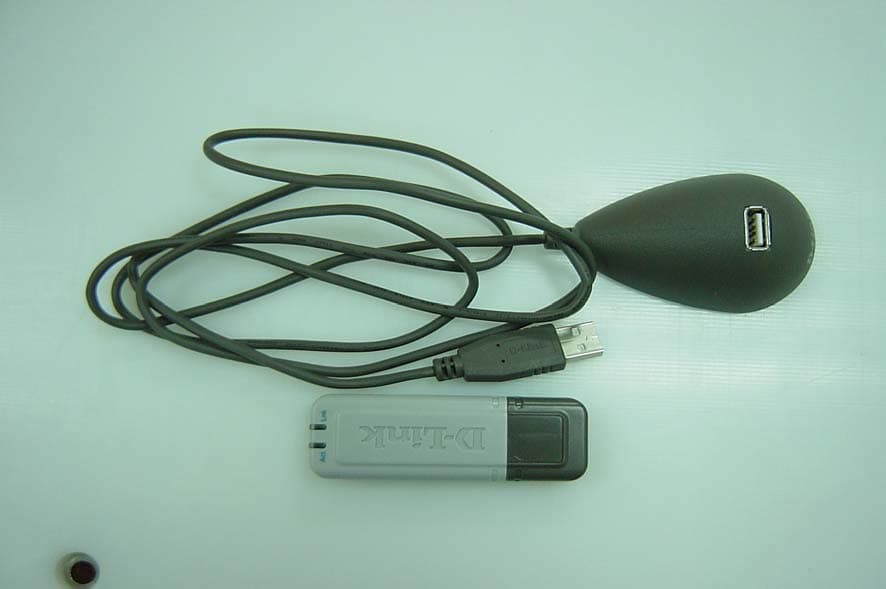
Click to zoom
Application Details
- Equipment Class
- DTS - Digital Transmission System
- Date of Grant
- Feb 01, 2005
- Application Purpose
- Original Equipment
- Date of Application
- Dec 11, 2004
- Equipment Note
- Wireless USB Adapter
- Frequency Range
- 5745.00000000 - 5825.00000000
- Company
- D-Link Corporation
- Country
- United States
Documents & Files
Document Text
Text extracted from the exhibit documents filed with the FCC. Open a document above to read the original.
Users Manual
DSL-G604TDSL-G604T DSL-G604TDSL-G604T DSL-G604T 2 DWL-AG132 User’s Manual D-Link Systems, Inc. Table of Contents Table of Contents Table of Contents ............................................................................................... 2 Package Contents .............................................................................................. 4 Introduction ....................................................................................................... 5 Features and Benefits ......................................................................................... 7 Wireless Basics ................................................................................................. 8 Installation Considerations ................................................................................ 9 Getting Started................................................................................................. 10 Using the Configuration Utility ......................................................................... 13 Networking Basics ........................................................................................... 24 Troubleshooting ............................................................................................... 38 Technical Specifications .................................................................................. 41 Contacting Technical Support ........................................................................ 43 Warranty.......................................................................................................... 44 Registration..................................................................................................... 48 3 DWL-AG132 User’s Manual D-Link Systems, Inc. At least 64MB of memory and a 500MHz processor Properly installed and working USB Controller Package Contents Package Contents D-Link AirPremier AG DWL-AG132 Wireless AG USB 2.0 Adapter Manual on CD Quick Installation Guide Cradle If any of the above items are missing, please contact your reseller. Minimum System Requirements A computer or laptop with an available USB 2.0 port Windows XP/2000 ® 4 DWL-AG132 User’s Manual D-Link Systems, Inc. Introduction Introduction The D-Link AirPremier AG DWL-AG132 Wireless AG USB Adapter is an 802.11a/ 802.11g high-performance, convenient Plug & Play USB 2.0 solution that brings wireless networking to your laptop or desktop PC. With a maximum wireless signal rate of up to 54Mbps (108Mbps* in Turbo mode), and the convenience of both 802.11a and 802.11g connectivity, you can connect to a wireless network at home, at the office or at any wireless hotspot. Now you can stay connected wherever you are and wherever you go. The DWL-AG132 is Wi-Fi compliant, meaning that it can connect and interoperate with other 802.11b , 802.11g and 802.11a Wi-Fi-compliant wireless routers, access points and adapters. The DWL-AG132 connects to any available USB port on a laptop or desktop Windows -based computer, and also includes a USB cradle. With the optional USB cradle, the DWL-AG132 can be positioned virtually anywhere at a workstation to achieve the best available wireless signal reception - whether that workstation is in your office, on your deck or patio, by the pool, at the local coffee shop, or in an airport terminal while waiting to board your next flight. The adapter works with Microsoft Windows XP and Windows 2000 operating systems to ensure that you’ll be up and running on a wireless network in just a matter of seconds. Using its default settings, the DWL-AG132 automatically connects to other D-Link AirPremier AG wireless products as soon as it’s active. *Maximum wireless signal rate derived from IEEE Standard 802.11a/g specifications. Actual data throughput will vary. Network conditions and evironmental factors lower actual data throughput rate. The DWL-AG132 has the newest, strongest and most advanced security features available today. When used with other 802.11 WPA (Wi-Fi Protected Access) and 802.1x compatible products in a network with a RADIUS server, the security features include: WPA: Wi-Fi Protected Access which authorizes and identifies users based on a secret key that changes automatically at regular intervals. WPA uses TKIP (Temporal Key Integrity Protocol) to change the temporal key every 10,000 packets (a packet is a kind of message transmitted over a network.) This ensures much greater security than the standard WEP security. (By contrast, the previous WEP encryption implementations required the keys to be changed manually.) ® 5 DWL-AG132 User’s Manual D-Link Systems, Inc. For home users that will not incorporate a RADIUS server in their network, the security for the DWL-AG132, used in conjunction with other WPA-compatible 802.11 products, will still be much stronger than ever before. Utilizing the Pre-Shared Key mode of WPA, the DWL-AG132 will obtain a new security key every time it connects to the 802.11 network. You only need to input your encryption information once in the configuration menu. No longer will you have to manually input a new WEP key frequently to ensure security. With the DWL-AG132, you will automatically receive a new key every time you connect, vastly increasing the safety of your communication. 802.1x: Authentication which is a first line of defense against intrusion. In the authentication process, the Authentication Server verifies the identity of the client attempting to connect to the network. Unfamiliar clients would be denied access. 6 DWL-AG132 User’s Manual D-Link Systems, Inc. Features and Benefits Features and Benefits 3 Environmental factors may adversely affect range. User-friendly configuration and diagnostic utilities. Supports Infrastructure networks via an access point and Peer-to-Peer communication in Ad-Hoc mode. Connects at up to 328 feet indoors 3 . 1 year warranty. 2 Using a USB 1.1 port will adversely affect throughput. 1 Maximum wireless signal rate…
Text truncated - open the document above for the full version.
Users Manual
DSL-G604TDSL-G604T DSL-G604TDSL-G604T DSL-G604T 2 DWL-AG132 User’s Manual D-Link Systems, Inc. Table of Contents Table of Contents Table of Contents ............................................................................................... 2 Package Contents .............................................................................................. 4 Introduction ....................................................................................................... 5 Features and Benefits ......................................................................................... 7 Wireless Basics ................................................................................................. 8 Installation Considerations ................................................................................ 9 Getting Started................................................................................................. 10 Using the Configuration Utility ......................................................................... 13 Networking Basics ........................................................................................... 24 Troubleshooting ............................................................................................... 38 Technical Specifications .................................................................................. 41 Contacting Technical Support ........................................................................ 43 Warranty.......................................................................................................... 44 Registration..................................................................................................... 48 3 DWL-AG132 User’s Manual D-Link Systems, Inc. At least 64MB of memory and a 500MHz processor Properly installed and working USB Controller Package Contents Package Contents D-Link AirPremier AG DWL-AG132 Wireless AG USB 2.0 Adapter Manual on CD Quick Installation Guide Cradle If any of the above items are missing, please contact your reseller. Minimum System Requirements A computer or laptop with an available USB 2.0 port Windows XP/2000 ® 4 DWL-AG132 User’s Manual D-Link Systems, Inc. Introduction Introduction The D-Link AirPremier AG DWL-AG132 Wireless AG USB Adapter is an 802.11a/ 802.11g high-performance, convenient Plug & Play USB 2.0 solution that brings wireless networking to your laptop or desktop PC. With a maximum wireless signal rate of up to 54Mbps (108Mbps* in Turbo mode), and the convenience of both 802.11a and 802.11g connectivity, you can connect to a wireless network at home, at the office or at any wireless hotspot. Now you can stay connected wherever you are and wherever you go. The DWL-AG132 is Wi-Fi compliant, meaning that it can connect and interoperate with other 802.11b , 802.11g and 802.11a Wi-Fi-compliant wireless routers, access points and adapters. The DWL-AG132 connects to any available USB port on a laptop or desktop Windows -based computer, and also includes a USB cradle. With the optional USB cradle, the DWL-AG132 can be positioned virtually anywhere at a workstation to achieve the best available wireless signal reception - whether that workstation is in your office, on your deck or patio, by the pool, at the local coffee shop, or in an airport terminal while waiting to board your next flight. The adapter works with Microsoft Windows XP and Windows 2000 operating systems to ensure that you’ll be up and running on a wireless network in just a matter of seconds. Using its default settings, the DWL-AG132 automatically connects to other D-Link AirPremier AG wireless products as soon as it’s active. *Maximum wireless signal rate derived from IEEE Standard 802.11a/g specifications. Actual data throughput will vary. Network conditions and evironmental factors lower actual data throughput rate. The DWL-AG132 has the newest, strongest and most advanced security features available today. When used with other 802.11 WPA (Wi-Fi Protected Access) and 802.1x compatible products in a network with a RADIUS server, the security features include: WPA: Wi-Fi Protected Access which authorizes and identifies users based on a secret key that changes automatically at regular intervals. WPA uses TKIP (Temporal Key Integrity Protocol) to change the temporal key every 10,000 packets (a packet is a kind of message transmitted over a network.) This ensures much greater security than the standard WEP security. (By contrast, the previous WEP encryption implementations required the keys to be changed manually.) ® 5 DWL-AG132 User’s Manual D-Link Systems, Inc. For home users that will not incorporate a RADIUS server in their network, the security for the DWL-AG132, used in conjunction with other WPA-compatible 802.11 products, will still be much stronger than ever before. Utilizing the Pre-Shared Key mode of WPA, the DWL-AG132 will obtain a new security key every time it connects to the 802.11 network. You only need to input your encryption information once in the configuration menu. No longer will you have to manually input a new WEP key frequently to ensure security. With the DWL-AG132, you will automatically receive a new key every time you connect, vastly increasing the safety of your communication. 802.1x: Authentication which is a first line of defense against intrusion. In the authentication process, the Authentication Server verifies the identity of the client attempting to connect to the network. Unfamiliar clients would be denied access. 6 DWL-AG132 User’s Manual D-Link Systems, Inc. Features and Benefits Features and Benefits 3 Environmental factors may adversely affect range. User-friendly configuration and diagnostic utilities. Supports Infrastructure networks via an access point and Peer-to-Peer communication in Ad-Hoc mode. Connects at up to 328 feet indoors 3 . 1 year warranty. 2 Using a USB 1.1 port will adversely affect throughput. 1 Maximum wireless signal rate…
Text truncated - open the document above for the full version.
Users Manual
DSL-G604TDSL-G604T DSL-G604TDSL-G604T DSL-G604T 2 DWL-AG132 User’s Manual D-Link Systems, Inc. Table of Contents Table of Contents Table of Contents ............................................................................................... 2 Package Contents .............................................................................................. 4 Introduction ....................................................................................................... 5 Features and Benefits ......................................................................................... 7 Wireless Basics ................................................................................................. 8 Installation Considerations ................................................................................ 9 Getting Started................................................................................................. 10 Using the Configuration Utility ......................................................................... 13 Networking Basics ........................................................................................... 24 Troubleshooting ............................................................................................... 38 Technical Specifications .................................................................................. 41 Contacting Technical Support ........................................................................ 43 Warranty.......................................................................................................... 44 Registration..................................................................................................... 48 3 DWL-AG132 User’s Manual D-Link Systems, Inc. At least 64MB of memory and a 500MHz processor Properly installed and working USB Controller Package Contents Package Contents D-Link AirPremier AG DWL-AG132 Wireless AG USB 2.0 Adapter Manual on CD Quick Installation Guide Cradle If any of the above items are missing, please contact your reseller. Minimum System Requirements A computer or laptop with an available USB 2.0 port Windows XP/2000 ® 4 DWL-AG132 User’s Manual D-Link Systems, Inc. Introduction Introduction The D-Link AirPremier AG DWL-AG132 Wireless AG USB Adapter is an 802.11a/ 802.11g high-performance, convenient Plug & Play USB 2.0 solution that brings wireless networking to your laptop or desktop PC. With a maximum wireless signal rate of up to 54Mbps (108Mbps* in Turbo mode), and the convenience of both 802.11a and 802.11g connectivity, you can connect to a wireless network at home, at the office or at any wireless hotspot. Now you can stay connected wherever you are and wherever you go. The DWL-AG132 is Wi-Fi compliant, meaning that it can connect and interoperate with other 802.11b , 802.11g and 802.11a Wi-Fi-compliant wireless routers, access points and adapters. The DWL-AG132 connects to any available USB port on a laptop or desktop Windows -based computer, and also includes a USB cradle. With the optional USB cradle, the DWL-AG132 can be positioned virtually anywhere at a workstation to achieve the best available wireless signal reception - whether that workstation is in your office, on your deck or patio, by the pool, at the local coffee shop, or in an airport terminal while waiting to board your next flight. The adapter works with Microsoft Windows XP and Windows 2000 operating systems to ensure that you’ll be up and running on a wireless network in just a matter of seconds. Using its default settings, the DWL-AG132 automatically connects to other D-Link AirPremier AG wireless products as soon as it’s active. *Maximum wireless signal rate derived from IEEE Standard 802.11a/g specifications. Actual data throughput will vary. Network conditions and evironmental factors lower actual data throughput rate. The DWL-AG132 has the newest, strongest and most advanced security features available today. When used with other 802.11 WPA (Wi-Fi Protected Access) and 802.1x compatible products in a network with a RADIUS server, the security features include: WPA: Wi-Fi Protected Access which authorizes and identifies users based on a secret key that changes automatically at regular intervals. WPA uses TKIP (Temporal Key Integrity Protocol) to change the temporal key every 10,000 packets (a packet is a kind of message transmitted over a network.) This ensures much greater security than the standard WEP security. (By contrast, the previous WEP encryption implementations required the keys to be changed manually.) ® 5 DWL-AG132 User’s Manual D-Link Systems, Inc. For home users that will not incorporate a RADIUS server in their network, the security for the DWL-AG132, used in conjunction with other WPA-compatible 802.11 products, will still be much stronger than ever before. Utilizing the Pre-Shared Key mode of WPA, the DWL-AG132 will obtain a new security key every time it connects to the 802.11 network. You only need to input your encryption information once in the configuration menu. No longer will you have to manually input a new WEP key frequently to ensure security. With the DWL-AG132, you will automatically receive a new key every time you connect, vastly increasing the safety of your communication. 802.1x: Authentication which is a first line of defense against intrusion. In the authentication process, the Authentication Server verifies the identity of the client attempting to connect to the network. Unfamiliar clients would be denied access. 6 DWL-AG132 User’s Manual D-Link Systems, Inc. Features and Benefits Features and Benefits 3 Environmental factors may adversely affect range. User-friendly configuration and diagnostic utilities. Supports Infrastructure networks via an access point and Peer-to-Peer communication in Ad-Hoc mode. Connects at up to 328 feet indoors 3 . 1 year warranty. 2 Using a USB 1.1 port will adversely affect throughput. 1 Maximum wireless signal rate…
Text truncated - open the document above for the full version.
Cover Letter(s)
11/24/2004 D-Link Corporation NO.8,Li Hsing Rd VII ,SCIENCE-BASED INDUSTRIAL PARK,HSINCHU,TAIWAN,R.O.C. TEL: +886 3-563-6666 FAX: +886 3-578-1861 Federal Communications Commission Authorization and Evaluation Division FCC ID: KA2DWLAG132B1 Confidentiality Request Pursuant to Sections 0.457 and 0.459 of the Commission’s Rules, the Applicant hereby requests confidential treatment of information accompanying this Application as outlined below: 1. Schematics 2. Operational Description 3. Block Diagram The above materials contain trade secrets and proprietary information not customarily released to the public. The public disclosure of these matters might be harmful to the Applicant and provide unjustified benefits to its competitors. The Applicant understands that pursuant to Rule 0.457, disclosure of this Application and all accompanying documentation will not be made before the date of the Grant for this application. Sincerely, --------------------------------------------------- Leeming Li / Manager D-Link Corporation Tel: 886-3-563-6666 ext.6613 Fax: 886-3-578-1861 E-mail: [email protected]
Cover Letter(s)
D-Link Corporation NO.8, Li Hsing Rd VII, SCIENCE-BASED INDUSTRIAL PARK, HSINCHU, TAIWAN, R.O.C. TEL: +886 3-563-6666 FAX: +886 3-578-1861 POWER OF ATTORNEY Date: November 24, 2004 We, the undersigned, hereby authorize Compliance Certification Services Inc. to act on our behalf in all matters relating to all processes related to FCC & IC applications and communications issue. Any and all acts carried out by Compliance Certification Services Inc. on our behalf shall have the same effects as acts of our own. If you have any questions regarding this authorization, please don’t hesitate to contact us. Thank you. Sincerely yours, ------------------------------------------------------------------- Leeming Li / Manager D-Link Corporation Tel: 886-3-563-6666 ext.6613 Fax: 886-3-578-1861 E-mail: [email protected]
Cover Letter(s)
To: Ting Lin, From: Stan Lyles [email protected] FCC Application Processing Branch Re: FCC ID KA2DWLAG132B1 Applicant: D Link Corporation Correspondence Reference Number: 28370 731 Confirmation Number: EA614399 1.) Please submit DTS test report for this device. Test setup photographs were uploaded and not the test report in the test report exhibit. Ans. Uploaded and please have a check. 2.) Please justify that SAR testing with antenna "A and B" is worst case compared to transmission from an individual antenna. Ans. Please take a look at the attached antenna circuit(Page 3) in advance. Two antennas are indicated: tray of ANT1 is grounded at the end and the tray of ANT2 is split to S2 and S3 via a balanced circuit (which is the only antenna connector the EUT has). So actually the antenna "A" and "B" indicated in our test report are referred to "S2" and "S3" which can transmit at the same time. Therefore, we measured the condition of antenna "A" and "B" together as the worst case. 3.) Please update the FCC RF exposure statement in the user manual to clearly define the type of host this device has been approved for use in (i.e. laptop computers). Ans. In the submitted user manual, page 48 of user manual of RF exposure statement, it has already indicated that this device was tested with typical lap held operations and was connected to the back side of the notebook computer. Please check again and advise if it's accepted. The items indicated above must be submitted before processing can continue on the above referenced application. Failure to provide the requested information within 60 days of the original e-mail date may result in application dismissal pursuant to Section 2.917 (c) and forfeiture of the filing fee pursuant to section 1.1108. DO NOT reply to this e-mail by using the Reply button. In order for your response to be processed expeditiously, you must upload your response via the Internet at www.fcc.gov, Electronic Filing, OET Equipment Authorization Electronic Filing. If the response is submitted through Add Attachments, in order to expedite processing, a message which informs the processing staff that a new exhibit has been submitted must also be submitted via Submit Correspondence. Also, please note that partial responses increase processing time and should not be submitted. Any questions about the content of this correspondence should be directed to the e-mail address listed below the name of the sender.
External Photos
Compliance Certification Services Inc. Report No: 41103001 Date of Issue: December 10, 2004 Page 1 Total Page: 4 Rev. 00 EXTERNAL PHOTOGRAPHS OF EUT Compliance Certification Services Inc. Report No: 41103001 Date of Issue: December 10, 2004 Page 2 Rev. 00
ID Label/Location Info
Model No.: DWL-AG132 P/N: EWLAG132EUB1 MAC: 000F3D000001 FCC ID: KA2DWLAG132B1 H/W Ver.: B1F/W Ver.: 1.00 MADE IN TAIWAN
Internal Photos
Compliance Certification Services Inc. Report No: 41103001 Date of Issue: December 10, 2004 Page 3 Rev. 00 INTERNAL PHOTOGRAPHS OF EUT Compliance Certification Services Inc. Report No: 41103001 Date of Issue: December 10, 2004 Page 4
Parts List/Tune Up Info
ACX Adv anced Ceram ic X AT5020 Series Multilayer Chip Antenna Features Monolithic SMD with small, low-profile and light-weight type. Wide bandwidth Applications Bluetooth/Wireless LAN/Home RF ISM band 2.4GHz applications Specifications Part Number Frequency Range (MHz) Peak Gain XZ-V Average Gain XZ-V VSWR Impedance AT5020 -B2R8HAA_ 2400 ~ 2500 0 dBi typ. -1 dBi typ. 2 max. 50 Ω Q’ty/Reel (pcs) : 2,000pcs Operating Temperature Range : -40 ~ +85 o C Storage Temperature Range : -40 ~ +85 o C Power Capacity : 3W max. Part Number AT 5020 - B 2R8 HAA ghfe dc c Type AT : Antenna d Dimensions ( L × W ) 5.0× 2.0 mm e Material Code B f Frequency Range 2R8=2800MHz g Specification Code HAA h Packaging T: Tape & Reel B: Bulk Terminal Configuration No. Terminal Name No. Terminal Name c Feeding Point d NC d c ACX Adv anced Ceram ic X Dimensions and Recommended PC Board Pattern Unit : mm a W T L Mark L W T a Dimensions 5.00.2 2.00.2 1.10.2 0.50.3 (a) Without Matching Circuits 1.0 1.8 3.9 5.9 1.0 1.0 * * * (b) With Matching Circuits 1.0 4.0 1.0 1.8 8.9 3.9 * * * *Line width should be designed to match 50Ω characteristic impedance, depending on PCB material and thickness. ACX Adv anced Ceram ic X Typical Electrical Characteristics (T=25 o C) Test Board 50Ω Feed Line 9.6mm 30mm 18mm 18mm Ground No Ground Antenna Return Loss (a) Without Matching Circuits (b) With Matching Circuits ACX Radiation Patterns Adv anced Ceram ic X Y Z 0 o 270 o X 180 o XY cut @2.45GHz Vertical Horizontal XY-V/XY-H 90 o XY-cut scanning direction Y Z 0 o 270 o X 180 XZ-V/XZ-H XZ cut @2.45GHz Vertical Horizontal 90 o XZ-cut scanning direction XY cut @2.45GHz Vertical Horizontal YZ-V/YZ-H Z X 90 o 0 o 270 180 Y YZ-cut scanning direction Advanced Ceramic X Corp. 16 Tzu Chiang Road, Hsinchu Industrial District Hsinchu Hsien 303, Taiwan TEL:886-3-5987008 FAX:886-3-5987001 E-mail: [email protected] http://www.acxc.com.tw
Parts List/Tune Up Info
ACX Adv anced Ceram ic X AT3216 Series Multilayer Chip Antenna Features Monolithic SMD with small, low-profile and light-weight type. Wide bandwidth Applications 5~6GHz wireless communication system Specifications Part Number Frequency Range (MHz) Peak Gain (XZ-V) Average Gain (XZ-V) VSWR Impedance AT3216 -B5R5HAA_ 4900~5875 2.0 dBi typ. -2.5 dBi typ. 2.2 max. 50 Ω Q’ty/Reel (pcs) : 3,000 pcs Operating Temperature Range : -40 ~ +85 o C Storage Temperature Range : -40 ~ +85 o C Power Capacity : 500mW max. Part Number AT 3216 - B 5R5 HAA ghfe dc c Type AT : Antenna d Dimensions ( L × W ) 3.2× 1.6 mm e Material Code B f Frequency Range 5R5=5500MHz g Specification Code HAA h Packaging T: Tape & Reel B: Bulk Terminal Configuration No. Terminal Name No. Terminal Name c Feeding Point d NC d c ACX Adv anced Ceram ic X Dimensions and Recommended PC Board Pattern Unit : mm a W T L Mark L W T a Dimensions 3.20.2 1.60.2 1.3+ 0.1/-0.2 0.50.3 (a) Without Matching Circuits 2.6 * 4.2 1.6 1.9 0.4 0 0 (b) With Matching Circuits 2.6 * 4.2 1.6 1.9 0.4 0 0 2.2nH *Line width should be designed to match 50Ω characteristic impedance, depending on PCB material and thickness. ACX Adv anced Ceram ic X Typical Electrical Characteristics (T=25 o C) Test Board 6.5mm 39.5mm 50 Ω Feed Line Ground No Ground Antenna Matching Circuit 19mm 6.5mm 33.5mm Return Loss (a) Without Matching Circuits (b) With Matching Circuits ACX Adv anced Ceram ic X Radiation Patterns XZ cut @5.5GHz Vertical Horizontal XY cut @5.5GHz Vertical Horizontal YZ cut @5.5GHz Vertical Horizontal YZ-V/YZ-H XZ-V/XZ-H XY-V/XY-H Y Z X 90 o 0 o 270 180 XZ-cut scanning direction Y Z 90 o 0 o 270 o X 180 XY-cut scanning direction Y Z 90 o 0 o 270 o X 180 o YZ-cut scanning direction Advanced Ceramic X Corp. 16 Tzu Chiang Road, Hsinchu Industrial District Hsinchu Hsien 303, Taiwan TEL:886-3-5987008 FAX:886-3-5987001 E-mail: [email protected] http://www.acxc.com.tw
RF Exposure Info
Compliance Certification Services Inc. Report No: 41103001-SF FCC ID: KA2DWLAG132B1 Date of Issue: December 1, 2004 Note: This report shall not be reproduced except in full, without the written approval of Compliance Certification Services Inc. This document may be altered or revised by Compliance Certification Services Inc. personnel only, and shall be noted in the revision section of the document. Page 1 Total Page: 35 Rev. 00 ANSI/IEEE Std. C95.1-1992 in accordance with the requirements of FCC Report and Order: ET Docket 93-62, and OET Bulletin 65 Supplement C FCC TEST REPORT For Wireless USB Adapter Trade Name: D-Link Model: DWL-AG132 Issued to D-Link Corporation No.8, Li-shing Road VII, Science-based Industrial Park, Hsinchu, Taiwan R.O.C. Issued by Compliance Certification Services Inc. No. 11, Wu-Kung 6 Rd, Wu-Ku Hsiang, Wu-Ku Industrial District, Taipei Hsien, (248) Taiwan. TEL: 886-2-2299-9720 FAX: 886-2-2299-9721 Compliance Certification Services Inc. Report No: 41103001-SF FCC ID: KA2DWLAG132B1 Date of Issue: December 1, 2004 Page 2 Rev.00 TABLE OF CONTENTS 1. CERTIFICATE OF COMPLIANCE (SAR EVALUATION) .................................................................... 3 2. EUT DESCRIPTION .................................................................................................................................. 4 3. REQUIREMENTS FOR COMPLIANCE TESTING DEFINED BY THE FCC ....................................... 5 4. DOSIMETRIC ASSESSMENT SYSTEM .................................................................................................5 4.1 MEASUREMENT SYSTEM DIAGRAM....................................................................................... 6 4.2 SYSTEM COMPONENTS.............................................................................................................. 7 5. EVALUATION PROCEDURES .............................................................................................................. 10 6. MEASUREMENT UNCERTAINTY ....................................................................................................... 14 7. EXPOSURE LIMIT .................................................................................................................................. 15 8. TYPICAL COMPOSITION OF INGREDIENTS FOR LIQUID TISSUE PHANTOMS ........................ 15 9. MEASUREMENT RESULTS .................................................................................................................. 16 9.1 SYSTEM PERFORMANCE CHECK ........................................................................................... 16 9.2 TEST LIQUID CONFIRMATION................................................................................................ 18 9.3 EUT TUNE-UP PROCEDURES ................................................................................................... 20 9.4 SAR MEASUREMENTS RESULTS ............................................................................................ 21 10. EUT PHOTOS........................................................................................................................................... 32 …
Text truncated - open the document above for the full version.
Contact Information
Applicant
Brett Adair(General Counsel)
Technical Contact
Compliance Certification Services Inc.Ting Lin
[email protected]886-2-2299-9720
No. 81-1, Lane 210, Bade Rd. 2, Luchu Hsiang, · Taoyuan Hsien, · Taiwan
Non-Technical Contact
Compliance Certification Services Inc.Ting Lin
[email protected]886-2-2299-9720
Test Firm
Compliance Certification Services Inc.Kurt Chen
Technical Specifications
| # | Rule Parts | Frequency Range | Power Output |
|---|---|---|---|
| 2 | 15C | 5.75 GHz - 5.83 GHz | 40.46 mW |
Other Applications from D-Link Corporation

KA2CS6012A1
Jul 07, 20262K Fixed Indoor Cloud Camera, 2K Fixed Indoor Wi-Fi Camera
Equipment Class
DTS - Digital Transmission SystemKA2AE65UA1
Mar 02, 2026Wi-Fi 7 BE6500 USB 3.0 Dongle
Equipment Class
NII - Unlicensed National Information Infrastructure TXKA2APE9560A1
Nov 17, 2025BE9500 Celling mount Access Point
Equipment Class
6ID - 15E 6 GHz Low Power Indoor Access PointKA2AX9UA1
Dec 04, 2024AX900 Wi-Fi 6 USB Adapter, Wi-Fi 6 AX900 USB 2.0 Dongle
Equipment Class
DSS - Part 15 Spread Spectrum TransmitterKA2AC13UA1
Dec 04, 2024AC1300 Wi-Fi 5 USB Adapter, Wi-Fi 5 AC1300 USB 2.0 Dongle
Equipment Class
DTS - Digital Transmission System