KA2IR600LB1Wireless N150 Cloud Router
D-Link Corporation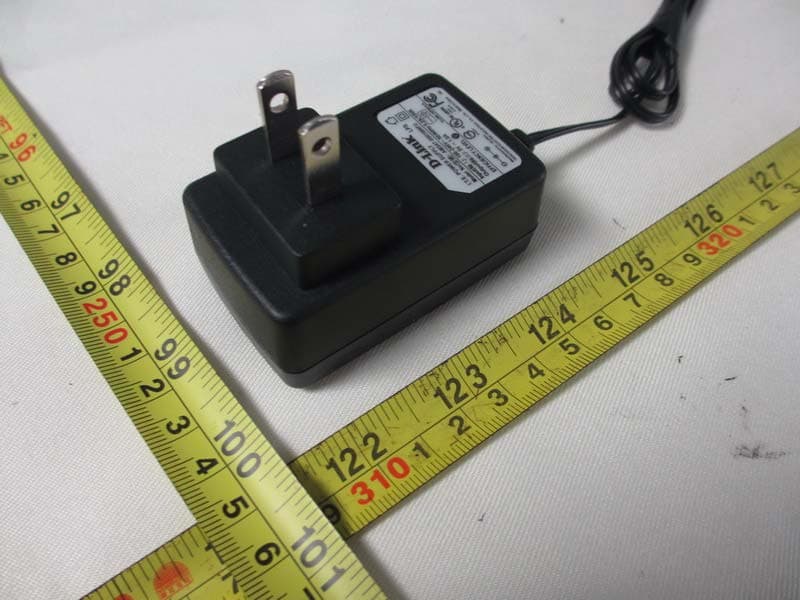
Click to zoom
Application Details
- Equipment Class
- DTS - Digital Transmission System
- Date of Grant
- Mar 18, 2013
- Application Purpose
- Original Equipment
- Date of Application
- Mar 18, 2013
- Equipment Note
- Wireless N150 Cloud Router
- Frequency Range
- 2412.00000000 - 2462.00000000
- Company
- D-Link Corporation
- Country
- United States
Documents & Files
Document Text
Text extracted from the exhibit documents filed with the FCC. Open a document above to read the original.
Users Manual
Wireless N150 Cloud Router DIR-600L QUICK INSTALLATION GUIDE Рук ов одс тв о по быстРой установке Guía de InstalacIón RápIda GuIa de Instalação RápIda petunjuk pemasanGan cepat DIR-600L 2 ENGLISH CONTENTS OF PACKAGING CONTENTS POWER ADAPTER adapteR If any of these items are missing from your packaging contact your reseller WIRELESS N 150 ROUTER dIR-600l DIR-600L 3 ENGLISH PRODUCT SETUP INSTALL YOUR ROUTER step 1 position your router close to your modem and the computer that is already online. place this router in an open area of your intended work area for better wireless coverage. step 2 unplug the ethernet cable from your modem that is connected to your computer. plug it into the lan port labeled 1 on the back of your router. the router is now connected to your computer. step 3 Find another ethernet cable and plug the of end of this cable into the port labeled InteRnet on the back of the router. plug the other end of this cable into the ethernet port on your modem. step 4 connect the supplied power adapter into the power port on the back of the router and then plug into a power outlet or surge protector. Verify the power light is lit. Below is a basic network setup. DIR-600L 4 ENGLISH PRODUCT SETUP RUN EASY SETUP WIZARD AND mydlink SERVICE step 1 From the computer you connected to the router, open a web browser and enter http://192.168.0.1 or http://dlinkrouter then, press enter and you will be directed to the d-link setup Wizard page, which detects InteRnet connection type. step 2 according to the detection result, follow the on-screen instructions to configure your InteRnet setting. If your InteRnet setting is dHcp, the wizard will bring you to the page of "cuRRent netWoRk settInG". DIR-600L 5 ENGLISH PRODUCT SETUP RUN EASY SETUP WIZARD AND mydlink SERVICE step 3 In the page of "cuRRent netWoRk settInG", you will see the InteRnet status is "connected". step 4 If you have not registered a mydlink account, please click "configure" In the section "mydlink account' and complete the registration form. click "Register" DIR-600L 6 ENGLISH PRODUCT SETUP RUN EASY SETUP WIZARD AND mydlink SERVICE step 5 now you can see the hint that a verification e-mail has been sent out. open a new browser to login your e-mail account for receiving the verification mail. once the account verification phase is complete, click "configure" In the section "mydlink account' and login mydlink account. click "login" DIR-600L 7 ENGLISH step 6 now the router has successfully connected to mydlink service. You can download the app "mydlink lite" from android market or apple store to start enjoy mydink service! PRODUCT SETUP RUN EASY SETUP WIZARD AND mydlink SERVICE DIR-600L 8 ENGLISH TROUBLESHOOTING SET-UP AND CONFIGURATION PROBLEMS 1. HOW DO I CONFIGURE MY DIR-600L ROUTER, OR CHECK MY WIRELESS NETWORK NAME (SSID) AND WIRELESS ENCRYPTION KEY? - connect your pc to the router using an ethernet cable. - open a web browser and enter the address http:// dlinkrouter or http://192.168.0.1 - the default username is ‘admin’. the default password is ‘’ (leave the field blank). - If you have changed the password and can not remember it, you will need to reset the router to set the password back to ‘’ (leave the field blank). 2. HOW DO I RESET MY DIR-600L ROUTER TO FACTORY DEFAULT SETTINGS? - ensure the router is powered on. - press and hold the reset button on the rear of the device for 20 seconds. note: Resetting the router to factory default will erase the current configuration settings. to re- configure your settings, log into the router as outlined in question 1, then run the setup Wizard. 3. HOW DO I ADD A NEW WIRELESS CLIENT OR PC IF I HAVE FORGOTTEN MY WIRELESS NETWORK NAME (SSID) OR WIRELESS ENCRYPTION KEY? - every pc that needs to connect to the router wirelessly, you will need to ensure you use the correct Wireless network name (ssId) and encryption key. - use the web based user interface (as described in question 1 above) to check or choose your wireless settings. - make sure you write down these settings so that you can enter them into each wirelessly connected pc. You will find a dedicated area on the back of this document, this important information for future use. 4. WHY CAN I NOT GET AN INTERNET CONNECTION? - For adsl users please contact your Isp to make sure the service has been enabled/connected by your Isp and that your Isp username and password is correct. DIR-600L 9 ENGLISH TECHNICAL SUPPORT Australia: tel: 1300-766-868 24/7 technical support Web: http://www.dlink.com.au e-mail: [email protected] India: tel: +91-22-27626600 t oll Free 1800-22-8998 Web: www.dlink.co.in e-mail: [email protected] Singapore, Thailand, Indonesia, Malaysia, Philippines, Vietnam: singapore - www.dlink.com.sg thailand - www.dlink.co.th Indonesia - www.dlink.co.id malaysia - www.dlink.com.my philippines - www.dlink.com.ph Vietnam - www.dlink.com.vn Korea: tel : +82-2-2028-1810 monday to Friday 9:00am to 6:00pm Web : http://d-link.co.kr e-mail : [email protected] New Zealand: tel: 0800-900-900 24/7 technical support Web: http://www.dlink.co.nz e-mail: [email protected] South Africa and Sub Sahara Region: tel: +27 12 661 2025 08600 dlInk (for south africa only) monday to Friday 8:30am to 9:00pm south africa time Web: http://www.d-link.co.za e-mail: [email protected] Saudi Arabia (KSA): tel: +966 01 217 0008 Fax: +966 01 217 0009 saturday to Wednesday 9.30am to 6.30pm thursdays 9.30am to 2.00 pm e-mail: [email protected] D-Link Middle East - Dubai, U.A.E. plot no. s31102, jebel ali Free Zone south, p.o.Box 18224, dubai, u.a.e. tel: +971-4-8809022 Fax: +971-4-8809066 / 8809069 technical support: +971-4-8809033 General Inquiries: [email protected] tech support: [email protected] Egypt 1, makram ebeid street - city lights Building nasrcity - cairo, egypt Floor 6, office c2 tel.: +2 02 26718375 - +2 02 26717280 technical support: +2 02 26738470 General Inquiries: [email protected] tech support: support.eg@dlink-m…
Text truncated - open the document above for the full version.
External Photos
Neutron Engineering Inc. Report No.: NEI-FCCP-1-1301C059 Page 138 of 140 9. EUT PHOTO Neutron Engineering Inc. Report No.: NEI-FCCP-1-1301C059 Page 139 of 140 Adapter: D-Link / F05W-050100SPAU Neutron Engineering Inc. Report No.: NEI-FCCP-1-1301C059 Page 140 of 140 Adapter: D-Link / AMS47-0501000FU
Internal Photos
Neutron Engineering Inc. Project No.: 1301C059 Page 2 of 5 Neutron Engineering Inc. Project No.: 1301C059 Page 3 of 5 Neutron Engineering Inc. Project No.: 1301C059 Page 4 of 5 Neutron Engineering Inc. Project No.: 1301C059 Page 5 of 5
RF Exposure Info
Neutron Engineering Inc. FCC RF EXPOSURE REPORT FCC ID: KA2IR600LB1 Project No. : 1301C059 Equipment : Wireless N150 Cloud Router Model : WF2415 Applicant : D-LINK CORPORATION Address : No. 289, Sinhu 3rd Rd., Neihu District, Taiwan According: : FCC Guidelines for Human Exposure IEEE C95.1 Neutron Engineering Inc. No.3, Jinshagang 1st Road, ShiXia, Dalang Town, Dong Guan, China. TEL : (0769) 8318-3000 FAX : (0769) 8319-6000 Neutron Engineering Inc. MPE CALCULATION METHOD: Calculation Method of RF Safety Distance: where: S = power density P = power input to the antenna G = power gain of the antenna in the direction of interest relative to an isotropic radiator R = distance to the center of radiation of the antenna Neutron Engineering Inc. TEST RESULTS EUT: Wireless N150 Cloud Router Model Name : DIR-600L Temperature: 25 °C Relative Humidity: 60 % Pressure: 1012 hPa Test Voltage : AC 120V/60Hz Test Mode : TX B MODE CH01/CH06/CH11 Antenna Gain (dBi) Antenna Gain (numeric) Peak Output Power (dBm) Peak Output Power (mW) Power Density (S) (mW/cm 2 ) Limit of Power Density (S) (mW/cm 2 ) Te s t Result 4 2.5119 22.74 187.9317 0.093961591 Complies 4 2.5119 22.83 191.8669 0.095929101 Complies 4 2.5119 22.82 191.4256 0.095708471 Complies EUT: Wireless N150 Cloud Router Model Name : DIR-600L Temperature: 25 °C Relative Humidity: 60 % Pressure: 1012 hPa Test Voltage : AC 120V/60Hz Test Mode : TX G MODE CH01/CH06/CH11 Antenna Gain (dBi) Antenna Gain (numeric) Peak Output Power (dBm) Peak Output Power (mW) Power Density (S) (mW/cm 2 ) Limit of Power Density (S) (mW/cm 2 ) Te s t Result 4 2.5119 22.15 164.0590 0.082025781 Complies 4 2.5119 22.32 170.6082 0.085300261 Complies 4 2.5119 22.11 162.5549 0.081273761 Complies Neutron Engineering Inc. EUT: Wireless N150 Cloud Router Model Name : DIR-600L Temperature: 25 °C Relative Humidity: 60 % Pressure: 1012 hPa Test Voltage : AC 120V/60Hz Test Mode : TX N20MHz MODE CH01/CH06/CH11 Antenna Gain (dBi) Antenna Gain (numeric) Peak Output Power (dBm) Peak Output Power (mW) Power Density (S) (mW/cm 2 ) Limit of Power Density (S) (mW/cm 2 ) Te s t Result 4 2.5119 21.82 152.0548 0.076023941 Complies 4 2.5119 21.76 149.9685 0.074980851 Complies 4 2.5119 21.74 149.2794 0.074636351 Complies EUT: Wireless N150 Cloud Router Model Name : DIR-600L Temperature: 25 °C Relative Humidity: 60 % Pressure: 1012 hPa Test Voltage : AC 120V/60Hz Test Mode : TX N40MHz MODE CH03/CH06/CH09 Antenna Gain (dBi) Antenna Gain (numeric) Peak Output Power (dBm) Peak Output Power (mW) Power Density (S) (mW/cm 2 ) Limit of Power Density (S) (mW/cm 2 ) Te s t Result 4 2.5119 19.19 82.9851 0.041490661 Complies 4 2.5119 19.41 87.2971 0.043646601 Complies 4 2.5119 19.29 84.9180 0.042457101 Complies Note: the calculation distance is 20cm
Test Report
Neutron Engineering Inc. Report No.: NEI-FCCP-1-1301C059 Page 1 of 140 FCC Radio Test Report FCC ID: KA2IR600LB1 This report concerns (check one): Original Grant Class I Change Issued Date : Feb. 28, 2013 Project No. : 1301C059 Equipment : Wireless N150 Cloud Router Model Name : DIR-600L Applicant : D-LINK CORPORATION Address : No. 289, Sinhu 3rd Rd., Neihu District, Taiwan Manufacturer : Alpha Networks Inc. Address : NO. 8 Li-shing Rd. VII, Science-based Industrial Park, Hsinchu, Taiwan. Tested by: Neutron Engineering Inc. EMC Laboratory Date of Receipt: Jan. 10, 2013 Date of Test: Jan. 10, 2013 ~ Feb. 27, 2013 Testing Engineer : (David Mao) Technical Manager : (Leo Hung) Authorized Signatory : (Steven Lu) Neutron Engineering Inc. No.3,Jinshagang 1st Road, ShiXia, Dalang Town, Dong Guan, China. TEL : (0769) 8318-3000 FAX : (0769) 8319-6000 Neutron Engineering Inc. Report No.: NEI-FCCP-1-1301C059 Page 2 of 140 Declaration Neutron represents to the client that testing is done in accordance with standard procedures as applicable and that test instruments used has been calibrated with the standards traceable to National Measurement Laboratory (NML) of R.O.C, or National Institute of Standards and Technology (NIST) of U.S.A. Neutron's reports apply only to the specific samples tested under conditions. It is manufacture’s responsibility to ensure that additional production units of this model are manufactured with the identical electrical and mechanical components. Neutron shall have no liability for any declarations, inferences o r generalizations drawn by the client or others from Neutron issued reports. Neutron’s reports must not be used by the client to claim product endorsement by the authorities or any agency of the Government. This report is the confidential property of the client. As a mutual protection to the clients, the public and Neutron-self, extracts from the test report shall not be reproduced except in full with Neutron’s authorized written approval. Neutron’s laboratory quality assurance procedures are in compliance with the ISO Guide 17025 requirements, and accredited by the conformity assessment authorities listed in this test report. Limitation For the use of the authority's logo is limited unless the Test Standard(s)/Scope(s)/Item(s) mentioned in this test report is (are) included in the conformity assessment authorities acceptance respective. Neutron Engineering Inc. Report No.: NEI-FCCP-1-1301C059 Page 3 of 140 Table of Contents Page 1 . CERTIFICATION 5 2 . SUMMARY OF TEST RESULTS 6 2.1 TEST FACILITY 7 2.2 MEASUREMENT UNCERTAINTY 7 3 . GENERAL INFORMATION 8 3.1 GENERAL DESCRIPTION OF EUT 8 3.2 DESCRIPTION OF TEST MODES 10 3.3 TABLE OF PARAMETERS OF TEXT SOFTWARE SETTING 11 3.4 BLOCK DIGRAM SHOWING THE CONFIGURATION OF SYSTEM TESTED 12 3.5 DESCRIPTION OF SUPPORT UNITS 13 4 . EMC EMISSION TEST 14 4.1 CONDUCTED EMISSION MEASUREMENT 14 4.1.1 POWER LINE CONDUCTED EMISSION LIMITS 14 4.1.2 MEASUREMENT INSTRUMENTS LIST AND SETTING 14 4.1.3 TEST PROCEDURE 15 4.1.4 DEVIATION FROM TEST STANDARD 15 4.1.5 TEST SETUP 15 4.1.6 EUT OPERATING CONDITIONS 15 4.1.7 TEST RESULTS 16 4.1.8. EUT TEST PHOTO 21 4.2 RADIATED EMISSION MEASUREMENT 22 4.2.1 RADIATED EMISSION LIMITS 22 4.2.2 MEASUREMENT INSTRUMENTS LIST ANS SETTING 23 4.2.3 TEST PROCEDURE 24 4.2.4 DEVIATION FROM TEST STANDARD 24 4.2.5 TEST SETUP 25 4.2.6 EUT OPERATING CONDITIONS 26 4.2.7 TEST RESULTS (BELOW 30MHZ) 27 4.2.8 TEST RESULTS (BETWEEN 30 – 1000 MHZ) 28 4.2.9 TEST RESULTS (ABOVE 1000 MHZ) 41 4.2.10. EUT TEST PHOTO 89 5 . BANDWIDTH TEST 92 5.1 APPLIED PROCEDURES / LIMIT 92 5.1.1 MEASUREMENT INSTRUMENTS LIST 92 5.1.2 TEST PROCEDURE 92 5.1.3 DEVIATION FROM STANDARD 92 5.1.4 TEST SETUP 92 5.1.5 EUT OPERATION CONDITIONS 92 Neutron Engineering Inc. Report No.: NEI-FCCP-1-1301C059 Page 4 of 140 Table of Contents Page 5.1.6 TEST RESULTS 93 5.1.7. EUT TEST PHOTO 101 6 . MAXIMUM OUTPUT POWER TEST 102 6.1 APPLIED PROCEDURES / LIMIT 102 6.1.1 MEASUREMENT INSTRUMENTS LIST 102 6.1.2 TEST PROCEDURE 102 6.1.3 DEVIATION FROM STANDARD 102 6.1.4 TEST SETUP 102 6.1.5 EUT OPERATION CONDITIONS 102 6.1.6 TEST RESULTS 103 6.1.7. EUT TEST PHOTO 105 7 . ANTENNA CONDUCTED SPURIOUS EMISSION 106 7.1 APPLIED PROCEDURES / LIMIT 106 7.1.1 MEASUREMENT INSTRUMENTS LIST 106 7.1.2 TEST PROCEDURE 106 7.1.3 DEVIATION FROM STANDARD 106 7.1.4 TEST SETUP 106 7.1.5 EUT OPERATION CONDITIONS 106 7.1.6 TEST RESULTS 107 7.1.7. EUT TEST PHOTO 127 8 . POWER SPECTRAL DENSITY TEST 128 8.1 APPLIED PROCEDURES / LIMIT 128 8.1.1 MEASUREMENT INSTRUMENTS LIST 128 8.1.2 TEST PROCEDURE 128 8.1.3 DEVIATION FROM STANDARD 128 8.1.4 TEST SETUP 128 8.1.5 EUT OPERATION CONDITIONS 128 8.1.6 TEST RESULTS 129 8.1.7. EUT TEST PHOTO 137 9 . EUT PHOTO 138 Neutron Engineering Inc. Report No.: NEI-FCCP-1-1301C059 Page 5 of 140 1. CERTIFICATION Equipment : Wireless N150 Cloud Router Brand Name : D-Link Model Name : DIR-600L Applicant : D-LINK CORPORATION Date of Test : Jan. 10, 2013 ~ Feb. 27, 2013 Test Item : ENGINEERING SAMPLE Standards : FCC Part15, Subpart C(15.247) / ANSI C63.4-2009 The above equipment has been tested and found compliance with the requirement of the relative standards by Neutron Engineering Inc. EMC Laboratory. The test data, data evaluation, and equipment configuration contained in our test report (Ref No. NEI-FCCP-1-1301C059) were obtained utilizing the test procedures, test instruments, test sites that has been accredited by the Authority of NVLAP and TAF according to the ISO-17025 quality assessment standard and technical standard(s). Neutron Engineering Inc. Report No.: NEI-FCCP-1-1301C059 Page 6 of 140 2. SUMMARY OF TEST RESULTS Test procedures according to the technical standards: FCC Part15 (15.247) , Subpart C Standard Section Test Item Judgment Remark 15.207 Conducted Emission PASS 15.247(d) Antenna conducted Spurious EmissionPASS 15.247(a)(2) 6dB Bandwidth PASS 15.247(b)(3) Peak Output Power PASS 15.209/15.205 Radiated Spurious Emission PASS 15.247(e) Power Spectr…
Text truncated - open the document above for the full version.
Test Setup Photos
Neutron Engineering Inc. Report No.: NEI-FCCP-1-1301C059 Page 21 of 140 4.1.8. EUT TEST PHOTO Conducted Measurement Photos Neutron Engineering Inc. Report No.: NEI-FCCP-1-1301C059 Page 89 of 140 4.2.10. EUT TEST PHOTO Radiated Measurement Photos 9K~ 30MHz Neutron Engineering Inc. Report No.: NEI-FCCP-1-1301C059 Page 90 of 140 Radiated Measurement Photos 30MHz~1000MHz Neutron Engineering Inc. Report No.: NEI-FCCP-1-1301C059 Page 91 of 140 Radiated Measurement Photos Above 1000MHz
Contact Information
Applicant
Brett Adair(General Counsel)
Test Firm
BTL Inc.Daisy Dai
Technical Specifications
| # | Rule Parts | Frequency Range | Power Output |
|---|---|---|---|
| 1 | 15C | 2.41 GHz - 2.46 GHz | 192.00 mW |
Other Applications from D-Link Corporation

KA2CS6012A1
Jul 07, 20262K Fixed Indoor Cloud Camera, 2K Fixed Indoor Wi-Fi Camera
Equipment Class
DTS - Digital Transmission SystemKA2AE65UA1
Mar 02, 2026Wi-Fi 7 BE6500 USB 3.0 Dongle
Equipment Class
NII - Unlicensed National Information Infrastructure TXKA2APE9560A1
Nov 17, 2025BE9500 Celling mount Access Point
Equipment Class
6ID - 15E 6 GHz Low Power Indoor Access PointKA2AX9UA1
Dec 04, 2024AX900 Wi-Fi 6 USB Adapter, Wi-Fi 6 AX900 USB 2.0 Dongle
Equipment Class
DSS - Part 15 Spread Spectrum TransmitterKA2AC13UA1
Dec 04, 2024AC1300 Wi-Fi 5 USB Adapter, Wi-Fi 5 AC1300 USB 2.0 Dongle
Equipment Class
DTS - Digital Transmission System