KA2IRX3260A1AX3200 Mesh Wi-Fi 6 Router
D-Link Corporation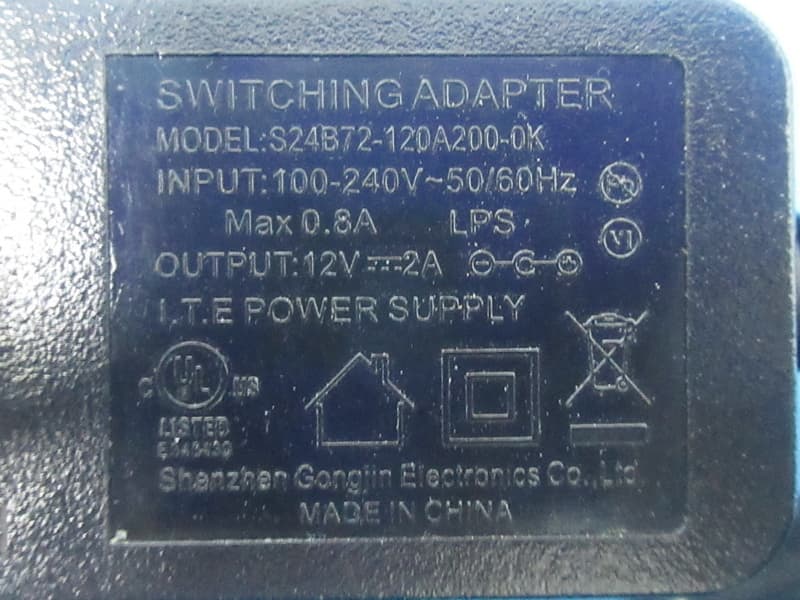
Click to zoom
Application Details
- Equipment Class
- DTS - Digital Transmission System
- Date of Grant
- Jun 01, 2021
- Application Purpose
- Original Equipment
- Date of Application
- May 27, 2021
- Equipment Note
- AX3200 Mesh Wi-Fi 6 Router
- Frequency Range
- 2412.00000000 - 2462.00000000
- Company
- D-Link Corporation
- Country
- United States
Documents & Files
Document Text
Text extracted from the exhibit documents filed with the FCC. Open a document above to read the original.
Users Manual
76D-Link DIR-X3260 User Manual Section 3 - Conffguration Static Route - IPv6 In the Features menu on the bar at the top of the page, click Static Route to access the IPv4 Static Route settings, then click IPv6 to configure the IPv6 Static Routes. To configure the Static Route IPv4 settings, click the IPv4 link. Refer to Static Route - IPv4 on page 75 Click Save at any time to save the changes you have made on this page. If you wish to remove a route, click on the trash can icon in the Delete column. If you wish to edit a route, click on the pencil icon in the Edit column. If you wish to create a new route, click the Add Route button. If you clicked on Edit or Add Rule, the following options will appear: NameEnter a name for the rule. DestNetworkThis is the IP address of the router used to reach the specified destination. PrefixLenEnter the IPv6 address prefix length of the packets that will take this route. GatewayEnter your next hop gateway to be taken when this route is used. MetricEnter a route metric value ranging from 0 to 15. This value indicates the cost of using this route. InterfaceSelect the interface that the IP packet must use to transit out of the router when this route is used. 77D-Link DIR-X3260 User Manual Section 3 - Conffguration Dynamic DNS In the Features menu on the bar at the top of the page, click Dynamic DNS. This setting allows your router to associate an easy-to-remember domain name such as [YourDomainName].com with the regularly changing IP address assigned by your Internet Service provider. This feature is helpful when running a virtual server. Click Save at any time to save the changes you have made on this page. Enable Dynamic DNSEnable or disable dynamic DNS. Enabling this feature will reveal further configuration options. StatusDisplays the current dynamic DNS connection status. Server AddressEnter the address of your dynamic DNS server, or select one from the drop-down menu. Host NameEnter the host name that you registered with your dynamic DNS service provider. User NameEnter your dynamic DNS username. PasswordEnter your dynamic DNS password. Time OutEnter a time out time (in hours). 78D-Link DIR-X3260 User Manual Section 3 - Conffguration At the bottom of the page are the IPv6 host settings. If you wish to remove a record, click on the trash can icon in the Delete column. If you wish to edit a record, click on the pencil icon in the Edit column. If you wish to create a new record, click the Add Record button. Host NameEnter the host name that you registered with your dynamic DNS service provider. IPv6 AddressEnter the IPv6 address of the dynamic DNS server. Alternatively, select the server device in the drop-down menu. 79D-Link DIR-X3260 User Manual Section 3 - Conffguration Quick VPN In the Features menu on the bar at the top of the page, click Quick VPN. This page will help you configure the Quick VPN feature of your router. For more information, refer to Quick VPN on page 102. Before proceeding, ensure that your Internet connection is working properly. We recommend configuring Dynamic DNS before proceeding with Quick VPN setup. If your router is assigned an IP address from your ISP using DHCP, it may frequently change, requiring clients credentials to be set up again and a simple DDNS address will be easier than an IP address. To configure the User settings and create, manage, and delete user accounts with user-defined access to certain router services, click the User link. Refer to User on page 86 Click Save at any time to save the changes you have made on this page. L2TP over IPSecEnable or disable the Quick VPN server. UsernameEnter a username between 1 and 20 characters. PasswordEnter a password between 1 and 20 characters. PSKEnter a passkey between 6 and 64 characters. VPN Profile for iOS Device and MAC OS X Click export to save the VPN profile settings file for iOS devices or Mac OS X. Advanced Settings... Authentication Protocol Choose the authentication protocol type: MSCHAPv2, PAP, or CHAP. MSCHAPv2 is the default. MPPESelect the encryption cipher strength: None, RC4-40, or RC4- 128.RC4-128 is the default. 80D-Link DIR-X3260 User Manual Section 3 - Conffguration Management Time & Schedule - Time In the Management menu on the bar at the top of the page, click Time & Schedule. The Time page allows you to configure, update, and maintain the correct time on the internal system clock. From here you can set the time zone and the Network Time Protocol (NTP) server. To configure the Schedule settings, click the Schedule link. Refer to Time & Schedule - Schedule on page 81 Click Save at any time to save the changes you have made on this page. Time Configuration Time ZoneSelect your time zone from the drop-down menu. TimeDisplays the current date and time of the router. Automatic Time Configuration NTP ServerSelect from the drop-down menu to either use the D-Link NTP Server to synchronize the time and date for your router, or choose Manual to set the NTP server's IP address. 81D-Link DIR-X3260 User Manual Section 3 - Conffguration Time & Schedule - Schedule First, enter the name of your schedule in the Name field. Each box represents one hour, with the time at the top of each column. To add a time period to the schedule, simply click on the starting hour and drag to the ending hour. You can add multiple days to the schedule, but only one period per day. To remove a time period from the schedule, click on the cross icon. Click Apply when you are done. In the Management menu on the bar at the top of the page, click Time & Schedule to access the Time page, then click the Schedule link. The Schedule page allows you to control some of the router functions through a pre-configured schedule. To configure the Time settings, click the Time link. Refer to Time & Schedule - Time on page 80 Click Save at any time to save the changes you have made on this page. If you wish to remove a schedule, click on the trash can icon in the Delete column. If you wish to edit…
Text truncated - open the document above for the full version.
Users Manual
Version 1.00 | 03/05/2021 User Manual DIR-X3260 AX3200 Wi-Fi 6 Gigabit Router iD-Link DIR-X3260 User Manual D-Link reserves the right to revise this publication and to make changes in the content hereof without obligation to notify any person or organization of such revisions or changes. Manual Revisions HardwareRevisionDateDescription A1v1.002021/05/19Initial release Trademarks D-Link and the D-Link logo are trademarks or registered trademarks of D-Link Corporation or its subsidiaries in the United States or other countries. All other company or product names mentioned herein are trademarks or registered trademarks of their respective companies. Apple®, Apple logo®, Safari®, iPhone®, and Macintosh® are trademarks of Apple Inc., registered in the U.S. and other countries. App Store SM is a service mark of Apple Inc. Chrome™ browser, Google Play™ and Android™ are trademarks of Google Inc. Internet Explorer®, Windows® and the Windows logo are trademarks of the Microsoft group of companies. Copyright © 2021 by D-Link Corporation, Inc. All rights reserved. This publication may not be reproduced, in whole or in part, without prior expressed written permission from D-Link Corporation, Inc. Preface iiD-Link DIR-X3260 User Manual ErP Power Usage This device is an Energy Related Product (ErP) with High Network Availability (HiNA), and automatically switches to a power- saving Network Standby mode within 1 minute of no packets being transmitted. It can also be turned off through a power switch to save energy when it is not needed. DIR-X3260Network Standby: 5.31 watts Switched Off: 0.69 watts iiiD-Link DIR-X3260 User Manual Table of Contents Table of Contents Product Overview ..............................................................1 Package Contents .........................................................................1 System Requirements .................................................................2 Features ............................................................................................3 Hardware Overview .....................................................................4 LED Indicators ........................................................................4 Installation .........................................................................5 Before you Begin ...........................................................................5 Wireless Installation Considerations ......................................6 Setup .................................................................................................7 D-Link Wi-Fi App Setup .......................................................8 Hardware Setup ..................................................................10 Setup Wizard ........................................................................13 Configuration ...................................................................20 Home ..............................................................................................21 Internet ...................................................................................22 DIR-X3260 ..............................................................................23 Connected Clients ..............................................................24 Settings ..........................................................................................26 Wizard .....................................................................................26 Internet - IPv4 .......................................................................27 IPv4 - Dynamic IP (DHCP) ............................................28 IPv4 - Static IP ..................................................................29 IPv4 - PPPoE .....................................................................30 IPv4 - PPTP ........................................................................32 IPv4 - L2TP ........................................................................34 IPv4 - DS-Lite ...................................................................36 Internet - IPv6 .......................................................................37 IPv6 - Auto Detection ...................................................38 IPv6 - Static IPv6 .............................................................40 IPv6 - Auto Configuration (SLAAC/DHCPv6) ........42 IPv6 - PPPoE .....................................................................45 IPv6 - 6rd ...........................................................................49 IPv6 - Local Connectivity Only ..................................51 Internet - VLAN ....................................................................52 Wireless ..................................................................................54 Guest Zone .......................................................................60 Network ..................................................................................61 D-Link Cloud .........................................................................63 Features ..........................................................................................64 QoS Engine............................................................................64 Firewall Settings - Advanced ..........................................66 Firewall Settings - IPv4/IPv6 Rules ................................68 Port Forwarding ..................................................................70 Port Forwarding - Virtual Server ....................................72 Website Filter ........................................................................74 Static Route - IPv4 ...............................................................75 Static Route - IPv6 ...............................................................76 Dynamic DNS .......................................................................77 Quick VPN ..............................................................................79…
Text truncated - open the document above for the full version.
Attestation Statements
The test data, data evaluation, and equipment configuration contained in our test report(s) above was (were) obtained utilizing the test procedures, test instruments, test sites that has been accredited according to the ISO/IEC 17025 quality assessment standard and technical standard(s). The test data contained in the referenced test report relate only to the EUT sample and item(s) tested. Ryan Wang Authorized Signatory BTL INC. No. 29, Jintang Road, Tangzhen Industry Park, Pudong New Area, Shanghai 201210,China TEL: +86-021-61765666 TECHNICAL COMPLIANCE STATEMENT This is to certify that the product listed in follows was (were) tested in the BTL EMC Laboratory to comply with below FCC official limits. Equipment AX3200 Mesh Wi-Fi 6 Router Brand Name D-Link Model Name DIR-X3260 Applicant D-Link Corporation Address 17595 Mt. Herrmann Fountain Valley, CA92708 USA Standard(s) FCC CFR Title 47,Part 15,Subpart B,Class B ANSI C63.4-2014 Report(s) BTL-FCCE-1-2102H003
Cover Letter(s)
RF_160, Issue 02 Declaration of Authorization We Name: D-Link Corporation Address: 14420 Myford Road Suite 100 City: Irvine California Country: United States Declare that: Name Representative of agent: Ms. Riley Wei Agent Company name: BTL Inc. Address: No. 29, Jintang Road, Tangzhen Industry Park Pudong New Area City: Shanghai Country: China is authorized to apply for Certification and signing related documents of the following product(s), including 731 form(s): Product description: AX3200 Mesh Wi-Fi 6 Router Type designation: DIR-X3260 Trademark: D-Link FCC ID: KA2IRX3260A1 on our behalf. Date: 2021-05-18 City: Fountain Valley, California Name: Shanglin Chung Function: Vice President Signature: Notes: (1): Required for FCC application (2): For FCC it must be the Grantee Code “owner” or the authorized agent.
Cover Letter(s)
D-Link Corporation Ad Hoc Mode Declaration Date: 2021-05-18 We, the undersigned company Company Name: D-Link Corporation Address: 14420 Myford Road Suite 100 Irvine California United States 92606 Declare that: Product description: AX3200 Mesh Wi-Fi 6 Router Type designation: DIR-X3260 Brand:D-Link FCC ID: KA2IRX3260A1 1. The EUT doesn’t have Ad Hoc Mode function on “non-US frequencies”. 802.11a/n Ad Hoc mode should not be supported even on US DFS frequencies (5.25 ~5.35GHz/5.47 ~5.725GHz). 2. In addition, The product meets all other requirements specified in Part 15E Section 15.407 and no configuration controls are provided to change the frequency of operations outside the grant of certification for US operation. 3. Only channels 1~11 will be used in USA. Country code selection is disabled. If you have any questions regarding the authorization, please do not hesitate to contact us, thank you~ Sincerely, Signature: ________________________ Name: Shanglin Chung Tel: +886-2-66000123 #5610 Email: [email protected]
Cover Letter(s)
D-Link Corporation Declaration Letter Date: 2021-05-18 We, the undersigned company Company Name: D-Link Corporation Address: 14420 Myford Road Suite 100 Irvine California United States 92606 Declare that: Product description: AX3200 Mesh Wi-Fi 6 Router Type designation: DIR-X3260 Brand: D-Link FCC ID: KA2IRX3260A1 this device with Bridge and Mesh modes of operation are permitted to operate in the DFS band and employ a DFS function. The functionality of the Bridge mode as specified in §15.403(a) and the Mesh mode is validated in the DFS test report by performing a test statistical performance check on any one of the radar types. If you have any questions regarding the authorization, please do not hesitate to contact us, thank you~ Sincerely, Signature: ________________________ Name: Shanglin Chung Tel: +886-2-66000123 #5610 Email: [email protected]
External Photos
Project No.: 2102H003 Page 1 of 13 ATTACHMENT PHOTOGRAPHS OF EUT Project No.: 2102H003 Page 2 of 13 Project No.: 2102H003 Page 3 of 13 Project No.: 2102H003 Page 4 of 13 Model: MAUS-1202002400 Project No.: 2102H003 Page 5 of 13 Project No.: 2102H003 Page 6 of 13 Model: S24B72-120A200-0K Project No.: 2102H003 Page 7 of 13
ID Label/Location Info
Label Label location
Internal Photos
Project No.: 2102H003 Page 8 of 13 2.4G/5G Ant.1 2.4G/5G Ant.3 2.4G/5G Ant.4 2.4G/5G Ant.2 BLE Ant. Project No.: 2102H003 Page 9 of 13 Project No.: 2102H003 Page 10 of 13 Project No.: 2102H003 Page 11 of 13 Project No.: 2102H003 Page 12 of 13 Project No.: 2102H003 Page 13 of 13
RF Exposure Info
Report No.: BTL-FCCP-5-2102H003 Page 1 of 5 FCC RF EXPOSURE REPORT FCC ID: KA2IRX3260A1 Project No. : 2102H003 Equipment : AX3200 Mesh Wi-Fi 6 Router Brand Name : D-Link Test Model : DIR-X3260 Series Model : N/A Applicant : D-Link Corporation Address : 14420 Myford Road Suite 100 Irvine California United States 92606 Manufacturer : D-Link Corporation Address : 14420 Myford Road Suite 100 Irvine California United States 92606 Date of Receipt : Mar. 10, 2021 Date of Test : Mar. 10, 2021~Apr. 14, 2021 Issued Date : May. 27, 2021 Report Version : R00 Test Sample : Engineering Sample No.: SH2021020931 for radiation; SH2021020932 for conducted; SH2021020930-3 for adapter. Standard(s) : FCC Part 2.1091 FCC Title 47 Part 2.1091 KDB 447498 D01 General RF exposure guidance v06 The above equipment has been tested and found compliance with the requirement of the relative standards by BTL Inc. Prepared by : Maker Qi Approved by : Issac Song Add: No. 29, Jintang Road, Tangzhen Industry Park, Pudong New Area, Shanghai 201210,China TEL: +86-021-61765666 Web: www.newbtl.com Report No.: BTL-FCCP-5-2102H003 Page 2 of 5 REPORT ISSUED HISTORY Report Version Description Issued Date R00 Original Issue. May. 27, 2021 1. MPE CALCULATION METHOD Calculation Method of RF Safety Distance: where: S = power density P = power input to the antenna G = power gain of the antenna in the direction of interest relative to an isotropic radiator R = distance to the center of radiation of the antenna Report No.: BTL-FCCP-5-2102H003 Page 3 of 5 Table for Filed Antenna For BLE Ant. Brand Model Name Antenna Type Connector Gain (dBi) 1 N/A N/A PCB N/A 3.2 Note: The antenna gain provided by the manufacturer For 2.4G Ant. Brand Model Name Antenna Type Connector Gain(dBi) 1 N/A N/A Dipole N/A 4.75 2 N/A N/A Dipole N/A 4.75 3 N/A N/A Dipole N/A 4.75 4 N/A N/A Dipole N/A 4.67 Note: 1.This EUT supports Beamforming and CDD, all antennas have the same gain, any transmit signals are correlated with each other, so 1) Beamforming: Directional gain = 10log[(10 G1/20 +10 G2/20+....+ 10 GN/20 ) 2 /N ANT ]dBi, that is Directional gain=10log[(10 G1/20 +10 G2/20+....+ 10 GN/20 ) 2 /N ANT ]dBi =10.75; So output power limit is 30-10.75+6=25.25, the power spectral density limit is 8-10.75+6=3.25. 2) CDD: For power spectral density measurements, Directional gain = 10log[(10 G1/20 +10 G2/20+....+ 10 GN/20 ) 2 /N ANT ]dBi, that is Directional gain=10log[(10 G1/20 +10 G2/20+....+ 10 GN/20 ) 2 /N ANT ]dBi =10.75; So power spectral density limit is 8-10.75+6=3.25. For power meansurements, Directional gain =G ANT MAX. +Array Gain, Array Gain=0dB(N ANT ≤4), so the Directional gain=4.75. 2.The antenna gain provided by the manufacturer. Operating Mode TX Mode Ant. 1 Ant. 2 Ant. 3 Ant. 4 Ant. 1+2+3+4 IEEE 802.11b ˟ IEEE 802.11g ˟ IEEE 802.11n (HT20) IEEE 802.11n (HT40) Report No.: BTL-FCCP-5-2102H003 Page 4 of 5 For 5G Ant. Brand Model Name Antenna Type Connector Gain(dBi) 1 N/A N/A Dipole N/A 4.96 2 N/A N/A Dipole N/A 4.96 3 N/A N/A Dipole N/A 4.96 4 N/A N/A Dipole N/A 4.92 Note: 1. This EUT supports Beamforming and CDD, all antennas have unequal gains, any transmit signals are correlated with each other, so 1) Beamforming: Directional gain = 10log[(10 G1/20 +10 G2/20 +....+10 GN/20 ) 2 /N ANT ]dBi, that is Directional gain=10log[(10 G1/20 +10 G2/20 +....+10 GN/20 ) 2 /N ANT ]dBi =10.97; Then, the UNII-1, UNII-3 output power limit is 30-10.97+6=25.03, the UNII-2A,UNII-2C output power limit is 24-10.97+6=19.03. The UNII-1 power spectral density limit is 17-10.97+6=12.03,UNII-2A,UNII-2C power spectral density limit is 11-10.97+6=6.03, the UNII-3 power spectral density limit is 30-10.97+6=25.03. 2) CDD: For power spectral density measurements, the Directional gain=10log[(10 G1/20 +10 G2/20 +....+10 GN/20 ) 2 /N ANT ]dBi, that is Directional gain=10log[(10 G1/20 +10 G2/20 +....+10 GN/20 ) 2 /N ANT ]dBi =10.97; Then, the UNII-1 power spectral density limited is 17-10.97+6=12.03, UNII-2A,UNII-2C power spectral density limit is 11-10.97+6=6.03, the UNII-3 power spectral density limit is 30-10.97+6=25.03. For power meansurements, Directional gain= G ANT MAX. +Array Gain.Array Gain=0dB(N ANT ≤4), so the Directional gain=4.96. 2. The antenna gain and beamforming gain are provided by the manufacturer. Operating Mode TX Mode Ant.1 Ant.2 Ant.3 Ant.4 Ant.1+ Ant.2+ Ant.3+ Ant.4 IEEE 802.11a - IEEE 802.11n (HT20) IEEE 802.11n (HT40) IEEE 802.11ac(VHT20) IEEE 802.11ac(VHT40) IEEE 802.11ac(VHT80) IEEE 802.11ac(VHT80+80) IEEE 802.11ax(HE20) IEEE 802.11ax(HE40) IEEE 802.11ax(HE80) IEEE 802.11ax(HE80+80) Report No.: BTL-FCCP-5-2102H003 Page 5 of 5 2. TEST RESULTS For BLE Antenna Gain (dBi) Antenna Gain (numeric) Max. tune up Power (dBm) Max. tune up Power (mW) Power Density (S) (mW/cm 2 ) Limit of Power Density (S) (mW/cm 2 ) Test Result 3.2 2.08930 16 39.8107 0.00735400 1 Complies For 2.4GHz: Beamforming Antenna Gain (dBi) Antenna Gain (numeric) Max. tune up Power (dBm) Max. tune up Power (mW) Power Density (S) (mW/cm 2 ) Limit of Power Density (S) (mW/cm 2 ) Test Result 10.75 11.8850 25 316.2278 0.33231200 1 Complies CDD: Antenna Gain (dBi) Antenna Gain (numeric) Max. tune up Power (dBm) Max. tune up Power (mW) Power Density (S) (mW/cm 2 ) Limit of Power Density (S) (mW/cm 2 ) Test Result 4.75 2.9854 28 630.9573 0.16655200 1 Complies For 5GHz : Beamforming Antenna Gain (dBi) Antenna Gain (numeric) Max. tune up Power (dBm) Max. tune up Power (mW) Power Density (S) (mW/cm 2 ) Limit of Power Density (S) (mW/cm 2 ) Test Result 10.97 12.5026 25 316.2278 0.34958000 1 Complies CDD: Antenna Gain (dBi) Antenna Gain (numeric) Max. tune up Power (dBm) Max. tune up Power Power (mW) Power Density (S) (mW/cm 2 ) Limit of Power Density (S) (mW/cm 2 ) Test Result 4.96 3.1333 30 1000.0000 0.27704400 1 Complies For the max simultaneous transmission MPE: 2.…
Text truncated - open the document above for the full version.
Test Report
Report No.:BTL-FCCP-2-2102H003 Page 1 of 54 FCC Radio Test Report FCC ID: KA2IRX3260A1 This report concerns: Original Grant Project No. : 2102H003 Equipment : AX3200 Mesh Wi-Fi 6 Router Brand Name : D-Link Test Model : DIR-X3260 Series Model : N/A Applicant : D-Link Corporation Address : 14420 Myford Road Suite 100 Irvine California United States 92606 Manufacturer : D-Link Corporation Address : 14420 Myford Road Suite 100 Irvine California United States 92606 Date of Receipt : Mar. 10, 2021 Date of Test : Mar. 10, 2021~Apr. 14, 2021 Issued Date : May. 19, 2021 Report Version : R00 Test Sample : Engineering Sample No.: SH2021020931 for radiation; SH2021020932 for conducted; SH2021020930-3 for adapter. Standard(s) : FCC Part15, Subpart C (15.247) ANSI C63.10-2013 KDB 558074 D01 15.247 Meas Guidance v05r02 The above equipment has been tested and found compliance with the requirement of the relative standards by BTL Inc. Prepared by : Maker Qi Approved by : Issac Song Add: No. 29, Jintang Road, Tangzhen Industry Park, Pudong New Area, Shanghai 201210,China TEL: +86-021-61765666 Web: www.newbtl.com Report No.:BTL-FCCP-2-2102H003 Page 2 of 54 Declaration BTL represents to the client that testing is done in accordance with standard procedures as applicable and that test instruments used has been calibrated with standards traceable to international standard(s) and/or national standard(s). BTL's reports apply only to the specific samples tested under conditions. It is manufacture’s responsibility to ensure that additional production units of this model are manufactured with the identical electrical and mechanical components. BTL shall have no liability for any declarations, inferences or generalizations drawn by the client or others from BTL issued reports. The report must not be used by the client to claim product certification, approval, or endorsement by NVLAP, NIST, A2LA, or any agency of the U.S. Government. This report is the confidential property of the client. As a mutual protection to the clients, the public and ourselves, the test report shall not be reproduced, except in full, without our written approval. BTL’s laboratory quality assurance procedures are in compliance with the ISO/IEC 17025 requirements, and accredited by the conformity assessment authorities listed in this test report. BTL is not responsible for the sampling stage, so the results only apply to the sample as received. The information, data and test plan are provided by manufacturer which may affect the validity of results, so it is manufacturer’s responsibility to ensure that the apparatus meets the essential requirements of applied standards and in all the possible configurations as representative of its intended use. Limitation For the use of the authority's logo is limited unless the Test Standard(s)/Scope(s)/Item(s) mentioned in this test report is (are) included in the conformity assessment authorities acceptance respective. Please note that the measurement uncertainty is provided for informational purpose only and are not use in determining the Pass/Fail results. Report No.:BTL-FCCP-2-2102H003 Page 3 of 54 Table of Contents Page REPORT ISSUED HISTORY 5 1 . SUMMARY OF TEST RESULTS 6 1.1 TEST FACILITY 7 1.2 MEASUREMENT UNCERTAINTY 7 1.3 TEST ENVIRONMENT CONDITIONS 7 2 . GENERAL INFORMATION 8 2.1 GENERAL DESCRIPTION OF EUT 8 2.2 DESCRIPTION OF TEST MODES 10 2.3 PARAMETERS OF TEST SOFTWARE 10 2.4 BLOCK DIAGRAM SHOWING THE CONFIGURATION OF SYSTEM TESTED 11 2.5 SUPPORT UNITS 11 3 . AC POWER LINE CONDUCTED EMISSIONS TEST 12 3.1 LIMIT 12 3.2 TEST PROCEDURE 12 3.3 DEVIATION FROM TEST STANDARD 12 3.4 TEST SETUP 13 3.5 EUT OPERATING CONDITIONS 13 3.6 TEST RESULTS 13 4 . RADIATED EMISSION TEST 14 4.1 LIMIT 14 4.2 TEST PROCEDURE 15 4.3 DEVIATION FROM TEST STANDARD 15 4.4 TEST SETUP 16 4.5 EUT OPERATING CONDITIONS 17 4.6 TEST RESULT - 9 KHZ TO 30 MHZ 17 4.7 TEST RESULT - 30 MHZ TO 1000 MHZ 17 4.8 TEST RESULT - ABOVE 1000 MHZ 17 5 . BANDWIDTH TEST 18 5.1 LIMIT 18 5.2 TEST PROCEDURE 18 5.3 DEVIATION FROM STANDARD 18 5.4 TEST SETUP 18 5.5 EUT OPERATION CONDITIONS 18 Report No.:BTL-FCCP-2-2102H003 Page 4 of 54 Table of Contents Page 5.6 TEST RESULTS 18 6 . MAXIMUM OUTPUT POWER & E.I.R.P. TEST 19 6.1 LIMIT 19 6.2 TEST PROCEDURE 19 6.3 DEVIATION FROM STANDARD 19 6.4 TEST SETUP 19 6.5 EUT OPERATION CONDITIONS 19 6.6 TEST RESULTS 19 7 . CONDUCTED SPURIOUS EMISSION 20 7.1 LIMIT 20 7.2 TEST PROCEDURE 20 7.3 DEVIATION FROM STANDARD 20 7.4 TEST SETUP 20 7.5 EUT OPERATION CONDITIONS 20 7.6 TEST RESULTS 20 8 . POWER SPECTRAL DENSITY TEST 21 8.1 LIMIT 21 8.2 TEST PROCEDURE 21 8.3 DEVIATION FROM STANDARD 21 8.4 TEST SETUP 21 8.5 EUT OPERATION CONDITIONS 21 8.6 TEST RESULTS 21 9 . MEASUREMENT INSTRUMENTS LIST 22 10 . EUT TEST PHOTO 24 APPENDIX A - AC POWER LINE CONDUCTED EMISSIONS 27 APPENDIX B - RADIATED EMISSION - 9 KHZ TO 30 MHZ 30 APPENDIX C - RADIATED EMISSION - 30 MHZ TO 1000 MHZ 31 APPENDIX D - RADIATED EMISSION - ABOVE 1000 MHZ 34 APPENDIX E - BANDWIDTH 47 APPENDIX F - MAXIMUM OUTPUT POWER & E.I.R.P. 49 APPENDIX G - CONDUCTED SPURIOUS EMISSION 51 APPENDIX H - POWER SPECTRAL DENSITY 53 Report No.:BTL-FCCP-2-2102H003 Page 5 of 54 REPORT ISSUED HISTORY Report Version Description Issued Date R00 Original Issue. May. 19, 2021 Report No.:BTL-FCCP-2-2102H003 Page 6 of 54 1. SUMMARY OF TEST RESULTS Test procedures according to the technical standard(s): FCC Part15, Subpart C (15.247) Standard(s) Section Test Item Test Result Judgment Remark 15.207 AC Power Line Conducted Emissions APPENDIX A PA SS ------ 15.247(d) 15.205(a) 15.209(a) Radiated Emissions APPENDIX B APPENDIX C APPENDIX D PA SS ------ 15.247(a)(2) Bandwidth APPENDIX E PA SS ------ 15.247(b)(3) Maximum Output Power APPENDIX F PA SS ------ 15.247(d) Conducted Spurious Emission APPENDIX G PA SS ------ 15.247(e) Power Spectral Density APPENDIX H PA SS ------ 15.203 Antenna Requirement ------ PA SS ------ Note: (1) “N/A” denotes test is not applicable to this device. (2) The device w…
Text truncated - open the document above for the full version.
Test Report
Report No.: BTL-FCCP-4-2102H003 Page 1 of 114 FCC Radio Test Report FCC ID: FCC ID:KA2IRX3260A1 This report concerns: Original Grant Project No. : 2102H003 Equipment : AX3200 Mesh Wi-Fi 6 Router Brand Name : D-Link Test Model : DIR-X3260 Series Model : N/A Applicant : D-Link Corporation Address : 14420 Myford Road Suite 100 Irvine California United States 92606 Manufacturer : D-Link Corporation Address : 14420 Myford Road Suite 100 Irvine California United States 92606 Date of Receipt : Mar. 10, 2021 Date of Test : Mar. 10, 2021~Apr. 14, 2021 Issued Date : May. 19, 2021 Report Version : R00 Test Sample : Engineering Sample No.: SH2021020931 for radiation; SH2021020932 for conducted; SH2021020930-3 for adapter. Standard(s) : FCC CFR Title 47, Part 15, Subpart C FCC KDB 558074 D01 15.247 Meas Guidance v05r02 FCC KDB 662911 D01 Multiple Transmitter Output v02r01 ANSI C63.10-2013 The above equipment has been tested and found compliance with the requirement of the relative standards by BTL Inc. Prepared by : Maker Qi Approved by : Issac Song Add: No. 29, Jintang Road, Tangzhen Industry Park, Pudong New Area, Shanghai 201210,China TEL: +86-021-61765666 Web: www.newbtl.com Report No.: BTL-FCCP-4-2102H003 Page 2 of 114 Declaration BTL represents to the client that testing is done in accordance with standard procedures as applicable and that test instruments used has been calibrated with standards traceable to international standard(s) and/or national standard(s). BTL's reports apply only to the specific samples tested under conditions. It is manufacture’s responsibility to ensure that additional production units of this model are manufactured with the identical …
Text truncated - open the document above for the full version.
Contact Information
Applicant
Brett Adair(General Counsel)
Test Firm
BTL INC.Sophia Huang
[email protected]+86-769-83183000
Technical Specifications
| # | Rule Parts | Frequency Range | Power Output |
|---|---|---|---|
| 2 | 15C | 2.41 GHz - 2.46 GHz | 606.70 mW |
Other Applications from D-Link Corporation
KA2CS6530A1
Sep 08, 20262K Pan & Tilt Outdoor Wi-Fi Camera
Equipment Class
DTS - Digital Transmission System
KA2CS6012A1
Jul 07, 20262K Fixed Indoor Cloud Camera, 2K Fixed Indoor Wi-Fi Camera
Equipment Class
DTS - Digital Transmission SystemKA2AE65UA1
Mar 02, 2026Wi-Fi 7 BE6500 USB 3.0 Dongle
Equipment Class
NII - Unlicensed National Information Infrastructure TXKA2APE9560A1
Nov 17, 2025BE9500 Celling mount Access Point
Equipment Class
6ID - 15E 6 GHz Low Power Indoor Access PointKA2AX9UA1
Dec 04, 2024AX900 Wi-Fi 6 USB Adapter, Wi-Fi 6 AX900 USB 2.0 Dongle
Equipment Class
DSS - Part 15 Spread Spectrum Transmitter