KA2WM156A2DWM-156 3.75G HSUPA USB ADAPTER
D-Link Corporation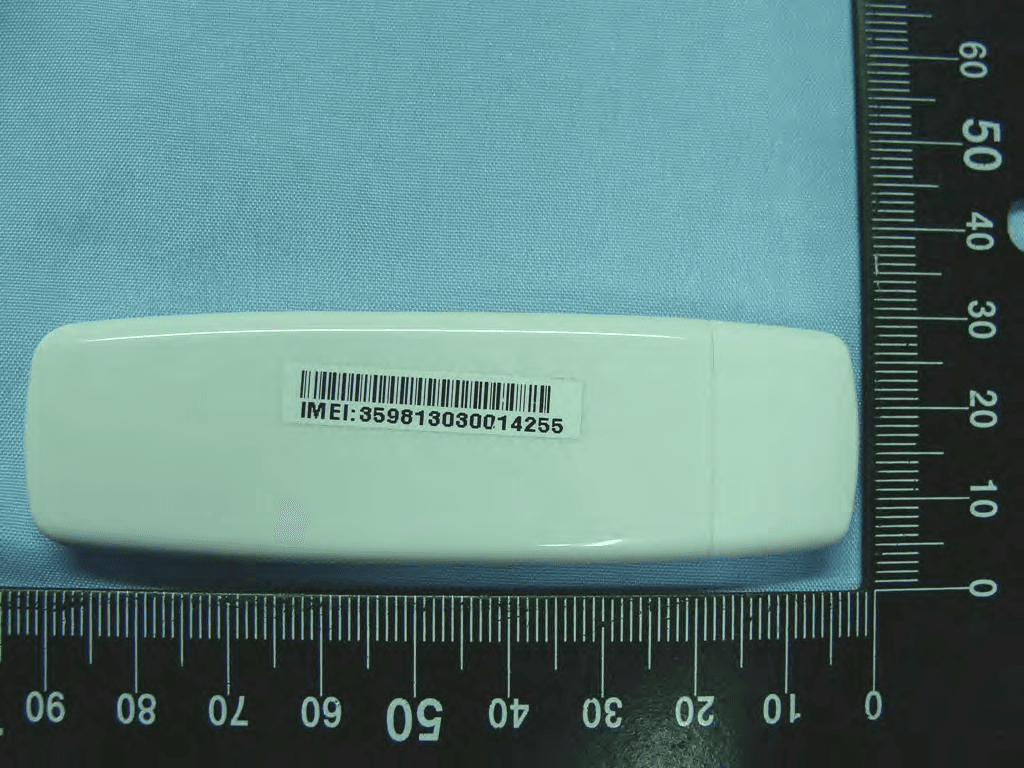
Click to zoom
Application Details
- Equipment Class
- PCB - PCS Licensed Transmitter
- Date of Grant
- Apr 14, 2010
- Application Purpose
- Original Equipment
- Date of Application
- Apr 14, 2010
- Equipment Note
- DWM-156 3.75G HSUPA USB ADAPTER
- Frequency Range
- 1852.40000000 - 1907.60000000
- Company
- D-Link Corporation
- Country
- United States
Documents & Files
Document Text
Text extracted from the exhibit documents filed with the FCC. Open a document above to read the original.
Users Manual
1.1Setting Via the Profiles icon the user can create, modify and delete profiles as well as define default profiles. 1.1.1. New Profile You can create your own personal profile. The Data Card supports two types of profile: RAS and NDIS. Each profile contains the account information that is used to establish the connection. Follow the steps below to create a personalized profile: 1. Click the Profile button. 2. Click the New button to activate the wizard to help you create a new profile. 3. Select the profile type, NDIS or RAS, and enter the name for the connection. 4. Enter the parameters relative to the APN, (only in the case of a RAS connection), and the telephone number. This data can be obtained from your cellular phone network operator. 5. Confirm the choices made by clicking the OK button. 1.1.1.1. Editing 1. Click the Profile button. 2. Select a profile and click the Edit button. 3. Click on the selected field and type in the updated information . 4. Click the OK button to close the Edit Profile window. 1.1.1.2. Deleting Single Profiles 1. Click the Profile button. 2. Select the profile and click the Delete button. 3. Click the Yes button to confirm the deletion. 1.1.1.3. Deleting All 1. Click the Profile button. 2. Select the profiles to delete. 3. Click the Delete button. 1.1.1.4. Setting as Default Profile 1. Click the Profile button. 2. Select the profile to be used as the Default one . 3. Click Set as Default Profile. 1.1.2 PIN The DWM-156 can manage SIM-related information such as PIN code enabling/disabling, changing PIN1/PIN2. 1.1.2.1. Enabling/Disabling PIN Code To prevent unauthorized use of the SIM card a PIN code can be used for security. Disable (default) 1. Select Profile > PIN > Disable. Enable 1. Select Profile > PIN > Enable. 2. Enter the correct PIN code Note: The PIN is provided by the network provider. 3. Click the OK button to enable. Warning: The PIN code must be entered correctly within three [3] tries. Failure to do so will result in the SIM card being blocked. If a PIN number has been enabled, the user will be asked to enter it before accessing the DWM-156 software. The following window will be displayed. 1.Enter the PIN code. 2.Click the OK button. 1.1.2.2 Changing PIN Code SIM cards often contain two PIN codes that can be changed. 1.Select Profile > PIN > Change code. 2.Enter the details in the following fields: Enter Current PIN2 Code, Enter New PIN2 Code and Confirm New PIN2 Code. Warning: The current PIN code must be entered correctly within three [3] tries. Failure to do so will result in the SIM card being blocked. 3.Click the OK button to change. 4.When the procedure completes a window is displayed. Click the OK button to exit. 1.1.3. Band Settings The DWM-156 supports three options for band selection: Option Description Automatic The DWM-156 automatically selects the band on the basis of the networks available in current area and those supported by the Data Card. 3G only The Data Card can be used exclusively with the 3G UMTS/HSPA service (used in Europe, Asia and Australia). 2G only The Data Card can be used exclusively with the 2G GSM/GPRS service or the EDGE 850/900/1800/1900. To modify the band settings, proceed as follows: 1. Select Profile > Band. 2. Select Band tab. 3. Select Automatic, 3G only or 2G only. 4. Click the Apply button and then OK. 1.1.4 Network Settings The geographical area where the Data Card is used may be covered by more than one network. The management software uses two options for selecting the network. Option Description Automatic By default the Data Card will select the Taiwan Mobile network automatically. Manual Users can use the Data Card to get a list of the networks and select an available network to use. To set the network manually, proceed as follows: 1. Select Profile > Network. 2. Select Manual. 3. Click the Search button to view all the networks available. 4. Select a network operator and click the Apply button. 1.2 Phone The DWM-156 contacts manager allows you to display all the contacts on the PC or on the SIM card. Contacts can be added, edited or deleted. 1.2.1. Contacts 1. Click the Contacts button. 2. Click the Add button. 3. In the Add Contact window, enter the name and telephone number of the contact, and where to store the details (PC or SIM). 4. Click the OK button to add the contact. 1.2.1.1 Editing Contacts 1. Click the Contacts button. 2. Select the contact to edit. 3. Click the Edit button. 4. Modify the contact’s details. 5. Click the OK button to save the changes. 1.2.1.2 Deleting Single Contacts 1. Click the Contacts button. 2. Select the contact to delete. 3. The message box "Do you want to delete selected contact(s)?" pops up. 4. Click the Delete button. 5. Click the Yes button to confirm the deletion. 6. The message box "Done" pops up. Click the OK button. 1.2.1.3 Deleting Multiple Contacts 1. Click the Contacts button. 2. Click the Ctrl and select the contact to delete. 3. The message box "Do you want to delete selected contact(s)?" pops up. 4. Click the Delete button. 5. Click the Yes button to confirm the deletion. 6. The message box "Done" pops up. Click the OK button. 1.2.2 Call log 1. You can see the call log on the list. 2. Clear all calls. 3. The message box "Do you want to clear all logs?" pops up. Choose Y. 1.2.3. Call Settings 1.2. 1.2.3.1 Call Barring 1. Select Contacts > Call Settings > Call Barring. 2. After Querying finish, you can set outgoing calls and incoming call, the drop- down lists of outgoing calls are all, International, International except to home and off and the drop-down of incoming calls are all, When roaming and off. 3. Choose one of them, enter Call Barring code, press OK button to confirm it. You can see SS processing. 1.2.3.2 Call Divert 1. Select Contacts > Call Settings > Call Divert. 2. You can Enable "All voice calls", "If busy", "If not answered", "If out of reach", if you enable All voice calls, please enter the phone number. You can also choose 5 to 3…
Text truncated - open the document above for the full version.
External Photos
Photographs of EUT Report No.: EP020329 Model Name: DWM-156 SPORTON INTERNATIONAL INC. Page Number : 1 of 17 TEL : 886-3-327-3456 Issued Date : Mar. 26, 2010 FAX : 886-3-328-4978 Report Version : Rev. 01 FCC ID : KA2WM156A2 : 1. External Photograph of EUT Photographs of EUT Report No.: EP020329 Model Name: DWM-156 SPORTON INTERNATIONAL INC. Page Number : 2 of 17 TEL : 886-3-327-3456 Issued Date : Mar. 26, 2010 FAX : 886-3-328-4978 Report Version : Rev. 01 FCC ID : KA2WM156A2 : Photographs of EUT Report No.: EP020329 Model Name: DWM-156 SPORTON INTERNATIONAL INC. Page Number : 3 of 17 TEL : 886-3-327-3456 Issued Date : Mar. 26, 2010 FAX : 886-3-328-4978 Report Version : Rev. 01 FCC ID : KA2WM156A2 : Photographs of EUT Report No.: EP020329 Model Name: DWM-156 SPORTON INTERNATIONAL INC. Page Number : 4 of 17 TEL : 886-3-327-3456 Issued Date : Mar. 26, 2010 FAX : 886-3-328-4978 Report Version : Rev. 01 FCC ID : KA2WM156A2 : Photographs of EUT Report No.: EP020329 Model Name: DWM-156 SPORTON INTERNATIONAL INC. Page Number : 5 of 17 TEL : 886-3-327-3456 Issued Date : Mar. 26, 2010 FAX : 886-3-328-4978 Report Version : Rev. 01 FCC ID : KA2WM156A2 : Photographs of EUT Report No.: EP020329 Model Name: DWM-156 SPORTON INTERNATIONAL INC. Page Number : 6 of 17 TEL : 886-3-327-3456 Issued Date : Mar. 26, 2010 FAX : 886-3-328-4978 Report Version : Rev. 01 FCC ID : KA2WM156A2 : 720510
ID Label/Location Info
Label Location Back of the device and label location
Internal Photos
Photographs of EUT Report No.: EP020329 Model Name: DWM-156 SPORTON INTERNATIONAL INC. Page Number : 7 of 17 TEL : 886-3-327-3456 Issued Date : Mar. 26, 2010 FAX : 886-3-328-4978 Report Version : Rev. 01 FCC ID : KA2WM156A2 : 2. Internal Photograph of EUT Photographs of EUT Report No.: EP020329 Model Name: DWM-156 SPORTON INTERNATIONAL INC. Page Number : 8 of 17 TEL : 886-3-327-3456 Issued Date : Mar. 26, 2010 FAX : 886-3-328-4978 Report Version : Rev. 01 FCC ID : KA2WM156A2 : Photographs of EUT Report No.: EP020329 Model Name: DWM-156 SPORTON INTERNATIONAL INC. Page Number : 9 of 17 TEL : 886-3-327-3456 Issued Date : Mar. 26, 2010 FAX : 886-3-328-4978 Report Version : Rev. 01 FCC ID : KA2WM156A2 : Photographs of EUT Report No.: EP020329 Model Name: DWM-156 SPORTON INTERNATIONAL INC. Page Number : 10 of 17 TEL : 886-3-327-3456 Issued Date : Mar. 26, 2010 FAX : 886-3-328-4978 Report Version : Rev. 01 FCC ID : KA2WM156A2 : Photographs of EUT Report No.: EP020329 Model Name: DWM-156 SPORTON INTERNATIONAL INC. Page Number : 11 of 17 TEL : 886-3-327-3456 Issued Date : Mar. 26, 2010 FAX : 886-3-328-4978 Report Version : Rev. 01 FCC ID : KA2WM156A2 : Photographs of EUT Report No.: EP020329 Model Name: DWM-156 SPORTON INTERNATIONAL INC. Page Number : 12 of 17 TEL : 886-3-327-3456 Issued Date : Mar. 26, 2010 FAX : 886-3-328-4978 Report Version : Rev. 01 FCC ID : KA2WM156A2 : Photographs of EUT Report No.: EP020329 Model Name: DWM-156 SPORTON INTERNATIONAL INC. Page Number : 13 of 17 TEL : 886-3-327-3456 Issued Date : Mar. 26, 2010 FAX : 886-3-328-4978 Report Version : Rev. 01 FCC ID : KA2WM156A2 : Photographs of EUT Report No.: EP020329 Model Name: DWM-156 SPORTON INTERNATIONAL INC. Page Number : 14 of 17 TEL : 886-3-327-3456 Issued Date : Mar. 26, 2010 FAX : 886-3-328-4978 Report Version : Rev. 01 FCC ID : KA2WM156A2 : Photographs of EUT Report No.: EP020329 Model Name: DWM-156 SPORTON INTERNATIONAL INC. Page Number : 15 of 17 TEL : 886-3-327-3456 Issued Date : Mar. 26, 2010 FAX : 886-3-328-4978 Report Version : Rev. 01 FCC ID : KA2WM156A2 : WWAN Antenna <Tx/Rx> Photographs of EUT Report No.: EP020329 Model Name: DWM-156 SPORTON INTERNATIONAL INC. Page Number : 16 of 17 TEL : 886-3-327-3456 Issued Date : Mar. 26, 2010 FAX : 886-3-328-4978 Report Version : Rev. 01 FCC ID : KA2WM156A2 : WWAN Antenna <Tx/Rx> Photographs of EUT Report No.: EP020329 Model Name: DWM-156 SPORTON INTERNATIONAL INC. Page Number : 17 of 17 TEL : 886-3-327-3456 Issued Date : Mar. 26, 2010 FAX : 886-3-328-4978 Report Version : Rev. 01 FCC ID : KA2WM156A2 : 720510 WWAN Antenna <Tx/Rx>
RF Exposure Info
Test Laboratory: Sporton International Inc. SAR/HAC Testing Lab Date: 2010/3/16 System Check_Body_835MHz_100316 DUT: Dipole 835 MHz Communication System: CW; Frequency: 835 MHz;Duty Cycle: 1:1 Medium: MSL_850_100316 Medium parameters used: f = 835 MHz; σ = 0.967 mho/m; ε r = 54.1; ρ = 1000 kg/m 3 Ambient Temperature:22.5 °C; Liquid Temperature:21.5 °C DASY4 Configuration: - Probe: ET3DV6 - SN1787; ConvF(6.09, 6.09, 6.09); Calibrated: 2009/5/26 - Sensor-Surface: 4mm (Mechanical Surface Detection) - Electronics: DAE3 Sn577; Calibrated: 2009/8/24 - Phantom: ELI 4.0_Front; Type: QDOVA001BB; Serial: 1026 - Measurement SW: DASY4, V4.7 Build 80; Postprocessing SW: SEMCAD, V1.8 Build 186 Pin=100mW/Area Scan (61x61x1): Measurement grid: dx=15mm, dy=15mm Maximum value of SAR (interpolated) = 1.09 mW/g Pin=100mW/Zoom Scan (7x7x7)/Cube 0: Measurement grid: dx=5mm, dy=5mm, dz=5mm Reference Value = 34.8 V/m; Power Drift = 0.021 dB Peak SAR (extrapolated) = 1.43 W/kg SAR(1 g) = 1 mW/g; SAR(10 g) = 0.656 mW/g Maximum value of SAR (measured) = 1.09 mW/g 0 dB = 1.09mW/g Test Laboratory: Sporton International Inc. SAR/HAC Testing Lab Date: 2010/3/17 System Check_Body_835MHz_100317 DUT: Dipole 835 MHz Communication System: CW; Frequency: 835 MHz;Duty Cycle: 1:1 Medium: MSL_850_100317 Medium parameters used: f = 835 MHz; σ = 0.994 mho/m; ε r = 56; ρ = 1000 kg/m 3 Ambient Temperature:22.8 °C; Liquid Temperature:21.3 °C DASY4 Configuration: - Probe: ET3DV6 - SN1787; ConvF(6.09, 6.09, 6.09); Calibrated: 2009/5/26 - Sensor-Surface: 4mm (Mechanical Surface Detection) - Electronics: DAE3 Sn577; Calibrated: 2009/8/24 - Phantom: ELI 4.0_Front; Type: QDOVA001BB; Serial: 1026 - Measurement SW: DASY4, V4.7 Build 80; Postprocessing SW: SEMCAD, V1.8 Build 186 Pin=100mW/Area Scan (61x61x1): Measurement grid: dx=15mm, dy=15mm Maximum value of SAR (interpolated) = 0.972 mW/g Pin=100mW/Zoom Scan (7x7x7)/Cube 0: Measurement grid: dx=5mm, dy=5mm, dz=5mm Reference Value = 32.3 V/m; Power Drift = -0.032 dB Peak SAR (extrapolated) = 1.28 W/kg SAR(1 g) = 0.894 mW/g; SAR(10 g) = 0.591 mW/g Maximum value of SAR (measured) = 0.969 mW/g 0 dB = 0.969mW/g Test Laboratory: Sporton International Inc. SAR/HAC Testing Lab Date: 2010/3/16 System Check_Body_1900MHz_100316 DUT: Dipole 1900 MHz Communication System: CW; Frequency: 1900 MHz;Duty Cycle: 1:1 Medium: MSL_1900_100316 Medium parameters used: f = 1900 MHz; σ = 1.53 mho/m; ε r = 54.3; ρ = 1000 kg/m 3 Ambient Temperature:22.3 °C; Liquid Temperature:21.3 °C DASY4 Configuration: - Probe: ET3DV6 - SN1787; ConvF(4.49, 4.49, 4.49); Calibrated: 2009/5/26 - Sensor-Surface: 4mm (Mechanical Surface Detection) - Electronics: DAE3 Sn577; Calibrated: 2009/8/24 - Phantom: ELI 4.0_Front; Type: QDOVA001BB; Serial: 1026 - Measurement SW: DASY4, V4.7 Build 80; Postprocessing SW: SEMCAD, V1.8 Build 186 Pin=100mW/Area Scan (91x91x1): Measurement grid: dx=10mm, dy=10mm Maximum value of SAR (interpolated) = 4.37 mW/g Pin=100mW/Zoom Scan (7x7x7)/Cube 0: Measurement grid: dx=5mm, dy=5mm, dz=5mm Reference Value = 58.2 V/m; Power Drift = 0.008 dB Peak SAR (extrapolated) = 5.66 W/kg SAR(1 g) = 3.73 mW/g; SAR(10 g) = 2.05 mW/g Maximum value of SAR (measured) = 4.26 mW/g 0 dB = 4.26mW/g
RF Exposure Info
Test Laboratory: Sporton International Inc. SAR/HAC Testing Lab Date: 2010/3/17 #30 GSM850_GPRS12_Horizontal Up_0.5cm_Ch251 DUT: 020329 Communication System: GSM850; Frequency: 848.8 MHz;Duty Cycle: 1:2 Medium: MSL_850_100317 Medium parameters used: f = 849 MHz; σ = 1.01 mho/m; ε r = 55.9; ρ = 1000 kg/m 3 Ambient Temperature:22.8 °C; Liquid Temperature:21.3 °C DASY4 Configuration: - Probe: ET3DV6 - SN1787; ConvF(6.09, 6.09, 6.09); Calibrated: 2009/5/26 - Sensor-Surface: 4mm (Mechanical Surface Detection) - Electronics: DAE3 Sn577; Calibrated: 2009/8/24 - Phantom: ELI 4.0_Front; Type: QDOVA001BB; Serial: 1026 - Measurement SW: DASY4, V4.7 Build 80; Postprocessing SW: SEMCAD, V1.8 Build 186 Ch251/Area Scan (31x51x1): Measurement grid: dx=20mm, dy=20mm Maximum value of SAR (interpolated) = 1.52 mW/g Ch251/Zoom Scan (5x5x7)/Cube 0: Measurement grid: dx=8mm, dy=8mm, dz=5mm Reference Value = 30.6 V/m; Power Drift = 0.061 dB Peak SAR (extrapolated) = 1.92 W/kg SAR(1 g) = 1.19 mW/g; SAR(10 g) = 0.744 mW/g Maximum value of SAR (measured) = 1.29 mW/g 0 dB = 1.29mW/g Test Laboratory: Sporton International Inc. SAR/HAC Testing Lab Date: 2010/3/17 #30 GSM850_GPRS12_Horizontal Up_0.5cm_Ch251_2D DUT: 020329 Communication System: GSM850; Frequency: 848.8 MHz;Duty Cycle: 1:2 Medium: MSL_850_100317 Medium parameters used: f = 849 MHz; σ = 1.01 mho/m; ε r = 55.9; ρ = 1000 kg/m 3 Ambient Temperature:22.8 °C; Liquid Temperature:21.3 °C DASY4 Configuration: - Probe: ET3DV6 - SN1787; ConvF(6.09, 6.09, 6.09); Calibrated: 2009/5/26 - Sensor-Surface: 4mm (Mechanical Surface Detection) - Electronics: DAE3 Sn577; Calibrated: 2009/8/24 - Phantom: ELI 4.0_Front; Type: QDOVA001BB; Serial: 1026 - Measurement SW: DASY4, V4.7 Build 80; Postprocessing SW: SEMCAD, V1.8 Build 186 Ch251/Area Scan (31x51x1): Measurement grid: dx=20mm, dy=20mm Maximum value of SAR (interpolated) = 1.52 mW/g Ch251/Zoom Scan (5x5x7)/Cube 0: Measurement grid: dx=8mm, dy=8mm, dz=5mm Reference Value = 30.6 V/m; Power Drift = 0.061 dB Peak SAR (extrapolated) = 1.92 W/kg SAR(1 g) = 1.19 mW/g; SAR(10 g) = 0.744 mW/g Maximum value of SAR (measured) = 1.29 mW/g Test Laboratory: Sporton International Inc. SAR/HAC Testing Lab Date: 2010/3/17 #32 GSM850_GPRS12_Horizontal Down_0.5cm_Ch251 DUT: 020329 Communication System: GSM850; Frequency: 848.8 MHz;Duty Cycle: 1:2 Medium: MSL_850_100317 Medium parameters used: f = 849 MHz; σ = 1.01 mho/m; ε r = 55.9; ρ = 1000 kg/m 3 Ambient Temperature:22.8 °C; Liquid Temperature:21.3 °C DASY4 Configuration: - Probe: ET3DV6 - SN1787; ConvF(6.09, 6.09, 6.09); Calibrated: 2009/5/26 - Sensor-Surface: 4mm (Mechanical Surface Detection) - Electronics: DAE3 Sn577; Calibrated: 2009/8/24 - Phantom: ELI 4.0_Front; Type: QDOVA001BB; Serial: 1026 - Measurement SW: DASY4, V4.7 Build 80; Postprocessing SW: SEMCAD, V1.8 Build 186 Ch251/Area Scan (31x51x1): Measurement grid: dx=20mm, dy=20mm Maximum value of SAR (interpolated) = 1.09 mW/g Ch251/Zoom Scan (5x5x7)/Cube 0: Measurement grid: dx=8mm, dy=8mm, dz=5mm Reference Value = 26.7 V/m; Power Drift = -0.085 dB Peak SAR (extrapolated) = 1.63 W/kg SAR(1 g) = 1.02 mW/g; SAR(10 g) = 0.642 mW/g Maximum value of SAR (measured) = 1.08 mW/g 0 dB = 1.08mW/g Test Laboratory: Sporton International Inc. SAR/HAC Testing Lab Date: 2010/3/17 #26 GSM850_GPRS12_Vertical Front_0.5cm_Ch189 DUT: 020329 Communication System: GSM850; Frequency: 836.4 MHz;Duty Cycle: 1:2 Medium: MSL_850_100317 Medium parameters used : f = 836.4 MHz; σ = 0.996 mho/m; ε r = 56; ρ = 1000 kg/m 3 Ambient Temperature:22.8 °C; Liquid Temperature:21.3 °C DASY4 Configuration: - Probe: ET3DV6 - SN1787; ConvF(6.09, 6.09, 6.09); Calibrated: 2009/5/26 - Sensor-Surface: 4mm (Mechanical Surface Detection) - Electronics: DAE3 Sn577; Calibrated: 2009/8/24 - Phantom: ELI 4.0_Front; Type: QDOVA001BB; Serial: 1026 - Measurement SW: DASY4, V4.7 Build 80; Postprocessing SW: SEMCAD, V1.8 Build 186 Ch189/Area Scan (31x51x1): Measurement grid: dx=20mm, dy=20mm Maximum value of SAR (interpolated) = 0.487 mW/g Ch189/Zoom Scan (5x5x7)/Cube 0: Measurement grid: dx=8mm, dy=8mm, dz=5mm Reference Value = 11.7 V/m; Power Drift = -0.018 dB Peak SAR (extrapolated) = 0.764 W/kg SAR(1 g) = 0.420 mW/g; SAR(10 g) = 0.243 mW/g Maximum value of SAR (measured) = 0.458 mW/g 0 dB = 0.458mW/g Test Laboratory: Sporton International Inc. SAR/HAC Testing Lab Date: 2010/3/17 #27 GSM850_GPRS12_Vertical Back_0.5cm_Ch189 DUT: 020329 Communication System: GSM850; Frequency: 836.4 MHz;Duty Cycle: 1:2 Medium: MSL_850_100317 Medium parameters used : f = 836.4 MHz; σ = 0.996 mho/m; ε r = 56; ρ = 1000 kg/m 3 Ambient Temperature:22.8 °C; Liquid Temperature:21.3 °C DASY4 Configuration: - Probe: ET3DV6 - SN1787; ConvF(6.09, 6.09, 6.09); Calibrated: 2009/5/26 - Sensor-Surface: 4mm (Mechanical Surface Detection) - Electronics: DAE3 Sn577; Calibrated: 2009/8/24 - Phantom: ELI 4.0_Front; Type: QDOVA001BB; Serial: 1026 - Measurement SW: DASY4, V4.7 Build 80; Postprocessing SW: SEMCAD, V1.8 Build 186 Ch189/Area Scan (31x51x1): Measurement grid: dx=20mm, dy=20mm Maximum value of SAR (interpolated) = 0.483 mW/g Ch189/Zoom Scan (5x5x7)/Cube 0: Measurement grid: dx=8mm, dy=8mm, dz=5mm Reference Value = 20.4 V/m; Power Drift = -0.141 dB Peak SAR (extrapolated) = 0.680 W/kg SAR(1 g) = 0.459 mW/g; SAR(10 g) = 0.302 mW/g Maximum value of SAR (measured) = 0.501 mW/g 0 dB = 0.501mW/g Test Laboratory: Sporton International Inc. SAR/HAC Testing Lab Date: 2010/3/17 #28 GSM850_GPRS12_Tip Mode_0.5cm_Ch189 DUT: 020329 Communication System: GSM850; Frequency: 836.4 MHz;Duty Cycle: 1:2 Medium: MSL_850_100317 Medium parameters used : f = 836.4 MHz; σ = 0.996 mho/m; ε r = 56; ρ = 1000 kg/m 3 Ambient Temperature:22.8 °C; Liquid Temperature:21.3 °C DASY4 Configuration: - Probe: ET3DV6 - SN1787; ConvF(6.09, 6.09, 6.09); Calibrated: 2009/5/26 - Sensor-Surface: 4mm (Mechanical Surface Detection) - Electronics: DAE3 Sn577; Calibrated: 2009/8/24 - Phantom: ELI 4.0_Front; Type: QDOVA001BB; Serial: 1026 - Measurement S…
Text truncated - open the document above for the full version.
RF Exposure Info
SPORTON INTERNATIONAL INC. Calibration Certificate of DASY SPORTON INTERNATIONAL INC. Calibration Certificate of DASY SPORTON INTERNATIONAL INC. Calibration Certificate of DASY SPORTON INTERNATIONAL INC. Calibration Certificate of DASY SPORTON INTERNATIONAL INC. Calibration Certificate of DASY SPORTON INTERNATIONAL INC. Calibration Certificate of DASY SPORTON INTERNATIONAL INC. Calibration Certificate of DASY SPORTON INTERNATIONAL INC. Calibration Certificate of DASY SPORTON INTERNATIONAL INC. Calibration Certificate of DASY SPORTON INTERNATIONAL INC. Calibration Certificate of DASY SPORTON INTERNATIONAL INC. Calibration Certificate of DASY SPORTON INTERNATIONAL INC. Calibration Certificate of DASY SPORTON INTERNATIONAL INC. Calibration Certificate of DASY SPORTON INTERNATIONAL INC. Calibration Certificate of DASY SPORTON INTERNATIONAL INC. Calibration Certificate of DASY SPORTON INTERNATIONAL INC. Calibration Certificate of DASY SPORTON INTERNATIONAL INC. Calibration Certificate of DASY SPORTON INTERNATIONAL INC. Calibration Certificate of DASY SPORTON INTERNATIONAL INC. Calibration Certificate of DASY SPORTON INTERNATIONAL INC. Calibration Certificate of DASY SPORTON INTERNATIONAL INC. Calibration Certificate of DASY SPORTON INTERNATIONAL INC. Calibration Certificate of DASY SPORTON INTERNATIONAL INC. Calibration Certificate of DASY SPORTON INTERNATIONAL INC. Calibration Certificate of DASY SPORTON INTERNATIONAL INC. Calibration Certificate of DASY SPORTON INTERNATIONAL INC. Calibration Certificate of DASY SPORTON INTERNATIONAL INC. Calibration Certificate of DASY SPORTON INTERNATIONAL INC. Calibration Certificate of DASY SPORTON INTERNATIONAL INC. Calibration Certificate of DASY SPORTON INTERNATIONAL INC. Calibration Certificate of DASY SPORTON INTERNATIONAL INC. Calibration Certificate of DASY SPORTON INTERNATIONAL INC. Calibration Certificate of DASY
RF Exposure Info
SPORTON INTERNATIONAL INC. Page Number : F1 of F7 TEL : 886-3-327-3456 Report Issued Date : Mar. 26, 2010 FAX : 886-3-328-4978 Report Version : Rev. 01 FCC ID : KA2WM156A2 FCC SAR Test Report Report No. : FA020329 Appendix F. FCC 3G SAR Measurement Procedures Conducted Output Power: The EUT was tested according to the requirements of the FCC 3G procedures and the TS 34.121. The EUT's WCDMA and HSPA function is Release 6 version supporting HSDPA Category 8, and HSUPA Category 5. A detailed analysis of the output power for all WCDMA, HSPDA, and HSPA (HSUPA & HSDPA) modes is provided in the tables below. According to the FCC 3G procedures, handsets with both HSDPA and HSUPA should be tested according to Release 6 HSPA test procedures, and the EUT does not support VOIP function over the HSPA function. Device was tested according to procedure KDB941225 - section Release 6 HSPA Data Devices as documented/evaluated in the following table. WCDMA SAR Test mode - Conducted Power Mode Setup Cell band (850) PCS band (1900) CH4132 CH4182 CH4233 CH9262 CH9400 CH9538 826.4 (MHz) 836.4 (MHz) 846.6 (MHz) 1852.4 (MHz) 1880.0 (MHz) 1907.6 (MHz) WCDMA RMC 12.2Kbps 22.08 22.16 22.56 17.86 17.88 18.38 HSDPA Subtest 1 22.08 22.09 22.29 17.70 17.83 18.22 Subtest 2 21.71 21.84 21.95 17.85 17.80 18.36 Subtest 3 21.55 21.85 21.87 17.88 17.84 18.32 Subtest 4 21.55 21.66 21.91 17.96 17.90 18.28 HSUPA Subtest 1 21.38 21.32 21.76 17.30 17.38 17.93 Subtest 2 19.76 19.77 20.13 16.07 16.57 17.15 Subtest 3 20.99 21.33 20.90 17.38 17.56 17.41 Subtest 4 21.20 21.08 20.77 17.07 17.15 17.79 Subtest 5 20.92 21.22 21.34 17.60 17.42 17.80 SPORTON INTERNATIONAL INC. Page Number : F2 of F7 TEL : 886-3-327-3456 Report Issued Date : Mar. 26, 2010 FAX : 886-3-328-4978 Report Version : Rev. 01 FCC ID : KA2WM156A2 FCC SAR Test Report Report No. : FA020329 WCDMA Setup Configuration: a. The EUT was connected to Base Station referred to the drawing of Setup Configuration. b. The RF path losses were compensated into the measurements. c. A call was established between EUT and Base Station with following setting i. Data rates: Varied from RMC 12.2Kbps ii. RMC Test Loop = Loop Mode 1 iii. Power Ctrl Mode = All Up bits d. The transmitted maximum output power was recorded. Setup Configuration SPORTON INTERNATIONAL INC. Page Number : F3 of F7 TEL : 886-3-327-3456 Report Issued Date : Mar. 26, 2010 FAX : 886-3-328-4978 Report Version : Rev. 01 FCC ID : KA2WM156A2 FCC SAR Test Report Report No. : FA020329 HSDPA Setup Configuration: a. The EUT was connected to Base Station referred to the drawing of Setup Configuration. b. The RF path losses were compensated into the measurements. c. A call was established between EUT and Base Station with following setting: i. Set Gain Factors (β c and β d ) and parameters were set according to each ii. Specific sub-test in the following table, C10.1.4, quoted from the TS 34.121 iii. Set RMC12.2Kbps + HSDPA mode. iv. Set Cell Power = -86 dBm v. Set HS-DSCH Configuration Type to FRC (H-set 1, QPSK) vi. Select HSDPA Uplink Parameters vii. Set DeltaACK, DeltaNACK and DeltaCQI = 8 viii. Set Ack-Nack Repetition Factor to 3 ix. Set CQI Feedback Cycle (k) to 4 ms x. Set CQI Repetition Factor to 2 xi. Power Ctrl Mode = All Up bits d. The transmitted maximum output power was recorded. Setup Configuration SPORTON INTERNATIONAL INC. Page Number : F4 of F7 TEL : 886-3-327-3456 Report Issued Date : Mar. 26, 2010 FAX : 886-3-328-4978 Report Version : Rev. 01 FCC ID : KA2WM156A2 FCC SAR Test Report Report No. : FA020329 HSPA (HSUPA & HSPDA) Setup Configuration: a. The EUT was connected to Base Station referred to the drawing of Setup Configuration. b. The RF path losses were compensated into the measurements. c. A call was established between EUT and Base Station with following setting * : i. Call Configs = 5.2B, 5.9B, 5.10B, and 5.13.2B with QPSK ii. Set the Gain Factors (β c and β d ) and parameters (AG Index) were set according to each specific sub-test in the following table, C11.1.3, quoted from the TS 34.121 iii. Set Cell Power = -86 dBm iv. Set Channel Type = 12.2k + HSPA v. Set UE Target Power vi. Power Ctrl Mode= Alternating bits vii. Set and observe the E-TFCI viii. Confirm that E-TFCI is equal to the target E-TFCI of 75 for sub-test 1, and other subtest’s E-TFCI d. The transmitted maximum output power was recorded. Setup Configuration Note: For details settings in the Agilent 8960 test equipment, please refer to the user guide “ HSUPA Measurement Guide with 8960 V7.5.0 Release 7 (2007-06) Ver.: v.02.18” SPORTON INTERNATIONAL INC. Page Number : F5 of F7 TEL : 886-3-327-3456 Report Issued Date : Mar. 26, 2010 FAX : 886-3-328-4978 Report Version : Rev. 01 FCC ID : KA2WM156A2 FCC SAR Test Report Report No. : FA020329 Example for HSPA Subtest 1, and other subtests following table, C11.1.3 (Gain Factors (β c = 11 and β d = 15)) Example: AG – Index = 20 for HSPA subtest 1 SPORTON INTERNATIONAL INC. Page Number : F6 of F7 TEL : 886-3-327-3456 Report Issued Date : Mar. 26, 2010 FAX : 886-3-328-4978 Report Version : Rev. 01 FCC ID : KA2WM156A2 FCC SAR Test Report Report No. : FA020329 Example: Confirm that E-TFCI is equal to the target E-TFCI of 75 for sub-test 1 SPORTON INTERNATIONAL INC. Page Number : F7 of F7 TEL : 886-3-327-3456 Report Issued Date : Mar. 26, 2010 FAX : 886-3-328-4978 Report Version : Rev. 01 FCC ID : KA2WM156A2 FCC SAR Test Report Report No. : FA020329 Reference: [1] 941225 D01 SAR test for 3G devices v02, SAR Measurement Procedures for 3G Devices CDMA 2000/Ev-Do/WCDMA/HSDPA/HSPA Oct. 2007 Laboratory Division Office of Engineering and Technology Federal Communications Commission [2.] TS 34.121 Universal Mobile Telecommunications System (UMTS); Terminal Conformance Specification, Radio Transmission and Reception (FDD) [3.] HSUPA Measurement Guide with 8960 V7.5.0 Release 7 (2007-06) Ver.: v.02.18
RF Exposure Info
SPORTON INTERNATIONAL INC. Page Number : 1 of 32 TEL : 886-3-327-3456 Report Issued Date : Apr. 06, 2010 FAX : 886-3-328-4978 Report Version : Rev. 02 FCC ID : KA2WM156A2 FCC SAR Test Report Report No. : FA020329 FCC SAR Test Report APPLICANT : D-Link Co. EQUIPMENT : DWM-156 3.75G HSUPA USB Adapter BRAND NAME : D-Link MODEL NAME : DWM-156 FCC ID : KA2WM156A2 STANDARD : FCC 47 CFR Part 2 (2.1093) IEEE C95.1-1999 IEEE 1528-2003 FCC OET Bulletin 65 Supplement C (Edition 01-01) The product was received on Feb. 03, 2010 and completely tested on Mar. 17, 2010. We, SPORTON INTERNATIONAL INC., would like to declare that the tested sample has been evaluated in accordance with the procedures and shown the compliance with the applicable technical standards. The test results in this report apply exclusively to the tested model / sample. Without written approval of SPORTON INTERNATIONAL INC., the test report shall not be reproduced except in full. Reviewed by: Roy Wu / Manager SPORTON INTERNATIONAL INC. No. 52, Hwa Ya 1 st Rd., Hwa Ya Technology Park, Kwei-Shan Hsiang, Tao Yuan Hsien, Taiwan, R.O.C. SPORTON INTERNATIONAL INC. Page Number : 2 of 32 TEL : 886-3-327-3456 Report Issued Date : Apr. 06, 2010 FAX : 886-3-328-4978 Report Version : Rev. 02 FCC ID : KA2WM156A2 FCC SAR Test Report Report No. : FA020329 Table of Contents Revision History ................................................................................................................................................................ 3 1. Statement of Compliance .......................................................................................................................................... 4 2. Administration Data ................................................................................................................................................... 5 2.1 Testing Laboratory ............................................................................................................................................ 5 2.2 Applicant ........................................................................................................................................................... 5 2.3 Manufacturer .................................................................................................................................................... 5 2.4 Application Details ............................................................................................................................................ 5 3. General Information ................................................................................................................................................... 6 3.1 Description of Device Under Test (DUT) ........................................................................................................... 6 3.2 Product Photos ..................................................................................................…
Text truncated - open the document above for the full version.
Contact Information
Applicant
Brett Adair(General Counsel)
Test Firm
Sporton International Inc.Alex Chen
Technical Specifications
| # | Rule Parts | Frequency Range | Power Output | Emission | Tolerance |
|---|---|---|---|---|---|
| 6 | 24E | 1.85 GHz - 1.91 GHz | 120.00 mW | 4M18F9W | 0.01 ppm |
Other Applications from D-Link Corporation

KA2CS6012A1
Jul 07, 20262K Fixed Indoor Cloud Camera, 2K Fixed Indoor Wi-Fi Camera
Equipment Class
DTS - Digital Transmission SystemKA2AE65UA1
Mar 02, 2026Wi-Fi 7 BE6500 USB 3.0 Dongle
Equipment Class
NII - Unlicensed National Information Infrastructure TXKA2APE9560A1
Nov 17, 2025BE9500 Celling mount Access Point
Equipment Class
6ID - 15E 6 GHz Low Power Indoor Access PointKA2AX9UA1
Dec 04, 2024AX900 Wi-Fi 6 USB Adapter, Wi-Fi 6 AX900 USB 2.0 Dongle
Equipment Class
DSS - Part 15 Spread Spectrum TransmitterKA2AC13UA1
Dec 04, 2024AC1300 Wi-Fi 5 USB Adapter, Wi-Fi 5 AC1300 USB 2.0 Dongle
Equipment Class
DTS - Digital Transmission System