M72-PKK002Intrinsically safe DECT Telephone handset
HP Inc.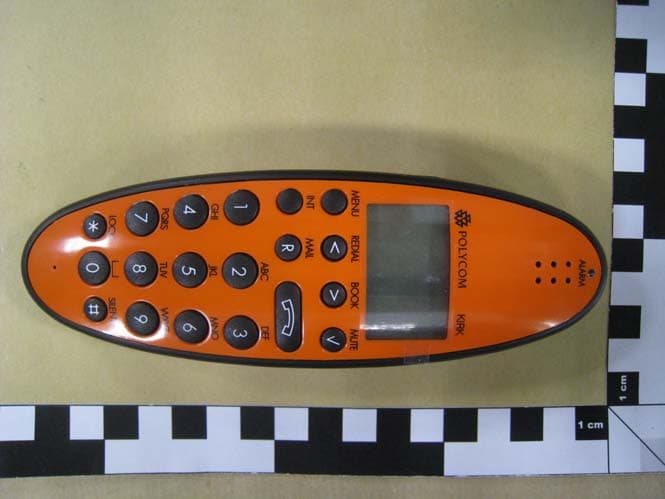
Click to zoom
Application Details
- Equipment Class
- PUE - Part 15 Unlicensed PCS portable Tx held to ear
- Date of Grant
- Mar 28, 2012
- Application Purpose
- Original Equipment
- Date of Application
- Mar 25, 2012
- Equipment Note
- Intrinsically safe DECT Telephone handset
- Frequency Range
- 1921.53600000 - 1928.44800000
- Company
- HP Inc.
- Country
- United States
Documents & Files
Document Text
Text extracted from the exhibit documents filed with the FCC. Open a document above to read the original.
Users Manual
Polycom ® KIRK ® 4080 User Guide DRAFT Congratulations on your new KIRK handset Your new handset from Polycom will provide you with the greatest possible degree of flexibility and mobility due to high battery capacity, low weight, practical size and design. DRAFT Contents: 1. Warnings ............................................................................... 4 2. Label information.................................................................. 5 3. Construction .......................................................................... 6 4. Battery information............................................................... 7 5. Charging................................................................................. 8 6. Key functions......................................................................... 9 7. Turning the handset ON/OFF............................................ 11 8. Making a call.......................................................................... 12 8.1 Receiving calls ................................................................. 14 8.2 During conversation ...................................................... 15 8.2.1 Volume regulation................................................. 15 8.2.2 Microphone mute.................................................. 15 8.2.3 Transferring the call to another handset............ 15 9. Menu structure...................................................................... 16 9.1 Using the alphanumeric keyboard............................... 17 9.2 The key functions............................................................ 18 9.3 Handset set-up ................................................................ 19 9.4 Handset functions........................................................... 21 9.5 Menu subscription and login........................................ 22 9.5.1 Create subscription ............................................... 23 9.5.2 Login........................................................................ 24 9.5.3 Auto login............................................................... 25 9.5.4 Remove subscription............................................. 28 9.5.5 Change startup text............................................... 28 9.6 Battery............................................................................... 29 9.7 Redial ............................................................................... 30 9.8 Book................................................................................... 32 9.9 External services.............................................................. 34 9.10 MSF Functions............................................................... 35 9.11 Mail/Textmessages....................................................... 36 9.12 Menu language.............................................................. 40 10. Shortcuts................................................................................. 41 11. Speed dial............................................................................... 42 12. Date and Time Function....................................................... 43 13. Advanced settings................................................................. 44 14. Information ............................................................................ 47 14.1 Error tree ........................................................................ 47 14.2 Error information.......................................................... 48 14.3 Warranty......................................................................... 48 14.4 Technical information................................................... 49 15. EC Declaration of Conformity ............................................ 50 DRAFT 1. Warnings The KIRK 4080 is developed for use in potentially explosive working environments, as defined by local fire protection authorities. The handset complies with the ATEX directive 94/9/EC as well as IEC standards, please refer to Declaration of Conformity at the end of this user guide for more details. For safe use of KIRK 4080, please remind the following: • Please consult your system manager for instruction before using KIRK 4080 • Do not open KIRK 4080 in a potentially explosive atmosphere • Battery may only be charged outside the hazardous area and the handset may only be charged with dedicated char- ger, part number 8464 2496. • The AC power adaptor used in connection with the charger must notbe connected to a higher voltage than 250V AC. • Only battery part-number 8474 3225may be used. • When an additional headset is needed, only part-number 0231 9517is allowed. • When the handset is used in hazardous area, the handset must be used with leather pouch part-number 0231 9543 if relative umidity <60%, or when the user wears clothes that could cause electrostatic charging. 4 DRAFT • If defects occur, remove KIRK 4080 immediately from the potentially explosive atmosphere • Only Polycom may repair and service KIRK 4080 • Relevant data concerning repairs must be logged • For traceability it is advisable to keep a record of type- and serial numbers of the handsets, as well as the name of users of the handset 5 DRAFT 6 Key for internal calls (not used on KIRK system 1500) Loud speaking Keyboard LOCK (Menu*) MENU key Display with backlight Recall key (MAIL key) SILENT (Menu#) ON/OFF HOOK key- also used as turn on key CONFIRMATION key - MUTE microphone. MUTE ringer when ringing. Long key press turns off. Right arrow key, save number. Telephone book menu from standby text Left arrow key, Redial menu from standby text Volume up/down LED Alarm key Headset Connector 3. Construction DRAFT 4. Battery information The battery is connected to the handset from factory and must not be removed. To replace the battery, please contact your local distributor. 7 DRAFT 5. Charging Do not charge KIRK 4080 in a potentially explosive atmosphere. Use only the dedicated charger 8464 2458 (ora…
Text truncated - open the document above for the full version.
Users Manual
Polycom ® KIRK ® 4080 User Guide DRAFT Congratulations on your new KIRK handset Your new handset from Polycom will provide you with the greatest possible degree of flexibility and mobility due to high battery capacity, low weight, practical size and design. DRAFT Contents: 1. Warnings ............................................................................... 4 2. Label information.................................................................. 5 3. Construction .......................................................................... 6 4. Battery information............................................................... 7 5. Charging................................................................................. 8 6. Key functions......................................................................... 9 7. Turning the handset ON/OFF............................................ 11 8. Making a call.......................................................................... 12 8.1 Receiving calls ................................................................. 14 8.2 During conversation ...................................................... 15 8.2.1 Volume regulation................................................. 15 8.2.2 Microphone mute.................................................. 15 8.2.3 Transferring the call to another handset............ 15 9. Menu structure...................................................................... 16 9.1 Using the alphanumeric keyboard............................... 17 9.2 The key functions............................................................ 18 9.3 Handset set-up ................................................................ 19 9.4 Handset functions........................................................... 21 9.5 Menu subscription and login........................................ 22 9.5.1 Create subscription ............................................... 23 9.5.2 Login........................................................................ 24 9.5.3 Auto login............................................................... 25 9.5.4 Remove subscription............................................. 28 9.5.5 Change startup text............................................... 28 9.6 Battery............................................................................... 29 9.7 Redial ............................................................................... 30 9.8 Book................................................................................... 32 9.9 External services.............................................................. 34 9.10 MSF Functions............................................................... 35 9.11 Mail/Textmessages....................................................... 36 9.12 Menu language.............................................................. 40 10. Shortcuts................................................................................. 41 11. Speed dial............................................................................... 42 12. Date and Time Function....................................................... 43 13. Advanced settings................................................................. 44 14. Information ............................................................................ 47 14.1 Error tree ........................................................................ 47 14.2 Error information.......................................................... 48 14.3 Warranty......................................................................... 48 14.4 Technical information................................................... 49 15. EC Declaration of Conformity ............................................ 50 DRAFT 1. Warnings The KIRK 4080 is developed for use in potentially explosive working environments, as defined by local fire protection authorities. The handset complies with the ATEX directive 94/9/EC as well as IEC standards, please refer to Declaration of Conformity at the end of this user guide for more details. For safe use of KIRK 4080, please remind the following: • Please consult your system manager for instruction before using KIRK 4080 • Do not open KIRK 4080 in a potentially explosive atmosphere • Battery may only be charged outside the hazardous area and the handset may only be charged with dedicated char- ger, part number 8464 2496. • The AC power adaptor used in connection with the charger must notbe connected to a higher voltage than 250V AC. • Only battery part-number 8474 3225may be used. • When an additional headset is needed, only part-number 0231 9517is allowed. • When the handset is used in hazardous area, the handset must be used with leather pouch part-number 0231 9543 if relative umidity <60%, or when the user wears clothes that could cause electrostatic charging. 4 DRAFT • If defects occur, remove KIRK 4080 immediately from the potentially explosive atmosphere • Only Polycom may repair and service KIRK 4080 • Relevant data concerning repairs must be logged • For traceability it is advisable to keep a record of type- and serial numbers of the handsets, as well as the name of users of the handset 5 DRAFT 6 Key for internal calls (not used on KIRK system 1500) Loud speaking Keyboard LOCK (Menu*) MENU key Display with backlight Recall key (MAIL key) SILENT (Menu#) ON/OFF HOOK key- also used as turn on key CONFIRMATION key - MUTE microphone. MUTE ringer when ringing. Long key press turns off. Right arrow key, save number. Telephone book menu from standby text Left arrow key, Redial menu from standby text Volume up/down LED Alarm key Headset Connector 3. Construction DRAFT 4. Battery information The battery is connected to the handset from factory and must not be removed. To replace the battery, please contact your local distributor. 7 DRAFT 5. Charging Do not charge KIRK 4080 in a potentially explosive atmosphere. Use only the dedicated charger 8464 2458 (ora…
Text truncated - open the document above for the full version.
Users Manual
Polycom ® KIRK ® 4080 User Guide DRAFT Congratulations on your new KIRK handset Your new handset from Polycom will provide you with the greatest possible degree of flexibility and mobility due to high battery capacity, low weight, practical size and design. DRAFT Contents: 1. Warnings ............................................................................... 4 2. Label information.................................................................. 5 3. Construction .......................................................................... 6 4. Battery information............................................................... 7 5. Charging................................................................................. 8 6. Key functions......................................................................... 9 7. Turning the handset ON/OFF............................................ 11 8. Making a call.......................................................................... 12 8.1 Receiving calls ................................................................. 14 8.2 During conversation ...................................................... 15 8.2.1 Volume regulation................................................. 15 8.2.2 Microphone mute.................................................. 15 8.2.3 Transferring the call to another handset............ 15 9. Menu structure...................................................................... 16 9.1 Using the alphanumeric keyboard............................... 17 9.2 The key functions............................................................ 18 9.3 Handset set-up ................................................................ 19 9.4 Handset functions........................................................... 21 9.5 Menu subscription and login........................................ 22 9.5.1 Create subscription ............................................... 23 9.5.2 Login........................................................................ 24 9.5.3 Auto login............................................................... 25 9.5.4 Remove subscription............................................. 28 9.5.5 Change startup text............................................... 28 9.6 Battery............................................................................... 29 9.7 Redial ............................................................................... 30 9.8 Book................................................................................... 32 9.9 External services.............................................................. 34 9.10 MSF Functions............................................................... 35 9.11 Mail/Textmessages....................................................... 36 9.12 Menu language.............................................................. 40 10. Shortcuts................................................................................. 41 11. Speed dial............................................................................... 42 12. Date and Time Function....................................................... 43 13. Advanced settings................................................................. 44 14. Information ............................................................................ 47 14.1 Error tree ........................................................................ 47 14.2 Error information.......................................................... 48 14.3 Warranty......................................................................... 48 14.4 Technical information................................................... 49 15. EC Declaration of Conformity ............................................ 50 DRAFT 1. Warnings The KIRK 4080 is developed for use in potentially explosive working environments, as defined by local fire protection authorities. The handset complies with the ATEX directive 94/9/EC as well as IEC standards, please refer to Declaration of Conformity at the end of this user guide for more details. For safe use of KIRK 4080, please remind the following: • Please consult your system manager for instruction before using KIRK 4080 • Do not open KIRK 4080 in a potentially explosive atmosphere • Battery may only be charged outside the hazardous area and the handset may only be charged with dedicated char- ger, part number 8464 2496. • The AC power adaptor used in connection with the charger must notbe connected to a higher voltage than 250V AC. • Only battery part-number 8474 3225may be used. • When an additional headset is needed, only part-number 0231 9517is allowed. • When the handset is used in hazardous area, the handset must be used with leather pouch part-number 0231 9543 if relative umidity <60%, or when the user wears clothes that could cause electrostatic charging. 4 DRAFT • If defects occur, remove KIRK 4080 immediately from the potentially explosive atmosphere • Only Polycom may repair and service KIRK 4080 • Relevant data concerning repairs must be logged • For traceability it is advisable to keep a record of type- and serial numbers of the handsets, as well as the name of users of the handset 5 DRAFT 6 Key for internal calls (not used on KIRK system 1500) Loud speaking Keyboard LOCK (Menu*) MENU key Display with backlight Recall key (MAIL key) SILENT (Menu#) ON/OFF HOOK key- also used as turn on key CONFIRMATION key - MUTE microphone. MUTE ringer when ringing. Long key press turns off. Right arrow key, save number. Telephone book menu from standby text Left arrow key, Redial menu from standby text Volume up/down LED Alarm key Headset Connector 3. Construction DRAFT 4. Battery information The battery is connected to the handset from factory and must not be removed. To replace the battery, please contact your local distributor. 7 DRAFT 5. Charging Do not charge KIRK 4080 in a potentially explosive atmosphere. Use only the dedicated charger 8464 2458 (ora…
Text truncated - open the document above for the full version.
Users Manual
Polycom ® KIRK ® 4080 User Guide DRAFT Congratulations on your new KIRK handset Your new handset from Polycom will provide you with the greatest possible degree of flexibility and mobility due to high battery capacity, low weight, practical size and design. DRAFT Contents: 1. Warnings ............................................................................... 4 2. Label information.................................................................. 5 3. Construction .......................................................................... 6 4. Battery information............................................................... 7 5. Charging................................................................................. 8 6. Key functions......................................................................... 9 7. Turning the handset ON/OFF............................................ 11 8. Making a call.......................................................................... 12 8.1 Receiving calls ................................................................. 14 8.2 During conversation ...................................................... 15 8.2.1 Volume regulation................................................. 15 8.2.2 Microphone mute.................................................. 15 8.2.3 Transferring the call to another handset............ 15 9. Menu structure...................................................................... 16 9.1 Using the alphanumeric keyboard............................... 17 9.2 The key functions............................................................ 18 9.3 Handset set-up ................................................................ 19 9.4 Handset functions........................................................... 21 9.5 Menu subscription and login........................................ 22 9.5.1 Create subscription ............................................... 23 9.5.2 Login........................................................................ 24 9.5.3 Auto login............................................................... 25 9.5.4 Remove subscription............................................. 28 9.5.5 Change startup text............................................... 28 9.6 Battery............................................................................... 29 9.7 Redial ............................................................................... 30 9.8 Book................................................................................... 32 9.9 External services.............................................................. 34 9.10 MSF Functions............................................................... 35 9.11 Mail/Textmessages....................................................... 36 9.12 Menu language.............................................................. 40 10. Shortcuts................................................................................. 41 11. Speed dial............................................................................... 42 12. Date and Time Function....................................................... 43 13. Advanced settings................................................................. 44 14. Information ............................................................................ 47 14.1 Error tree ........................................................................ 47 14.2 Error information.......................................................... 48 14.3 Warranty......................................................................... 48 14.4 Technical information................................................... 49 15. EC Declaration of Conformity ............................................ 50 DRAFT 1. Warnings The KIRK 4080 is developed for use in potentially explosive working environments, as defined by local fire protection authorities. The handset complies with the ATEX directive 94/9/EC as well as IEC standards, please refer to Declaration of Conformity at the end of this user guide for more details. For safe use of KIRK 4080, please remind the following: • Please consult your system manager for instruction before using KIRK 4080 • Do not open KIRK 4080 in a potentially explosive atmosphere • Battery may only be charged outside the hazardous area and the handset may only be charged with dedicated char- ger, part number 8464 2496. • The AC power adaptor used in connection with the charger must notbe connected to a higher voltage than 250V AC. • Only battery part-number 8474 3225may be used. • When an additional headset is needed, only part-number 0231 9517is allowed. • When the handset is used in hazardous area, the handset must be used with leather pouch part-number 0231 9543 if relative umidity <60%, or when the user wears clothes that could cause electrostatic charging. 4 DRAFT • If defects occur, remove KIRK 4080 immediately from the potentially explosive atmosphere • Only Polycom may repair and service KIRK 4080 • Relevant data concerning repairs must be logged • For traceability it is advisable to keep a record of type- and serial numbers of the handsets, as well as the name of users of the handset 5 DRAFT 6 Key for internal calls (not used on KIRK system 1500) Loud speaking Keyboard LOCK (Menu*) MENU key Display with backlight Recall key (MAIL key) SILENT (Menu#) ON/OFF HOOK key- also used as turn on key CONFIRMATION key - MUTE microphone. MUTE ringer when ringing. Long key press turns off. Right arrow key, save number. Telephone book menu from standby text Left arrow key, Redial menu from standby text Volume up/down LED Alarm key Headset Connector 3. Construction DRAFT 4. Battery information The battery is connected to the handset from factory and must not be removed. To replace the battery, please contact your local distributor. 7 DRAFT 5. Charging Do not charge KIRK 4080 in a potentially explosive atmosphere. Use only the dedicated charger 8464 2458 (ora…
Text truncated - open the document above for the full version.
Cover Letter(s)
• POLYCOM Federal Communications Commission Authorization and Evaluation Division Equipment Authorization Branch 7435 Oakland Mills Road Columbia, MD 21046 2/8/2012 To whom it may concern: We, the undersigned, hereby authorize Eurofins Product Service GmbH to act on our behalf in all matters relating to applications for equipment authorization FCC ID: 72-PKK002 including the signing of all documents related to these matters. Any and all acts carried out by Eurofins Product Service GmbH on our behalf shall have the same effect as acts of our own. We also hereby certify that no party to this application is subject to a denial of benefits, including FCC benefits, pursuant to Section 5301 of the Anti-Drug Abuse Act of 1988, 21 U.S.C. 862. Sincerely, \\\~L YukWan ~ Director"~orpo ate Technical Compliance Polycom Inc 4750 Willow Road Pleasanton CA 94588 USA
Cover Letter(s)
e Technical Compliance • POLYCOM Federal Communications Commission Equipment Authorization Branch 7435 Oakland Mills Road Columbia, MD 21046 3/21/2012 Request for Confidentiality Company name: Polycom Inc FCC 10: M72-PKK002 FCC Part 15 Certification Gentlemen, In accordance with CFR 47 § 0.459, Polycom Inc hereby requests confidentiality of following attachments: (1) schematic diagrams, (2) detailed block diagrams, (3) detailed operational descriptions, (4) parts lists. These documents contain detailed system and equipment description and related information about the product which Polycom Inc considers to be proprietary, confidential and a custom design and otherwise would not release to the general public. Since the design is a basis from which future technological products will evolve, Polycom Inc considers that this information would be of benefit to its competitors and that the disclosure of the information in these documents would give competitors an unfair advantage in the market. Sincerely, Pleasanton CA 94588 USA
Cover Letter(s)
• POLYCOM Federal Communications Commission Authorization and Evaluation Division Equipment Authorization Branch 7435 Oakland Mills Road Columbia, MD 21046 2/8/2012 To whom it may concern: We, the undersigned, hereby authorize Eurofins Product Service GmbH to act on our behalf in all matters relating to applications for equipment authorization FCC ID: 72-PKK002 including the signing of all documents related to these matters. Any and all acts carried out by Eurofins Product Service GmbH on our behalf shall have the same effect as acts of our own. We also hereby certify that no party to this application is subject to a denial of benefits, including FCC benefits, pursuant to Section 5301 of the Anti-Drug Abuse Act of 1988, 21 U.S.C. 862. Sincerely, \\\~L YukWan ~ Director"~orpo ate Technical Compliance Polycom Inc 4750 Willow Road Pleasanton CA 94588 USA
Cover Letter(s)
• POLYCOM Federal Communications Commission Authorization and Evaluation Division Equipment Authorization Branch 7435 Oakland Mills Road Columbia, MD 21046 2/8/2012 To whom it may concern: We, the undersigned, hereby authorize Eurofins Product Service GmbH to act on our behalf in all matters relating to applications for equipment authorization FCC ID: 72-PKK002 including the signing of all documents related to these matters. Any and all acts carried out by Eurofins Product Service GmbH on our behalf shall have the same effect as acts of our own. We also hereby certify that no party to this application is subject to a denial of benefits, including FCC benefits, pursuant to Section 5301 of the Anti-Drug Abuse Act of 1988, 21 U.S.C. 862. Sincerely, \\\~L YukWan ~ Director"~orpo ate Technical Compliance Polycom Inc 4750 Willow Road Pleasanton CA 94588 USA
Cover Letter(s)
e Technical Compliance • POLYCOM Federal Communications Commission Equipment Authorization Branch 7435 Oakland Mills Road Columbia, MD 21046 3/21/2012 Request for Confidentiality Company name: Polycom Inc FCC 10: M72-PKK002 FCC Part 15 Certification Gentlemen, In accordance with CFR 47 § 0.459, Polycom Inc hereby requests confidentiality of following attachments: (1) schematic diagrams, (2) detailed block diagrams, (3) detailed operational descriptions, (4) parts lists. These documents contain detailed system and equipment description and related information about the product which Polycom Inc considers to be proprietary, confidential and a custom design and otherwise would not release to the general public. Since the design is a basis from which future technological products will evolve, Polycom Inc considers that this information would be of benefit to its competitors and that the disclosure of the information in these documents would give competitors an unfair advantage in the market. Sincerely, Pleasanton CA 94588 USA
Cover Letter(s)
e Technical Compliance • POLYCOM Federal Communications Commission Equipment Authorization Branch 7435 Oakland Mills Road Columbia, MD 21046 3/21/2012 Request for Confidentiality Company name: Polycom Inc FCC 10: M72-PKK002 FCC Part 15 Certification Gentlemen, In accordance with CFR 47 § 0.459, Polycom Inc hereby requests confidentiality of following attachments: (1) schematic diagrams, (2) detailed block diagrams, (3) detailed operational descriptions, (4) parts lists. These documents contain detailed system and equipment description and related information about the product which Polycom Inc considers to be proprietary, confidential and a custom design and otherwise would not release to the general public. Since the design is a basis from which future technological products will evolve, Polycom Inc considers that this information would be of benefit to its competitors and that the disclosure of the information in these documents would give competitors an unfair advantage in the market. Sincerely, Pleasanton CA 94588 USA
Cover Letter(s)
• POLYCOM Federal Communications Commission Authorization and Evaluation Division Equipment Authorization Branch 7435 Oakland Mills Road Columbia, MD 21046 2/8/2012 To whom it may concern: We, the undersigned, hereby authorize Eurofins Product Service GmbH to act on our behalf in all matters relatin…
Text truncated - open the document above for the full version.
Contact Information
Applicant
Richard Tarsio(US/CAN TRSE Worldwide Technical Regulations)
Test Firm
Eurofins Product Service GmbHMichael Howard
Technical Specifications
| # | Rule Parts | Frequency Range | Power Output |
|---|---|---|---|
| 1 | 15D | 1.92 GHz - 1.93 GHz | 143.00 mW |
Other Applications from HP Inc.
M72-EDV250P
Jan 19, 2026Poly Edge V250 Plus
Equipment Class
NII - Unlicensed National Information Infrastructure TXM72-EDV850
Jan 15, 2026Poly Edge V850
Equipment Class
DSS - Part 15 Spread Spectrum TransmitterM72-EDV650
Dec 17, 2025Poly Edge V650
Equipment Class
DTS - Digital Transmission SystemM72-STX72R
Aug 25, 2024Video Bar
Equipment Class
NII - Unlicensed National Information Infrastructure TX
M72-P033
Jan 31, 2023Video CODEC
Equipment Class
DTS - Digital Transmission System