M72-PS8452Polycom SpectraLink 8400 Wireless Telephone
HP Inc.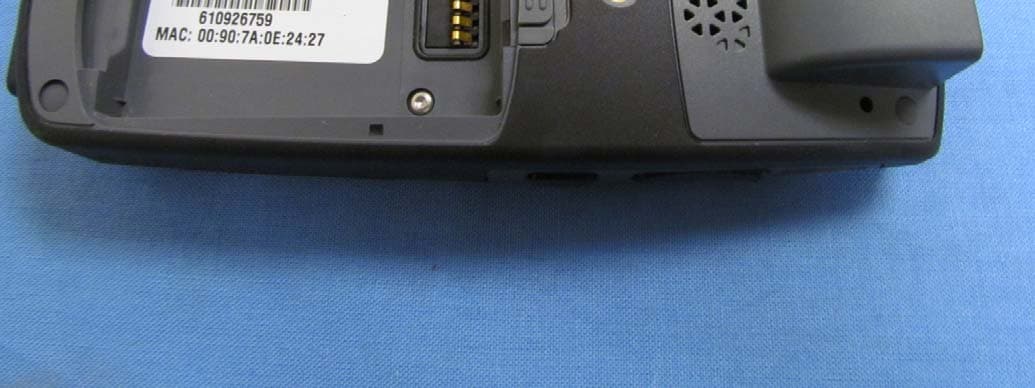
Click to zoom
Application Details
- Equipment Class
- DTS - Digital Transmission System
- Date of Grant
- Nov 27, 2011
- Application Purpose
- Original Equipment
- Date of Application
- Nov 27, 2011
- Equipment Note
- Polycom SpectraLink 8400 Wireless Telephone
- Frequency Range
- 5745.00000000 - 5825.00000000
- Company
- HP Inc.
- Country
- United States
Documents & Files
Document Text
Text extracted from the exhibit documents filed with the FCC. Open a document above to read the original.
Users Manual
• HAC—This equipment is Hearing Aid Compatible (HAC). • Handset Operation No rmal Position—Hold the handset as you would an y other telephone, with the earpiece to you r ea r and speak in to the mic rophone. The internal antenna is then positioned prope rly. • Handset Operation Body-Worn Position—To maintain compliance with RF energy exposure guidelines, if you wear a handset on your body when transmitting, always use the handset with a Polycom-supplied accessory as described in the user guide for this handset. Polycom supplies belt clips, holsters and lanyards for body-worn operation. Use of accessories not supplied by Polycom may cause the handset emissions to exceed RF energy exposure guidelines. • The user should not make changes or modifications not expressly approved by Polycom. Any such changes could void the user’s authority to operate the equipment. • Warning—The earpiece/mouthpiece region on the handset can attract and retain small metallic objects. REGULATORY INFORMATION Polycom, Inc. 4750 Willow Road Pleasanton, CA 94588 http://www.polycom.com COPYRIGHT. All rights rese rved under the International and pan -American Copyright Conventions. No par t of the contents of this document may be copied, reproduced, or transsmitted in any fo rm or by any means, or translated into another language or format, in whole or in part, without written consent of Polycom, Inc. Polycom® and the logo designs are registered trademarks of Polycom, Inc. in the United States, and various countries. Do not remove (or allow any third party to remove) any product identification, copyright or other notices. The software contained within this product is protected by United States copyright laws and international treaty provision. Polycom, Inc., retains title and ownership of all property rights with respect to the software within this product. Please contact your Polycom Authorized Reseller for assistance. NOTES AND WARNINGS 1725-36912-001 Rev. A Regulatory Information SPECTRALINK ® 8452 Wireless Telephone Charger Inforamtion (FCC AND IC) FCC Information FCC registration number: M72-PS8452 This device complies with Part 15 of the FCC Rules. Operation is subject to the following two conditions: (1) This device may not cause harmful interference, and (2) this device must accept any interference received, including interference that may cause undesired operation. FCC Radiation Exposure Statement: This portable device with its antenna complies with FCC’s RF radiation exposure limits set forth for an uncontrolled environment. To maintain compliance this transmitter must not be co-located or operating in conjunction with any other antenna or transmitter. Charger models SA106B-05, DCA39, DCA40, 8410 NOTE: This equipment has been tested and found to comply with the limits for a Class B digital device, pursuant to Part 15 of the FCC Rules. These limits are designed to provide reasonable protection against harmful interference in a residential installation. This equipment generates, uses and can radiate radio frequency energy and, if not installed and used in accordance with the instructions, may cause harmful interference to radio communications. However, there is no guarantee that interference will not occur in a particular installation. If this equipment does cause harmful interference to radio or television reception, which can be determined by turning the equipment off and on, the user is encouraged to try to correct the interference by one or more of the following measures: • Reorient or relocate the receiving antenna. • Increase the separation between the equipment and receiver. • Connect the equipment into an outlet on a circuit different from that to which the receiver is connected. • Consult the dealer or an experienced radio/TV technician for help. This Class B digital apparatus complies with Canadian ICES-003. Cet appareil numérique de la classe B est conforme à la norme NMB-003 du Canada. Canada Industry CanadaIC: 1849C-PS8452 United States (Safety) UL 60950-1 M72-PS8452 International Certification Industry Canada (IC) Notice This device complies with RSS-210 of Industry Canada. Operation is subject to the following two conditions: 1) This device may not cause interference, and 2) this device must accept any interference, including interference that may cause undesired operation of the device. Privacy of communications may not be ensured when using this telephone. Certification Number IC: 1849C-PS8452
Users Manual
Polycom ® SpectraLink ® 8400 Series A POLYCOM SOLUTION BROCHURE Polycom ® SpectraLink ® 8400 Series Wireless Handsets Transform Your Workplace with Mobile Unified Communications The time is now for mobile employees to benefit from the unified communications (UC) revolution, and the Polycom ® SpectraLink ® 8400 series of Wi-Fi handsets is leading the way. Demonstrably increasing worker productivity and organizational cost savings, the SpectraLink 8400 series of Wi-Fi phones allows on-site professionals to connect with customers, colleagues, and all the applications they need to perform their best. Designed with the requirements of on-site workers in the healthcare, retail, hospitality, and manufacturing industries in mind, the SpectraLink 8400 handset unites the most critical elements of workplace communications within a single mobile device that is highly reliable, extra durable, and easy to use. Achieve Your Goals and Lower Your Costs It’s proven: You can reduce liability by verifying records, decreasing errors, and improving safety. You can increase sales by speeding response times, raising satisfaction, and preserving loyalty. And you can minimize employee turnover by decreasing footsteps, reducing fatigue, and improving morale. The SpectraLink 8400 series handsets can help your organization achieve every one of these operational objectives. With the Polycom SpectraLink 8400 series, you also benefit from a lower total cost of ownership (TCO) and open standards designs that make it easy to integrate with your organization’s Wi-Fi infrastructure, telephony systems, and business applications. This enables you to leverage your existing investments and evolve your mobile technology needs to meet your organizational changes. More than a phone, more than a device—the Polycom SpectraLink handset is a revolution in workplace productivity. Using SpectraLink 8400 wireless telephones, organizations can improve service levels...reduce response times ...and make better decisions faster. The Polycom SpectraLink 8400 series enables mobile professionals to be reached immediately and reliably throughout your workplace. Whether attending to patients, customers, or guests, the SpectraLink 8400 series allows workers to fulfill their goals and deliver the very best care, service, and response times for any need. Instant alerts immediately notify workers of requests or alarms, so they can deliver services that directly impact safety, sales, and satisfaction. A Single Solution for the Corridor Warrior What if your mobile workers could combine their mobile phone, pager, two-way radio, barcode scanner and voice-recognition badge into one device? Now they can. The SpectraLink 8400 handset provides exactly the right communication tools for mobile professionals in the workplace—all in one lightweight, simple-to-use, ergonomic device. First, it’s a business phone tied directly into the enterprise telephony system and related applications, such as corporate voice mail, voice-activated dialing, and directories. Like a “desk phone in the hand,” the SpectraLink 8400 handset’s high definition voice quality powers clear conversations. Next, the new SpectraLink 8400 series handsets support text alerts and instant messaging that can replace overhead paging for a quieter environment that is better for workers, customers, and patients. Fully-integrated push-to-talk functionality makes it easy to instantly reach specialized teams within your organization, and eliminates the need for separate two-way radios. And with its user- friendly Web browser and application integration, the SpectraLink 8400 series provides fast, easy access to Web-based applications, reference tools, and procedure documents. Extend Unified Communications to Mobile Professionals Polycom Worldwide Headquarters 4750 Willow Road, Pleasanton, CA 94588 1.800.POLYCOM or +1.925.924.6000 www.polycom.com © 2011 Polycom, Inc. All rights reserved. LIMITATION OF WARRANTY: Polycom does not and cannot warrant that: (i) certain performance or results may be obtained using the software; (ii) the software is appropriate for your purposes or particular application; or (iii) the software is error or bug free or that it will provide uninterrupted usage. ACCORDINGLY, THIS SOFTWARE AND ITS DOCUMENTATION IS [LICENSED/SOLD] “AS IS” WITHOUT ANY WARRANTY AS TO THEIR QUALITY, PERFORMANCE, MERCHANTABILITY OR FITNESS FOR ANY PARTICULAR PURPOSE. THE ENTIRE RISK AS TO THE RESULTS AND PERFORMANCE OF THIS SOFTWARE IS ASSUMED BY THE PURCHASER OF THE PRODUCT. Polycom and the Polycom logo design are registered trademarks of Polycom, Inc. in the U.S. and various countries. All other trademarks are the property of their respective owners. Information in this document is subject to change without notice. 2489_0111 A One-of-a-Kind Handheld Assistant In addition, the SpectraLink 8450 handsets with built-in barcode readers are extremely powerful information portals to important resources and business critical databases. Patent-pending Polycom ® Quick Barcode Connector™ software enables workers to quickly associate their SpectraLink 8450 handset with a PC for application integration and automated data capture; eliminating time consuming and error-prone manual entry processes. Accessories for the SpectraLink 8400 series allow mobile professionals the ultimate in flexibility. The dual charger keeps the handset and spare battery ready-to-go, while the quad charger makes sure fully charged batteries are ready for every shift. The speakerphone dock charges the handset and spare battery, and also allows Polycom HD voice conferencing. Polycom SpectraLink 8400 series handsets are tough, rugged, and built to outlive delicate cell phones, PDAs, and other consumer devices. They are resistant to water, dust, bacteria, and to dropping, even on concrete. Advanced features like the reinforced cage design, component shock mounting, rubberized over molding will keep your SpectraLink 8400 handset working for years…
Text truncated - open the document above for the full version.
Users Manual
Safety Information SPECTRALINK ® Wireless Telephones Link 5120 Pa ten t Information The accompanying prod uct is protected by on e or more US and forei gn paten ts and /or pendin g pa tent applications held by Polycom, Inc. Noti ce Polycom, Inc. has prepared this document for use by Polycom personnel and customers. The drawings and specifications contained herein are the property of Polycom and shall be neither reproduced in whole or in part without the prior written approval of Polycom, nor be implied to grant any license to make, use, or sell equipment manufactured in accordance herewith. Polycom reserves the right to make changes in specifications and other information contained in this document without prior notice, and the reader should in all cases consult Polycom to determine whether any such changes have been made. NO REPRESENTATION OR OTHER AFFIRMATION OF FACT CONTAINED IN THIS DOCUMENT INCLUDING BUT NOT LIMITED TO STATEMENTS REGARDING CAPACITY, RESPONSE-TIME PERFORMANCE, SUITABILITY FOR USE, OR PERFORMANCE OF PRODUCTS DESCRIBED HEREIN SHALL BE DEEMED TO BE A WARRANTY BY POLYCOM FOR ANY PURPOSE, OR GIVE RISE TO ANY LIABILITY OF POLYCOM WHATSOEVER. SpectraLink 8000/6020 Series: Handset models: 802X, 803X, 602X Charger models: PCS1850, PCD1850, PCQ1850 Battery Pack models: PBP0850, PBP1300, PBP1850 SpectraLink 84xx Series: Handset models: 8440, 8450, 8452 Charger models: SA106B-05, DCA39, DCA40 Speakerphone Dock: 8410 Battery Pack models: RS657, RS658 Model Number s Table of Contents English ................................................................................................................................... 2 Français .................................................................................................................................. 8 Español ................................................................................................................................. 14 Deutsch ................................................................................................................................ 20 Italiano ................................................................................................................................. 26 Nederlands .......................................................................................................................... 32 For detailed information about SpectraLink 8400 handsets, consult the comprehensive SpectraLink 8400 Series Wireless Telephone User Guide available at: http://support.polycom.com/PolycomService/support/us/support/voice/wi-fi/spectralink_8400_wireless. html For detailed information about SpectraLink 8020/8030 handsets, consult the comprehensive SpectraLink 8020/8030 User Guide available at: http://support.polycom.com/PolycomService/support/us/support/voice/wi-fi/index.html For detailed information about SpectraLink 6020 Wireless Telephones, consult the comprehensive SpectraLink 6020 Wireless Telephone User Guide available at: http://support.polycom.com/PolycomService/support/us/support/voice/proprietary_wireless/spectralink_ 6020_wireless.html 2 English SAFETY INFORMATION Chargers and Ba tte ry Packs It is normal for the chargers to become warm when ch arging. Chargers oper ate in a 50° to 85° F (10° to 30° C) environment. Do not expose them to f reezing temperatures or direct sunlight. Do not place anythi ng in the charger other than the handset or single Battery Pack as a ppropria te, to avoid bending the contact s. Bent contact s ca n keep th e Battery Pack from chargi ng. SpectraLink 8400 Series Use only 8400 Series products with other 8400 Series products as identified by the model number located on the label of the product. SpectraLink 8452 Wireless Telephone 8452 SpectraLink 8450 Wireless Telephone 8450 SpectraLink 8440 Wireless Telephone 8440 SpectraLink 8410 Speakerphone Dock 8410 USB Charger SA106B-05 Dual Charger DCA39 Quad Charger DCA40 Standard Capacity Battery Pack RS657 Extended Capacity Battery Pack RS658 SpectraLink 8000/6020 Series Use only 8000/6020 Series products with other 8000/6020 Series products as identified by the model number located on the label of the product. SpectraLink 8020 Wireless Telephone 802X SpectraLink 8030 Wireless Telephone 803X SpectraLink 6020 Wireless Telephone 602X Desktop Charger PCS1850 Dual Charger PCD1850 Quad Charger PCQ1850 Standard Battery Pack PBP0850 Extended Battery Pack PBP1300 UltraExtended Battery Pack PBP1850 Each SpectraLink family of products only works with other members of the same family. If you have any questions about product compatibility, contact your system administrator. English 3 Only use Polyco m Battery Packs with Polycom chargers. Never use a non-Pol ycom chargi ng unit as it could damage the Battery Pack . Only use the original plug-in power adapter for the chargers. Contact your service representative for ass istance if you have a faul ty Battery Pack or a problem with your charger. Any Battery Pack whic h exhibi ts swel ling, cracking or other abnormali ty should be di sposed o f promptly and properly. Do n ot i mmer se the B attery P ack i n w ater o r throw into fire. Do n ot t hrow away t he B attery P ack w ith your domestic waste. T ake use d B attery P acks t o a n a ppropriate collec tion point f or recycl ing or send them back t o y our supplier o r servicing agent. All batteries c an c ause p roperty damage and/or b odily injury, such as burns, i f a conductive mater ial such as jewelry, keys, o r b eaded c hains touches expose d t er minals. The conduct ive mater ial may co mplete an e lectric al c ircuit (short c ircuit) a nd b ec ome qui te h ot . Exercise care in handling any charged battery, particularly w hen p lacing i t in side a p oc ket, purse , o r o ther container w ith metal obj ects. CAUTION: THERE IS A RISK OF EXPLOSION IF YOU REPLACE THE BATTERY PACK WITH AN INCORRECT TYPE. ONLY USE POLYCOM MODEL RS657 OR RS658 BATTERY PACKS WITH SPECTRALINK 8400 SERIES WIRELESS TELEPHONES.…
Text truncated - open the document above for the full version.
Users Manual
The Polycom ® SpectraLink ® 8400 VoWLAN series handsets deliver on a fundamental need for enterprise-grade on-site voice mobility. Characterized by market-leading Polycom HD Voice™ quality, durability, and broad telephony and WLAN interoperability, SpectraLink 8400 handsets deliver a reliable user experience and predictable return on investment. The SpectraLink 8400 series enhances the customer value proposition through an optional integrated barcode scanner and an enhanced standards-based applications interface. In partnership with the Polycom applications development ecosystem, the SpectraLink 8400 product toolset enables new opportunities for end-user productivity solutions. Physical Characteristics Durability and Performance Display: • 2.2-inch 240 x 320 resolution • 65,000 color palette Buttons: • Four (4) context-sensitive softkey buttons • Dedicated Push-to-Talk • Five-way navigation and select control • Home & back navigation keys • Up/Down volume control • Barcode reader (8450 handset) • Start and End Keys Status LED • Message (voicemail) waiting • Out of coverage • Phone ringing Peripheral Interfaces • Micro USB interface for wall charging and configuration • 2.5mm TRS connector for wired headset • Bluetooth SpectraLink 8400 Series Product Specifications A POLYCOM SPECIFICATIONS SHEET SpectraLink 8440 and 8450 Rear SpectraLink 8440 Face SpectraLink 8450 Face 1 Batteries • Two easy-access cosmetic battery capacity options • Standard – Up to 8 hrs talk time, 80hrs standby time • Enhanced – Up to 12 hrs talk time, 120hrs standby time Durability • Drop/shock: MIL STD 810F, method 516.5 procedure VI • Ingress protection standard IP-64 per IEC 60529 • Rubberized molding • Magnesium LCD mounting Environmental • Operational temperature: 32F to 104F (0 to 40C) • Storage temperature: -22 to 140F (-30 to 60C) Dimensions & weight Wireless Networking Wi-Fi Bluetooth • Version 2.1, HSP Version 1.2 • Class 1 support with range of ~10 meters Telephony Features Rich call server feature integration and native Push-to-Talk Call Handling Features* • Up to 6 telephone line appearances • Call Hold/Resume function • Last Call Return • Music on Hold • Consultation Hold • Call Transfer (Attended, Unattended) • Overlap dialing • Bridged Line Appearance (BLA) • Three-Way Conferencing (local) • Find-Me call forking • Call Screening (Incoming, outgoing) • Automatic Answer • Call Park & Retrieve • Group Call Pickup • Call Waiting • Multiple Calls per Line • Do Not Disturb • Calling party ID (name and number) • Called party ID (name and number) • Connected party ID (name and number) • Call Forward (Busy, No answer, Unconditional) • Call Reject * Summary only – actual feature support will vary among call platforms Codecs • G.711 (a-law, u-law), G.729, G.722 , G.722.1 Push-to-Talk (PTT)/Paging • On-board native ‘walkie-talkie’ capability • One-to-one, one-to-many broadcast communication • 24 configurable channels • Priority, default channel Additional Telephony Features • RTCP (RFC3550, 1889) • Call server redundancy • Predictive dialing from contacts list • Recent call lists SpectraLink 8440SpectraLink 8450 Dimensions147mm by 53mm by25mm147mm by 53mm by 28mm Weight 5.6 oz6.2 oz BandFrequencyData Rates 802.11a 5.15 - 5.25 GHz 5.25 - 5.35 GHz 5.47 - 5.725 GHz 5.725 - 5.825 GHz 6, 9, 12, 18, 24, 36, 48, 54 Mbps 802.11b2.4 - 2.4835 GHz1, 2, 5.5, 11 Mbps 802.11g2.4 - 2.4835 GHz 6, 9, 12, 18, 24, 36, 48, 54 Mbps 802.11n*2.4 & 5 GHz21.7, 43.3, 65, 72.2 Mbps 2.4GHz and 5GHz dynamic band roaming supported *Single-stream, 20MHz channel with SGI A POLYCOM SPECIFICATIONS SHEETSpectraLink 8400 Series Product Specifications 2 Management Ease of Provisioning, Performance and Fault Management Provisioning • Server based central provisioning via FTP, TFTP, HTTP or HTTPs • Centralized user administration • Provisioning and call server redundancy • Initial configuration via USB • Unicode UTF-8 Multilingual User Interface Performance and Fault Management • On-board site survey and diagnostics tools • Enhanced syslog reporting • Roaming and handoff reporting • Event logging • Hardware diagnostics • Status and status reporting • PING support (initiate and response) • Traceroute Configuration Management • User and administrator login and privileges • PC-connected (USB) and remote over-the-air configuration management Applications Tools Feature rich data applications interface options Polycom XML Applications Program Interface • Standards-based XHTML API • On-board WebKit-based browser (JavaScript, CSS, DOM) for rich applications integration • Bundled with Polycom Productivity Suite for Corporate Directory access using LDAP and Voice Quality Monitoring Polycom Open Application Interface (OAI) • Backward compatibility with SpectraLink OAI applications Instant Messaging • Handset-to-handset, PC client-to-handset IM support via Microsoft OCS 2007 R2 Instant Messaging Real Time Location Services (RTLS) • Embedded RTLS beacon (Ekahau) for location tracking Calendar - Exchange Server Integration • Day and month view • Meeting reminders Performance Industry leading voice and call quality Audio quality • TIA 810B, TIA 920 audio quality standards • Full-duplex audio (compliant with IEEE 1329 full duplex standards) • Voice activity detection (VAD) • Comfort noise fill • Adaptive jitter buffer & packet loss concealment • Acoustic echo cancellation & background noise suppression Quality of Service (QoS) • WMM (Wi-Fi Multimedia) • WMM-Power Save, WMM-Admission Control (draft) • IEEE 802.1p/Q tagging (VLAN)/DSCP tagging Security • WEP, WPA-Personal, WPA2-Personal, WPA2-Enterprise with 802.1X (EAP-FAST, PEAP-MSCHAPv2) with Opportunistic Key Caching (OKC) and Cisco Client Key Management (CCKM) • Media encryption via Secure Real-Time Protocol (SRTP) • SIP signaling encryption via Transport Layer Security (TLS) • Server-based configuration file encryption (AES 128bit) • HTTPS secure provisioning • Support for signed software executables Networking St…
Text truncated - open the document above for the full version.
Users Manual
Quick Start Guide SPECTRALINK ® 8400 Series Each SpectraLink family of products only works with other members of the same family. If you have any questions about product compatibility, contact your system administrator. SpectraLink 8400 Series Use only 8400 Series products with other 8400 Series products as identified by the model number located on the label of the product. SpectraLink 8452 Wireless Telephone SpectraLink 8450 Wireless Telephone SpectraLink 8440 Wireless Telephone Speakerphone Dock USB Charger Dual Charger Quad Charger Standard Capacity Battery Pack Extended Capacity Battery Pack 8452 8450 8440 8410 SA106B-05 DCA39 DCA40 RS657 RS658 The Polycom SpectraLink 8400 Series Wireless Handset User Guide is your complete reference for utilizing all of the features of this handset. It may be found online at: http://support.polycom.com/PolycomService/support/us/support/voice/wi-fi/spectralink_8400_wireless.html Quick Start Guide SPECTRALINK ® 8400 Series 3 This booklet is a basic guide to getting started with your SpectraLink ® 8400 Series Wireless Telephone. Table of Contents Package Contents ..................................................................... 3 The Home Screen ....................................................................... 6 The Session Manager ................................................................. 8 Status and Call Icons ................................................................. 9 Basic Handset Features ............................................................10 Using the Barcode Reader ...................................................... 17 Accessories ............................................................................. 18 Offer for Source for GPL and LGPL Software.......................... 23 Warranty and Copyright ........................................................... 24 Package Contents 4 LED indicator Start key • Opens the Dialer from the Home screen • Initiates a call from the Dialer • Answers an incoming call Keypad While in Multi Key Answer Mode you can use any of these keys to answer an incoming call instead of pressing the Start key or Answer soft key Home key Returns you to the Home screen Back key Returns to the previous menu level or to the Home screen End key • Ends the call or returns to the Home screen • Rejects an incoming call • Terminates a conference call • Powers the handset on or off when held down for about two seconds Navigation keys and Scroll through menus and fields ◄ and ► Move cursor OK key • Selects menu items • Enables or disables menu items Full-color LCD display Soft keys Access context-sensitive features Model number Front View – All Models 5 Volume up Volume down USB interface (Lift the cover for access) Headset jack (Lift the cover for access) Talk button (PTT) Barcode reader Volume up Volume down Talk button (PTT) Barcode reader scan button Headset jack (Lift the cover for access) USB interface (Lift the cover for access) Side View – 8450/8452 Side View – 8440 6 Battery Pack Battery Pack removal latch Speakerphone Noise-cancelling Microphone Barcode reader (8450/8452 only) Status bar Date and time Extension Current profile Home icons: Messages Settings Contacts/Call Lists Applications (not shown) Soft key labels Rear View The Home Screen The Home screen provides you with information about the status of the handset and the Home icons. 7 Shortcut Menus The soft keys at the bottom of the display allow you to select functions. The gray triangles in the upper right corner of the soft keys indicate that there is a shortcut menu with additional options. Use the shortcut menus to quickly find the options you want. Use the ▲ and ▼ navigation keys to highlight an option, and choose the option by pressing OK. Alternatively, you can press the number of the option on the keypad to instantly activate it. Grayed options are not available. Home Icons The Home icons allow you to access your handset’s features from the Home screen. Use the ◄ and ► keys to rotate the Home icons. Press the OK key to select the center icon. Contacts/Call Lists The Contacts/Call Lists icon gives you access to your Contact Directory and your Corporate Directory, if available. For more information, see Contact Directory on page 14. Messages The Messages icon gives you access to Voicemail and Instant Messages. For more information, see Voicemail on page 14, and Instant Messaging on page 15. Settings The Settings icon opens a menu for configuring many handset features. See your User Guide for a complete list of these options. Applications Depending on the configuration of your handset, a menu of custom applications may be accessible by selecting the Applications icon from the Home screen. See your system administrator for information about any applications listed on this menu. 8 Line number Name, if known Call icon indicates call status Call duration Extension or channel A dark blue cell indicates on hold status A light blue cell indicates call is highlighted A green cell indicates active while another cell is highlighted The Session Manager Use your handset to manage up to eight communication sessions - calls, broadcasts, chats, and alerts - at any one time and in any combination. Each communication session is shown as a color-coded cell in the Session Manager screen. Cells display with a call icon indicating call status, a line number indicator, the name and extension/channel of the party, and the call duration, as shown next: When a cell is highlighted, soft keys display that you can press to affect that call while other cells remain unaffected. Use the ▲ and ▼ navigation keys to scroll to and highlight a cell. Call Icon 9 Status and Call Icons Status IconIndicationIndication 10 Enter a number in the number field The Contact Directory list will be filtered according to the number entered Basic Handset Features Basic handset features offer you the ability to place, answer, end, hold, resume, and otherwise manage your …
Text truncated - open the document above for the full version.
Cover Letter(s)
Po~rcom Inc. 4 7S(J II 'illow Road Pleasallton C I 9458H l'S,I POLYCOMe Address for ( orrrspondcncc: Singleton Court Busine.u Centre Wonastow Road Industrial £mlfe (West) Jlonmollfii SP25 5JA UA North American Frequency Declaration "Polycom Inc. declares that the Polycom Spectralink 8452 handset is limited to legal frequency bands and channels in North America via controlled software SKU' s that are not accessible to an end user of the product." Monmouth: 25th November, 2011 Place and Date of Issue Yuk Ming Wan; Director, Corporate Technical Compliance (Name; function)
Cover Letter(s)
• POLYCOM Letter of Authorization Company: Polycom Inc Address: 4750 Willow Road, Pleasanton CA 94588-2708 Product Name: Polycom Spectralink 8400 Handset Model Number: 8452 We authorize MiCOM Labs, 440 Boulder COUtt, Suite 200, Pleasanton, CA 94566, USA, to act on our behalf on all matters concerning the above named equipment. Any ind ividual with in MiCOM Labs is authorized to act on our behalf and take action on the application. This shall include the following: • Testing • Approval appl ications and procedures • Payment of approval fees We declare that MiCOM Labs, 440 Boulder Court, Suite 200, Pleasanton, CA 94566, USA, is allowed to forward all information related to the approval project to the applied notified body and to the notification entities and to discuss any issues concerning the approval application. Any and all acts carried out by MiCOM Labs on our behalf shalI have the same effect as acts of our own. Name: Yuk Wan Date: 2 Nov …
Text truncated - open the document above for the full version.
Contact Information
Applicant
Richard Tarsio(US/CAN TRSE Worldwide Technical Regulations)
Test Firm
Micom LabsGordon Hurst
Technical Specifications
| # | Rule Parts | Frequency Range | Power Output |
|---|---|---|---|
| 2 | 15C | 5.75 GHz - 5.83 GHz | 83.00 mW |
Other Applications from HP Inc.
M72-EDV250P
Jan 19, 2026Poly Edge V250 Plus
Equipment Class
NII - Unlicensed National Information Infrastructure TXM72-EDV850
Jan 15, 2026Poly Edge V850
Equipment Class
DSS - Part 15 Spread Spectrum TransmitterM72-EDV650
Dec 17, 2025Poly Edge V650
Equipment Class
DTS - Digital Transmission SystemM72-STX72R
Aug 25, 2024Video Bar
Equipment Class
NII - Unlicensed National Information Infrastructure TX
M72-P033
Jan 31, 2023Video CODEC
Equipment Class
DTS - Digital Transmission System