MG3-2015Echostar XiP 40.0
Universal Electronics Inc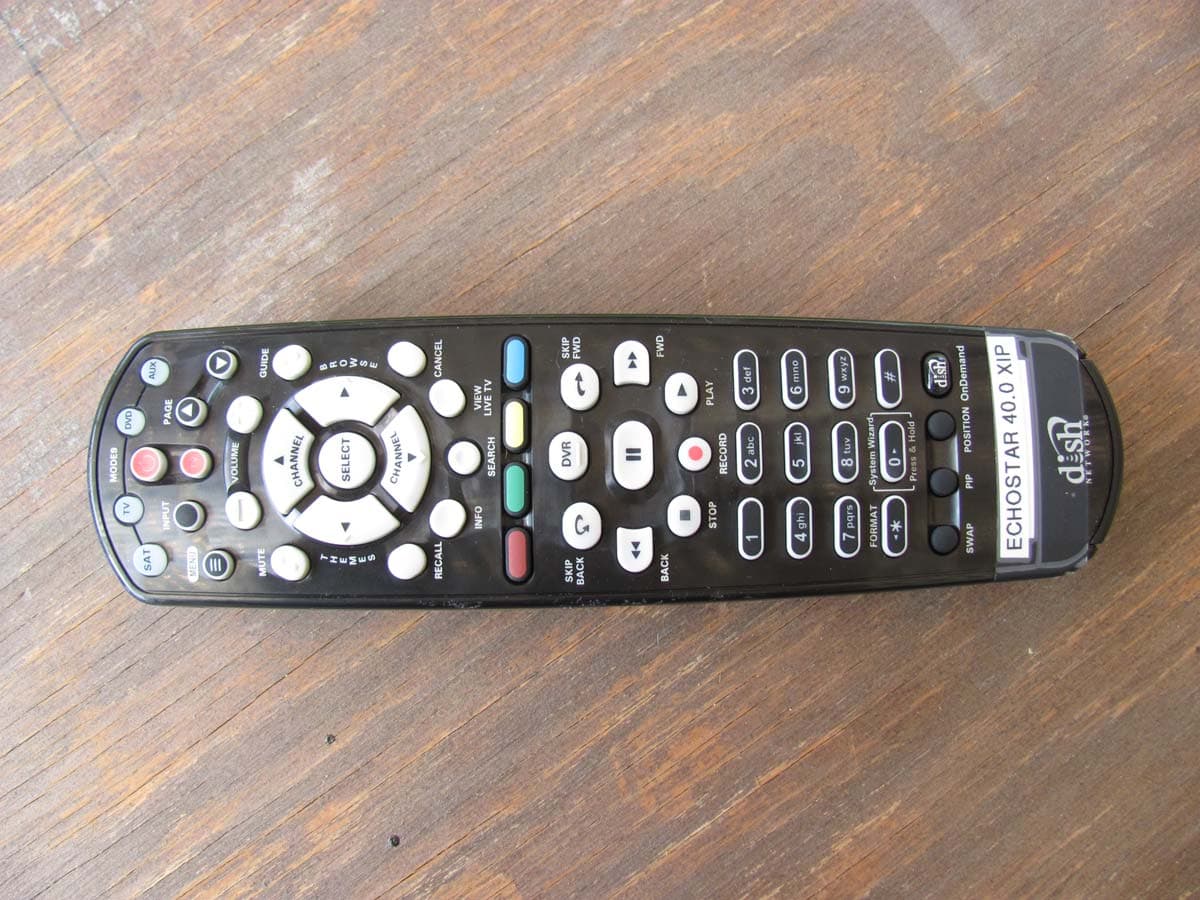
Click to zoom
Application Details
- Equipment Class
- DXT - Part 15 Low Power Transceiver, Rx Verified
- Date of Grant
- Aug 14, 2011
- Application Purpose
- Original Equipment
- Date of Application
- Aug 14, 2011
- Equipment Note
- Echostar XiP 40.0
- Frequency Range
- 2425.00000000 - 2475.00000000
- Company
- Universal Electronics Inc
- Country
- United States
Documents & Files
Document Text
Text extracted from the exhibit documents filed with the FCC. Open a document above to read the original.
Users Manual
Remote User Guide Safety Instructions You must keep safety in mind while using this device. Keep these and any other instructions for future reference. Observe Warnings: Carefully follow all warnings on the device and in the operating instructions. Heat: Do NOT place the device near heat sources such as radiators, stoves, heat registers, or other appliances that produce heat. Care and Use Cleaning: Do NOT use liquid, abrasive, solvent, or aerosol cleaners. Use a damp cloth for cleaning. When Not in Use: Remove the batteries if this device is to be left unattended or unused for a long period of time. Refer servicing to qualified personnel when a solid object or liquid has fallen onto or into the device. Do NOT attempt to service this device. Refer all servicing to qualified personnel. Opening covers other than the battery cover will void the warranty. Publishing Information Copyright © 2011. EchoStar Technologies L.L.C., Englewood, Colorado 80112. All rights reserved. The information in this User Guide may change without notice. Revisions may be issued to tell you about such changes. Send comments or questions about this User Guide to [email protected] or Technical Publications, EchoStar Technologies L.L.C, 90 Inverness Drive Circle East, Englewood, Colorado 80112. Document Number: 188891 Printed in DISH Network is a registered trademark of DISH Network L.L.C. All product names, trade names, or corporate names mentioned in this User Guide are acknowledged to be the proprietary property of the registered owners. 1 Configuring the 40.0 Remote 1 2 3 4 Confirm your remote has the green number 1 key installed. Pull the remote battery cover off. If your remote has a blank, black key, continue to Insert the Batteries on page 2. Separate the key from the remote by inserting your thumbnail or a coin in the crease. Remove the key by grasping at the bottom. Insert the key face up and slide into place. 5 Note: If you are using the green TV1 key that comes installed in your remote, skip these steps. Go to Insert the Batteries (page 2). 2 Insert the Batteries Pull the remote battery cover off. Insert 4 AAA batteries, making sure to match the plus (+) ends with the plus markings on the battery case. Replace the remote battery cover. 1 2 3 3 Using System Wizard Use System Wizard initially to set up the remote to work with the receiver. System Wizard can also store/restore the settings for your XiP system in both your remote control’s memory and on the receiver. This feature is helpful if you ever need to program a replacement remote or a new system. Note: If your batteries are low, replace them before beginning. Press and hold 0 until System Wizard message appears. Make sure the remote and receiver are in line of sight. Or, Press MENU, select Remote Control, and then select System Wizard. If first time in System Wizard, follow instructions provided. Follow the on-screen options to Backup or Restore setting for your XiP system and remote control settings. Select Continue to return to your paid programming. 1 2 3 4 OR 4 Linking Remote to Receiver Verify the antenna is installed on the back of the receiver. Turn your receiver and TV on, and press SYSTEM INFO on the front panel of the receiver. Confirm that you see the System Info screen. Press and release SAT on your remote. Wait until you hear a tone and see the remote listed on the screen. Confirm that your remote operates your receiver by pressing remote buttons. If this is not working, go back to step 4. 3 2 1 4 5 Use these instructions to link the remote to the receiver if your receiver does not support System Wizard. R E M O T E A N T E N NA SYSTEM INFO 5 SAT Mode To use the features described in this section, make sure you are in SAT mode by pressing the SAT Mode button. Note: Some features may not be available depending on your receiver model. SAT Power & TV Power Top button turns the receiver on/off Bottom button turns the TV on/off Volume and Mute Buttons Control TV volume Programming required Recall Return to last TV channel viewed Picture-In- Picture (PIP) Buttons Watch two separate programs at same time (in Single Mode) Number Buttons Enter a channel number or navigate through menus Menu Access receiver features and settings Pair/Input Press once for Input. Press and hold for Pair Themes Search for programs using Themes Info Retrieve info on programs Search Search for a program Shortcut Keys Access frequently used features Digital Video Recorder (DVR) Buttons Pause live TV and play or record programming Format Format the picture to the desired width to match the program you are viewing System Wizard Press and hold to fix remote control issues and sync data Arrow/Select Buttons Channel up/down, navigate through menus, and select a desired option View Satellite Programming Exit out of any menu/guide and return to viewing live TV Cancel Return to previous menu or to watch a program Browse See what is on other channels while watching TV Program Guide Display current and future satellite program listings Page Buttons Page up/down in menus Press this button for SAT Mode Dish OnDemand Explore interactive TV features 6 TV Mode TV To use the features described in this section, make sure you are in TV mode by pressing the TV Mode button. Remote programming is required. Note: Some features may not be available depending on your receiver model. Note: Remote operation is different on DISH Network TVs. See your DISH Network TV User’s Guide for proper operation. Power & TV Power Top button turns the TV on/off Bottom button turns the TV on/off Press this button for TV Mode Mute Turn TV volume on or off Recall Return to last TV channel viewed Picture-In-Picture (PIP) Buttons Watch two separate programs at same time (in Single Mode) Number Buttons Enter a channel number or navigate through menus TV Menu Access menu features available on some TVs Pair/Input Switch between TV inputs (available only for certain makes and models of TVs) Up/Down Arrow Button Chan…
Text truncated - open the document above for the full version.
ID Label/Location Info
TITLE SCALE 1:1 SIZE DWG. NO A SHEET 1 of 1 REV 01 APPROVALS DATE UNLESS OTHERWISE SPECIFIED DIMENSIONS ARE IN MM. DRAWN CHECKED REVISIONS ECOITEM MASTER DESCRIPTION REV DATE BY TOLERANCES: 0.000 +/- .125 0.00 +/- .25 0.0 +/- .4 0. +/- .7 HOLE DIA: +/- .075 ANGLES: +/- .5 C31107186229INITIAL RELEASE @ DEVELOPMENT 01 04/19/11JW JASON WALKER04/19/11 186229 NOTES: 1. ALL DIMENSIONS ARE IN MILLIMETERS, UNLESS OTHERWISE NOTED. 2. PLACE ARTWORK AT LOCATION SHOWN. 3. COLOR OF PRINTING: LIGHT GRAY (PMS 427) 4. MATERIAL: POLYCARBONATE, BLACK LIGHT SATIN TEXTURE WITH PERMANENT PRESSURE-SENSITIVE BACKING. UL/CSA APPROVED. THICKNESS OF POLYCARBONATE MUST BE LESS THAN OR EQUAL TO .007”. POLYCARBONATE WITH ADHESIVE CANNOT EXCEED THE TOTAL DEPTH OF THE RECESSED AREA. 5. COVER ADHESIVE WITH PROTECTIVE BACKING. 6. THIS PRODUCT IS RoHS COMPLIANT. 7. QUALITY ASSURANCE PROVISIONS: IN ADDITION TO MEETING ALL REQUIREMENTS OUTLINED IN THIS SPECIFICATION, ALL REQUIREMENTS IN THE FOLLOWING ECHOSTAR QUALITY ASSURANCE DOCUMENTS AND THEIR REFERENCES MUST BE MET OR EXCEEDED. A) 124214 SUPPLIER AQL REQUIREMENTS B) 105450 SUPPLIER QA REQUIREMENTS C) 123473765-AA COSMETIC PROVISIONS Scale: 200% Use this image to create label Scale: 100% Use this image to create label 34.5 20.9 LABEL / ART, BOTTOM CASE, RMTE, 40.0, UHF-2G, CHINA 186228 40.0 UHF 2G FCC ID: MG3-2015 Made in China EchoStar Technologies L.L.C.
Test Report
Report Number: B10718A1 FCC Part 15 Subpart B and FCC Section 15.249 Test Report EchoStar XiP 40.0 Model: 40.0 UHF 2G Brea Division 114 Olinda Drive Brea, CA 92823 (714) 579-0500 Agoura Division 2337 Troutdale Drive Agoura, CA 91301 (818) 597-0600 Silverado Division 19121 El Toro Road Silverado, CA 92676 (949) 589-0700 Lake Forest Division 20621 Pascal Way Lake Forest, CA 92630 (949) 587-0400 Page 1 of 17 FCC PART 15 SUBPART B and C TEST REPORT for ECHOSTAR XiP 40.0 MODEL: 40.0 UHF 2G Prepared for UNIVERSAL ELECTRONICS, INC. 6101 GATEWAY DRIVE CYPRESS, CALIFORNIA 90630 Prepared by:_____________________ KYLE FUJIMOTO Approved by:____________________ JAMES ROSS COMPATIBLE ELECTRONICS INC. 114 OLINDA DRIVE BREA, CALIFORNIA 92823 (714) 579-0500 DATE: AUGUST 8, 2011 REPORT APPENDICES TOTAL BODY A B C D E PAGES 17 2 2 2 12 25 60 This report shall not be reproduced except in full, without the written approval of Compatible Electronics. Report Number: B10718A1 FCC Part 15 Subpart B and FCC Section 15.249 Test Report EchoStar XiP 40.0 Model: 40.0 UHF 2G Brea Division 114 Olinda Drive Brea, CA 92823 (714) 579-0500 Agoura Division 2337 Troutdale Drive Agoura, CA 91301 (818) 597-0600 Silverado Division 19121 El Toro Road Silverado, CA 92676 (949) 589-0700 Lake Forest Division 20621 Pascal Way Lake Forest, CA 92630 (949) 587-0400 Page 2 of 17 TABLE OF CONTENTS Section / Title PAGE GENERAL REPORT SUMMARY 4 SUMMARY OF TEST RESULTS 4 1. PURPOSE 5 2. ADMINISTRATIVE DATA 6 2.1 Location of Testing 6 2.2 Traceability Statement 6 2.3 Cognizant Personnel 6 2.4 Date Test Sample was Received 6 2.5 Disposition of the Test Sample 6 2.6 Abbreviations and Acronyms 6 3. APPLICABLE DOCUMENTS 7 4. DESCRIPTION OF TEST CONFIGURATION 8 4.1 Description of Test Configuration – Emissions 8 4.1.1 Cable Construction and Termination 9 5. LISTS OF EUT, ACCESSORIES AND TEST EQUIPMENT 10 5.1 EUT and Accessory List 10 5.2 Emissions Test Equipment 11 6. TEST SITE DESCRIPTION 12 6.1 Test Facility Description 12 6.2 EUT Mounting, Bonding and Grounding 12 6.3 Facility Environmental Characteristics 12 7. TEST PROCEDURES 13 7.1 RF Emissions 13 7.1.1 Conducted Emissions Test 13 7.1.2 Radiated Emissions (Spurious and Harmonics) Test 14 7.1.3 RF Emissions Test Results 16 8. CONCLUSIONS 17 Report Number: B10718A1 FCC Part 15 Subpart B and FCC Section 15.249 Test Report EchoStar XiP 40.0 Model: 40.0 UHF 2G Brea Division 114 Olinda Drive Brea, CA 92823 (714) 579-0500 Agoura Division 2337 Troutdale Drive Agoura, CA 91301 (818) 597-0600 Silverado Division 19121 El Toro Road Silverado, CA 92676 (949) 589-0700 Lake Forest Division 20621 Pascal Way Lake Forest, CA 92630 (949) 587-0400 Page 3 of 17 LIST OF APPENDICES APPENDIX TITLE A Laboratory Accreditations and Recognitions B Modifications to the EUT C Additional Models Covered Under This Report D Diagram, Charts, and Photos Test Setup Diagram Antenna and Amplifier Factors Radiated Emissions Photos E Data Sheets LIST OF FIGURES FIGURE TITLE 1 Conducted Emissions Test Setup 2 Plot Map And Layout of Radiated Test Site – 3 Meters Report Number: B10718A1 FCC Part 15 Subpart B and FCC Section 15.249 Test Report EchoStar XiP 40.0 Model: 40.0 UHF 2G Brea Division 114 Olinda Drive Brea, CA 92823 (714) 579-0500 Agoura Division 2337 Troutdale Drive Agoura, CA 91301 (818) 597-0600 Silverado Division 19121 El Toro Road Silverado, CA 92676 (949) 589-0700 Lake Forest Division 20621 Pascal Way Lake Forest, CA 92630 (949) 587-0400 Page 4 of 17 GENERAL REPORT SUMMARY Compatible Electronics Inc. generates this electromagnetic emission test report, which is an independent testing and consulting firm. The test report is based on testing performed by Compatible Electronics personnel according to the measurement procedures described in the test specifications given below and in the "Test Procedures" section of this report. The measurement data and conclusions appearing herein relate only to the sample tested and this report may not be reproduced without the written permission of Compatible Electronics, unless done so in full. This report must not be used to claim product endorsement by NVLAP, NIST or any other agency of the U.S. Government. Device Tested: EchoStar XiP 40.0 Model: 40.0 UHF 2G S/N: N/A Product Description: See Expository Statement Modifications: The EUT was not modified in order to meet the specifications. Manufacturer: Gemstar Technology (Yangzhou) Company Limited #1 Junsheng Road, Fanshui Town Industrial Zone, Baoying Yangzhou, Jiansu Province, China (Post Code: 225819) Customer: Universal Electronics, Inc. 6101 Gateway Drive Cypress, California 90630 Test Date(s): June 15 and July 18, 2011 Test Specifications: EMI requirements CFR Title 47, Part 15, Subpart B Test Procedure: ANSI C63.4 Test Deviations: The test procedure was not deviated from during the testing. SUMMARY OF TEST RESULTS TEST DESCRIPTION RESULTS 1 Conducted RF Emissions 150 kHz to 30 MHz This test was not performed because the EUT operates on battery power only. 2 Radiated RF Emissions 10 kHz – 25000 MHz (Transmitter, Receive, and Digital Portion) Complies with the Class B limits of CFR Title 47, Part 15, Subpart B; and Subpart C, sections 15.205, 15.209, and 15.249. Report Number: B10718A1 FCC Part 15 Subpart B and FCC Section 15.249 Test Report EchoStar XiP 40.0 Model: 40.0 UHF 2G Brea Division 114 Olinda Drive Brea, CA 92823 (714) 579-0500 Agoura Division 2337 Troutdale Drive Agoura, CA 91301 (818) 597-0600 Silverado Division 19121 El Toro Road Silverado, CA 92676 (949) 589-0700 Lake Forest Division 20621 Pascal Way Lake Forest, CA 92630 (949) 587-0400 Page 5 of 17 1. PURPOSE This document is a qualification test report based on the Electromagnetic Interference (EMI) tests performed on the EchoStar XiP 40.0, Model: 40.0 UHF 2G. The EMI measurements were performed according to the measurement procedure described in ANSI C63.4. The tests were performed in order to determine whether the electromagnetic emissions from the equipmen…
Text truncated - open the document above for the full version.
Contact Information
Applicant
Jesse Mendez(Staff Engineer Electrical)
Technical Contact
Compatible Electronics, Inc.Kyle Fujimoto
[email protected]714-579-0500
114 Olinda Drive · Brea · United States
Test Firm
Compatible Electronics, Inc.Michael Christensen
Technical Specifications
| # | Rule Parts | Frequency Range | Power Output |
|---|---|---|---|
| 1 | 15C | 2.42 GHz - 2.48 GHz | - |
Other Applications from Universal Electronics Inc
MG3-PIRZWLR
Sep 15, 2026UEI/Ecolink Z-Wave Long Range PIR Sensor
Equipment Class
DTS - Digital Transmission System
MG3-DWZW8ECO
Jul 27, 2026Door Sensor
Equipment Class
DTS - Digital Transmission System
MG3-J1TH028
Jun 11, 2026Thermostat
Equipment Class
DTS - Digital Transmission SystemMG3-R37967R01
Apr 13, 2026OFA Smart Control Pro 6
Equipment Class
DTS - Digital Transmission SystemMG3-R36021BA00
Dec 12, 2025Tatlow Platform RCU Android TV
Equipment Class
DTS - Digital Transmission System