MG3-4067Comcast DTA RF4CE 2 Device 2010
Universal Electronics Inc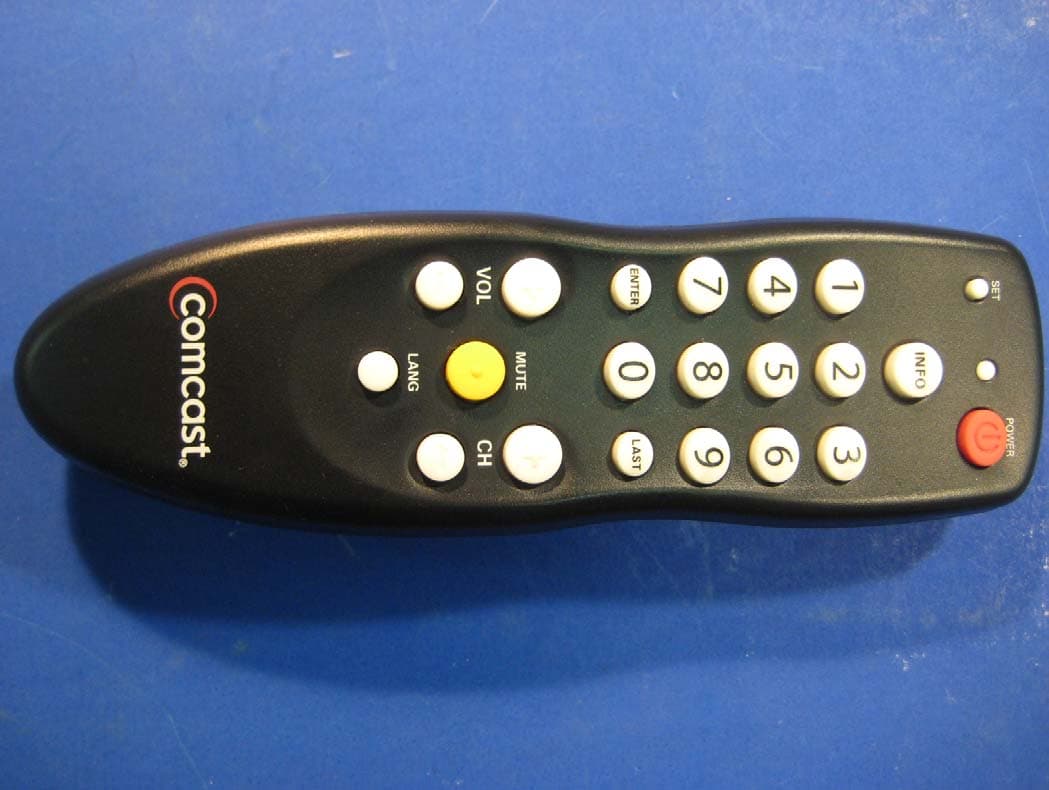
Click to zoom
Application Details
- Equipment Class
- DXT - Part 15 Low Power Transceiver, Rx Verified
- Date of Grant
- Jan 28, 2010
- Application Purpose
- Original Equipment
- Date of Application
- Jan 27, 2010
- Equipment Note
- Comcast DTA RF4CE 2 Device 2010
- Frequency Range
- 2405.00000000 - 2480.00000000
- Company
- Universal Electronics Inc
- Country
- United States
Documents & Files
Document Text
Text extracted from the exhibit documents filed with the FCC. Open a document above to read the original.
Users Manual
FoldFoldFoldFoldFold FoldFold FoldFoldFoldFoldFoldFoldFold Overview The Comcast Digital Transport Adapter universal remote is designed to work with the Digital Transport Adapter (Digital Adapter) supplied by Comcast. This remote is designed to operate all of the features and functions of the Digital Adapter and is programmable to operate the Volume and Power of your TV. The remote control requires installing two (2) new AA batteries (included) and simple programming instructions to control your TV. For best results, please read and perform all instruc- tions listed here. Also, keep this guide for future reference. installing Batteries 1. Pull back the remote control’s battery cover and remove it. 2. Insert the two (2) supplied AA batteries according to the + and - marks in the battery case. 3. Push the battery cover back into place. 4. Test the unit by pressing the power key. If batteries are inserted correctly, the Red Light will blink. NOTE: When batteries need replacement, the remote control will stop operating. Replace the old batteries replace old batter- ies with new AA batteries. Features and FunctiOns Use the remote control’s keys to per- form actions described below (see the following key chart). When a valid TV code is programmed the POwer key will turn on or off the TV. Use set for all programming sequences. Use in FO to display current channel information. The INFO key is also used to manually pair the remote with the Digital Apapter Use the keypad (0 ~ 9) to directly select the channels (e.g., 09 or 031). Use enter to directly tune to a channel (e.g. 1-0-9 Enter). Use last to recall the last channel. Use lang to switch between different languages and audio options, when available on the Digital Adapter. Use cH+ (or cH-) to select the next higher (or lower) channel. Use vOl+ (or vOl-) to raise (or lower) the sound volume on the Digital Adapter . When a valid TV code is programmed these keys will operate the TV's volume control. Press Mute once to turn sound off or on. autO Pairing reMOte The Comcast Digital Adapter remote control needs to be paired with the Digital Apapter prior to operating This process is auotmatic when batteries are first inserted. 1. Insert fress "AA" bateries 2. Press and release any key. 3. Upon discovery of a valid pairing candidate the red light will turn off and the on screen image will change. 4. Enter the 3 digit code displayed on the TV screen. If successful, the red light will flash 4 times and the remote will be fully operational with the DTA receiver. Manual Pairing If the remote stops working the Digital Adapter use the following steps to manually re-pair the remote with the Digital Adapter. 1. Press and hold set for three sec- onds and release. The red light will blink twice. 2. Press in FO repeatedly until your TV screen changes. 3. Using the digit keys enter the 3 digit code displayed on the TV to complete the pairing process. reMOve Pairing Remote Pairing with the Digital Adapter will automatically be reset when the batteries are removed. PrOgraMMing tv c OntrOl The Comcast Digital Adapter remote control is paired with the Digital Adapter. The Comcast Digital Adapter remote also contains a universal TV library to allow you to control the Power and Volume of your TV. 1. Turn on the TV NOTE: Please read steps 2 to 4 com- pletely before proceeding. Highlight or write down the codes and device you wish to program before moving on to step 2. 2. Press and hold set until the red light blinks twice, then release set. 3. Locate the code for your device in Manufacturer’s Codes on the back of this user guide. Brands are listed in alphabetical order with the most popular codes listed first. 4. Enter the first five-digit code for your TV. If you perform this pro- cedure correctly, the red light will blink twice NOTE: If you enter an invalid code, the red light will display one long blink and exit the programming mode. Repeat steps 2 to 5 with a valid code. 5. Aim the remote control at your TV and press Power once. The device should turn off. If it does not respond, repeat steps 2 to 4, trying each code listed for your brand until you find one that works. If it still does not work, try Searching For Your Code. 6. The TV code will be stored in the Digital Apadter and will be reprogrammed when the batter- ies are changed and the Digital Apapter remote is successfully re- paried with the Digital Adapter. tv code: searcHing FOr YOur cOde If your brand of TV does not respond to the remote control after trying all of the codes listed, or if your brand is not listed at all, try searching for your code. 1. Turn on your TV. 2. Press and hold set until the red light blinks twice, then release set. 3. Enter in 9 - 9 - 1. The red light will blink twice. 4. While pointing the remote control at the TV and press and release the cH + key until the TV turns off. (Note: You may need to press [cH+] numerous times). NOTE: In the search mode, the remote control will send IR codes from its library to the TV. 5. Press set once to lock in the code. The red light will blink twice. cHecking tHe cOdes If you have set up the remote control using the Searching For Your Code procedure, you may need to find out which five-digit code is operating your TV. Perform the following steps after setting up your TV to find out which five-digit code operates your TV. 1. Press and hold set until the red light blinks twice, then release set. 2. Enter in 9 - 9 - 0. The red light will blink twice. 3. To view the code for the first digit, press 1 once. Wait 3 sec- onds and count the number of times the red light blinks (e.g., 3 blinks =3) and write down the number in the left most TV Code box (at end of this section). NOTE: If a code digit is “0”, the red light will not blink. 4. Repeat step 3 four more times for the remaining digits. Use 2 for the second digit, 3 for the third digit, 4 for the fourth digit and 5 for the fifth digit. Finish writing down the code in the TV Code boxes (at end of this…
Text truncated - open the document above for the full version.
Cover Letter(s)
Non ‐ Conformities FCC ID: MG3 ‐ 4067 (CKC CS Ref # E10 ‐ 000008 ‐ FCC ‐ 01) OK ID # Non ‐ Conformity or Comment Submitted response Respondent / Date of Response √ C 1 Please put in your User’s Manual the no modification statement required by 15.21. Okay ‐ CKendall 1/25/10 Please see the 2nd page of the user’s manual. It already has this information. Jesse Mendez 1/22/10 √ C 2 The zip code for this application was stated as 90603 and the FCC has it listed as 90630. Please change. Okay ‐ CKendall 1/25/10 This was a typo on my part when uploading the application. The actual Zip code is listed as 90630 in all the documentation provided by the customer. I simply transposed the numbers. Updated the Application and all areas that require it. Jessina Hunter 1/22/10 3 4 5 6
Test Report
This report contains a total of 43 pages and may be reproduced in full only. Partial reproduction may only be done with the written consent of CKC Laboratories, Inc. Universal Electronics TEST REPORT FOR Comcast DTA RF4CE 2 Device 2010, URC‐4067 Tested To The Following Standards: FCC Part 15 Subpart C Sections 15.209 & 15.249 Report No.: 90293‐5 Date of issue: January 6, 2010 TESTING CERT #803.01, 803.02, 803.05, 803.06 This test report bears the accreditation symbol indicating that the testing performed herein meets the test and reporting requirements of ISO/IEC 17025 under the applicable scope of EMC testing for CKC Laboratories, Inc. We strive to create long‐term, trust based relationships by providing sound, adaptive, customer first testing services. We embrace each of our customers’ unique EMC challenges, not as an interruption to set processes, but rather as the reason we are in business. Page 2of 43 Report No.:90293‐5 TABLE OF CONTENTS Administrative Information ........................................................................................................................................... 3 Test Report Information ............................................................................................................................................ 3 Report Authorization ................................................................................................................................................. 3 Test Facility Information ............................................................................................................................................ 4 Site Registration & Accreditation Information .......................................................................................................... 4 Site File Registration Numbers ...................................................................................................................................... 4 Summary of Results ................................................................................................................................................... 5 Conditions During Testing ......................................................................................................................................... 5 Equipment Under Test ............................................................................................................................................... 6 Peripheral Devices ..................................................................................................................................................... 6 FCC Part 15 Subpart C .................................................................................................................................................... 7 Temperature And Humidity During Testing............................................................................................................... 7 15.31(e) Voltage Variation ......................................................................................................................................... 7 15.31(m) Number Of Channels .................................................................................................................................. 7 15.33(a) Frequency Ranges Tested ............................................................................................................................ 7 15.203 Antenna Requirements .................................................................................................................................. 7 EUT Operating Frequency .......................................................................................................................................... 7 15.249(a) ‐ RF Power Output ..................................................................................................................................... 8 15.249(d)/15.209 ‐ Field Strength of Spurious Radiation ........................................................................................ 21 2.1049 ‐ Occupied Bandwidth ................................................................................................................................. 35 15.249 (b) FCC Bandedge ......................................................................................................................................... 39 Supplemental Information .......................................................................................................................................... 42 Measurement Uncertainty ...................................................................................................................................... 42 Emissions Test Details .............................................................................................................................................. 42 Page 3of 43 Report No.:90293‐5 ADMINISTRATIVE INFORMATION Test Report Information REPORT PREPARED FOR: REPORT PREPARED BY: Universal Electronics 6101 Gateway Drive Cypress, CA 90603 CKC Laboratories, Inc. 5046 Sierra Pines Dr. Mariposa, CA 95338 REPRESENTATIVE: Jessie Mendez Project Number: 90293 Contract Number: 44150 DATE OF EQUIPMENT RECEIPT: December23, 2009 DATE(S) OF TESTING: December23‐31, 2009 Report Authorization The test data contained in this report documents the observed testing parameters pertaining to and are relevant for only the sample equipment tested in the agreed upon operational mode(s) and configuration(s) as identified herein. Compliance assessment remains the client’s responsibility. This report may not be used to claim product endorsement by A2LA or any government agencies. This test report has been authorized for release under quality control from CKC Laboratories, Inc. Steve Behm Director of Quality Assurance & Engineering Services CKC Laboratories, Inc. Page 4of 43 Report No.:90293‐5 Test Facility Information Our laboratories are configured to effectivel…
Text truncated - open the document above for the full version.
Contact Information
Applicant
Jesse Mendez(Staff Engineer Electrical)
Technical Contact
CKC Certification Services, LLCJessina Hunter
[email protected]209-966-5240
5046 Sierra Pines Dr. · Mariposa, California · United States
Test Firm
CKC Laboratories, Inc.Steve Behm
Technical Specifications
| # | Rule Parts | Frequency Range | Power Output |
|---|---|---|---|
| 1 | 15C | 2.40 GHz - 2.48 GHz | - |
Other Applications from Universal Electronics Inc
MG3-PIRZWLR
Sep 15, 2026UEI/Ecolink Z-Wave Long Range PIR Sensor
Equipment Class
DTS - Digital Transmission System
MG3-DWZW8ECO
Jul 27, 2026Door Sensor
Equipment Class
DTS - Digital Transmission System
MG3-J1TH028
Jun 11, 2026Thermostat
Equipment Class
DTS - Digital Transmission SystemMG3-R37967R01
Apr 13, 2026OFA Smart Control Pro 6
Equipment Class
DTS - Digital Transmission SystemMG3-R36021BA00
Dec 12, 2025Tatlow Platform RCU Android TV
Equipment Class
DTS - Digital Transmission System